C++ String Basics
C++ strings store textual information. The string variable has a sequence of characters enclosed by double quotes.
In C++ string basics, we cover following topics.
- Types of strings
- How to initialise strings ?
- How to read input strings ?
Types Of Strings
A string is a character array terminated by a null (\0)character. The C++ language allows us to declare two types of strings.
- C-style strings
- String objects from class string
C-style Strings
The C++ supports C-style strings which is a character array of fixed length. The length of the array is pre-determined or decided when the array is initialised. Each string ends with null character.
Initialise A C-style string
You can declare and initialize C-style string in following ways.
//string declaration
char name[3];
//string initialisation
name[3] = "Ram";
//string declaration
char state[10];
state[10] = {'D','e','l','h','i'};
//declare & initialise at same time
char age[3] = {'2','5'};
When you Initialize the string leave square bracket empty. The size is decided by number of elements inserted into the array.
// string size not defined
char pincode[] = "2342";
// string size not define here also
char pincode[] = {'2','3','5','8'};
The spaces required for a character array can be larger than its requirement.
char animal[30] = "Lion";The space required for Lion is 4 space. However, there are 30 space available. Therefore, 26 memory space remain unused and wasted.
Important Features of C-style string
- A null is automatically added at the end of the string.
- If the string array has extra space than required. Then the memory space is wasted due to internal fragmentation.
- Length of the array is fixed.
- Due to its fixed length, the C-style string does not expand more than allocated spaces.
To solve the wastage problem, and make string dynamic.
String Objects From Class string
The C++ string class allows to create variable length string objects. Before you use the string class include the string header file as follows.
#include <string.h>Depending on the C++ compiler, the file name may differ. Refer to your compiler documentation. For example, Dev C++ 5.11 uses <cstring> .
Initialize String Objects
To initialize string object use one of the following method.
string s = "Hello World!"; // declare and assign value
string p = s;             // assign another string

char s[] = "Raju";
string m = string(s);     // convert the character array and assign
string x("Mumbai");       // use the constructor
Important Features of String Objects
- The string objects are dynamic and of variable length. The object can shrink or expand because the internal memory is adjusted automatically.
- If you do not initialize a string, then a string of length 0 is created.
- The string object may or may not terminate with a
null. - C++98, C++1 and above offers a wide range of functions to manipulate string objects.
Reading String Inputs
A C++ program receives input from users through input stream (istream). Use one of the member from class istream to receive string inputs.
| Method | Class name |
| cin | Object of class istream |
| get() | Public function of class istream |
| getline() | Public function of class istream |
cin
The cin is an object of class istream that read input characters from input device such as keyboard. Since , cin is associated with the standard C input stream (studio.h) , it puts the program on wait while user enters the input.
The input is stored in a variable with the help of an extraction operator (>>).
cin >> name;There is problem reading strings with cin object. Consider the following example.
Example#2
//Program written using Dev C++ 5.11
#include <iostream>
#include <cstring>
#define SIZE 15
using namespace std;
int main ()
{
   char Name [SIZE];
   char State [SIZE];

   std::cout << "Enter Name:" << "\n";
   std::cin >> Name;
   std::cout << " Enter State:" << "\n";
   std::cin >> State;
   //Printing output
   std::cout >> "Your name is" >> Name >> std::endl;
   std::cout >> " Your state is:" >> State >> endl;
   system ("pause");
   return 0;
}
Output#2
Enter Name:
John
Enter State:
Doe
The cin stop taking input as soon as a white-space , a tab, or a newline is encountered. Therefore, if user enters ” John doe”. The first part is read and second part remain in the stream. The cin takes it as input for state.
get()
The get () and getline () are two functions that read input characters until a newline character or end of the file is met. The main difference between get() and getline() is that the get() function adds a newline at the end of the string.
The syntax to read a C-style string using get() function is given below.
//Syntax for C-style strings
istream& get (char* s, streamsize n);
istream& get (char* s, streamsize n, char delim);
//example:
char name[10];
cin.get(name, 10);
cin.get(name, 10, '\n');
<span style="color:#cf2e2e" class="tadv-color">s</span> – It is the pointer to character array.
<span style="color:#cf2e2e" class="tadv-color">n</span> – Number of characters to write in the string s including null. It should not be less than 2.
If you want to read only one character use get().
<span style="color:#cf2e2e" class="tadv-color">delim</span> – You may set an explicit delimiting character to end the input. The default is newline (\n).
getline ()
The getline() is also read line from the standard input stream (stdio), but it store the string without null.
Use following syntax to read character array.
// Syntax to read character array
istream& getline (char* s, streamsize n );
istream& getline (char* s, streamsize n, char delim );
//Example
char s[10];
cin.getline(s, 10);
cin.getline(s, 10,'-');
You can receive string object as input using getline ().
// Syntax for String object
istream& getline (istream& is, string& str, char delim);
istream& getline (istream& is, string& str);
//Example
string name;
getline (cin, name);
getline (cin, name, '\n');
<span style="color:#cf2e2e" class="tadv-color">is</span> – stream object from which characters are extracted. Ex. cin.
<span style="color:#cf2e2e" class="tadv-color">str</span> – the string object to store line of text. Any previous entry will be overwritten.
<span style="color:#cf2e2e" class="tadv-color">delim</span> – you can specify an explicit delimiter instead of default newline.
Example#3
//C++ program to receive input using //getline () written using Dev C++ 5.11
#include <iostream>
#include <cstring>
#define SIZE 15
using namespace std;
int main ()
{
    //string declaration
    char name[SIZE];
    string age;

    //read input strings
    cout << " Enter Name: " << '\n';
    cin.getline(name, 15);
    cout << " Enter Age : " << '\n';
    getline (cin, age);
    //print output
    cout << " Your name is " << name <<
    ". Your age is " << age << endl;

    return 0;
}
Output#3
Enter Name:
John Doe
Enter Age:
56
Your name is John Doe. Your age is 56.
References
- Cplusplus.com. 2020. Istream::Getline – C++ Reference. [online] Available at: <http://www.cplusplus.com/reference/istream/istream/getline/> [Accessed 18 April 2020].
- Cplusplus.com. 2020. Istream::Getline – C++ Reference. [online] Available at: <http://www.cplusplus.com/reference/istream/istream/getline/> [Accessed 18 April 2020].
- Sheth, T. (2015). C++ Primer Plus (6th ed., pp. 120-139). Pearson Education India.
- Bronson, G., & Borse, G. (2010). C++ for engineers and scientists (p. 140). Thomson Course Technology.
- Balagurusamy, E. (2008). Object oriented programming with C (pp. 428-431). Tata McGraw-Hill.
C++ Integer Data Type
Data types describe the kind of data so that computer can store or manipulate them appropriately. This is the reason to declare a data type in C++ programming.
Data types are also necessary because data items such as numbers are used in expressions. If there is a mismatch, for example – integer and real numbers – in an expression then the computer must be able to resolve it. C++ allows the following data types.
- Integer
- Float
- Double
- Char
Memory Organization
All data is stored in memory which is organized in bytes. A single byte is of  bits.
bits.
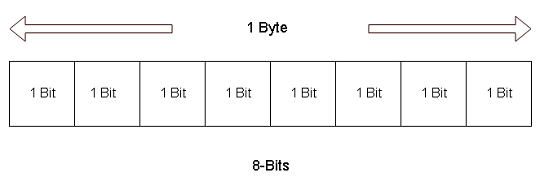
The integer data type takes  or
or  bytes to store information. This means it takes
  or
or  bit space.
Integer Data Types
The integers are negative and positive numbers. C++ add modifiers like  to integers to describe size and range of values of the integer types. The list of modifiers is given below.
- int
- long int
- short int
- signed int
- unsigned int
For example
short int = 2 bytes = 16 bitsThe integers have both positive and negative values and each bit position takes two values –  or
or  .
.
Therefore, its range is  to
to 
The  type takes only positive values and the
  value takes both positive and negative values. All the integer types take bytes of space except the
  which takes only bytes of information.
An Example Program
// Program to display the size of integer data types
#include <iostream.h>
int main()
{
        int a = 10;
        short int b = 12;
        long int c = 100;
        unsigned int d = 30;
        signed int e = 32;

        cout << sizeof(a) << "Bytes" << endl;
        cout << sizeof(b) << "Bytes" << endl;
        cout << sizeof(c) << "Bytes" << endl;
        cout << sizeof(d) << "Bytes" << endl;
        cout << sizeof(e) << "Bytes" << endl;
        system("pause");
        return 0;
}
Output
4 Bytes
2 Bytes
4 Bytes
4 Bytes
4 Bytes
The  function takes the variable as an argument and then output the byte size of the variable. The integer variable has a size of bytes on my windows
  –
–  bit machine. The size of the integer variable may be different on a different machine.
C++ Program Structure
C++ is a very popular programming language. Every C++ program has a general structure that it must follow.
Here is common structure of a C++ program.
Header Section
The header section is used for
- Including header files
- Declaring global variables
- Declaring functions
- Defining constants
You can divide C++ functions into two categories – Builtin functions and User-defined functions. Built-in functions are written in a header file that ends with a  extension. In other words, built-in functions comes with the C++ compiler located in a directory called
  .
.
User-defined functions are written by programmers. You can write your own codes and store them in the source file for C++ that ends with extension ( ).
).
Syntax to include header file in a C++ program
#include "iostream.h"
or
#include <iostream.h>
When you use double quotes the compiler look for the header file in the directory where the C++ program located and then look for file in directory that contains all the headers. Otherwise, if we use  , then compiler look for the file only under directory.
The header section is a global section because it is outside the main program. You can declare functions (user-defined) with global scope so that all other functions can call it anytime.
void add() ;
int calculate();
You can declare global variables which is used by the main program components such as functions and expressions.
int number;
char name;
You can specify a macro or a numeric constant value in the header section. The value of a numeric constant does not change during the execution of a program.
Syntax for declaring numeric constant
#define MAX 10
#define PI  3.14
The Main Function
The main function is where your program gets executed first. The main function has a default return type of  in C++. It calls other functions while executing.
void main()
{
            statement 1;
            statement 2;
            ...
            ...
            statement n;
}
The two braces –  and
and  indicate a block of statements and
  like every other function has a block of statements. The block is the entire C++ program and when it has finished execution, returns an integer value.
If you do not want main to return any value, use the keyword  to indicate this.
Other Functions
A user-defined function is a function that performs some task for the user in the program. It is different from built-in functions because user has the control to change the function anytime.
The programmer declares the function in the head section or in the main body of a C program. The declared function has definition that defines what the function does. The best practice is to keep the function definition after main() function. But, it is not necessary.
Putting it all together
The following is an example of C++ program structure.
#include <iostream.h>
#define NUM 100
void main()
{
        int x = 20;
        int sum = 0;
        sum = x + NUM;
        cout << sum << endl;
}
Output
120C++ Multidimensional Arrays
A C++ multidimensional array has more dimensions identified by the number of subscripts. In this article, you will learn about a two-dimensional array in detail.
Two-dimensional Array
A two-dimensional array has rows and columns. The horizontal arrangement of elements within a two-dimensional array is row and vertical arrangement is a column.
For example,
A[2][4] means that this two-dimensional element is from 3rd row and 5th column. The row or column index starts at 0.
Two-dimensional Array Declaration
To declare a 2d array like any variable does the following.
<data_type><array_name>[m][n];The ism no of rows and equalsn no of columns.
Example #1
int account [3][4];
float boxes[2][3];
The example shows that the array account has 3 rows and 4 columns indicated by subscripts.
Two-dimensional Array Initialisation
Initialising two-dimensional array means assigning initial values. There are two ways to do that.
Consider following examples,
int matrix [3][3];
matrix [3][3] = {5,6,8,1,4,7,9,2,0};
First, note that the total number of values are equal to 3 × 3 – rows X columns.
int bins[2][2];
bins[2][2] = {{23, 45},{78, 43}};
The first internal brace is the first row and never changes. Similarly, the second brace is the second row.
Also, you can initialise 2a d array dynamically. See the example program below.
/* Program to demonstrate
two-dimensional array
*/
#include <cstdlib>
#include <iostream>
using namespace std;
int main()
{
int sq_matrix[3][3];
int i,j;
//Reading values for matrix
cout << "Enter matrix values";
for(i =0;i<3;i++)
{
for(j=0;j<3;j++)
{
cin >> sq_matrix [i][j];
}
}
//print the array
for(i =0;i<3;i++)
{
for(j=0;j<3;j++)
{
cout << sq_matrix [i][j] << " ";
}
cout << endl;
}
system("PAUSE");
return EXIT_SUCCESS;
}
Output
Enter matrix values4
8
9
0
8
4
2
9
7
4 8 9
0 8 4
2 9 7C++ One-Dimensional Arrays
One dimensional array are the simplest form of an array in C++ language. You can easily declare, initialize, and manipulate a one-dimensional array. A one-dimensional array can be a parameter for function and so on. You can treat individual array element like any other C++ variables.
1-D Array Declaration
The syntax to declare a one-dimensional array is very simple. Here it is,
<data_type> <array_name> [n];The two square brackets hold the number of elements in the array denoted by n.
Example#1
float demo[10];The above array can hold 11 elements because the index associated with each array element starts with 0. The first element has an index value of 0.
1-D Array Initialization
There are different ways to initialize an array. You must provide values to each array element before using them in your program.
The syntax to initialize a one-dimensional array is as follows.
<data_type> <array_name> [n]; //array declaration first
<array_name> [n] = {<array_value1, array_value2, ..., array_value n-1}; //value assignment
or
<data_type> <array_name> [n] = {<arrayvalue ,   array_value2 , ... , array_value n-1};
You can use any suitable method given. Here is an example for one-dimensional array declaration.
Example #2
int toyota_car [5]; //array declarationtoyota_car [5]= { 2345, 4566, 7766, 3456, 9898}; //array value assignmentExample #3
char superheroes[3] = {"spiderman", "superman", "ironman"};or
you can do the declaration and assignment without specifying a number. See the example below.
Example #4
char superheroes[] = {"spiderman", "superman", "ironman"};In the above example, we never provide any number to the subscript, the assignment of 3 values will determine the length of the one-dimensional array.
How To Pass An Array In A Function
The size of the one-dimensional array is large and it is difficult to pass an entire array as a function parameter. This will crash the memory or slow down the program. However, arrays are different than normal variables, they are like pointers, a variable that refers to another variable instead of holding value. Only some characteristics of pointers are adopted by arrays.
The first element of the array has an index value of 0. If you use the name of the array, then it refers to the memory address of the first element of the array. Using the first element, you can find the memory address of rest of the elements and this is done by adding an offset to the memory address of the first element.
For example,
arrayT has address 0x256778, then
arrayT + 1 has the address of the next location, and so on.
*(arrayT+ 1) gives the value stored at the next location. See the image below for better understanding.
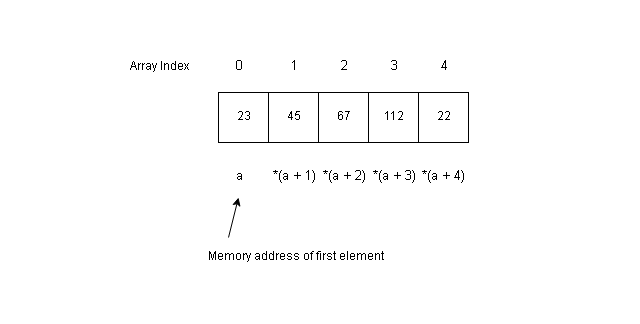
Therefore, to pass an array as a function parameter, you need to pass only the first element memory address and the rest of the array can be calculated automatically.
Function Declaration With Array as Parameter
You must declare a function as usual and declare the array as a parameter for the function. Check the example below.
int calculate_sum(int arrayT[]); //function declarationNote that we have not specified a number for the subscript. You can do it separately.
Function Definition With Array as Parameter
Function definition must contain the array with type as a parameter.
int calculate_sum(int arrayT[])
{
      Some code;
}
Function Call with Array as Argument
The function call is the most important part that contains the actual argument. Here you must pass only the first element memory address and any other values for the function.
int calculate_sum(arrayT);The following example program demonstrates the concept.
Example Program:
/* This program demonstrate the use of memory address of the
first element of an array and pass it as a parameter to a function.
The function use a different subscript notation (a + i) to compute sum
of all elements of the array */
#include <cstdlib>
#include <iostream>
using namespace std;
int main()
{
    int arr[5]={23,45,67,112,22};
    int arrpara(int arr[]);
    arrpara(arr);
system("PAUSE");
return EXIT_SUCCESS;
}
int arrpara(int arr[])
{
    int sum = 0;
    int i;
    for(i=0;i<5;i++)
    {
        sum = sum + *(arr + i);
    }
cout << " first element =" << " " << arr << endl;
cout << "sum =" << " " << sum << endl;
}
Output:
first element = 0x28ff20
sum = 269C++ Arrays
The C++ arrays are a collection of data objects of the same type that are stored in consecutive memory locations under a common name (array name).
The array elements are indicated with a subscript called the index value. Using the index we can access an array element just like any variable.
In the following section, you will learn to
- Declare an array
- Initialize an array
- Access an array element
How to declare an array?
To declare an array use the following syntax.
<data type> < array name> [number of elements in the array];The declaration contains the following information.
The data type of array
All array has only one data type and storing any other value other than what is declared will result in an error. The data type could be any built-in type or user-defined type such as structures.
The array name
The array name follows the same rule as any variable name. It cannot begin with a number or special character, cannot contain a whitespace.
Subscript
The subscript is the square bracket used to define the number of elements in the array. A single subscript is for one-dimensional array and two subscript represents two-dimensional array.
For example,
int mangoes[10];The above declaration will reserve memory space for 10 integer elements.
Invalid ways to declare an array
Not following the rules of an array declaration is considered invalid and lead to error.
- arr[10]; // It is invalid because no array type declared
- int 9arr[10]; // It is invalid because array name starts with number.
- int arr[10.2]; // An array cannot have floating point number in the index.
- char [#]; // No array name and special character for the number of elements.
- static float arr[-20]; // Static storage class not for arrays and negative values not allowed
How to initialize an array?
An array must be initialized similarly to any C++ variable. An initial value is assigned to each and every member of an array that is declared.
The syntax to initialize an array is given below.
<data type> <array name> [n number of elements] = { value1, value2, value3, ..., value n};You may initialize the array after declaration also.
<data type> <array name> [n number of elements];
<array name> = { value 1, value2, value3, ..., value n};
Examples of array initialization
int oranges[5] = {1,3,4,5,6};
int mangoes[8];
mangoes[8] = { 3,6,2,0,8,1,4,9};
Suppose you initialize fewer elements than the available space in an array. The remaining elements will get
a value of 0 by default.
For example
int tables[7] = { 2,4,5,6};
Then the values assigned to each element of the above array is
tables[0] = 2;
tables[1] = 4;
tables[2] = 5;
tables[3] = 6;
tables[4] = 0;
tables[5] = 0;
tables[6] = 0;
You can see that the last 3 elements have value of 0.
How to access and manipulate array elements?
Each array element has an index value, which starts from 0. If the array has 5 elements than the index values are 0, 1, 2, 3, 4. The array index has a range of 0 to n-1 for n elements.
For example,
int fruit[6] = { 2, 5, 7, 9, 1, 3};
The 5th element of the array is fruit[4] with a value of 1. Therefore, the nth element has a subscript value of n-1.
n = 6 , fruit[5]
n = 3, fruit[2]
The individual elements of the array are treated as any variable. They can be assigned new values, used in expressions and so on.
Reading array element
You can read array element using cin(standard input stream) in your program. It is difficult to read each element individually, so we use a loop to change the index value of array element and assign a value.
For example,
for(int i = 0; i < 5; i++)
{
     cout << "Enter a value:";
     cin << fruit[i];
}
The variable i represents the index and each iteration of the loop increment the index referring to a new array element. The loop terminates when the variable i exceeds constant value 5.
You can use array element in an expression such as
value = fruit[5] * fruit[2];
cout << value << endl;
Example Program:
/* Basics of Array */
#include <cstdlib>
#include <iostream>
#define MAX 10
using namespace std;
int main()
{
    // Array declaration

    int fruit_arr[MAX];

    //Reading Array from Console

    for(int i=0;i < MAX; i++)
    {
            cout<<"Enter a number:";
            cin >> fruit_arr[i];
    }

    //Print the Array elements with indexes

    for(int i = 0; i < MAX; i++)
    {
            cout << "Index" << "[" << i << "]" << "=" << fruit_arr[i] << endl;
    }

    system("PAUSE");
    return EXIT_SUCCESS;
}
Output:
Enter a number:24
Enter a number:55
Enter a number:56
Enter a number:75
Enter a number:53
Enter a number:23
Enter a number:51
Enter a number:98
Enter a number:57
Enter a number:43
Index[0]=24
Index[1]=55
Index[2]=56
Index[3]=75
Index[4]=53
Index[5]=23
Index[6]=51
Index[7]=98
Index[8]=57
Index[9]=43
In the next article, you will learn about different types of the array and how to use them.
C++ Local Functions
A function is declared globally above the main function, or within the main function. You can also declare a function inside another function in C++. In this article, you will learn to declare, define and call a local function.
Local Function Declaration
Like every other function, a local function must be declared within the body of another function. You must declare the return type, number of parameters and their type.
For example,
void account()

{

    int total;

    int bill1, bill2;

    int add_bills(int , int );

//Initialization of variables

    bill1 = 2000;

    bill2 = 5000;

    total = 0;

//Compute total bill amount

    total = add_bills( bill, bill2);

//Print results

    cout << "Total Amount =" << "" << total << endl;

}

//Definition of function add_bills()

int add_bills( int bill1, int bill2)
{

    return(bill1 + bill2);

}
The function add_bills() is a local function with proper declaration, definition and function call. The function add_bills() adds the bill1 and bill2 and return their sum.
You can add any number of local functions in your program as long as they do not violate the rules of C++ functions.
Recursive Functions
The recursive function is a special case of local function where a function calls itself several times until the programming problem is solved.
See the following figure for the general structure of a recursive function.
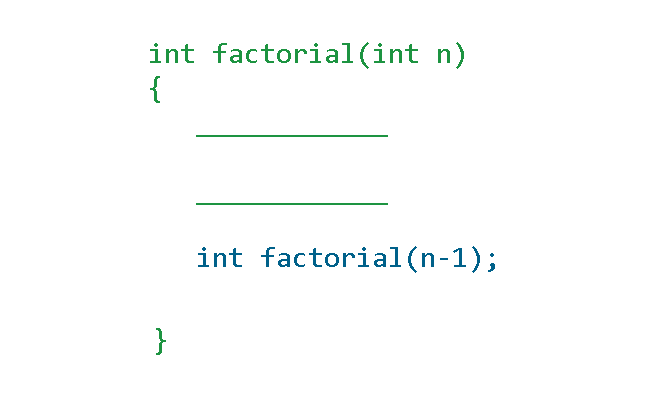
The function factorial calls itself recursively because each call to factorial will also call itself until the value of n becomes 0. The value of n is decreasing with each iteration.
Example Program:
/*Program to compute Nth factorial */

#include <cstdlib>
#include <iostream>

using namespace std;

int fact (int n)
{

    unsigned int f;

    if ((n == 0) || (n == 1))

        return (n);

    else

        /* Compute factorial by Recursive calls */

        f = n * fact (n - 1);

        return (f);

}

main ()
{

    int i, n;

    /* Reading the number */

    cout << "Enter the Number :";

    cin >> n;

    /* Printing results */

    cout << "Factorial of Number" << n <<" is " << fact (n) << endl;


    system ("PAUSE");

    return 0;

}
Output:
Enter the Number: 5
Factorial of Number 5 is 120
C++ Storage Classes
The C++ variables are divided into 4 major storage classes which can change the scope/lifetime of the variables. In this article, you will learn about C++ storage classes with examples.
The C++ storage classes are the same as the C programming language. Here is the list of storage classes.
- Automatic Storage class
- Register Storage
- Static Storage class
- External Storage class
The storage class controls the scope (local or global) of the variable and lifetime of the variable during program execution. You must use the appropriate keyword for each storage class during variable declaration.
For example, to declare a static storage class variable use the keyword-. .
.
static int box;Automatic Storage Class
The automatic storage class is the default storage class. The C++ program allocates and deallocates automatic storage to all variables. There is no need to declare a variable automatic.
The value of the auto variable is destroyed once its lifetime is over. The same variable gets a new storage when a function or program starts again. Use the keyword auto to declare a variable automatic.
auto int account;Example Program: #1
// Demo Auto Storage Class
#include <cstdlib>
#include <iostream>
using namespace std;
int main()
     {
       // Variable Declaration
       auto float a,b,c,d,n;
       //initialize n value
       n = 0.0;
       //Reading input values
       cout << " Enter A value:";
       cin >> a;

       cout << "Enter B value:";
       cin >> b;

       cout << "Enter C value:";
       cin >> c;

       cout << "Enter D value:";
       cin >> d;

      //Expression
      n = (a * b)/ (c + d);
      //Printing Output
      cout << "The Value of N =" << " " << n << endl;
      system("PAUSE");
      return EXIT_SUCCESS;
     }
Output:
Enter A value:2.4
Enter B value:5.3
Enter C value:6.3
Enter D value:1.6
The Value of N = 1.61013
Register Storage Class
The register storage class make sure that the variable gets stored in a register for faster access. Anything stored in the register is quickly accessed compared to memory. But, this is not guaranteed, it may get stored in memory also.
To declare a register storage class variable, use the following syntax.
Example Program: #2
//Demo Register Storage Class
#include <cstdlib>
#include <iostream>
#include <cmath>
using namespace std;
int main()
{
    //Variable Declaration
      register float degree, radian, Sine_value;

    //Variable Initialization
      radian = 0.0;
      Sine_value = 0.0;

    //Reading Input Degrees
      cout << "Enter Degrees To Find Sine Value:";
      cin >> degree;

    //Convert Degree to Radian measure and Computing Sine value
      radian = degree * 3.14/180;
      Sine_value = sin(radian);

    //Printing Output
      cout << "Sine Value =" << " " << Sine_value << endl;
      system("PAUSE");
      return EXIT_SUCCESS;
}
Output:
Enter Degrees To Find Sine Value:90
Sine Value = 1
Static Storage Class
The static storage class does not destroy a variable when the function block is terminated. It retains the variable and its value for next time whenever the function is invoked. The new values can replace the old values of static variables. Thus, the lifetime of a variable is increased with the help of keyword
The global variables are static by default, but the local variable inside a block can also be a variable. Here is the syntax to declare a  .
.
static int total_value;Example Program: #3
This program demonstrates the value of a variable without a static storage class.
//Demo in C++ without static keyword
#include <cstdlib>
#include <iostream>
using namespace std;
int main()
     {
         //Variable Declaration and function declaration
           int bill_1,bill_2;
           int i = 0;
           int total = 0;
           int account_payable(int, int);
         while(i < 3)
         {
           account_payable(bill_1, bill_2) ;
           i++;
         }

        system("PAUSE");
        return EXIT_SUCCESS;
    }
//Function definition
int account_payable(int bill_1, int bill_2)
    {
         // Local variable declaration
            int sum = 0;
         // Variable initialization
            bill_1 = 25000;
            bill_2 = 35000;
            sum = sum + bill_1 + bill_2;
            cout << "Sum = " << " " << sum << endl;
    }
Output:
Sum =  60000
Sum =  60000
Sum =  60000
The output is 60000 because each iteration of the loop  in the program, the variable
  is destroyed. It then starts the next iteration with a new variable .
Let us examine the output of the same program with keyword.
Example Program: #4
//Demo Static Variable in C++ with static keyword
#include <cstdlib>
#include <iostream>
using namespace std;
int main()
     {
         //Variable Declaration and function declaration
           int bill_1,bill_2;
           int i = 0;
           int total = 0;
           int account_payable(int, int);
           while(i < 3)
          {
                account_payable(bill_1, bill_2) ;
                i++;
          }
         system("PAUSE");
         return EXIT_SUCCESS;
    }
//Function definition
int account_payable(int bill_1, int bill_2)
     {
         // Local variable declaration
            static int sum = 0;
         // Variable initialization
            bill_1 = 25000;
            bill_2 = 35000;
            sum = sum + bill_1 + bill_2;
            cout << "Sum = " << " " << sum << endl;
     }
Output:
Sum =  60000
Sum =  120000
Sum =  180000
With static keyword, the variable sum is not destroyed and the new value of each iteration is added to the previous value. Hence, there is an incremental increase in the output.
External Storage Class
The variables declared in the global declaration section which is located above the main function. Such a variable is an external variable. But, there are two types of external variable. An external variable without keyword  . The scope is limited to current C file.
The external storage class allow variables to share information across files. The variable is declared in some file called  . But, it is used in another file called
  .
.
To declare a variable use the keyword.
Example Program: #5
/*
Demo For External Storage Class
File Name: test1.cpp
*/
#include <cstdlib>
#include <iostream>
//Gloabl declaration of extern int amount before usage
int amount = 13000;
using namespace std;
int main()
     {
         //Variable Declaration
           int expenses, total;
         //Initialization
           expenses = 1000;
           total = 0;

         //Calculate total amount
           total = expenses + amount;
           cout << "Total Amount =" << " " << total << endl;
           system("PAUSE");
           return EXIT_SUCCESS;
     }
The code for second file – .
/* Demo external storage class
File Name: test2.cpp
*/
#include <iostream>
 extern int amount;
Output:
Total Amount = 14000C++ Global vs. Local Variable
The C++ programming language have scope set for variables depending on where it is declared. You can use variable with global scope anywhere in the program. The variable with local scope has limited scope. In this article, we will understand the difference between them and how to use them.
Global Variable
A global variable is not a special variable, but the scope of an ordinary variable. As mentioned earlier, variables are divided into global and local scope based on where they declared. The global variables are declared just below the header files. Once declared you can use them in:
- Inside main function
- Inside user-defined function
- Inside another file of same program
For example,
// Header section
#include <iostream>
#include <ios>
//Global declaration section
int area = 0;
The variable area has a global scope now and you can use it anywhere in the program.
Local Variable
The local variable has limited scope such as a block or main function. If you want to perform some quick calculations in a block , declared a new variable just for the block. One interesting fact about  and
and  variable is than they can share same name of their scope are different.
Example Program:
//Gloabl vs. Local Variables
#include <cstdlib>
#include <iostream>
using namespace std;
// Gloabl declaration
int area = 0;
int main()
{
    //Function declaration

    int area_rectangle();

    // call function area_rectangle();

    area = area_rectangle();

    //printing the results

    cout << "Area of Rectangle =" << area << endl;

    system("PAUSE");
    return EXIT_SUCCESS;
}
//finction definition area_rectangle()
int area_rectangle()
{
    //local variable declaration

    int area, length, breadth;

    //reading inputs

    cout << "Enter value of Length:";
    cin >> length;

    cout << "Enter value of Breadth:";
    cin >> breadth;

    area = length * breadth;

    return(area);
}
Output:
Enter value of Length:10
Enter value of Breadth:35
Area of Rectangle =350
The above program computes area of a rectangle given its  and
and  . The variable
  is declared in two places.
- In the global declaration section
- Locally inside the function
Since, the scope of both functions are different, they do not conflict with each other and C++ allows such declarations.
In the next lesson, we will learn about other built-in variable classification method called storage class.
C++ Function Types
The C++ functions are of many types, but we broadly classify them into four categories – functions that return a value, function that does not return a value, function with parameters, and function without parameter. You many find functions that fall under more than one categories.
In this article, you will learn about function each of the function types in more detail.
Function without return
A C++ function need not return anything. It can compute and display the results. In such cases, you can use the keyword void to indicate that a function does return a value.
For example,
void sqaure ( int x);
The above is a valid declaration. You must use the same declaration in function definition.
void square (int x)
{
       int value = x * x;
       cout << "Square of x =" << " " << x << endl;
}
Example Program:
This example program takes three input parameters and computes cube of a number and prints the output, rather than returning the value.
//Function that does not return values
#include <cstdlib>
#include <iostream>
using namespace std;
int main()
{
    //variable and function declaration
    int x;
    int cube(int);

    //reading the value

    cout << "Enter a number to find it's Cube:";
    cin >> x;

    //calling function cube(x)

    cube(x);


    system("PAUSE");
    return EXIT_SUCCESS;
}
//function definition for cube(X)
int cube( int x)
{
    //Local variable declaration and initialization

    int cube_value = 0;

    //compute the cube value

    cube_value = x * x * x;

    //printing output

    cout << "Cube Value =" << " " << cube_value << endl;

}
Output:
Enter a number to find it's Cube:23
Cube Value = 12167
Function with return value
A C++ function if returns a value, then the returned value can be used for further computation. You can assign the return value to another variable like any other variable assignment.
For example,
int a,b,c,d;
int addition(int, int);
int multiplication( int, int);
int equation_value = 0;
a = 10;
c = d = 0;
b = 4;
// equation
c = addition(a, b);
d = multiplication( a, b);
equation_value = c + d;
// printing output
cout << "Equation Value =" << equation_value << endl;
In the above example, you can see that the returned value from function addition() and multiplication() is used for computing equation_value.
Example Program:
This example contains code from previous example given above.
//Function with return value
#include <cstdlib>
#include <iostream>
using namespace std;
int main()
{
    //Function and Variable Declarations

    int a,b,c,d;
    int addition(int, int);
    int multiplication( int, int);

    int equation_value = 0;

    //Variable initialization

    c = d = 0;

    //Reading input values

    cout << "Enter A value:";
    cin >> a;

    cout << endl;

    cout << "Enter B value:";
    cin >> b;

    // Computing equation value

    c = addition(a, b);
    d = multiplication( a, b);

    equation_value = c + d;

    // Printing output

    cout << endl;
    cout << "Equation Value =" << " " << equation_value << endl;

    system("PAUSE");
    return EXIT_SUCCESS;
}
//function addition
int addition(int a, int b)
{
    return(a + b);
}
//function multiplication
int multiplication(int a, int b)
{
    return(a * b);
}Output:
Enter A value:23
Enter B value:5
Equation Value = 143
Function Without Parameters
A function can be without any parameters. All variables required for this type of function is either declared globally, or declared locally inside the function.
For example, consider the following program, that make use of both global and local variable for a function without any parameters.
Note that a function can either return a value or return no value even if it has no parameters.
Example Program: function without parameters
//Function without parameters
#include <cstdlib>
#include <iostream>
//Global Variable Declarations and initialization
int temp = 0;
using namespace std;
int main()
{
    //Variable and Function Declaration

    int total_count;
    int counter();

    //Variable Initialization

    total_count = 0;

    //Calling Function Counter()

    total_count = counter();

    //Printing Output

    cout << "Total Count =" << " " << total_count << endl;


    system("PAUSE");
    return EXIT_SUCCESS;
}
//Function Definition Counter()
int counter()
{

      //Local Variable Declaration

      int i, n;

      //Read number of values

      cout << "How many Values:";
      cin >> n;

      //start counting

      for(i=1;i <= n;i++)
      {
                // Using the global variable temp

                temp = temp + i;

      }
      return(temp);

}Output:
How many Values:34
Total Count = 595
The program takes no parameters, but use the global variable temp and a local variable i to compute sum of all numbers up to user input number n. The temp is returned after the function counter() terminates successfully.
Functions With Parameters
The functions with parameters takes formal and actual parameters. The parameter type must match in function declaration and function definition.
A function with parameter may or may not return a value. It depends on the programmer implementing the function, or the requirement of the programmer.
For example, consider the following program.
Example Program: function with parameters
//Function with Parameters
#include <cstdlib>
#include <iostream>
using namespace std;
int main()
{
    //Variable and Function Declaration

    float principal,amount;
    int year;
    float rate,SI;
    float simple_interest(float , float , int);

    principal = amount = rate = SI = 0.0;
    year = 0;

    // Reading input values

    cout << "Enter Principle:";
    cin >> principal;

    cout << endl;
    cout << "Enter Rate of Interest in percentage(%):";
    cin >> rate;

    cout << endl;
    cout << "Enter Number of Years:";
    cin >> year;

    //Compute simple interest

    SI = simple_interest(principal,rate,year);
    amount = SI + principal;

    //Printing results

    cout << endl;
    cout << "Simple Interest =" << " " << SI << endl;
    cout << "Total Amount =" << " " << amount << endl;

    system("PAUSE");
    return EXIT_SUCCESS;
}
//Function definition simple_interest()
float simple_interest(float principal, float rate, int year)
{
      float total = 0.0;
      rate = rate/100;
      total = principal * rate * (float)year;
      return(total);
}Output:
Enter Principle:10000
Enter Rate of Interest in percentage(%):10.56
Enter Number of Years:3
Simple Interest = 3168
Total Amount = 13168
The above example program computes simple interest for principal amount, at a rate in percentage, for a period of time calculated annually. The principal, rate, and year are the parameter for the function simple_interest() which takes these parameters, computes and returns the simple interest.