C File Input-Output
Most of the programs we have seen so far involve static or dynamic memory. One of the features of C programming language is the ability to read and write files.
The information is written to operating system files in binary format and later retrieved in the memory buffer to be read or written. This is done with the help of file pointers and various C library functions.
Learn the basics of C programming before you begin.
File Operations in C
C language allows following file operations in broader sense.
- Create new file.
- Open existing file.
- Read from a file.
- Write to a file.
- Move to a specific location on file (seek).
- Close the File.
The library functions for file operations is stored in  header file.
See the following example,
Example Program – File Operations
"test.txt"
A Square has 4 equal sides, and a rectangle has 4 sides, but they are not equal.
The triangle has 3 angles and 3 sides.
We now write a program that will use –  .
.
"Read_file.c"
#include <stdio.h>
int main()
{
     FILE  *file_pointer;
     char ch;

     /* use library function fopen() to open and existing file */
     file_pointer = fopen ("test.c", "r");

     while(1)
     {
          /*  read each character from file_pointer which is pointing to file - test.c */
          ch = fgetc(file_pointer);

          /*  EOF is a macro that signals end-of-file */
          if(ch == EOF)
          break;
          printf("%c", ch);
     }

     /* All the character has been read, close the file with library function - fclose() */
     fclose(file_pointer);

return 0;
}
Output:
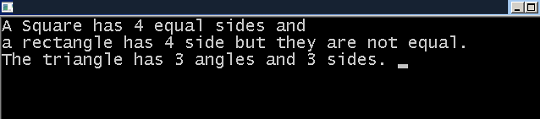
FILE
It is a file control structure that store information about  . The description of in Turbo C++ compiler is as follows.
typedef struct {
    short            level;
    unsigned         flags;
    char             fd;
    unsigned char    hold;
    short            bsize;
    unsigned char    *buffer,*curp;
    unsigned         istemp;
    short            token;
} FILE;
This is hidden from the programmer. The command
FILE *file_pointer;creates a pointer of type with the ability to hold file information like size, mode of opening, location, etc. provided when the file was opened using  command.
file_pointer = fopen("test.txt", "r");fopen()
The function needs two arguments.
- file name
- opening mode
In the example above, the file name is and the opening mode is  which stands for
  .
.
What does fopen() do ?
It does three tasks.
- Search for the file on the disk.
- If found, load the file in memory buffer.
- Set a character pointer that points to the first character of the file in buffer.
Since too many disk operations is costly for operating systems. A buffer is needed so that all operations are performed in the buffer and later committed to the file on the disk.
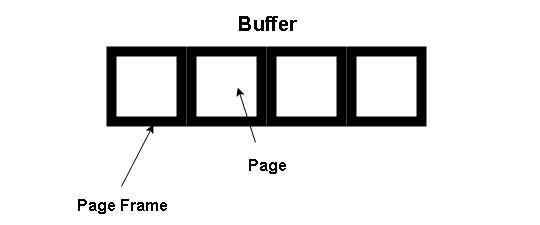
fgetc()
The file in open in buffer and ready for file operations. The  has a character pointer that points to first character of the file in buffer.
The function  starts reading each character one at a time and assign to character variable
  , which is printed as output.
ch = fgetc(file_pointer);fclose()
Once the  is reached and file operation is completed, all the reference to the
  and must be removed from buffer. This is done using
  .
.
fclose(file_pointer);Any further operation required; you have to open the file again using function.
How to Install Turbo C++ Compiler
C compiler is the most important requirement to practice writing programs. In this article, we walk you through the process of installing Turbo C++ 3.2 compiler. Before installation you must complete the following requirements.
Operating System: Windows 7 and above, including Windows 10.
.Net Framework 4.5 : Only for Windows 7, Vista and XP
Steps to Install Turbo C++ 3.2
Follow these steps to do a fresh installation of Turbo C++ .
Step 1: Download Turbo C++ 3.2.
Step 2: Extract “Turbo C++ 3.2 zip” file in the same directory.
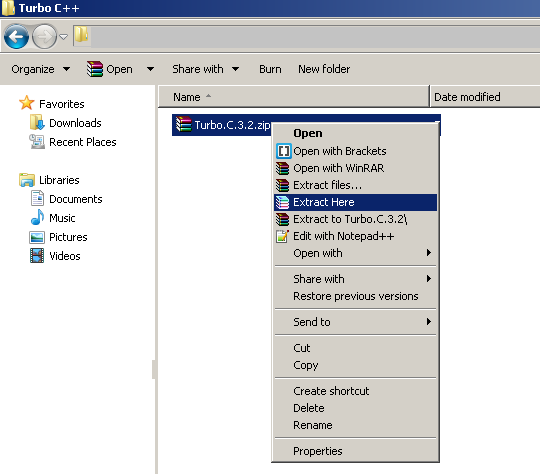
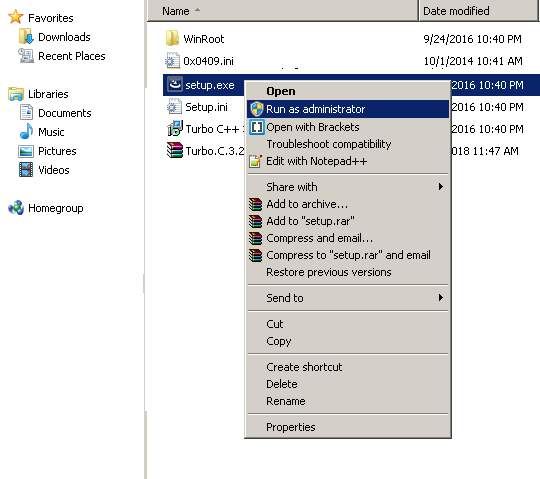
Step 3: Run “Setup.exe” file and follow the instructions. Make sure that you run setup as administrator.
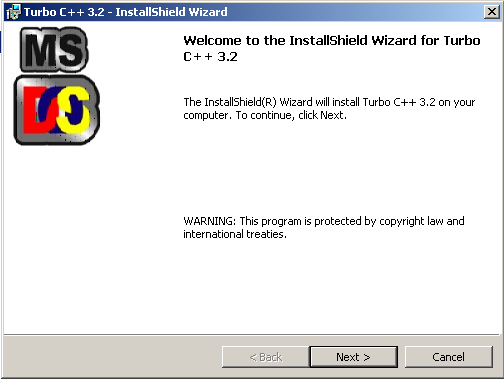
Step 4: You will get the Install Shield Wizard to Turbo C++. Click Next to continue.
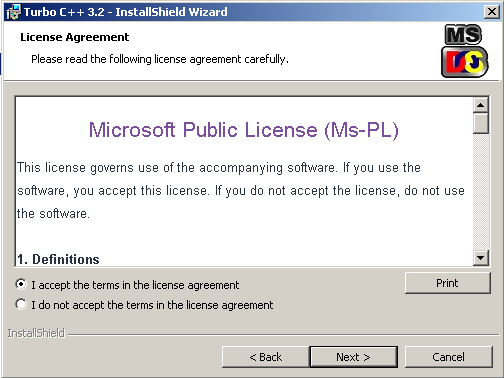
Step 5: You will receive the License Agreement windows, accept the License Agreement and click Next to continue.
Step 6: Setup is now ready to install Turbo C++ compiler.
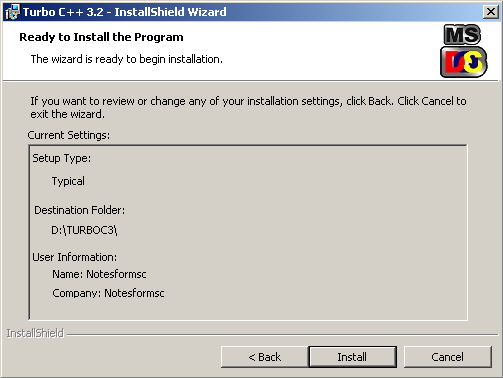
Step 7: Click Install to start the installation.
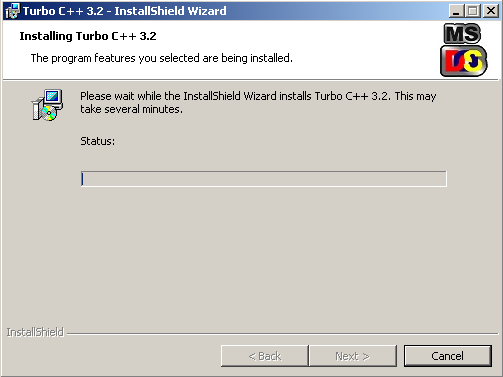
Step 8: After few minutes the setup completes the installation successfully.
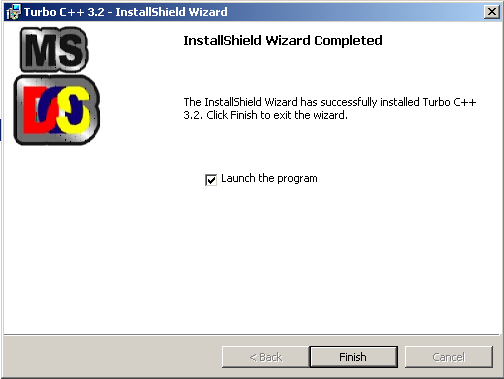
You can now click on Finish and launch the program. The initial screen for Turbo C++ 3.2 look like following.
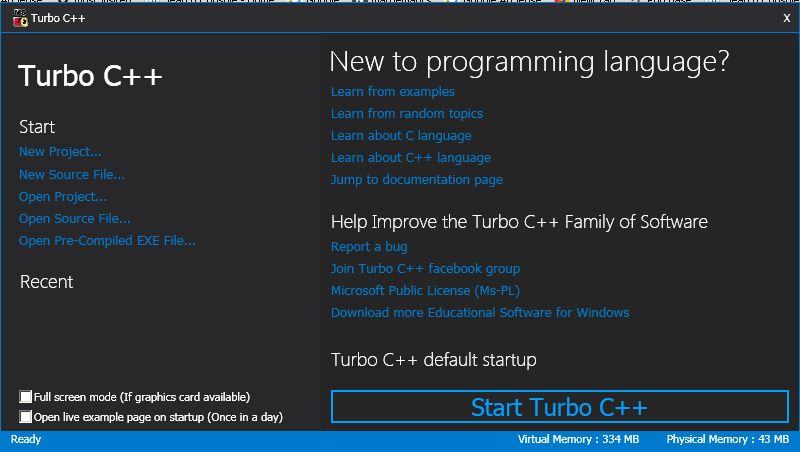
You can now click on “Start Turbo C++” and continue writing programs.
C Library String Functions
You can access the builtin C library functions through header files. The string related functions are located in String.h file.
Each function listed below has a specific purpose.
| Function | Description |
|---|---|
| strlen() | To find the length of a string. |
| strlwr() | Converts a string to lowercase. |
| strupr() | Converts a string to uppercase. |
| strcat() | Add one string to another to make a bigger string. |
| strncat() | Add n character of a string to another string |
| strcpy() | Copies a string to another string replaces any existing. |
| strcmp() | Compare two strings. |
| strncpy() | Copies first n characters of two strings. |
| strncmp() | Compares only first n characters with another string. |
| stricmp() | Compare two strings, disregards case. |
| strcmpi() | Same as stricmp() |
| strncmp() | Compares first n characters of two strings. |
| strnicmp() | Compares first n characters of two strings, disregards case |
| strdup() | Duplicate a string. |
| strchr() | Finds first occurrence of a given character in a string. |
| strrchr() | Finds last occurrence of a given character in a string. |
| strstr() | Finds first occurrence of a given string in another string. |
| strset() | Changes all characters of a string to given character. |
| strnset() | Changes first n char of a string to given character. |
| strrev() | Reverse a given string. |
From the above table,  ,
,  ,
,  and
and  are the most frequently used functions.
C Library String Functions Example
You will write a program that implement these  built-in functions.
#include <stdio.h>
#include <stdlib.h>
#include <string.h>
int main()
{
    char str[] = "Chile";
    char str2[] = "India";
    int len1;
    int len2;
    int boo;

/* Implement strlen() function */
    len1 = strlen(str);
    len2 = strlen(str2);
    printf("Length of First String = %d\n",len1);
    printf("Length of Second String = %d\n",len2);
    boo = strcmp(str2,str);

    if(boo > 0)
    {
        printf("String Mismatch\n");
    }
    else
    {
        printf("String Matched\n");
    }

    strcat(str,str2);
    printf("string cat = %s\n",str);
    strcpy(str,str2);
    printf("string copy = %s\n",str);

system("PAUSE");
return 0;
}
Output
Your site doesn’t include support for the CodeMirror Blocks block. You can try installing the block, convert it to a Custom HTML block, or remove it entirely.

Install CodeMirror Blocks
Keep as HTML
Length of First String = 5
Length of Second String = 5
String Mismatch
string cat = ChileIndia
string copy = India
Press any key to continue . . . C Strings And Pointers
In the previous lesson, you learned about C string and how they are important to manipulate text in a C program. In this article, you will learn how strings can be accessed and used with pointers.
Learn C programming basics and pointer concepts before you begin with this lesson. If you are familiar with them, skip and continue reading the next section.
Pointer is a special variable that can store the value of string constant, just like character array. But, there are some advantages of using pointers.
Let us see the initialization of string constant.
char manager[20] = "David";
char *p = "Harry";
Both methods is simple and straightforward, but you cannot assign another string to a character array. It is only possible with pointers.
For example,
char manager[20] = "Bruce";
char supervisor[20];
char *p = "Mary";
char *s;
supervisor[20] = manager[20]; /* will give error */
*s = *p;                      /* No error */
*s = "Tang";               /* is valid */
supervisor[20]= "George";  /* Not valid */
Accessing Characters in a String
The most popular method to access individual characters from a string is treating the string like an array and loop through each character.
For example,
int i = 0;
while(name[i] != '\0'){
    printf("%c", name[i]);
}
getch();
return 0;
}
You can do the same with pointers. Consider the pointer version of above.
char *p = "elephant";
int i;
while (*p!= '\0')
{
  printf("%c",*p);
  p++;
}
The output of both is going to be same.
String and Pointer Example Program
The following program does all the string manipulation we discussed in the article.
#include <stdio.h>
#include <stdlib.h>
int main()
{
    char fruit[20] = "APPLE";
    char *p = "ELEPHANT";
    char *s;
    int i;
    s = p;

    while (*s!= '\0')
    {
         printf("%c",*s);
         s++;
    }

    printf("\n\n");
    /* Standard Array Technique */
    i = 0;
    while( fruit[i] != '\0')
    {
         printf("%c", fruit[i]);
         i++;
    }
    printf("\n\n");

system("PAUSE");
return 0;
}
Output
ELEPHANT
APPLE
Press any key to continue . . . C Strings
A string constant is an array of characters just like an array of integers. It helps to work with words and sentences in C programming. Yet, an array of integers and character array are not the same as strings.
Learn basic of C programming before you begin with strings. If you are familiar with the C basics continue reading.
What is a String constant?
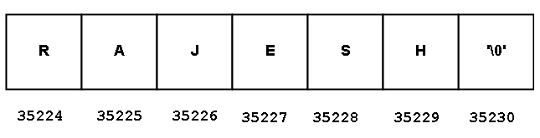
A string constant is a one-dimensional array of characters with is terminated by  , also called a null character.
char firstname[] = { 'P', 'E', 'T', 'E', 'R', '\0'};The value of a  character is and each character in the string constant occupy
  of memory. The syntax to initialize a string is very simple.
char name[] = "Rajesh";
/*where
  char = data type of string.
  name[]    = indicates that it is a character array or a string.
  "   "   =  double quotes show that the value is a string.
  Rajesh     = actual string value.
  */
The C compiler inserts a automatically, so there is no need to specify  for every string that you create.
Reading and Printing String Constant
Reading input and writing out is an important part of the C programming language. To read a string constant use following syntax.
char name[10];
scanf("%s", &name)
You already know that ![name[10]](https://notesformsc.org/wp-content/ql-cache/quicklatex.com-dd4a1b215de8a9165603f2b8a16dd81a_l3.png "Rendered by QuickLaTeX.com") is declared as a string of type char. The
is declared as a string of type char. The  is a builtin function that read inputs of various data types. To tell that the input is a string use the modifier “%s”. But, can only read a single word like “Rajesh”, and not “Rajesh Kumar”.
To read a multi-word string use  or do following.
scanf("%[^\n]s", name);The modifier is used for printing strings. For example,
printf("%s", name);String Example program
It is time to implement everything you learned so far about strings. In this C program, you will perform two tasks.
- read and print a single word string.
- read and print a multi-word string.
Program Code
#include <stdio.h>
#include <string.h>
int main()
{
char input_name[35];
int choice;
/* Menu */
printf("Menu\n\n");
printf("1. Read Single Word\n");
printf("2. Read Multi-Word String\n");
printf("\n\n Enter your Choice:");
scanf("%d",&choice);
switch(choice)
{
case 1:
    system("cls");
    printf("Enter Single Word:");
    scanf("%s", &input_name);
    printf("%s", input_name);
    break;
case 1:
    system("cls");
    printf("Enter Multi-Word:");
    scanf("%[^\n]s", &input_name);
    printf("%s", input_name);
    break;
}
system("pause");
return 0;
}
Output
Menu
1. Read Single Word
2. Read Multi-Word String
 Enter your Choice:1
Enter Single Word String:Paris
Paris
Press any key to continue . . . C Assignment Operators
The assignment operators assign values to variables. Once values are assigned the variables are evaluated in expressions and return a single value.
There are three types of assignments as shown below.
1. Variable = Value( e.g., a = 4)
2. Variable = Expression( e.g., a = 3 + b)
3. Variable = Variable <Operator> Value (e.g., a = a + 3 or a += 3)
You can see from the above examples, that there is a left value(L-value) and (R-value). This assignment has a right to left associativity. In other words, right value(L-value) must be unambiguous or known, otherwise assignment will not work.
Precedence of operator
Every operator has a precedence in operators hierarchy, and it is executed in that order in an expression. The assignment operators have the least preference, so it executed last.
How many types of assignment operators
Let’s see how many assignment operators available to us.
| Operator | Example | Associativity |
|---|---|---|
| = | A = 10 or B = C | Right to Left |
| += | A += 10 | Right to Left |
| -= | A -= 100 | Right to Left |
| /= | A /= 12 | Right to Left |
| *= | A *= 10 | Right to Left |
| %= | A %= 5 | Right to Left |
| &= | A &= 10 | Right to Left |
| |= | A |= 10 | Right to Left |
| ^= | A ^= 4 | Right to Left |
| >>= | A >>= 4 | Right to Left |
| <<= | A <<= 3 | Right to Left |
Example Program
This is an example program to demonstrate the effect of each assignment operator. You can run this program in any standard C compiler and it will work.
#include <stdio.h>
#include <stdlib.h>
#include <conio.h>
int main()
{
    int a,b,c,d;
/* simple assignment */
    a = 1000;
    b = 400;
    c = 120;
    printf("\n\n\n\n\n");
    printf("\t\t\ta:=%d\n",a);
    printf("\t\t\tb:=%d\n",b);
    printf("\t\t\tc:=%d\n",c);
/* assignment with arithmetic operators */
    a += b;
    b -= c;
    printf("\t\t\ta += b:=%d\n",a);
    printf("\t\t\tb -= c:=%d\n",b);
    a *= b;
    b /= c;
    printf("\t\t\ta *= b:=%d\n",a);
    printf("\t\t\tb /= c:=%d\n",b);
    a %= b;
    b ^= c;
    printf("\t\t\ta MOD= b:=%d\n",a);
    printf("\t\t\tb ^= c:=%d\n",b);
    a |= b;
    b &= c;
    printf("\t\t\ta |= b:=%d\n",a);
    printf("\t\t\tb &= c:=%d\n",b);
    a >>= 1;
    b <<= 2; printf("\t\t\ta >>= b:=%d\n",a);
    printf("\t\t\tb <<= c:=%d\n",b);
    getch();
    return 0;
}
Output – C Assignment Operators
The output of the above program is given below. Throughout the program, the value of variables a, b and c changes several times.
a:=1000
b:=100
c:=120
a += b:=1400
b -= c:=280
a *= b:=392000
b /= c:=2
a MOD= b:=0
b ^= c:=122
a |= b:=122
b &= c:=120
a >>= b:=120
b <<= c:=480
References
- Balagurusamy, E. 2000. Programming in ANSI C. Tata McGraw-Hill Education,.
- Brian W. Kernighan, Dennis M. Ritchie. 1988. C Programming Language, 2nd Edition. Prentice Hall.
- Kanetkar, Yashavant. 20 November 2002. Let us C. Bpb Publications.
C Pointers
Pointer is a difficult concept for beginners of C programming language. Yet, you must master this concept because this is probably the most important concept in C language.
To learn pointers, you must learn – the pointer notations, the pointer syntax, and basic pointer concepts.
What is C pointer?
A normal variable store a value of a specific data type. However, a pointer is a special variable that holds memory address of another variable as a reference.
The main advantages of the pointer are
- Saves memory
- Faster Access to variables
Let us briefly explain each of the advantages.
Pointer saves memory
A pointer variable saves memory by creating a reference to a variable that has value, instead of creating a new value and storing it. Creating a reference to another variable is easy and C programming language allow more than one pointers to refer the same variable. This concept is known as “sharing”.
Faster Access to Variables
A pointer is faster that a regular variable when used as parameter to a function. There are two ways to pass parameters to a function – Call-by-value and Call-by-reference.
When a variable is passed as call-by-value method, a copy of the variable is passed as a parameter. This method is slower because it has to copy the variable.
The call-by-reference method involves pointers which pass a reference to the original variable. Therefore, using pointer make the program faster.
C program for Call-by-Reference
C Pointer Operators
There are three kinds of operator used while working with pointers. Each of the operators is used in a specific way with pointers as well as other variables.
- Assignment operator (=): It assigns values to variables.
- Dereference operator (*): Pointers can access values of variables using this operator.
- Address-Of operator (&): Unary operator to get access to memory address of a variable.
The operators are part of syntax to define and use pointers.
Syntax for Pointers
Most people do not understand pointers because they do not understand the syntax, what it means to declare pointers, what does it mean to reference a variable.
A visual representation should clear all doubts about the pointer. In this section, you will find syntax and a visual representation of syntax in the memory.
Pointer Declaration
To declare a pointer type variable, you need  , followed by
  asterisk symbol and a
  .
.
data_type* user_defined_name;For example
int* p;
float* p;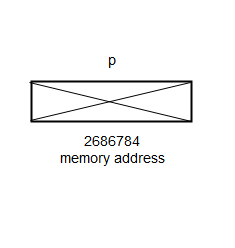
Note that the asterisk symbol also means a dereferencing operator, so you must be careful in using it. In a different context, it means differently.
Pointer Initialization
A pointer starts out bad, but we need to point it to a variable. Never use a pointer that is not initialized, you will encounter an error. A pointer must always point to something before it is used.
The  is assigned memory address of a target variable, see the figure below.
user_defined_pointer_name = &variable_name;for example,
int num = 1100; /* Variable declaration and initialization is must */
int* p;
p = #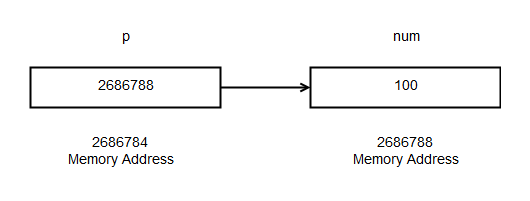
The above figure shows that pointer variable  is assigned memory address of variable number. The
  operator before variable
  gives the memory address.
De-referencing pointer
De-referencing means getting access to the values of the variable pointer is pointing to. To do this, you need the dereferencing operator ().
user_defined_variable_name = *pointer_name;
/* must assign the deference value to another variable or print it as output */
For example
int c, d;
c = 100;
int* p;
p = &c;
d = *p; /* now d is assigned the value of 100 using dereference operator */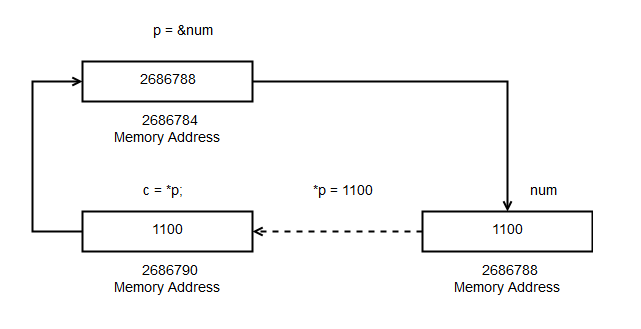
Bad Pointer Concept
Every pointer that you declare starts out bad, but you must assign an address of a proper variable to the pointer. Until then, it remains a bad pointer. If you get errors in your program that use pointers, check for bad pointers first.
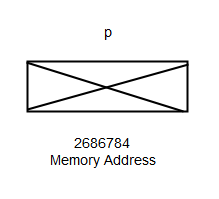
Different programming constructs behave differently to a bad pointer which points to nothing. Some just halt the program, and others crash the program itself like C/C++.
Null Pointer Concept
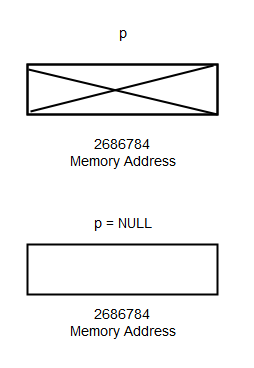
The  has a default value in every compiler which means
  or sometimes a
  . When the pointer points to then you can say that it points to nothing.
That is the reason, you must never de-reference a pointer because technically, it points to nothing. Sometimes the is assigned a value of 0 or any other constant values. But still, you cannot de-reference the pointer.
Sharing Concept
You can assign one pointer to another pointer. Basically, this will give the second pointer the address of the original variable. See the figure below. In other words, they both share the same value and points to the same variable.
The assignment is quite straightforward, you assign one pointer to another directly like any other variable.
For example
q = p;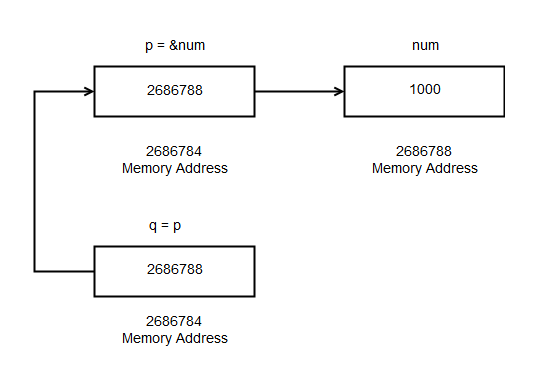
Example Program – Pointers
#include stdio.h
#include stdlib.h
int main()
{
    int num = 100;
    int* p;
    int* q;
    p = #
    q = p;
    printf("\n\n\n\n");
    printf("\t\t\tAddress of num= %u\n",&num);
    printf("\t\t\tAddress of p = %u\n",&p);
    printf("\t\t\tAddress stored at p = %u\n",p);
    printf("\t\t\tAddress of q = %u\n",&q);
    printf("\t\t\tValue of pointer p= %d\n",*p),
    printf("\t\t\tValue of pointer q = %d\n",*q);
    getch();
    return 0;
}
Output – Pointers
The output of the above program is given below. The program shows address of all the pointers: p, q and variable: num. It also uses the dereferencing operator to retrieve the values for pointers.
Address of num= 2686788
Address of p = 2686784
Address stored at p = 2686788
Address of q = 2686780
Value of pointer p= 100
Value of pointer q = 100
References
- Balagurusamy, E. 2000. Programming in ANSI C. Tata McGraw-Hill Education,.
- Brian W. Kernighan, Dennis M. Ritchie. 1988. C Programming Language, 2nd Edition. Prentice Hall.
C Functions
The C functions are another important feature in C language which helps in achieving a particular task. There is at least one function in a C program and it’s called the  function. Without the main, there is no C program.
You cannot delete the main function, but you can delete other user-defined functions.
Why Functions ?
There are two reasons why function exists
- Code reuse
- Better program management because programming task can be broken and distributed to many functions.
You can repeat the same function by calling instead of writing the whole code again as many times as required in your C programs.
In structured programming practice, the program is broken into manageable tasks and later each task becomes a function with own codes. This is very easy to manage compared to writing whole code into the function itself.
Important parts of a C function
Three things are important about a C function
- Function declaration
- Function definition
- Function call
Function Declaration
You can declare function prototype using formal argument in two location in a C program.
- Global declaration
- Local declaration
Some declaration is done outside of function and those are called the globally declared variables or functions.
There is nothing special about them except that you can call them anywhere in your program or another file in the same program.
The scope of a local variable is inside of main or inside of a user-defined function. It means you cannot call the function outside or or another user-defined function.
Syntax: –
data_type function_name (
data_type variable1,
data_type variable2,
.
.
data_type variable n);Example: –
int addition (int a, int b);Function definition
The function definition is written outside of the function and it has all the statements to perform a specific task assigned to that function. You can declare local variables other than function parameters in a function definition.
Syntax: –
data_type> function_name (data_type variable1…)
{
    Statement 1;
    Statement 2;
    .
    .
    Statement n;
}Example:–
int addition (int x, int y)
{
    int result = x + y;
    return result;
}
Function Call
You can call a function anywhere you want to use it depending on the scope of the function. You can call a function in three places
- Inside another function
- In
 program
 - Another file in the same program
Syntax:–
function_name (variable_list);Example:–
addition (a, b);Function Types
Earlier you learned about the function components inside a C program. There are different types of functions in C language. They are as follows
- Function without parameters
- Function with parameters
- Function with return
- Function without return
We will discuss each one of them in more details.
1. Functions without parameters
These type of functions do not take parameters to perform a computation.
Syntax:
data type function_name> ( );Example: –
int addition ( );Example Program:
#include <stdio.h>
int main ()
{
    int result = 0;
    int addition (); /* function declaration */
    result = addition (); /* function call */
    printf ("Total= %d\n", result);
    getch ();
    return 0;
}
/* function definition */
int addition ()
{
    int a = 10;
    int b = 20;
    int total = 0;
    total = a + b;
    return output;
}
Output
Total = 302. Function with parameters
A function with parameter has two important parameter values depending on where it appears.
- Formal parameters
- Actual parameters
Formal Parameters
The formal parameter appears at the function declaration when you tell the kind of argument is used, especially the data type.
For example
void sum (int x, int y);and
void sum (int, int);They are the same type of declarations.
Actual Parameters
The actual parameters are only used in function calls. The things you must know about functions with parameters are
What kind of values they take?
- Integer
- Float or double
- Array
- String of characters
- Pointers
- Memory address
Syntax: –
data_type function_name ( variable1 …);Example: –
void multiply (int a, int b);How to supply parameters for these types of functions during function call?
There is two way to do this
- Call-by-Value
- Call-by-Reference
If you want to learn the how this works – check examples of both
Examples of each input
In this section, we will discuss different calls to functions.
Integer value
Example:
int a, b;
a = b = 10;
/* function declaration */
int addition (int a, int b);
/* function call */
addition (a, b);
/* function definition */
int addition (int a, int b)
{
     do something;
}
Float or Double
Example:
float a, b;
a = b = 10.45;
/* function declaration */
float addition (int a, int b);
/* function call */
addition (a, b);
/* function definition */
float addition (float a, float b)
{
     do something;
}
Character value
Example:
char vote;
vote = 'Y';
/* function declaration */
void opinion (char vote);
/* function call */
opinion (vote);
/* function definition */
void opinion (char vote)
{
    do something;
}
Array value as parameter
An array is a contagious memory location that holds the same type of values, and a subscript helps in identifying the correct location of an array element. There are four notations to access the value from an array.
![Array [0]](data:image/svg+xml;base64,PHN2ZyB4bWxucz0iaHR0cDovL3d3dy53My5vcmcvMjAwMC9zdmciIHdpZHRoPSI2NiIgaGVpZ2h0PSIxOCIgdmlld0JveD0iMCAwIDY2IDE4Ij48cmVjdCB3aWR0aD0iMTAwJSIgaGVpZ2h0PSIxMDAlIiBzdHlsZT0iZmlsbDojY2ZkNGRiO2ZpbGwtb3BhY2l0eTogMC4xOyIvPjwvc3ZnPg== "Rendered by QuickLaTeX.com") – refers to value of first element of array.
– refers to value of first element of array. – refers to memory address of first element of an array.
 or – refers to value of second element of an array.
 or
or  – refers to memory address of second element of an array.
![Array [0]](https://notesformsc.org/wp-content/ql-cache/quicklatex.com-627df554a7f9fd2f9ddbbe88f2ab77bd_l3.png "Rendered by QuickLaTeX.com") – refers to value of first element of array.
– refers to value of first element of array. – refers to memory address of first element of an array.
 – refers to value of second element of an array.
 or
or  – refers to memory address of second element of an array.
Note: The notation ![array [0]](https://notesformsc.org/wp-content/ql-cache/quicklatex.com-d112510865e1d04e0e241f1e060a6058_l3.png "Rendered by QuickLaTeX.com") is same as
is same as ![i [array]](https://notesformsc.org/wp-content/ql-cache/quicklatex.com-301de0e34a8f3276d229c3d3af929c85_l3.png "Rendered by QuickLaTeX.com") because it means
because it means  or
or  which called the commutative property.
When you use an array as a parameter to function.
- The name of the array ‘array’ is a pointer to the first location in an array. It contains the memory address of the first element in the array.
- The index or subscript is added to the memory address to find all elements of the array which is much more efficient than copying and passing an entire array and slowing the program.
Since it is not possible to send the entire array as a function argument by call-by-value method, passing a pointer to the first element or passing the address to the first element is easy. Later any element of the array can be accessed using subscript or index value.
Syntax:-
/* Function declaration */
int sum (int arr []);
/*Function call where arr points to the first element of the arr [] */
sum (arr)
/* Function definition */
int sum (int arr []) {
   do something;
}
Pointer value as parameter to function
Pointers do not hold any value, but points to the memory address of a variable that has a value.
There are some rules regarding the pointer.
- Pointer contains memory address of variable
- Pointer must point to something before you use them.
- Pointer is passed as parameter to a function using call-by-reference method.
Here is an example of pointer as function parameter.
Syntax: –
/* Function declaration */
    int sum (int *p);
    int a = 10;
    p = &a;
/*Function call where 'p' points memory address of variable 'a' */
    sum (p);
/* Definition of the function*/
    int sum (int *p);
    {
        Do something;
    }
3. Function with return
After completing a specific task some function return a single value to the main function or to a function that called it.
A function with return requires two things.
- A return statement using keyword –
 .
. - The return type should match with the return type of function.
 .
.Syntax:–
data_type function_name ( )
    {
        do something;
        return variable;
}Example:-
int sum (int a, int b)
    {
        int sum = 0;
        sum = a + b;
        return sum;
}
Notice that the sum is an integer and returns an integer value which matches with the  function data type. If there is a mismatch you will get an error.
The main function always returns an integer by default, unless it’s specified not to return anything.
4. Function without return
There is a different class of functions that do not return any value. There are two requirements to define such a function.
- No return keyword required because function does not return any value.
- The function has no data type declared and instead the keyword ‘void’ is used to denote that the function does not return anything.
void sum (int a, int b)
{
    int sum = 0;
    sum = a + b;
    printf ("The sum is %d\n", sum);
}
Example Programs
References
- Kanetkar, Yashavant. 20 November 2002. Let us C. Bpb Publications.
- Linden, Peter Van der. 1994. Expert C Programming: Deep C Secrets. Upper Saddle River, NJ, USA: Prentice-Hall, Inc.
C Do-While Loop
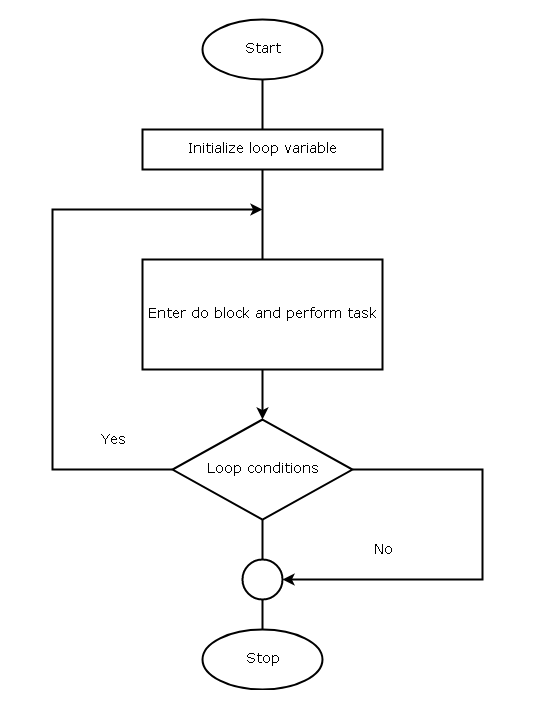
The C do-while loop is a different kind of loop which checks for exit conditions instead of entry condition. So it is very useful if you want a loop that keeps iterating until an exit criterion is met.
In a C program, the do-while loop will let you execute your code first and then checks for test condition if it is true to complete the execution.
If the test condition is false, the loop terminates and ignores any computation it may have performed previously.
Diagram for C Do-While Loop
The diagram below is used for a do-while loop when we create a flowchart for the C program.
Example Program
#include <stdio.h>
int main ()
{
     int i, sum;
     /* Initialization of loop variable 'i' and sum */
     i = 0;
     sum = 0;

     /* Do-while loop body execution starts */
     do {
          sum = sum + i;
          /* Increment the loop */
          i++;
        } while (i < 10); /* check for exit condition */

    printf ("\n\n\n\n\n");
    printf ("\t\t\tThe sum is %d", sum);

getch ();
return 0;
}
Output – C Do-While Loop
sum is 45Example Explained
In the above example, the do-while is initialized like other loop control structures – for and while loop. The variable sum is also initialized to 0.
i=0;
sum = 0;
Then, the do block is started with executing the following statement. Unlike other loops, the do-while does not check for entry conditions and directly execute the loop body.
sum = sum + i;Next, the do-while loop is incremented for next iteration.
i++;When all the tasks in a do block is completed the while condition checks for the Boolean value of the loop and decides to continue if true or terminates the do-while loop if false.
The program then prints the output, when the loop terminates.
printf ("The sum is %d", sum);and the program ends.
References
- Balagurusamy, E. 2000. Programming in ANSI C. Tata McGraw-Hill Education,.
- Kanetkar, Yashavant. 20 November 2002. Let us C. Bpb Publications.
C For Loop
The  loop is a simpler version of the while loop that we learned in the previous lesson. It has the same components as while loop.
For Loop Basics
The for loop is more popular because all conditions for loop is declared in one place.
Before the for loop starts.
- Loop variable – It is used for initializing the loop, test condition for loop and increment or decrement the loop.
- Loop test condition– decide whether to execute the loop body or not.
- Loop body – contains statements required for performing a task inside the loop.
Logically  loop and loop is same but the loop is lot more simple than the loop. This is because you can initialize, put test conditions and increment or decrement the loop in a single line.
for( initialize counter; test condition; increment or decrement counter)
{
   Statements;
}
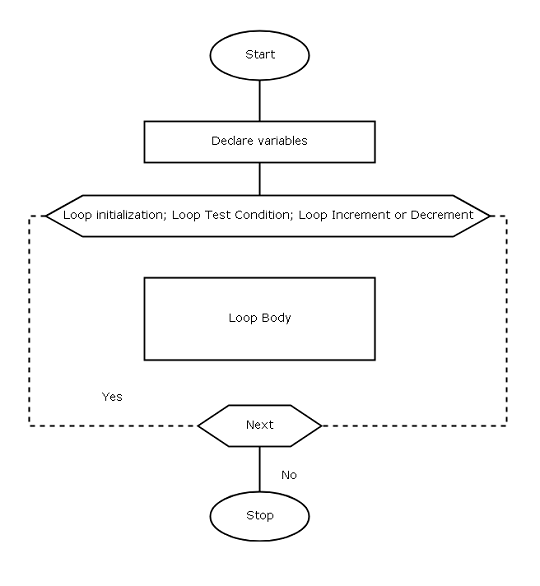
Flowchart Symbol of ‘for’ loop
The following symbol is used when we draw a flowchart for a C program that make use of a loop.
Example Program
In this example program, we are going to a number over and over for 10 times and print the result. This program uses a single loop.
Your site doesn’t include support for the CodeMirror Blocks block. You can try installing the block, convert it to a Custom HTML block, or remove it entirely.

Install CodeMirror Blocks
Keep as HTML
/* C Program to add a number 10 times */
#include <stdio.h>
int main ()
{
     int number, total, i;
     number = 2;
     total = 0;

     for (i=0; i<10; i++)
     {
          total = total + number;
     }

     printf ("\n\n\n\n");
     printf ("\t\t\tThe total is %d", total);

getch ();
return 0;
}
Output
The total is 20Example Explained
The program has three variables – loop variable  and
and  and it uses one loop to repeatedly add the number to
  until the loop terminates.
First the variables  and
and  are initialized.
total = 0;
number = 2;
The loop variable  is used inside the loop to initialize the loop, define the test condition and increment the loop.
for (i =0; i<10; i++)Since the loop starts at  , it will run for 10 iteration because the 10th iteration it will terminate. At each iteration, the loop will check the test condition against the current value of .
When the condition for loop is ‘true’, the loop body will execute and add value of variable to repeatedly.
total = total + number;The loop adds the 10 times and when  , it terminates and prints the value of as output.
printf ("\t\t\t\t The total is %d", total);The program ends.
References
- Balagurusamy, E. 2000. Programming in ANSI C. Tata McGraw-Hill Education,.
- Kanetkar, Yashavant. 20 November 2002. Let us C. Bpb Publications.