JavaScript – Exercise 12 – Arrays
JavaScript arrays can hold different types of data unlike other programming languages like C, C++, and Java. In this article, you will create a simple array and store elements in the array.
Structure of array declaration
To declare an array in JavaScript use following syntax.
arrayName = [];  //declare an empty array

arrayName = [23, "Car", 45.66, 'B'];   //Assign values later

Or

var arr = [34,56,77,2,6];
JavaScript push() and pop() method
You can use JavaScript arrays like a stack. You can push element using the push() method or delete an element from the array.
Elements from array are pushed or deleted from the rear end of the array. You can consider the rear end of the array as top of stack.
var arr = [44,55,66,77];

// calling push function to insert 88

arr.push(88);

// calling push function to insert 100

arr.push(100);

// display the array

console.log(arr);

// delete an element using pop() function

arr.pop();

// display array

console.log(arr);
Two Dimensional Array
JavaScript allows you to create a multidimensional array. The two dimensional array has rows and columns. To create a two dimensional array use following syntax.
var arrTwoDimensional = [ [2,5],[3,6],[,4,8] ];

arrTwoDimensional.push([5,10]);
Example Program:
<!DOCTYPE html>
<html>
<head>
  <title>JavaScript - Array Stack</title>
  <meta charset = "utf-8">
 </head>
 <body>

<script>
var arr = [44,55,66,77];

 // calling push function to insert 88

 arr.push(88);

 // calling push function to insert 100

 arr.push(100);

 // display the array

 document.write(arr + "<br>");

 // delete an element using pop() function

 arr.pop();

 // display array
 document.write(arr + "<br>");

var arrtwoDimensional = [[2,3],[4,5],[6,7]];

arrtwoDimensional.push([8,9] + "<br>");

document.write(arrtwoDimensional);
</script>
 </body>
 </html>
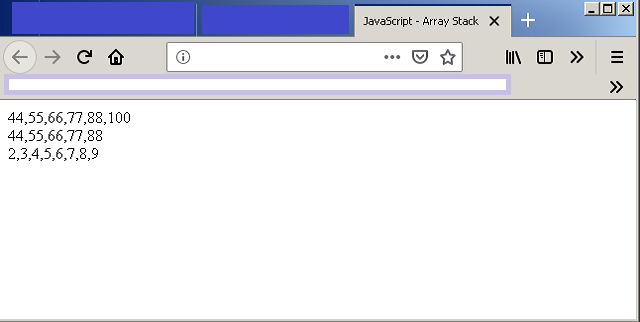
Output – JavaScript Arrays
JavaScript – Exercise 11 – The Do-While Loop
In this example, you will learn about a different kind of JavaScript loop control structure. All other loops do not let the loop execute if the condition of the loop is false. However, the do-while loop make sure that the loop execute at least once before it fails.
Structure of do-while loop
int i = 10;

do {

       execute statements;

     } while (i < 10);
In the example above the loop executes at least once before the i = 11. For the sake of do-while example. We will do the following things.
- Create an HTML page.
- Write JavaScript code that will sum all the elements of a two dimensional array.
- Output the result in browser console.
HTML Example: do-while.html
Open any text editor and write the following code and save it as do-while.html.
<!DOCTYPE html>
<html>
<head>
    <title>JavaScript - Do-While Loop </title>
</head>
<body>


</body>
</html.
At this moment do not add anything in the body section. Leave it empty. Save the document as do-while.html
.
Add JavaScript Code
In this section, you will add your JavaScript code to the HTML file created previously. Add the following code in the body section of the HTML document.
  function myArrTotal(arr) {

       var sum = 0;
       var i = 0;

             do {
                          for(var j=0;j < arr[i].length;j++)
                            {
                                       sum = sum + arr[i][j];
                               }
                           i++;
                   }while(i < arr.length);
                  return sum;
                }
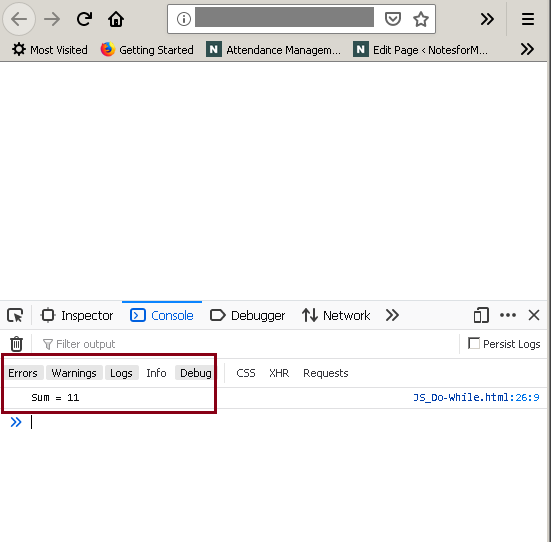
console.log("Sum =" + myArrTotal([[2],[4],[5]]));
Output : do-while loop