Python Try Block
The python try block is part of python exception handling mechanism. The try block is similar to an if-then-else block. If an error occurs the try block stops executing. These errors are known errors for which we have a try block. They are called exceptions.
The try block is to notice the error or exception that happened and stop executing.
After that you can have a catch block in python that will handle the error in most appropriate way. Usually the error handling routine is written by the programmers.
Syntax Try Block
There may be code outside the try block and any error in those parts will not be catch-ed. The syntax for try block is given below.
# The try block
number_d = 10
number_s = int(input("Enter a number :"))
try:
    result = number_d/number_s
    print(result)
except:
    pass
In the example above, the variables – number_d and number_s are declared outside of the try block, therefore, no error will be caught.
If the value of number_s is 0, there will be a ZeroDivisionError and the program will exit without printing anything because the except keyword does not do anything and let the block pass.
Therefore, output of the above program will be empty. See the figure below.
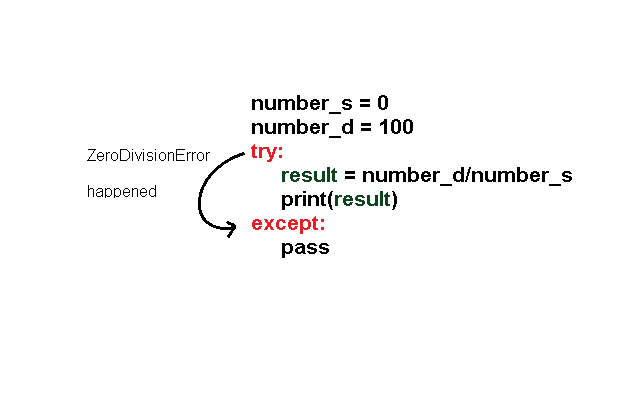
Instead of pass, you can print a customized error to indicate what error was caught. Note that we already know that a ZeroDivisionError would happen.
Consider the modified program from above.
# The try block
number_d = 10
number_s = int(input("Enter a number :"))
try:
    result = number_d/number_s
    print(result)
except:
    print("Cannot divide by Zero. Try different integer")
The output of the above program is following when number_s is 0.
Enter a number :0
Cannot divide by Zero. Try different integer
>>>
In the next article, we will understand more about exception handling, especially, the catch block(except).
Error Handling Overview
In computer programs, some kind of errors are expected. We can simply read those errors and fix the problem. But some errors are bound to happen, usually related to user inputs or mismatch of specific conditions of the program.
Since, we know them already and knows that it would occur in some point in time during the execution, we can write codes that would respond to those errors.
These responses are error handling codes.
Python programming also supports error handling mechanism using certain keywords. These are
- try
- except
- else
- finally
Let us try to understand each one of them here.
Try block
The try block contain the actual program code which gets executed in a sequential manner until an error occurs.
Except block
The except block will catch the error that happened in the try block
Else block
If the try block is successful, then the program executes an else block if exists.
Finally
A piece of code that runs no matter what.
Python Keyword Parameters
In earlier articles about function, we have used parameters and those parameters are replaced with some arguments when a function call takes place.
In this article, you will learn about python functions that takes default values or called it named parameters.These named parameters have some values assigned to them. You can always override these default values. Consider the example below.
def add(n1, n2 = 55):
     return n1 + n2
# Using default value need not require second parameter
result1 = add(41)
# Override the default parameter with new value
result2 = add(25, 75)
# Print output
print(result1)
print(result2)
The first function call does not mention the second parameter which automatically calls the default value of n2 = 55. There will not be a Type error.The function continue to evaluate the expression.
The second function call overrides the default value of 55 with 75 and the function completes the expression.The output of the program is given below.
== RESTART: C:/PythonExercises/Keyword Parameter.py ==
96
100
>>>
The keyword parameter also applies to built-in functions.
Keyword Parameters Of Built-in Functions
The built-in functions such as print() has keyword parameters with default value. The print() function has separator (sep) which has a default value of while space.
print(23,55,77)The output of the above is as follows.
23 55 77
>>>
The output above shows that each number is separated by a white space. You can override the default value and put some other character. Let us modify our previous print statement and use sep='_'.
print(23, 55, 77, sep='_')The output will have a different separator than white space.It will be replaced with underscore( _ ).
23_55_77
>>>
Not only this, the print() function has another keyword parameter called end. The end has a newline character as default value that allows the print() to start with a newline every time. You can make sure that the print() prints all items in the same line horizontally if you override the default newline.
print(44,23)
print(77,88, end=" ")
print(6,25, end=" ")
The output is given below.
44 23
77 88 6 25
>>>
If you look at the output, the first print statement that does not use end is printed on a separate line. It is because the end uses a newline character by default.
The second and the third print statement does not use newline and is overridden by white space at the end of each print statement. Therefore, it prints all the values horizontally.
Consider an example where we used both sep and end keyword parameter.
print(44,66, sep='@', end='$')The output is given below.
44@66$
>>>
Each of the character is separated by @ and the print ends with $ sign.
Python Function Return NoneType
In the previous articles, you have seen various types of functions. Function either return a value or nothing. In this article, you will learn about functions that return a None. The None is the only value that belong to None Type.
When Python Functions Return None
There are a number of situations when a python function returns a None value. We have listed them here.
- Functions purposely returns a None.
- Functions that does not return anything and assigned to a variable.
- Function that returns another function
Now, we will see an example of each of these cases.
Function That Returns a None
A function is created and does some calculation and returns None. Consider the following example to understand this.
def expression_1(num):
     if num > 100:
         return num + 100
     else:
         return None
result = expression_1(90)
print(result)
In the example above example, if the number is less than 100, the result will get a value of None. The output of the program is given below.
== RESTART:C:/PythonExercises/function_return_none.py ==
None
>>>
Function Returns Nothing
There are functions that does not return anything and in such case, the function automatically returns a None. The following example multiply two numbers but does nothing more than that. When the function is printed as output, the value of the output is None.
def multiply(n1, n2):
    result = n1 * n2
print(multiply(4, 7))
The output of the function is None. See below.
== RESTART: C:/PythonExercises/function_no_return.py ===
None
>>>
Function That Return Another Function
In this case, the function returns another function. The program cannot print another function, therefore, it is equal to None.
def printChar():
     return print("D")
result = printChar()
print(result)
The output of the program is given below.
= RESTART: C:/PythonExercises/Func_Ret_OtherFunc.py =
D
None
>>>
The output above is interesting because it shows how the values are printed sequentially. First, the print("D") is executed and "D" is printed.The second print statement is executed after the function terminates. Therefore, the final output is None.
In the next article, we will discuss about advanced python functions.
Python Functions Common Errors
While writing a python function and using it in your program, you get lot of errors such typing wrong name of the function, changing the order of definition and function calls, wrong parameters, less parameters(parameter mismatch) and scope errors.
Wrong Function Definition and Function Call Order
In python programming one of the most common error is calling the function even before you define your function. The function definition runs first and creates the function in python programming before you can call it. If you call the function earlier than python will throw an error. Consider the following example.
print(add(23,67))
def add(n1, n2):
    return n1 + n2
The program above will try to execute print statement – print(23, 67) and it will not find the function add(). This will result in following error.
= RESTART: C:/PythonExercises/Wrong_definition_function_call_order.py
Traceback (most recent call last):
  File "C:/PROGRAMMING/PythonExercises/Wrong_definition_function_call_order.py", line 1, in <module>
    print(add(23,67))
NameError: name 'add' is not defined
>>>
Parameter Mismatch Error
A lot of python functions are written with multiple parameters.However, when you call the function with either wrong parameter type or less number of parameters, python will throw an error in each case.
def expression_1(num1, num2, num3):
     return (num1 + num2)/num3
# But the function call has wrong type
expression_1("345", 55, 66)
Consider the parameter type mismatch error example. In the program below, the function is expecting a number, but receives a string number. Therefore, throws an error.
=== RESTART: C:/PythonExercises/Functions/type_mismatch_error.py ===
Traceback (most recent call last):
  File "C:/PythonExercises/Functions/type_mismatch_error.py", line 5, in <module>
    expression_1("345", 55, 66)
  File "C:/PythonExercises/Functions/type_mismatch_error.py", line 2, in expression_1
    return (num1 + num2)/num3
TypeError: can only concatenate str (not "int") to str
From the above example, it clearly evident that there is a type mismatch between the function call and function definition.
The second type of error happens when the function call does not have the correct number of arguments, according to parameters.
# function definition
def expression_2(num1, num2, num3):
     return num1 * num2 + num3
# function call with only two parameters, missing third
expression_2(10,44)
The above program missing the third argument according to third parameter in the function definition. Note that the argument is the value replaced with the parameter. Therefore, number of arguments must match number of parameters.
Traceback (most recent call last):
  File "C:/PROGRAMMING/PythonExercises/Functions/number_of_arguments_mismatch_error.py", line 5, in <module>
    expression_2(10,44)
TypeError: expression_2() missing 1 required positional argument: 'num3'
>>>
The error clearly says that the num3 is missing.
Scope Error
In python, a local variable that is created inside of the function cannot be called outside of the function. This is possible in the case of a conditional block such as if, if-then-else, etc. But not in python functions.This is called a scope error. Consider the following example. This example tries to find the maximum of two numbers.
def find_max(n1, n2):
     num1 = n1
     num2 = n2

     if num1 > num2:
          result = num1
     elif num2 > num1:
          result = num2
     else:
          result = num1
find_max(34,77)
print(result)
The program tries to print the variable called result created inside of the function. But it does not work and gives following error.
Traceback (most recent call last):
  File "C:/PROGRAMMING/PythonExercises/Functions/Scope_Error.py", line 13, in <module>
    print(result)
NameError: name 'result' is not defined
To fix the problem, you have to assign the function itself to a variable and then print it. Consider the modified program below.
def find_max(n1, n2):
     num1 = n1
     num2 = n2

     if num1 > num2:
          result = num1
     elif num2 > num1:
          result = num2
     else:
          result = num1
     return result
maxNum = find_max(34,77)
print(maxNum)
The output of the program is printed successfully.
===== RESTART: C:/PythonExercises/Scope_Error.py =======
77
>>>
In the next article, we will talk about function that returns None type.
Python Functions With Parameters and Return
Python programming allows function to take some parameters and compute them and return a value. This is very efficient method of programming when it clearly defined what inputs a function will take and what output it returns.
Python Program That Compute Sum Of Two Matrix
In this example, we will create two matrix using lists and use python functions to pass the matrix and add them and return a sum_matrix.
# Program to add two matrix and return the final matrix
# print the output
matrixOne = [[2,3],[1,1]]
matrixTwo = [[4,5],[7,2]]
sum_matrix = [[0,0],[0,0]]
def add_m():
    m3 = [[0,0],[0,0]]
    for i in range(2):
       for j in range(2):
          m3[i][j] = matrixOne[i][j] + matrixTwo[i][j]
    return m3
sum_matrix = add_m()
for i in range(0,2):
    for j in range(0,2):
          print(sum_matrix[i][j], end=" ")
    print()
In the program above, the function receives two matrix of size 2 x 2 and adds them to m3. The matrix m3 is returned as the final matrix.
The function is called with matrices as arguments and the output is assigned to sum_matrix. It means the function will return m3 matrix and assign it to sum_matrix. Then we use a nested loop to display the content of sum_matrix. Output of the above program is given below.
====== RESTART: C:\Python_projects\Functions\Add_Matices.py =========
6 8
8 3
>>>
In the next article, we will discuss a new topic.
Python Function With Parameters, No Return
In the previous example, you have seen that python can take no parameter and return some value. In this example, you will learn that a function can take some parameter and output the results without returning the value.
Python Program To Reverse a String
In this example, we will accept a string as parameter and then reverse the string and print the output to the console. The function does not return anything.
## Program to reverse a string
my_string = "Great Country!"
# Function Definition
def reverse_string(s):
     for i in range(len(s)-1, -1, -1):
             print(s[i], end= " ")
# Function Call
reverse_string(my_string)
There are a few things worth mentioning here. The function use the len() function which returns the length of the string. The len(s)-1 gives the index of the last character of the my_string.The index of first character is 0.
== RESTART: C:/Python_projects/Functions/Parameter_No_Return.py ==
! y r t n u o C   t a e r G
>>>
Lets understand why range(len(s)-1, -1, -1) is going to work. The range function starts with len(s)-1 and goes up to -1. But it does not include -1 because range does not include the upper limit. Therefore, all characters starting with 12(because there are 13 characters in the string) to 0 are printed in reverse order.
Note that the last -1 in the range() function indicate that the function is decrementing. In the next article, we will discuss about functions that do take parameters and also return a value.
Python Function With No Parameters, With Return
In this article, you will learn about functions that does not take any parameters, but does return a value. The returned value can be used for further computation.
Function That Returns Sum of a List of Numbers
In this example, you will create a list of numbers and then sum the numbers in the list and return the value to main program for outputting.
# Program that returns sum of a list of Numbers

my_list = [23,44,66,74,23]

# Function definition
def add_list():
    sum = 0
    for list_item in my_list:
         sum = sum + list_item
    return sum
# Function call
result = add_list()
print("The Sum is", result)
The output of the above program is given below. Note that the my_list is global variable, therefore, it is accessible by the function.
== RESTART: C:/Python_projects/Functions/No_Parameter_With_Return.py =====
The Sum is 230
>>>
Python Function With No Parameter, No Return
In the last article, we have seen how a user-defined function is created. The user-defined function has two parts – the function definition and the function call.The function definition may or may not have parameters and it may or may not return a value.
In this article, you will see an example of python function with no parameters, and no return.
Program to Compute Factorial of a Number
This program is a simple program that computes factorial of a given input number.
## Program To Compute Factorial of a Number
## Function Definition
def factorial_number():

     factorial = 1
     fact_number = int(input("Enter a Number to Get its Factorial: "))
     for i in range(1, fact_number + 1):
        factorial = factorial * i
     print("The factorial is" , factorial)
## Function Call
factorial_number()
The above program does not take any parameters and does not return anything. The output of the program is given below.
========= RESTART: C:/Python_projects/Functions/Factorial.py =============
Enter a Number to Get its Factorial: 5
The factorial is 120
>>>
In the next article, we will discuss about function with parameter with return.
Python Functions
So far we have seen many programs which ran sequentially, means executed the lines of codes in a linear manner. We have also seen blocks of code such as if-then-else and loops such as for-loop and while-loop. In this article , you learn about python functions.
Once thing is common to all of these codes, that is, re-usability. None of the above is reusable. You cannot run the same loop or if-block in two different places.
Python Functions
Python functions are named block of code that you can reuse in multiple places in your program. Python uses different types of function, you can create new variables within the function, also functions may or may not return results. The function also take parameters.
How Functions Work?
The main program executes and knows that a function definition exists. When the program need to call the function to do a specific task. It calls it and transfer the control over to the function. Note that in python function definition always comes before function call.
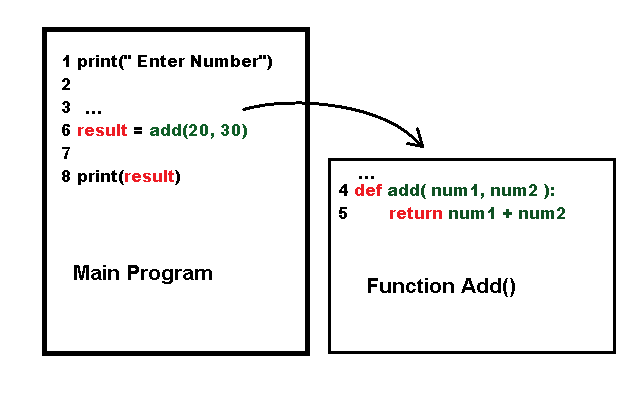
In the figure above, line 4 and 5 is not executed until line 6 do the function call. You can say that the function is a program by itself. The transfer of control to the function is the non-sequential nature of functional programming which is a different programming paradigm altogether.
Types of Functions in Python
There are three types of functions in python programming. They are:
- Built-in Functions
- Import Class Methods
- User-defined functions
In the next few sections, we will talk about the types of function in detail.
Built-in Functions in Python
Several functions are built-in to the python and very useful. You have seen one such function – print(). All of these function may or may not take some arguments and return an output.
For example.
## The print() function will simply print the content to the console.
print(" This is a string")
## The abs() function is called the absolute function will return an
## absolute value of an integer.
s1 = abs(4)
print(s1)
# output 4
s2 = abs(-4)
print(s2)
# output 4
Imported Module Methods
Methods are also type of function except that they are tied to an object and class. Python allows use to import modules which has a set of function that you can use for specific purpose.For example, the math module has several mathematical functions.
# program to find the square root
import math
num = 144
print(math.sqrt(num))
Output of the above program is square root of the number 144.
12.0
User-Defined Function in Python
The main advantage of python is the ability to create your own function also called the user-defined function. The programmers can write their own functions.
Function Definition
Function definition is the code which defines what a function can do. It can calculate an expression, print something, or manipulate input data and return the result to the main program.
def multiply(n1, n2):
    return n1 * n2
The function definition always starts with the keyword – def, followed by a function name – here it is multiply(). This part is called function header.
The function may or may not take parameters within its parenthesis (). In the example above, the function takes two parameters – n1 and n2.
The second part of the function is its body. The function do some evaluation or computation in the function body. After evaluation or performing a specific task, a function may or may not return a result. The keyword return indicate that the function is returning a value.
In the above example, the function is returning the value after multiplying n1 and n2.
Function Call
The function definition is tells the program what it does, however, to use a function the main program or a function must call another function. This is known as function call.
If the function has parameters, then user must provide some arguments to the function. An argument replaces the parameter in the function and it is evaluated within the function body.
Consider the following example.
# Function definition
def multiply(n1, n2):
   return n1 * n2
# Function call
result = multiply(24, 10)
# Print output
print(he result is", result)
The output of the program is given below.
=== RESTART: C:/Python_projects/Functions/Function_Example.py ====
The result is 240
>>>
In the next article, we will discuss different structures of functions in detail.