VB 6 – Len()
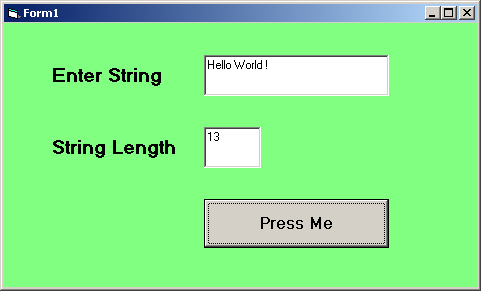
In this example, you will learn about string handling function called Len() which return the length of a given string.
VB Code
Private Sub Command1_Click()

Dim str As String
str = Text1.Text
Text2.Text = Len(str)

End Sub
Output – Len()
VB 6 Static Function
In the previous article, you learned about functions that returned values. The variables that return the value are of two types – global and local. The local variable gets destroyed every time we call the function in our program.
The only solution to this problem is to make variable or function retain its previous value. This can be achieved using the static keyword in VB 6.
Example: Without static keyword
In this example program a function is called each time a button is clicked and display the count using a message box.
Private Sub Command1_Click ()
Dim clkCount As Integer
clkCount = counter ()
MsgBox ("Result =" + Str(clkCount))
End Sub

Static Function counter () As Integer
Dim count As Integer
count = count + 1
counter = count
End Function
Output – static function
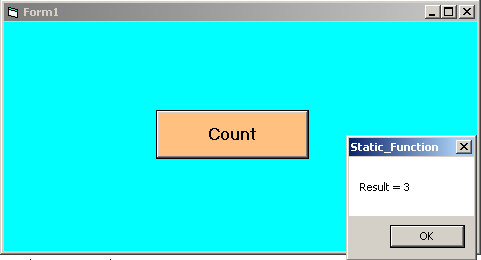
In the example above, each time a user clicks the button, the result is 1. The variable count is reset to 0. To retain the value of count either declare the variable as static or declare the entire function as static. One that’s done the function will retain the value even though we recall the function several times and increment the counter successfully.
VB 6 Declaring Functions
In the previous article, we learned about subroutines. You will learn about VB 6 functions in this article and learn the difference between a function and a subroutine.
A Vb 6 subroutine receives an argument but does not return anything. However, a function takes an argument and returns a value. A VB 6 function is a block of code that can separate your program into manageable parts.
Declaring a VB 6 Function
[Private | Public | Friend] [Static] Function name [(arglist)] [As type]

...
[Statements]
...
[expression]
...
[Exit Function]
...
[Statement]
...
End Function- Public keyword – All procedures in all other modules and forms can access the function.
- Private keyword – All procedures and function in the same module or form where the function is declared can access it.
- Friend keyword – Used only in modules that uses classes and it means that all procedures throughout the project can access this function except the controller of an instance of an object.
- Static – Normally, a local variable to a function get destroyed when function terminates. Static keyword keeps the value of a local variable intact between function calls.
- Function name – User-defined name for the function.
- arglist – A list of variables passed as arguments to the function.
- type – The return data type of the function.
- Statements – A group of statements that a function can execute.
- Exit Function – A way to exit the function immediately before it could complete execution.
- End Function – Terminates the function upon completion.
How to declare arglist in the function?
Arguments to a function are values that the function will use to complete a calculation or complete a task.
To call a function you have to use the function name and the list of arguments which uses the following syntax.
[Optional][ByVal|ByRef][ParamArray] varname[()] [As type][= defaultvalue]Now, we will briefly discuss the list above.
Optional – This keyword means that the arglist is optional and not required.
ByRef – This keyword means that a reference to the original value is passed through the function.This is true by default.
ByVal – This keyword means that the original value of the variable is passed to the function.
ParamArray – Usually you can send limited number of variables through a function, however, if you need to send a list of values of same type use the ParamArray or nothing at all, because this is optional.
varname – It is the programmer-defined name of the argument.
type – This defines the data type of the argument.
defaultvalue – If you want to set a optional default value for a argument, this feature is helpful. If no value is supplied for a variable, then the function can use the default value for computation.
Example Program: VB Function
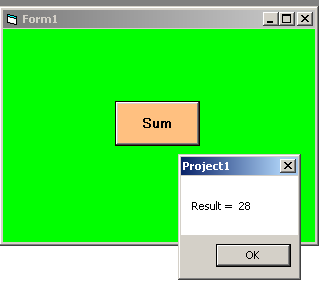
In this example, we will create a simple function that accepts two numbers and return their sum.
VB Code
Private Sub Command1_Click ()
Dim result As Integer
result = Sum (5, 23)
MsgBox ("Result = " + Str(result))
End Sub
Function Sum (number1 As Integer, number2 As Integer) As Integer
Sum = number1 + number2
End Function
Output
Java Variables
Java variable is an identifier that store a value within the program. The value of the variable is stored in memory. Every Java variable has a scope and lifetime. Each variable must be declared, initialized before you use them. The general convention is to create unique, meaningful names for variables.
Variable Declaration
The variable declaration is given a name and data type to the variable. This also allocates memory to the variable object and a default value depending on type. In Java, this is a safety measure to avoid unexpected values.
The syntax for variable declaration.
<data_type> <variable_name>;Example #1
int account;

char fruits;
You can declare multiple variables at a time of the same type.
Example #2
int a, b, c;Variable Initialization
The variable initialization assigns initial values to the variable. When the program executes and terminates, the variable value may not be the same.
Syntax to initialize a variable.
<data_type> <variable_name> = <value>;
or
<data_type> <variable_name>; //declared
<variable_name> = <value>;
Example #3
int number = 4000;
float circle;
circle = 5.88;
Scope of Variables
The scope of variable decides visibility of the variable within the Java program. The scope has two parts.
- Class declaration
- Method declaration
A variable inside the class has class based visibility and scope. We will discuss class based visibility when you learn about Java classes.
The method based scope is divided into global scope and local scope. Consider an example,
class GlobalTest {

           public static void main(String args[]) {

                int box1 = 100;  //global variable


               if(box1 > 60) {

                    int box2 = 200;

                   System.out.println("Box1  and  Box2:" + " " + box1 + box2);

                      }

          }

}
Output
Box1 and Box2: 100 200From the example program above, it is very clear that global variable (box1) is visible to if block and the output has value of box1. However, you cannot access local variable (box2) outside of its block.
Nested Blocks
A nested block contains another block of code. In case of nested blocks global and local access behavior remains same.