Table of Contents
The “For Loop” is the most popular loop in many popular programming languages.
A “For loop” executes a given statement repeatedly until the given condition in the loop becomes false. The loop consists of one or more statements. As long as the condition is “true”, it will execute the statements.
It’s easier to understand this with an example.
We have a web page in the following example, that repeats a given statement using “for loop”. The code prints value of i until the value of i is equal to or greater than 5.
JavaScript Code
var i=0;
for(i=0;i<=5;i++)
{
    document.write("<h3>" + "The Number is"+ i + "</h3>");
 }
The code is added to HTML page called the loop1.html as an internal JavaScript.
Format of the “For loop“
The syntax of “For loop” is simple.
for(i = 0; i <= 5; i++)
{
}
[kate]i[/katex] is loop variable and it could be any lowercase alphabet.
i <= 5 is the loop condition. As long as it is true, the statement inside the loop is executed iteratively.
i++ increments the loop by a count of 1.
Now, we will see how “For loop” works with an example.
HTML Code – loop1.html
<!DOCTYPE html>
<html>
<head>
  <title>For Loop</title>
  <meta charset = "utf-8">
 </head>
 <body>
 <script>
var i=0;
for(i=0;i<=5;i++)
{
    document.write("<h3>" + "The Number is"+ i + "</h3>");
 }
</script>
<p>THIS IS TEST USING INTERNAL JAVA SCRIPT</p>
<p>When you open this web page in a browser that understands the JavaScript, then you will get the following output.</p>

 </body>
 </html>
Make sure that you put the JavaScript code between the <script> … </script> tags. The code can reside in head section or body section. It will still work.
Output – loop1.html
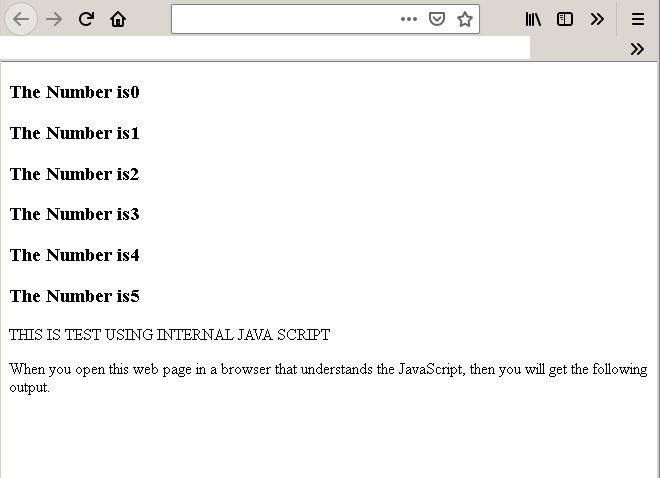
One the HTML page loop1.html is loaded, will print numbers when the “For loop” is executed.
Note how loop is incrementing the numbers by a value of 1. At each iteration of loop, we are incrementing the count by 1 using i++.