File Handling Programming Examples
This page contains all file handling programming examples.
Learn to code in four different programming languages – C, C++, Java, and Python.
Structure/Class-based Programming Examples
This page contains all structure/class-based programming examples. Learn programming with our easy to understand examples in C, C++, Java, and Python programming languages.
Function-Based Programming Examples
This page contains all function-based programming examples.
Learn to code with four different languages – C, C++, Java, and Python with our easy to understand example programs.
String Programming Examples
This page contains all string programming examples. Learn to code in four different programming languages – C, C++, Java, and Python.
Array Programming Examples
This page contains all array programming examples. Learn program coding in four different languages – C, C++, Java, and Python.
Loop and Pattern Programming Examples
This page contains all loop and pattern programming example programs.
Mathematical Programming Examples
This page contains mathematical programming examples.
Matrix Programs
Combinatorics Programs
Trigonometry Programs
Sequence and Series Programs
Geometry Related Programs
Statistical Programs
CSS position property
The CSS position property is not popular today, because there are excellent and efficient ways to do layouts in HTML. But, its still worth learning as many websites do use them to design layouts. It is mostly used with website design is of fixed width, that is, you already know the width of your web pages – the fixed width.
The position property applied to HTML elements. Once set, you can position the element anywhere on the page – top, right, left and bottom. The element is taken out of normal flow and shifted to the new position. Now, before we get started, you need to understand the HTML normal flow also known as flow layout.
HTML flow layout
There are two kinds of elements that dictate the flow of HTML layout – inline and block. A block type element takes up the entire width of the container( width of the webpage) and inline element only take width of the content, not more than that unless you modify it with CSS.
Consider paragraph element <p> and header element <h1> in the following; the width is equal to the width of the HTML body.
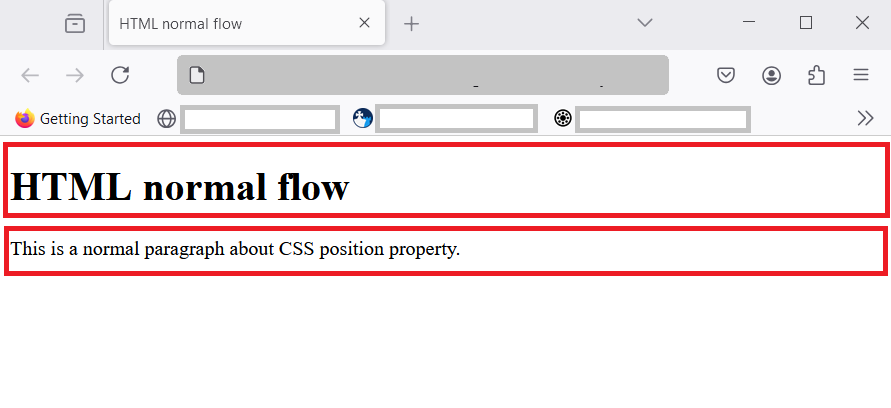
You notice that two block elements have taken the entire width of the container and does not allow any other element. Any new element must start in a new row or next line. Similarly, inline element takes just the width of the content. So, we can have many inline elements in a single line.
Consider another example, here is a paragraph element with one bold inline text.
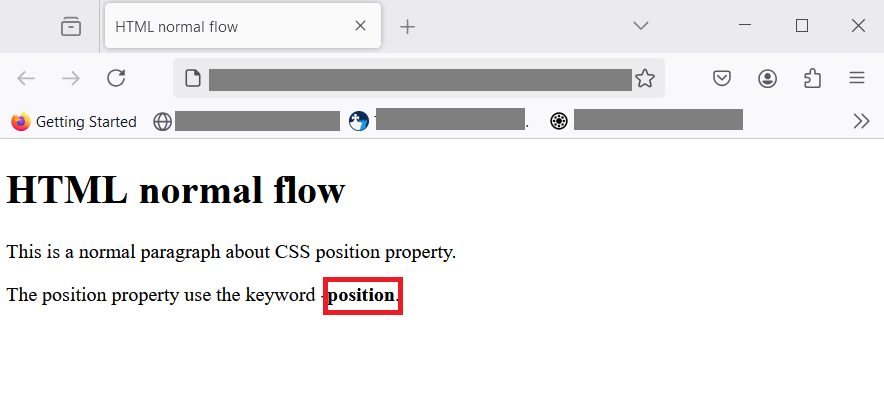
With inline element, it just takes enough space for the content. In the image above, word position is a bold text using inline element <strong>position</strong>. Instead of taking whole line ,like paragraph element, it only takes space enough to hold the word – position. This is normal flow in HTML.
CSS position property
If the CSS position property is set on an HTML element , then we can specify its position anywhere on the page. There are five different position values for this property.
- static
- relative
- fixed
- absolute
- sticky
I will explain each one of them with examples. You could use these examples to practice and understand it later. Let’s begin.
position: static;
By default, HTML flow is static. The normal flow itself is static and when you specify the top, right, left and bottom values, there is no effect on the element.
For example, let use a <div> element and set its position to static. Here is code.
<!DOCTYPE html>
<html>
 <head>
   <meta charset ="UTF-*">
   <title>HTML position - static</title>
 </head>
 <body>
   <h1>position: static</h1>
   <div>This element is static.</div>
 </body>
</html>
When you see the output in browser.
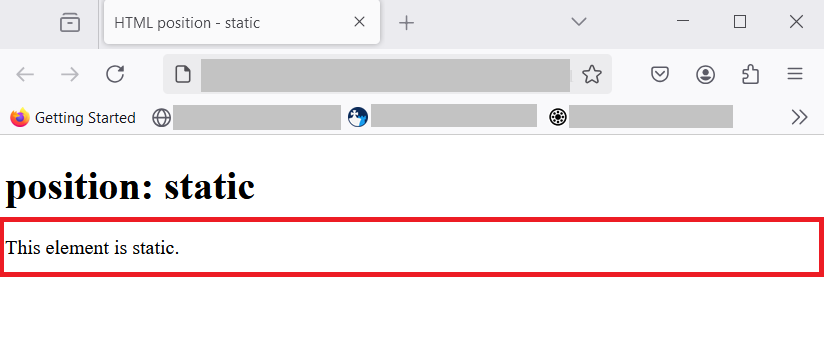
You can see from the figure above, that position is static and it does not make any change in the position. The <div> element is a block element, it takes the full width of the browser. That is normal flow in HTML. It is another way of saying “do nothing” to the element.
position: relative;
The relative position is a position relative to normal flow position. If an element is displayed in it’s normal position, you can shift it’s position to a new one, just by adjusting – top , bottom, left and right. You are allowed to set two or move values to position the element anywhere on the document.
Now before I show you, how relative position works, you must understand two important concepts – stacking context and the z-index.
Stacking context and z-index
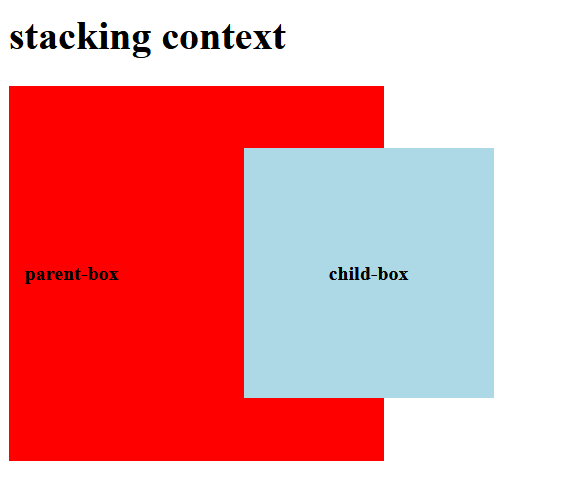
When we set relative property on an HTML element , sometimes one element appears above or below another element to the user viewing at the browser. This is called the stacking context. It appears that there is a z-coordinate other than (x,y)-coordinate system of CSS. This third coordinate is called z-index in CSS.
<!DOCTYPE html>
<html>
 <head>
   <meta charset ="UTF-*">
   <title>Stacking context</title>

   <style>
    /*style information */
     div{
      display: flex;
      justify-content: center;
      align-items: center;
      font-weight: bold;
     }
       .parent {
        background-color: red;
        width: 300px;
        height: 300px;
       }
       .child{
        background-color: lightblue;
         width: 200px;
         height: 200px;
         position: relative;
         left:100px;
       }
   </style>
 </head>
<body>
   <h1>stacking context</h1>
   <div class="parent">
       <p>parent-box</p>
       <div class="child">
           <p>child-box</p>
       </div>
    </div>
</body>
</html>
The stacking context happen according to rendering order of the elements if you have two or move elements on the page. It can also happen with or without z-index value. With z-index , you can control which element get preference and show on top of other elements. For now, just remember this basic concepts.
How does relative positioning works
Usually , CSS display HTML elements in 2 dimensional space using a coordinate system (x, y) on the view- port (visible area inside browser). Here x is horizontal offset from the original position and y is vertical offset from the original position. To understand it better, see the image below.
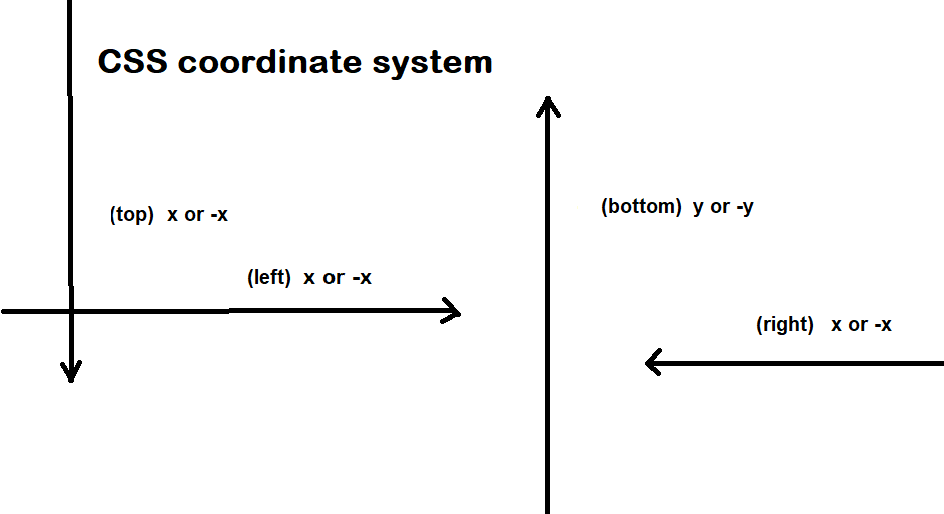
As we know , when you set position:relative on any element you can shift that element to top, right, bottom and left by an offset value. You can apply more than one values for an HTML element. Consider this example, the box is in it’s original position(HTML normal flow) has a background of red.
<!DOCTYPE html>
<html>
 <head>
   <meta charset ="UTF-*">
   <title>Original Box Position</title>

   <style>
    /*style information */
     div{
      display: flex;
      justify-content: center;
      align-items: center;
      font-weight: bold;
     }
       .box{
        background-color: red;
        width: 300px;
        height: 300px;
       }

   </style>
 </head>
<body>
   <h1>Original Position</h1>
   <div class="box">
       <p>Box</p>
   </div>
    </div>
</body>
</html>
Here is the result:
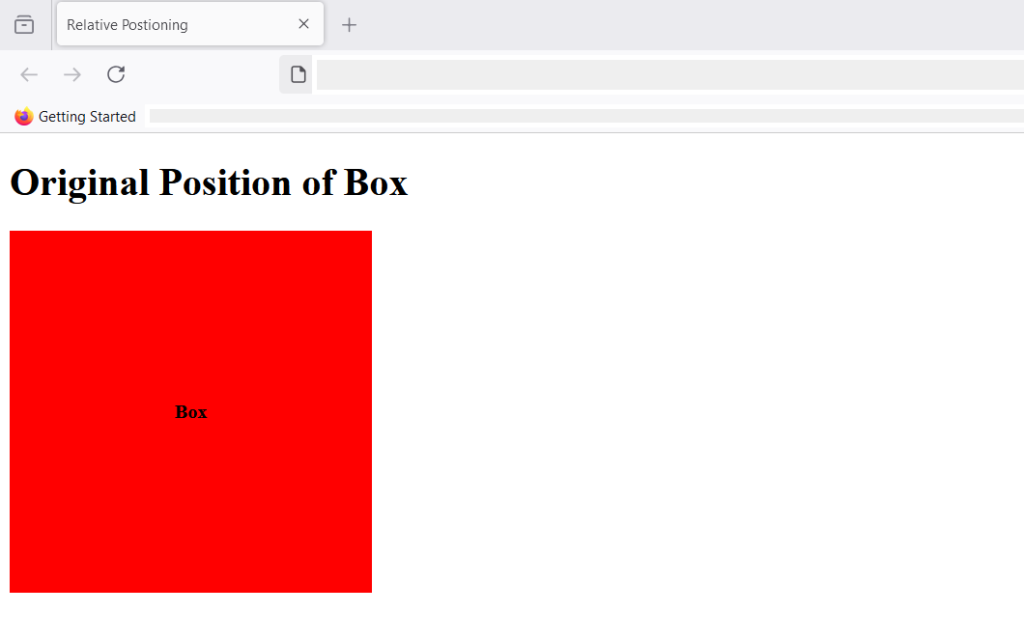
After we have applied the following CSS to the box, it’s position changes relative to the original position.
   .box{
        background-color: red;
        width: 300px;
        height: 300px;
        position:relative;
        top: 20px;
        left: 200px;
       }
Here is the result after position: relative; is applied with top and left values.
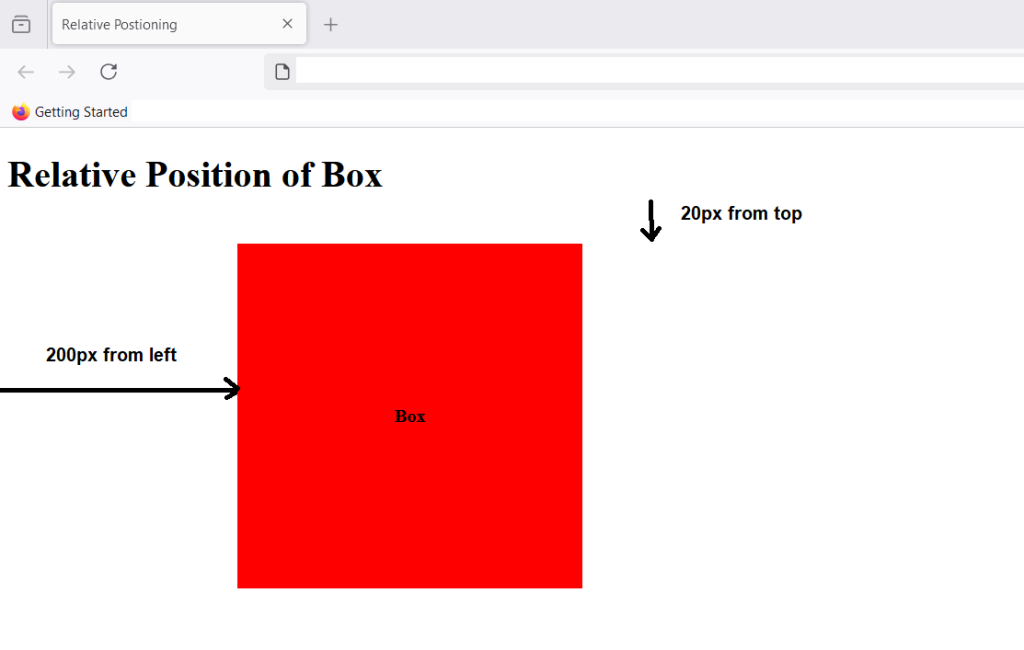
The element shifted 20px from the top relative to the original normal flow of the element, it also shifted 200px from left due the left value we set on the box in CSS.
position: absolute
Evey block in HTML has ancestor block, if a block has no ancestor , them body becomes its ancestor, which is another way of saying ” the HTML body contains that block”. Here block can be any layout elements like div, section,paragraph, etc.
When you set position; absolute; for an element, it aligns relative to the ancestor or the containing block. If there is no ancestor block, then the default ancestor is HTML body. The position is determined from the starting edge of the ancestor element. The offset values of top, left, right, and bottom is computed from the leftmost edge of the ancestor element.
Let’s understand this with an example.
<!DOCTYPE html>
<html>
 <head>
   <meta charset ="UTF-*">
   <title>Position Absolute</title>

   <style>
    /*style information */

       .box-parent{
        background-color: red;
        position:relative;
        top: 50px;
        left: 100px;
        width: 400px;
        height: 400px;
       }
      .box-child
      {
        background-color: lightblue;
        position: absolute;
        width: 300px;
        height: 200px;
       }

      .box-grandchild{
        position:absolute;
        width: 200px;
        height:50px;
        background-color: yellow;
      }

   </style>
 </head>
<body>
   <h1>Position Absolute</h1>
   <div class="box-parent">
       <p>Box-parent</p>
       <div class="box-child">
        <p>Box-child</p>
        <div class="box-grandchild">
          <p>box-grandchild</p>
        </div>
       </div>
   </div>

</body>
</html>
In the above example, there are three boxes – parent box, child box and grandchild box. The parent box is red contains child box and given blue background. The child box contains grandchild box whose background is yellow.
Here’s what you get when the page is displayed in the browser.
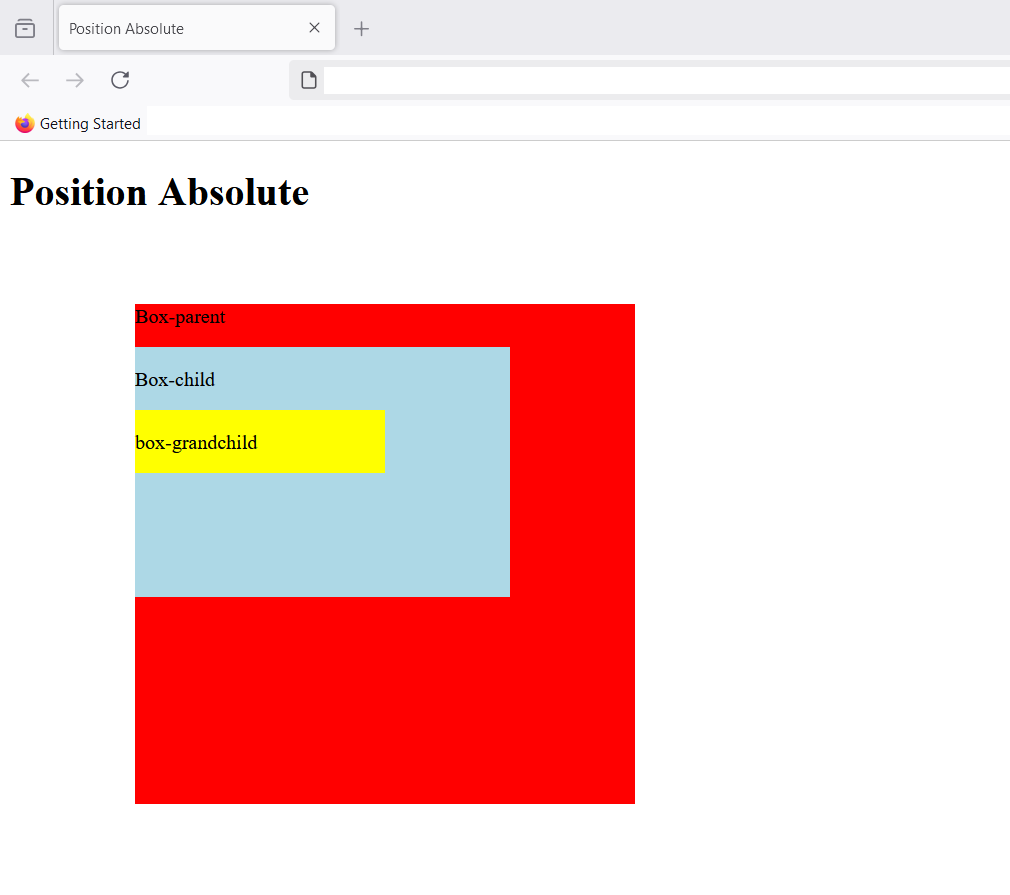
The child element is aligned to parent element , since no left , top, bottom or right is set, the child element (blue box) appears in a normal flow after the paragraph element , it is next block level element. You can still take it out of the normal flow by specifying new top, bottom, left and right values.If there is a margin value , it is included in the values of top, left, right and bottom if specified.
The grandchild box (yellow) also have similar properties, it is in normal flow, but position:absolute; allows to shift the box to a new position.
Note that absolute position is also like relative position, the element can overlap its parents in stacking context with or without z-index.
position: fixed;
The fixed position is also absolute positioning with a difference. It is absolute positioning relative to the viewport (Browser’s visible screen). Whatever is above-the-fold is part of viewport. The above-the-fold is that part of the screen which you can view without scrolling.
Since, the position is fixed, the element is stay in its absolute position even when you scroll down. It is used to display ads, banners, navigation or sidebars that has to remain fixed on a website. It does not goes away with scrolling as long as you remain on the same page.
Consider this example, here I have made a small blog with sidebar and the top navigation is fixed.
<!DOCTYPE html>
<html>
 <head>
   <meta charset ="UTF-*">
   <title>HTML position - fixed</title>
   <style>
    /*style information*/
   .container{
    margin: 0;
    padding:0;
   }
    .navbar > ul{
      background-color: #000;
      color:white;
      display:flex;
      align-items: center;
      list-style-type:none;
      width: 100%;
      padding: 20px;
    }
.mainsection{
  display: flex;
  padding: 20px;
}
.navbar ul {
  position:fixed;
  top:0;
}
.navbar ul li {
  width: 70px;
}
    .main{
      width: 60%;
      background-color: beige;
      padding: 30px;
    }
    .sidebar{
      width: 35%;
      background-color: gold;
      padding:30px;
    }
   </style>
 </head>
<body>
  <div class="container">

   <div class="navbar">
    <ul>
        <li><a>Home</a></li>
        <li><a>Products</a></li>
        <li><a>Blog</a></li>
        <li><a>About</a></li>
        <li><a>Contact</a></li>
    </ul>
   </div>
   <div class="mainsection">

   <div class="main">
    <h1>Header 1</h1>
    <p>Lorem ipsum dolor sit amet consectetur, adipisicing elit. Voluptas dolores natus eligendi, accusantium eaque tenetur ipsum adipisci officiis. Facilis, omnis ducimus atque illo eum facere pariatur mollitia veritatis inventore provident.</p>
   <p>Lorem ipsum dolor sit amet consectetur adipisicing elit. Explicabo exercitationem quo dignissimos odio nihil molestiae ipsum, officia eaque quod deleniti nesciunt dicta nemo reprehenderit esse assumenda architecto expedita suscipit? Iusto!
    Lorem ipsum dolor sit amet consectetur adipisicing elit. Perferendis, veritatis laborum iusto at nesciunt delectus, iste iure mollitia consequatur voluptatem, eum consequuntur nam incidunt architecto quis harum autem eligendi <id class="lorem">Lorem ipsum dolor, sit amet consectetur adipisicing elit. Eveniet doloribus fugiat quos sed totam consequuntur nulla assumenda ab itaque animi aliquam repellendus iusto beatae, eaque, eligendi tempore, delectus consequatur at.</id>
   </p>
   <p>Lorem ipsum dolor sit amet consectetur adipisicing elit. Explicabo exercitationem quo dignissimos odio nihil molestiae ipsum, officia eaque quod deleniti nesciunt dicta nemo reprehenderit esse assumenda architecto expedita suscipit? Iusto!
    Lorem ipsum dolor sit amet consectetur adipisicing elit. Perferendis, veritatis laborum iusto at nesciunt delectus, iste iure mollitia consequatur voluptatem, eum consequuntur nam incidunt architecto quis harum autem eligendi <id class="lorem">Lorem ipsum dolor, sit amet consectetur adipisicing elit. Eveniet doloribus fugiat quos sed totam consequuntur nulla assumenda ab itaque animi aliquam repellendus iusto beatae, eaque, eligendi tempore, delectus consequatur at.</id>
   </p>
   <h2>Header 2</h2>
   <p>Lorem ipsum dolor sit amet consectetur adipisicing elit. Explicabo exercitationem quo dignissimos odio nihil molestiae ipsum, officia eaque quod deleniti nesciunt dicta nemo reprehenderit esse assumenda architecto expedita suscipit? Iusto!
    Lorem ipsum dolor sit amet consectetur adipisicing elit. Perferendis, veritatis laborum iusto at nesciunt delectus, iste iure mollitia consequatur voluptatem, eum consequuntur nam incidunt architecto quis harum autem eligendi <id class="lorem">Lorem ipsum dolor, sit amet consectetur adipisicing elit. Eveniet doloribus fugiat quos sed totam consequuntur nulla assumenda ab itaque animi aliquam repellendus iusto beatae, eaque, eligendi tempore, delectus consequatur at.</id>
   </p>
   <h2>Another Header 2</h2>
   <p>Lorem ipsum dolor sit amet consectetur adipisicing elit. Explicabo exercitationem quo dignissimos odio nihil molestiae ipsum, officia eaque quod deleniti nesciunt dicta nemo reprehenderit esse assumenda architecto expedita suscipit? Iusto!
    Lorem ipsum dolor sit amet consectetur adipisicing elit. Perferendis, veritatis laborum iusto at nesciunt delectus, iste iure mollitia consequatur voluptatem, eum consequuntur nam incidunt architecto quis harum autem eligendi <id class="lorem">Lorem ipsum dolor, sit amet consectetur adipisicing elit. Eveniet doloribus fugiat quos sed totam consequuntur nulla assumenda ab itaque animi aliquam repellendus iusto beatae, eaque, eligendi tempore, delectus consequatur at.</id>
   </p>
  </div>
   <div class="sidebar">
    <h2>Sidebar Header 2</h2>
    <p>Lorem ipsum dolor sit amet consectetur adipisicing elit. At quibusdam, cupiditate possimus molestias facere earum veritatis ducimus praesentium recusandae molestiae vel nulla. Aliquid, omnis quam? Sunt ullam architecto natus quis?</p>
    <ul>
      <li>Lorem ipsum dolor sit amet consectetur adipisicing elit. Quisquam molestias asperiores ullam quidem commodi animi aperiam eaque ea facilis dicta amet neque deleniti, dolore cumque debitis adipisci assumenda eum vero.</li>
      <li>Lorem ipsum dolor sit amet consectetur adipisicing elit. Porro delectus modi adipisci quasi qui temporibus necessitatibus distinctio, beatae inventore sunt iure. Reiciendis veritatis quos qui aliquid vero sed ipsam molestiae.</li>
      <li>Lorem ipsum dolor sit amet consectetur adipisicing elit. Porro eius corrupti sed harum ullam qui asperiores nisi delectus, distinctio debitis ipsam aut. Asperiores cupiditate in possimus quisquam, ducimus incidunt minus.</li>
      <li>Lorem ipsum dolor sit amet consectetur adipisicing elit. Assumenda harum et vel, repellendus cum autem rerum dolorem iste, qui veniam eaque tempore unde maxime ea est quod, quia fugit id?</li>
      <li>Lorem ipsum dolor sit amet consectetur adipisicing elit. Quas doloremque numquam, in amet officiis odit quos fuga culpa corporis voluptates optio sapiente soluta ad nisi dolor asperiores eveniet deserunt maiores.</li>
  </ul>

  </div>
    </div>
    </div>
    </body>
    </html>
Here is the output in the browser.
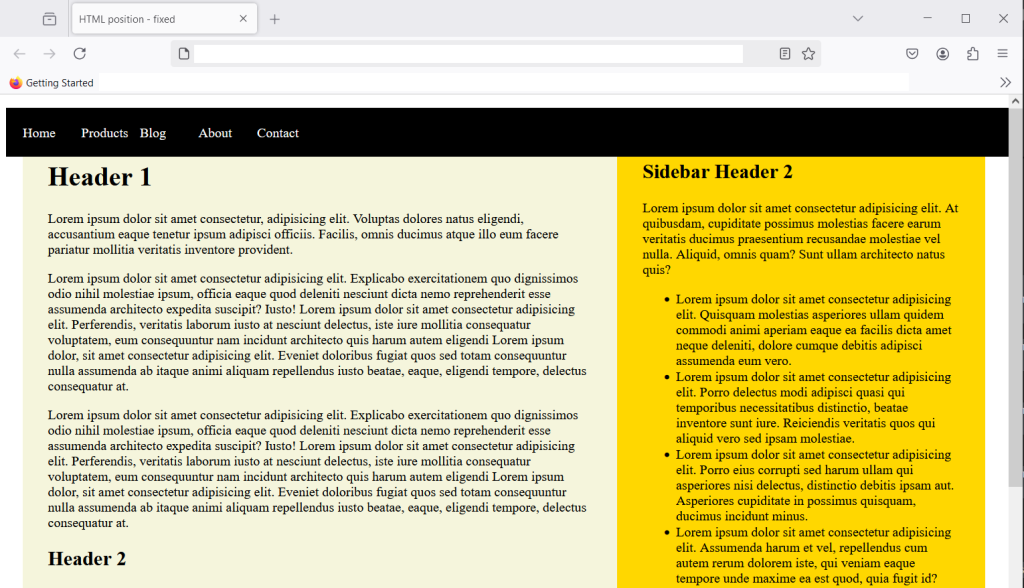
The blog has sidebar and main section with enough dummy content that you need to scroll down to see the text below the fold. Even if you scroll , the top navigation won’t go away as it is fixed relative to the viewport. The scrolling action don’t change viewport, so navigation is going to remain fixed.
position: sticky
The position:sticky; is both relative and fixed. The fixed position is fixed all the time, once you set it will remain fixed. However, sticky position is fixed only when a certain scroll position is reached. Until then it remain relative to normal flow.
Let’s understand this with an example,
<!DOCTYPE html>
<html lang="en">
<head>
  <meta charset="UTF-8">
  <meta name="viewport" content="width=device-width, initial-scale=1.0">
  <title>Position Sticky</title>
  <style>
    /*style information */
    .container{
       background-color: beige;
        margin:0;
        padding:20px;
        border:5px solid black;
        width:50%;
        height: 150px;
        overflow-y: auto;
    }
    .sticky-box{
      position:sticky;
      top:0px;
      background-color: yellow;
      padding: 20px;
    }
  </style>
</head>
<body>
  <div class="container">
    <h2>Position sticky </h2>
    <p>Lorem ipsum dolor sit amet consectetur adipisicing elit. Quo asperiores vitae nostrum quaerat maxime! Accusamus iusto, minima porro id maxime, laudantium cum quibusdam earum libero eum distinctio incidunt? Non, debitis.</p>
    <div class="sticky-box">
      <strong>This is a sticky box.</strong>
    </div>
    <p>Lorem ipsum, dolor sit amet consectetur adipisicing elit. Doloremque consequuntur error, quam perspiciatis nemo excepturi rerum suscipit ratione molestiae eligendi atque culpa enim saepe labore necessitatibus libero veniam esse est.</p>
    <p>Lorem, ipsum dolor sit amet consectetur adipisicing elit. Beatae voluptate aspernatur vero nisi itaque perferendis? Debitis id, a repellendus ipsa repellat ex sequi doloremque consequatur iure distinctio, vel facilis sunt! Lorem ipsum, dolor sit amet consectetur adipisicing elit. Ex, aliquam reprehenderit dolores adipisci est similique facere eveniet officiis numquam nostrum minus tempora voluptates, consectetur ab distinctio cupiditate repellendus labore quae.</p>
  </div>
</body>
</html>
The above HTML and CSS will create a box with a sticky element. User can scroll the box beyond 150px to see the rest of the content inside the box. Here is what you see in browser.
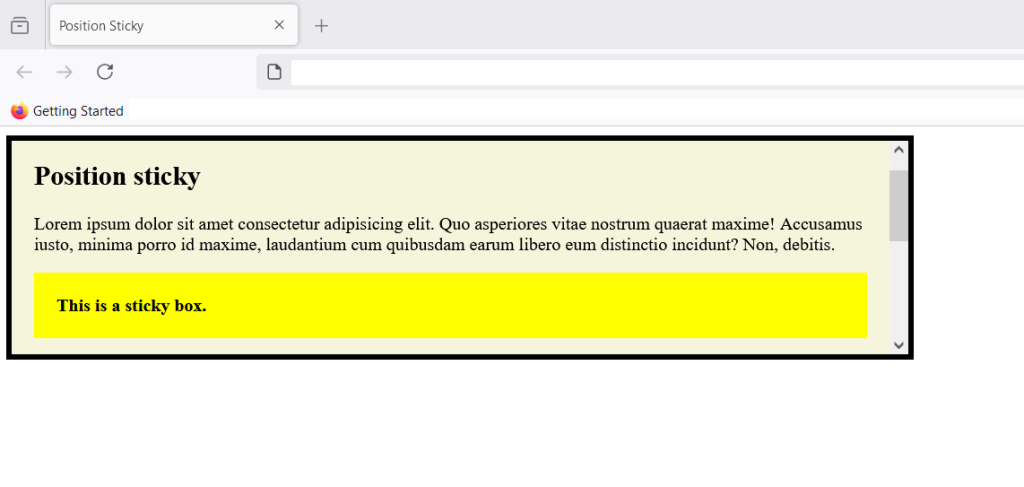
When you try to scroll the box and yellow sticky box goes up and reach top:0px and at that point the sticky element acts like a fixed element. You can set set four values – top, left, bottom and right to position the sticky element.
Note that any margin or padding value is included in the offset values of top, left, bottom and right.
Summary
You have learned about five different values of CSS position property. The static is the default position, relative is relative to normal HTML flow, the absolute position is a position relative to its immediate ancestor, fixed position is relative to viewport and remain fixed even when user scroll. The sticky position is both relative and fixed. It become fixed when reach a certain scroll position from user.
Factors and Factoring Expressions
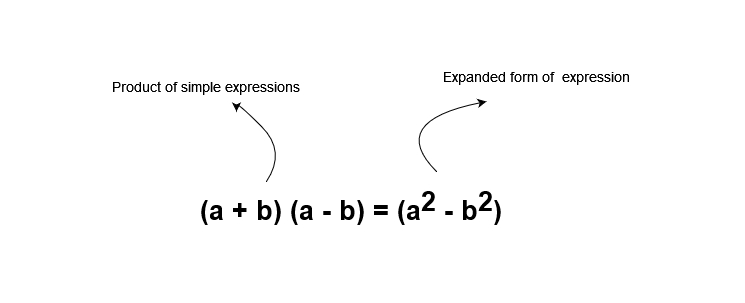
In the previous lesson, you learned about distributive law and how to use them to rewrite expressions. The distribution law applied on factored expression and it changes into distributed form. The factored form of expression is showing the function as a product of two simpler expressions which when multiplied will be in expanded form.
In this article, I am going to talk about factors and factoring expressions. I assume that you know about expression, if not then you can read previous lessons of this course.
Factors
All numbers are expressions, called numeric expressions or simply constants. There are two types of numeric constants – prime numbers and composite numbers. The prime numbers have only two factors – 1 and itself. If a is prime number , then its factors are 1 and a. Other numbers which are composite numbers, have more factors including 1 and the number itself.
What are factors of a number ?
To understand factors let’s take an example number –  .
.
Let’s make a list of all numbers that divide perfectly which means if you divide by those numbers you selected , you get  as remainder. I have listed then below.
\begin{aligned}\bf 1, 12, 6, 2, 4, 3\end{aligned}These are factors of number . If we multiply these numbers ,we get . For example, and  and
and  and
and  multiply to give us .
Let us now try to find factors of a prime number. For example, we can find factors of number  . You will note that number has no other divisor than
  and itself , therefore, its factors are and . This is a prime number.
Prime Factorization
Every number is multiple of prime numbers and the number 1 is factor of all numbers. To find all prime numbers that are factors of a number is called prime factorization.
For example,
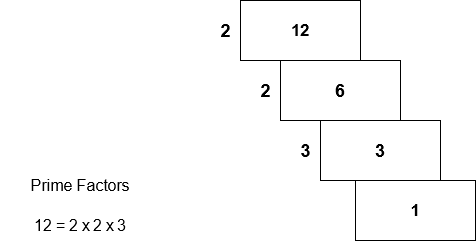
We can divide number by  which is prime factor. We get 6 as quotient, the number
  is divisible by , which gives as quotient. We divide by and the quotient is . Therefore, by prime factorization, our factors are
  or you can write
  . We only count prime numbers and leave and which are also factors of
  .
.
Greatest Common Factor
Sometimes you want to compare two numbers and find a greatest factor that are common to both number. It is called greatest common factor or GCF. We can find GCF of two numbers by listing all known factors of a number or by prime factorization method.
For example,
To find the greatest common factor of number  and
and  using the factor listing method.
List all factors of : which is:  .
.
List all factors of : which is: 
The number  is the greatest common number and hence, it is the GCF of and . You can find the GCF of more than two numbers without any problem using the same method.
Let us, find the GCF through prime factorization method.
We take two number which is 10 and 25 again.
If we divide 10 with prime numbers only, we get.
5 and 2 as prime factors.
If we divide 25 with prime numbers only we get,
5 because 25 is square of 5.
Once again the common factor is 5 which is the greatest common factor for 10 and 25.
Factoring expressions
An expression is made of terms and each term is made of coefficient and variables. By taking common factors, we are breaking the expression into simple expressions and show it as product of those simple expressions. Factors multiply to give the expanded form of expression. So we separate greatest common factors from each term, the negative sign, and least common multiples of variables during the process of factorization.
Steps to find the the factors of an expression is:
- Find the greatest common factor of coefficients of expression.
- Find out if sign of factor is negative or positive.
- Least common multiples of variables
- Write down the factors as product of simple expressions.
Let us see few examples to understand this better. But, before that you must understand few terms about expressions.
An expression with single term is called a monomial. for example,
 is a monomial
 is a monomial.
An expression with two terms is called a binomial and expression with three term is called a trinomial. An expression made of several monomial is called a polynomial. All expression with one or more terms is essentially a polynomial.
Example 1:
Write the following monomial in factored form:

Step 1:
The first step is to find the GCF for the coefficient 6.To find the coefficient of , we use prime factorization method and list out all prime factors for .The prime factors of are:

Step 2:
Second step is to, check if the term is negative, if yes, then our factor is negative. otherwise , it is positive only. Always check the first term only. The first term decides whether GCF is a positive or a negative number. Suppose  is a monomial then first term is negative
  which is a negative value.
Step 3:
The third step, find the variables and their multiples. The variables are letters such as  or any letter from English alphabets.Here we have variable
  raised to which means variable ‘x’ multiplied to itself times.

Now , We can write out expression in factored form as
 multiplied by
  and if you multiply them, you get
  . This of course, is a verbal expression. We could write it as
\begin{aligned} \bf(2x^2) \dot (3x) = 6x^3\end{aligned}Example #2
Write the following expression in factored form:

First step is to find the factors of coefficients of both terms using prime factorization method.
 has factor
  .
. has factors
The greatest common factor is .
Step 2:
The second step is to check the sign, the greatest common factor is negative because the first term of the expression is negative. For example, the first term  has a negative coefficient
  . Therefore, the greatest common factor is also negative.
Step 3:
The third step is to find the least common multiple for variables.
First term has  multiplied times.
Second term has  multiplied by
  .
.
multiplied is least common multiple. Therefore, our factors are  multiplied by
  . We must be careful about signs because negative multiplied by negative is positive value.
Summary
Let summarize that you learned in this lesson. To find the factors of an expression, you must do the following
- Find the GCF or greatest common factor for all terms in the expression.
- If the first term is negative then the factor is also negative.
- List out the least common multiple for variables.
- Write down your expression as a product of simple expressions.
Rewriting Expressions using Distributive Law
In the previous article, you learned about rewriting expressions using commutative law, associative law and sometimes with identity law.The expressions are sometimes presented in the form of product of simple expressions, and we can expand it my multiplying those expressions. One such method is distribution of multiplication over addition or subtraction. In this article, I am going to discuss about distributive law and how to rewrite expressions using distributive law.
Distributive Law.
The distributive law is a special mathematical property, also called distributive property that distributes multiplication over addition or subtraction. The distributive law is written as a (b + c) is equal to ab + ac where a, b and c are some real numbers. Real numbers are all numbers that you can think of, except some special numbers called the complex numbers. In future lessons, you will learn about real numbers, but for now let’s focus on distributive law.
\begin{aligned}
&a(b +  c) = ab + ac \\\\
&where \\\\
&a, b, c \in \mathbb{R}
\end{aligned}
Distributive Law for Subtraction
The distributive law for subtraction is a(b – c) equal to ab – ac. It is similar to distributive law for addition.
\begin{aligned}
&a(b -  c) = ab - ac \\\\
&where \\\\
&a, b, c \in \mathbb{R}
\end{aligned}
Each of the number inside the parentheses are multiplied with variable a which means multiplication with a is distributed to each variable inside of the parentheses.
How to we know if distributive law is correct?
Suppose there is a rectangle with length a and width p. To find the area of this rectangle we must multiply a with p, meaning  . This is our original rectangle.
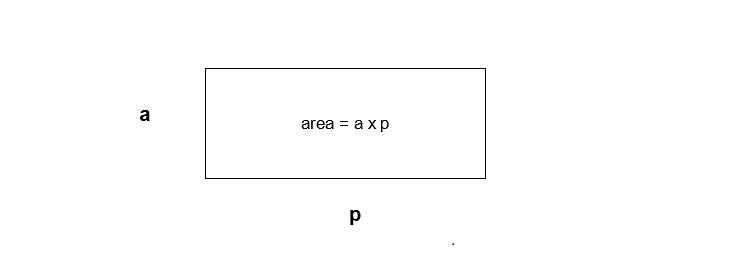
Now, divide the rectangle into two by dividing the width p into b and c. The area of rectangle is still length x width, but we write it as
\begin{aligned}
&area = a(b +  c) \\\\
&where \\\\
&(b + c) = p
\end{aligned}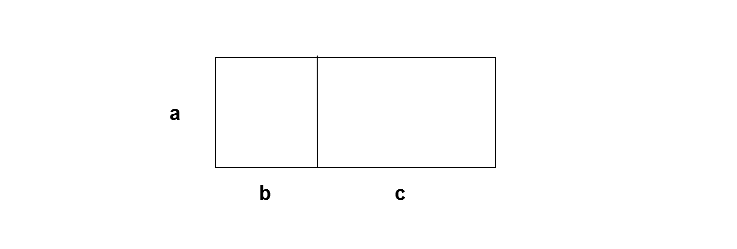
We can observe that there are two smaller rectangles with width = b and width = c. If we combine the area of smaller rectangles we can find the area of the original rectangle.
\begin{aligned}
&Area \hspace{3px} first \hspace{3px} rectangle = a \times b\\\\
&Area \hspace{3px} second\hspace{3px} rectangle = a \times c\\\\
&Therefore, a(b + c) = ab + ac = Area \hspace{3px} of \hspace{3px} original \hspace{3px} rectangle
\end{aligned}
Let distributive law be  . Suppose
  , replacing a in the equation, we get
5(b + c) = 5b + 5c
It is same as  .
.
Distributive law for Subtraction.
The distribution law for subtraction is similar to distributive law for addition.It is in the form:
a( b - c) = ab - ac
Let’s try to understand this with an example.
Suppose  and
and  . Our equation becomes
\begin{aligned}
&10(7 - 3) = (10 \times 7) - (10 \times 3)
\end{aligned}
Solve left side expression first which is
10(7 - 4) = 10 (4) = 40
Now , evaluate the right side of the equation.
(10 \times 7) - (10 \times 3)
= 70 - 40 = 30
Therefore, L.H.S is equal to R.H.S of the equation means distribution law for subtraction is valid and true. Let us see few example problems.
Example #1:
Rewrite the following expression using distributive law.
\begin{aligned}
&4(a + b)\\\\
&by \hspace{3 px} distributive \hspace{3 px} law, \hspace{3 px}x(a + b ) = xa + xb\\\\
&Therefore, \hspace{3px}our \hspace{3px}we\hspace{3px} know\hspace{3px} that \hspace{3px}x = 4,\\\\
&Replacing  \hspace{3px}x \hspace{3px}with \hspace{3px}4, \hspace{3px}we \hspace{3px}get \hspace{3px}4a + 4b \hspace{3px}as \hspace{3px}answer.
\end{aligned}
Example #2:
Rewrite the following expression using distributive law
\begin{aligned}
&2(5x - 1)\\\\
&Expression \hspace{3px} in\hspace{3px}  form:\\\\
&\hspace{3px} a(b - c) = ab - ac.\\\\
&2( 5x ) - 2 (1)\\\\
&we \hspace{3px} get , \hspace{3px}  10x - 2\\\\

\end{aligned}
For variables with a coefficient, you can multiply the coefficient with any number. Here we multiplied coefficient  with
with  to get
  .
.
Now, sightly difficult problem,
Example #3:
Rewrite the following expression using distributive law.
\begin{aligned}
&3(2x - 3y)\\\\
&
\end{aligned}
In this expression, we have two variables and their own coefficients. But, that will not stop you from applying distributive law. Remove the parenthesis and our expression becomes
\begin{aligned}
&(3 \times 2x) - (3 \times 3y)\\\\
&6x - 9y
\end{aligned} is the expanded form of the expression 3(2x – 3y)$ after applying distributive law.
Summary
You learned about distributive law and how to rewrite expression in expanded form by applying the distributive law. The distributive law is distribution of multiplication over addition or subtraction which simplify the expression. Sometimes you are given expanded for of expression and ask to write them as factored form. It is done by taking common factors from the expression. In the next lesson, we shall see how this is done.