C Program To Process Marks Of Student And Display Grade
The C program to process marks of student and display grade checks for multiple conditions on the input marks and then decides the grade of a student.
This program is written using Dev C++ compiler version 4.9.9.2 installed on Windows 7 64-bit computer. You can use any standard C compiler and this program should work.
To help you understand the program we have the following sections – problem definition, a flowchart of the program, the source code for the program and a verified output. When you practice the program by yourself, make sure that you compare the output value from this article.
Problem Definition
This program is a simple C program that makes use of structures. The program when executed asks for “Total number of students for whom marks should be processed”. Upon receiving the number of student value, it asks for each student details such as
- Rollno
- Name
- Marks
When all the details are entered it is stored in an array of structures. You can learn about structures from the following link – C Programming Tutorial – Structure and Union
The marks of student is used to process the grades and stored in the variable grade of each student. The program prints the results for each student.
The grade is calculated based on the following logic.
If grade is less than or equal to 50, the student gets 'F',
If grade is greater than 50, but less than or equal to 55, student gets a 'D',
If grade is greater than 55, but less than or equal to 60, student gets a 'C',
If grade is greater than 60, but less than or equal to 75, student gets a 'B',
if grade is grater than 75, but less than or equal to 90, then student gets 'A',
if grade is above 90, the student get the highest grade - 'A+'.
You may change the evaluation criteria as per your need.
Program Code – Processing Student Marks and Display Results
/* Program to process marks of students and display Grades */
#include <stdio.h>
#include <conio.h>
struct student{
    char name[25];
    int rollno;
    int marks;
    char grade;
};
main()
{
    struct student stud[15];
    int i,n;
/* Get the number of students */
    printf("ENTER THE NUMBER OF STUDENTS:");
    scanf("%d",&n);
/* Get the value of Students marks*/
    for(i=0;i<n;i++)
    {
        printf("ENTER STUDENT INFORMATION:\n");
        printf("NAME:");
        scanf("%s",&stud[i].name);
        printf("ROLLNO:");
        scanf("%d",&stud[i].rollno);
        printf("MARKS(In Percentage):");
        scanf("%d",&stud[i].marks);
        printf("\n");
    }
/* Print student information*/
    for(i=0;i<n;i++)
    {
        if(stud[i].marks <= 50)
        {
            stud[i].grade = 'F';
        }
        else if(stud[i].marks > 50 && stud[i].marks <= 55)
        {
            stud[i].grade = 'D';
        }
        else if(stud[i].marks > 55 && stud[i].marks <= 60)
        {
            stud[i].grade = 'C';
        }
        else if(stud[i].marks > 60 && stud[i].marks <= 75)
        {
            stud[i].grade = 'B';
        }
        else if (stud[i].marks > 75 && stud[i].marks <= 90)
        {
            stud[i].grade = 'A';
        }
        else if(stud[i].marks > 90)
        {
            stud[i].grade = 'S';
        }
    }
    for(i = 0;i<40;i++)
    printf("_");printf("\n");
    printf("Name\tRollNo\tMarks\tGrade\n");
    for(i = 0;i<40;i++)
    printf("_");printf("\n");
    for(i=0;i<n;i++)
        {
        printf("%s\t%d\t%d\t%c\n",stud[i].name,stud[i].rollno,stud[i].marks,stud[i].grade);
   }
   for(i = 0;i<40;i++)
   printf("_");printf("\n");
   getch();
       return 0;
}
Output – Processing Student Marks and Display Results
ENTER THE NUMBER OF STUDENTS:4
ENTER STUDENT INFORMATION:
NAME:Peter
ROLLNO:233
MARKS(In Percentage):56

ENTER STUDENT INFORMATION:
NAME:John
ROLLNO:234
MARKS(In Percentage):86

ENTER STUDENT INFORMATION:
NAME:Kate
ROLLNO:235
MARKS(In Percentage):45

ENTER STUDENT INFORMATION:
NAME:Larry
ROLLNO:236
MARKS(In Percentage):90

_________________________________________________________
Name      RollNo     Marks     Grade
_________________________________________________________
Peter     233        56         C
John      234        86         A
Kate      235        45         F
Larry     236        90         A
_________________________________________________________Program To Compute Nth Factorial Using Recursion
The program to compute Nth factorial using recursion calls a function recursively to compute the output. The recursion is the ability of a computing procedure to call itself repeatedly until the problem is solved.
Problem Definition
In simple words, factorial of a given number \Large n is the product of all the numbers up to that number, including the number. The program computes Nth factorial using recursion.
So factorial of \Large 5 is \Large 1 \times 2 \times 3 \times 4 \times 5 = 120.
See the figure below to understand how recursion works. If \Large factorial () is a function then,
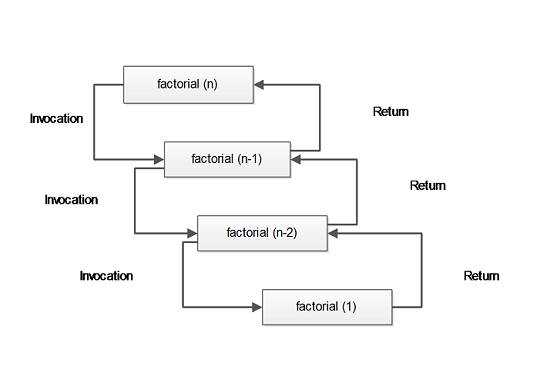
Every time factorial function calls itself, it reduces 1 from the parameter of the function until the \Large factorial(1) is reached.
It starts processing or working from \Large factorial(1) to the top – \Large factorial(n) and prints the final results.
Each of the \Large factorial() function executes the expression containing values returned from the lower level \Large factorial() function. This continues until no more values are available to process.
Flowchart – Nth Factorial with Recursion
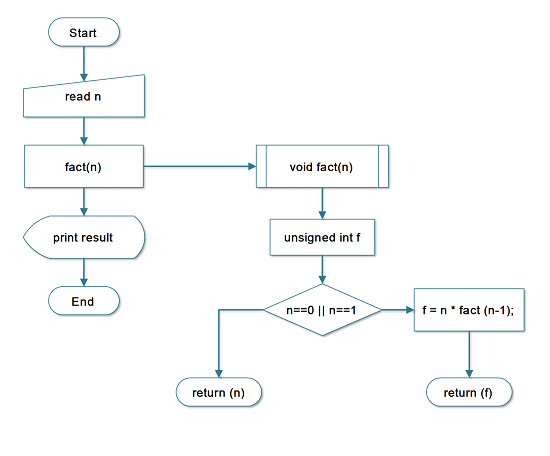
Program Codes – Factorial with Recursion
/*Program to compute Nth factorial */
#include < stdio.h >
#include < stdlib.h >
int fact (int n)
{
    unsigned int f;
    if ((n == 0) || (n == 1))
        return (n);
    else
        /* Compute factorial by Recursive calls */
        f = n * fact (n - 1);
        return (f);
}
main ()
{
    int i, n;
    /* Reading the number */
    printf ("Enter the Number :");
    scanf ("%d", & n);
    /* Printing results */
    for (i = 0; i < 30; i++)
    printf ("_");printf ("\n\n");
    printf ("Factorial of Number %d is %d\n", n, fact (n));
    for (i = 0; i < 30; i++)
    printf ("_");printf ("\n\n");
    system ("PAUSE");
    return 0;
}
#include <iostream>
using namespace std;
int fact(int n) {
if (n == 0 || n == 1)
return 1;
return n * fact(n - 1);
}
int main() {
int n;
cout << "Enter the Number :";
cin >> n;
for (int i = 0; i < 30; i++) cout << "_";
cout << "\n\n";
cout << "Factorial of Number " << n << " is " << fact(n) << endl;
for (int i = 0; i < 30; i++) cout << "_";
cout << "\n\n";
return 0;
}import java.util.Scanner;
class Factorial {
static int fact(int n) {
if (n == 0 || n == 1)
return 1;
return n * fact(n - 1);
}
public static void main(String[] args) {
Scanner sc = new Scanner(System.in);
System.out.print("Enter the Number :");
int n = sc.nextInt();
for (int i = 0; i < 30; i++) System.out.print("_");
System.out.println("\n");
System.out.println("Factorial of Number " + n + " is " + fact(n));
for (int i = 0; i < 30; i++) System.out.print("_");
System.out.println("\n");
sc.close();
}
}def fact(n):
if n == 0 or n == 1:
return 1
return n * fact(n - 1)
n = int(input("Enter the Number :"))
print("_" * 30)
print()
print(f"Factorial of Number {n} is {fact(n)}")
print("_" * 30)
print()In the above source code above following expression calls \Large fact(n-1) several times.
f = n * fact(n-1);The \Large n is the current number multiplied with values returned by function \Large fact(n-1). However, there are no values yet.
The \Large fact(n-1) calls itself and this process continues till \Large 1 reached.
The actual multiplication starts from \Large fact(1) which return a value and process of returning values continues up to \Large fact(n) processing all returned values.
Finally, the result gets stored in \Large f and the program prints the final output to console.
Output
                Enter the Number:5
                _______________________________
                Factorial of Number 5 is 120
_______________________________Program To Check If A Number Is Prime Or Not
This program receives an input number from user and check if the number is prime number or not.The number is divided by 2, 3 and 5 to see if the remainder of the division is 0. If the remainder is zero, then the number is not prime otherwise, it is prime number.
Problem Definition
Prime numbers are very important topic in mathematics. It is usually easy to find the small prime numbers, but very difficult to identify a prime number, when the numbers grow larger. We want to write a program to test whether a given number is a prime number or not.
What is a Prime number?
Any positive number greater than 1 which is divisible only by itself and number one is called a Prime number, all other numbers are Composite numbers.
For example
\Large 63 = 3 \times 21
The number \Large 63 has two factors \Large 3 and \Large 21, therefore it is a composite number.
\Large 73 = 73 \times 1
The factors of number \Large 73 are \Large 73 itself and \Large 1, therefore, \Large 73 is a prime number.
How do we process the given input number?
Here are the steps to process the input number in the program.
Step 1 – Get the number, \Large N.
Step 2 – Check if the number, \Large N is divisible by \Large 2, 3, or \Large 5.
Step 3 – If the number, \Large N is divisible, then the \Large remainder = = 0.
Step 4 – If number is divisible, then \Large check = 0, else \Large check = 1.
Step 5 – If \Large check = = 1, number is a prime number
Step 6 – Print the output
Step 7 – End the program
Flowchart – Program to check a Prime number
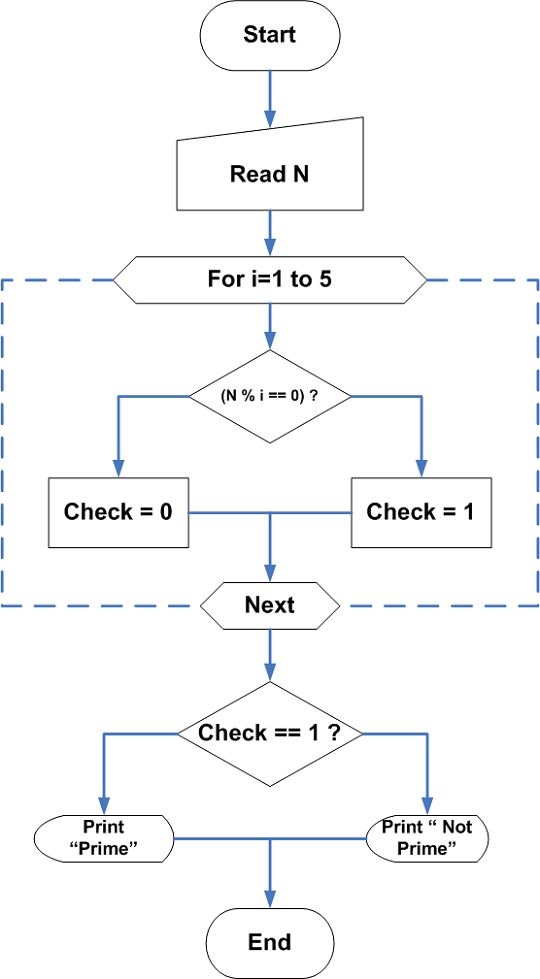
Program Codes – Prime Number Check
/* Program to Check whether a Number is Prime or Not */

#include <stdio.h>
#include <conio.h>

int main()
{
    int num, i, check = 1;

    /* Read the number */
    printf("Enter a number: ");
    scanf("%d", &num);

    /* Numbers less than or equal to 1 are not prime */
    if (num <= 1)
        check = 0;

    /* Check divisibility */
    for (i = 2; i <= num / 2; i++)
    {
        if (num % i == 0)
        {
            check = 0;
            break;
        }
    }

    /* Print the result */
    for (i = 0; i < 35; i++)
        printf("_");
    printf("\n\n");

    if (check == 1)
        printf("The Number %d is a Prime Number\n\n", num);
    else
        printf("The Number %d is not a Prime Number\n\n", num);

    for (i = 0; i < 35; i++)
        printf("_");
    printf("\n\n");

    getch();
    return 0;
}
#include <iostream>
using namespace std;
int main()
{
int num, i;
bool isPrime = true;
cout << "Enter a number: ";
cin >> num;
if (num <= 1)
isPrime = false;
for (i = 2; i <= num / 2; i++)
{
if (num % i == 0)
{
isPrime = false;
break;
}
}
cout << "\n-----------------------------------\n";
if (isPrime)
cout << "The Number " << num << " is a Prime Number\n";
else
cout << "The Number " << num << " is not a Prime Number\n";
cout << "-----------------------------------\n";
return 0;
}import java.util.Scanner;
class PrimeNumber
{
public static void main(String[] args)
{
int num, i;
boolean isPrime = true;
Scanner sc = new Scanner(System.in);
System.out.print("Enter a number: ");
num = sc.nextInt();
if (num <= 1)
isPrime = false;
for (i = 2; i <= num / 2; i++)
{
if (num % i == 0)
{
isPrime = false;
break;
}
}
System.out.println("\n-----------------------------------");
if (isPrime)
System.out.println("The Number " + num + " is a Prime Number");
else
System.out.println("The Number " + num + " is not a Prime Number");
System.out.println("-----------------------------------");
sc.close();
}
}num = int(input("Enter a number: "))
is_prime = True
if num <= 1:
is_prime = False
for i in range(2, num // 2 + 1):
if num % i == 0:
is_prime = False
break
print("\n-----------------------------------")
if is_prime:
print(f"The Number {num} is a Prime Number")
else:
print(f"The Number {num} is not a Prime Number")
print("-----------------------------------")The for loop in the above source code continuously divides the given number to verify if remainder becomes a zero. If not then variable check is 1.
The program performs a second test in which if the value of variable check is \Large 0, it prints “Number is not a prime number” and if the value of variable check is \Large 1, prints “The Number is a prime number”.
Output
         Enter a number:71
         ---------------------------------------
         The Number 71 is a Prime Number
---------------------------------------C Program To Implement Linear Search and Binary Search Algorithm
In this article, you will learn to write a C program that implement two search algorithms – Linear Search and Binary Search Algorithm using C switch statement.
The purpose is not to explain the algorithm, but to show you the implementation and working of these two search algorithms.
This program is written on Turbo C++ version 3.0, but you can use any other standard C compiler to code and run this program. It is intended for intermediate learners of C language. Check the following sections for more details.
- Learn Implementation of Bubble Sort Algorithm
- Learn Implementation of Insertion Sort Algorithm
- Find Maximum and Minimum Using Pointers.(Linear Search Method).
Problem Definition
The program implements two search algorithm – linear search and binary search. The linear search is probably the oldest search algorithm, it goes through each and every element of the unsorted array and look for the key, you are searching for. However, the binary search, look for an element by dividing the array into two half, then compare the key element with a calculated mid value. If key is less than or equal to mid value, go left half and keep doing the same thing all over again. If the key is greater than the mid value, go to the right half of array, and perform the same steps again.
The binary search is faster, but it requires that the array is already sorted in ascending order or descending order. Otherwise it won’t work.
Program Code
/* Program to implement linear search and Binary search */

#include <stdio.h>

#include <stdlib.h>

main()
{

/* Declare variables - array_of_number,search_key,i,j,low,high*/

    int array[100],search_key,i,j,n,low,high,location,choice;

    void linear_search(int search_key,int array[100],int n);

    void binary_search(int search_key,int array[100],int n);

    clrscr();

/* read the elements of array */

    printf("ENTER THE SIZE OF THE ARRAY:");

    scanf("%d",&n);

    printf("ENTER THE ELEMENTS OF THE ARRAY:\n");

    for(i=1;i<=n;i++)
    {

        scanf("%d",&array[i]);

    }

/* Get the Search Key element for Linear Search */

    printf("ENTER THE SEARCH KEY:");

    scanf("%d",&search_key);

/* Choice of Search Algorithm */

    printf("___________________\n");

    printf("1.LINEAR SEARCH\n");

    printf("2.BINARY SEARCH\n");

    printf("___________________\n");

    printf("ENTER YOUR CHOICE:");

    scanf("%d",&choice);

    switch(choice)
    {

    case 1:

        linear_search(search_key,array,n);

        break;

    case 2:

        binary_search(search_key,array,n);

        break;

    default:

        exit(0);

}

    getch();

    return 0;

}

/* LINEAR SEARCH */

    void linear_search(int search_key,int array[100],int n)
    {

/*Declare Variable */

        int i,location;

        for(i=1;i<=n;i++)
        {

            if(search_key == array[i])
            {

                location = i;

    printf("______________________________________\n");

    printf("The location of Search Key = %d is %d\n",search_key,location);

    printf("______________________________________\n");

        }

    }

}

/* Binary Search to find Search Key */

void binary_search(int search_key,int array[100],int n)
{

    int mid,i,low,high;

    low = 1;

    high = n;

    mid = (low + high)/2;

    i=1;

    while(search_key != array[mid])
    {

        if(search_key <= array[mid])
        {

            low = 1;

            high = mid+1;

            mid = (low+high)/2;

        }
        else
        {

            low = mid+1;

            high = n;

            mid = (low+high)/2;

        }

}

    printf("__________________________________\n");

    printf("location=%d\t",mid);

    printf("Search_Key=%d Found!\n",search_key);

    printf("__________________________________\n");

}
Output
The output of the above program is given below. The user first enters the array size and array elements. But if he wants to use the binary search, the user must enter sorted values.
Then the user is given two choice of search algorithms – linear search and binary search. This part is implemented using C switch-case statements.
ENTER THE SIZE OF THE ARRAY:6
ENTER THE ELEMENTS OF THE ARRAY:
45
6
86
23
64
77
ENTER THE SEARCH KEY:86
____________________
1. LINEAR SEARCH
2. BINARY SEARCH
____________________
ENTER YOUR CHOICE:2
_____________________________________________
Location =3 Search_Key = 86 Found!C Program to Implement Bubble Sort Algorithm
This program is an implementation of Bubble sort algorithm. The program receives unsorted input numbers and sorts the number in ascending or descending number as an output.
Visit following link to learn about other sorting and searching algorithms.
This program is written with Turbo C++ version 3 compiler, but you can use any other standard C compiler to code and run this program. It is intended for intermediate to an advanced level learner of C language.
To help you understand this program see the following sections – Problem definition, Flowchart of the program and a verified output.
Problem Definition
In this program, we read some numbers into an array. The numbers are unsorted and our goal is to sort the input numbers using Bubble Sort algorithm.
In depth analysis of the Bubble Sort algorithm is not in the scope of the article. We discuss the working of this algorithm and later implement the same using C program.
The working of this algorithm is easy to understand with an example. Suppose we are given following unsorted numbers to sort using bubble sort.
unsorted = 2 4 1 8 6

Pick the first number = 2
Compare with all the number one-by-one from right-to-left and when a[j] > a[j+1], swap the numbers.
2 < 4 (no swap)
2 > 1 (swap)
The array is now = 1 2 4 8 6
Pick the second number = 2 and it is smaller than all the other numbers.
Pick the third number = 4 and it is found to be smaller the rest of the numbers.
8 > 6 (swap)
The array is now = 1 2 3 4 6 8
Pick the fourth number = 8,
Pick the fifth number = 6 to sort and it is again smaller than last number 8. In this way the whole array is sorted.
Program Code Bubble sort
/*PROGRAM FOR BUBBLE SORTING */

#include <stdio.h>

#include <stdlib.h>

#define N 100

main()
{

    int array[N],n,i,j,temp;

/* Read number of elements in array */

    printf("ENTER NUMBER OF ELEMENTS:");
    scanf("%d",&n);

/* Read the elements of array */

    printf("ENTER %d ELEMENTS\n",n);

for(i=0;i<n;i++)
{

    scanf("%d",&array[i]); }

/* Do Bubble Sort */

    for(i=0;i<(n-1);i++)
    {

        for(j=0;j<(n-i-1);j++)
        {

            if(array[j]>array[j+1])
            {

                temp = array[j];
                array[j]=array[j+1];
                array[j+1] = temp;
            }

        }

    }

/* Print the Sorted Array */

printf("_____________________________________________\n");

printf("Sorted list in Ascending Order:\n");

for(i=0;i<n;i++)
{

    printf("%d\t",array[i]);

}

printf("\n____________________________________________\n");

    getch();
    return 0;

}
Output-Bubble Sort Algorithm
The output of the above program for bubble sort algorithm is given below. The first ask for number of elements and then the elements itself.
The output is sorted number in ascending order. You can modify the program source code to change the order.
ENTER NUMBER OF ELEMENTS:5
ENTER 5 ELEMENTS
12
33
6
2
55
________________________________________________
Sorted list in Ascending Order:
2 6 12 33 55Program To Manipulate Matrices
The C program for matrix manipulation performs basic matrix operations upon receiving the values for two matrices from the user. The program does addition, subtraction, multiplication, and transpose of a matrix.
To learn about matrices, visit our Linear algebra hub page.
Problem Definition
Suppose you are given two matrices, then you can perform following simple operations on them.
The program uses only square matrices for all its operations. For example, if \Large A and \Large B are two matrices then,
\Large A = \hspace{1cm} \begin{bmatrix} 1 & 2 & 3\\ 1 & 1 & 4\\ 2 & 3 & 5 \end{bmatrix} \\~\\
\Large B = \hspace{1cm} \begin{bmatrix} 3 & 1 & 3\\ 2 & 1 & 1\\ 3 & 6 & 3 \end{bmatrix} \\~\\
\Large A^T = \hspace{.8cm} \begin{bmatrix} 1 & 1 & 2\\ 2 & 1 & 3\\ 3 & 4 & 5 \end{bmatrix} // Transpose \hspace{4px}of \hspace{4px}A \hspace{4px}Matrix\\~\\
\Large A + B = \hspace{0.3cm} \begin{bmatrix} 4 & 3 & 6\\ 3 & 2 & 5\\ 5 & 9 & 8 \end{bmatrix} // Addition \hspace{4px}of \hspace{4px}A \hspace{4px}and \hspace{4px}B \hspace{4px}matrix\\~\\
\Large A - B = \hspace{0.3cm} \begin{bmatrix} -2 & 1 & 0\\ -1 & 0 & 3\\ -1 & -3 & 2 \end{bmatrix} //\hspace{4px}Subtraction \hspace{4px}of \hspace{4px}A \hspace{4px}and \hspace{4px}B \hspace{4px}matrix\\~\\
\Large A * B = \hspace{0.3cm} \begin{bmatrix} -2 & 1 & 0\\ -1 & 0 & 3\\ -1 & -3 & 2 \end{bmatrix} // \hspace{4px}Multiplication \hspace{4px}of \hspace{4px}A \hspace{4px}and \hspace{4px}B \hspace{4px}matrix
More about the operations ..
- In multiplication of two matrices \Large A and \Large B, the row in \Large Amultiply all elements in column in \Large Band the result is added to get each element of the output matrix. You do this for all rows and columns.
- In transpose of matrix, the row becomes the column and the column becomes the row, in the resultant matrix.
- The addition and subtraction of matrices are straight-forward operations.
Flowchart Matrix Manipulation Program
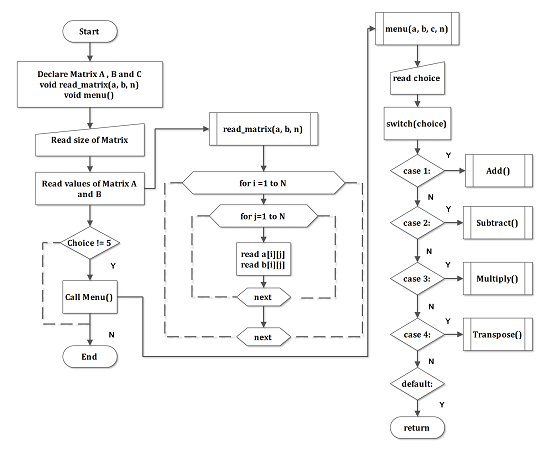
Program Codes – Matrix Manipulation Program
 /* PROGRAM IN C TO MANIPULATE MATRIX */
#include <stdio.h>
#include <conio.h>
#define N 10
main()
{
    int a[10][10],b[10][10];
    int c[10][10];
    int i,j,k,n,choice;
    void read_matrix(int a[N][N],int b[N][N],int n);
    void menu(int a[N][N],int b[N][N],int c[N][N],int n);
    /* Get the Size of the Matrices */
    printf("ENTER SIZE OF MATRIX:");
    scanf("%d",&n);
    /* Read Matrices values */
    read_matrix(a,b,n);
    i=0;
    while(choice !=5)
    {
        menu(a,b,c,n);
        i++;
    }
    system("PAUSE");
    return 0;
}

void menu(int a[N][N],int b[N][N],int c[N][N],int n)
{
    int i,j,k,choice;
    printf("ENTER A CHOICE:\n");
    for(i=0;i<30;i++)
    printf("_");printf("\n\n");
        printf("1.ADDITION\n");
        printf("2.SUBTRACTION\n");
        printf("3.MULTIPLICATION\n");
        printf("4.TRANSPOSE\n");
        printf("5.QUIT\n")
    for(i=0;i<30;i++)
    printf("_");printf("\n\n");
    scanf("%d",&choice);
    i=0;
    switch(choice)
    {
        case 1:
            for(i=0;i<n;i++) {
                for(j=0;j<n;j++) {
                    c[i][j] = a[i][j] + b[i][j];
                    }
            }
            /* Print Result */
            system("cls");
            printf("RESULT\n");
            for(i=0;i<n;i++) {
                for(j=0;j<n;j++) {
                    printf("%d\t",c[i][j]);
                }
            printf("n");
            }
            for(i=0;i<30;i++)
            printf("*");
            printf("\n\n");
            break;
        case 2:
            for(i=0;i<n;i++) {
                for(j=0;j<n;j++) {
                    c[i][j] = a[i][j] - b[i][j];
                }
            }
            /* Print Result */
            system("cls");
            printf("RESULT\n");
            for(i=0;i<n;i++) {
                for(j=0;j<n;j++) {
                    printf("%d\t",c[i][j]);
                }
            printf("\n");
            }
            for(i=0;i<30;i++)
            printf("_");printf("\n\n");
            break;
        case 3:
            for(i=0;i<n;i++) {
                for( j=0;j<n;j++) {
                    for( k=0;k<n;k++) {
                    c[i][j] = c[i][j] + a[i][k] * b[k][j];
                    }
                }
            }
            /* Print the result */
            system("cls");
            printf("Result\n");
            for( i=0;i<n;i++) {
                for(j=0;j<n;j++) {
                    printf("%d\t",c[i][j]);
                }
            printf("\n");
            }
            for(i=0;i<30;i++)
            printf("_");printf("\n\n");
            break;
            /* Transpose Matrix -A */
        case 4:
            for(i=0;i<n;i++) {
                for(j=0;j<n;j++) {
                    c[i][j] = a[j][i];
                }
            }
            /* Print Result */
            system("cls");
            printf("*RESULT*\n");
            for(i=0;i<n;i++) {
                for(j=0;j<n;j++) {
                    printf("%d\t",c[i][j]);
                }
            printf("\n");
            }
            for(i=0;i<30;i++)
            printf("_");printf("\n\n");
            break;
        default: exit(0);
        }
    }
/* Read Matrix a and b*/
void read_matrix(int a[N][N],int b[N][N],int n) {
    int i,j;
    printf("READ MATRIX A:\n\n");
    printf("ENTER MATRIX VALUES ROW WISE:\n\n");
    for(i=0;i<n;i++) {
        for(j=0;j<n;j++) {
            scanf("%d",&a[i][j]);
        }
    }

    /* Print Matrix A */
    printf("*Matrix-A*\n");
    for(i=0;i<n;i++) {
        for(j=0;j<n;j++) {
            printf("%d\t",a[i][j]);
        }
    printf("\n");
    }
    for(i=0;i<30;i++)
    printf("*");printf("\n\n");
    /* READ MATRIX B */
    printf("READ MATRIX B:\n\n");
    printf("ENTER MATRIX VALUES ROW WISE:\n\n");
    for(i=0;i<n;i++) {
        for(j=0;j<n;j++) {
            scanf("%d",&b[i][j]);
        }
    }

    /*Print Matrix-B */
    printf("*Matrix-B*\n");
    for(i=0;i<n;i++) {
        for(j=0;j<n;j++) {
            printf("%d\t",b[i][j]);
            }
    printf("\n");
    }
    for(i=0;i<30;i++)
    printf("*");printf("\n\n");
}
#include <iostream>
using namespace std;
#define N 10
void readMatrix(int a[N][N], int b[N][N], int n) {
cout << "READ MATRIX A (row-wise):\n";
for (int i = 0; i < n; i++)
for (int j = 0; j < n; j++)
cin >> a[i][j];
cout << "\nREAD MATRIX B (row-wise):\n";
for (int i = 0; i < n; i++)
for (int j = 0; j < n; j++)
cin >> b[i][j];
}
void menu(int a[N][N], int b[N][N], int c[N][N], int n) {
int choice;
cout << "\n1. ADDITION\n2. SUBTRACTION\n3. MULTIPLICATION\n4. TRANSPOSE\n5. QUIT\n";
cout << "Enter choice: ";
cin >> choice;
switch (choice) {
case 1:
for (int i = 0; i < n; i++)
for (int j = 0; j < n; j++)
c[i][j] = a[i][j] + b[i][j];
break;
case 2:
for (int i = 0; i < n; i++)
for (int j = 0; j < n; j++)
c[i][j] = a[i][j] - b[i][j];
break;
case 3:
for (int i = 0; i < n; i++)
for (int j = 0; j < n; j++) {
c[i][j] = 0;
for (int k = 0; k < n; k++)
c[i][j] += a[i][k] * b[k][j];
}
break;
case 4:
for (int i = 0; i < n; i++)
for (int j = 0; j < n; j++)
c[i][j] = a[j][i];
break;
case 5:
exit(0);
}
cout << "\nRESULT:\n";
for (int i = 0; i < n; i++) {
for (int j = 0; j < n; j++)
cout << c[i][j] << "\t";
cout << endl;
}
}
int main() {
int a[N][N], b[N][N], c[N][N], n;
cout << "ENTER SIZE OF MATRIX: ";
cin >> n;
readMatrix(a, b, n);
while (true)
menu(a, b, c, n);
return 0;
}import java.util.Scanner;
class MatrixOperations {
static final int N = 10;
static void readMatrix(int[][] a, int[][] b, int n, Scanner sc) {
System.out.println("READ MATRIX A (row-wise):");
for (int i = 0; i < n; i++)
for (int j = 0; j < n; j++)
a[i][j] = sc.nextInt();
System.out.println("READ MATRIX B (row-wise):");
for (int i = 0; i < n; i++)
for (int j = 0; j < n; j++)
b[i][j] = sc.nextInt();
}
static void menu(int[][] a, int[][] b, int[][] c, int n, Scanner sc) {
System.out.println("\n1. ADDITION\n2. SUBTRACTION\n3. MULTIPLICATION\n4. TRANSPOSE\n5. QUIT");
System.out.print("Enter choice: ");
int choice = sc.nextInt();
switch (choice) {
case 1:
for (int i = 0; i < n; i++)
for (int j = 0; j < n; j++)
c[i][j] = a[i][j] + b[i][j];
break;
case 2:
for (int i = 0; i < n; i++)
for (int j = 0; j < n; j++)
c[i][j] = a[i][j] - b[i][j];
break;
case 3:
for (int i = 0; i < n; i++)
for (int j = 0; j < n; j++) {
c[i][j] = 0;
for (int k = 0; k < n; k++)
c[i][j] += a[i][k] * b[k][j];
}
break;
case 4:
for (int i = 0; i < n; i++)
for (int j = 0; j < n; j++)
c[i][j] = a[j][i];
break;
case 5:
System.exit(0);
}
System.out.println("\nRESULT:");
for (int i = 0; i < n; i++) {
for (int j = 0; j < n; j++)
System.out.print(c[i][j] + "\t");
System.out.println();
}
}
public static void main(String[] args) {
Scanner sc = new Scanner(System.in);
int[][] a = new int[N][N];
int[][] b = new int[N][N];
int[][] c = new int[N][N];
System.out.print("ENTER SIZE OF MATRIX: ");
int n = sc.nextInt();
readMatrix(a, b, n, sc);
while (true)
menu(a, b, c, n, sc);
}
}def read_matrix(n):
print("READ MATRIX A (row-wise):")
a = [[int(input()) for _ in range(n)] for _ in range(n)]
print("READ MATRIX B (row-wise):")
b = [[int(input()) for _ in range(n)] for _ in range(n)]
return a, b
def menu(a, b, n):
print("\n1. ADDITION\n2. SUBTRACTION\n3. MULTIPLICATION\n4. TRANSPOSE\n5. QUIT")
choice = int(input("Enter choice: "))
c = [[0]*n for _ in range(n)]
if choice == 1:
for i in range(n):
for j in range(n):
c[i][j] = a[i][j] + b[i][j]
elif choice == 2:
for i in range(n):
for j in range(n):
c[i][j] = a[i][j] - b[i][j]
elif choice == 3:
for i in range(n):
for j in range(n):
for k in range(n):
c[i][j] += a[i][k] * b[k][j]
elif choice == 4:
for i in range(n):
for j in range(n):
c[i][j] = a[j][i]
elif choice == 5:
exit()
print("\nRESULT:")
for row in c:
print(*row)
n = int(input("ENTER SIZE OF MATRIX: "))
a, b = read_matrix(n)
while True:
menu(a, b, n)Output
ENTER SIZE OF MATRIX:2
READ MATRIX A:

ENTER MATRIX VALUES ROWWISE:
1 2
4 2
*MATRIX-A*
1    2
4    2
********************************

READ MATRIX B:

ENTER MATRIX VALUES ROWWISE:
1 4
1 1
*MATRIX-B*
1    4
1    1
*****************************
ENTER A CHOICE:
___________________________
1.ADDITION
2.SUBTRACTION
3.MULTIPLICATION
4.TRANSPOSE
5.QUITProgram To Find Reminder without Modulo Operation
A modulo operator in c returns the remainder of a division, not a quotient. This program finds remainder without using the modulo (mod) operator.
This program is a frequently asked question for aptitude tests and job interviews. So, you must try the write the program yourself and then compare your results with the solution given on this page.
Problem Definition
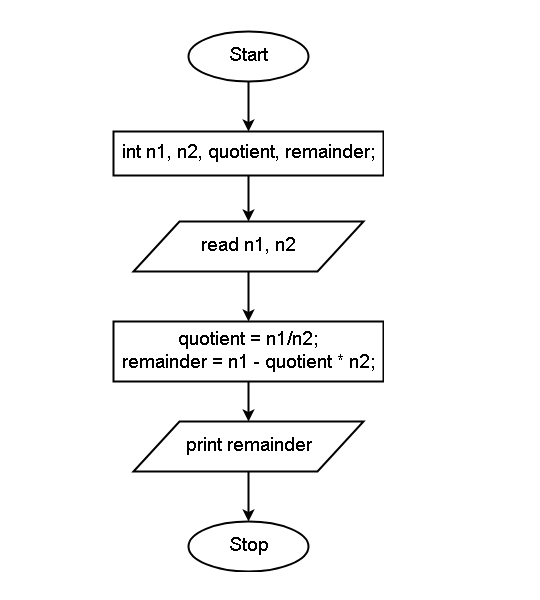
The program receives an input number – a divisor and a dividend. The quotient of the division is easily obtained using the division operator (/).
Now, you cannot use the modulo operator and have to find another way to find the remainder. You can do it in two steps listed below.
- Find an intermediate number by multiplying quotient * divisor.
- subtract the intermediate number from the dividend.
For example, divisor = 10, dividend = 53, find the remainder.
\begin{aligned}&
quotient = 53 / 10 = 3 \\ \\
&intermediate \hspace{2mm} number  = 5 * 10 = 50\\ \\
&remainder = dividend - intermediate  \hspace{2mm} number\\ \\
&remainder = 53 - 50 = 3
\end{aligned}
See the flowchart for this program given below to understand this logic.
Flowchart – Remainder without Modulo Operation
Program Code – Remainder without Modulo Operation
#include <stdio.h>
#include <conio.h>
void main()
{
        int n1,n2,quotient,reminder;
        clrscr();
        printf("Enter two numbers:\n");
        scanf("%d %d",&n1,&n2);
        quotient = n1/n2;
        reminder = n1 - quotient * n2;
        printf("Remainder = %d\n",reminder);
        getch();
}
#include <iostream>
using namespace std;
int main() {
int n1, n2, quotient, remainder;
cout << "Enter two numbers:" << endl;
cin >> n1 >> n2;
quotient = n1 / n2;
remainder = n1 - quotient * n2;
cout << "Remainder = " << remainder << endl;
return 0;
}import java.util.Scanner;
public class RemainderCalculation {
public static void main(String[] args) {
int n1, n2, quotient, remainder;
Scanner sc = new Scanner(System.in);
System.out.println("Enter two numbers:");
n1 = sc.nextInt();
n2 = sc.nextInt();
quotient = n1 / n2;
remainder = n1 - quotient * n2;
System.out.println("Remainder = " + remainder);
sc.close();
}
}# Program to calculate remainder using quotient logic
print("Enter two numbers:")
n1, n2 = map(int, input().split())
quotient = n1 // n2
remainder = n1 - quotient * n2
print("Remainder =", remainder)Output
The larger number 255 is the dividend, and the smaller number 33 is the divisor. The division does not return quotient, but the remainder 24.
Enter two numbers:255 33
Reminder = 24Program To Reverse A Given String
The program to reverse a given string takes the input string and output reverse of the string. Each of the characters from the input string is extracted one at a time to achieve this task.
Problem Definition
The program takes an input string at run-time using the built-in function fgets (str) where str is a character array. In this array of characters, the beginning characters are exchanged with the ending characters of the string with the help of a temp variable.
For example
If the string is “ELEPHANT”. The letter is ‘E’ and ‘T’ are exchanged until all characters are reversed. The final output is TNAHPELE.
Program Codes – Reverse a String
#include <stdio.h>
#include <string.h>

int main()
{
    char str[100], temp;
    int i, j;

    printf("Enter the string: ");
    fgets(str, sizeof(str), stdin);

    /* Remove newline character if present */
    str[strcspn(str, "\n")] = '\0';

    i = 0;
    j = strlen(str) - 1;

    while (i < j)
    {
        temp = str[i];
        str[i] = str[j];
        str[j] = temp;
        i++;
        j--;
    }

    printf("Reverse string is: %s\n", str);
    return 0;
}
#include <iostream>
#include <string>
using namespace std;

int main()
{
    string str;
    cout << "Enter the string: ";
    getline(cin, str);

    int i = 0, j = str.length() - 1;
    while (i < j)
    {
        swap(str[i], str[j]);
        i++;
        j--;
    }

    cout << "Reverse string is: " << str << endl;
    return 0;
}
import java.util.Scanner;
public class ReverseString {
public static void main(String[] args) {
Scanner sc = new Scanner(System.in);
System.out.print("Enter the string: ");
String str = sc.nextLine();
char[] ch = str.toCharArray();
int i = 0, j = ch.length - 1;
while (i < j) {
char temp = ch[i];
ch[i] = ch[j];
ch[j] = temp;
i++;
j--;
}
System.out.println("Reverse string is: " + new String(ch));
sc.close();
}
}s = input("Enter the string: ")
rev = s[::-1]
print("Reverse string is:", rev)Output
The output of the above program is given below. When the program ask for a string input, the user enters – MATHEMATICS. The program reverses the string and give following output.
Enter the String: MATHEMATICS
Reverse String is SCITAMEHTAM