Program to demonstrate Constructor Overloading in Java
This is a simple program to demonstrate constructor overloading in Java programming language.
The constructor is a special method that the same name as that of the public class. There are different methods of overloading the constructors.
This is a simple program to demonstrate the constructor overloading concepts and it is intended for beginners of Java programming language.
We are using JDK 8u111 with Netbean IDE 8.2 installed on a windows 7 64-bit PC to compile and run this program.
Problem Definition
The constructor uses the same name as that of its public class. But the constructors can be different or overloaded based on the parameters. In the following program we specify 3 constructors with different type and number of parameters.
Program Code
class Cload{

    String pname;

    int qty;

    int price;

    Cload (int prodqty,String prodname, int prodprice)
    {

        pname=prodname;

        qty=prodqty;

        price=prodprice;

    }

    Cload(int q,String p1name)
    {

        pname=p1name;

        price = q;

        qty = price/10;

    }

    Cload(String ppname,int pprice)
    {

        pname= ppname;

        price = (int)(pprice - (0.1));

    }

    void print()
    {
        System.out.println("Product Name:" + pname);

        System.out.println("Quantity:" + qty);

        System.out.println("Price:" + price);

    }

public static void main(String args[])
{

    Cload prods = new Cload("apple",10);

    Cload prods1 = new Cload(200,"orange");

    prods.print();

    prods1.print();

}

}
Output – Java Constructor Overloading
Product Name:apple
Quantity:0
Price:9
Product Name:orange
Quantity:20
Price:200
Related Articles:-
- Program in Java for addition of two matrices.
- Java program using multiple classes.
- Java program to demonstrate usage of arrays.
Program to demonstrate use of Bitwise Shift Operator in Java
This is a simple program to demonstrate the use of Bitwise Shift operator and learn the basics of Java Programming.
Sometimes we need to change the value of a variable by performing a low-level operation. In a computer system, every number is stored as a binary number made of 1s and 0s. The Bitwise Shift operator can change the value of a stored variable by changing its binary value.
We are using JDK 8u111 with Netbeans IDE 8.2 to compile and run this program.
Problem Definition
This program changes the value of a variable by changing bit values. To perform a bitwise shift we are using two-byte data type variable.
A byte is one of the eight primitive data types in Java. The byte type is 8-bit signed integer data type. It means that it stores integer values -128 to 127, because whenever a signed binary is used then one bit is used as an sign bit. If the signed bit is not used then the integer values are between 0 to 255.
The bit shift operator shifts a certain number of bit to right or left depending on which operator you are using – right bit shift operator (>>) or left bit shift operator (<<).
The program changes the value of variable a by shifting the bit values to left.
Program Code
class Byteshift {

    public static void main(String args[])
    {

        byte a=64,b;

        int l;

        l = a<<2;

        b = (byte)(a << 2);

        System.out.println("Original value of a:" + a);

        System.out.println("l and b:" + l +" "+ b);

    }

}
Output – Bitwise Shift Operator
Original value of  a: 64

l and b: 256  0
The original value a = 64 is 0100 0000 in binary. The bit shift operator move the first 1s to 2 bit left. The new binary value is 0000 0000 which is 0.
Now the l is not limited to 8-bit like a, it is of 32 or 16 bits. The left bit shift by 2 place will be following.
l = 0000 0001 0000 0000 = 2^9 = 256Related Articles:-
- Java Program Demonstrating usage of String-buffer Class and String-builder Class
- Java program to demo builtin string functions.
- Program to demonstrate Bitwise Shift Operators in Java.
Program to read text using Bufferedreader in Java
Java programming language has many classes to read input characters. One such class is BufferedReader class and this program to read text using the BufferedReader in Java demonstrates the working of this class.
We are using JDK 8u111 with Netbeans IDE 8.2 installed on a Windows 7 64-bit PC to compile and run this program. You can also install the JDK and run this program from a windows command console.
Problem Definition
This program uses the BufferedReader class to create a new BufferedReader object. The main program is BRRead and the Java program is saved with the same name – BRRead.java. To write a program to read character using Bufferedreader in Java and display the characters in integer equivalent.
For example, if character is ‘a’, then output is 97 – ANSI equivalent.
The BufferedReader object uses InputStreamReader another object from InputStreamReader Class that reads a stream of characters.
Program Code
import java.io.*;

class BRRead
{
    public static void main(String args[])

    throws IOException
    {
      char c;
      BufferedReader br = new BufferedReader (new InputStreamReader(System.in));

      System.out.println("Enter character,'10' to quit");

      // read characters

    do {

      c= br.read();
      System.out.println(c);
      }while(c != 10);

    }

}
Output – BufferedReader Demo
The output of the above program is given below. The program reads a stream of character through BufferedReader object and display the characters when the last read character is 10.
Enter character,'10' to quit
New York
78
101
119
32
89
111
114
107
10
Related Articles:-
- Java program to demo builtin string function.
- Program to read text using Bufferedreader in Java.
- Java program demonstrating usage of StringBuffer class and StringBuilder class.
Program to find Area of a Triangle in Java
The program to find the area of a triangle is a simple program that demonstrates the program structure of Java. It is intended for beginner level learner of Java programming.
Also, we used NetBean 8.2 on a windows 7 64-bit with Java SDK 8u111 to write this program.
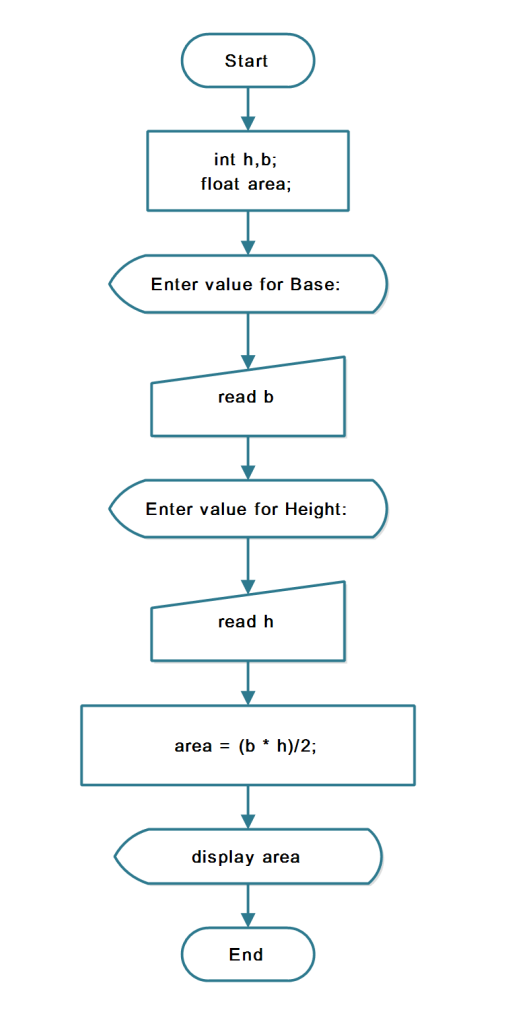
To help you understand the program read following sections – problem definition, flowchart, program code for practice and verified output.
Problem Definition
A triangle is a geometric shape with 3 sides and sum of internal angles make 180 degrees.The following figure shows a triangle with three sides.
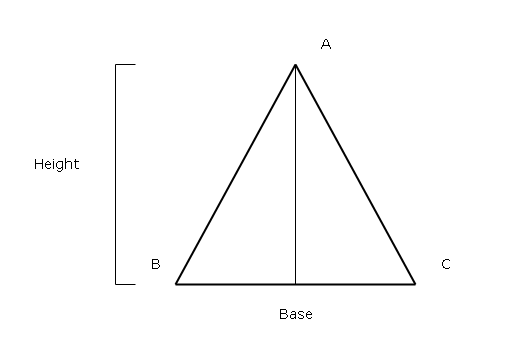
To find the area of a triangle you need to know the length of base and the length of height and use the following formula.
Area of Triangle = base * (height /2)
Or
Area of Triangle = b * (h/2)
Flowchart
Program Code
/*
 * To change this license header, choose License Headers in Project Properties.
 * To change this template file, choose Tools | Templates
 * and open the template in the editor.
 */

package JavaExamples;
import java.io.*;
/**
 *
 * @author Admin
 */
public class AreaTriangle {

public static void main(String args[])
{

    int b, h;
    float area;

    try {

        DataInputStream d = new DataInputStream((System.in));

        System.out.println("Enter value for Base:");

        String st = d.readLine();

        System.out.println("Enter value for Height:");

        String sh = d.readLine();

        b = Integer.parseInt(st);

        h = Integer.parseInt(sh);

        System.out.println("b=" + b);

        System.out.println("h=" + h);

        area = (b * h) / 2;

        System.out.println("Area of triangle=" + area);

        } catch (IOException e)   {

            System.out.println("Wrong Input");

        }

    }

}
Output – Area Of Triangle
Enter value for Base:

20

Enter value for Height:

12

b=20

h=12

Area of triangle= 120.0Program to add two numbers in Java
This is a simple program to add two numbers in Java help demonstrate and learn the basics of Java programming. The Java program uses arithmetic operators and this is an example of the addition operator.
This program is written using JDK 8u111 with Netbeans IDE 8.2 on a Windows 7 64-bit PC. Alternatively, you can also compile and run this program from Windows Command line with only JDK installed.
Problem Definition
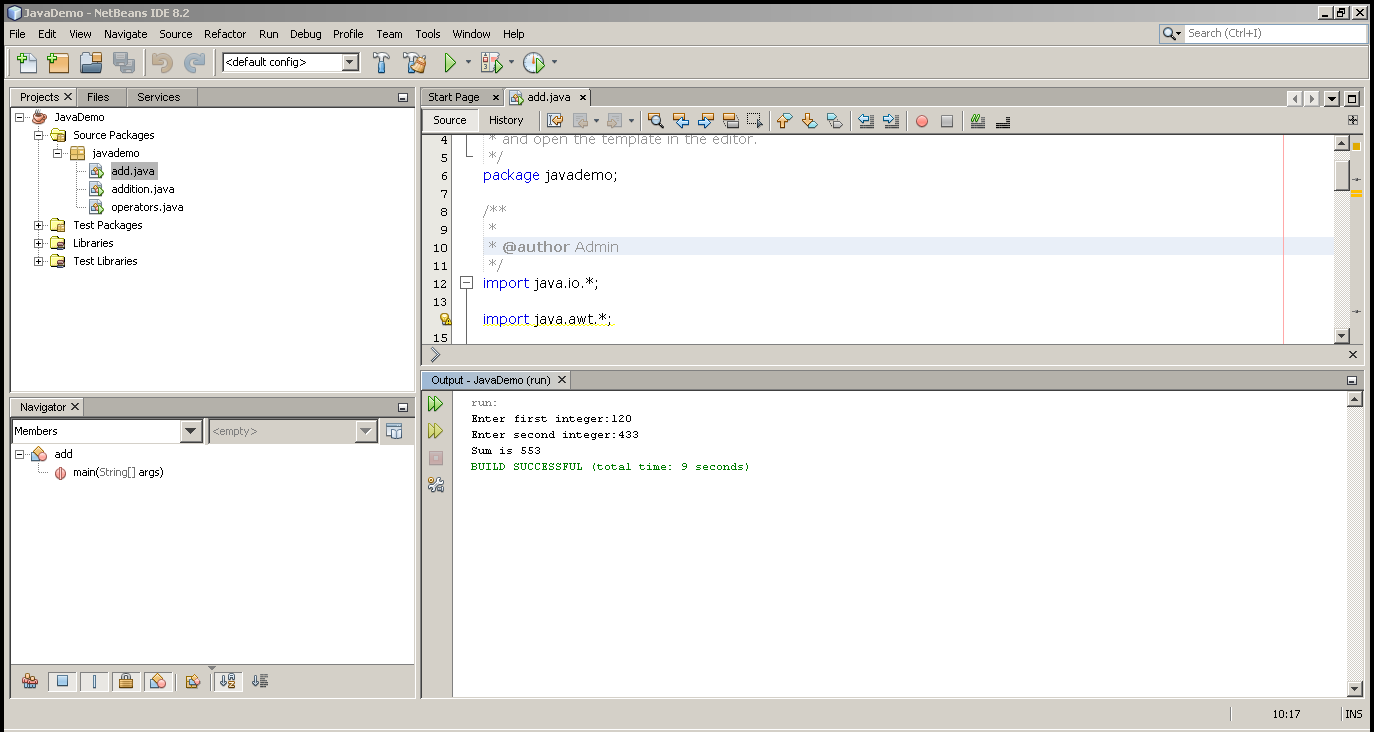
In this program, we receive two input numbers from the user and add them using the addition (+) operator and display the sum.
Program Code
import java.io.*;

import java.awt.*;

import javax.swing.*;

class add
{

    public static void main(String args[])
    {

        int a,b,c;

        try // try start here
        {

            DataInputStream d = new DataInputStream((System.in));

            System.out.println("ENTER VALUE FOR A");

            String an = d.readLine();

            System.out.println("ENTER VALUE FOR B");

            String bn = d.readLine();

            a = Integer.parseInt(an);

            b = Integer.parseInt(bn);

            c = a + b;

            System.out.println("C=" + c);

        } // end try here

        catch(IOException e) // catch start
        {

            System.out.println("Wrong Input");

        } //catch end

    }

}
Output – Add Two Numbers
The output of the program is given below.
ENTER VALUE FOR A:

120

ENTER VALUE FOR B:

433

C = 553
Related Articles:-
- Program to find the area of a triangle in Java.
- Program to find the area of a circle in Java.
- Program in Java for the addition of two matrices.
- Program to compute average marks of students.
Java Program to extend a Class
Extending a class in Java programming language is called inheritance. A parent class is created first and then it is extended using keyword – extends.
The child class inherits the properties and methods of the parent class and override them when necessary.
Problem Definition
In this example, we will create a parent class called the organization and declare a method called show(). Then we create another class that extends the organization class called branch. In the child class, you will override the method show() defined in organization class.
Program Code
class organization{

 void show()
     {
         System.out.println("Organization");
    }

   public static void main(String[] args){

   branch bx1 = new branch();


    bx1.show();

}

}

class branch extends organization{

     void show()
     {
         System.out.println("Branch Overrides");
    }
}
Output
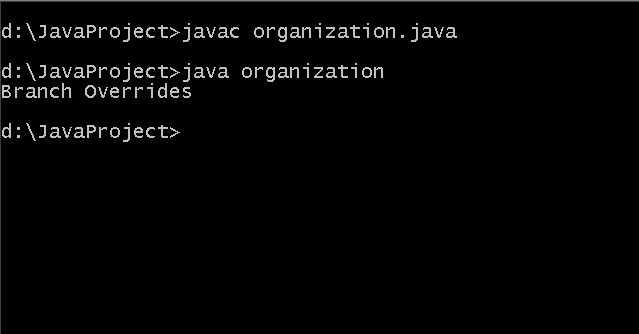
Output – Extending Java class