XML Document Modeling
As you know already that XML is extensible markup language that help display information, store information in meaningful format, and transport information for applications and humans.
When we talk about documents, then first thing come to our mind is articles, books that are organized in chapters, sections, paragraphs, etc. That is only in the traditional sense.
In XML document, a wide variety of information can be stored and transported; therefore, XML document has wider definition than the traditional documents. One special feature of XML is the ability to exchange data between applications.
In simple words, XML document does nothing but hold information to display or exchange or transport.
XML Document Tree
The XML document that is a piece of information is arranged order of elements. Basically, elements are arranged to create a document tree structure. At the top, you have the root element, or a single element called the document element, and all other elements are nested within the root element. As you know from previous lessons, that elements are simply labeling the content of the document.
Consider the following information written in XML.
<?xml version="1.0"?>
<student>
  <name>
     <firstname>Radhe</firstname>
     <lastname>Govind</lastname>
 </name>
  <age>23</age>
  <courses>
    <subject1> Computer Science</subject1>
    <subject2> Mathematics </subject2>
  </courses>
  <grade>A+</grade>
</student>
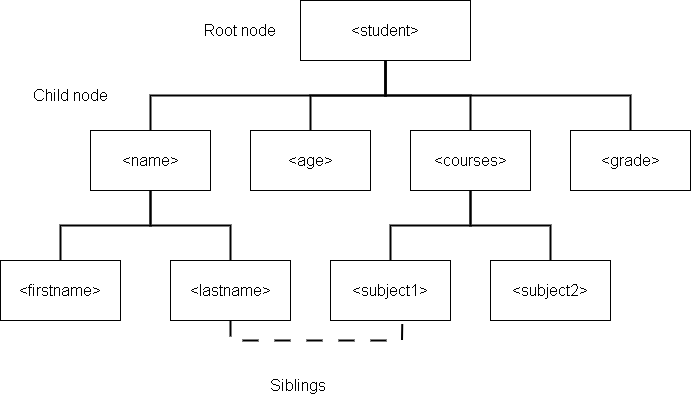
The above XML document has student information such as name, course, age and grade. The name and course are asking for more information such as first name and last name. The courses are asking for subjects that a student can study.
XML present this document as a document tree for easy access. It is also known as XML DOM (XML Document Object Modelling).
Not only text information, but XML can be used to store pictures or graphic images. The Scalable Vector Graphics (SVG) language is used to create line drawings, and since, they are vectors images, there is no problem resizing them.
Difference Between XML document or a File
The primary difference between the XML document is the structure. A file is stored in bits, and bytes. Therefore, files have different permissions and restrictions on them. The file is a physical structure stored in the computer system.
XML document is logical structure and new markup language can be created following the rules of the XML. Since, there are not restrictions on XML documents, it can be used anywhere.
Document Modeling
Since, XML is a markup language creator itself, how do you create a language from XML ? There are two ways to create XML documents.
- Freeform XML
- Document Type Definition (DTD)
Freeform XML
The freeform XML is used to create your own XML language tags following the rules of XML syntax. These minimum rules are:
- XML documents contains a root element
- XML tags are properly closed, and not omitted.
- XML tags are case sensitive means you cannot have different case for opening or closing element.
- XML elements must be nested properly and in right order.
- XML attribute values must double quotes.
When a document satisfies the minimum rules of XML document, it is called a well-formed document.
But its usefulness is limited because of no restrictions, and that increases the chances of error. The application can throw lot of errors if you leave lot of mistakes in the document.
Document Type Definition (DTD)
The XML provides you with a mechanism to define the language before you use it, through document modeling. The model specifies the rules of the XML language, and any document you create and use this model must validate itself with DTD.
The document type definition is mentioned at the top of the XML document for validation check which declares the tags and data to be used within the document.
XML Schema
The newest document model is XML schema, which uses templates for XML documents to validate it. The schemas are also XML documents, and we will learn it in future lessons.
Any markup language created using the XML is called XML Application, and there are many such applications available all over the internet.
Summary
In this lesson, you have learned that XML can help us create new XML based languages using freeform XML that follows basic rules of XML documents. Since, minimum rules are prone to errors, XML offer document model such document type definition (DTD) and schema modeling.
Document modeling is mechanism to specify our own rules for XML languages and validate the documents.
What is Markup ?
Markup is to identify parts of document for display or to provide meaning to the content of a document. Here the document is different from the traditional document, which means we are referring to electronic documents. Here the electronic document with markup is made of elements, not just the files stored in the disk as bits and bytes. We will come back to this topic later.
Markup Languages
There are many languages that uses markups and called the markup languages. Here is a short list,
- HTML – Hypertext Markup Language
- KML – Keyhole Markup Language
- MathML – Mathematical Markup Language
- SGML – Standard Generalized Markup Language
- XHTML – eXtensible Hypertext Markup Language
- XML – eXtensible Markup Language
Note that each language ends up with ML which means “markup language”. The XML is not a markup language only, in fact, it has rules for creating markup languages. The markup is like a symbol and markup language is a set of symbols that are placed inside of a document to demarcate and label parts of the document.
Why use Markups?
Markup tells the computer how to handle a document, else the computer needs to scan the full document.
Consider this example,
"In India, I went to India Gate".There are two references to the word – India. The first one is talking about a place, and the second, talking about a historical monument. Only markup can help identity the proper word with context.
Imagine a file full of information like this, the computer needs to scan the full document to get to the right information without markup.
Let us take a look at the document with some markup text in XML.
<address>
 <doorno>12</doorno>
 <building>4D</building>
<street>Seasane street</street>
<city>Chennai <emphasis>600034</emphasis> </city>
<paragraph>The country information is not required.</paragraph>
 <graphic fileref="areamap.pict"/></paragraph>
</address>
Let us try to understand the structure of markup document. The elements <address> </address> makes up a tag. There are two parts for every tag – markups and the content.
Address tag
The address tag marks the start and end of the document. It is nesting all other tags within itself,
Emphasis tag
Emphasis is similar to textual document emphasis; it decorates the inline text within a document. In a line of text, the emphasis changes a text to appear little italicized.
Paragraph tag
The paragraph tag takes content that requires lot of space like a paragraph of text or other information.
Graphics tag
The graphics tag embeds pictures in the document.
Marks in XML documents
What role does markup play inside an XML document?
The markup set the boundaries of the document, defines the content, set regions within document, and link other type of contents to the XML documents.
Set Boundaries
The < address > tag mark the boundaries of the collection of text which is address information and its label is “address”. There is a start and end for the document.
Set Regions
What is the region of text doing inside document? is a textual paragraph, not list, picture, etc. It is possible to set different types of regions inside a document.
Position Elements
If you look carefully, the address information and its elements like door no, building, street, and city are positioned properly in an order. The information is displayed in that order. Regions of text has positions. comes before, so it will show or printed that way.
Nesting of Elements
<emphasis> is under <city> which is under <address>. The XML processor will be treating this “Nesting” and the content differently, depending on where it appears. Title may be bold if there is one. The emphasis is italicized.
Relationships
Text can used to link to a resource. link to a picture from XML fragment to show the picture in the document. We used the <graphics> tag.
Summary
In this lesson, you learned about markup and markup languages. What are the features of a markup text and how the document is made of elements. The advantage of markup languages documents is wide and its range of application is also huge.
We will talk about of these in future lessons.
Validating XML Document using Internal DTD
In this post we will create an XML document and validate the document using DTD. The Document Type Definition( DTD) tell us about the building blocks of a XML document. Hence, it is used for validating the XML documents.
Objective:
To create a XML document for BOOKSTORE and write the DTD information before the XML content in the same document.
Then we validate the document using a software tool or an online XML Validator. For this exercise we are using Net Beans, so you may also like to get Net Beans IDE from Oracle or NetBeans.org.
When you create a new Project in Net Beans, Click the new document option, highlighted in below figure using the circle.
Program:

XML Document [ BOOKSTORE.XML ]
Write the following XML information and save the file as BOOKSTORE.xml file.
<?xml version="1.0" encoding="UTF-8"?>
<!--
To change this license header, choose License Headers in Project Properties.
To change this template file, choose Tools | Templates
and open the template in the editor.
-->

<!DOCTYPE BOOKSTORE [

<!ELEMENT BOOKSTORE (BOOK*) >
<!ELEMENT BOOK (BOOKID,BOOKTITLE,AUTHOR,PUBLISHED)>
<!ELEMENT BOOKID (#PCDATA)>
<!ELEMENT BOOKTITLE (#PCDATA)>
<!ELEMENT AUTHOR (#PCDATA)>
<!ELEMENT PUBLISHED (#PCDATA)>
]>

<BOOKSTORE>
<BOOK>
<BOOKID> 01</BOOKID>
<BOOKTITLE>ART OF LIVING</BOOKTITLE>
<AUTHOR>SHANKAR</AUTHOR>
<PUBLISHED>2005 </PUBLISHED>
</BOOK>
<BOOK>
<BOOKID> 02</BOOKID>
<BOOKTITLE>DISCRETE MATH</BOOKTITLE>
<AUTHOR>KENNETH ROSEN</AUTHOR>
<PUBLISHED>1998 </PUBLISHED>
</BOOK>
<BOOK>
<BOOKID> 03</BOOKID>
<BOOKTITLE>HARRY POTTER</BOOKTITLE>
<AUTHOR>J.K.ROWLING</AUTHOR>
<PUBLISHED>2001 </PUBLISHED>
</BOOK>
</BOOKSTORE>
The document starts with DTD information enclosed within < [ …… ] > and then the rest of the document is XML tags.
Note: XML is case sensitive and tag names must be consistent throughout the document.
Validating the XML
To validate the XML Document using NetBeans, Right-Click the XML file and Click Validate XML.
If the document is well-formed, then we will get following output.
If the validation is not successful you need to make the necessary changes in order to make the XML document well-formed.
XML Basics
XML is not a programming language because it does not create applications, and uses a text editor.XML is not a database that store the data. XML is a structured document format which carry data and metadata. A metadata contains information about the data.
XML uses markup tags to self-describe the data and metadata. There is an opening tag and closing tag to enclose the text information. These tags are XML elements.
For example,
<name>Fraser</name>It is self-describing XML tags and Fraser is the name of the dog.
Example XML document
<?xml version="1.0"?>
<Computer>
<Company></Company>
<Model></Model>
<Price></Price>
<Technical_spec>
     <Processor></Processor>
     <Memory></Memory>
     <Disk space></Disk_space>
     <Screen_type></Screen_type>
     <Cd_drive></Cd_drive>
</Technical_spec>
</Computer>
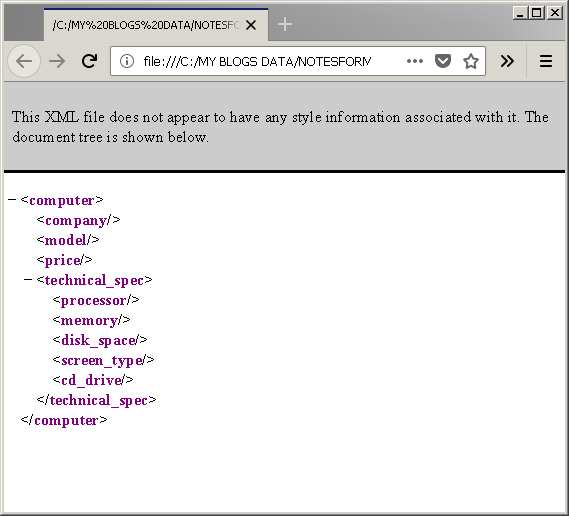
Output in Browser
You must save the above document as file.xml and when you open the file in a browser. The XML is displayed as given in the following figure.
Difference between HTML and XML
There is a lot of difference between XML and HTML even though they both are markup languages. The list of difference between XML and HTML is given below.
| HTML | XML |
|---|---|
| Purpose of HTML is to present information using structure (<h1>, <p>) and appearance (<font>, <b>). | Purpose of XML is to store data and share the data. It also define the content using metadata. |
| HTML comes with predetermined tags. | You can create own xml tags. |
| HTML is not strict, XHTML is only standard followed strictly. | XML document must be well-formed, and if valid, must be validated using DTD or Schema. |
| HTML is for humans only. | XML is used by both humans and machines. Application can exchange data using XML document format. |
XML Document Structure
The example document we saw earlier contains following sections.
- XML Declaration
- Document type declaration (! DOCTYPE)
- Element data
- Attribute data
- XML content
Now, we will describe each one of them briefly.
XML Declaration
There are lots of XML documents available that are similar to XML. How do we identify which one is XML? The XML declaration describe the type of document we use. The information is contained within <?xml … ?> tag. It means we are using XML document and its version is “1.0”. For more information, learn from previous lesson about XML declaration.
The XML declaration contains following components
| Component of XML declaration | Meaning |
|---|---|
| <?xml | Mark the beginning of XML declaration |
| Version=”xxx” | Says about the version of XML used in the document. |
| Standalone =” xxx” | It can be “Yes” or “No” which means that the document can contain external markup declarations. You can use it for including DTD statements inside the documents. |
| Encoding=”xxx” | This contains the character encoding used in the XML document. |
XML Document Type Declaration
The XML documents are well-formed which means they are syntactically correct. A well-formed XML document can include document type declaration (DOCTYPE), although it does not require it.
A well-formed and valid XML document must include a document type declaration (DOCTYPE) with two information.
1. Root element name
2. Path to external dtd file or internal dtd
The DTD stands for document type definition which checks for constraints on a XML document and confirms the validity of the document. The main purpose of DTD is to ask a XML parser to validate the document instance with a document model, called the validity checking. This is completely optional, we will learn about DTD later.
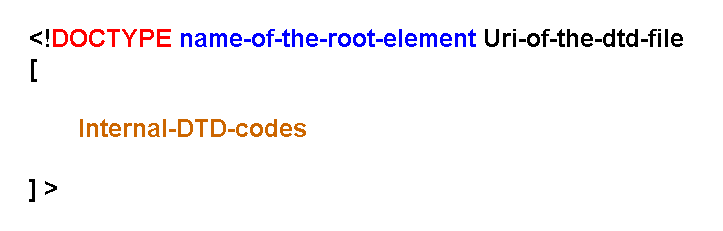
The general syntax for document type declaration is given below.
<! DOCTYPE name_of_root_element SYSTEM "name of external dtd"><!DOCTYPE – the syntax begins with doctype string.
Name_of_the_root_element – next you have name of the root element of the XML document.
Uri_of_the_dtd_file – Whether you are using a local DTD file, or an external DTD file located on internet, you should mention the URl path to the file.
Internal DTD codes – The internal DTD codes are enclosed between opening and closing square brackets ([ ]). These codes are either DTD declarations or entities declarations. The internal codes are either for adding new codes including DTD files or to change DTD codes mentioned in the DTD files outside.
For example
<! DOCTYPE student SYSTEM "student.dtd">Where student.dtd is a non-public dtd file.
Or
<! DOCTYPE name_of_root_element SYSTEM [ ]">You can put your dtd code inside the square brackets.
For example
<! DOCTYPE student SYSTEM

[

//your dtd codes

]">
Element Data
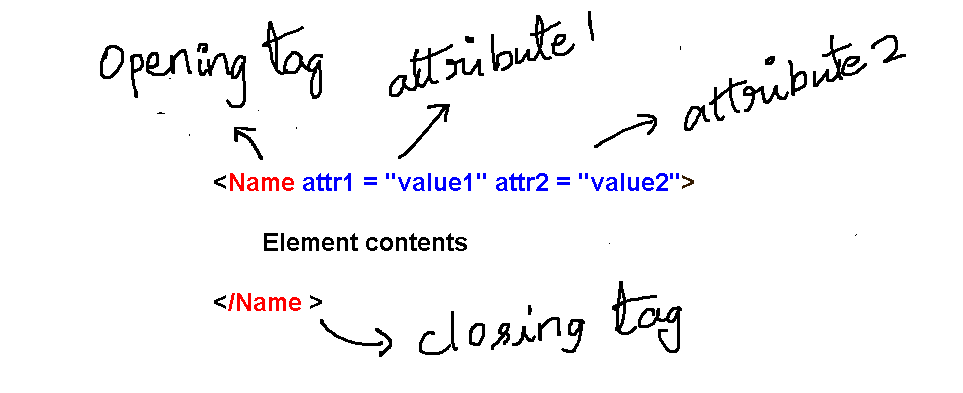
Element contains the contents of the XML document. A matching pair of tags is called the element and consists of XML contents. Some tags are self-closing, it means there is no pair of tags.
Elements are part of the main XML document, and they are displayed differently. Some elements contain other elements (nested elements) and text, while some elements only contain text information.
For example,
<Car> Toyota </car> is an element with Toyota as the text content. The elements can also be nested.
<Car>

<Model> ET900</Model>

<Price> </Price>

</Car>
Now car has sub-elements and there could be more levels like this, and there is no restriction. Note that the price is empty, and XML does not find the difference between and empty or non-empty elements.
Attributes
You can put additional information within an element called an attribute.
For example,
<price currency="USD"></price>XML Contents
XML document can contain any type of content as long as it valid according to XML metadata information. The XML document can contain any amount of content that could be hundreds of megabytes of information.
References
Ron Schmelzer, Travis Vandersypen, Jason Bloomberg, Madhu Siddalingaiah, Sam Hunting, Michael Qualls, Chad Darby, David Houlding, Diane Kennedy. 2002. XML and Web Services Unleashed. Sams.
www.w3schools.com. n.d. XML Tutorial. Accessed May 16, 2018. https://www.w3schools.com/xml/default.asp.
XML Notes – Concepts, Examples, and Exam-Ready Revision
The eXtensible Markup Language (XML) is a core subject in Computer Science and Information Technology (IT) curricula, as well as in competitive examinations such as GATE, UGC NET, and university semester exams.
On this page, you will find structured resources to learn XML concepts, along with clear explanations, examples and exam-ready revision notes.
What Will You Learn
On this page you will find:
- XML concepts explained clearly and systematically
- Exam-oriented explanations supported with relevant examples
- MCQ-based practice posts to test your understanding
- Detailed articles along with exam-ready revision PDFs
This Page is for:
- Computer science and IT students
- GATE and other competitive exam aspirants
- University exam preparation
- Self learners who want to revise data structures knowledge.
Topic Sections
Find XML topics here.