Table of Contents
In real world we do many types of transactions, however, we don’t notice little activities during those transactions. In this article, I will explain the transaction and translation processing with examples. You will learn about benefits and working of transaction processing including different states of transaction processing in DBMS. Let’s begin.
What is a transaction ?
We will begin by this simple question. What is a transaction ? To understand it let’s take a simple example. Suppose you go to an online shop and order a mobile phone , you pay for the phone via online banking or credit card etc and the phone is delivered to your house. The whole sequence of activity to buy a phone till you receive it, is a transaction.
In database management (DBMS), a transaction is logical unit of work that represents some real world event of an organization or an enterprise. These logical unit of work are divided into sequence of operations executed in order and the transaction is completed successfully.
Do you need a transaction processing in DBMS ?
Yes! if it is one or two users working with database, then a transaction processing is not required because we know that database will be in consistent state. However, modern databases are huge and thousands of users are accessing them simultaneously.
We have concurrency control in DBMS to control concurrent access to database The transaction processing does the transaction management executing transaction with large databases and many concurrent users. Due to this type of complexity, DBMS comes with the transaction processing system.
Some common examples are : Railway Reservation System, Banking System , etc.
User and Database views about Transaction processing in DBMS
We know that transaction is logical unit of work, but for database , transaction is database processing with one or more database access operations. I mean that a single operation could be reading bank balance , or reducing the account balance of a user, and/or other operations that affect database. All database operation need access to the database first before doing anything.
Users take some action or a sequence of actions to perform certain operations to get access to the database. These operations are – read, write, modify existing data and delete data.
When user or an application begin a transaction, it must be complete which means that the transaction must leave the database in a consistent state. The consistent state is the healthy state of a database. Any other intermediate state is not acceptable.
So, if a transaction begin with a consistent state, after transaction it must leave database in a consistent state. Database transactions are performed using language like SQL. The SQL ( Structured Query Language) is a simple query language for DBMS to translate human queries into machine specific queries and successfully retrieve the results.
We talked about preserving the integrity of the database , to do that any transaction to database must be atomic. It means that when a transaction begin , it must finish successfully or do nothing. A complete transaction should not affect other transactions, even when many other transactions waiting for the same data that current transaction is working on. These are concurrent transactions
The concurrent transactions are also called Serializability. Even though the transactions are concurrent is performed in serial manner in database. This ensures that no other transactions are affected while one transaction is working with the database. Similarly, a transaction can fail, if a transaction failed, it must not affect the database.
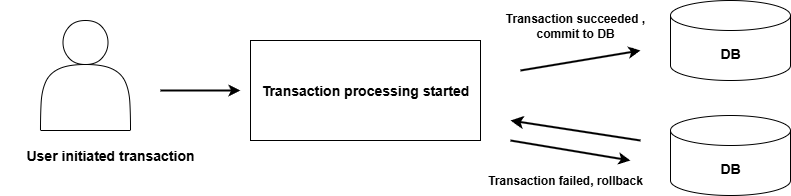
What are the benefits of Transaction processing ?
There are numerous benefits of a transaction processing unit in DBMS. But, I am going to list only three primary benefits.
- No inconsistencies – If there is a conflict in transaction by concurrent users , it does not leave database inconsistent. A transaction either finish successfully or failed without making changes.
- System failures – Protection against system failures like power outage, corrupt database, user error is one of the many tasks of DBMS. How is this related to transaction processing ? The recovery mechanism use different techniques to recover data from transactions. These techniques are log-based recover, checkpoints, shadow paging, database replication and point-in-time recovery. Failed transactions are discarded and database keep track of completed transactions.
- Committed Transactions – Once committed, a transaction cannot be reversed or undone because it is written to the database.
Real Life Examples of Transactions
Now that you know basics of transactions and transaction processing . I will give some example that will reinforce your learning. Some real life event is a transaction.
- Withdrawing cash from ATM is a transaction.
- Making an online purchase is a transaction.
- Paying bill for a service is a transaction.
As a human it seems simple to us, but for a computer system or DBMS it is set of logical operations. So each of these transactions are divided in smaller units called operations (Database operations for easier understanding).
Transaction therefore, is a sequence of operations such as READ, WRITE, SELECT or UPDATE the database. You will learn about operations in SQL and how it is done.
Before a transaction begin , the database is in consistent state and after transaction is finished , it leaves the database in a consistent state.
I am giving the impression that transaction always involve a single database, which is not true. A transaction can use one or more database as and when required. Also, we can do transaction processing in a single stream one after another , so there will never be any conflicts or inconsistencies. Since, we have concurrent users and its not practical to transaction processing in a linear way.
Let’s understand transaction processing with real world examples.
Example 1: Withdrawing cash from ATM
In this scenario, we walk into an ATM ( Automated Teller Machine) to withdraw some cash, we use our card, withdraw the cash , collect card and get a slip for balance in our account. This is a familiar scenario for all.
The ATM machine runs a program that is connected to databases that consists of our account information. Since, there are lot of accounts , probable thousands or millions, bank run data centers using a DBMS. So, when you try to withdraw cash from ATM , DBMS perceives it as a set of database operations. A simple transaction of withdrawing cash is set of database operations. Once you receive the cash, the transaction is complete with balance adjusted for your bank account.
Note: walking up to any ATM is not part of the transaction, but its an activity that initiates the transaction of withdrawing or depositing cash, cheque , etc.
ATM Transaction divided into database operations
These are series of steps in order, once last operation is completed, your transaction is completed successfully.
- Inserting ATM card – you insert your debit card for cash withdrawal, the machine won’t accept all cards.
- Selecting language to communicate – to facilitate easy communication during transaction, you get to choose the language.
- Entering Pin for authentication – this verifies that you are the true account holder authorized to withdraw cash. In other words, do database transaction.
- Choose the Transaction type – ATM allows multiple type of services, not just withdrawal.
- Choosing Account type – your account could be minor account, saving , or current account. Select the right option , so that transaction may continue. This is an added layer of security.
- Choose Amount – Assuming that you want to withdraw, input the correct amount and this will be subtracted from account balance in the database.
- Collect Cash – collecting cash is not database operation, but it indicates that your account balance is adjusted for the withdrawal amount. The transaction is complete.
- Collect receipt – this is ATM getting information from database about your account status and balance.
- Take your card back – transaction is successfully completed.
Once all the steps are completed , your transaction is complete. However, there are constraints for transaction. You must correctly authenticate with pin, withdrawal limits, etc.
Example 2: Purchasing a movie ticket online
This is a common scenario, where you go online to book ticket for a movie. You visit the booking site such as Bookmyshow in India, or SM Cinema in Philippines, or Cinepolis in USA. You visit the website , choose your location, select your movie that you want to watch, select movie hall, type of seats, number of seats, and pay online and you will get the booking confirmation successfully.
Similar to our ATM system, the movie operators or websites also maintain a database that is frequently updated when people buy movie ticket. There are certain constraints. For example, you cannot buy tickets after a show is full and/or after 15 to 60 min of screening, booking stops.
A database transaction for buying movie ticket is limited to selecting location, movie hall, seats and paying for those seats and final confirmation in the form of an online ticket sent to your mail.
Purchasing movie tickets database operations
The process of booking tickets starts with you logging into the booking app or website. Though it is not part of actual transaction, but it initiates the transaction, just like you visiting ATM.
- Selecting location – In this step, you visit the website and then select your preferred location to watch a movie. You simply choose from available locations from a list.
- Select available movies – Select a movie, that you like to watch.
- Select movie hall – The selected movie might be showing in different halls at different timings. You can select the your preferred hall. Though sometimes, the choice depends on timings. You may select a hall because of timings of the show.
- Select number and type of seats – This is the most crucial step, you must select the number of seats, type of seats and any other features available.
- Make payment for seats – Now you make an online payment using any one of the payment gateways available or use a card complete the transaction.
- Seat confirmation – This is an important step as it marks your completed transaction. The database for movies and shows will be updated for those seats that you have booked and you will receive an invoice or ticket in digital form for identification.
The booking movie tickets online is similar to ATM cash withdrawal , only database structure and information are different. In case of failure in completing the booking process, the entire process is roll-backed. You must start the process again. Any amount reduced from your bank account will be reversed automatically.
Example 3: Paying bills online
Our third example is a database transaction where you don’t buy any product, but pay bills for services already received. That is also a kind of transaction. For example, you want to pay for your monthly mobile phone bill. First you need to know, how much money you have to pay ? and any additional charges.
You initiate the transaction by login into the service website, then you select one of the payment methods, pay the bill amount and if the transaction is successful, you will get an acknowledgement in the form of digital receipt. There are so many services you can pay in similar manner.
For database login into the web system is not part of transaction itself, however, it is part of database security. Before executing the your transaction, you must authenticate your self with necessary permission.
Paying bills online as database operations in DBMS
As I mentioned earlier, all transactions are divided into logical operations on one or more database. The process of paying bills online is also divided into logical operations.
- Login into the website – Suppose you are paying bill for your telephone or mobile services. The first thing you do is login into your account on the website.
- View bill to be paid – You get the information about bill that was generated. Sometimes bills could be downloaded as a document like pdf file or word document. The main goal is to know the amount you need to pay including any taxes.
- Select any payment method – Getting bill information is part of database operation , but not selecting the payment method. But, it part of transaction – a task.
- Pay the bill – After you choose one of the online method, pay the bill. If transaction is successful, you will get the confirmation.
- Reference number or receipt – Once the bill is paid , you will receive a transaction reference in your email or a receipt online. This indicates that your transaction was successful. The database is updated with new status of your mobile service. The back account is subtracted by amount mentioned in the bill.
Note: similar to purchasing product or ATM , if transaction is failed, rollback will happen. Only when it is successful, the database is updated permanently.
States of Transaction Processing in DBMS
If the transaction is completed, then it is committed. Any failure of database cannot erase the committed information. It means that committed is a state of transaction processing. There are four main states of transaction processing and each successful or failed transaction goes through these states.
- Active state
- Partially committed state
- Committed state
- Failed state
- Aborted state
- Terminated state
The transaction moves from one state to another until it is terminated after success or failure.

Figure 2: States of a Transaction
Exam focus:
Explain Transaction states with diagram.(3 – 5 marks).
Active State
The active state is where all operation such as read and write happens. Yet, it is not committed to database, and kept in a temporary buffer.
Partially Committed State
In partially committed state, the transaction has completed all the final operation and ready to commit. It is not committed, but getting ready to commit. At this point, any kind of failure in transaction will result in rollback.
Committed State
After writing all changes to the database, a transaction enters the committed state, the changes are written permanently to the database store and cannot be undone. A rollback is not possible in case of failure, but its not required at all because database is updated with the change and its never lost.
Failed State
A transaction enters the failed state when a power failure happens, or a logical corruption in database occurs, or one or more database constraints is violated. The failed state indicate that a transaction cannot be completed successfully.
Abort State
If the transaction has entered failed state , then it must enter the abort state next and rollback the changes. Suppose the failure or error is fixed, that does not mean that transaction will leave failed state and start with an active state automatically. If transaction has failed state, it must rollback first and a new transaction must be initiated.
Terminated State
Whether transaction has committed successfully or aborted due to failure, it is marked as completed and when it enters terminated state , transaction is removed from the system.
“Want a quick summary of Transaction States in DBMS with examples? Check out our Mini-Post version here.”
Next, we will see important properties of transaction processing.
Explain the difference between Failed state and Rollback state (1–3 marks).
Properties of Transaction Processing
The four different properties of database transactions are called ACID properties They stands for
- Atomicity
- Consistency
- Isolation
- Durability
The acid properties ensure that the database transaction processing is reliable and secure.
Atomicity
Think of transaction as one task and all operations must finish within one transaction or nothing should happen and transaction is aborted. In other words, a transaction is multiple read and write operations grouped together. It works on the principle of “All or Nothing”.
Consistency
A transaction must leave database in a stable consistent state with all the new updates, or if the transaction failed for reason, it must rollback all the changes and leave database consistent as it was before the transaction started.
Isolation
During the execution of a transaction, no other transaction is allowed to see the updates or change it, until the current transaction is completed or aborted. The read and write access for data is suspended for any transactions other than the current transaction till it commit successfully and completed.
This kind of system is used in multi-user databases and isolation is achieved through concurrency control.
Durability
Durability means something that stays for a long time. Once the changes are made to the database, it is permanent and cannot be erased by a failed transaction or power failure or a system failure. The database may become inconsistent, however, database management has several recovery mechanisms to bring database back to a consistent state.
Explain ACID properties with example.(3 – 5 marks).
Want to learn about ACID properties in detail. Here is our mini-post version: ACID Properties in DBMS.
SQL and Transaction Processing
As mentioned earlier, SQL is the language of database management and its a structured query language. Usually, you can execute simple insert, select, update or delete individually and get results. In the case of transaction processing, you need distinct commands that the regular read or write.
In SQL , the transaction processing is achieved through three commands;
- BEGIN or BEGIN TRANSACTION
- COMMIT
- ROLLBACK
The BEGIN or BEGIN TRANSACTION marks the start of a new transaction and whatever commands follow it part of that specific transaction. The COMMIT is executed when all the changes are completed in the buffer. The ROLLBACK command is executed when a transaction fails or enter the failed state mentioned earlier.
There are other related commands such as SAVEPOINT. It is a checkpoint to which you can ROLLBACK in case of failure. The checkpoint in part of transaction log about which you will learn in next section.
Transaction Logs
Earlier I mentioned that a transaction is executed in buffer cache, before it is written to the disk and marked committed. The transaction log works with buffer and it is a record of all transaction and changes made to the database. It is not yet written to the database.
What is the use of such a transaction log ? It helps in database recovery using checkpoint. The Log information is used by DBMS for recovery triggered by a ROLLBACK command due to system crash, power failure or abnormal termination of a program.
What are the contents of Transaction log?
In database systems like PostgreSQL, MySql, Oracle and SQL Server , the structure of transaction log is almost the same, which includes following;
- Transaction ID – this is a unique identifier for the transaction and it also mark the beginning or transaction.
- Operation Records – this contains log records with information about type of operations(INSERT, DELETE, etc), table or row that was changed, undo/redo information if a rollback or commit is required.
- Undo/Redo Information – Undo log is information to rollback changes, and Redo log is enough information to reapply committed changes but not written to the disk.
- Long Sequence Number (LSN) – A sequence number that for each records in a transaction log for the purpose of ordering changes in the database. With each operation in the transaction , LSN increment monotonously.
- Commit or Rollback Records – a special record that get updated when transaction commits or rollbacks.
- Checkpoint Records – a specific checkpoint for database recovery so that recovery don’t need to go through entire log.
Test your self : Transaction Processing in DBMS: Concepts, MCQs and Questions
Summary
Let’s summarize what you learned about transaction processing. A transaction is representation of a real life event in the database with one or more database operations. A transaction must finish all operation or do nothing and terminate. Once committed the information in database is permanently stored.
Every transaction goes through different states mentioned in the table below.
| Transaction State | Meaning |
| Active state | Transaction has started |
| Pre-committed state | Transaction has finished all operations and ready to commit |
| Committed state | Transaction has written to the database and committed |
| Failed state | Transaction enter failed state due to failure in processing |
| Abort state | Transaction is rolling back the changes with the help of checkpoint |
| Terminated state | Transaction is removed from the system |
In a multi-user system, every transaction must adhere to ACID properties. The ACID properties and its meaning given below.
| Property | Meaning |
| Atomicity | Each transaction and its operations must be unique |
| Consistency | If transaction commits or rollback in failure , must leave database stable and consistent |
| Isolation | Once data accessed by a transaction , no other transaction must see or change the data until current transaction is finished |
| Durability | Transaction once committed, the information is stored permanently and cannot be undone |
Transaction uses SQL commands and transaction logs to complete its database operation.
Preparing for DBMS university or GATE exams? Revise Transaction Processing in DBMS using a structured, exam-focused PDF that includes:
- Concept overviews
- MCQs
- Short exam questions with solutions