Understanding Python Dictionary
Python has multiple data structures, and Dictionary is one of them. This tutorial will take you through every aspect of the dictionary data structure in Python language.
What is a Dictionary in Python?
When Python was launched, Dictionary was introduced as an unordered collection of items. However, later with Python 3.7 launch, Dictionary was made an ordered collection of items.
Dictionary is somewhat similar to an array, but every element of the dictionary has a key linked. You can use that key to access its respective element, unlike an array.
Note: The key of a dictionary has to be unique. Let’s understand the syntax of a Dictionary:
Syntax
Every element in a dictionary is comma-separated, and all the elements with their keys are enclosed in the curly brackets. The syntax is as follows:
Dic = {"key1":"value","key2":"value"}Example: One real example of the dictionary is to store the number of subjects every student is enrolled in:
SubRecord = {"Smith":5,"Sam":4,"Lucy":6}Here “SubRecord” is the name associated with the dictionary, and “Smith,” “Sam,” and “Lucy” are the keys of the dictionary. Whereas the integer values represent the number of subjects students are enrolled in.
How to define a Dictionary?
Though the syntax might seem simple to you, but there are multiple ways to define a dictionary in Python. In this section, we will learn about some of the ways to create a dictionary in a Python program:
Basic Implementation
Dict1 = {1:"This",2:"is",3:"Python",4:"Programming"}
print(type(Dict1))
Output:
<class 'dict'>
Using “Dict()” Method with Assigning Operator
In the above method, we have used the colon “:” to link every element and key. It is preferred when we have to set integers as keys. However, if you want to use string instead of the colon, “:” equals to “=” can also be used.
Dict2 = dict(
First =  'Python',
Second = "Programming"
print(type(Dict2))
Output:
<class 'dict'>
Apart from these two, there could be another way to create/define a dictionary in Python. We have listed the most popular ones among all.
Accessing Dictionary Elements
Accessing Dictionary elements is pretty straightforward. It is almost similar to accessing elements of an array. In Array, we use the index values to access the elements, whereas, in Dictionary, we have to use keys to access the elements.
For instance,
We have the following dictionary:
Dict1 = {1:"This",2:"is",3:"Python",4:"Programming"}Now, if you want to access the 4th element i.e., “Programming,” you have to write a code statement like this:
print(Dict1[4])
Output:
Programming
In case you provide a key input that doesn’t exist; you will get a similar exception message:
Traceback (Most recent call last):
  File '<string>', line 5, in <module>
KeyError: 5
>
Adding and Removing Elements from Dictionary
To add elements in a dictionary, you can use multiple ways. A few of them are listed below:
Adding Elements directly using Key
In this method, we simply add an element by defining it with a unique key.
For instance,
Let’s assume we have a pre-existing dictionary with the following elements:
Dict1 = {1:"This",2:"is",3:"Python",4:"Programming"}Now, add a new element, we can use a similar code statement:
Dict1[5] = "Tutorial"
print(Dict1)
Output:
{1:"This",2:"is",3:"Python",4:"Programming,5:Tutorial"}Here we have used a unique key; however, its value gets updated if an existing key is used.
For instance,
Dict1 = {1:"This",2:"is",3:"Python",4:"Programming"}
	Dict1[4] = "Tutorial"
	print(Dict1)
Output:
{1:"This",2:"is",3:"Python",4:"Tutorial"}Adding Element using Update() Method
Python also has a built-in method to Add or Update existing dictionary elements.
For Instance,
Adding an new element:
Dict1 = {1:"This",2:"is",3:"Python",4:"Programming"}
Dict1.update({5:"Tutorial"})
print(Dict1)
Output:
{1:"This",2:"is",3:"Python",4:"Programming,5:Tutorial"}Updating a existing element:
Dict1 = {1:"This",2:"is",3:"Python",4:"Programming"}
Dict1.update({3:"a"})
print(Dict1)
Output:
{1:"This",2:"is",3:"a",4:"Programming"}So, that’s how you can add or update elements in the Python dictionary using the update() method. Now, lets learn:
Removing an Element from Dictionary
To remove an element from a dictionary, you can use the built-in del keyword of python.
For instance,
Dict1 = {1: 'This', 2: 'is', 3: 'Python', 4: 'Programming', 5: 'Tutorial'}
del Dict1[5]
print(Dict1)
Output:
{1:"This",2:"is",3:"Python",4:"Programming"}Using the del keyword, you can also delete the whole dictionary.
Final Notes
Since you have gone through the whole tutorial, we hope now you have a clear understanding of Dictionaries in Python. In the next article, you will learn about other python data structures.
Python Strings
Python string is a data structure that holds list or a string of characters. These characters could be
- a single letter
- a number
- symbol
- or special character
Unicode
The letters are both lowercase and uppercase which we human can understand. The capital 'A' for us is same as lowercase 'a'
The Unicode is a universal IT standard that use hexadecimal letters to represent a single character.
Therefore, we can represent 'A' in Unicode.
\u0041  # represent Unicode A
\u0061  # represent Unicode a
Note that the hexadecimal is a number system to represent decimal numbers using 0 to 9 and A to F. The A to F stands for 10 to 15. Therefore, to total character in hexadecimal is between 0 to 15.
Special Characters
There are characters that does not have symbols. For example, line feed(LF) or carriage return (CR).
The computer start writing or reading from a new line of the text upon receiving these characters.The computer use Unicode characters for these special characters.
There are many special characters in a normal Qwerty keyboard. Here is a list of common characters used in python programming language.
| Character | Name |
| \\ | backslash |
| \’ | single quote |
| \” | double quote |
| \b | backspace |
| \f | form feed(FF) |
| \n | line feed(LF) |
| \r | carriage return(CR) |
| \t | single TAB space |
The rest of the string related topic is discussed in future articles.
Python Built-in Methods
Earlier you learned about functions and built-in functions. One of the built-in function is print() function. In this article, you will learn about python built-in methods.
There are two types of methods in python. One that comes from python modules and built-in methods. The python module will have function definition which you can use after importing the module into the program.
Built-in Methods
For built-in methods, there is no need to import any module. The built-in methods are associated with python data types, because the data types themselves are objects.
For example, let us consider isdigit() method. The isdigit() method is part of string type. Use the .(dot) notation to access any method.
# declare a string
myString = "13445"
myString_2 = "Hello"
# check if the strings contains any digits
result = myString.isdigit()
# print result
print(result)
result = myString_2.isdigit()
# print result
print(result)
The isdigit() method checks the string object and look for any non-digit character. If it finds one, then returns False.If each character is a digit, then, it will return True. The output of the above program is given below.
True
False
Consider another method associated with list object.
# create a list
myDrink = ["tea","coffee","milk"]
# append the list
myDrink.append("juice")
# print the updated list
print(myDrink)
In the above example, we have created a new list of beverages. We are using .append method to update the list. Therefore, different types of data types have different types of methods. Some return an integer, Boolean value, and some update the values.
Functions vs. Methods
As we mentioned earlier, that the function is declared above the of program and called to do some tasks. The method is function that is associated to a data type.
For method, you need to use the dot(.) notation to access it.
Can we replace the built-in method with a function ?
The answer is Yes.
Let us consider another example where we replace the isdigit() method with isDigit() function.
import string
def isDigit(myStr):
    for character in myStr:
           if not character in string.digits:
                   return False
    return True
myStr = "32455"
print(isDigit(myStr))
print(myStr.isdigit())
In the above program, both isDigit() and isdigit() are same.
True
True
Only difference is that the isDigit() needs argument string, and isdigit() is from the string class where argument comes from the object of that string class.
Python Mutable vs. Non-Mutable Data Types
In this article, you will learn about python mutable vs. non-mutable date type and how they affect passing of arguments to the function.
In the previous article, you learned about passing arguments by reference and passing arguments using values. The choice of passing arguments depends on the data type.
Mutability is the ability of variable to change its value after being declared. A mutable variable can change its value after being declared. The data type of mutable give this ability.
An immutable variable is that which cannot change its value after being declared. The data type of such variable does permit mutability. Python basic data types are mostly immutable types.
Variable Declaration
A variable declaration is the process of assigning a value to the variable. This process reserves a memory location for the variable to store its data.
For example.
myInt  = 44
print(id(myInt))
myList = ["Apple","Orange","Grapes"]
print(id(myList))
The code above will create two memory location and store its values. The first value is an integer and second one is a list type.
The program uses id() function to display the memory addresses of the variables. Output is given below.
140713857296112
321864522440
Now, if we try to change the value of integer which is a mutable variable because of integer type. It won’t update the existing variable, but create a new variable at a new memory location.
myInt = 44
print("Before: ",id(myInt))
myInt = myInt + 10
print("After: ",id(myInt))
The result of myInt = myInt + 10 is stored in new location. Here is the output.
Before:  140713857296112
After:  140713857296432
This is because integer is immutable type.
Python Immutable Type
Consider same example with a string.
myString = "mycar"
print(myString)
print("Before: ",id(myString))
print(myString.upper())
print("After: ",id(myString))
In the example above, the program changes the original text lowercase letters to uppercase letters using python upper() function.
After changing the string to uppercase, it does not change the value or memory address of the original text.This is because python string type is also immutable. Here is the output.
mycar
Before:  321865256432
MYCAR
After:  321865256432
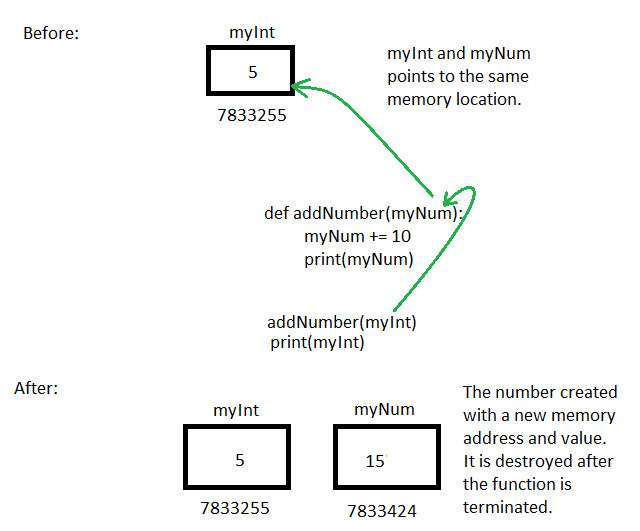
Immutable Type with Function
An immutable variable when passed as parameter will act list it is passed by value because it will not change the original value passed variable.
Python Mutable Type
There are newer data types in python that allows to change the original variable data.
myList = ["Apple","Orange","Grapes"]
print(id(myList))
The above is a list data type which is mutable. That means you can change it without re-declaring it in a new location.
myList = ["Apple","Orange","Grapes"]
# printing the memory address of the list
print(myList)
print(id(myList))
# adding banana to the list
myList.append("Banana")
# print the memory address of the updated list
print(myList)
print(id(myList))
Once we run the program, the program adds a new item to the list. We also print the original list with the updated list.
Here output is given below.
['Apple', 'Orange', 'Grapes']
321864522760
['Apple', 'Orange', 'Grapes', 'Banana']
321864522760
The list is updated and the new item appears in the list. However, you note that the memory address of the myList has not changed. That is because the list data type is mutable.
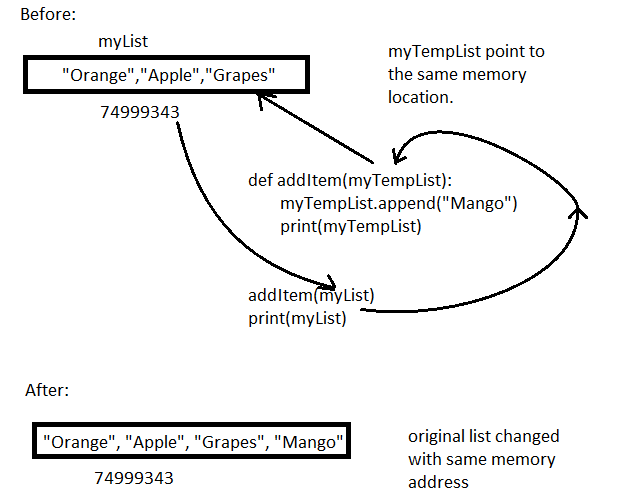
Mutable Variable and Function
A mutable variable when passed as parameter to the function will compute and change the original value of the variable. It works similar to passing by reference to a function.
Re-Declaration
Whenever we re-declare a mutable variable, it will be created in a new location. However, immutable variable is value based, therefore, when you create a new variable and assign it some value. If the value is already available in the memory. Python assign that value to new variable.
Suppose myInt has a value of 23 stored at 74384844. If you re-declare myInt than it is going to point to same memory location 74384844 where 23 is available.
See the example below.
print("Before")
myInt = 23
myStr = "Hello"
myList = [1, 3 , 6, 9]
print(id(myInt))
print(id(myStr))
print(id(myList))
# re-declare the variable with same value
print("After")
myInt = 23
myStr = "Hello"
myList = [1, 3 , 6, 9]
print(id(myInt))
print(id(myStr))
print(id(myList))
The output of the program is given below.
Before
140713857295440
321852102896
321864540808
After
140713857295440
321852102896
321852148936
The value of immutable type is does not change memory location because it is assigning the available value 23 and “Hello” in the memory. The value of mutable variable myList changes due to re-declaration.
Python Passing-By-Reference vs. Passing-By-Value
In earlier articles, you have learned about python functions and their types. In this article, you will learn about passing-by-reference vs. passing-by-value in python. This concept is already well known in many programming languages.
We will understand the difference between passing-by-reference vs. passing-by-value with respect to python programming language.
Before we begin, you must understand how variables are stored in python.
How Variables Are Stored in Memory ?
A variable is simply a container in python, an identifier that points to some data value. Each data item has a data types associated with it. A data type can be mutable or immutable, about which we will discuss later.
Suppose we declared a variable – myInteger and assigned it value of 200. See the figure below where each box is a memory location.
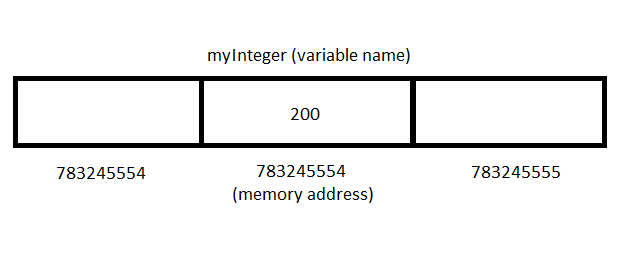
A python variable points to a memory location and the value of the variable is stored in that location. Each memory location is identified by its own memory address.
Passing-By-Reference
By default, python pass the variable to a function as a reference. In this technique, the memory location of the variable is sent to the function.
If the function is able to change the original value of the variable using the reference. We call it passing-by-reference.
Consider following example.
# A new list with memory location
myList = ["Orange", "Apple","Grapes"]

# Function to add an item to the list
def addItem(myTempList):
    myTempList.append("Mango")
    print(myTempList)
# Print the original list
addItem(myList)
print(myList)
The program add takes the argument myList, and myTempList in the function definition also points to myList data. Both of them points to same memory location.
Output of the program is given below.
['Orange', 'Apple', 'Grapes', 'Mango']
['Orange', 'Apple', 'Grapes', 'Mango']
The output shows that the original myList and the myTempList are same. This is the effect of passing by reference as it changes the original data.
Note: A data type must be mutable to be able to change original data.
Passing By Value in Python
Python support passing by value which means only value of the variable is send to the function. Therefore, it is not going to affect the original variable.
The result of the computation is stored in a new memory location.
For example.
myInt = 45
print("myInt",id(myInt))
mySecondInt = myInt
print("mySecondInt",id(mySecondInt))
myInt = 10
print("myInt",id(myInt))
myInt += 23
print("myInt",id(myInt))
There are 3 variables in the above code – myInt and mySecondInt.
mySecondInt is holds the same value as myInt. In the next line, we changed the value of myInt to 10. The output of the program is given below.
myInt 140721280886544
mySecondInt 140721280886544
myInt 140721280885424
myInt 140721280886160
The program prints memory address of myInt and mySecondInt which is the same address.
The variable myInt is re-declared and it changed the memory address of the variable. It did not change the original value. Also, when myInt is incremented by 23, it did not change the value, but created a new myInt with a different memory location.
There are two takeaway from this:
- Declaration change the variable with new memory address.
- Primitive operation on variable changed its memory rather than changing the original variable.
The above is the nature of passing by value. The passing by value do not change the original value, but create a new one.
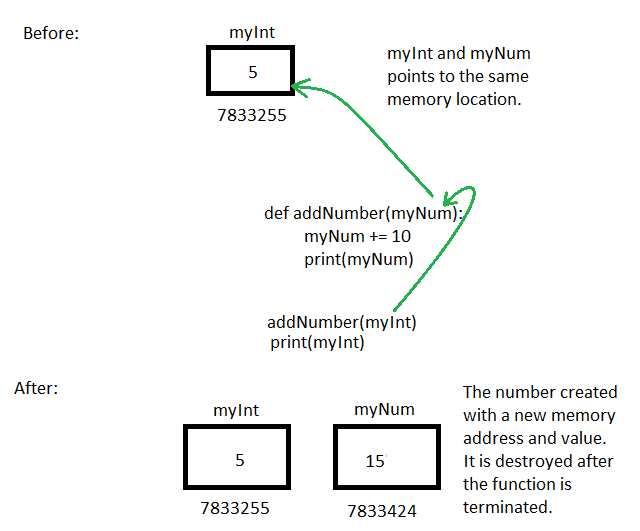
Consider the following program which uses passing by value.
myInt = 5
def addNumber(myNum):
    myNum += 10
    print(myNum)
    print("Memory Address of myNum",id(myNum))

addNumber(myInt)
print(myInt)
print("Memory Address of myInt",id(myInt))
The output of the program is given below.
15
Memory Address of myNum 140721280885584
5
Memory Address of myInt 140721280885264
Note that the value and memory address of the myNum and myInt is totally different. The original variable myInt was passed to the function, however, it was never changed.
This is passing by value which does not affect the original passed arguments.
Summary
- Python by default pass by reference
- The pass by reference change the original value of variable passed as arguments. The variable must be mutable.
- Pass by value does not change the original variables passed to the function, and make a new variable. The data type must be immutable.
Python Data Structures Overview
In this article, you will get python data structures overview. Python data structures is arranging abstract data types to increase their accessibility and efficiency. Python comes with basic data types such as integer, float and abstract data types like list, dictionaries, set and so on
Almost everything can be done using python basic data types, which are converted into 1s and 0s. However, complex problems cannot be solved using basic types. Therefore, we can create abstract types using these basic types to solve particular problems.
For example, we can use strings and numbers to create a python list or dictionaries.
List Like Structures
Python support list and list-like data structures where you can store list of values of different types under one variable name.
If you want to access an element from list then use an Index value.
Python Data Structures Overview
In this section, we will discuss about all the data structures available with python language. Also, you learn some advanced computer science concepts in this section. Here is a list of data structures and concepts that you will learn.
Python Concepts
You will learn some important concepts such as passing-by-reference vs. passing-by-value, mutability, mutable variables vs. immutable variables, and basics of python methods.
Basic Data Types
String – A data types that holds a string of characters accessible through index value.
List – A data type that holds multiple individual data values call under one variable name. It is very similar to concept of array in other programming languages such as C/C++, Java, etc/
Dictionary – A data type that use to store data as key/value pairs. You must enter the key value access the data from a dictionary.
Python Nested Try-Catch
In earlier lessons, you learned about try-catch-else-finally blocks. In this article, you will learn that we can put a try-catch block inside another try-catch block. Therefore, there can be more than one level of python nested try-catch blocks.
Understanding Nested Try-Catch
Each of these try-catch will handle different exceptions. Earlier we have seen exceptions at the same level. But, the objective of python nested try-catch is to find errors at different levels of code. See the figure below to understand how it works.
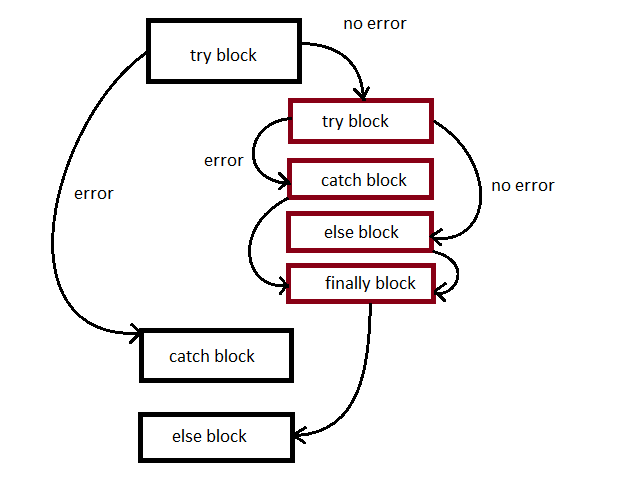
The program first checks the outer try-catch block and if there is no exception, continues with the inner try-catch block.
The inner try-catch block run independently and any exception or error is handled using inner catch block and all other blocks are executed sequentially.
Note that nested try block will not execute if outer try-catch has an error.
Example #1 : Python Nested Try-Catch
In this example, we will receive amount, rate, and year as inputs and compute simple interest and total amount.
The user will enter the value and we want to make sure that there is no Type Error. Therefore, we will get the correct input.
Only after we receive correct input we must do compute the simple interest.
# check the correct input
try:
   amount = int(input("Enter the amount: "))
   rate = float(input("Enter rate in decimal, eg 0.12: "))
   year = int(input("Enter number of Years: "))
   simple_interest = 0.0
   total = 0.0
   # compute the simple interest
   try:
      simple_interest = amount * rate * year
      total = amount + simple_interest
      print("Simple Interest = ", simple_interest)
      print("Total amount", total)
   except Exception as err:
      print(err)
   else:
      print("Successfully Computed SI")
   finally:
      print("Completed!")
except ValueError as err:
   print("Wrong type! try again later")
In the above program, we check input types and if the input types are not correct there will be an error and the exception is caught.
For example, user input 15000.42 as amount which is a float value, however, the program is expecting an integer input. Therefore, it will cause a Value Error.
Enter the amount: 15000.42
Wrong type! try again later
>>>
If the user put all values correctly, then the nested try-catch will be executed.
The output of the above is given below.
Enter the amount: 15000
Enter rate in decimal, eg 0.12: 0.9
Enter number of Years: 5
Simple Interest =  67500.0
Total amount 82500.0
Successfully Computed SI
Completed!
>>>
Note that all the other blocks such as else and finally also executed from the nested try-catch.
Example #2: Python Nested Try-Catch
Here we take a real world example, of file handling. Whenever, you try to manipulate a file. The first try-catch block will try to catch any file opening exceptions. Only after that file is opened successfully, nested try-catch is executed and catch other errors.
First step is to create a file named testFile.txt and put some 4 or 5 lines of information.
Save the file in the same directory as the above program. Suppose the program name is file_m.py, then you must put testFile.txt in the same directory as file_m.py.
Here is the code for the file_m.py.
# File Exception Handling with Nested Try-Catch
try:
    file = open("testFile.txt","r")

    # print all file information to console
    try:
        for line in file:
            print(line)
    except Exception as error:
        print(error)
    else:
        print("Success")
    finally:
        file.close
        print("File closed")
except (FileNotFoundError, PermissionError) as error:
    print(error)
The program above checks if there is a FileNotFoundError or a PermissionError happens. If file exists and there is no permission error. For example, suppose the file does not exist. Then you should receive error given below.
/File_Exception_Handling_With_Nested_try.py
[Errno 2] No such file or directory: 'test.txt'
>>>
The output of the above program is given below.
Orange

Mango

Banana

Grapes
Success
File closed
>>>
The nested try block will continue to manipulate the file and print contents of the file to the console. In the next article, we will discuss how exception handling is done with loops and control structures.
Python Exception Handling With Finally
In the previous article, you learned about different ways of handling an exception in the try block. However, there are some codes that are bound to run no matter what.
It does not matter if an exception happens or not.A block of code must run regardless of the outcome. These type of codes run in finally block.
Motivation for Finally Keyword
What is the reason to use finally as part of exception handling code. It is because the exception handling process starts at try block and we want to target try block for which there must be exception handling.However, if you notice all codes need not be part of try block.
In this process of simplification, some codes are clearly not part this try-catch scenario.Therefore, these codes that are independent of try-catch are put at the end of the exception handling process. Hence, the name finally.
Example Program: Python Finally
In this example, we will use the file handling code by python. The python program opens a file called myFile.txt and then read its content. If the file does not exist, or there is no permission to open the file we will catch it using except block.
At the end of the program the opened file must be closed no matter what. This is something we need to do regardless of try-catch block. Therefore, we can include this code in finally.
# Program to demo finally block in Python exception handling
try:
    f = open("myFile.txt", "r")
except Exception as err:
    print(err)
else:
    result = f.read()
    print(result)
finally:
    f.close
The program opens the file and read the content of the file. At the end, it must close the open file regardless of whether file was opened or failed to open.
f.close
The above is the code to close the file.
In the next article, we will discuss about nesting of try-except blocks.
Python Exception Handling With Else
The else block in python is also part of the exception handling. The try block when finds an error, jumps to the catch block. However, we want some behavior when the try block itself is successful.
The response code when the try block is successful is written in the else block. Note that the else block is also used in if-then-else conditional.statements
But here is if block is replaced with try block and the execution of else block does not depend on the failure of if-block, but on successful completion of the if block.
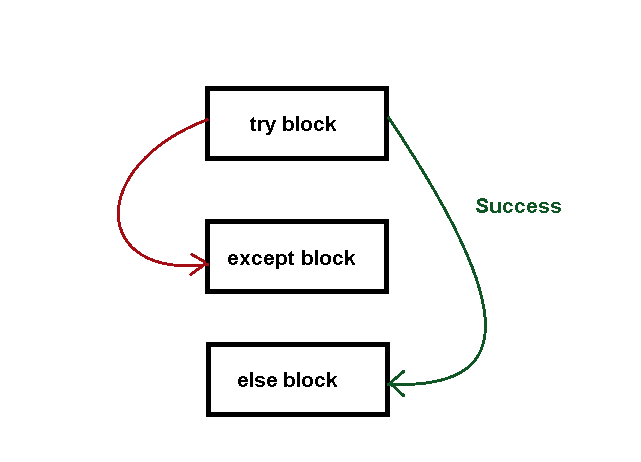
The above figure suggests that a try except and else block can exist together. If the try is successful , then execute the else block, otherwise, execute the except block because an exception has occurred.
Example Program #1: Exception Handling With Else
In this example program, we try to compare two numbers, if the first number is greater than second number, the python will .multiply these two numbers, else do nothing.
There will be an exception to check Type Error. Here is the code for the program.
# Read two numbers
num1 = int(input("Enter your first number: "))
num2 = int(input("Enter your second number: "))
# try block begins
try:
    if num1 >= num2:
        print(num1, num2)
except TypeError:
    print("A Type Error Occurred!")
else:
    result = num1 * num2
    print("Output = ",result)
In the example above, there is not error because the only error expected is a Type Error. Once the try block finish comparing the numbers – num1 and num2. It jumps to the else block if num1 >= num2.
In the else block, we multiple two numbers and display the result.
Example Program #2:
Once common use of python is file handling. You must open a file with correct file name and path before using it. In this example, we will open a file successfully and when it is open, simply execute the rest of the codes in else block.
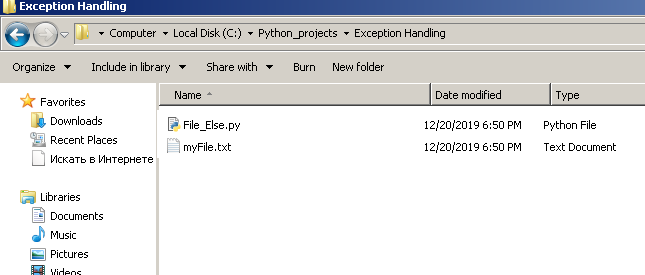
Before running this program, create a new file called myFile.txt in the same directory where you keep your python program.
This program is saved in C:\python_projects\Exception Handling\, therefore, create a file called myFile.txt in the same directory.
# Program to open a file with else block
try:
    f = open("myFile.txt", "r")

except Exception as err:
    print(err)
else:
    result = f.read()
    f.close
    print(result)
After executing the program, you will find that the program return “file read successfully” on the console because we asked the program to read the file and put its content on the console.
open() – It is the function that opens the file and takes two parameters – file name and mode
“r” – It is the mode in which we can do different operations on the file. “r” means read, “w” means write to file, “a” means append to the file.
Output of the Above Program
==== RESTART: C:/Python_projects/Exception Handling/File_Else.py ====
File read successfully
>>>
In the next article, you will learn about importance of python finally keyword.
Python Except Block
The python except block is the catch block in the exception handling mechanism. Any error or exception caught in the try block is caught by the python except block and response code is executed.
In the previous article, you learned about the try block and in the article, we will explore the except block in details.
Catching Different Types of Exceptions
A program can generate many errors and a single except always is not the right choice. You may catch a Name error in your program, but you may not be able to identify and catch a Value error in your program.
Therefore, you need
- multiple except blocks or catch blocks
- each must catch a specific error and respond to it
Naming An Except Block
You can name an except block and it will catch only those errors that it meant to be and respond appropriately.
Consider the following example.
try:
    x = 10
    y = 23
    z = y/0                # zero division error
    print("Successful",c)  # variable C does  not exist, it's a name error
except ZeroDivisionError:
    print("Unable to divide by zero!")
In the example above, there is a ZeroDivisionError at z = y/0. The except block is only looking for ZeroDivisionError. It will ignore any other exception or error.
Also, a try block may contain many errors, but as soon as an exception is met the try block stop the execution of codes and look for a except block(catch block).
Look at the print statement in the try block, it is trying to print a non-existing variable C. This will cause a Name Error, however, that does not happen because the try block already found the ZeroDivisionError. No further execution take place.
Here is the output of the above program.
== RESTART: C:/Python_projects/Exception Handling/named_exception.py ==
Variable does not exist
>>>
Let us modify the above program and add multiple exceptions.
Multiple Exception Handling in Python
Once we add multiple except blocks, each with its own name, we can catch and respond to many errors in the try block.
Here is the modified example from above.
try:
    x = 20
    y = 40
    z = y/x
    print("Successful",C)  # variable C not exist
except ZeroDivisionError:
    print("Unable to divide by zero!")
except NameError:
    print("Variable does not exist!!")
Now, the ZeroDivisionError is fixed and the program is trying to print non-existent variable C. This will result in a Name Error. Since, that is the only error we encounter, the except block (catch block) will respond immediately.
== RESTART: C:/Python_projects/Exception Handling/named_exception.py ==
Variable does not exist!!
>>>
Multiple Error Handling In the Same Except Block
You can also catch more than one error using same except block. You may have to identify the correct response based on the error. Consider the following example.
try:
    x = 10
    y = 23
    z = y/x
    print("Successful",C)
except (ZeroDivisionError , NameError):
        print("Unable to divide by zero! or a Name Error occurred")
The except block will catch any of the two errors – a ZeroDivisionError or a Name Error. However, the response is common to both the errors.
Multiple Exception Handling in Using Different Except Blocks
You do not need to keep all the exceptions grouped like in the above example. You may keep them separate and for each of these exception write a different response. This is certainly an improvement compared to grouping multiple exceptions in the same except block.
See the example below.
try:
    x = 10
    y = 23
    z = y/x
    print("Successful",C)
except NameError:
        print("Name Error occurred")
except TypeError:
    print("Type error occurred")
Each type of exception has its own response code.
Storing Exception in a Variable
Python programming allows you to catch an exception and store it in another variable. The you can print the value of that variable or manipulate it.
Here is an example,
try:
    x = 10
    y = 23
    z = y/"Hello"
    print("Successful",x)
except TypeError as err:
    print(err)
In the code above, the error is stored in the variable called err.Later, we printed the error using that variable. Here is the output to the program above.
unsupported operand type(s) for /: 'int' and 'str'
>>>
The error clearly states that it is a Type Error.
All the above errors are known error types. What if we want to catch unknown exception because in many programming languages , unknown exceptions happen all the time.
Handling Unknown Exceptions in Python
In python, you can handle all the unknown exceptions using a single except block called Exception.Let us see an example.
try:
    x = 10
    y = 23
    z = y/0
    print("Successful",x)
except TypeError as err:
    print(err)
except Exception:
    print("Unknown error occurred!")
The program above catch Type Error and if an error type is not type error, then the Exception block will catch it and print “Unknown error”.
Note that an exception block is catch unknown exceptions that may or may not happen. For all other types you must write your own error handling codes.
In the next article, we will discuss about the Else block and its role in exception handling.