C++ Program to Convert Infix to Postfix Using Stack
In this article, you will write a C++ program to convert infix expression to a postfix expression using stack operations.
This program is written using Turbo C++ compiler on a Windows 7 64-bit PC. You can use any other suitable C++ compiler and it will still work. Make sure to change the syntax according to the compiler you are using.
Problem Definition
The program requires infix expression as an input. Once the input is received, it will do following to convert the infix expression into a postfix expression. This program use a character stack.
- Receive the input expression with a ‘$’ sign at the end.
- Read the characters one at a time.
- If the character is alphabet, do not put on the stack, but print it.
- If the character is non-alphabet then put it on the stack, and print it if the priority is higher than the next character.
- If the character read is ‘(‘, print every thing from the stack until you reach ‘)’ character.
- Stack become empty, you continue with the rest of the expression.
- If you encounter a ‘$’ sign, the infix to postfix is completed.
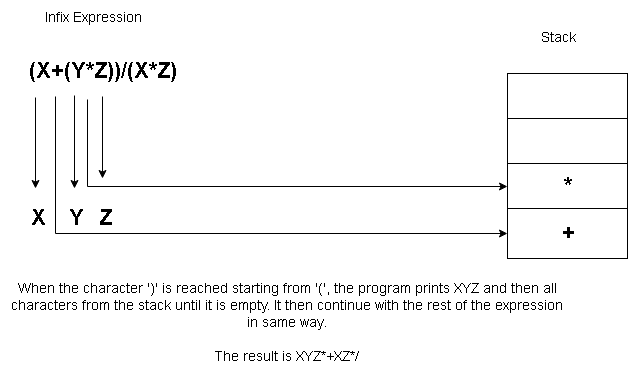
Source Code – Infix to Postfix
/* C++ Program To Convert Infix Expression
To Postfix Expression */

#include  "iostream.h"
#include  "string.h"
#include  "ctype.h"
#include  "conio.h"
#include  "stdio.h"
#include  "math.h"

class ex1 {

  char str[50];

public:

  void input();
  int strprt(char);
  int expprt(char);
  void convert();
  };

//Class declaration ends here

void ex1::input() {

  cout << "Enter the Infix expression"<< endl;
  cout << "End with $ sign:"<< endl;
  cin >> str;
  }

int ex1::strprt(char c) {

  int pr;
  switch(c) {

    case '#':

      pr = -1;
      break;

    case '(':
    case ')':
      pr = 0;
      break;

    case '*':
    case '/':
      pr = 2;
      break;

   case '+':
   case '-':
      pr = 1;
      break;
   }

   // Switch-Case ends here

   return(pr);
   }

   int ex1::expprt(char c) {

     int pr;

     switch(c) {

       case '(':
	pr = 4;
	break;

       case ')':
	pr = 0;
	break;

       case '*':
       case '/':
	pr=2;
	break;

       case '+':
       case '-':
	pr = 1;
	break;
	}

       return(pr);
       }

   void ex1::convert() {

     int i = 0;
     int top = 0;

     char stk[50],item;

     while(str[i]!= '$') {

       item = str[i];

       if(isalpha(item)) {

	 cout<< item;

	 }
      else {

	 if(item == ')') {

	   while(stk[top]!='(') {


	     cout << stk[top];

	     --top;

	     }
	  --top;

	 }

	 else {

	   while((strprt(str[top])) > expprt(item)) {

	     cout << stk[top];

	     --top;
	   }

	++top;

	stk[top] = item;

	}
     }

     i++;

     }

   while(top >= 1) {

     cout << stk[top];

     --top;

     }
   }

   //Function convert ends here

   // Main Function

   void main() {

     ex1 ob;

     clrscr();

     ob.input();

     ob.convert();

     getch();

     }
Output – Infix to Postfix
Enter the Infix expression End with the ‘$’ sign:
(X+(Y*Z))/(X*Z)
Output:
XYZ*+XZ*/C++ Program to Compute Sum of n^2/(n-1) Series
In mathematics, there are many series whose sum is calculated using computer programs to reduces the effort of doing enormous computations. This example program computes the sum of series (  ). The user has to input the value of n.
To write such programs you must be careful about two things – accuracy and type conversions. Accuracy means correct to at least 3 decimal places because series involves real values. A small difference can produce wrong results.
Sometimes we need to do arithmetic between an integer value and a float value. In such cases, to get the correct value of the expression to convert both operands into the same type using C++ type cast operator.
Before you begin, learn basics of C++ programming. Continue reading if you are familiar with the basics.
- C++ program structure
- How to install Turbo C++ compiler
- How to compile a program using Turbo C++ compiler
- C++ data type classification
Problem Definition
We want to write a program that computes the sum of the following series and prints an output to the console.
n^2/(n-1)
When the program runs, the user provides the value of  and the program computes the sum of all values up to n. The program cannot have a value less than
  because any value less than is undefined.
For example,
\begin{aligned}
&if \hspace{5px} n = 1\\\\
&= 1^2/(1 - 1)\\\\
&= 1/0\\\\
&= Undefined
\end{aligned}
To understand the problem let us do a manual computation and verify the results using our example program. Suppose  , then
\begin{aligned}
&= \frac{2^2}{(2 - 1)} + \frac{3^2}{(3-1)} + \frac{4^2}{(4-1)}+\frac{ 5^2}{(5-1)}\\\\
&= 4/1 + 9/2 + 16/3 + 25/4\\\\
&= 20.08
\end{aligned}
You can use a calculator or do fraction addition. The final sum of the series is given below.

Now, you need to verify the output by running the C++ program for the sum of the series given below.
Program Source Code
#include <cstdlib>
#include <iostream>

using namespace std;
int main(){

int n,i;
double sum;

//initialize sum to 0
sum = 0.0;

//read value of N
cout << "Enter the value of n:";
cin >> n;

//Compute the value of the sum, but the equation has a restriction.
//The value of n should not be less than 2
   for(i=2;i<=n;i++)
   {
      sum = sum + float(i * i)/float(i-1);
   }

//Printing the Output to Console
cout << "\n";
cout << "Sum of the Series n^2/(n-1) =" << " " << sum << endl;
cout << "\n";

system("PAUSE");
return EXIT_SUCCESS;
}
Output
The output of the program is the same what we received using manual computation method. Therefore, the program works correctly. You may try different inputs.
Enter the value of n:5
Sum of the Series n^2/(n-1) = 20.0833
Press any key to continue . . . C++ Program to Find Trigonometric Ratios
This program is a demonstration of the use of C++ math header. Given 3 sides or angle values of a triangle, this program computes all 6 trigonometric ratios and print the result to the console.
The trigonometric ratios are calculated using builtin function from math.h header file.
Learn the basics of C programming before you try this example.
Problem Definition
The program gives two option to the user during run time. Depending on the available input values the user selects following.
- Find the 6 trigonometric values for a given angle.
- Find the 6 trigonometric values for given 3 sides.
If the user chooses the first option, then he or she must input the angle measure for which they wish to find the trigonometric ratio values.
The program than uses builtin trignometric functions from math.h header file such sin(), cosine() and tan() functions to computes the output.
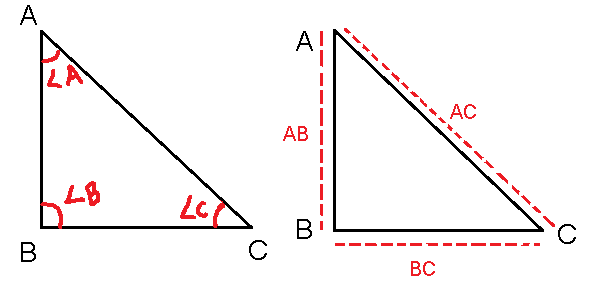
Secondly, if the user choice is finding trig rations using the length of sides of the triangle, then they must enter the values of sides.
First, enter the length of two shorter sides – AB and BC – where AB is opposite side and BC is the adjacent side of a triangle.
Then enter the length of the longer side (hypotenuse), but the value is not accepted if it is less than AB and BC because a hypotenuse is the longest side in a triangle.
The program computes the trigonometric ratios in the following manner.
\begin{aligned}
&sin \hspace{3px}\theta = \frac {opposite \hspace{3px}side}{hypotenuse}= \frac{AB}{AC}\\\\
&cos \hspace{3px}\theta = \frac {adjacent \hspace{3px}side}{ hypotenuse} =  \frac {BC}{AC}\\\\
&tan \hspace{3px} \theta =  \frac {opposite \hspace{3px}}{ adjacent side} = \frac { AB}{AC}\\\\
&cosec \hspace{3px}\theta =  \frac {1}{sin \hspace{3px}\theta}\\\\
&sec \hspace{3px}\theta =  \frac {1}{cos \hspace{3px} \theta}\\\\
&cot \hspace{3px}\theta =  \frac {cos \hspace{3px}\theta }{sin \hspace{3px} \theta}
\end{aligned}
Program Source Code
#include <cstdlib>
#include <iostream>
#include <cmath>
#include <iomanip>

using namespace std;

int main()
{
   float sine,cosine,tangent,cotangent,cosecant,secant;
   float rad,degree;
   rad = degree = 0.0;
   int choice;

//sine=cosine=tangent=cotangent=cosecant=secant = 0.0;

   cout <<"1. Find trig ratios using radian measure:" << endl;
   cout <<"2. Find trig ratios using length of sides:" << endl;
   cout <<"Enter your choice:";
   cin >> choice;
   if(choice == 1)
   {
      cout << "Enter the angle in degrees:";
      cin >> degree;
      rad = (degree/180) * 3.14;
      sine = sin(rad);
      cosine = cos(rad);
      tangent = tan(rad);
      secant = 1/cosine;
      cosecant = 1/sine;
      cotangent = cosine/sine;
   }
  else if(choice == 2)
  {
      float opposite,adjacent,hypotenuse;
      cout << "Enter the length of each side:" << endl;
      cout << "Length of opposite side(AB)?:" << endl;
      cin >> opposite;
      cout << "Length of adjacent side(BC)?:" << endl;
      cin >> adjacent;
      cout << "Length of hypotenuse (AC)?:" << endl;
      cin >> hypotenuse;
      sine = opposite/hypotenuse;
      cosine = adjacent/hypotenuse;
      tangent = opposite/adjacent;
      secant = 1/cosine;
      cosecant = 1/sine;
      cotangent = cosine/sine;
 }
 else
 {
      cout << "Incorrect ! Choose correct option:" << endl;
 }
//checking valid values for sin,cos,tan,cosec,sec,cot before printing

if(sine >= -1.0 || sine <= 1.0)
{
   cout << "Sin" << " " << degree << "=" << sine << endl;
}
else
{
cout << "Sin" << "=" << "Undefined" << endl;
}

if(cosine >= -1.0 || cosine <= 1.0)
{
   cout << "Cos" << " " << degree << "=" << cosine << endl;
}
else
{
   cout << "Cos" << "=" << "Undefined" << endl;
}

if(degree != 90)
{
   cout << "Tan" << " " << degree << "=" << tangent << endl;
}
else
{
   cout << "Tan" << "=" << "Undefined" << endl;
}

if(degree != 90)
{
   cout << "Sec" << " " << degree << "=" << secant << endl;
}
else
{
   cout << "Sec" << "=" << "Undefined" << endl;
}

if(degree != 0 && cosecant <= -1.0 || cosecant >= 1.0)
{
   cout << "Cosecant" << " " << degree << "=" << cosecant << endl;
}
else
{
   cout << "Cosecant" << "=" << "Undefined" << endl;
}

if(degree != 0)
{
   cout << "Cotangent" << " "<< degree << "=" << cotangent << endl;
}
else
{
   cout << "Cotangent" << " " << "=" << "Undefined" << endl;
}

system("PAUSE");
return EXIT_SUCCESS;
}
Output
1. Find trig ratios using radian measure:
2. Find trig ratios using length of sides:
Enter your choice:1
Enter the angle in degrees:90
Sin 90=1
Cos 90=0.000796274
Tan=Undefined
Sec=Undefined
Cosecant 90=1
Cotangent 90=0.000796275
Press any key to continue . . .
If user choose the second option, then you get following results.
Enter your choice:2
Enter the length of each side:
Length of opposite side (AB)?:
5.6
Length of Adjacent side (BC)?:
7.8
Length of hypotenuse (AC)?:
10.55
Sin 0=0.530806
Cos 0=0.739336
Tan 0=0.717949
Sec 0=1.35256
Cosecant 0=1.388393
Cotantent = Undefined
Press any key to continue . . .C++ Operator Classification
The C++ programming language offers different types of operators. These operators are used in expressions that evaluate to a single value. Sometimes the operator is used in decision making that changes the flow of the program.
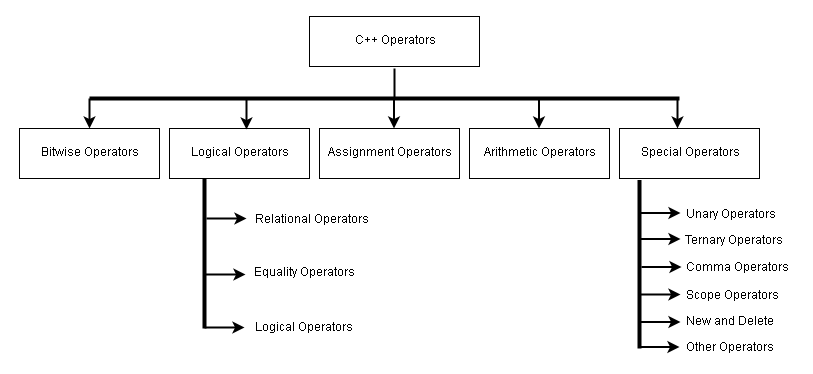
Here is the diagram that classifies C++ operators into different categories.
Arithmetic Operators
| Operator | Description |
| + | Addition operation |
| – | Subtraction operation |
| * | Multiplication |
| / | Division operation |
| % | Mod operation ( gives remainder) |
Assignment Operators
| Operator | Description |
| = | Assigns right-value to left-value |
| += | Assigns ( left-value + right-value) to left-value |
| -= | Assigns ( left-value – right-value) to left-value |
| *= | Assigns ( left-value * right-value) to left-value |
| /= | Assigns ( left-value/ right-value ) to left-value |
| %= | Assigns (left-value % right-value) to left-value |
| >>= | Right-shift and then assign to left-value |
| <<= | Left-shift and then assign to left-value |
| &= | Bitwise AND operation and then assign to left-value |
| |= | Bitwise OR operation and then assign to left-value. |
| ~= | Bitwise complement and then assign to left-value |
Note: In the following expression  is left-value and
  is right-value.
A = 10;
Logical Operators
| Operator | Description |
| < | Less than |
| > | Greater than |
| <= | Less than or equal to |
| >= | Greater than or equal to |
| == | Equal to |
| != | Not equal to |
| && | AND operation |
| || | OR operation |
| ! | NOT operation |
Bitwise Operators
| Operator | Description |
| & | Bitwise AND operation |
| | | Bitwise OR operation |
| ^ | Bitwise Exclusive OR (XOR) operation |
| >> | Bitwise Right Shift |
| << | Bitwise Left Shift |
| ~ | Bitwise Complement |
Unary Operators
| Operator | Description |
| * | Pointer reference |
| & | Reference to address of a variable |
| – | Negative value |
| ! | Not operation |
| ~ | Bitwise complement |
| ++ | Increment operator |
| — | Decrement operator |
| type | Forced conversion to another data type |
| sizeof | Size of a data type in bytes |
C++ Program to Implement Queue using Arrays
Queue is a linear data structure and it works on the principle of First In, Last Out (FILO). One of the common ways to implement a queue is using arrays. The elements are inserted at the front of the queue and removed from the rear of the queue.
Before you learn about how to implement a queue, be familiar with the concept of arrays and queue. If you are familiar with the basics, continue reading.
Problem Definition
This program implements a simple queue in which elements are inserted from the front and removed from the rear of the queue as mentioned earlier. So we maintain two variables to keep track of queue status.
You can perform three operations on a queue.
- Insert a Queue Element
- Delete Queue Element
- Display Queue Elements
But, remeber that the queue operations are limited by the status of the queue at given time.If queue is full, then there is no insertion, or if queue is empty then there is not deletion.
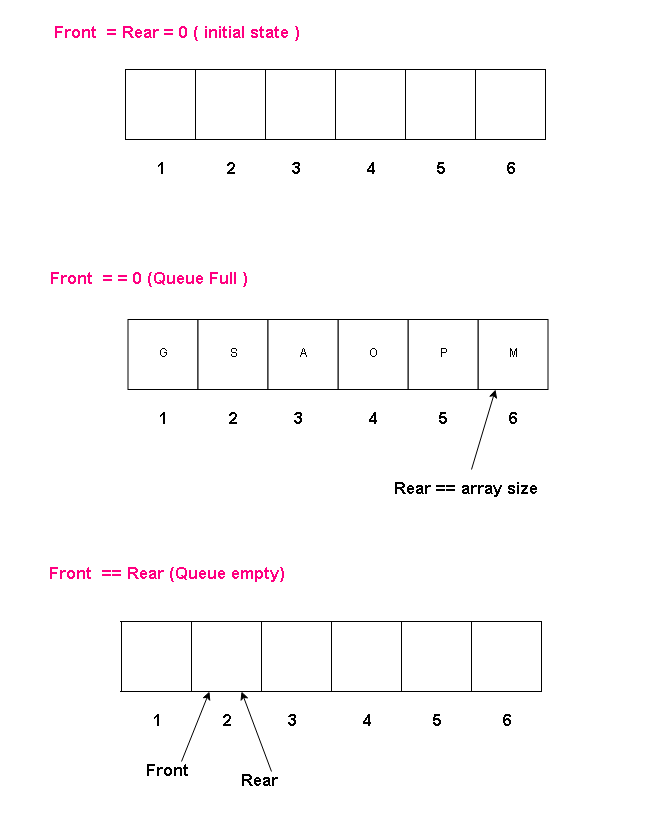
Therefore, queue states are following.
Queue Initial State
front = rear = 0
Queue is Empty
front == rear
Queue is Full
front = = 0
rear = = Queue size
In any case, the rear will not exceed the size of the queue.
Flowchart
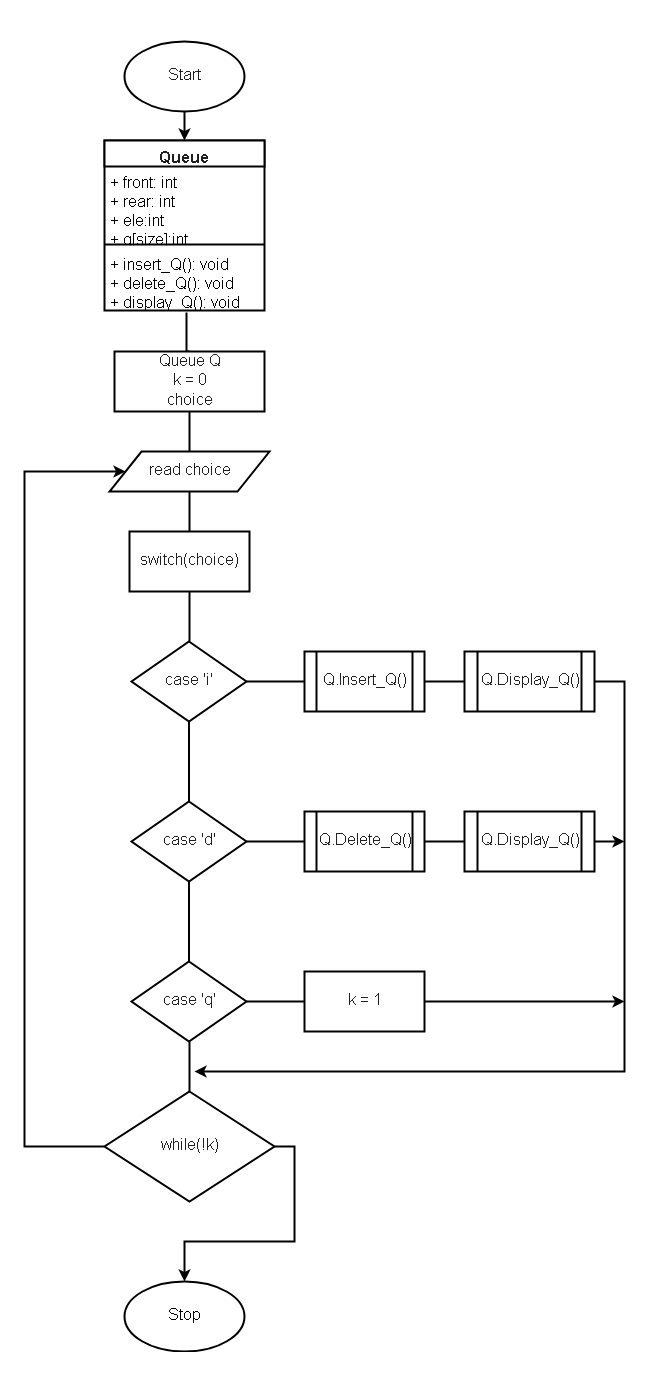
From the following flowchart, it is clear that when user input their choice, the Queue object calls specific functions like Insert_Q() or Delete_Q() and display results immediately using Display_Q() function. The function definition is given in the program code section. The queue operations continue until user decides to quit with choice ‘q’.
Program Code
//Queue using Arrays

#include <cstdlib>
#include <iostream.h>
#include <string.h>
#include <ctype.h>
#include <process.h>

#define size 5

// class queue definition

class Queue
{

    public:

        int rear, front;
        int ele;
        int q[size];

    Queue()
    {

        rear = front = 0;

    }

    void Insert_Q();
    void Delete_Q();
    void Display_Q();

};

// Function definition Insert_Q()

void Queue::Insert_Q()
{

    cout << "Input Queue Element:";
    cin>> ele;

// rear must never be greater than size

    if(rear < size)
    {

        rear++; //increment the rear
        q[rear] = ele; // insert the new element

        if(front == 0)
        {

            front=1;

        }
        else
        {

            cout << "Queue is Full\n";

         }

    }

}

// Function Definition for Delete_Q()

void Queue::Delete_Q()
{

// Find out if queue is empty

    if(front == 0)
    {

        cout << "Queuy is Empty. Nothing to Delete!" << endl;
        return;

    }
    else
    {

        ele = q[front]; // delete the element that front is pointing to
        cout << "Element Deleted :" << ele << endl;

    }

    if(front == rear)
    {

        front = 0;
        rear = 0;

    }
    else
    {

        front = front + 1;

    }

}

//Function Definition for Display_Q()

void Queue::Display_Q()
{

    if(front == 0)

        return;

    for(int i=front;i<=rear;i++)
    {

        cout << " " << q[i];

    }
        cout << "\n\n";
}


using namespace std;

int main()
{

    Queue Q;

    int k = 0;

    char choice;

do
{

    cout <<"Insert -> I Delete -> D Quit -> Q " << endl;
    cout <<"Input the choice:"<< endl;

    do
    {
        cin >> choice;
        choice = tolower(choice);

    }while(strchr("idq",choice)==NULL);

    cout << "Your choice is -> " << choice << endl;

    switch(choice)
    {

        case 'i':
            Q.Insert_Q();
            cout <<"Queue after Insertion:";
            Q.Display_Q();
            break;

        case 'd':
            Q.Delete_Q();
            cout <<"Queue after Deletion"<< endl;
            Q.Display_Q();
            break;
        case 'q':
            k=1;
    }

}while(!k);

system("PAUSE");
return EXIT_SUCCESS;
}
Output
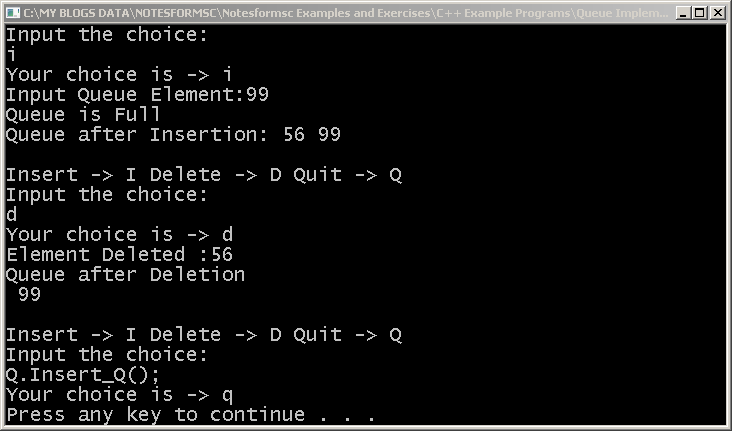
We input two numbers first using the choice ‘i’ and then deleted 56 from the front of the queue.
C++ Program to Compute Net Present Value (NPV)
This is a simple C++ program to compute Net Present Value ( NPV ) for a imaginary project. The NPV is computed to analyses an investment taking into account its discounted cash inflows for a specific period of time.
The program is intended for both beginners and intermediate learners of C++ programming. Dev-C++ is used for compiling the program. You may use any standard C++ compiler like Turbo C++ and the program will still work. You first try the program on your own and then look at the program code and verified output to compare the results. In this way, you will learn effectively.
Problem Definition
The purpose of NPV is to evaluate the profitability of an investment. Before you try to understand the Net Present Value (NPV) of an investment, you must understand a few terminologies.These terms are used in the NPV calculations.
Future Value (FV)
If you invest $100 at a rate of 10% per annum. After 1 year you will receive $110 and this is called the Future Value (FV). To compute FV use the following formula.
$latex FV = C * (1 + r)^n$
where
$latex C$ = initial investment
$latex r$ = interest rate (in percentage)
$latex n$ = number of periods ( Note: period can be monthly, quarterly, or yearly)
Present Value (PV)
Suppose you are getting an amount of $120 for an investment at rate of 10% per annum. The find the Present Value(PV) of $120 use the following formula.
$latex PV = FV * 1/(1 + r)^n$
where
$latex FV$ = future Value
$latex r$= interest rate ( here it called a discount rate)
$latex n$ = number of periods ( Note: period can be monthly, quarterly, or yearly)
You can see that there is an inverse relationship between PV and FV for an investment.
Net Present Value (NPV)
Business transactions are not as simple as given in the above examples. In an accounting period, there can be numerous cash flows for a business. The Net Present Value calculation takes into account each type of cash flow – incoming and outgoing, take the Present Value (PV) of each cash flow, and add the incoming, or subtract the outgoing cash flow to determine the NPV of an investment business.
To compute the NPV use the following formula,
$latex NPV = -C_{0}$ + $latex C_{1}$ * $latex \frac{1}{(1 + r)^1}$ + $latex C_{2}$ * $latex \frac{1}{(1 + r)^2}$ + … + $latex C_{n}$ * $latex \frac{1}{(1 + r)^n}$
where
$latex -C_{0}$ = initial investment
$latex C_{n}$ = future incoming cash flow at a specific period.
$latex r$ = discount rate
$latex n$ = number of periods.
Example
Consider the following example, where an investor wants to find the NPV of a project called Project-I. The initial investment of the project is $100,000, the discount rate is 10% and the investment is for 5 years. He receives a regular cash flow at the end of every period and the discounted cash flow is calculated accordingly.

The following program uses the above data as input values and computes the NPV and the net profit for the business. The NPV is given by following formula.
NPV = Total Discounted Cash Flow (DCF) – Initial Investment (C)
NPV = $620.9213231
Net Profit = Total Cash Flow (TCF) – Initial Investment (C)
Net Profit = $50000
Both the figures are given in the above table. Based on the NPV value, you can decide whether to accept the proposal or reject it.
Program Code – Program to Compute NPV
Find the program source code for Net Present Value (NPV ) in C++. The input for the program is given in the previous section.
/* Program to compute the Net Present Value of a Project*/
#include <iostream.h>
#include <stdio.h>
#include <stdlib.h>
#include <conio.h>
#include <math.h>

int main()
{

    double NPV,initial,cashflow[100],dcf[100],year,discount_rate;
    double discount_factor[100],temp,d,total,Net_Profit;
    int i;

    NPV = 0.0;
    Net_Profit = 0.0;

    cout << "Enter Discount Rate:";
    cin >> discount_rate;
    cout << "Enter Year:";
    cin >> year;
    cout << "Enter Initial Investment:";
    cin >> initial;
    cout << "Enter Year wise cashflow" << endl;

    for(i=1;i <= year;i++)
    {
        cout << "Year\t" << i << "\t" << ":";
        cin >> cashflow[i];
    }

//Compute the discount Factor

    for(i=1;i <= year;i++)
    {
        temp = discount_rate/100;
        d = temp + 1 ;
        discount_factor[i] = 1/(pow(d,i));
        dcf[i] = cashflow[i] * discount_factor[i];

    }

    for(i=1;i <= year;i++)
    {

        NPV = NPV + dcf[i];
        total = total + cashflow[i];
    }

        Net_Profit = total - initial;
        NPV = NPV - initial;
        cout << endl;

    for(i=1;i <= year;i++)
    {
        cout << discount_factor[i] << "\t" << dcf[i] << endl;
    }

    cout << endl;
    cout << "NPV=" << NPV << endl;
    cout << "Net Profit=" << Net_Profit << endl;
    getch();
    return 0;

}
Output – NPV Program
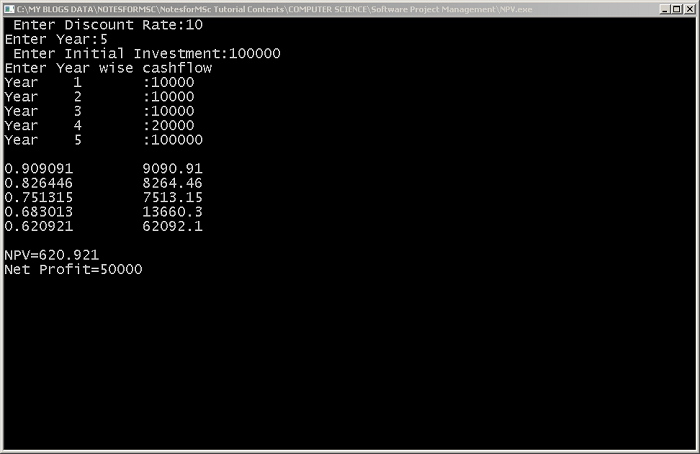
The output from the above program is given below. The output is same as given in the table from the earlier section. If you cannot find the correct answer, then check the input values.
C++ Program to Print Pascal Triangle
In this article, you will learn to write a C++ program to print pascal triangle. A Pascal triangle is a very important mathematical concept. It is named after French mathematician Blaise Pascal. A Pascal triangle is used to find the coefficients of a binomial expansion
.
Read: C++ program to print number triangles
This program is intended for intermediate learner of C++ programming language. We used Dev C++ compiler version 4.9.9.2 installed on Windows 7 64-bit system to compile and test the program.
Problem Definition
A typical binomial look like the following, because it has only two variables – a and b.
$latex (a + b)^2$ = $latex a^2 + 2ab + b^2$
The right-hand equation is called the binomial expansion. Each of the binomial expansion terms has a coefficient.
$latex a^2$ = coefficient is 1.
$latex 2ab$ = coefficient is 2.
$latex b^2$= coefficient is 1.
Pascal Triangle
The Pascal triangle display all coefficients of all powers from 0 for a binomial expansion.
$latex (a + b)^n $
Where n is the power of binomial whose coefficient we want to know.
The top (n = 0) is one has a coefficient of 1. The coefficient of 4<sup>th</sup> row (n = 4) 2<sup>nd</sup> element is 6.
You can find the coefficient of any term by adding previous two terms just above the term you are looking for.
Get coefficient of 3rd row and 1st term = 3
Get coefficient of 3rd row and 3rd term = 3
Add them together and you get
Coefficient of 4th row and 2nd term = 6
Formula
There is a formula for finding the coefficient of any term – given the row (n) and the term (r);nCr = n! / r! (n – r)!
To understand the formula and C++ program, you must learn these two mathematical concepts.
- Factorial
- Combination
We have used the formula of a coefficient to find coefficients of all the rows in this program.
Program Code – Program to Print Pascal Triangle
#include <iostream.h>

#include <stdio.h>

#include <stdlib.h>

#include <cmath.h>

using namespace std;

int main()
{

    int p, j;

    int row, lines, element, term;

    cout << "Enter Number of Rows in Pascal Triangle:";

    cin >> lines;

    int fact (int);

    for (row = 0; row < lines; row++)
    {

        for (j = 0; j <= (lines - row - 2); j++)

        cout << " ";

        for (element = 0; element <= row; element++)
        {

            p = row - element;

            term = fact (row)/ (fact (element)* fact (p));

            cout << " " << term;

        }

        cout << "\n";

    }

    getch ();

    return 0;

}

/* Factorial Function */

int fact (int x)
{

    if (x == 1 || x == 0)
    {

        return 1;

    }
    else
    {

        return (x * fact(x-1));

    }

}
Output – Program to Print Pascal Triangle
The output of the program is given below. The program requires that you input the number of the row. A row is equal to the power of a binomial. The program prints all the coefficients of all the previous rows.
C++ Program to Print Number Triangles
The program to print number triangles uses two loops (usually while or for loop) and prints a triangle of numbers. In this example, we will see four such patterns of number triangle.
This program is written using Dev C++ version 4.9.9.2 installed on a Windows 7 64-bit PC. You may use any standard C++ compiler and the code in this program will still work.
The intent of this program is to develop an understanding of C++ loops for beginner C++ programmers.
How a loop starts and terminates?
How does a nested loop works?
These are some of the questions, we tried to answer using these examples. However, you as a learner must try to write the program on your own and then compare your results given here.
Problem Definition
We want to following 4 number triangles using nested for loops. You may try a different combination of loops for better learning. The number patterns are given below.
Each of this program take two “for” loop. The outer loop is for rows and inner loop is for columns.
Program Code – Pattern 1
The program code for pattern 1 is given below.
/* C++ Program to print the following number triangle
1
2 1
3 2 1
4 3 2 1
5 4 3 2 1
6 5 4 3 2 1
7 6 5 4 3 2 1
8 7 6 5 4 3 2 1
9 8 7 6 5 4 3 2 1 */

#include <conio.h>
#include <iostream.h>
#include <cstdlib>

int main()
{
   int i,j,n;
   n = 10;
   for( i = 1; i < n; i++)
   {
      for( j=i;j >= 1; j--)
      {
         cout << j;
      }
   cout << "\n";
   }
getch();
return 0;
}
Output – Pattern 1
1
2 1
3 2 1
4 3 2 1
5 4 3 2 1
6 5 4 3 2 1
7 6 5 4 3 2 1
8 7 6 5 4 3 2 1
9 8 7 6 5 4 3 2 1
Program Code – Pattern 2
The program code for pattern 2 is given below.
/* C++ program to print following number triangle
1
12
123
1234
12345
123456
1234567
12345678
123456789 */

#include <conio.h>
#include <iostream.h>
#include <cstdlib>

using namespace std;
int main()
{
   int i,j,n;
   n = 10;
   for(i = 1;i < n;i++)
   {
      for(j = 1;j<=i;j++)
      {
         cout << j;
      }
   cout << "\n";
   }
getch();
return EXIT_SUCCESS;
}
Output – Pattern 2
1
12
123
1234
12345
123456
1234567
12345678
123456789
Program Code – Pattern 3
The program code for pattern 1 is given below.
/* C++ Program to Print
987654321
87654321
7654321
654321
54321
4321
321
21
1 */

#include <conio.h>
#include <iostream.h>
#include <cstdlib>

using namespace std;

int main()
{

    int i,j,n;

    n = 10;

    for(i = 1; i <=10;i++) { for( j= n-i;j>= 1;j--)
        {

            cout << j;

        }

            cout << "\n";
    }

getch();
return EXIT_SUCCESS;

}
Output – Pattern 3
Program Code – Pattern 4
The program code for pattern 4 is given below.
/* C++ Program to print
123456789
12345678
1234567
123456
12345
1234
123
12
1 */

#include <conio.h>
#include <iostream.h>
#include <cstdlib>

using namespace std;

int main()
{

    int i,j,n;

    n = 10;

    for(i = 1; i <= n;i++)
    {

        for(j = 1; j <= n - i; j++)
        {

            cout << j;

        }

            cout << "\n";
    }

getch();

return EXIT_SUCCESS;

}
Output – Pattern 4
C++ Program for Compound Interest Calculations
In this example program for interest calculations, we will compute three different types of interests given the input – the principal amount, rate and time period.
The program intend to demonstrate the use of functions with return values for intermediate level learners of C++ programming.
This program is written using DEV C++ compiler version 4.9.9.2 installed on a Windows 7 64-bit PC. You may use any other standard C++ compiler such as Turbo C++ and the program will still work.
Problem Definition
There are three types of interests that we want to calculate using this program. Each of the interest is a separate function in the program that returns a value.
- Simple Interest
- Compound Interest
- Effective Annual Rate (Compound Interest that compounded many times during the year).
The program requires three input given below.
- Principal amount
- Rate in Percent
- Time in years
- Period
Period is when the user choose to compute Effective Annual Rate. The period is the number of times the interest compounded in a year – Half Yearly, Quarterly, Monthly and Daily.
Simple Interest
The simple interest is computed using the following formula.
A = (P + SI) = (P + Prt) => P (1 + rt)Where
A = Total Amount with Interest
SI = simple interest
P = principle amount
r = rate in decimals
t = time in years
For Example:
Suppose P = $1000, r = 10% and time = 5 years. Convert rate into decimal value.
R = 10/100 = 0.10
A = 1000(1 + (0.10 * 5) = 1000(1 + 0.50) = 10<s>00</s> * 150/1<s>00 </s>= <strong>$1500</strong>.
SI = A – P
SI = 1500 – 1000 = <strong>$500.</strong>
Compound Interest
The difference between simple interest and compound interest is that the principal amount for simple interest does not change in the given time period, but for compound interest, for each compounding period then there is a new principal amount. The compound interest is computed using the following formula
A = P (1 + r)^t
Where
A = Total amount at the end of the time.
P = Principal amount
r = rate in percentage, rate = r/100
T = time in years
CI = Total Compounded Interest, CI = A – P
For example
Suppose principal = $2000, rate = 20% and time = 3 years, then
A = 2000(1 + 0.2)<sup>3 </sup>= 2000(1.2)<sup>3</sup> = 2000 * 1.728 = <strong>$3456</strong>
CI = 3456 – 2000 = <strong>$1456</strong>
Periodic Compounding and Effective Annual Rate
All examples of compound interest were calculated using a fixed percentage of interest rates. But what will be the compound interest if the compounding is done many times during the year.
The interest rates advertised by the bank will be 10%, but after compounding the interest rate changes and it all depends on how many times we compounded.
This new annual rate is called the Effective Annual Rate and original advertised rate is called the Nominal Rate.
The new formula for computing compound interest when the compounding is done many times during a year is given below.
A = P (1 + (r/n))^ntWhere
A = Total Compounded amount with the principal
P = principal amount
CI = total compounded interest earned
r = interest rate (nominal)
n = number of times compounded in a year
t = number of years
The formula for finding the Effective Annual Rate is
EAR = (1 + (r/n))^n – 1
For example,
Suppose P = $1000, nominal rate r = 10% and number of times we compounded in a year (monthly) = 12 and years = 3
A = 1000(1 + (0.10/12))<sup> 12*3</sup>
= 1000(1 + 0.0083)<sup>36</sup>
= 1000 (1.0083)<sup>36</sup>
= <strong>$1348.18</strong>
CI = 1348.18 – 1000
<strong>= $348.18</strong>
EAR = (1 + (0.10/12))<sup> 12</sup> – 1]
= (1 + 0.0083)<sup>12</sup> – 1
= 0.1046
= <strong>10.46%</strong>
Program Code – Interest Calculation Program
#include <iostream.h>

#include <stdlib.h>

#include <cmath>

using namespace std;

double simple_interest (double principal, double rate, double time);

double compound_interest (double principal, double rate, double time);

double compound_interest_ear (double principal, double rate, double time, double period);

int main ()
{

    double amount, principal, rate, time, interest, R;

    int choice;

    double SI, CI, EAR, Amount, period;

    amount = principal = rate = time = interest = 0.0;

    while (choice! = -99)
    {

        cout << "\n\n\n\n\n";

        cout << "\t\t\tEnter Principal amount:"; cin >> principal;

        cout << "\t\t\tEnter Rate (In percentage):"; cin >> R;

        rate = R/100;

        cout << "\t\t\tEnter Time (In Years):"; cin >> time;

        cout << "\t\t\t" << principal << endl;

        cout << "\t\t\t" << rate << endl;

        cout << "\t\t\t" << time << endl;

        cout << "\t\t\t************ MENU ********************" << endl;

        cout << "\t\t\t1: Simple Interest" << endl;

        cout << "\t\t\t2: Compound Interest" << endl;

        cout << "\t\t\t3: Effective Annual Rate (Compound Interest)" << endl;

        cout << "\t\t\t****************************************" << endl;

        cout << "\t\t\tEnter You Choice:"; cin >> choice;

        if(choice == 3)
        {

            cout << "\t\t\tNo of Period in a Year:";
            cin >> period;

        }

    switch(choice)
    {

        case 1:

            SI = simple_interest (principal, rate, time);

            Amount = principal + SI;

            cout << "\n\n\n";

            cout << "\t\t\tSimple Interest =" << " "<< SI << endl;

            cout << "\t\t\tTotal Amount =" << " " << Amount<< endl;

            break;

        case 2:

            Amount = compound_interest(principal, rate, time);

            CI = Amount - principal;

            cout << "\n\n\n";

            cout << "\t\t\tCompound Interest with Principal =" << " "
            <<
            Amount << endl;

            cout << "\t\t\tTotal Compound Interest ="<< " " <<
            CI << endl;

            break;

        case 3:

            Amount = compound_interest_ear(principal, rate, time, period);

            CI = Amount - principal;

            EAR = pow((1 + (rate/period)),period)-1;

            cout << "\n\n\n";

            cout << "\t\t\tCompound Interest with Principal =" << " " <<
            Amount << endl;

            cout << "\t\t\tTotal Compound Interest =" << " " <<
            CI << endl;

            cout << "\t\t\tEffective Annual Rate =" << " " <<
            EAR << endl;

            cout << "\t\t\tNomianal Rate =" << " " <<
            rate << endl;

            break;

        default:

            cout << "\t\t\tSorry ! Try again";

            break;

        }

    cout << "\n\n\n";

    cout << "\t\t\tDo you want to Continue?" << endl;

    cout << "\t\t\tEnter -99 to end" << endl;

    cout << "\t\t\tOr Enter any other number to Continue:";
    cin << choice;

    }

    system("PAUSE");

    return EXIT_SUCCESS;

}

// Simple interest

double simple_interest(double principal, double rate, double time)
{

    double SI = principal * rate * time;

    double Amount = principal + SI;

    return SI;

}

// Compound Interest

double compound_interest(double principal, double rate, double time)
{

    double CI;

    double Amount;

    Amount = principal * pow((1 + rate),time);

    return Amount;

}

// Compound Interest with the effective annual rate

double compound_interest_ear(double principal,double rate, double time,double period)
{

    double CI, EAR, Amount;

    period = period * time;

    Amount = principal * pow((1 + (rate/period)),period);

    return Amount;

}
Output – Interest Calculations
The output of the program to do interest calculations is given below.
C++ Program to Count the Occurrence of a Digit in a Number
The C++ program to count the occurrence of a digit in a number is a simple program that receives two inputs – a number and a digit
It counts the number of times a digit appears in the given number and prints the output. The occurrence is 0 when the digit is not in the number.
This program is intended for beginners of C++ programming language. We used Dev-C++ compiler – version 4.9.9.2 installed on a Windows 7 64-bit computer. This program code will work with any standard C++ compiler if the correct header files are used.
Read: C Program to Count Frequency of Vowels
You will find the following section to help you understand the program logic.
- Problem Definition
- Flowchart of the program.
- Program Source Code
- Verified Output after running the program.
Problem Definition
The program need two inputs as follows
- A positive integer number
- A positive digit
If you do not use positive value the program fails, so make sure that the inputs are always positive number.
We use 4 steps to solve the problem of counting the occurrence of a digit. The occurrence is stored in a variable called count.
- When the number is given, each digit must be separated.
- Extracted digit is compared with the input digit.
- If there is a match – (digit == extracted digit), then count is incremented by 1, otherwise check the next extracted digit, until all the digits in the given number is exhausted.
- Print the counted value as output.
Flowchart – Count the Occurrence of a Digit
A flowchart of the program show that we make two comparisons during the execution of the program.
- Check if all the digits in the given number is checked – (while (quotient! = 0)).
- Check if extracted digits from the number is equal to input digit so that we can count the occurrence – if (digit == remainder).
Program Code – Count the Occurrence of a Digit
/* C++ Program to Count the Occurrence of a Digit in a Number */
#include <cstdlib>
#include <iostream>
#include <conio.h>

using namespace std;
int main()
{
    int number, remainder, quotient;
    int count, digit, i;
    count = digit = i = 0;

    cout << "\n\n\n\n";
    cout << "\t\t\tEnter the number:";
    cin >> number;
    cout << "\t\t\tEnter the digit:";
    cin >> digit;
    quotient = number;

    while (quotient! = 0)
    {
        remainder = quotient % 10;
        quotient = quotient / 10;
        if (digit == remainder)
        {
            count = count + 1;
        }
    }
        cout << "\n\n\n\n";
        cout << "\t\t\tThe digit" << " " << digit << " " << "appeared" << " " << count << " " << "times\n\n";
        getch();
        return EXIT_SUCCESS;
}
We use two important logic in this program to count the occurrence of a digit.
Remainder = quotient % 10;The above statement will store the remainder which is extracted digit we want.
For example,
 will give a remainder of
  .
.
Quotient = quotient / 10;The above statement will give next number from which we want to extract a digit.
For example,
will extract the digit , but next time we want to extract digit which is only possible if we have number  .
.
So, if we divide  by , the quotient is which is the number we want for next iteration to extract another digit.
Output
The output of the program is given below.
                                Enter the number:36666
                                Enter the digit:6


                                The digit 6 appeared 4 times