Table of Contents
In this article, you will create an application in visual basic 6.0 with Microsoft access database as a back-end to manage customer transactions and bank employee details. This project is called bank management system in vb 6.0 using ms access.
The bank management system in vb 6.0 using ms access. must do the following tasks.
- INSERT, DELETE, UPDATE records of Employees and Customers.
- Keep track of customer transactions. A customer is allowed to withdraw and deposit money, not exceeding the balance in the account.
- Bank employees only work for the branch with unique code.
- Customer and Bank employee can log into there account with user id and password.
The system will be developed in following ways.
- Develop System Design
- Data Model [ E-R Diagram]
- User Interface in VB 6.0
- Code the different Modules
- Verify the Output
SYSTEM MODEL
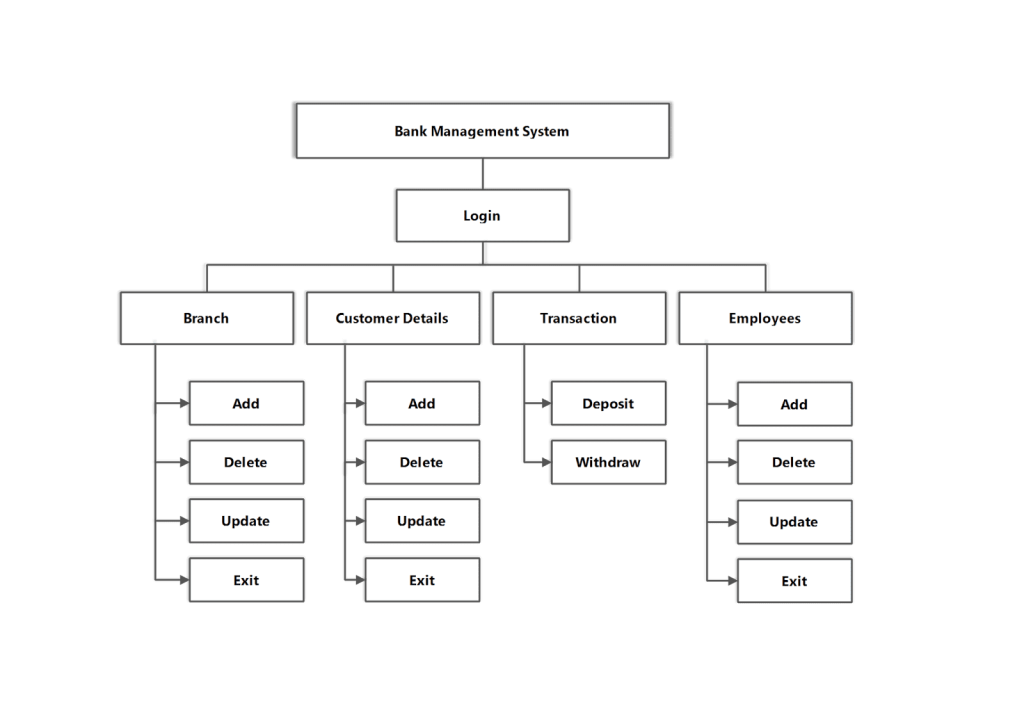
DATA MODEL
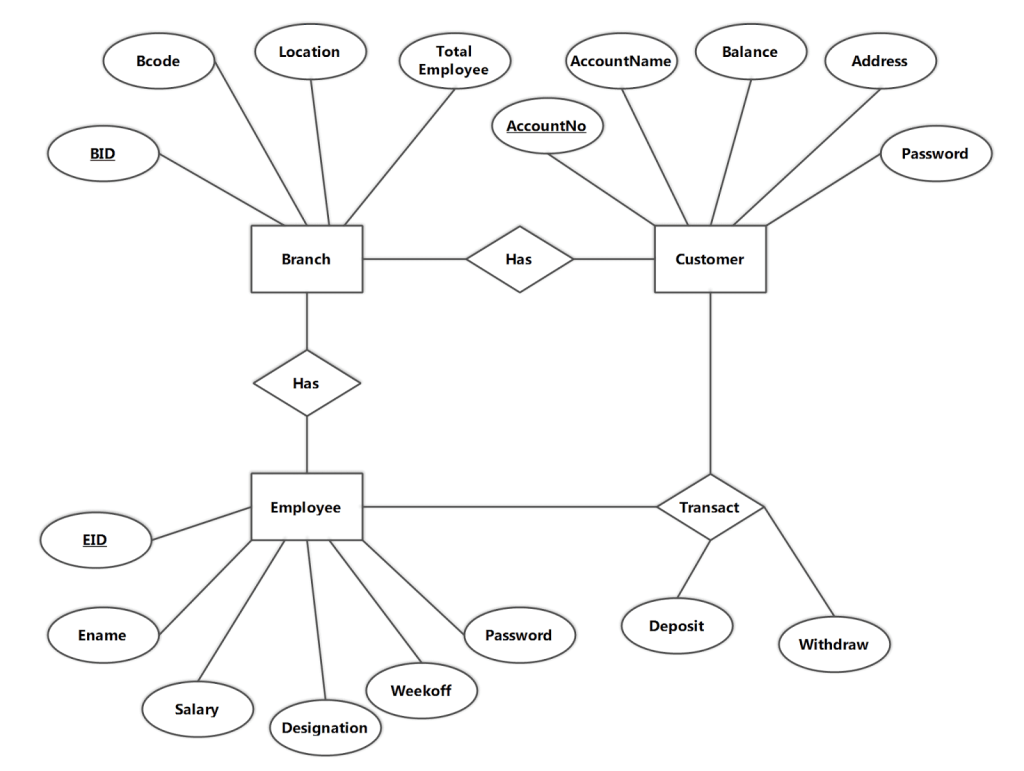
E-R Diagram
Tables
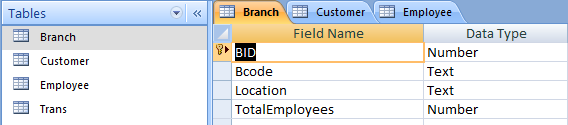
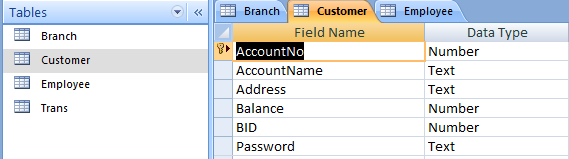
Using the E-R Diagram we can create a relational model of the database. It means we can create tables with the database. To create a new database go to the Microsoft Access Database and create a new blank database. If you have MS Access 2007 or Higher save the database with (.mdb) extension. Otherwise, Visual Basic 6 may not recognize the database file.
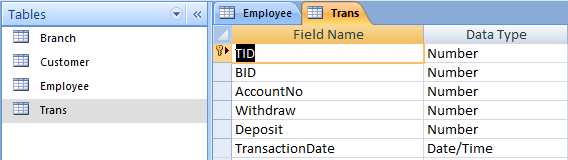
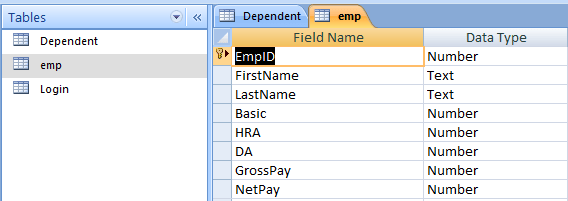
Create three four tables within the database with appropriate data-types given in the following figures.
MODULES AND FORMS
The modules used in this application are given below
- frmBankManagement
- frmLogin
- frmMENU(MDI Form)
- frmBranch
- frmCustomer
- frmEmployee
- frmTransaction
- Module1.bas
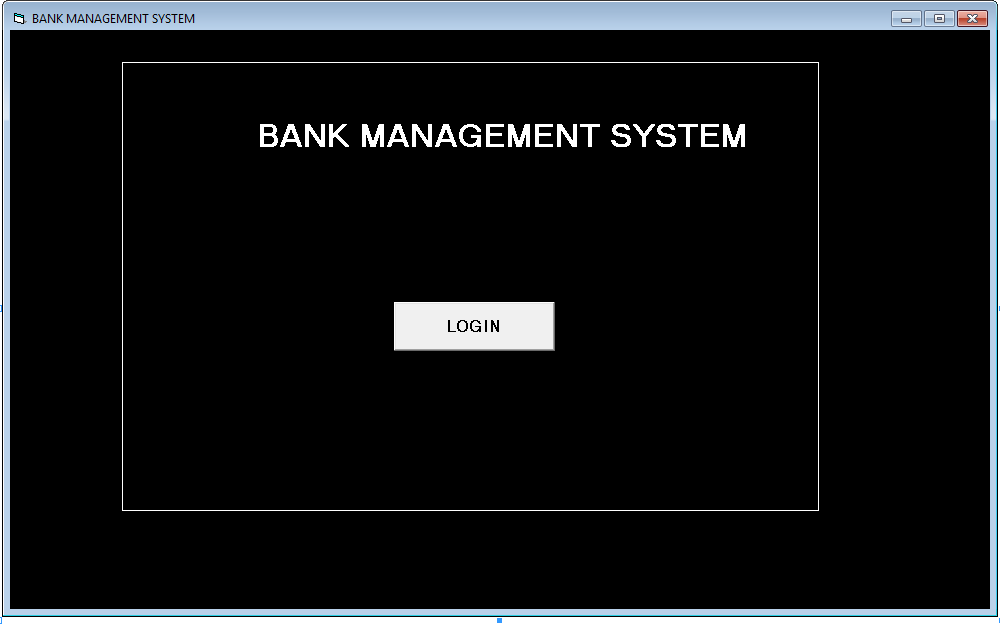
Components of frmBankManagement
Labels:
Name : lblBankManagement
Caption : Bank Management System
Buttons:
Name : cmdLogin
Caption : LOGIN
Code for frmBankMangement
Private Sub cmdLogin_Click()
    Unload Me
    frmLogin.Show
End Sub
Components of frmLogin
Labels
Name : lblUserID
Caption : UserID
Name : lblPassword
Caption : Password
Text-boxes
Name : txtUserID
Text : 'leave blank'
Name : txtPassword
Text : Password
Buttons
Name : cmdLogin
Caption : Login
Name : cmdCancel
Caption : Cancel
Code for frmLogin
Option Explicit
Public LoginSucceeded As Boolean
Private Sub cmdCancel_Click()
    'set the global var to false 'to denote a failed login
    LoginSucceeded = False
    Me.Hide
End Sub
Private Sub cmdLogin_Click()
    rs.CursorLocation = adUseClient rec.CursorLocation
    = adUseClient rec.Open "SELECT * FROM Employee", con,
    adOpenDynamic, adLockPessimistic rs.Open
    "SELECT * FROM Customer", con, adOpenDynamic, adLockOptimistic
    'check the username
    While Not rs.EOF
    If txtUserID = rs!AccountNo And txtPassword = rs!Password Then
    frmMENU.Show
    LoginSucceeded = True
    con.Close MsgBox ("Connection Closed")
    Exit Sub
    Unload Me
    ElseIf
    Val(txtUserID) = rec!EID And txtPassword
    = rec!Password Then
    frmMENU.Show LoginSucceeded = True
    con.Close
    MsgBox ("Connection Closed")
    Exit Sub
    Unload Me
    ElseIf
    Val(txtUserID) <> rs!AccountNo Then
    rs.MoveNext ElseIf Val(txtUserID) <>
    rec!EID Then rec.MoveNext
    Else
    MsgBox "Invalid Password, try again!", ,
    "Login" txtPassword.SetFocus
    SendKeys "{Home}+{End}"
    Exit Sub
    End If
    Wend
    rs.Close
    rec.Close
End Sub
Private Sub Form_Load()
    Call loadcon
    MsgBox ("Connected")
End Sub
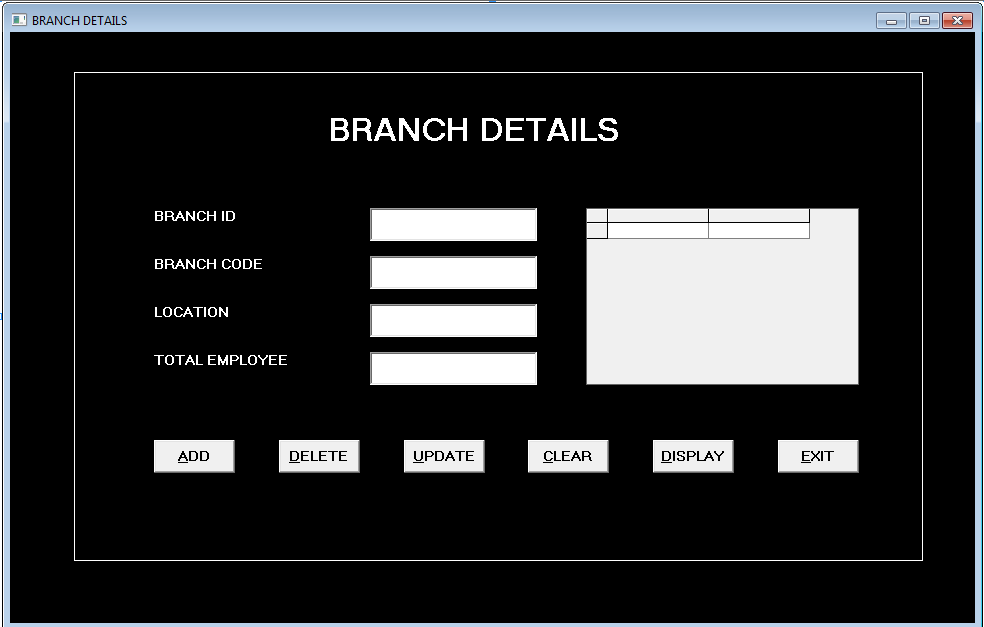
Components for frmBranch
Labels
Name : lblBID
Caption : BRANCH ID
Name : lblBcode
Caption :BRANCH CODEName : lblLocation
Caption : LOCATIONName : lblTotEmp
Caption : TOTAL EMPLOYEEText-boxes
Name: txtBID
Text : 'leave blank'
Name : txtBcode
Text : 'leave blank'Name : txtLocation
Text : 'leave blank'Name : txtTotEmp
Text : 'leave blank'Buttons
Name : cmdAdd
Caption : &ADD
Name : cmdDel
Caption : &DELETEName : cmdUpdate
Caption: &UPDATEName : cmdDisplay
Caption : &DISPLAYName : cmdClr
Caption : &CLEARName : cmdExit
Caption : &EXITDataGrids
Name : DataGrid1Code for frmBranch
Private Sub cmdAdd_Click()
    Dim total As Double
    rs.Open "SELECT Count(EID) FROM Employee",
    con, adOpenDynamic, adLockPessimistic
    total = rs.Fields(0).Value
    con.Execute "INSERT INTO
    Branch(BID, Bcode, Location , TotalEmployees )
    VALUES (" & txtBID & ",'" & txtBcode &
    "','" & txtLocation & "', " & total & ")"
    MsgBox ("Record Added")
End Sub
Private Sub cmdClr_Click()
    txtBID = " "
    txtBcode = " "
    txtLocation = " "
    txtTotEmp = " "
End Sub
Private Sub cmdDel_Click()
    con.Execute "DELETE * FROM Branch
    WHERE BID = " & txtBID & ""
    MsgBox ("Record Deleted")
End Sub
Private Sub cmdDisplay_Click()
    rs.CursorLocation = adUseClient
    rs.Open "SELECT * FROM Branch",
    con, adOpenDynamic, adLockPessimistic
    Set DataGrid1.DataSource = rs
End Sub
Private Sub cmdExit_Click()
    Unload Me
    con.Close
End Sub
Private Sub cmdUpdate_Click()
    Dim total As Double
    rs.Open "SELECT Count(EID) FROM
    Employee WHERE BID = " &
    txtBID & " ", con,
    adOpenDynamic, adLockPessimistic
    total = rs.Fields(0).Value
    con.Execute "UPDATE Branch SET Bcode
    = '" & txtBcode & "',Location
    = '" & txtLocation & " ',
    TotalEmployees = " & total & "
    WHERE BID = " & txtBID & " "
    MsgBox ("Record Updated ")
End Sub
Private Sub Form_Load()
    Call loadcon
End Sub
Components of frmCustomer
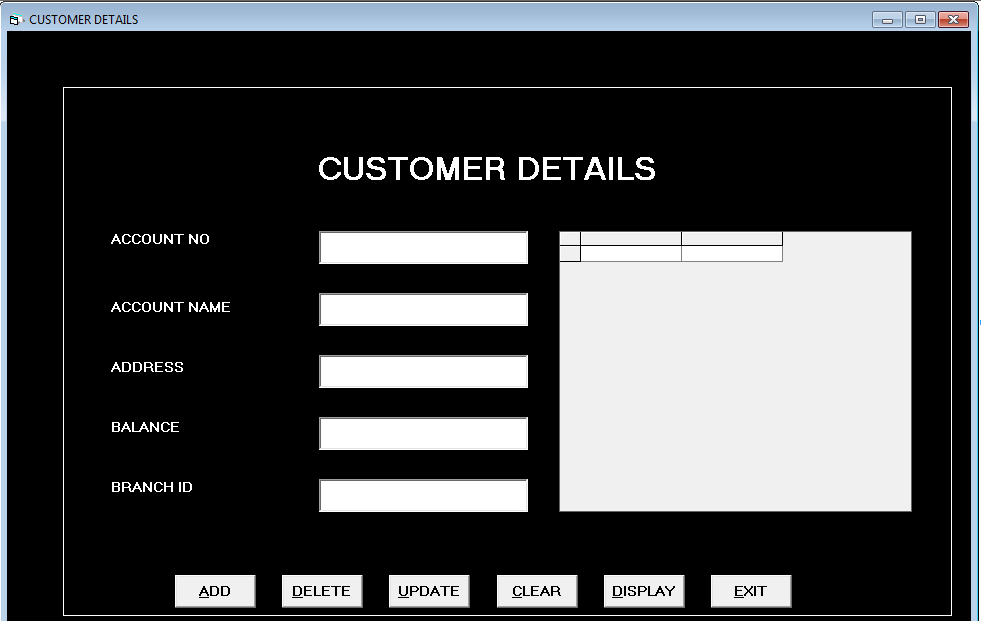
Labels
Name :lblAno
Caption : ACCOUNT NO
Name :lblAno
Caption : ACCOUNT NOName :lblAname
Caption : ACCOUNT NAMEName : lblAddress
Caption : BALANCEName : lblBrankID
Caption : BRANCH IDText-Boxes
Name : txtAno
Text : 'leave blank'
Name : txtAname
Text ; 'leave blank'Name : txtAddress
Text : 'leave blank'Name : txtBalance
Text : 'leave blank'Name : txtBID
Text : 'leave blank'Name : cmdAdd
Caption : &ADDName : cmdDel
Caption : &DELETEName : cmdClr
Caption : &CLEARName : cmdExit
Caption : &EXITName : cmdUPDATE
Caption : &UPDATEName : cmdDisplay
Caption : &DISPLAYCode for frmCustomer
Private Sub cmdAdd_Click()
con.Execute "INSERT INTO Customer (
AccountNo, AccountName, Address, Balance, BID )
VALUES(" & txtAno & ",' " & txtAname &
" ',' " & txtAddress & " '," &
txtBalance & ", " & txtBID & ")"
txtAno = "" txtAname = "" txtAddress = ""
txtBalance = "" txtBID = ""
MsgBox ("Record Added")
End Sub
Private Sub cmdClr_Click()
txtAno = ""
txtAname = ""
txtAddress = ""
txtBalance = ""
txtBID = ""
End Sub
Private Sub cmdDel_Click()
con.Execute "DELETE * FROM Customer
WHERE AccountNo = " & txtAno & ""
MsgBox ("Record Deleted")
End Sub
Private Sub cmdDisplay_Click()
rs.Open "SELECT * FROM Customer",
con, adOpenDynamic, adLockPessimistic
Set DataGrid1.DataSource = rs
End Sub
Private Sub cmdExit_Click()
Unload Me
con.Close
End Sub
Private Sub cmdUpdate_Click()
con.Execute "UPDATE Customer
SET AccountName = '" & txtAname & " ',
Address = ' " & txtAddress & " ',
Balance = " & txtBalance & "
WHERE AccountNo = " & txtAno & "" txtAno = ""
MsgBox ("Record Updated!")
End Sub
Private Sub Form_Load()
Call loadcon
MsgBox ("connected")
End SubComponents of frmEmployees
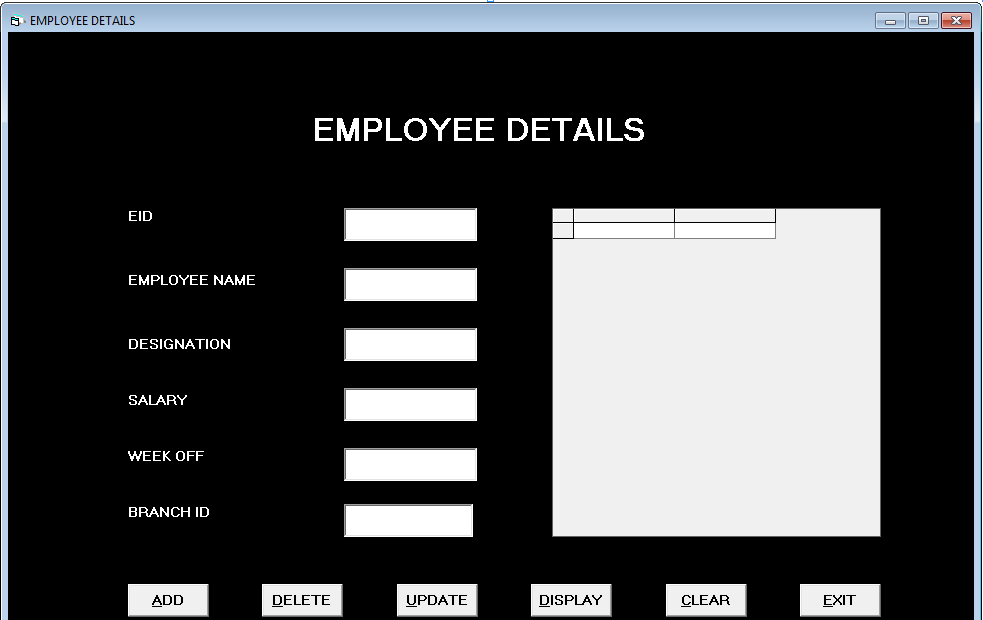
Labels
Name : lblEID
Caption : EIDName : lblEname
Caption : EMPLOYEE NAMEName : lblEname
Caption : EMPLOYEE NAMEName : lblDesig
Caption : DESIGNATIONName : lblSalary
Caption : SALARYName : lblWeekoff
Caption :WEEKOFFName : lblBranchID
Caption : BRANCH IDText-boxes
Name : txtEID
Text : 'leave blank'Name : txtEname
Text : 'leave blank'Name : txtDesig
Text ; 'leave blank'Name ; txtSalary
Text : 'leave blank'Name : txtWeekoff
Text : 'leave blank'Name : txtBID
Text : 'leave blank'Buttons
Name : cmdAdd
Caption : &ADD
Name : cmdDel
Caption : &DELETEName : cmdUpdate
Caption : &UPDATEName : cmdDisplay
Caption : &DISPLAYName : cmdClr
Caption : &CLEARName : cmdExit
Caption : &EXITDataGrid
Name : DataGrid 1Code for frmEmployee
Private Sub cmdAdd_Click()
con.Execute "INSERT INTO
Employee (EID, Ename, Designation, Salary, Weekoff, BID)
VALUES (" & txtEID & ",'" &
txtEname & "','" &
txtDesig & "', " &
txtSalary & ", '" &
txtWeekoff & "', " &
txtBID & ")"
MsgBox ("Record Added")
txtEID = "" txtEname = "" txtDesig
= "" txtSalary = "" txtWeekoff = "" txtBID = ""
End Sub
Private Sub cmdClr_Click()
txtEID = ""
txtEname = ""
txtDesig = ""
txtSalary = ""
txtWeekoff = ""
txtBID = ""
End Sub
Private Sub cmdDel_Click()
con.Execute "DELETE * FROM
Employee WHERE EID = " &
txtEID & ""
MsgBox ("Record Deleted ")
txtEID = ""
End Sub
Private Sub cmdDisplay_Click()
rs.Open "SELECT * FROM Employee",
con, adOpenDynamic, adLockPessimistic
Set DataGrid1.DataSource = rs
End Sub
Private Sub cmdExit_Click()
Unload Me
con.Close
End Sub
Private Sub cmdUpdate_Click()
con.Execute "UPDATE Employee
SET Ename = '" &
txtEname & "',Designation = '" &
txtDesig & "',Salary = " &
txtSalary & ",Weekoff = ' " &
txtWeekoff & " ', BID = " &
txtBID & " WHERE EID = " &
txtBID & " "
MsgBox ("Record Updated")
End Sub
Private Sub Form_Load()
loadcon
End SubComponents of frmTransaction
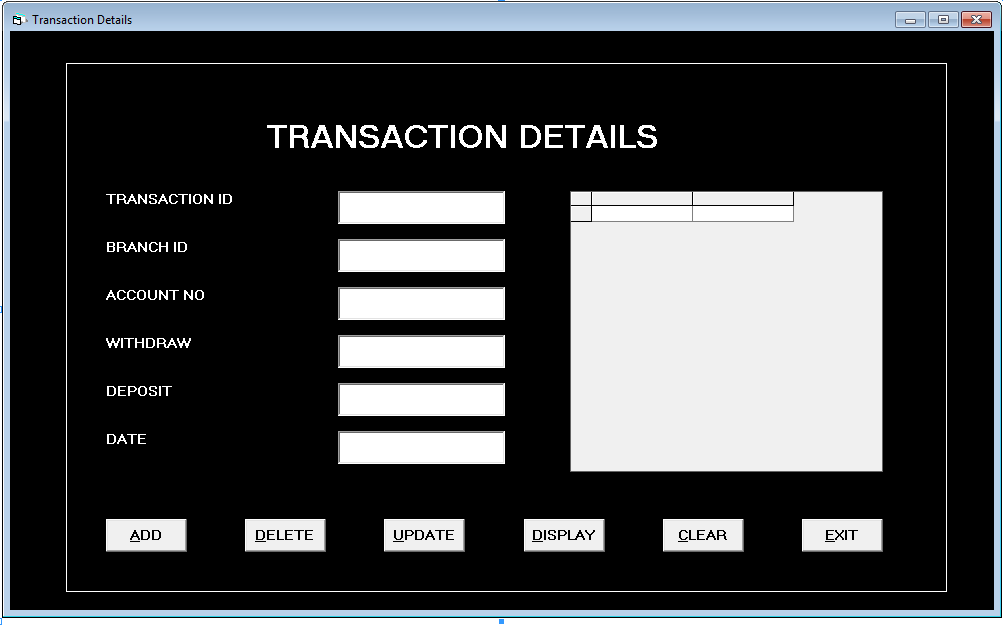
Labels
Name : lblTID
Caption : TRANSACTION IDName : lblBID
Caption : BRANCH IDName :lblAno
Caption : ACCOUNT NOName : lblWDraw
Caption : WITHDRAWName : lblDEPOSIT
Caption : lblDepositName : lblDate
Caption : DATEText-boxes
Name : txtTID
Text : 'leave blank'Name : txtBID
Text : 'leave blank'Name : txtAno
Text : 'leave blank'Name : txtWDraw
Text : 'leave blank'Name : txtDeposit
Text : 'leave blank'Name : txtDate
Text : 'leave blank'Buttons
Name : cmdAdd
Caption : &ADD
Name : cmdDel
Caption : &DELETEName : cmdUpdate
Caption : &UPDATEName : cmdDisplay
Caption : &DISPLAYName : cmdClr
Caption : &CLEARName : cmdExit
Caption : &EXITData Grids
Name : Data Grid 1Code for frmTransaction
Private Sub cmdAdd_Click()
    con.Execute "INSERT INTO
   Trans(TID, BID, AccountNo, Withdraw, Deposit, TransactionDate )
    VALUES (" & txtTID & "," &
    txtBID & ", " &
    txtAno & "," &
    txtWDraw & ", " &
    txtDeposit & ", ' " &
    txtDate & "' )"
    txtTID = "" txtBID = "" txtAno
    = "" txtWDraw = "" txtDeposit
    = "" txtDate = ""
    MsgBox ("Record Added")
End Sub
Private Sub cmdClr_Click()
    txtTID = ""
    txtBID = ""
    txtAno = ""
    txtWDraw = ""
    txtDeposit = ""
    txtDate = ""
End Sub
Private Sub cmdDel_Click()
    con.Execute "DELETE * FROM
    Trans WHERE TID = " &
    txtTID & ""
    MsgBox ("Record Deleted")
End Sub
Private Sub cmdDisplay_Click()
    rs.Open "SELECT * FROM Trans ", con,
    adOpenDynamic, adLockPessimistic
    Set DataGrid1.DataSource = rs
End Sub
Private Sub cmdExit_Click()
    Unload Me
    con.Close
End Sub
Private Sub cmdUpdate_Click()
    con.Execute "UPDATE Trans SET
    BID = " & txtBID & " ,
    AccountNo = " & txtAno & " ,
    Withdraw = " & txtWDraw & ",
    Deposit = " & txtDeposit & "
    WHERE TID = " & txtTID & ""
    txtTID = "" txtBID = "" txtAno
    = "" txtWDraw = "" txtDeposit = "" txtDate = ""
    MsgBox ("Record Updated")
End Sub
Private Sub Form_Load()
    Call loadcon
    MsgBox ("connected")
End Sub
frmMENU [ MDI Form ]
The MDI form is that form which has MENU and when you click on any one of the menu item, it opens up another MDI Child form.
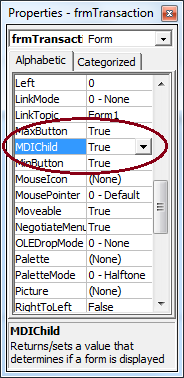
We will set MDI Child property for following forms
- frmBranch
- frmCustomer
- frmEmployee
- frmTransaction
Go to the property of each form and set the MDI Child to ‘True’.
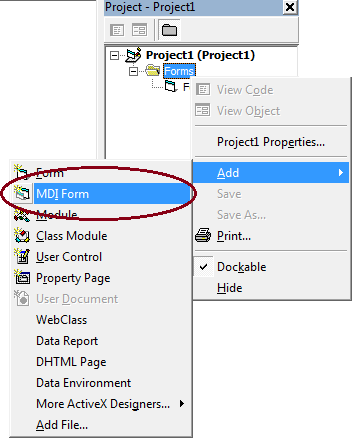
Under Project 1 , [Right Click] the Forms > [Click] Add > [Click] MDI Form.
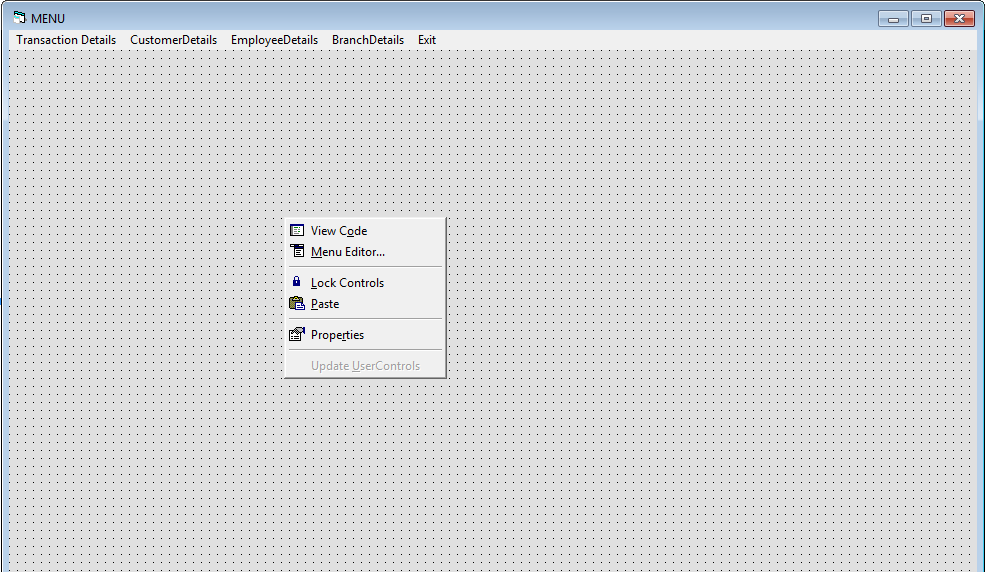
Configure Menu using the Menu Editor in MDI Form and write appropriate code for the form.
Code for frmMENU
Private Sub branch_Click(Index As Integer)
  frmBranch.Show
End Sub

Private Sub customer_Click(Index As Integer)
  frmCustomer.Show
End Sub

Private Sub employee_Click(Index As Integer)
  frmEmployee.Show
End Sub

Private Sub exit_Click(Index As Integer)
  Unload Me
  Unload frmBankManagement
  Unload frmLogin
  Unload frmCustomer
  Unload frmEmployee
End Sub

Private Sub transaction_Click(Index As Integer)
  frmTransaction.Show
End Sub
Code for Module1.Bas
Most of the forms in the application need to connect to the database, so you may have to write code for connectivity with Microsoft Access Database repeatedly in each form.
Instead of writing the code for connectivity in each form, we write it once in a Module and call the function from the form. In this way, we save time to write the same code many times.
Here is the code for Module1.bas
Note; To know more about creating a new Module go to one of the previous Visual Basic 6 posts.
Public con As ADODB.Connection
  Public rs As ADODB.Recordset
  Public constr As String
  Public Sub loadcon() constr = "Provider=Microsoft.Jet.OLEDB.4.0;
  Data Source=C:UsersGirishDocumentsStudentDB.mdb;Persist Security Info=False"
  con.Open constr
End Sub