C Programming Examples – Solved Programs for Practice and Revision
C Programming Examples provide a practical collection of solved C programs covering all major concepts of the C language. These example programs are designed to strengthen logic building, syntax understanding, and problem-solving skills, which are essential for academic learning and programming practice.
This page serves as a central repository of example programs discussed across different C topics, helping learners revise concepts through working code and outputs.
What Will You Get?
On this page, you will find:
- A comprehensive collection of topic-wise C example programs
- Fully written and well-structured C code
- Programs covering basic to advanced C concepts
- Examples useful for lab work, assignments, and exams
- Output-based programs for practice and revision
This Page Is For
- Beginners learning C Programming
- Computer Science and IT students
- Engineering and diploma lab exam preparation
- Learners who want to practice and revise C concepts through programs
How to Use This Page
- Strengthen programming logic through hands-on learning
- Revise a concept by directly practicing its example programs
- Use examples for college labs and viva preparation
String C Programs
Graphics C Programs
C Function that Implements Call-By-Value
In this lesson, you will learn about C function that implements call-by-value parameters. In C programming language, functions are very important because with functions there is no C program. The main () in C program is a function and it calls other user-defined functions. Some functions need parameters to do the necessary tasks.
So the efficiency of a program depends on how and what is passed as parameters to its functions when you call it in the main() function.
This program is written and compiled using Dev-C++ version 4 on a Windows 7 64-bit system. You can use any other standard C compiler to compile and run this program. This program is intended for beginner level learner of C programming.
Problem Definition
We mentioned earlier that you can call any function in the main() of a C program. There are two methods to call a function and pass parameters to the function.
- Call-by-Value
- Call-by-Reference
In this post, we will discuss only the functions that implements Call-by-Value method. The choice of method totally depends on the type of C program, so no particular method is superior to the other. To know more about call-by-reference, read the following article.
C Function that Implements Call-By-Reference
So when you call the function using call-by-value method and you pass actual arguments to the function. The copy of the original variable is sent to the function for processing. All operations are performed on the copy of the original value.
For example, if we declare two variables
int a = 10;     /* Original values */
int b = 20;     /* Original values */
Now, when the function is called in main ().
swap( a, b); /* Sends the copy of the original value of a and b */In function swap () which contains the actual procedure of the function, uses the copy of variable values and perform operations defined within the function body.
void swap ( int a, int b)   /* Use the copy of the original variable */
{

------------------------------

------------------------------

}
This method is a safe method because the original value will never get changed accidentally.
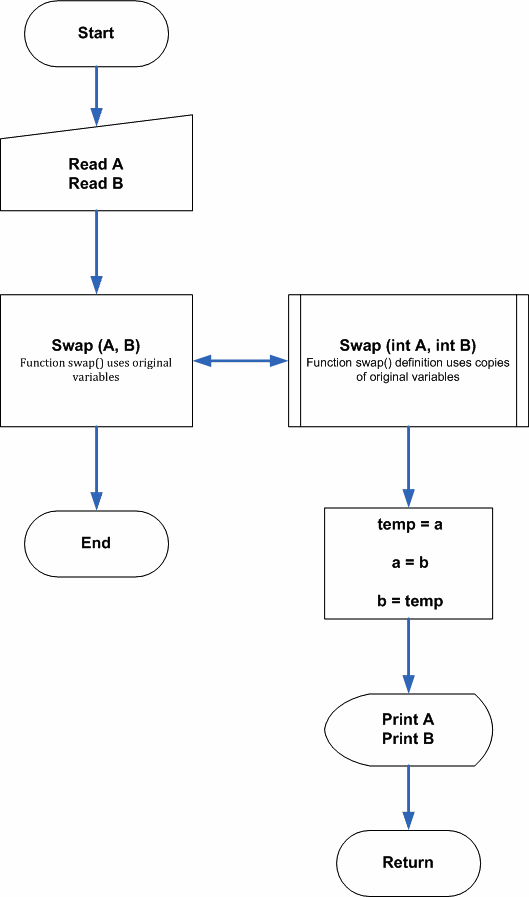
Flowchart – C function that implements Call-By-Value
Program Code
/* C Function that Implements Call-By-Value */
#include <stdio.h>
#include <stdlib.h>
int main()
{
  int a,b,i;
  void swap(int a,int b);

  /* Read the integer values */
  printf("ENTER TWO NUMBERS:");
  scanf("%d%d",&a,&b);
  for(i=0;i<45;i++)
    printf("_");printf("\n\n");
    printf("BEFORE SWAP: A =%dtB = %d\n",a,b);
  for(i=0;i<45;i++)
    printf("_");printf("\n\n");

  /* Swap the integers */
  for(i=0;i<45;i++)
    printf("_");printf("\n\n");
    swap(a,b); /* <-- function call using original variables */
  for(i=0;i<45;i++)
    printf("_");printf("\n\n");
  getch();
  return 0;
}

/* Swap operation */
 void swap(int a,int b) /* <--- Parameters are copies of original variable values */
 {
   int temp = 0;
   temp = a;
   a = b;
   b = temp;

   /* Print the results */
   printf("AFTER SWAP: A= %d\t B = %d\n",a,b);
 }
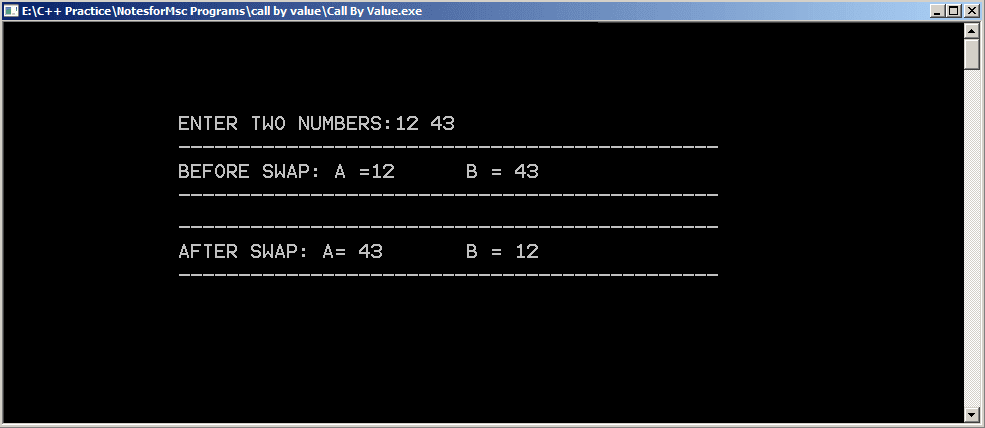
Output
The output of the program is given below.
Program For A Simple Calculator
This example program accepts two input numbers and performs an arithmetic operation such as addition, subtraction, division, multiplication and mod operation on them. The output is printed to the console.
Program Definition
This calculator program is built using C arithmetic operators. The user is presented with a list of choices. Once the user input his or her choice that operation is performed.
Here is the list of operations presented to the users.
- Addition
- Subtraction
- Multiplication
- Division
- Modulo
- Close
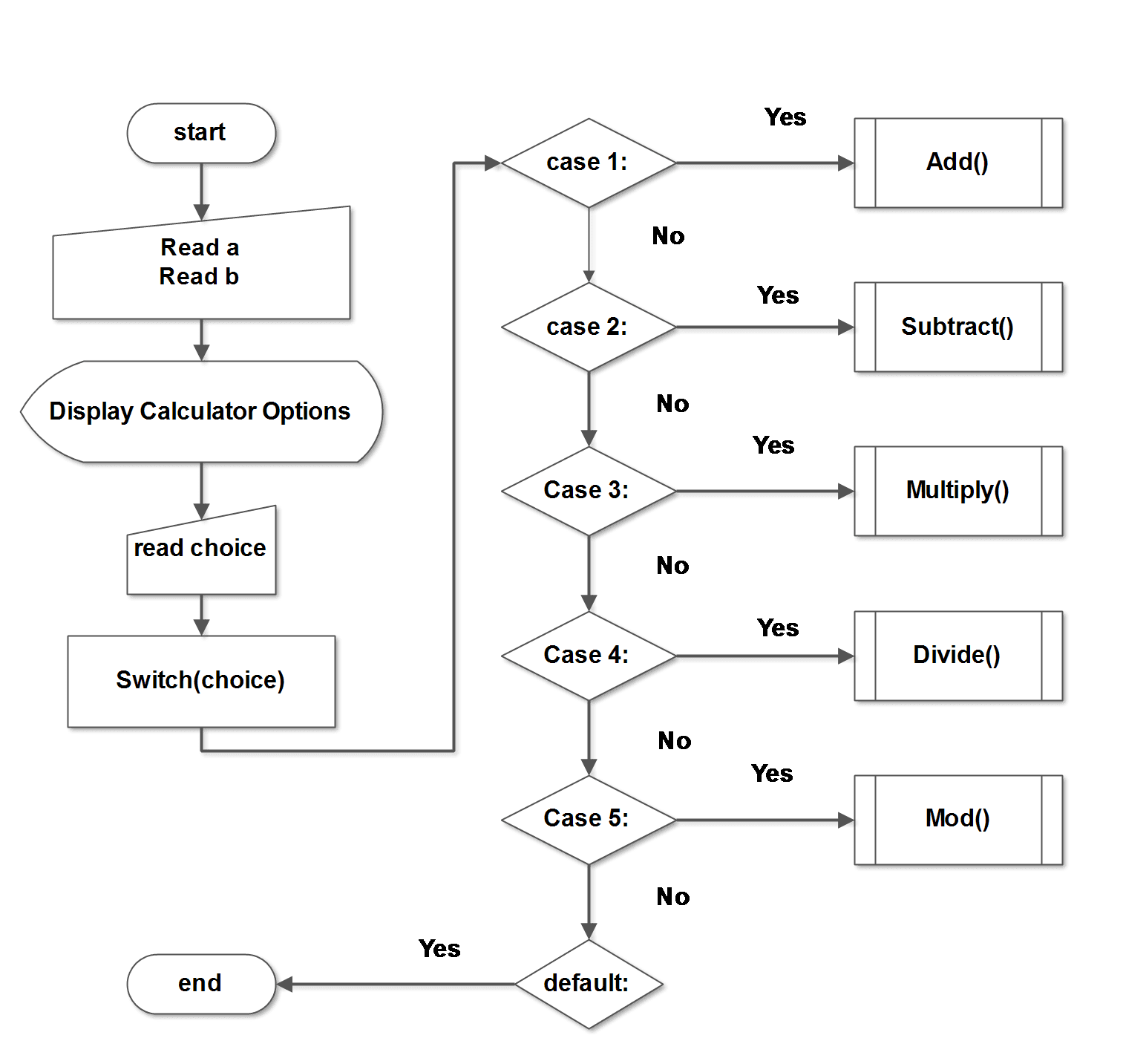
The C calculator is implemented using the switch-case mechanism of C language.
Flowchart
Program Codes
/* Program for a simple calculator
in C using Switch_Case */
#include <stdio.h>
#include <conio.h>
main()
{
/* Variable declarations */
        int i,a,b,choice,result;
        void menu(int a,int b,int choice);
        printf("ENTER TWO NUMBERS:n");
        printf("a=:");
        scanf("%d",&a);
        printf("b=:");
        scanf("%d",&b);
        i=0;
        while(choice != 6)
        {
            menu(a,b,choice);
            i++;
        }
        getch();
        return 0;
}
void menu(int a, int b, int choice)
{
        int result,i;
        for(i=0;i < 35;i++)
        printf("*"); printf("\n\n");
        printf("\tC CALCULATOR\n\n");
        for(i=0;i < 35;i++)
        printf("_"); printf("\n\n");
        printf("1.ADDITION\n");
        printf("2.SUBTRACTION\n");
        printf("3.MULTIPLICATION\n");
        printf("4.DIVISION\n");
        printf("5.MODULO \n");
        printf("6.CLOSE\n");
        for(i=0;i < 35;i++)
        printf("_"); printf("\n\n");
        printf("Enter your Choice\n");
        scanf("%d",&choice);
        switch(choice)
        {
        case 1:
            result = a + b;
            for(i=0;i < 35;i++)
            printf("_"); printf("\n\n");
            printf("Result=%d\n",result);
/* Addition Operation */
            printf("\n\n");
            break;
        case 2:
            result = a - b;
            for(i=0;i < 35;i++)
            printf("_"); printf("\n\n");
            printf("Result=%d\n",result);
/* Subtraction */
            printf("\n\n");
            break;
        case 3:
            result = a * b;
            for(i=0;i < 35;i++)
            printf("_"); printf("\n\n");
            printf("Result=%d\n",result);
/* Multiplication */
            break;
        case 4:
            result = a/b;
            for(i=0;i < 35;i++)
            printf("_"); printf("\n\n");
            printf("Result=%d\n",result);
/* Division operation */
            printf("\n\n");
            break;
        case 5:
            result = a % b;
            for(i=0;i < 35;i++)
            printf("_"); printf("\n\n");
            printf("Result=%d\n",result);
/* Modulo operation */
            printf("\n\n");
            break;
            default:
            exit(0);
    }
}
#include <iostream>
using namespace std;
void menu(int a, int b) {
int choice, result;
while (true) {
for (int i = 0; i < 35; i++) cout << "*";
cout << "\n\n\tC++ CALCULATOR\n\n";
for (int i = 0; i < 35; i++) cout << "_";
cout << "\n\n";
cout << "1. ADDITION\n";
cout << "2. SUBTRACTION\n";
cout << "3. MULTIPLICATION\n";
cout << "4. DIVISION\n";
cout << "5. MODULO\n";
cout << "6. CLOSE\n";
for (int i = 0; i < 35; i++) cout << "_";
cout << "\n\nEnter your choice: ";
cin >> choice;
switch (choice) {
case 1:
result = a + b;
break;
case 2:
result = a - b;
break;
case 3:
result = a * b;
break;
case 4:
result = a / b;
break;
case 5:
result = a % b;
break;
case 6:
return;
default:
cout << "Invalid choice\n";
continue;
}
cout << "\nResult = " << result << "\n\n";
}
}
int main() {
int a, b;
cout << "ENTER TWO NUMBERS\n";
cout << "a = ";
cin >> a;
cout << "b = ";
cin >> b;
menu(a, b);
return 0;
}
import java.util.Scanner;

class Calculator {

    static void menu(int a, int b) {
        Scanner sc = new Scanner(System.in);
        int choice, result;

        while (true) {
            for (int i = 0; i < 35; i++) System.out.print("*");
            System.out.println("\n\n\tJAVA CALCULATOR\n");
            for (int i = 0; i < 35; i++) System.out.print("_");
            System.out.println("\n");

            System.out.println("1. ADDITION");
            System.out.println("2. SUBTRACTION");
            System.out.println("3. MULTIPLICATION");
            System.out.println("4. DIVISION");
            System.out.println("5. MODULO");
            System.out.println("6. CLOSE");

            for (int i = 0; i < 35; i++) System.out.print("_");
            System.out.print("\n\nEnter your choice: ");
            choice = sc.nextInt();

            switch (choice) {
                case 1:
                    result = a + b;
                    break;
                case 2:
                    result = a - b;
                    break;
                case 3:
                    result = a * b;
                    break;
                case 4:
                    result = a / b;
                    break;
                case 5:
                    result = a % b;
                    break;
                case 6:
                    return;
                default:
                    System.out.println("Invalid choice");
                    continue;
            }

            System.out.println("\nResult = " + result + "\n");
        }
    }

    public static void main(String[] args) {
        Scanner sc = new Scanner(System.in);

        System.out.println("ENTER TWO NUMBERS");
        System.out.print("a = ");
        int a = sc.nextInt();
        System.out.print("b = ");
        int b = sc.nextInt();

        menu(a, b);
        sc.close();
    }
}
def menu(a, b):
while True:
print("*" * 35)
print("\n\tPYTHON CALCULATOR\n")
print("_" * 35)
print("1. ADDITION")
print("2. SUBTRACTION")
print("3. MULTIPLICATION")
print("4. DIVISION")
print("5. MODULO")
print("6. CLOSE")
print("_" * 35)
choice = int(input("Enter your choice: "))
if choice == 1:
result = a + b
elif choice == 2:
result = a - b
elif choice == 3:
result = a * b
elif choice == 4:
result = a // b
elif choice == 5:
result = a % b
elif choice == 6:
break
else:
print("Invalid choice")
continue
print("\nResult =", result, "\n")
a = int(input("ENTER TWO NUMBERS\na = "))
b = int(input("b = "))
menu(a, b)
Each arithmetic operator performs their respective operation on user inputs and return the results. Here is the list of important expressions used in the program.
result = a + b;
result = a - b;
result = a * b;
result = a / b;
result = a % b;
Output
The calculator program shows options when you run it. Enter two input numbers and then enter your choice of arithmetic operation.
ENTER TWO NUMBERS:
a=:33
b=:55
****************************************
               C CALCULATOR
________________________________________
1.ADDITION
2.SUBTRACTION
3.MULTIPLICATION
4.DIVISION
5.MODULO
6.CLOSE
________________________________________

Enter your Choice
_
The output will be displayed on the screen.
                C CALCULATOR
___________________________________________________
1.ADDITION
2.SUBTRACTION
3.MULTIPLICATION
4.DIVISION
5.MODULO
6.CLOSE
___________________________________________________
Enter your Choice
1
___________________________________________________
Result=88Program to Swap Two Numbers Without a Third Variable
The program to swap two number uses the simple procedure with a fewer number of variables.The regular swapping procedure contains an extra variable called temp, a temporary variable to hold values in between the swap task. This program does not use any temp variable and achieve the same results.
Problem Definition
The following code shows the common method to swap two integer numbers within a program. As mentioned earlier, it uses a temp variable. The temp is assigned the value of variable a and a is assigned the value of variable b.
\begin{aligned}
&temp = 10\\ \\
&a = 20
\end{aligned}
In the next step, b is assigned the value of temp to complete the swap procedure.
\begin{aligned}
&b = temp;\\ \\
&b \hspace{2mm} is \hspace{2mm} 10 \hspace{2mm}now.
\end{aligned}
Code For Swap Using A Temp Variable
a = 10
b = 20
/* Store the value of variable a into temp */
temp = a;
/* Value of b is assigned to a */
a = b;
/* Value of temp is assigned to b*/
b = temp;
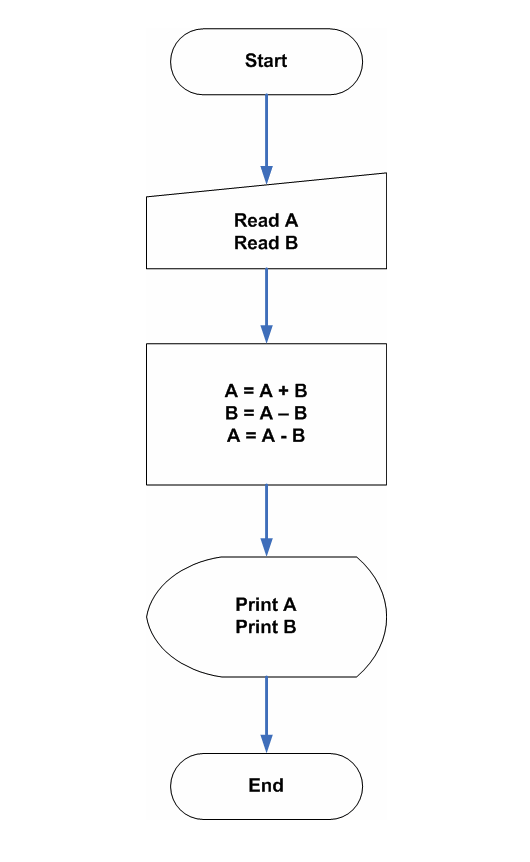
Flowchart – Swap Numbers without Third Variable
Program Code – Swap Numbers without Third Variable
The above source code shows efficient use of arithmetic operators to swap the number and moreover, it is faster because there are no unnecessary assignments of variables.
/*Program to swap two numbers without third variable */
#include <stdio.h>
#include >conio.h>
main()
{
int a,b;
/* Read input */
printf("Enter value for A:");
scanf("%d\n",&a);
printf("Enter value for B:");
scanf("%d\n",&b);
/* Swap numbers */
a = a + b;
b = a - b;
a = a - b;
/* Print the results */
printf("------------------------------------");
printf("A = %d", a); printf("B = %d",b);
printf("------------------------------------");
return 0;
}
/* Program to swap two numbers without third variable */
#include <iostream>
using namespace std;
int main() {
int a, b;
/* Read input */
cout << "Enter value for A:";
cin >> a;
cout << "Enter value for B:";
cin >> b;
/* Swap numbers */
a = a + b;
b = a - b;
a = a - b;
/* Print the results */
cout << "------------------------------------";
cout << "A = " << a;
cout << "B = " << b;
cout << "------------------------------------";
return 0;
}/* Program to swap two numbers without third variable */
import java.util.Scanner;
public class SwapWithoutTemp {
public static void main(String[] args) {
int a, b;
Scanner sc = new Scanner(System.in);
/* Read input */
System.out.print("Enter value for A:");
a = sc.nextInt();
System.out.print("Enter value for B:");
b = sc.nextInt();
/* Swap numbers */
a = a + b;
b = a - b;
a = a - b;
/* Print the results */
System.out.print("------------------------------------");
System.out.print("A = " + a);
System.out.print("B = " + b);
System.out.print("------------------------------------");
sc.close();
}
}# Program to swap two numbers without third variable
# Read input
a = int(input("Enter value for A:"))
b = int(input("Enter value for B:"))
# Swap numbers
a = a + b
b = a - b
a = a - b
# Print the results
print("------------------------------------")
print("A =", a)
print("B =", b)
print("------------------------------------")
Output
Enter value for A:24
Enter value for B:44
----------------------------------------
A = 44 B = 24
----------------------------------------C Program To Find The Memory Size Of Arrays
In C programming, one of the frequent problem is to find the total memory size of an array. If the array is string, integer, or a floating type, the size varies. This post will teach you to write a C program that will compute the memory size of the array automatically.
Problem Definition
Once you have defined an array, its is very difficult to know the size of the array that totally depends on the data type of the array. The main primitive types are listed below.
String Size – 1 bytes
Integer – 2 bytes
Float – 4 bytes
There are other types that depends on these primitive types. One such user-defined size is an array.
This program will take an array and determine the size of each element of the array and add the total size into a single variable. Once finished the program will display the total size of the array.
Program Code
#include <stdio.h>
int main()
{
    int arr[15]= {1,1,1,1,1,1,1,1,1,1,1,1,1,1,1};
    int x = 0;
    int i;

for (i =0;i< 15;i++)
{
    x = x + sizeof(arr[i]);
}
printf("%d",x);
return 0;
}
The program code above works for a single integer array type, if you want to change it to a string array or a float, it will still give you the correct output with the total array memory size.
Output
30In the program above, the size of each integer is 2 bytes and there are 15 elements for the array. Therefore, the total size is 15 * 2 =30 bytes.
You may try this program with other data types and check results.
Evaluating Postfix Expression Using Stack
The postfix expression is a notation for expression used in computers where operator comes after the operands in the expression. It is also known as reverse polish notation. In this example, you will learn evaluating postfix expression using stack.
Suppose A and B are two operand and'+' is the operator. We humans write the infix expression which is A + B. However, the computer must convert the infix expression into postfix so that it can compute the expression.
It is the way computer look at expression.
Algorithm To Evaluate Postfix Expression
Let’s call this postfix expression as P and the stack as S. To evaluate P, the program must use following algorithm.
- Add a right parenthesis ‘)’ at the end of expression P . It marks the end of the expression.
- Start scanning the expression P until ‘)’ is reached.
- If an operand is found, push that to stack S.
- If an operator op is found.
- Remove top two element of stack S, where A is topmost, and second to top is B.
- Evaluate B op A.
- Push the result back to stack S.
- Keep repeating step 3 and 4 until the end ‘)’ has reached.
- The final result is top of the stack.
- Stop the program.
Program Code:
/* Program to evaluate postfix
expression and output result */
#include <stdio.h>
#include <stdlib.h>
#include <math.h>
#include <string.h>
#include <conio.h>
#define MAXSIZE 100

/* Stack array and top variables in structure */
struct stack
{
	int stack[];
	int Top;
};

/* type definition for user-defined
data types */
typedef struct stack NODE;

/* This function will add an element
to Top of the stack */
void push(NODE *pu, int item)
{

	if (pu->Top== MAXSIZE-1)
	{
		printf("\nThe Stack is Full");
		getch();
	}
	else
	{

		pu->stack[++pu->Top] = item;
	}
}
/* This function will delete an element
from the top of the stack */
int pop(NODE *po)
{
	int item;
	/* If the Top pointer points to
	NULL then there is not element to
	delete */
	if(po->Top ==-1)
	{
		printf("\nThe Stack is Empty");
	}
	/*Otherwise delete the top of the stack
	and decrement the top pointer */
	else
	{
		item=po->stack[po->Top--];


	}
	return item;
}
/*Postfix evaluation*/
int Postfix_Eval(char postfix[])
{
	int a,b,temp,len;
	/* declaring a pointer variabe
	of type structure NODE */
	NODE *ps;
	int i;
	/* Initializing the Top pointer to NULL*/
	ps->Top=-1;
	push(ps,'#');
	/* Find length of the string */
	len = strlen(postfix);

	for(i=0;i<len;i++)
	{
		if(postfix[i]<='9'&&postfix[i]>='0')
		{
			/*Operand is pushed to stack*/
			push(ps,(postfix[i]-48));
		}
		else
		{
				/* Pop the two top operands for
				operation */
				a = pop(ps);
				b = pop(ps);

				switch(postfix[i])
				{
					case '+':
						temp=b+a;
						break;
					case '-':
						temp=b-a;
						break;
					case '*':
						temp=b*a;
						break;
					case '/':
						temp=b/a;
						break;
					case '%':
						temp=b%a;
						break;
					case '^':
						temp=pow(b,a);

				}/* End of switch*/
				push(ps,temp);
		}

	}
			      return(pop(ps));
}

int main() {

	char choice,postfix[MAXSIZE];
	do
	{
		clrscr();
		printf("\n\nEnter the Postfix expression=");
		fflush(stdin);
		gets(postfix);
		printf("\n\nThe Postfix Evaluation is = %d",Postfix_Eval(postfix));
		printf("\n\nDo you want to continue(Y/y)=");
		fflush(stdin);
		scanf("%c",&choice);
		}while(choice=='Y'||choice=='y');
return 0;
	}
Output
Enter the Postfix expression=46+9*

The Postfix Evaluation is = 90
Do you want to continue(Y/y)=_C Program To Check A Palindrome String
This C program checks a given string whether it is a palindrome or not. The string is read from left to right and right to left and each character is matched. If all the characters in the input string match correctly, then it is a palindrome string, otherwise not.
This program is written using Dev C++ compiler version 4.9.9.2 on a Windows 7 64-bit system. You may use any ANSI C compiler and compile this program. The goal is to get an error-free program.
Before you get started with the program, we recommend you to learn the following C programming concepts for the better understanding of this example.
- C Printing Outputs
- C Reading Input Values
- C Arithmetic Operators
- C Logical Operators
- C Flow Control Structures
- C For Loop
Problem Definition
A palindrome string is a special string which is same when you read it from left-to-right or right-to-left.
For example, the string “ToboT“, is same if you read it from left-to-right or right-to-left, therefore, it is a Palindrome.
When the program is executed, provide an input string to read and it will check whether it is a palindrome string or not and display the output to the console.
How does the program process the input string?
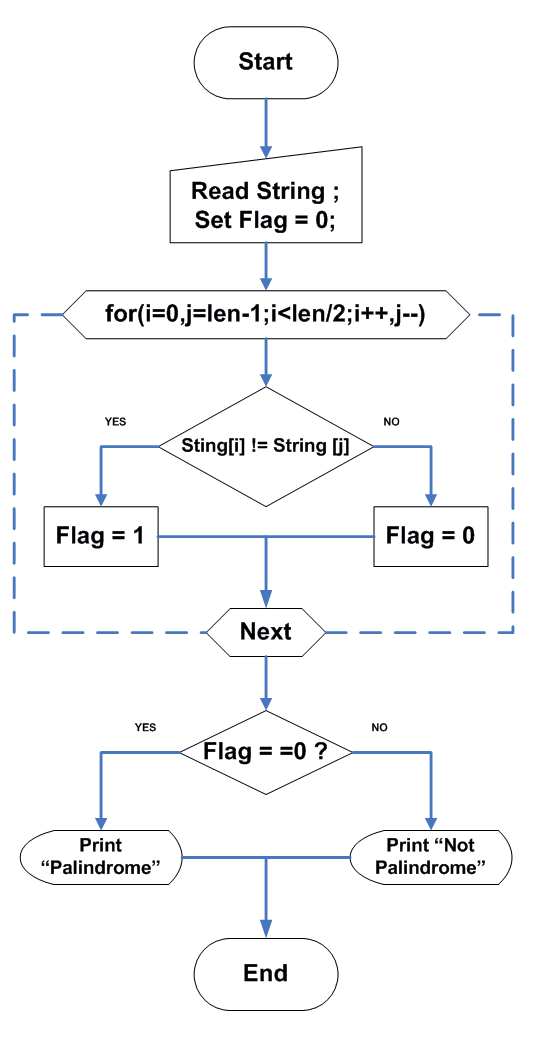
Each of the step helps in isolating the character of the input string and compare it from both direction. It should match in order to be a palindrome.
Step 1 – Read the input string
Step 2 – Read the input string from left-to-right & right-to-left character by character.
Step 3 – Compare each character of left side to the right side character one at a time.
Step 4 – If any character is different, set flag = 1, else flag = 0.
Step 5 – If flag = = 0, print “It is a Palindrome“.
Step 6 – Finally, if flag = = 1, print” It is not a Palindrome“.
Step 7 – End the program.
Flowchart – Check a Palindrome String
Program Code – Palindrome String
/*Program to Check if the String is Palindrome or not */
#include <stdio.h>
#include <conio.h>
main()
{
    char string [80],c;
    int i,j,len,flag=0;
    /* Read the string */
    printf("Enter a String for Palindrome Check:\n\n");
    scanf("%[^n]",string);
    printf("%s",string);
    /* Find length of the string */
    for(len=0;string[len]!='\0';len++)
    printf("\n\nLength is %d\n",len);
    /* Double initialisation for FOR loop */
    for(i=0,j=len-1;i<len/2;i++,j--)
    {
        if(string[i]!=string[j])
            flag=1;
    }
/* Check if Palindrome and print the result */
    if(flag)
    {
      for(i=1;i<=30;i++)
      printf("_");printf("\n\n");
      printf("\nString is not Palindrome.\n");
      for(i=1;i<=30;i++)
      printf("_");printf("\n\n");
    }
    else
    {
      for(i=1;i<=30;i++)
      printf("_");printf("\n\n");
      printf("\nString is a Palindrome.\n");
      for(i=1;i<=30;i++)
      printf("_");printf("\n\n");
    }
    system("PAUSE");
    return 0;
}
Output
The output of the program is given below. The program reads a string called “TaboT” and prints the output to the console.
Enter a String for Palindrome Check:

tabot
tabot

Length is 5
_____________________________

String is not Palindrome.
_____________________________Program To Check An Armstrong Number
This C program checks an input number whether it is an Armstrong number on not and prints the results. An Armstrong number is special number sum of the \Large n^{th} power of its every digit is equal to the original number. The \Large n is the number of digits in the input number. This concept is explained in more detail in the problem section.
Problem Definition
What is an Armstrong Number?
Suppose there is a number \Large N, this number has \Large n digits, if
- We take each digit of the number \Large N separately
- Compute \Large n^{th} power of each digit, and
- Take the sum, \Large S of all the power obtained in step 2.
- If the sum is equal to original number, \Large N
- Then the given number \Large N is an Armstrong number.
For Example
\Large \begin{aligned}
&371 = 3^3 + 7^3 + 1^3\\ \\
&= 27 + 343 + 1\\ \\
&=371
\end{aligned}
The number \Large N in above example is \Large 371 and number of digits \Large n = 3. So we raise each of the digits of \Large 371 to power to \Large 3. Then the sum of all power is equal to the original number if the number is an Armstrong number.
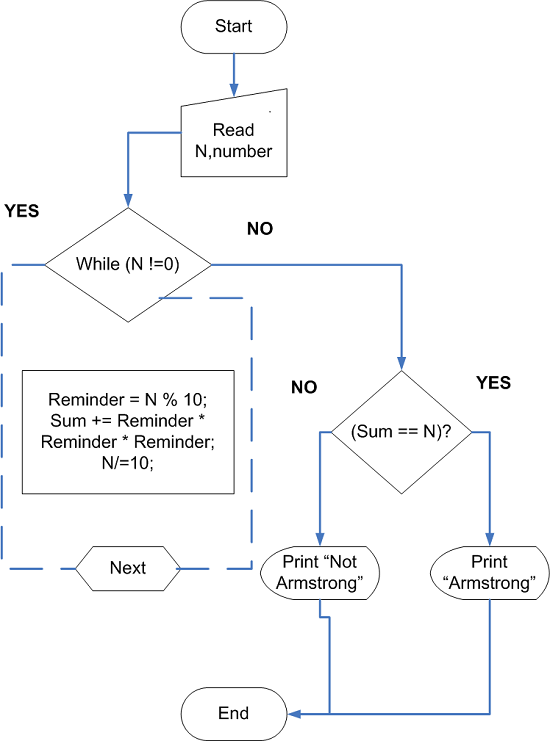
How do we process the Input number N?
Step 1 – Get the number \Large N
Step 2 – Split each digit of the number
Step 3 – Raise each digit to the power of \Large 3 and take a sum of all the powers.
Step 4 – Repeat step 1 to 3 if number \Large N not equal to \Large 0.
Step 5 – Check if \Large Sum == N after Step 4, \Large N == 0.
Step 6 – Print the Output.
Flowchart – Check Armstrong Number
Program Codes – Armstrong Number
#include <stdio.h>
#include <conio.h>
main()
{
    int n,i,n1,rem,num =0;
    /* Read the input number */
    printf("Enter a positive integer:");
    scanf("%d",&n);
    /*Get the sum of nth power of each digit */
    n1 = n;
    while(n1 != 0)
    {
        rem = n1 % 10;
        num += rem * rem * rem;
        n1/=10;
    }
    /* Check if the number is an Armstrong or Not */
    if(num == n)
    {
    /*Print the result */
        for(i =0;i<30;i++)
        {
            printf("_");
        }
    printf("\n\n");
    printf(" %d is an Armstrong number\n",n);
        for(i =0;i<30;i++)
        {
            printf("_");
        }
    printf("\n\n");
    }
    else
    {
        for(i =0;i<30;i++)
        {
            printf("_");
            printf("\n\n");
        }
    printf("%d is not an Armstrong number",n);
        for(i =0;i<30;i++)
        {
            printf("_");
            printf("\n\n");
        }
    }
    getch();
    return 0;
}
#include <iostream>
using namespace std;
int main() {
int n, n1, rem, num = 0;
cout << "Enter a positive integer: ";
cin >> n;
n1 = n;
while (n1 != 0) {
rem = n1 % 10;
num += rem * rem * rem;
n1 /= 10;
}
if (num == n) {
for (int i = 0; i < 30; i++) cout << "_";
cout << "\n\n" << n << " is an Armstrong number\n";
for (int i = 0; i < 30; i++) cout << "_";
cout << "\n";
} else {
for (int i = 0; i < 30; i++) cout << "_";
cout << "\n\n" << n << " is not an Armstrong number\n";
for (int i = 0; i < 30; i++) cout << "_";
cout << "\n";
}
return 0;
}import java.util.Scanner;
class ArmstrongNumber {
public static void main(String[] args) {
int n, n1, rem, num = 0;
Scanner sc = new Scanner(System.in);
System.out.print("Enter a positive integer: ");
n = sc.nextInt();
n1 = n;
while (n1 != 0) {
rem = n1 % 10;
num += rem * rem * rem;
n1 /= 10;
}
if (num == n) {
for (int i = 0; i < 30; i++) System.out.print("_");
System.out.println("\n\n" + n + " is an Armstrong number");
for (int i = 0; i < 30; i++) System.out.print("_");
System.out.println();
} else {
for (int i = 0; i < 30; i++) System.out.print("_");
System.out.println("\n\n" + n + " is not an Armstrong number");
for (int i = 0; i < 30; i++) System.out.print("_");
System.out.println();
}
sc.close();
}
}n = int(input("Enter a positive integer: "))
n1 = n
num = 0
while n1 != 0:
rem = n1 % 10
num += rem * rem * rem
n1 //= 10
if num == n:
print("_" * 30)
print(f"\n{n} is an Armstrong number")
print("_" * 30)
else:
print("_" * 30)
print(f"\n{n} is not an Armstrong number")
print("_" * 30)
Output
Here is the output of the program for an input integer 371.
 Enter a positive integer:371
 ____________________________
 371 is an Armstrong number
____________________________C Program to Check Eligibility of Students for Engineering or Medical Admission
This program is a mini-project in C programming written using Dev C++ version 5, you can use any standard C compiler to compile the following program.
To help you understand this program, we have the following sections – problem definition, flowchart, program source code, and verified output.
In this C program, we want to compute the following.
- Students’ total marks
- Compute the cutoff marks
- Check if the students are eligible for engineering or medical admission
- Display ‘P’ for Pass, ‘F’ for Fail, ‘E’ if eligible for engineering, ‘M’ if eligible for medical admission
Problem Definition
This program require some input from the users. The input to the program is student information.
- Name
- Registration
and students mark in following 6 subjects.
- Language 1
- Language 2
- Mathematics
- Physics
- Chemistry
- Biology
One the program receives the input values, it will compute following output.
- Total marks in all subjects
- Average marks in all subjects
- Engineering cutoff marks (Must be greater than or equal to 220 for eligibility)
- Medical cutoff marks (Must be greater than or equal to 230 for eligibility)
- Display ‘P’ if student pass in all subjects (All marks greater than 50)
- Display ‘F’ if student fail in any subject (Mark is less than 50)
- Display ‘E’ if student passed and eligible for Engineering admission
- Display ‘M’ if student passed and eligible for medical admission
Let us see how these outputs are calculated.
Total Marks = (Lang1 + Lang2 + Math + Physics + Chemistry + Biology)
Average Marks = (Lang1 + Lang2 + Math + Physics + Chemistry + Biology)/6
Engineering Cutoff = Math/2+ Physics/4 + Chemistry/4
Medical Cutoff = Math/2 + Biology/4 + Chemistry/4
Flowchart of the Program

Program Code
/* Program to Compute the marks of student
and decide cutoff for Engineering and Medical Cutoff */

#include "stdio.h"
#include "conio.h"

#define N 10

struct student{

    char name[20];
    int regno;
    int lang1;
    int lang2;
    int math;
    int physics;
    int chemistry;
    int biology;
    int total;
    int avg;
    char result;
    int engg_cutoff;
    int med_cutoff;

};

main()
{

    struct student stud[100];

    int i,n;

    printf("ENTER THE NUMBER OF STUDENTS:\n");

    scanf("%d",&n);

/* Input Student Details */

printf("____________________________________________________\n\n");


    printf("Student whose Result is P has Passed the Course\n\n");
    printf("Student whose Result is F has Failed the Course\n\n");
    printf("Student whose Result is E has passed \n");
    printf("and eligible for Engineering admission\n\n");
    printf("Student whose Result is M has passed\n");
    printf("and eligible for Medical admission \n\n");

printf("____________________________________________________\n\n");

printf("ENTER STUDENT DETAILS:\n");

for(i=0;i<n;i++)
{

    printf("ENTER STUDENT NAME:");
    scanf("%s",&stud[i].name);

    printf("ENTER STUDENT REGISTRATION NUMBER:");
    scanf("%d",&stud[i].regno);

    printf("ENTER FIRST LANGUAGE MARKS:");
    scanf("%d",&stud[i].lang1);

    printf("ENTER SECOND LANGUAGE MARKS:");
    scanf("%d",&stud[i].lang2);

    printf("MATH:");
    scanf("%d",&stud[i].math);

    printf("PHYSICS:");
    scanf("%d",&stud[i].physics);

    printf("CHEMISTRY:");
    scanf("%d",&stud[i].chemistry);

    printf("BIOLOGY:");
    scanf("%d",&stud[i].biology);

}

/* Student Results, Total Marks, Average Marks */

for(i=0;i<n;i++)
{

    if(stud[i].lang1 < 50 || stud[i].lang2 < 50 ||
    stud[i].math < 50 || stud[i].physics < 50 ||
    stud[i].chemistry < 50 || stud[i].biology < 50)
    {

        stud[i].result = 'F';

    }
    else
    {

        stud[i].result = 'P';

    }
}

for(i=0;i<n;i++)
{

    stud[i].total = 0;

    stud[i].avg = 0;

    stud[i].total = stud[i].lang1 + stud[i].lang2 +
    stud[i].math + stud [i].physics +
    stud[i].chemistry + stud[i].biology;

    stud[i].avg = stud[i].total/6;

}

/* Print Student Information */

printf("_______________________________________________________________________________________\n\n");

printf("NAME\tREGNO\tLANG-1\tLANG-2\tMATH\tPHY\tCHEM\tBIO\tTOTAL AVG RESULT\n\n");

printf("________________________________________________________________________________________\n\n");

for(i=0;i<n;i++)
{

    printf("%s\t%d\t%d\t%d\t%d\t%d\t%d\t%d\t%d\t%d
    %c\n\n",stud[i].name,stud[i].regno,stud[i].lang1,
    stud[i].lang2,stud [i].math,stud[i].physics,
    stud[i].chemistry,stud[i].biology,stud [i].total,
    stud[i].avg,stud[i].result);

}

printf("*****************************************************************************\n\n");

/* Compute Engineering and Medical Cutoff Marks */

for( i=0;i<n;i++)
{

stud[i].engg_cutoff = (stud[i].math)/2 +
(stud[i].physics)/4 + (stud [i].chemistry)/4;

stud[i].med_cutoff = (stud[i].math)/2 +
stud [i].biology)/4 + (stud[i].chemistry)/4;

stud[i].engg_cutoff = stud [i].engg_cutoff +
stud[i].lang1 + stud[i].lang2;

stud[i].med_cutoff = stud[i].med_cutoff +
stud[i].lang1 + stud[i].lang2;

    if(stud[i].engg_cutoff >= 220 && stud[i].med_cutoff < 230 )
    {

        stud[i].result = 'E';

    }
    else if(stud[i].med_cutoff >= 230)
    {

        stud[i].result = 'M';

    }

}

/* Print Student Results and Eligibility */

printf("Name\tTotal\tResult\tMedCO\tEngg_CO\n\n");

printf(______________________________________________\n\n");

for(i=0;i<n;i++)
{

    printf("%s\t%d\t%c\t%d\t%d\n\n",stud[i].name,
    stud[i].total,stud [i].result,
    stud[i].med_cutoff,stud[i].engg_cutoff);

}

    getch();
    return 0;

}
Output
The initial screen of the program is as follows, make sure that you read the instruction before providing input to the program for correct output.
ENTER THE NUMBER OF STUDENTS:
3
_________________________________________________________________
Student whose Result is P has Passed the Course

Student whose Result is F has Failed the Course

Student whose Result is E has passed
and eligible for Engineering admission

Student whose Result is M has passed
and eligible for Medical admission
________________________________________________________________
ENTER STUDENT DETAILS:
ENTER STUDENT NAME: _
When you provide inputs correctly, you should receive a similar output shown below.
C Program To Convert Infix Expression To Prefix Expression
In this article, we discuss about writing a C program to convert infix expression to prefix expression. The infix expression is of form operand operator operand and it is converted to operator operand operand form.
Consider the following example.
// Infix expression
((A + B) * C)

// Prefix expression
*+ABC
Problem Definition
The user enters an infix expression and the C program converts the infix expression to prefix equivalent expression.
The program uses a character array to receive the input expression and another character array to output the final prefix expression. The program use a stack S to keep track of operators and parenthesis of the expression.
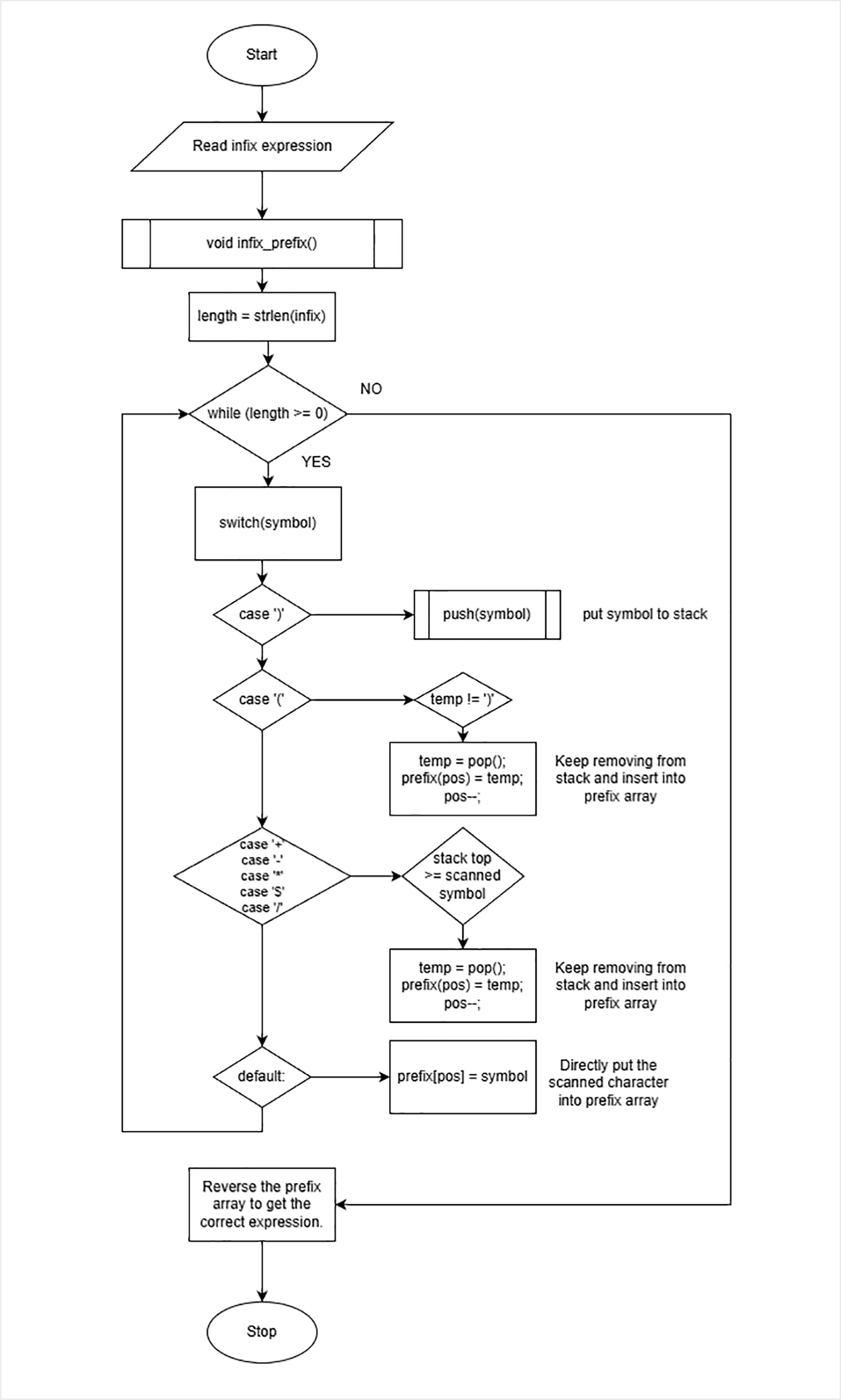
Here is the algorithm to convert infix expression to prefix expression.
- Scan the infix expression right to left.
- If the character is right parenthesis “)”, push to stack S.
- If the character is left parenthesis “(“, then start popping stack one by one and put the characters into prefix array.
- If the scanned character is operator , compare with the operator on stack and continuously pop operators from stack if scanned operator has less precedence than the operator on the top of the stack. If scanned operator has higher precedence than top of the stack. Put the operator on the stack.
- If scanned character is an operand, directly put it in the prefix array.
- If all scanned character is finished , start popping stack and put the operators in prefix array one by one.
For example, suppose we want to convert the infix expression ((A + B) * C) into prefix expression.
Step 1: Start scanning from right to left of the infix expression.

Step 2: Identify the character and put it in stack or prefix array accordingly.

Scanned character  Type          Stack     Prefix array   Stack Operation
--------------------------------------------------------------------------
)                    operator      )                           push(')')
C                    operand                    C                  n/a
*                    operator      *                           push('*')
)                    operator      )                           push(')')
B                    operand                    B                  n/a
+                    operator      +                           push('+')
A                    operator                   A                  n/a
(                    operator                   +              pop()
                                                *              pop()
(                    operator      (                           pop()

Prefix Array :-  *+ABC
Functions Used In the Program
The program uses functions to perform scan, pop from stack, push to stack, check the precedence of operators, etc. Each of these function is discussed in the following sections.
Stack Functions
void push(char sym)
{
   top = top + 1;
   s[top] = sym;
}
char pop ()
{
char item;
item = s[top];
top = top-1;
return item;
}Identify priority of scanned character
You need to identify the priority level of scanned character so that we can compare it with the operator on the top of the stack . The function will return a number for each scanned character.
int G (char symbol)
{
switch (symbol)
{
case '+':
case '-': return 2;
case '*':
case '/': return 4;
case '^':
case '$': return 5;
case '(': return 0;
case ')': return 9;
default : return 7;
}
}Identify priority of character on the top of the stack
This function will return the priority of a character on the top of the stack. We must compare it with the priority of the scanned character. If scanned character has higher priority , push it into the stack.
Else start popping characters from stack and push them into prefix array until scanned character priority become higher.
int F (char symbol)
{
switch (symbol)
{
case '+':
case '-': return 1;
case '*':
case '/': return 3;
case '^':
case '$': return 6;
case '(': return 0;
case '#': return -1;
default : return 8;
}
}Infix expression to prefix expression converter
This the main function that does character by character scan of infix expression. Let’s look at the variable declarations.
/* Global Declarations */
int pos = 0;
int top; /* top of the stack pointer */
int length; /* length of the expression */
char symbol; /* scanned character */
char temp; /* when item is popped from stack we will keep it in temp */
char s[30]; /* stack of type character */
char infix; /* infix expression */
char prefix; /* prefix array for prefix expression */
/* void infix_prefix (char infix[], char prefix[])
{
int i, t1;
top = -1; /* stack is empty */
length = strlen(infix); /* length of infix expression */
length = length - 1; /* The length of the expression
pos = length; is used for prefix array
t1 = length; and infix array */
/* start scanning the infix expression */
while ( length >= 0)
{
symbol = infix[length];
switch(symbol)
{
/* if ) push to stack */
case ')': push(symbol);
break;
/* if ( start popping from
stack unless a matching )
not found */
case '(':
temp = pop();
while( temp != ')')
{
prefix[pos] = temp;
pos--;
temp = pop();
}
if (temp != ')')
{
prefix[pos--] = pop();
}
break;
case '+':
case '-':
case '*':
case '$':
case '/':
case '^': while(F(s[top]) >= G(symbol)) /* if priority of stack is more than
{ scanned symbol, then keep
popping stack until priority
of stack top become less than
the scanned character */
temp = pop();
prefix[pos] = temp;
pos--;
}
push(symbol);
break;
default:
prefix[pos--] = symbol;
break;
}
length--; /*after scanning each character
decrement length to the
next character */
{
while(s[] != '#') /* when all characters are
scanned, then start popping
{ stack and put every thing
temp = pop(); prefix array */
prefix[pos--] = temp;
}
for (i = 0; i < t1; i++) /* reverse the expression in prefix
{ array to get the correct result */
prefix[i] = prefix[i + pos + 1];
}
Flowchart – infix to prefix
Program Code – Infix To Prefix
#include <stdio.h>
#include <string.h>
#include <conio.h>
/* Global Declarations */
int pos = 0;
int top;
int length;
char symbol;
char temp;
char s[30];
char infix;
char prefix;
void push(char sym)
{
top = top + 1;
s[top] = sym;
}
char pop ()
{
  char item;
  item = s[top];
  top = top-1;
  return item;
}
int G (char symbol)
{
  switch (symbol)
  {
    case '+':
    case '-': return 2;
    case '*':
    case '/': return 4;
    case '^':
    case '$': return 5;
    case '(': return 0;
    case ')': return 9;
    default : return 7;
  }

}
int F (char symbol)
{
  switch (symbol)
  {
    case '+':
    case '-': return 1;
    case '*':
    case '/': return 3;
    case '^':
    case '$': return 6;
    case '(': return 0;
    case '#': return -1;
    default : return 8;
  }

}
void infix_prefix (char infix[], char prefix[])
{
int i, t1;
top = -1;
length = strlen(infix); expression */
length = length - 1;
pos = length;
t1 = length;
while ( length >= 0)
{
symbol = infix[length];
switch(symbol)
{
case ')': push(symbol);
break;
case '(':
temp = pop();
while( temp != ')')
{
prefix[pos] = temp;
pos--;
temp = pop();
}
if (temp != ')')
{
prefix[pos--] = pop();
}
break;
case '+':
case '-':
case '*':
case '$':
case '/':
case '^': while(F(s[top]) >= G(symbol))
{
temp = pop();
prefix[pos] = temp;
pos--;
}
push(symbol);
break;
default:
prefix[pos--] = symbol;
break;
}
length--;
{
while(s[] != '#')
{
temp = pop();
prefix[pos--] = temp;
}
for (i = 0; i < t1; i++)
{
prefix[i] = prefix[i + pos + 1];
}
/* MAIN PROGRAM */
void main ()
{
clrscr();
printf("Enter the valid infix expression\n');
scanf("%s",infix);
infix_prefix(infix, prefix);
printf("The prefix expression \n");
printf("%s\n",prefix);
getch();
}Output
*+ABC