Floating point and Double Data Type
Numbers can be represented using Integer data types in C++. But some numbers like real numbers cannot be stored like integers because there is a decimal part associated with the real numbers.
C++ programming language has  and
and  data type to represent real numbers.
A real number is declared using keyword –  or
or  . The main difference between and is the size. The size of float is
  bytes or
  bits, where the size of type is
  bytes or
  bits. There is a long version of the data type which is about
  bytes or
  bytes in size.
| Data Types | Byte Size | Bit Size (1 byte = 8 bits) |
| float | 4 | 32 |
| double | 8 | 64 |
| long double | 12 or 16 | 96 or 128 |
Computer Representation of Floating Point
The real numbers are represented in scientific notation (or exponential notation) because it is easier to perform arithmetic involving real values.
The Exponential Notation
The exponential notation has two parts –  and
and  . The equation to represent the numbers in
  is shown below.
\begin{aligned}&\pm M * 10^E\\ \\ &where \\ \\ &0 \leq M \leq 10\end{aligned}For example, suppose you want to represent  in exponential notation then it becomes
\begin{aligned}&2.0 \cdot 10^4\\ \\&where \\ \\ &0 \leq 2 \leq 10\end{aligned}If you want to represent  in scientific notation, then
\begin{aligned}&1.33 \cdot 10^3\\ \\&where \\ \\&0 \leq 1.33 \leq 10\end{aligned}The number  can be represented as
\begin{aligned}&5.454 \cdot 10^{-5} \\ \\&where\\ \\&0 \leq 5.454 \leq 10\end{aligned}The table isolates the different parts of the examples given above.
| Mantissa | Exponent | E-notation |
| 2.0 | 4 | 2.0E4 |
| 1.33 | 3 | 1.33E3 |
| 5.454 | -5 | 5.454E-5 |
The above notation is suitable for human, but the computer needs a binary representation of numbers and that too, in  format.
Since we already know that bytes or bit is required to store a floating point number in a computer. The 
 number is divided into
  parts –
  bits for the mantissa,
  bit for sign, and bit for exponents.
The sign bit  means positive number and means a negative number.
The  exponent can store values between
  to
to  .
.
The computer representation of exponential notation is:
\begin{aligned}&(b_0. b_1 b_2 b_3 \cdots ) \cdot 2^E\\ \\&where \\ \\&b_{0} = 1\end{aligned}This representation is called the  .
.

Declaring Floating Type and Double Type
Declaring a floating type and double data type variabe in a C program is similar.
float PI  3.14;
double radius 5,33;
There is little difference between and though they are represented in the same way in a computer. The double precision is longer than the float in terms of allowing the real part of a floating number.
\begin{aligned}&3.244440\\ \\&3.244440000000000 \hspace{3px}(double \hspace{3px} is \hspace{3px} has \hspace{3px} longer \hspace{3px} decimal \hspace{3px} part )\end{aligned}C/C++ Keywords
The  are identifiers that cannot be used as
  . These are reserved words used as instructions in a C/C++ program.
In this article , we have listed all the common keywords used in C/C++ language with a short description of each.
| Keyword | Language | Description |
| auto | C/C++ | Auto storage class |
| break | C/C++ | Break a loop or block |
| case | C/C++ | Part of switch-case |
| char | C/C++ | Declares char type |
| const | C/C++ | Declares a constant |
| continue | C/C++ | Continue a loop |
| default | C/C++ | Default switch-case |
| do | C/C++ | Do-while loop |
| double | C/C++ | Double data type |
| else | C/C++ | If-else block |
| enum | C/C++ | Enumeration type |
| extern | C/C++ | External storage class |
| float | C/C++ | Float data type |
| for | C/C++ | For loop |
| goto | C/C++ | Jump between blocks (Deprecated) |
| if | C/C++ | If block |
| int | C/C++ | Integer data type |
| long | C/C++ | Long data type |
| register | C/C++ | Register storage class |
| return | C/C++ | Returns a value |
| short | C/C++ | Short data type |
| signed | C/C++ | Data type with sign |
| sizeof | C/C++ | Returns sizeof variable |
| static | C/C++ | Static storage class |
| struct | C/C++ | Declare a structure |
| switch | C/C++ | Switch-Case block |
| typedef | C/C++ | User-defined type |
| union | C/C++ | Declare a union |
| unsigned | C/C++ | Unsigned data type |
| void | C/C++ | Void means no type |
| volatile | C/C++ | Variables stored in volatile memory |
| while | C/C++ | While loop |
The above keywords are common to both C and C++. See the list below for C++ specific keywords. C++ programming has more keywords because it supports object-oriented programming (OOP).
| Keyword | Language (C++) | Description |
| asm | C++ | gives ability to add assembly language code in C++ program |
| catch | C++ | part of try-catch block used for exception handling |
| class | C++ | declare a class |
| delete | C++ | delete an object |
| friend | C++ | declare friend function |
| inline | C++ | declare a code or block inline |
| new | C++ | create object dynamically with new |
| operator | C++ | used to overload C++ operators |
| private | C++ | visibility of class member set to private |
| protected | C++ | visibility of class member set to protected |
| public | C++ | visibility set to public |
| template | C++ | declares a template |
| this | C++ | reference to current class, where this is used |
| throw | C++ | throws a message, result of an exception and it is default or user-defined. |
| try | C++ | exception handling using try block |
| virtual | C++ | declare a function abstract using virtual, no implementation required for such a function. |
New sets of keyword is added by ASCI C++ which are listed in the following table.
| Keyword | Language (ASCI C++) | Description |
| bool | C++ | Boolean type with true or false value |
| const_cast | C++ | take away the constant-ness of an object. |
| dynamic_cast | C++ | cast the type at runtime |
| explicit | C++ | used with explicit constructors |
| export | C++ | used before template definition in C++ |
| false | C++ | Boolean value |
| mutable | C++ | storage class |
| namespace | C++ | functions, variables, and classes all can come under namespaces. |
| reinterpret_cast | C++ | integral type to pointer type conversion and vice-versa |
| static_cast | C++ | cast type easily at compile time |
| true | C++ | Boolean value |
| typeid | C++ | returns a typeinfo object |
| typename | C++ | used with C++ template |
| using | C++ | tells the namespace the C++ program uses |
| wchar_t | C++ | wide character type |
C++ Data Type Classification
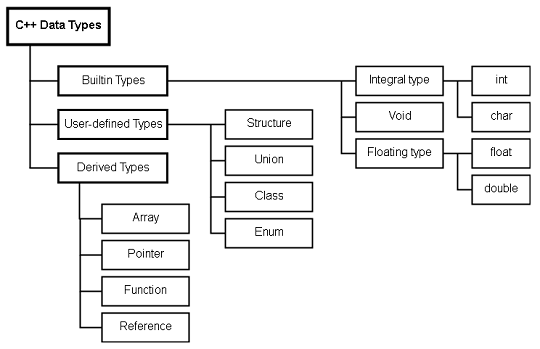
The C++ programming language has a wide variety of data types. In this article, you are going to get an overview of how these data types are classified.
A data type is a computer representation of identifiers such as variables or constants. The C++ data types are divided into 3 categories.
- Builtin types
- User-defined types
- Derived-types
Modifiers
The C++ language supports all the primitive data types like C language. The range of each of the basic data types can be changed using modifiers. A modifier changes the range of allowed values for a built-in data type.
The C++ modifiers are listed below.
- signed
- unsigned
- short
- long
The list of all the builtin data types with each modifier and their range is given in the following table.
| Data Type | Size | Range |
| char | 1 byte |  |
| unsigned char | 1 byte | 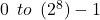 |
| signed char | 1 byte |  |
| int | 2 bytes |  |
| unsigned int | 2 bytes |  |
| signed int | 2 bytes | |
| short int | 2 bytes | |
| long int | 4 bytes |  |
| signed long int | 4 bytes | |
| unsigned long int | 4 bytes |  |
| float | 4 bytes |  |
| double | 8 bytes |  |
| long double | 10 bytes |  |
Note: Some of the ranges is compiler dependent.
C++ Character Data Types
The character data type is one of the primitive data types by C++ programming language. The character data type uses keyword  and it has a minimum size of
  or
or  .
.
This is good enough to hold any  characters because the values of characters in keyboard lies between
  . In other words, there are total
  characters in character set.
Learn C++ programming basics before you begin with character data types.
There are many types of character data types in C++. See the list below.
- char
- unsigned char
- signed char
- wchar_t
- char16_t
- char32_t
char
The most common form usage is char and its size of 1-byte good enough to hold any machine’s basic character set. The char is the keyword.
unsigned char
The plain char is unsigned in most machines and its size if 8-bits. But, the values it can take ranges from to  .
.
signed char
The signed char is also of 8-bits and it takes positive as well as negative values. The range is from  to
to  . In some machines, it is to
  .
.
wchar_t
This character data type can hold any character set which include not only the basic character set, but any extended character set of a system. The extended characters are wider than bits and starts with  .
.
For example,  .
.
char16_t and char32_t
The char16_t and char32_t is to represent the UTF-8-character sets which is any natural language.
C++ Constructors And Destructors
C++ constructors are special member functions that initialize objects when it is created. In other words, as soon as the object starts living the constructor assigns initial values to the objects. There is another special function called destructor, which does opposite of what constructor does – destroy objects.
Syntax for Declaring a Constructor
- A constructor should have same name as that of class.
- A constructor has not return type, not even void.
- Mostly it declared as Public or Protected, rarely it’s declared as Private.
- Constructor are not declared with special keywords such as volatile, const, static, virtual.
class A {
  int m;
public: A () {
  m = 0 ;
}
// Constructor that initialize m to 0.
};
The constructor above has class name A, so the constructor name is also A. It is declared under public visibility. It has no return value. There are many types of constructors which you will learn in this article. The following is a list of constructors used in C++.
- Default Constructor.
- Parameterized Constructor.
- Constructor with Default Arguments.
- Copy Constructor.
- Dynamic Constructor.
Default Constructor
There is no need to call a constructor like member functions. It gets invoked the moment you create an object. The compiler have this constructor and it is called the default constructor. It does not take any kind of values.
You can create a constructor that takes no arguments and it will be called a default constructor.
Example of a Default Constructor
The ‘Do-Nothing’ constructor is an example of default constructor.
class dummy {
   int m;
public:
   dummy () {
      }
};
In the above example, constructor dummy does nothing, however, it is called a default constructor. When you create an object of class dummy.
dummy obj; // object created and constructor will be invoked.The default constructor gets invoked automatically. This is known as automatic initialization of objects.
Parameterized Constructor
The default constructor set the default values which is not required all the time. A user-defined value is desired sometimes, in that case, you can use a parameterized constructor. A parameterized constructor will accept certain arguments and assign those to the private member of the class.
Syntax for Parameterized Constructor
The syntax for parameterized constructor is given below.
class dummy {
   int m, n;
  public:
   dummy(int x, int y){
      m = x;
      n = y);
  // parameterized constructor
 };
  //During object creation dummy
     obj(10, 223);
  // shortcut way called implicit
     declaration
     dummy obj = dummy(33, 445);
  // explicit declaration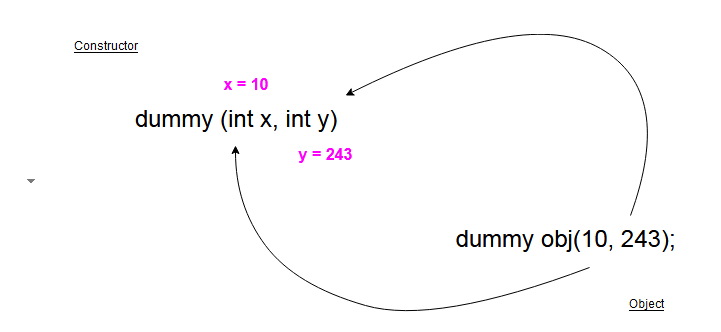
In the above example, when the object of class dummy is created, and supplied with values 10 and 243 for constructor. The value is assigned to x and y parameter of the constructor and later assigned to private members of class – m and n.
Constructors with Default Values
Parameterized constructors are great way to initialize with user-defined values, now in certain parameterized constructors, you can set a default parameter value.
For example,
class A {
   int m, n;
public:
   A (int x, int y = 100) {
      m = x;
      n = y;
   }
};
While creating an object for class A, you can enter only one argument instead of two.
A obj (234); // ignore the second value because it is y = 100Suppose you want to override the default value, C++ constructors, allow you to do that also.
A obj (234, 587); // Override default value y = 100, now y = 587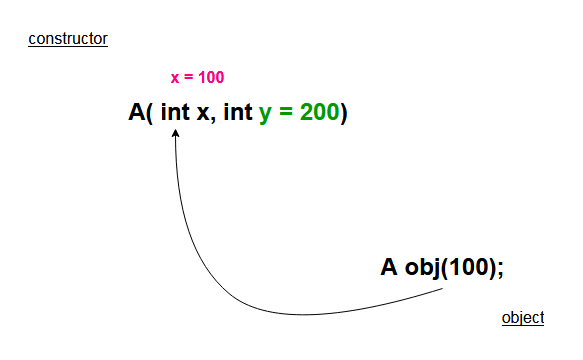
Copy Constructor
Constructors can accept all kinds of parameters except objects of their own class. But there is a way to pass objects of same class as parameter, instead of passing the object itself, pass a reference to the object.
The syntax for copy constructor is as follows.
class Set {
   int x;
  public:
   Set (Set) {
      // this declaration is wrong, cannot pass an object directly.
    }
 };
Now, consider the same example with modification.
class Set {
  int x;
public:
  Set (int y) {
  // constructor with parameters
  int x = y;
 }
  Set (&Set) {
  // this declaration is wrong, cannot pass an object directly.
  }
};
By using the reference operator, a reference to the object is passed. This type of constructor is called a copy constructor.
For example,
Set A (100);
Set B (A);
// will invoke the copy constructor and initialize B with values of A. Set C;
C = A;
// In this all values of A is assigned to object C, but not using copy constructor.
Dynamic Constructors
You can allocate memory to objects while creating them using constructors. This saves memory if you allocate object memory dynamically. The new keyword allocates memory and delete keyword free the memory when the object is destroyed.
For example, let demo be a class, we are going to create an object of demo dynamically. You need a pointer of type demo to this task.
demo *ptr = new demo;
The pointer (*ptr) has memory equal to any demo object. You can get values of data member using (*ptr) easily.
(*ptr).x = 100;
Where (*ptr) is just like any demo class object and x is a data member of class demo.
Destructors
The destructors do exactly opposite of what constructor do, they destroy the objects and free memory after object is terminated. Some well-known properties of destructors are
- They have same class name, similar to constructors.
- But, before the name it has a tilde (~).
- Never take argument or return anything.
- Clear objects and return free memory for future use.
References
- Balagurusamy. 2008. Object Oriented Programming With C++. Tata McGraw-Hill Education.
- Kanetkar, Yashavant. 20 November 2002. Let us C. Bpb Publication
C++ Objects
C++ class is a template for objects. The objects are created, destroyed and manipulated. The C++ objects make use of properties and methods of a class.
Declaring objects
There are two methods for creating objects.
- Declare objects with class declaration.
- Declare objects separately.
We will discuss both the method now.
Declare objects with Class Declaration
In this method, first you declare the class and then the object immediately.
For example
class student {
    char First_name [12];
    char Last_name [12];
    int Rollno;
    int total_marks;
    char grade;
public:
void compute_grade ()
{
    if (total_marks > 80)
    {
        grade = “A”;
    }
    else if (total_marks >= 70 && total_marks < 80)
    {
        grade = “B”;
    }
    else if (total_marks >= 50 && total_marks < 70)
    {
        grade = “C”;
    }
    else
    {
        grade = “F”;
    }
    cout << “Your Grade is” << “ “ << grade << endl;
} student1, student2, student3; //declaring student object
Declaring Objects Separately
In this method, the object and the class declaration is done separately. The advantage of declaring this way is that you can initialize the object at the time of declaration itself.
class student {
    char First_name [12];
    char Last_name [12];
    int Rollno;
    int total_marks;
    char grade;
public:
    void compute_grade ()
    {
        if(total_marks > 80)
        {
            grade = “A”;
        }
        else if (total_marks >= 70 && total_marks < 80)
        {
            grade = “B”;
        }
        else if (total_marks >= 50 && total_marks < 70)
        {
            grade = “C”;
        }
        else
        {
            grade = “F”;
        }
        cout << “Your Grade is” << “ “ << grade << endl;
     }
}; student S4, S5; // global declaration of objects
int main ()
{
    student S1, S2, S3; // declaration inside main ()
    return 0;
}
Accessing Class Members
You can access class members in just like structure or union. The main method of accessing the class member is using Dot (.) operator.
Syntax
The syntax for accessing a class member is given below.
<object_name>.data_member;
<object_name>.member_function ();
Example
S1.Rollno = 342556;
S1.total_marks = 67;
S1.compute_grade ();
getch ();
return 0;
Example Program Code:
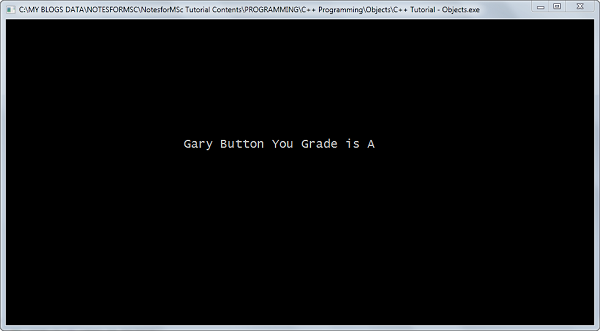
The example program given below will create student objects and then get total_marks of a student object. Then compute the grade and display it immediately.
#include <stdlib.h>
#include <iostream>
#include <conio.h>
#include <string>
class student {

public:
    char First_name [12];
    char Last_name [12];
    int Rollno;
    int total_marks;
    char grade;
    char compute_grade () {
        if (total_marks > 80)
        {
            grade = 'A';
        }
        else if (total_marks >= 70 && total_marks < 80)
        {
            grade = 'B';
         }
        else if (total_marks >= 50 && total_marks < 70)
        {
            grade = 'C';
        }
        else
        {
            grade = 'F';
        }
        return grade;
     }
};
using namespace std;
int main ()
{
    char result;
    student S1, S2;
    strcpy(S2.First_name,"Gary");
    strcpy(S2.Last_name,"Button");
    S2.Rollno = 2464545;
    S2.total_marks = 87;
    result = S2.compute_grade();
    cout << S2.First_name << " " << S2.Last_name << " " << "You Grade is" << " " << result;
    getch ();
    return 0;
}
Output – Example Program
The output of the above program is given below.
References
- Balagurusamy. 2008. Object Oriented Programming With C++. Tata McGraw-Hill Education.
- Maureau, Alex. 21-Jul-2013. Reviewing C++. Alex Maureau.
- Ravichandran. 2011. Programming with C++. Tata McGraw-Hill Education.
C++ Defining Member Function
One of the class member is member function. A function declared as a member of the class is called a c++ member function. There are many types of member functions and different ways to define the c++ member functions.
Types of C++ member functions
There are many types of member functions for different purpose.
- Manager Functions
- Accessor Functions
- Mutator Functions
Now we discuss each of them briefly.
Manager Functions
The main task of manager member function is to initialize and later destruction of created objects.
e.g. Constructor and De-constructor
Accessor Functions
The private data member of a class cannot be accessed by any other functions. The accessor member function returns the value of the private member.
e.g.
class student{
   private:
      int age;
   public:
      get_age(){
      return age;
      }
};
Mutators
The accessor get access to the private member to get the values. The mutator functions modify the data members in a class and usually placed right after the accessors.
e.g.
class sum{
   private:
       int a;
       int b;
       int total;
   public:
       void total(int a, int b)
       {
       total = a + b;
       cout << total << endl;
       }
 };
Defining the member function
There are two ways to define the member function.
- Inside the class (inline)
- Outside the class
Inline function
When the function is defined inside the class it is called an inline function. The inline member functions should be small because they are translated directly.
For example,
class student{
   int rollno;
   int name;
   char grade;
public:
   char get_grade{
        return(grade);
        }
};
Member function defined outside the class
Sometimes, the member function is defined outside of the class. But it must be declared inside the class first. The syntax to declare the c++ member function is given below.
Syntax
return-type <class-name> :: <function-name> (arguments) { }The member function is defined outside of the class using a scope resolution operation (::). Here is an example of function that is defined outside of class.
class student {
   int rollno;
   int name;
   char grade;
public:
   char get grade();
 };
//function definition
char student::get_grade() {
     return (grade);
}
References
- Balagurusamy. 2008. Object Oriented Programming With C++. Tata McGraw-Hill Education.
- Maureau, Alex. 21-Jul-2013. Reviewing C++. Alex Maureau.
- Ravichandran. 2011. Programming with C++. Tata McGraw-Hill Education.7
C++ Class Basics
C++ programming supports Object-Oriented Programming (OOP). The OOP concepts are implemented using classes in C++. Before we start learning about C++ class basics, understand the following OOP concepts given below.
Data Abstraction
C++ classes are abstract data-types (ADTs). The classes use data abstraction which is collection of data and methods in OOP. The term abstraction means showing only the essential features without sharing the implementation details. The internal details of a class is hidden to other classes.
Data Hiding or Information Hiding
C++ hiding details of a class and only allows member functions to access the data for protection. No other class or function can access the information from outside the class.
This is achieved using visibility labels – private, public and protected.
Data Encapsulation
The data and functions of a class is neatly encapsulated into a package so that information is hidden (data hiding) and no one can access the information outside of class.
Inheritance
The term “inheritance” means object of one class can inherit properties and methods of another class object.
The class whose properties and method are inherited is called the Base or Parent class.
The class which inherits the properties and methods is called the derived or child class. Inheritance creates a hierarchy of classes. The methods of child classes are reused many times because the derived class use them, otherwise, these methods should be written for each child class separately.
Code re-usability is the advantage of using inherited classes.
Polymorphism
Sometimes, a function of class takes many form but retain the same name. The process of polymorphism is known as function overloading in C++.
For example,
void fly ();
int fly (int);
float fly (int, int, float);
Message Passing
The message passing enables communication of information among objects. A request to run a method of an object is the message to that object.
You need three components for message passing in a c++ class.
- An object
- A method of the object (message)
- A parameter (information to be passed)
For example
Obj.fly (eagle);where
“Obj” is the object and “fly ()” is a message. The argument “eagle” is an information that is passed in the message.
Class Declaration Example
A c++ class is encapsulation of data and its methods to prevent access from outside the class.
To declare a class
- Use keyword class
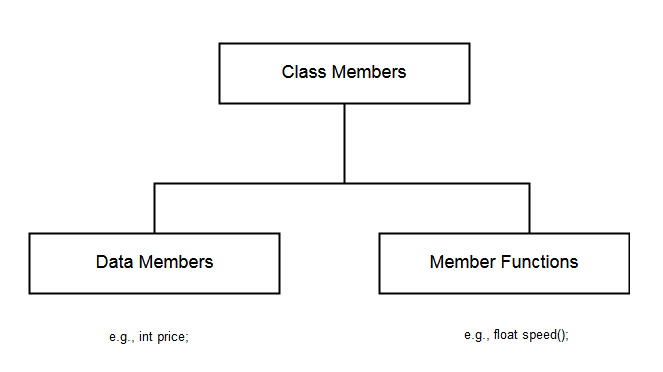
- The variables and methods inside a class are called class members. A variable inside class is called a data member and a method is called a member function.
- The visibility of member is controlled by visibility labels – private, public and protected.
For example
class car {
private:
char model;
char type;
float price;
public: void speed();
};
Visibility Labels
The visibility labels prevent the access of class members from outside the class. There are three types of visibility labels defined inside a c++ class.
- Public
- Private
- Protected

Public
- The public members can be accessed by any function outside the class. The public member functions are also called the interface functions because they interact with other classes.
- The member functions can be defined inline (inside the class) or outside the class.
Private
The main characteristics of private members are following.
- Private members cannot be accessed outside the class. Only member functions from same class can access private class members.
- When no visibility is defined then all class members are private and cannot be accessed outside the class.
- There is a special function called friend functions that can access private members.
Protected
The protected label have some characteristics of private label.
- The protected members can be accessed by member functions and friend functions. Also, access by member functions of derived classes and friend functions of derived classes.
- Cannot be accessed outside of class.
References
- Balagurusamy. 2008. Object Oriented Programming With C++. Tata McGraw-Hill Education.
- Ravichandran. 2011. Programming with C++. Tata McGraw-Hill Education.
C++ Programming Notes – Concepts, Examples, and Exam-Ready Revision
C++ Programming is a foundational subject in Computer Science and Information Technology (IT) curricula and a key requirement for university exams and competitive examinations.
On this page, you will find structured resources to learn C++ programming concepts, along with clear explanations, examples and exam-ready revision notes.
What Will You Learn
On this page you will find:
- Core C++ programming concepts explained clearly and systematically
- Exam-oriented explanations supported with relevant examples
- MCQ-based practice posts to test your understanding
- Detailed articles along with exam-ready revision PDFs
This Page is for:
- Computer science and IT students
- GATE and other competitive exam aspirants
- University exam preparation
- Self learners who want to revise C++ knowledge.
Topic Sections
Find C++ programming topics here.
(1) C++ Fundamentals
(2) C++ Data Types
(3) C++ Operators
(4) C++ Strings
(5) C++ User-Defined Types
(6) C++ Flow-Control Statements
(7) C++ Loop Control
(8) C++ Functions Related
(9) C++ Pointer Concepts
(10) C++ File Handling
(11) C++ Preprocessor
(12) C++ Object-Oriented Programming
- C++ Class Basics
- C++ Objects
- C++ Objects As Function Argument
- C++ Defining Member Function
- C++ Private Functions
- C++ Constructors & Deconstructors