C While Loop
In C programming, we like to repeat some instructions over and over again with or without updated information. C language provides loops for this purpose.
The type of loop, you want to use depends on how you want to use the loop – C while loop, C for or C do-while loop.
Read: C Programming Tutorial – Do-While Loop
Read: C Programming Tutorial – for loop.
- You may want to run the instruction for a fixed number of time.
- You may run the loop continuously until a specific condition terminates the loop.
C language provides 3 types of loop control structures.
- C While loop
- C For loop
- C Do-while loop
In the rest of the lesson, we will explore each loop structure in detail with examples and diagrams.
C While Loop
The while loop is a simple loop which repeatedly execute statements within the body of loop as long as the condition to enter the loop is remains true. The while loop is terminated as soon as the condition becomes false.
Parts of a while loop
- Loop variable – a variable of type integer to keep tract of iterations of loop.
- Loop condition – helps decide if loop body should be executed or not.
- Loop body – task assigned within the loop that is performed repeatedly.
The steps performed during the execution of a while loop is
Flowchart of C While Loop
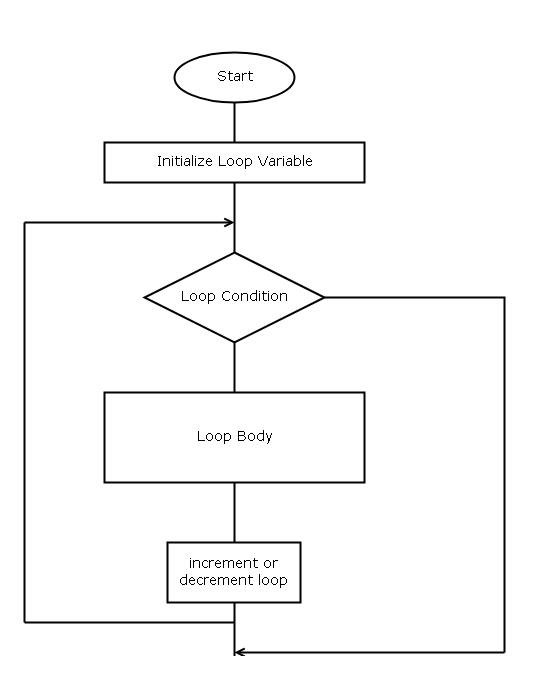
Step 1: while loop is initialized by setting an initial value the loop variable.
Step 2: Condition for loop entry is checked against some value, if the output is true.
Step 3: The loop body is executed.
Step 4: loop variable is incremented for next iteration
Step 5: If the next iteration does not meet the loop condition and become false, loop body is not executed and terminates the while loop.
Example Program – c while loop
#include <stdio.h>
int main()
{
     int i, sum;

     /* initialize the loop variable 'I' */
     sum = 0;
     i = 1;

     /* set while loop condition */
     while( i<=10)
     {
          sum = sum + i;

     /* increment the loop */
     i++;
     }

/* print the result after loop terminates */
printf("\n\n\n\n\n\n");
printf("\t\t\tThe sum is %d\n",sum);
getch();
return 0;
}
In this example, we are going to repeatedly add numbers using a while loop and at the end print the results.
Output – C while loop
The sum is 55Example explained
The example program has a loop variable  and we go through all the steps in the while loop execution and prints the output of the program after the loop terminates.
Step 1: The variable  and
and  is initialized, where is the loop variable.
i = 1;Step 2: The variable is tested in the loop condition and every time it is less than or equal to 10, the loop body is executed, otherwise it terminates the loop.
while (i<=10)Step 3: If condition is true, loop body is executed. The current value of is added to the variable .
sum = sum + i;Step 4: Increment the loop for next iteration.
i++;Step 5: when the condition becomes false,  , loop is terminated, and output is printed to the console.
printf("\t\t\tThe sum is %d\n",sum);Common Errors
The common errors using while loop is as follows.
- While loop not initialized properly.
- Incorrect relational operator or value for conditions.
- The condition must return a Boolean – true or false, otherwise loop does not work.
- Loop variable not incremented or decremented.
References
- Balagurusamy, E. 2000. Programming in ANSI C. Tata McGraw-Hill Education,.
- Kanetkar, Yashavant. 20 November 2002. Let us C. Bpb Publications.
C Flow Control Structures – II
In the previous lesson, we learned about the flow control structure. We learned about the if-else structures and nested if structures. In this lesson, we will learn about another flow control feature – switch-case.
If-else Construct
Consider a C program for calculator, the user is given a menu with options to choose from.
- Add
- Subtract
- Multiply
- Divide
We can write a program using if-else construct for the above problem.
#include <stdio.h>
int main()
{
    int choice;
    int a,b,c;
    a = 10;
    b = 20;
    printf ("Enter your choice:");
    if (choice == 1)
    c = a+b;
    if (choice == 2)
    c = a – b;
    if (choice == 3)
    c = a * b;
    else if(choice == 4)
    c = a/b;
    else
    {
    printf("Wrong input, Try again!");
    }
    getch();
    return 0;
}
The user enters a number, and it is matched with if-else blocks and whenever there is a match that block is executed.
The problem with these kinds of the construct is that when the menu is large, then the if-else construct will be difficult to manage. Also, there are many comparisons – each if a block is tested.
Switch-Case
The switch-case is suitable for menu driven C programs. Whenever the program is executed, a menu with a number of choices like the example below is presented to the user.
/* Calculator Application in C */
Enter your choice:
1. Add
2. Subtract
3. Multiply
4. Divide
The switch block look like the following in program source code. The switch block accepts a number as user choice.
When the user enters a number next to an option and the switch accepts the choice(number).
int choice;
switch (choice)
{
  statements;
}
The switch () matches the user choice with a list of cases. Each of the cases has a number associated with them followed by a colon.
case 2:
    Statement1;
    break;
case 3:
    Statement2;
    Statement3;
    break;
When the user choice and the case number match, the statement from the case is executed and terminated by a break, statement.
The entire switch-case block look like following
int choice;
scanf("%d",&choice);
Switch(choice)
{
Case 1:
    Do something;
    break;
Case 2:
    Do something;
    break;
default:
    Do something;
    break;
}
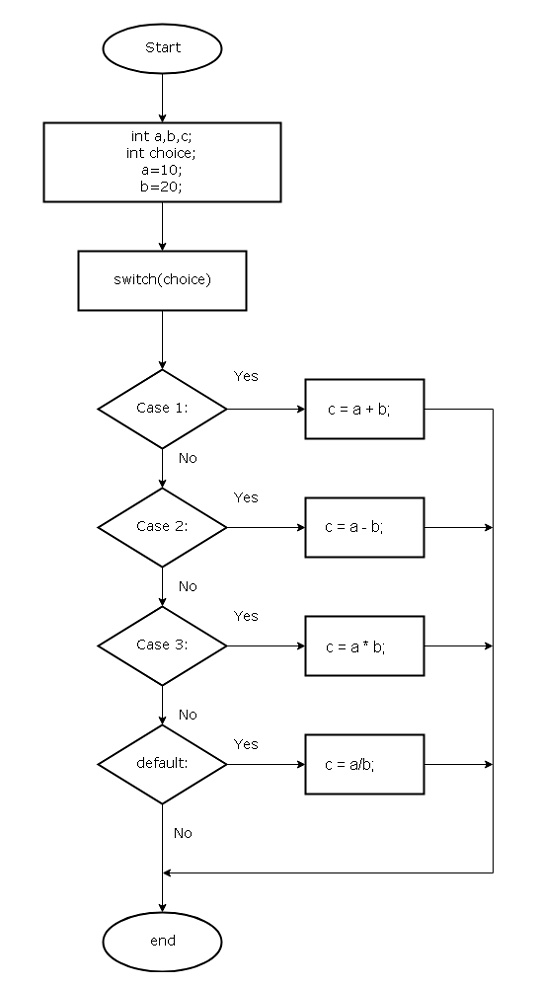
Let’s create an example program using the switch-case. We shall write the Calculator program using the switch-case.
Flowchart – C calculator using switch-case block
Program Code – C calculator using switch-case
/* C Program for a Calculator using switch-case */
#include <stdio.h>
int main()
{
    int choice;
    int a, b, c;
    a = 10;
    b = 20;
    printf ("Enter your choice:");

    scanf ("%d", &choice);
    Switch (choice)
    {
    case 1:
        c = a + b;
        break;
    case 2:
        c = a - b;
        break;
    case 3:
        c = a * b;
        break;
    case 4:
        c = a / b;
        break;
    default:
        printf ("Wrong choice, try again!");
        break;
    }
    printf ("Result = %d\n", c);
    getch();
    return 0;
}
Output – calculator program using switch-case block
The output of the program is given below.
Enter your choice :1
Result = 30
References
- Balagurusamy, E. 2000. Programming in ANSI C. Tata McGraw-Hill Education,.
- Kanetkar, Yashavant. 20 November 2002. Let us C. Bpb Publications.
C Logical Operators
C programming language has logical operators for logical expressions. The output of a logical operation is a Boolean value – true or false.
In a logical expression, you have one or more operands and each has a truth value, depending on the truth value of each operand the logical operator decides the final truth value of the logical expression.
Logical Operators
A list of logical operators in C language is given below. The minimum numbers of operands required by each of the operators are also given in the same table.
- AND (&&)
- OR (||)
- NOT (!)
We shall discuss each of them in more detail now.
AND (&&) operator
The AND operation is denoted by two ‘ampersand’ symbol. To understand the AND operation, consider the following expression,
\begin{aligned}&A \hspace{2px} \&\& \hspace{2px} B\\ \\
&Where \hspace{2px}A = (3 < 4)\hspace{2px} and \hspace{2px} B = (10 < 20)
\end{aligned}
The final output of the expression depends on the following conditions.
\begin{aligned}&A \hspace{5px} is \hspace{5px}  \textbf{true} \hspace{5px}  \&\& \hspace{5px} B \hspace{5px} is \hspace{5px}\textbf{ true} = A \hspace{5px}  \&\&\hspace{5px}  B\hspace{5px}  is \hspace{5px} \textbf{true}\\
&A \hspace{5px} is \hspace{5px}  \textbf{false} \hspace{5px}  \&\& \hspace{5px} B \hspace{5px} is \hspace{5px}\textbf{ true} = A \hspace{5px}  \&\&\hspace{5px}  B\hspace{5px}  is \hspace{5px} \textbf{false}\\
&A \hspace{5px} is \hspace{5px}  \textbf{true} \hspace{5px}  \&\& \hspace{5px} B \hspace{5px} is \hspace{5px}\textbf{ false} = A \hspace{5px}  \&\&\hspace{5px}  B\hspace{5px}  is \hspace{5px} \textbf{false}\\
&A \hspace{5px} is \hspace{5px}  \textbf{false} \hspace{5px}  \&\& \hspace{5px} B \hspace{5px} is \hspace{5px}\textbf{ false} = A \hspace{5px}  \&\&\hspace{5px}  B\hspace{5px}  is \hspace{5px} \textbf{false}\\
\end{aligned}
So, the AND is only true when both A and B are true.
OR (||) operator
The OR operation is also useful logical operator in the C language. The value of the expression is true under the following conditions.
\begin{aligned}&A \hspace{5px} is \hspace{5px}  \textbf{true} \hspace{5px}  || \hspace{5px} B \hspace{5px} is \hspace{5px}\textbf{ true} = A \hspace{5px} ||\hspace{5px}  B\hspace{5px}  is \hspace{5px} \textbf{true}\\
&A \hspace{5px} is \hspace{5px}  \textbf{false} \hspace{5px}  || \hspace{5px} B \hspace{5px} is \hspace{5px}\textbf{ true} = A \hspace{5px} ||\hspace{5px}  B\hspace{5px}  is \hspace{5px} \textbf{true}\\
&A \hspace{5px} is \hspace{5px}  \textbf{true} \hspace{5px}  || \hspace{5px} B \hspace{5px} is \hspace{5px}\textbf{ false} = A \hspace{5px} || \hspace{5px}  B\hspace{5px}  is \hspace{5px} \textbf{true}\\
&A \hspace{5px} is \hspace{5px}  \textbf{false} \hspace{5px} || \hspace{5px} B \hspace{5px} is \hspace{5px}\textbf{ false} = A \hspace{5px} || \hspace{5px}  B\hspace{5px}  is \hspace{5px} \textbf{false}\\
\end{aligned}
From the above example, it is clear that the OR is only true when at least A or B is true.
NOT (!) operator
The NOT is called the negation operation. It negates the truth value of the existing expression.
For example,
\begin{aligned}&If \hspace{5px}A \hspace{5px} is \hspace{5px}  \textbf{true} , then\hspace{5px}  !A \hspace{5px}   is \hspace{5px} \textbf{false}\\
&If \hspace{5px}A \hspace{5px} is \hspace{5px}  \textbf{false} , then\hspace{5px}  !A \hspace{5px}   is \hspace{5px} \textbf{true}\\
\end{aligned}
Note:- The $latex !(!A) == A&s=2$
Example – AND, OR, NOT
/* C Program to demonstrate use of Logical Operators */
#include <stdio.h>
int main() {
    int A, B ;
    A = (5 < 10); /* True */
    B = (10 < 20); /* True */
    printf("\n\n\n\n\n");

/* Working of AND operation - both A and B must be true */
    if(A && B) {
        printf("\tOutput AND - both A and B are true\n\n");
    }

/* Operation of Not operator */
    A = (2 < 10); /* False */
    B = (4 < 8); /* True */

/* A && B is False */
    if(!(A && B)) {
        printf("\tOutput NOT - (A && B) is False so negation!(A && B) is True\n\n");
    }

/* Working of OR operator - any one of A or B must be true */
    if (A || B) {
        printf("\tOutput OR - Any one of A or B is true\n\n");
    }

    getch();
    return 0;
}
Output – AND, OR, NOT
Output AND - both A and B are true
Output NOT - (A && B) is False so negation !(A && B) is True
Output OR - Any one of A or B is true
References
- Balagurusamy, E. 2000. Programming in ANSI C. Tata McGraw-Hill Education,
- Brian W. Kernighan, Dennis M. Ritchie. 1988. C Programming Language, 2nd Edition. Prentice Hall.
- Kanetkar, Yashavant. 20 November 2002. Let us C. Bpb Publications.
C Arithmetic Operators
The arithmetic operators in the C language are used to perform basic mathematical operations. It is used in a C arithmetic expression involving at least two operands and an operator.
An expression is C statement that evaluates to a single value. You can use this value in another C expression or output to the console.
For example,
A = 10;
B = 20;
C = A + B; /* This is an arithmetic expression involving two
Two operands and + operator */
In the above example, the expression A and B will be replaced with 10 + 20, when the program executes and the expression will evaluate to 30. This is assigned to variable C.
Arithmetic Operators
A list of arithmetic operators is given below. The mathematical symbol is actual mathematical operation perform in real world. The C operator is equivalent of that mathematical operation.
| Math Symbol | C Operator | Description |
|---|---|---|
| + | + | Addition |
| – | – | Subtraction |
| x | * | Multiplication |
| ÷ | / | Division |
| mod | % | Modulo |
Addition
The addition operator perform simple addition on two numbers. It requires two operands of type – integers or real numbers.
For example,
sum = number1 + number2 ;
sum = 10 + 23;
sum = 12.4 + 53.33;
The above are valid C expressions involving addition (+) operator.
Subtraction
The subtraction is similar to addition and perform simple subtraction on integers or real numbers.
For example,
result = number2 – number1;
result = 23.4 – 33.55;
result = 32 – 2;
These are some valid examples of C expression involving the subtraction (-) operator.
Multiplication
The multiplication is the first operation performed when an arithmetic expression is evaluated. We will learn more about operator precedence in future lessons.
The multiplication operator requires at least two operands to perform the multiplication and the result can be output to console and used in another expression.
For example,
C = A * B;
C = 34 * 100;
result = 23.44 * 34.545;
The above expressions are some valid expressions involving multiplication (*) operator.
Division operator
The division requires two operands – a dividend and a divisor. The dividend is divided using divisor and result is a quotient and remainder.
It is assumed that the dividend is always greater than the divisor, but it’s not necessarily true. Sometimes, dividend is a smaller value than divisor, but this does not produce wrong results.
For example,
result = number2 / number1;
result = 56.33/6.55;
result = 32 /22;
These are some valid examples of C expression involving the division (/) operator.
The third example will result in quotient = 1 and remainder = 10, but C division operator during an integer division only output quotient, not remainder.
Modulo Operator
Since, the division operator cannot produce remainder, the modulo operator solve this problem. The modulo operator only produce the remainder when performed on a dividend and a divisor.
For example,
result = number2 % number1; result = 10 % 3 ;
/* result = 1 */
result = 12.44 % 2.20
/* result = 1.44 */
The mod operation will produce only remainder, there is no quotient or any other outputs.
Example – Arithmetic Operators
/* C Program to demonstrate the Arithmetic Operators */
#include <stdio.h>
int main()
{
    int number1, number2, result;

/* Read Inputs */
    printf("\n\n\n\n\n\n");
    printf(" \t\t\tEnter two numbers\n\n");
    printf("\t\t\tNumber1:");
    scanf("%d",&number1);
    printf("\t\t\tNumber2:");
    scanf("%d",&number2);
    printf("\n\n");

/* Addition */
    result = number1 + number2;
    printf("\t\t\tAddition = %d\n", result);

/* Subtraction */
    result = number1 - number2;
    printf("\t\t\tSubtraction = %d\n", result);

/* Multiplication */
    result = number1 * number2;
    printf("\t\t\tMultiplication = %d\n", result);

/* Division */
    result = number1 / number2;
    printf("\t\t\tDivision = %d\n", result);

/* Modulo */
    result = number1 % number2;
    printf("\t\t\tModulo = %d\n", result);

    getch();
    return 0;
}
Output- Arithmetic Operators
Enter two numbers _
20
10
Addition = 30
Subtraction = 10
Multiplication = 200
Division = 2
Modulo = 0
References
- Balagurusamy, E. 2000. Programming in ANSI C. Tata McGraw-Hill Education,.
- Brian W. Kernighan, Dennis M. Ritchie. 1988. C Programming Language, 2nd Edition. Prentice Hall.
- Kanetkar, Yashavant. 20 November 2002. Let us C. Bpb Publications.
C Flow Control Structures – I
In a C program, the statements are executed sequentially – one at a time. But, not all C programs are executed in the same way. In some programs, we want to execute a part of the code and ignore others parts.
The flow of the program must change when we meet certain criteria or not meet the criteria. This is can be achieved using flow control structure in C language. A flow control structure in a C program can change the direction of flow of the program depending on the conditions. In this way, a certain section of code is ignored within a C program.
Flow Control Structures
A list of flow control structure is given below.
- If statements
- If-else statements
- Switch-case statements
- Conditional statements
Relational Operators are used for setting conditions within flow control structures.
The list of relational operator with brief description is given below.
| Operator | Description |
|---|---|
| == | Is equal to |
| != | Is not equal to |
| <= | Less than or equal to |
| >= | Greater than or equal to |
| < | Less than |
| > | Greater than |
If Statements
The ‘if’ block will execute a one or more C statements when a condition is true.
The syntax for if block is as follows
if (condition)
{
    statement 1;
}
There will not be any execution if the condition is false. The relational operator with the operands will evaluate to true or false.
For example
if ( 5 < 10)
{
    printf (" The statement is true");
}
In the above example, $latex 5 < 10&s=2$ is true by default and evaluate to true. Hence, the output will be “The statement is true”.
Types of if blocks
In this section we will discuss types of if block that you can use without getting errors in a C program.
Single if block with no curly brackets
if ( condition)
statement 1;
Single if block with curly brackets
if ( condition)
{
    statement 1;
}
Single if – else block without curly brackets
if( condition)
    Statement 1;
else
    statement 2;
Single if – else block with curly brackets
if (condition)
{
    statement 1;
    statement 2;
}
else
{
    statement 3;
    statement 4;
}
Single if – else if – else block with curly brackets
if ( condition)
{
    statement 1;
    statement 2;
}
else if ( condition 2)
{
    statement 3;
    statement 4;
}
else
{
    statement 5;
}
In the above block, there are two conditions that the program need to meet but it starts from the condition 1 and if the condition 1 is not met, checks for condition 2 and if that is not met either then execute the statement 5.
It is a good practice to use the curly bracket to avoid confusion.
The brackets show the boundaries for each block and brings clarity and also very helpful in managing codes when the program becomes very large.
Nested If Blocks
The nested block is blocked within another block and they are executed first whenever the block is executed. The following is an example of a nested block.
if ( condition 1)
{
    statement 1;
    if( condition 2)
    {
        statement 2;
        statement 3;
    }
}
Nested Blocks
In the example above, statement 2 and statement 3 are executed first when condition 2 is true. The nested block will not be executed if condition 1 is false in the parent block. The types of the nested block are given below.
Nested if block with curly brackets
if ( condition 1)
{
    if( condition 2)
    {
        statement 1;
        statement 2;
    }
}
Nested if block with no curly brackets
if ( condition 1)
{
    if ( condition 2)
    statement 1;
    statement 2;
}
Nested if – else block with curly brackets
if (condition 1)
{
    if (condition 2)
    {
        statement 1;
        statement 2;
    }
else
    {
        statement 3;
        statement 4;
    }
}
Nested if-else without curly brackets
if ( condition 1)
{
    if( condition 2)
    statement 1;
    statement 2;
else
    statement 3;
    statement 4;
}
Second Level nested ‘if’ block with curly brackets
if( condition 1)
{
    if (condition)
    {
        statement 1;
        if (condition 3)
        {
            statement 2;
            statement 3;
        }
    }
    else
   {
        statement 4;
    }
}
Flowchart – Symbol
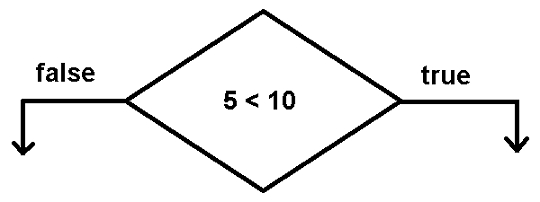
In a C program flowchart, the flow control such as if block is denoted by a diamond shape.
Examples – if – else and nested if blocks
In this section, an example of simple if block, if-else block and nested if block is given to demonstrate the usage of flow control structure in a C programs.
The example is written using Dev-C++ 4.9.9.2 compiler installed on a Windows 7 64-bit PC.
#include <stdio.h>
int main()
{
    int number1, number2, number3, sum;
    number1 = 20;
    number2 = 40;
    number3 = 50;
    sum = 0;
    sum = number1 + number2;
/* The 'if' block */
    if(number3 < 60) { printf("The sum is %d\n", sum); }
/* The 'if-else' block */
if(sum == 70)
{
    printf("The sum is correct\n");
}
else
{
    printf("The sum is incorrect, try again!\n");
}
/* nested if block */
if ( sum > 50)
{
    if( number3 > 40)
    {

        sum = sum + number3;
        printf("The new sum is %d\n",sum);
    }
}
    system("pause");
    return 0;
}
Output-Example if, if-else and nested if block
The sum is 60
The sum is incorrect, try again!
The new sum is 110
Press any key to continue . . .
References
- Balagurusamy, E. 2000. Programming in ANSI C. Tata McGraw-Hill Education,.
- Brian W. Kernighan, Dennis M. Ritchie. 1988. C Programming Language, 2nd Edition. Prentice Hall.
- Kanetkar, Yashavant. 20 November 2002. Let us C. Bpb Publications.
C Program Structure
C programming language is a general-purpose high-level programming language and like every programming language, it follows a consistent structure. In this article, we begin the tutorial by describing the structure and elements of C language.
C Statements
A C program is consists of statements or instructions grouped together. A statement is an instruction to a compiler which usually consists of keywords describing the instruction.
For example, consider the following statement.
int rooms = 10;In the above statement, keyword ‘int’ means integer and it used to describe a variable ‘rooms’ of type integer with a value 10.
printf ("My name is Thomas");This statement does not contain anything other than keyword – printf.
The keyword, variable and the value consists of alphabets (a –z A-Z, digits (0 – 9), special symbols (=, #, %, ^ and many more).
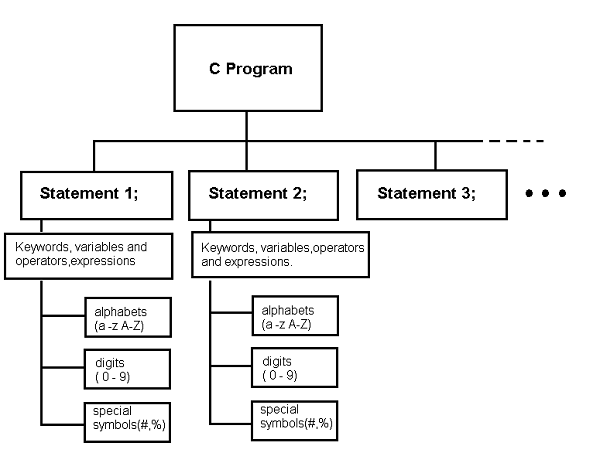
Note: Some statements do not have a variable or an expression and every C statement must end with a semi-colon.
Statement Block
Sometimes one or more C statements are blocked if they all contribute to one specific task. We put these statements between { and } brackets.
For example,
{
    Statement 1;
    Statement 2;
    ………………….
    …………………..
    Statement M;
}
A block of statement always starts with a keyword, which we will discuss in future lessons.
Nested Block
It is necessary to break a program into blocks of statements and break the block in sub-blocks to get clarity and efficiency in program logic. A block of statement which is inside of another block of statement is called a nested block.
For example, consider following diagram.
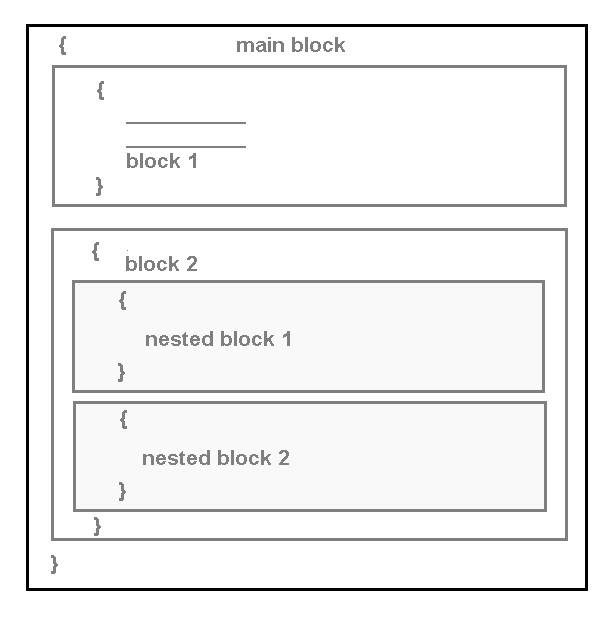
In the above program, there is a main block and two sub-blocks. The second sub-block has two nested blocks. The nested blocks can have more nested blocks if necessary.
First C Program
You can write a C program using any standard C compiler. Once you open the code editor add the following code into your compiler.
#include <stdio.h>
main ()
{
    printf ("Hello World!");
    return 0;
}
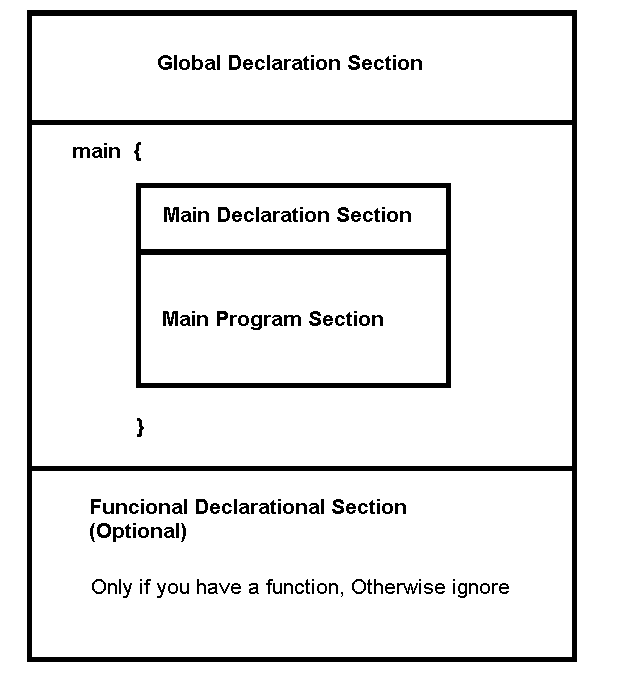
Every C program has a main block and inside the main block you can have multiple blocks or nested blocks of statements. A C program have following sections
- Global declaration
- Main function or block
- Main declaration
- Main program section
- Function definition section (optional)
Global Declaration Section
In the global declaration section, we define the header file, global variable, declare functions. The header files are part of standard C library and if the program requires a library function then we must include the appropriate header file that contains the function.
For example,
#include <stdio.h> // if we want to use printf ();Any variable or function that you define outside main has a global scope and can be used by other programs as well. These variables or functions must be declared in the global declaration section.
Main Program
The main () has the actual program code for a C program. It has two main section – main declaration section, main program section.
The main declaration section contains variables, functions declaration to be used in main program section. There scope is limited to the main (). The main () is a giant function or block which contains other blocks of statements.
Function definition section (optional)
A function is a block of code that does a specific task. The function definition section only required when you when you have declared a function in main () or global declaration section. Therefore, function definition will contain the actual statements for the function.
References
- Balagurusamy, E. 2000. Programming in ANSI C. Tata McGraw-Hill Education,.
- Brian W. Kernighan, Dennis M. Ritchie. 1988. C Programming Language, 2nd Edition. Prentice Hall
- Kanetkar, Yashavant. 20 November 2002. Let us C. Bpb Publications.
C Printing Outputs
In C language, you need to compute the results and then output the results to the console. In order to do that we need specific built-in functions from C library.
The most common library function is printf(), putchar() and puts(). In this article we will discuss each one of them in details and see some examples. Note that the above three functions belong to the stdio.h header file which is part of the standard C library.
Output with printf()
The printf() function is the most popular and common way to output the results of a C program to console. It is a built-in function from standard C library.
Syntax for printf():-
The syntax for printf() is very simple and given below. You can just printf a simple statement like the following.
For example,
printf("");Or
printf("Hello World!");Print a variable using the following syntax. For example,
printf("%d", result);The second syntax example has %d as the format specifier that says we are going to print an integer value and the name result is an integer that has some integer value.
you can have more than one variables in the printf() statement, however, the format specifier given should match with the variable data type in the order they are given.
printf( "int specifier float specifier char specifier",
integer variable, float variable, char variable);
In the above example first in the format specifier is an integer type , then variable listing should have an integer first, the second format is float , then the variable listing should be float and so on.
Format specifiers
There are many format specifiers in C language, but most commonly used are
- %d for integers
- %f for floats
- %c for character
- %s for strings of character like a name.
Plus, or minus sign for outputs
You can use more details between % and ‘d’,’f’,’c’ or ‘s’ to describe how you want to display your output.
For example,
printf("%+d", result);
printf("%-d",result);
The result will contain a plus or a minus in front of integer result.
+2344 or – 2334Right or Left justification of output
You can insert a digit in between % and ‘d’ and it will display result left or right justified to the console. For example, a positive value will right justify and a negative value will left justify.
printf("%10d",result);The above will justify 10 space to the right.
The negative value above will justify 10 space to the left if space is available.
Precision control
When you are working with float, the output will be a real value with decimal places depending on your system – 32 bit or 64 bit. You can control the decimal places with precision control. For example,
printf("%.2f",result);In the above example,
- .2 will limit the decimal places to 2 digits.
- f indicates that this is a float type variable
- result is the float type variable.
The output is 23.454566, the output will be 23.45 after the .2 is applied limiting the decimal to 2 digits.
printf("%10.2f",result);The above will result in
- 10 place right justified
- .2 limit decimal place to 2 digits
- Variable is float type
- Result is the variable of float type
New Line and tab
New line (\n) and (\t) are frequently used with printf() statement. The newline will print the output and begin the cursor in a new line, ready to print the next output statement.
a = 10
b = 20
printf("%d\n",a);
printf("%d\n",b);
Will give following output.
10 20But the with new line (\n) you get each output in its own line.
printf("%d\n",a);
printf("%d\n",b);
Will print following.
10
20
The tab(\t) will move the output to one or more tab space to right depending on how many time you have used it in the printf() statement.
printf("%d\t",result); /* one time tab */
printf("%d\t\t\t\t",result); /* 4 time tab */
Example Program
The example program below will demonstrate all the concepts we discussed above.
/* Program to demonstrate the printf statement with different format specifiers */
#include <stdio.h>
int main() {
     int number1, number2 , result;
     float number3,number4,result2;

     /* initialize variables */
     number1 = 200;
     number2 = 300;
     number3 = 2.5;
     number4 = 5.2;
     result = number1 + number2;
     result2 = number3 + number4;

     /* Normal output */
     printf("Normal Result\n");
     printf("%d\n",result);

     /* Result with + or - sign */
     printf("Result with plus sign\n"); printf("%+f\n",result2);

     /* Result justified */
     printf("Result 10 space right justified\n");
     printf("%10d\n",result);

     /*result justified to 12 place right and precision set to 3 digits */
     printf("Result 12 place justified and precision set to 3 digits\n");
     printf("%12.3f\n",result2);

     /* printf with newline and tab */
     printf("result with tab\n");
     printf("\t%d",result);
     printf("\n");
     printf("result with tab \n");
     printf("\t%f",result2);
     printf("\n\n");

system("pause");
return 0;
}
Output- printf()
Normal Result
500
Result with plus sign
+7.700000
Result 10 place right justified
       500
Result 12 place justified and precision set to 3digits
       7.700
result with tab
        500
result with tab
        7.700000
Press any key to continue . . .
Output with putchar()
The putchar() is also a library function belongs to stdio which output a single character to the console.The putchar() need a single argument to print it on screen.
Syntax:-
int x = '5';
putchar(x);
The above statement is incorrect because the datatype is an integer.
char x = '5';
putchar(x);
The above statement will give output 5 which is not an integer but a character.Check the example program below.
/* program to print a single character using putchar() function */
#include <stdio.h>
#include <stdlib.h>
int main()
{
    char x = '5';
    putchar(x);
    putchar('\n');
    system("PAUSE");
    return 0;
}
Output – putchar()
5
Press any key to continue . . . _
Output with puts()
The puts() is another library function that will print a string of characters until null character is reached or end of file (EOF).
Syntax: –
The syntax for puts() is as follows
char name[10] = "puppy";
puts(name);
The above will result in following output.
puppyExample Program
You can check the example program that demonstrate the usage of puts().
#include <stdio.h>
#include <stdlib.h>
int main()
{
    char name[10] = "PUPPY";
    puts(name);
    system("PAUSE");
    return 0;
}
Output-puts()
PUPPY
Press any key to continue . . . _
References
- Balagurusamy, E. 2000. Programming in ANSI C. Tata McGraw-Hill Education,.
- Brian W. Kernighan, Dennis M. Ritchie. 1988. C Programming Language, 2nd Edition. Prentice Hall.
- Kanetkar, Yashavant. 20 November 2002. Let us C. Bpb Publications.
C Reading Input Values
In C language, variables are assigned values directly and then we can use them in different types of expressions and get the results.
But the initial values given to the variables are fixed and does not change. Sometimes the user wants to enter the input values themselves and check the results for different input values.
For example
int main{
    int a , b, c;
    a = 10; no
    b = 20;
    c = a + b;
    printf("%d",c);
}
In the example above, the variable a and b has fixed values – 10 and 20, which decide the result of the program. If the user wants to test the program with a different set of input values, he or she needs to change the source code every time.
Reading Input with scanf()
Fortunately, C programming language has a built-in function called scanf() which helps read input value during the run-time of the program. There is not needed to change the input values from source code every time user wants a different input value.
The function scanf() is a C standard library function. It means that the C library supports different features of C programming language using a list of header files. To use any library function such as scanf() you need to include the header file containing that library function.
The scanf() is part of header file – stdio.h.
Syntax for scanf()
The syntax for scanf() is given below.
int number;
scanf("%d", &number);
First, we declared a variable called number of type integer. Then we used scanf statement. This statement has two important elements.
- format specifier
- address of operator
Format specifier
The format specifier tells what data type to read or write. It is very important to specifier what you are reading during the execution of a program, otherwise the C program will not recognize the input values. These are the common format specifiers.
- %d – for integer
- %f – for float
- %c – for character type
- %s – for string type
Address of Operator (&)
You may come across this operator time during this tutorial. This operator (&) is called the “address of” operator and it tells the memory location of the variable, so that, we can read input value and store at that address.
Example Program
In the following program, we will read quantity of two fruits that a customer purchased and then calculate the total amount payable.
#include <stdio.h>
int main()
{
    float unit_price_apple, unit_price_orange;
    int total_no_of_apples, total_no_of_oranges;
    int i;
    float total_cost = 0.0;

/* let's assign initial values to unit prices */
    unit_price_apple = 2.50;
    unit_price_orange = 1.50;

/* Read the quantity of apples and oranges purchased by the customer */
    printf("Enter total no of apples purchased:");
    scanf("%d", &total_no_of_apples);
    printf("Enter total no of oranges purchased:");
    scanf("%d", &total_no_of_oranges);

/* Compute total costs */
    total_cost = (total_no_of_apples * unit_price_apple) + (total_no_of_oranges * unit_price_orange);
    for(i=0;i<45;i++)
    printf("_"); printf("\n");
    printf("%f\n", total_cost);
    system("pause");
    return 0;
}
Output
Enter total no of apples purchased:10
Enter total no of oranges purchased:33
____________________________________________
74.500000
The input and output of the example program is given below.
Reading String or Char Inputs – getchar() and gets()
Sometimes it is easier to use functions to read string or character type variable values. The C language has two popular functions in the library for this purpose.
- getchar()
- gets()
getchar()
The getchar() is part of stdio.h header file and helps reading a single character. The following example show the usage and syntax for getchar() library function.
#include <stdio.h>
#include <stdlib.h>
int main()
{
    char grade;
    printf("Enter the Grade of a Student:");
    grade = getchar();
    printf("\n\n");
    printf("Your grade is %c\n",grade);
    system("PAUSE");
    return 0;
}
Output – getchar()
When the program is executed, user must input a grade for a student. The getchar() function will receive the input grade which is a single character and assign it to variable grade. The grade is printed as an output to the program.
Enter the Grade of a Student:A
Your grade is A
gets ()
The gets() function reads a string of characters. It is also part of stdio.h header file and a standard C library function. It is very useful in many string related programs.
A string is nothing but an array of characters with a terminating null character (\0). The gets () function copies the string of characters until a newline or end-of-file (EOF) is reached. To help you understand the syntax and usage of this function check the example program below.
#include <stdio.h>
#include <stdlib.h>
int main()
{
    char name[100];
    printf("Enter Your Name:");
    gets(name);
    printf("\n\n");
    printf("Your name is %s\n",name);
    system("PAUSE");
    return 0;
}
Output – gets ()
The output of the above program is given below.
Enter Your Name:  Jack Sparrow
Your name is Jack Sparrow
References
- Balagurusamy, E. 2000. Programming in ANSI C. Tata McGraw-Hill Education,.
- Brian W. Kernighan, Dennis M. Ritchie. 1988. C Programming Language, 2nd Edition. Prentice Hall.
- Kanetkar, Yashavant. 20 November 2002. Let us C. Bpb Publications.
C Arrays
In C programming language, an array is a data structure. Before we discuss C arrays, let us understand the reasons and motivation for creating an array.
Variables vs. Array
Suppose you want to create 10 variable of integer type, there is no problem in creating, accessing or modifying these variables. Also, it is very easy to use them in a C program.
However, if you want to create 1000 variables of the same type and keep the values in some ordered fashion – ascending or descending order, think about the amount of work you need to do to maintain them.
Some of the difficulties are:
- Ordering the variables based on their values.
- Accessing a variable means you should remember the name of the variable.
- Cannot loop through the variables.
C programming language offer C arrays as a solution to store the values under a single name. It means, for 1000 variables you need a single name reference.
Definition of an Array
An array is a collective name for a group of similar data types.
The definition tells you all the characteristics of an array. Let’s make a list of these characteristics.
- Collective name or a single name to refer all values in an array.
- Similar data type.
- It is a group of variables ordered by an index.
The only issue with an array is that the memory space reserved for an array is wasted, if not used.
C Arrays Index
Each item in an array has an index value which starts at 0. It is a common mistake to assume that the array starts at 1. The index helps to access the value of any element or elements of an array.
Note:- The index cannot be more than the size of an array.
One-Dimensional Array
A one-dimensional array is a linear arrangement of variables of similar type. You can create an array of int, float, or char.
Declaration of C arrays
//To declare an array using the following syntax.
< data_type > < array_name >[ <number of elements >];
Initialization of C arrays
There are three way to initialize an array.
int array[3] = { 3, 3, 5 , 3};
int array[] = {3, 5, 4, 3};
int array[3] = { 5, 3, 5, 3};
Accessing C array
To access an array element, use its index value.
int p;
p = array[4];
/* Value of 5th element of an array is assigned to variable p
because index = 0, 1, 2, 3, 4 */
int i = 0;
p = array[i];
Reading value to an array element
To read value into an array using the following method.
scanf("%d\n", &array[5])Memory Representation of One-Dimensional Array
Each element of an array occupies an address space given below. This location can be identified using an index value which depends on the size of an array. If the size = 8, then index value is n-1 i.e., 8 – 1 = 7;

Example Program
#include < stdio.h >
int main()
{
    int i;
    int arrone[3] = { 2, 3, 4 };
    int arrtwo[] = { 2, 4 };
    int arrthree[4];
/* reading value for arraythree */
    printf("Enter arraythree elements: \n ");
    for (i = 0; i < 4; i++)
    {
        scanf("%d", &arrthree[i]);
    }
/* print value of arrone */
    for (i = 0; i  3; i++)
    {
        printf("arrone[%d] = %d\n", i, arrone[i]);
    }
        printf("\n\n");
/* print value of arrtwo */
    for (i = 0; i  < 2; i++)
    {
        printf("arrtwo[%d] = %d\n", i, arrtwo[i]);
    }
    printf("\n\n");
/* print value of arrthree */
    for (i = 0; i < 4; i++)
    {
        printf("arrthree[%d] = %d\n", i, arrthree[i]);
    }
    printf("\n\n");
    system("PAUSE");
    return 0;
}
Output-One Dimensional Array
Two-Dimensional Array
A two-dimensional array has a row and a column index value for its variables that are of the same type. You can create an array of int, float or char of type two-dimensional.
Declaration of a 2D array
int array[4][3];The first index is row index value and the second index is column index value. So there are 4 rows and 3 columns in the 2D array we declared.
Initialization of an array
There are three ways to initialize a 2D array.
int array[][] = { { 3, 3, 5}, {3, 2, 4}, {3, 4, 3} };
int array[][2] = { {1, 3, 3}, {0, 2, 7}, { 3, 6, 2} };
int array[2][2] = { {1, 3, 3}, {0, 2, 7}, { 3, 6, 2} };
Accessing a 2D array
To access a 2D array element use the row index value and the column index value.
p = array[4][3];
int i =0;
int j = 3;
p = array[i][j];
Read into a 2D array
To read value into an array using the following method.
scanf("%d",&array[5][4]);Memory Representation of a 2D Array
The following diagram is a memory representation of a 2D array. It is a matrix representation with rows and columns representing the 2 dimensions of the array.
Example Program – C Arrays
#include <stdio.h>
int main()
{
    int i,j;
    int arr_one[2][3] = {{2,3,4},{2,5,6}};
    int arr_two[][2] = {{2,4},{3,5},{7,8}};
    int arr_three[2][2];
/* reading value for arr_three */
    printf("Enter arraythree elements:\n");
    for(i=0;i < 2;i++)
    {
        for(j=0;j<2;j++)
        {
            scanf("%d",&arr_three[i][j]);
        }
}
/* print value of arr_one */
    for(i=0;i<2;i++)
    {
        for( j=0;j<3;j++)
        {
            printf("arrone[%d][%d] = %d\n",i,j,arr_one[i][j]);
        }
}
       printf("\n");
/* print value of arr_two*/
    for(i=0;i < 3;i++)
    {
        for( j=0;j < 2;j++)
        {
            printf("arr_two[%d][%d] = %d\n",i,j,arr_two[i][j]);
        }
}
           printf("\n");
/* print value of arr_three */
    for(i=0;i < 2;i++)
    {
        for( j=0;j < 2;j++)
        {
            printf("arr_three[%d][%d] = %d\n",i,j,arr_three[i][j]);
        }
}
           printf("\n");
    system("PAUSE");
    return 0;
}
Output – Two-Dimensional Array
References
- Balagurusamy, E. 2000. Programming in ANSI C. Tata McGraw-Hill Education,.
- Brian W. Kernighan, Dennis M. Ritchie. 1988. C Programming Language, 2nd Edition. Prentice Hall.