C Programming Notes – Concepts, Examples, and Exam-Ready Revision
C Programming is a foundational subject in Computer Science and Information Technology (IT) curricula and a key requirement for university exams and competitive examinations.
On this page, you will find structured resources to learn C programming concepts, along with clear explanations, examples and exam-ready revision notes.
What Will You Learn
On this page you will find:
- Core C programming concepts explained clearly and systematically
- Exam-oriented explanations supported with relevant examples
- MCQ-based practice posts to test your understanding
- Detailed articles along with exam-ready revision PDFs
This Page is for:
- Computer science and IT students
- GATE and other competitive exam aspirants
- University exam preparation
- Self learners who want to revise C programming knowledge.
Topic Sections
Find C programming topics here.
(1) C Introduction
(2) C Input-Output
(3) C Data Types
(4) C Operators
(5) C Control Structures
(6) C String Types
(7) C Function Related
(8) C Pointers Related
(9) C File Management
(10) C Preprocessor
C Structures
An array or a variable can store elements of same data type, but they cannot store data of multiple data types. C programming language provides with a user-defined data type called a Structure.
Structure Definition
“A structure is a group of different data types which may or may not be the same.”
Declaring a Structure
Suppose you declared three different arrays as follows.
int arr1[20];
char arr2[20];
float arr3[20];
There is no relation between these three arrays and you cannot establish one. To solve the above problem, C programming language offers a user-defined data type called a Structure.
The syntax for declaring a Structure is given below.
struct {
< data_type 1>
< data_type 2>
< data_type 3>
.....................
.....................
};
For example, to declare a structure for a book.
struct book{
    int Id;
    char name[10];
    float price;
};
The structure name is the book and it has three different variables of three different data types – integer,
character and float point.
The Id store the unique identification number of the book, the name stores the name of the book and the price stores the price value of the book.
Creating Structure Objects
After declaring the structure, you need to create objects of the declared structure. There are two popular methods in the C programming language to create structure objects.
Method 1
To create objects separately after declaration use following syntax.
struct < structure_name > < object_name >, < object_name >, < object_name> .... ;For example, consider the following declaration
struct book obj1, obj2, obj3;You just created three structure objects of type book;
Method 2
The second method creates an object at the time of the structure declaration itself.
struct book{
    int Id;
    char name[10];
    float price;
    } item1, item2;
In the above method, we have declared two objects – item 1 and item 2 of type book during the structure declaration. Note that the structure declaration ends with a semi-colon.
Initializing a Structure Object
The structure does not reserve any memory when you declare it. You must initialize the structure members to reserve the memory space for the structure. The total size of the structure depends on the size of its individual members.
You can check this using a small program given below.
Example #1
#include <stdio.h>
struct cars{
     int ID;
     char name;
     int price;
};
int main() {
/* create two objects of type struct cars */
    struct cars c1, c2;
    printf("Size of Cars = %d\n ",sizeof(c1));
    system(" pause ");
    return 0;
}
Output
The output of above is as follows.
Size of Cars = 12
Press any key to continue . . .
Now, we will change the data type for member variable price, so that the size of the structure object increases. The modified program will have the following codes,
Example #2
#include <stdio.h>
struct cars{
        int ID;
        char model;
        double price;
};
int main()
{
         /* create two objects of type struct cars */
        struct cars c1, c2;
        printf("Size of Cars = %d\n",  sizeof(c1));
        system("PAUSE");
        return 0;
}
Output
The output of the modified program shows an increase in the size of the structure because the double data type takes 8 bytes of memory space including some extra space. This results in the increment of the overall size of the structure.
Size of Cars = 16
Press any key to continue . . .
To initialize a structure object you need to assign values to its variables. You can do this in two ways.
Method 1
Assign at the time of creation. You can assign the initial value to the member at the time of creating the objects.
struct cars c1 = {2322, "Toyota", 230000.00};You must assign the values in the correct order of structure members inside the brackets above.
Method 2
In this method, you assign values to each and every member individually. For Example,
c1.id = 333;
c1.model = "Toyota";
c1.price = 2300000.00;
The above method is inefficient when you have to do this for a large number of structure objects.
Accessing a Structure Variable
To access the structure member use the ‘dot’ operator. The syntax to use the variable is
For example,
c1.price;Where c1 is the structure object and price is the structure member.
Memory Representation of Structure
Consider the following example of C structure.
Example #3
#include  <stdio.h>
struct cars{
        int ID;
        char model;
        double price;
};
int main()
{
        /* create two objects of type struct cars */
        struct cars c1, c2;
        c1.ID = 333;
        c1.model = 'N';
        c1.price = 24400.00;
        printf(" Size of the Structure = %d\n",sizeof(c1));
        for(i=0;i < 30;i++)
        printf("_");printf("\n\n");
        printf( "id= %u\t model = %u\t price = %u\n",&c1.ID, &c1.model, &c1.price);
        system("PAUSE");
        return 0;
}
Output
The output of the above program shows that the member variables of a structure are stored sequentially. First the integer took 4 bytes, then character takes 1-byte storage and finally, double took 8 bytes of information.

The memory representation of a structure is given below. The structure member variables are stored sequentially.
Array of Structures
You can also create an array of structures. A single object of a structure consumes a lot of memory. So you must carefully decide the total size of an array of structures.
Also, an array does not use dynamic memory, if you don’t use the array properly, the allocated memory is wasted.
After declaring the array of structure, you may run out of memory for other variables and computations in the C program.
Declaring an Array of Structures
The declaration is very simple, and it is the same as declaring a normal one-dimensional array except the data type in a structure is heterogeneous.
struct < struct_array > [size];For example,
struct cars [50];Accessing a Member of an Array of Structures
You can access any member of the array of the structure just like an ordinary array. The syntax to access a member of the array of structure and its member is given below.
< struct_array_name > [index_value];For example,
cars[10];The syntax to access a member of the above structure is as follows.
[index_value].< member_name> ;For example,
cars[10].price = 100.333;Copying all Members of a Structure to Another Structure of the Same Type.
Unlike a normal array, you can directly copy values of all member of a structure to another structure of the same type. You should focus on the word – directly. In an array, the direct copy does not work. To copy an entire array to another array, you must go through a loop and copy each element one at a time.
For example,
for(i=0;i < 10 ; i++)
{
        c[i] = a[i];
}
where c[i] and a[i] are arrays of same type and size;
However, with the structure, you can copy them directly. Consider the following example.
Example #4
#include <stdio.h>
#include<stdlib.h>
/* declaring the structure one */
struct school
{
        char section;
        int students;
        int teachers;
};
int main()
{
        struct school universal[10];
        int i,n;
        universal[0].section = 'A';
        universal[0].students = 100;
        universal[0].teachers = 25;
/* copy the entire structure to new structure of same type */
        universal[5] = universal[0];
/* print the new structure */
        printf( "Section = %c\n",universal[5].section);
        printf( "Students = %d\n",universal[5].students);
        printf( "Teachers = %d\n",universal[5].teachers);
        system("PAUSE");
        return 0;
}
Output
The output of the above program shows that the entire content of structure universal [0] is copied to universal [5] directly.
Nested Structures
C programming structures can be nested within another structure. There is no limit on the level of nesting as long as you are not out of memory.
For example,
struct Sports {
        struct Game {
                int Id;
                char name;
                int players;
};
                int number_of _events:
                int event_manager;
};
In this way, you can achieve multiple levels of nesting for a given C structure.
Union
A union has the same form and rules as a Structure except for the implementation. Inside memory, only one field from a union is used at a time. Basically, the size of a union depends on the size of its largest data type.
For example, suppose you are given a union as the following,
Example #5
#include <stdio.h>
union book
{
        int name;
        int id;
        double price;
} b1;
int main()
{
        printf("The Size of the Union = %d Bytes\n",sizeof(b1));
        system("PAUSE");
        return 0;
}
Output
The output of the program is the byte size of the given union and its equal to the byte size of its largest member variable which is double.
The Size of the Union = 8 BytesReferences
- Balagurusamy, E. 2000. Programming in ANSI C. Tata McGraw-Hill Education,
- Brian W. Kernighan, Dennis M. Ritchie. 1988. C Programming Language, 2nd Edition. Prentice Hall.
C Storage Classes
Variables point to a memory location that has an address and a value stored. Other than this value, a variable also has a storage class.
The C storage classes decide the characteristics of a variable during the execution of a program – the characteristics are storage location, initial value stored, scope, the lifetime of the variable and linkage.
To understand the storage classes we must first discuss these characteristics.
Storage Location
A variable can be stored in memory or the CPU. A storage class decides the location of the value that gets stored in a variable. During its lifetime, a variable holds two things – an address to the memory location and a value of its declared data type.
Initial Value
Every variable is assigned a value by the user or the system assigns a default value to the variable because any variable that is not initialized, does not occupy a space in the memory.
Scope
The scope of the variable decides which different sections of the program can access the variable. There is many types of scope for a variable – block level scope, function level scope, function prototype level scope and source file level scope.
The lifetime of a Variable
The lifetime of the variable tells a programmer, how long the variable is going to hold its storage space and memory address during the execution of the program. After the lifetime of a variable, all resources should be accessible to other components of a program.
Linkage
The linkage tells us whether a variable is public or private. If the variable is sharable to other blocks or functions then it is public, otherwise, it is private.
There are three types of linkage – no linkage, internal linkage, and external linkage. The linkage is connected to the scope of a variable. The block level scope, function level scope and the function prototype level scope does not share variables. So, there is no linkage.
The file level or program level scope can have internal or external linkage. The use of static keyword means that the file level scope has internal linkage. Variable using extern keyword means that its an external linkage.
Types of C Storage Classes
There are four storage classes
- Automatic
- Register
- Static
- External
Automatic Storage Class
The automatic storage class variables are declared using keyword – auto. If you do not declare it as auto or some other C storage classes member, by default it is auto storage class member because all variables are stored in memory. When you create a new create a new auto storage class variable – a default garbage value is assigned automatically.
Syntax: –
To declare a variable as a member of automatic storage class use following syntax.
auto int number;
number = 100;
Example Program #1
#include < stdio.h >
int main()
{
    auto int number;
    printf("Number =%d\n", number);
    system("PAUSE");
    return 0;
}
Output #1
Number = 1982438964Register Storage Class
Variables in this class are declared using the keyword – register. The variable is stored in a register, but that is not guaranteed because the storage space of CPU registers are limited. In case, registers are not available, register storage class variables treated as auto class variables and stored in memory.
The default initial value of the register class is a garbage value. Each time you run the program containing register class variable a new garbage value is assigned automatically.
Since register storage class variables are stored in a register, you cannot expect to use the memory reference operator on them. It will produce errors.
The scope of the register class variable is local to its block and no linkage. Its lifetime is till the block of code is running during program execution.
Syntax:-
To declare a variable as register storage class type use following syntax.
register int demo_num;Example Program #2
#include <stdio.h>
int main()
{
    register int count;
    short int i;
    count = 0;
    for(i = 0 ;i < 10; i++)
    {
        count+
    }
    printf("count = %d\n",count);
    system("PAUSE");
    return 0;
}
Output #2
count = 10Static Storage Class
The static variables do not get updated when they are outside of the scope of their block. Normally you declare the static storage class variable only once during its lifetime.
They jump between function to function updating the value of the variable. Static variables are stored in a memory and by default, they get a value of 0, if a user did not initialize the static variable. The scope of the static variable is local to its block, function or function prototype or file level.
The static variable does not get destroyed immediately and they jump from function to function call, depending on how many times the function has been called.
Syntax:-
To declare a variable static using the keyword – static.
static int length;Example Program #3
#include <stdio.h>
void increment();
int main()
{
   /* function call */
    increment();

   /* function call */
    increment();

   /* function call */
   increment();

   system("PAUSE");
   return 0;
}
void increment()
{
    int length = 0;
    static int width;

    /* static integer automatically initialized to 0 */
    printf(" Current iteration !\n\n");
    length++;
    width++;
    printf("Length = %d\t Width = %d\n\n", length, width);
}
Output #3
   Current iteration !
Length = 1        Width = 1
   Current iteration !
Length = 1        Width = 2
   Current iteration !
Length = 1        Width = 3
External Storage Class
There is another C storage class that connects variables within a C program. The external storage class variables can be used outside of the program or file. They have an external or internal linkage. You must declare these variables using the extern keyword. The external storage class variables are stored in memory.
The scope of external storage class variable is global and it can be used by many blocks, functions or files in a C program. In this way, the lifetime of the external storage class variable is as long as the program is running.
Syntax:-
The external variable has two cases
- A global variable without extern keyword.
- A global variable with extern keyword.
A Global Variable without extern keyword
If you declare a variable outside of the main, it is external and initialized to 0 by default. These variables cannot be used outside of the current source file.
for example,
int x;
int main()
{
    printf("%d\n", x);
}
will print a value of 0.
A Global Variable with extern Keyword
To create an external storage class variable use the following syntax.
extern int x;The above will only give an error because it does not do anything in memory.
Example Program #4
"file.c"
#include <stdio.h>
int x;
int main()
{
    int p = x + 30;
    printf("p = %d\n", p);
    system("PAUSE");
    return 0;
}
"file2.c"
#include <stdio.h>
extern int x;
x = 39;
Output #4
p = 69
Press any key to continue . . . _
Summary
A summary of all C storage classes in C programming language with each character is given below.
When to use a Storage Class?
The usage of C storage classes depends on the programmer. If the program has constraints for which a storage class can solve the problem, then you should use a storage class variable.
Here is a list of reasons for using a storage class.
- When you want to use a variable that keeps the values intact between functions then use a static variable. This is a case of internal linkage.
- Register storage class variables are fast because they directly manipulated by a CPU, so it does not go through the memory fetch cycles. You must use them wisely.
- When you have variables that are shared between files in the same program, an external storage class variable is most suitable kind of variable type for this.
- There are so many scenarios where a C programming storage class can be useful and solve important programming problems. It helps the programmer build useful and efficient C programs.
References
- Balagurusamy, E. 2000. Programming in ANSI C. Tata McGraw-Hill Education,
- Brian W. Kernighan, Dennis M. Ritchie. 1988. C Programming Language, 2nd Edition. Prentice Hall.
C Data Types
Data types are a very important concept in programming languages. You can choose the right kind of variable types for your program. The data types depend on the compiler which creates machine codes suitable for 16-bit or 32-bit processors.
Sometimes when the processor has backward compatibility, then a 32-bit processor can run a 16-bit machine code successfully.
Integer Data Types
An integer data type is declared using keyword – int. We will have a separate discussion on keywords so let’s not worry about them right now.
If you think of memory, then think of sequence of bytes with an address called a memory address. A memory address is a hexadecimal value. One byte of information is 8-bit of information.
| Integer Data Types | Required Storage |
|---|---|
| int | 2 or 4 bytes |
| short int | 2 bytes |
| long int | 4 bytes |
On a 16-bit compiler like turbo C++, the int type has requires two bytes storage and on a 32-bit compiler, storage requirement is 4 bytes.
Short int is always 2 bytes in size and long int is always 4 bytes in size.
Range of the data types
What does it mean to have a range of values? We will explain that in a minute. Machine codes are binary strings made of 0s and 1s. They are instructions or data for processor – opcode and operand.
So, the range of a data type is nothing, but number of possible binary strings that is allowed using the byte storage. In other words, ” How many numbers can you store in binary format using 2 or 4 bytes of memory space ?”
For 16-bit compiler the range is
\begin{aligned}\left(\frac{2^{16} }{2}\right )- 1 = \left(\frac{65536}{2}\right ) - 1 = -32768 \hspace{2px} to\hspace{2px} +32767\end{aligned}For 32-bit compiler the range is
\begin{aligned}\left (\frac{2^{32} }{2}\right ) - 1 =\left (\frac{4294967296}{2}\right)- 1 = -2147483648 \hspace{2px} to \hspace{2px} +2147483647\end{aligned} Unsigned and Signed Integers
If you want all positive values, then declare the int variable as unsigned. An unsigned data type disregards the sign bit, so that all the values are positive starting from 0. The unsigned int for 16-bit compiler.
\begin{aligned}2^{16} - 1 = 65536 - 1 = Range \hspace{2px} from \hspace{2px}0\hspace{2px} to \hspace{2px}65535\end{aligned}unsigned int for 32-bit compiler
\begin{aligned}2^{32} - 1 = 4294967296 - 1 = Range \hspace{2px} from \hspace{2px} 0 \hspace{2px} to \hspace{2px}4294967295.\end{aligned}Signed data type has both positive and negative values.
For example,
signed long int;
signed short int;
Character Data Types
The character data type takes 1 byte of storage. The signed char and char are the same.
Unsigned and Signed Characters
signed char ; /* Range from -128 to + 127 */
unsigned char; /* Range from 0 to 255 */
Each character has a number and char cannot take values greater than -128 to +127.
Float and Double Data Types
The float and the double data types take 4 bytes and 8 bytes respectively. The long double take 10 bytes of storage.
| Data Types | Required Storage |
|---|---|
| float | 4 bytes |
| double | 8 bytes |
| long double | 10 bytes |
An Example Program
#include <stdio.h>
int main()
{
    char p = 'a';
    int s = 10;
    long int q1 = 1000;
    short int q2 = 223;
    float b1 = 23.55;
    double b2 = 33.5545;
    signed char ch = 'h';
    signed int g1 = -33;
    unsigned char ch1 = 'D';
    unsigned int g2 = 234;
    unsigned long int num = 333234;
    unsigned short int num2 = 2442;
    printf("char = %c\n", p);
    printf("int = %d\n",s);
    printf("long int = %ld\n",q1);
    printf("short int =%d\n",q2);
    printf("float = %f\n",b1);
    printf("double = %f\n",b2);
    printf("signed char= %c\n",ch);
    printf("signed int = %d\n", g1);
    printf("unsigned char = %u\n",ch1);
    printf("unsigned int = %u\n",g2);
    printf("unsigned long int = %u\n",num);
    printf("unsigned short int = %u\n",num2);
    system("PAUSE");
    return 0;
}
Output
char = a
int = 10
long int = 1000
short int =223
float = 23.549999
double = 33.554500
signed char = h
signed int = -33
unsigned char = 68
unsigned int = 234
unsigned long int = 333234
unsigned short int = 2442
References
- Balagurusamy, E. 2000. Programming in ANSI C. Tata McGraw-Hill Education,.
- Brian W. Kernighan, Dennis M. Ritchie. 1988. C Programming Language, 2nd Edition. Prentice Hall.
C Global And Local Variables
C program is a block of statements that are enclosed within { }. Each block has its own scope and it decides which variable to use that falls under its scope. In other words, two variables with the same name can exist in the same program if they are declared in different blocks.
The variables have two scopes that way – Global and Local.
Global Variables
When a variable is declared outside of the program then its scope widens and all block of code in the C program can use that variable.
A global variable declaration is similar to any other variable declaration except it is declared outside of the main program and usually placed on top of the main function.
Local Variables
The variables that are declared inside a block, cannot be used outside of the block. The scope of such a variable is local to the block itself. They are called Local Variables.
Since the local variables are native to the block of codes in C programs, they have a higher priority than the global variables.
Example #1
#include <stdio.h>;
int sum = 10;
/* declaring and initializing a Global variable */
int main()
{
   {
       int sum = 100;
/* Declaring and initializing a Local variable with the same name */
       printf(" SUM = %dn", sum);
    }
    system("PAUSE");
    return 0;
}
The scope of the variable is local inside of the block and global outside of the main program. The variable sum inside and outside are different, they are not the same. The local variable sum value gets printed to the output console because it has higher priority.
Output
SUM = 100References
- Balagurusamy, E. 2000. Programming in ANSI C. Tata McGraw-Hill Education,
- Brian W. Kernighan, Dennis M. Ritchie. 1988. C Programming Language, 2nd Edition. Prentice Hall.
C Variables And Constants
In a C program, some values do not change and some changes with the execution of the program. A constant never changes throughout the program and the variable changes frequently, hence the name.
Types of Constants
Constants can be classified into different types such as numeric constants and character constants. The following figure depicts the types of constants available with C language.
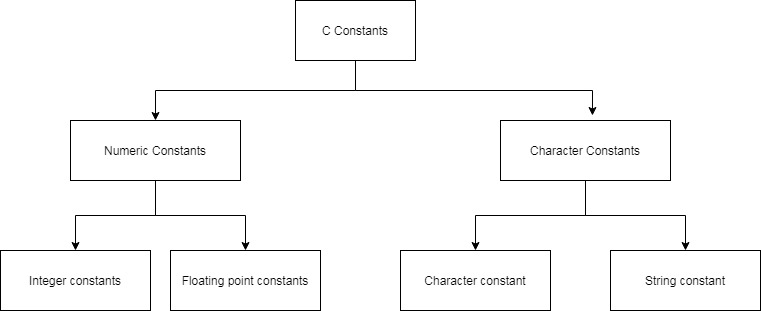
Numeric Constants and Character Constants
The numeric constants involve numbers such as integers and real numbers with decimal part – floating point number and double numbers are most popular types.
The character types are single character constant enclosed using single quotes and string constants are enclosed in double quotes. You can call string constant as a character array. For example,
/* Character constants */
'c'
'A'
/* String constants */
"Elephant"
"Oranges"
Named Constants
Some constant can be named in C programs. This is achieved with the help of C preprocessor commands. The C preprocessor will turn these constants in to values before execution of a program.
#define MAX 100The command is #define and the name of the constant is MAX with a value of 100.
Rules to Construct Constants and Variables
There are rules to construct constants and variables.
Rules for Constants
You can use a constant directly into an expression in C programs. C programming language will allow only specific operation of a type constant.
For example, you can perform arithmetic operations on numbers, but not on characters.
Rules for Variables
There are important rules to remember before you create a variable. These rules are listed below.
Rule 1: Variable names always start with an underscore or a character.
Rule 2: No other special character allowed in variable names except an underscore.
Rule 3: No white space or a comma allowed in a variable name.
Rule 4: Variable name length depends on the compiler.
This is not a rule, but a best practice – always use meaningful variable names in your program.
Syntax for Constants and Variables
There is no specific syntax for a constant, you can use them directly in your programs.
For example,
A = 10 + 30;
printf ( "%d\n", 100 + 30);
Every variable must be declared and initialized before you use it in a C program. The syntax to declare a variable requires
- the type of data for the variable
- a user-defined name for the variable.
For example,
int number;
char grade;
For example,
number = 100;
grade = 'A';
You can initialize a variable at the time of declaration itself.
For example,
int number = 200;
char key = 'B';
Note:- Every statement in C programming language must end with a semi-colon;
Example Program
#include <stdio.h>;
int main() {
    int number;
    float sum;
/* Variable Declaration with data type */
    sum = 0.0;
    number = 1000;
/* Variable initialization for sum and number */
    printf(" %d\n", number);
/* Printing output to console */
    printf(" %d\n", 10.23 + 3.7);
    system("PAUSE");
    return 0;
}
Output
The output of the above example program is given below.
1000
-171798692
References
- Balagurusamy, E. 2000. Programming in ANSI C. Tata McGraw-Hill Education,.
- Brian W. Kernighan, Dennis M. Ritchie. 1988. C Programming Language, 2nd Edition. Prentice Hall.
- Kanetkar, Yashavant. 20 November 2002. Let us C. Bpb Publications.
C Macro Expansion
You learned about C preprocessor directives and its components earlier. These directive are of four types – macro expansion, file inclusion, conditional compilation ,and other miscellaneous directives. The macro expansion is the most common and popular C preprocessor directives.
Before you begin, learn a bit about the preprocessor directives. If you are familiar with the concept, skip ahead.
A macro is a small piece of code or constant value that is replaced with C source code before the execution of a C program. This concept is same as inline codes defined using the keyword inline.
What is a macro expansion?
To understand the concept of macro expansion, consider an example program code given below. The program used the #define directive.
#include <stdio.h>
#include <stdlib.h>
#define LENGTH 10
#define BREADTH 20
int main()
{
    int area_rectangle = 0;
    area_rectangle = LENGTH * BREADTH;
    printf("Area of Rectangle = %d\n",area_rectangle);
    system("PAUSE");
    return 0;
}
Output
Area of Rectangle = 200The LENGTH and BREADTH are called the macro templates. The values 10 and 20 are called macro expansions.
When the program run and if the C preprocessor sees an instance of a macro within the program code, it will do the macro expansion. It replaces the macro template with the value of macro expansion.
The #define directive is a good way of declaring constant compared to a constant or a variable value. To change the constant, you must change it in all place in source code individually. The macro on the other hand only requires you to change the value of the #define directive.
Another advantage of macro expansion is that it is much faster than the variables or constants.
Usage of #define Directive
The #define directive is not only used to label a constant, but also other types of statements. The following program that demonstrates other possible usage of a #define directive.
#include <stdio.h>
#include <stdlib.h>
#define AND && // define an operator
#define OR ||
#define CONDITION1 (p > 10) AND (q < 100) // define a condition
#define CONDITION2 (q > 100)
#define STATEMENT1 printf("p is greater than 10\n");
#define STATEMENT2 printf("q is greater than 100\n"); //print statements
int main()
{
    int p,q;
    p = 13;
    q = 10;
    if(CONDITION1)
    {
        STATEMENT1
    }
    else if(CONDITION2)
    {
        STATEMENT2
    }
    system("PAUSE");
    return 0;
}
Output
p is greater than 10In the above program, we defined three different types of macro templates – operators, conditions, and statements. In other words, all elements of a program are suitable for macro expansion. You can use operators, replace conditions or execute any code, the preprocessor will replace it into a source code (macro expansion).
It is not a good practice to use large piece codes for the macro expansion. The next section is about complex macros that do exactly the same.
Macros with Arguments
The complex macros take arguments like functions and it looks like a function. But there is a big difference between complex macro and a C function. See the example below.
#include <stdio.h>
#include <stdlib.h>
#define SQUARE(x) (x * x)
int main()
{
    int n;
    int result;
    n = 5;
    result = 0;
    result = SQUARE(n);
    printf("Result = %d\n",result);
    system("PAUSE");
    return 0;
}
Output3
Result = 25The macro template takes argument x which is a value of the appropriate type(integer for multiplication). Whenever the C preprocessor sees SQUARE(x) in the program source code, it replaces it with ( x * x).
The x in the SQUARE(x) is an argument. So the macro expansion of SQUARE(n) becomes (n * n) where n has a value assigned to it.
Common Mistakes while using #define
Mistakes happen when you write your programs, especially when you are new to C programming. A list of common mistakes while using a #define directive is given below.
- Forgetting the # sign that results in a compiler error
- Not choosing a meaningful name for macro templates
- Using too many #define directives
- Using { } braces instead of ( ) in complex macros.
- Leaving a gap between macros – AREA (x) (x * x). This will result in compiler error.
In the next section, we will discuss about file inclusion preprocessor directives.
How to Compile a C program using Turbo C++?
In the previous article, you learned how to install a Turbo C++ compiler on a windows system. After installation you must write your first C program ,and compile it. In this article you will learn to compile your first C program.
Prerequisite to this article is installing turbo C++ compiler on your windows computer.
Writing Your First Program
To start writing your first C program using Turbo C++ compiler follow the steps given below.
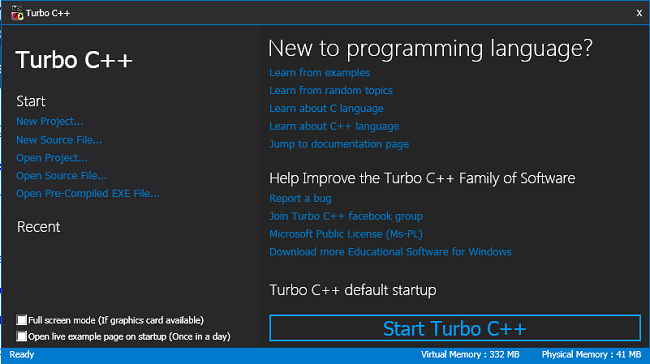
Open Turbo C++ Initial Screen
The first step is to open the Turbo C++ initial screen which is shown below. You can do this after installation either by clicking the desktop icon or click the Turbo C++ icon in start menu. The screen look like the following.
Start the Turbo C++ Compiler
The next step is to start the Turbo C++ compiler by clicking the “Start Turbo C++” compiler. You will see the compiler window shown below.
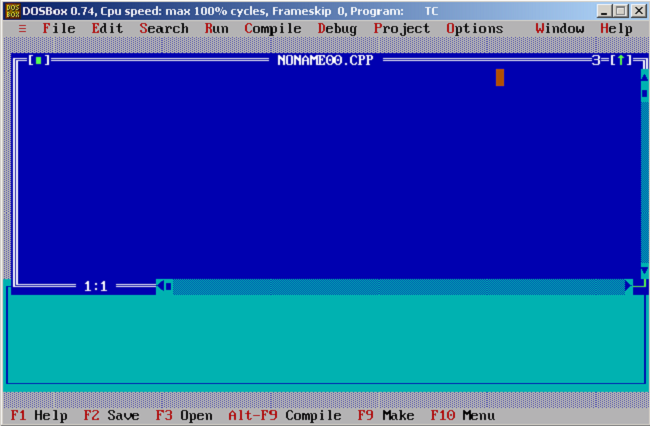
Before you write your program, make sure that the directories are correctly configured for the compiler. Go to Options > Click Directories in the Menu Bar. The following screen will appear, so you must verify the directories given here.
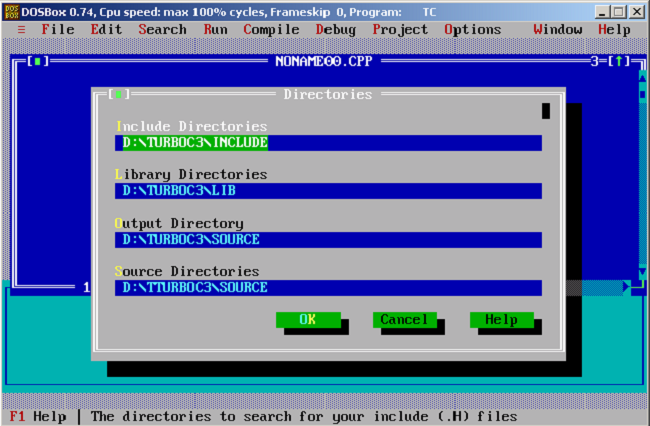
The directories must exist with all the required files and path to directories must be correct. You must verify this manually. If necessary, change the directories to where the Turbo C++ files exists.
Create a New Source File (prog.C)
By default, the program name is noname.cpp, but we want C source file. Go to File menu > Click Save as and in the Save File As box, type the name of the C source file.
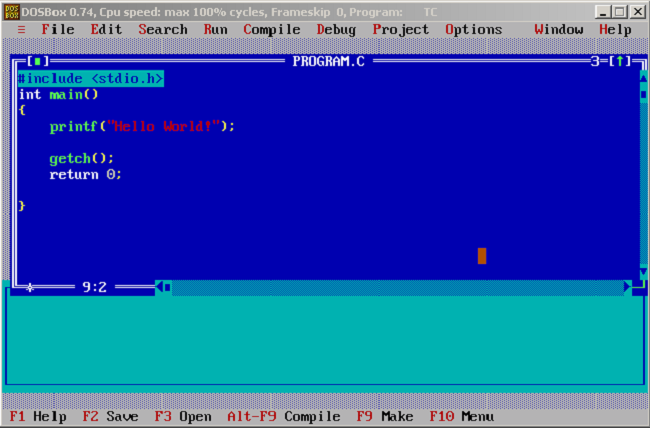
Prog.CNow, you can start writing your C program code. For this example, we will write the ‘Hello World’ program.
#include <stdio.h>
int main()
{
       printf("Hello World!");
       getch();
       return 0;
}
Compile the Program
There is two ways to compile a program in Turbo C++.
- Press Alt-F9 (as instructed in the status bar of Turbo C++)
- Go to Compile tab of Menu bar and press Compile or
Build All.
The compiler will finish compilation with no error or with some warnings. If an error is encountered, then the compilation is aborted and the problem line or lines are highlighted with error description.
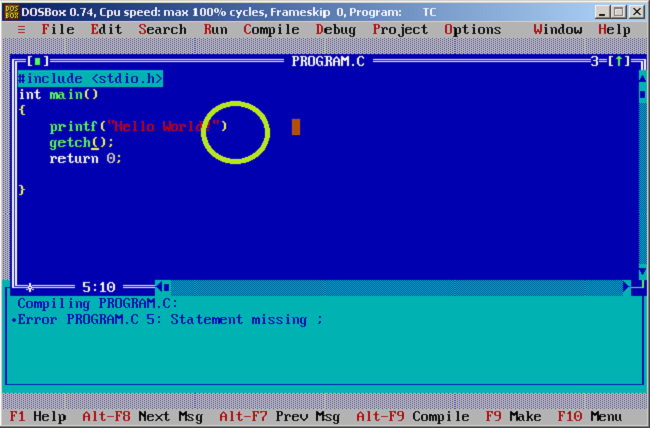
In the above program, we purposly omitted semi-colon (;) at the end of the C statement. This resulted in an error. The program indicate the line no, then name of the program and the error description.
Execute the Program
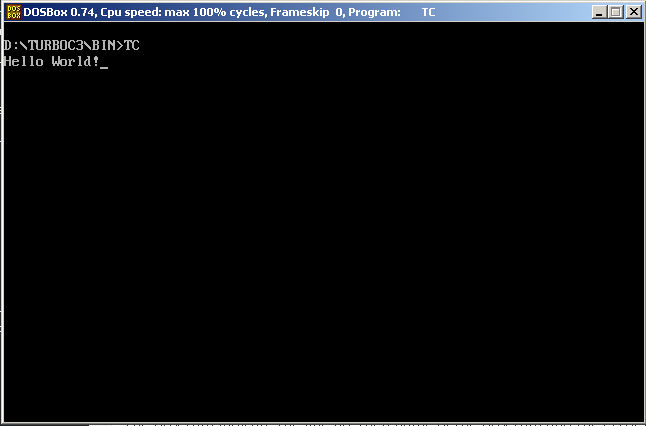
The program is created, you can run and test the output. To run the program, go to Run menu and click Run or press Ctrl + F9.The output of the error-free compiled program is given below.
References
- Balagurusamy, E. 2000. Programming in ANSI C. Tata McGraw-Hill Education,.
- Brian W. Kernighan, Dennis M. Ritchie. 1988. C Programming Language, 2nd Edition. Prentice Hall
- Kanetkar, Yashavant. 20 November 2002. Let us C. Bpb Publications
C Preprocessor Directives
There are a lot of components or processors involved inside or outside the C compiler that affects the compilation process. One of them is the C preprocessor.
The preprocessor executes its own commands to the program before it is sent to the compiler for compilation. The preprocessor commands are called preprocessor directives.
Though the directives have nothing to do with C language, it has somehow become part of the C programming language.
Before you start learning about the C compiler, learn C programming basics.
Steps to Compile a C Program
To understand the role of the C preprocessor, we must first understand the process of compiling a C program successfully. The steps are listed below and each of the steps produces some output file.
Step 1: Write the Source code in the Text editor.
Output File: Prog.C
Step 3: The Prog.C to preprocessor and preprocessor expands its codes. The expanded source code is sent to C compiler.
Output File: Prog.I
Step 4: The Prog. I file is compiled and an intermediate object file is created if there is no error.
Output File: Prog.obj
Step 5: A linker links the object code of program and object code of library functions to a system and creates an executable code.
Output File: Prog.exe
To run the program, you need to execute the  file.
file.
Features of Preprocessor Directives
You can place a preprocessor directive anywhere within your program but the common practice is to place the code before the main function.
Every preprocessor directive starts with a pound sign ( ) and then a directive name.
The next part in a preprocessor statement is called macro template and macro expansion.
For example,
#define SIDE 25
where
 is called
  .
.
 is called
  .
.
 is the
  .
.
Types of Directives
The type of directives is basically its purpose. It is about what the macro does in the program. We can divide the preprocessor directive into the following categories.
- Macro Expansion
- File Inclusion
- Conditional Compilation
- Other misc directives
In future articles, we will learn about each one of them in more details.
C Conditional Operators
In C programming language, sometimes it necessary to change the flow of the program.The C offers a special operator called a Conditional operator to do that.
Before you start learning about the conditional operator, be familiar with C programming basics. Skip this step if you already know the basics.
- C program Structure
- How to install Turbo C++ Compiler?
- C Arithmetic Operators
- C Data Types
- C Flow Control Structure – I
The conditional operator? : is also called the ternary operator. The syntax for the conditional operator is given below.
\begin{aligned}(expression \hspace{3px}A \hspace{3px}? \hspace{3px}expression \hspace{3px}B \hspace{3px}: \hspace{3px}expression \hspace{3px}C)\end{aligned}How does conditional operator work?
The expression A evaluates to true or false. If the result is true, then the expression B is executed and if the result is false, expression C is executed.
For example, consider the following code.
int a, b, res;
a = 10;
b = 5;
res = (a >= b ? printf("%d\n", a); : printf("%d\n", b););
The compiler checks for expression A which is “if a is greater than or equal to b”. If the expression A evaluates to true, then a value is printed.
If the expression A evaluates to false, then b value is printed as output.
Characteristics of Conditional Operator
There are a few important characteristics of the conditional operator which are listed below. Know them will be helpful in constructing C programs using conditional operators.
- The first expression (e.g. Expression A) must be an integral type.
- You can nest the expressions.
- Single expression execution.
- Lvalue problem
The First expression must be an integral type
The First expression must be an integral type such as integer, char, float or double. This condition makes sure that a boolean value is obtained upon execution.
Example:
For example, the following code character type is used within the conditional operator.
#include  <stdio.h>
#include  <stdlib.h>
int main() {
    char a, b;
    char result;
    a = 'm';
    b = 's';
    result = (a > b? a : b);
    printf("Result =
    %c\n",result);      system("PAUSE");
return 0;
}
Output
Result = 5
Press any key to continue . . .
You can nest the expressions
You can nest the expressions within another expression. Each expression will be executed according to its associativity. The conditional operator has right-to-left associativity.
Example:
In the code below, the conditional operator uses nested expression which is also conditional.
#include <stdio.h>
#include <stdlib.h>
int main()
{
    int a,b,c,d;
    int result;
    a = 10;
    b = 20;
    c = 5;
    d = 25;
    result = (a >= b? ( a <= c? (a + c) : (a - c)): (a < d? (a + d) : (a - d)));
    printf("Result = %d\n",result);
    system("PAUSE");
    return 0;
}
Output
Result = 35
Press any key to continue . . .
Single expression execution
Single expression execution is another characteristic of the conditional operator. Only one expression is executed at a time and adding too many statements in an expression will create confusion or break the program.
For example, the nested expressions have too many statements in the above example.
So, if the conditional statement exceeds one or two expressions, then it is better to use – if-else structure.
Lvalue problem
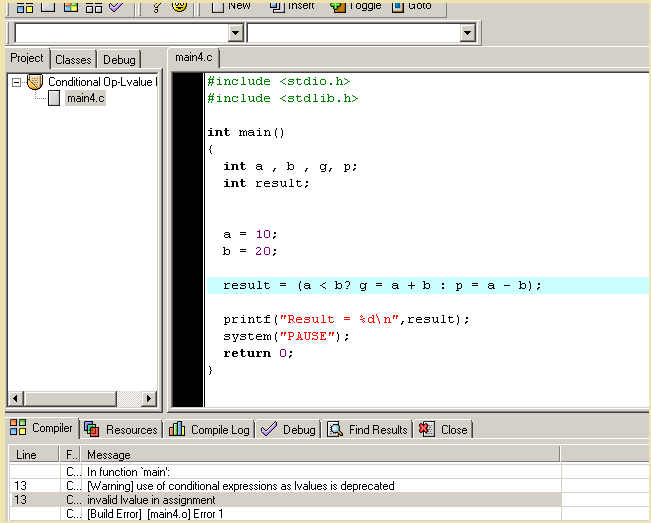
Lvalue problem is an issue that happens when both the expression B and expression C are the L-value expression. A L-value expression has a variable with memory location on left side of the equal sign (=).
Example:
#include <stdio.h>
#include <stdlib.h>
int main()
{
    int a , b , g, p;
    int result;
    a = 10;
    b = 20;
    result = (a < b? g = a + b : p = a - b);
    printf("Result = %d\n",result);
    system("PAUSE");
    return 0;
}
Output
The output of the above program is a compile-time error.