DBMS Exercises
DBMS exercises involves a construction of an E-R Model and then converting that ER Model to Relational model with database schema and relations.
You then have to learn how to construct various type queries to get desired results from the constructed databases.
On this page, you will find 4 different databases to construct and will have to answer questions related to each particular database to test your learning. You can check your answers with the solution to each question given below and know how much you learned.
Problem-Solution
Questions
Solutions
DBMS Solutions
This document has a list of DBMS solutions for questions in the previous sections. Try the problem on your own and then try solutions.
- Solution To DBMS Question – 1
- Solution To DBMS Question – 2
- Solution To DBMS Question – 3
- Solution To DBMS Question – 4
Solution to DBMS Question – 4
This is a solution to the DBMS assignment Lab questions. You go step by step and run queries to get the solution to the questions, but we recommend first try to solve the problems by yourself and then check the solutions.
View DBMS Assignment Questions
Step: Create an E-R Model

Step : Relational Model
Step : Implement Relations
1. Create the CUSTOMER table first and add constraints.
CREATE TABLE CUSTOMER ( CID NUMBER(5), CNAME VARCHAR2(30));ALTER TABLE CUSTOMER ADD PRIMARY KEY(CID));2. Create the BRANCH table and add constraints.
CREATE TABLE BRANCH (BCODE VARCHAR2(5), BNAME VARCHAR2(30));ALTER TABLE BRANCH ADD PRIMARY KEY(BCODE));
ALTER TABLE BRANCH ADD CONSTRAINT CPK CHECK ( BCODE LIKE 'B%');3. Create the ACCOUNT table and add constraints – primary key, foreign key and check constraints for account type.
S – Saving and C – current account
CREATE TABLE ACCOUNT ( ANO VARCHAR2(5), ATYPE CHAR(2), BALANCE NUMBER(7), CID NUMBER(5), BCODE VARCHAR2(5));ALTER TABLE ACCOUNT ADD PRIMARY KEY(ANO) ;
ALTER TABLE ACCOUNT ADD FOREIGN KEY(CID) REFERENCES CUSTOMER (CID);
ALTER TABLE ACCOUNT ADD FOREIGN KEY(BCODE) REFERENCES BRANCH(BCODE);
ALTER TABLE ACCOUNT ADD CONSTRAINT CPK2 CHECK (ATYPE IN ('S','C'));
ALTER TABLE ACCOUNT ADD CONSTRAINT CK CHECK (ANO LIKE 'A%');4. Create the final table – TRANSACTION and add constraints such as primary key, foreign key and check constraints for TTYPE.
W – WITHDRAWAL
D – DEPOSIT
CREATE TABLE TRANSACTION ( TID VARCHAR2(5), ANO VARCHAR2(5), TTYPE CHAR(2), TDATE DATE, TAMOUNT NUMBER(7));ALTER TABLE TRANSACTION ADD PRIMARY KEY(TID); ALTER TABLE TRANSACTION ADD FOREIGN KEY(ANO) REFERENCES ACCOUNT(ANO); ALTER TABLE TRANSACTION ADD CONSTRAINT CPK3 CHECK (TTYPE IN ('W','D'); ALTER TABLE TRANSACTION ADD CONSTRAINT CPK4 CHECK (TID LIKE 'T%');Other Solutions
Solution (B)
You can insert data into the tables now.
1. Customer Relation look like below after inserting data.
2. Insert data into the branch table as follows.
3. Insert the data into account table.
4. Insert data into the last table – Transaction.
Solution (C)
Solution (D)
Solution (E)
Solution (F)
Solution to DBMS Question – 3
This article has the solution to the third DBMS lab question to help you learn. We recommend you to try solving the problem yourself and then check the solution.
View DBMS Assignment Questions
First step is to create an E-R Diagram and then second step is to convert the E-R diagram to a Relational Model and Create Table schema.
Step 1: Create an E-R diagram of Question – 3.

Step 2: Convert the E-R Model into a Relational Model
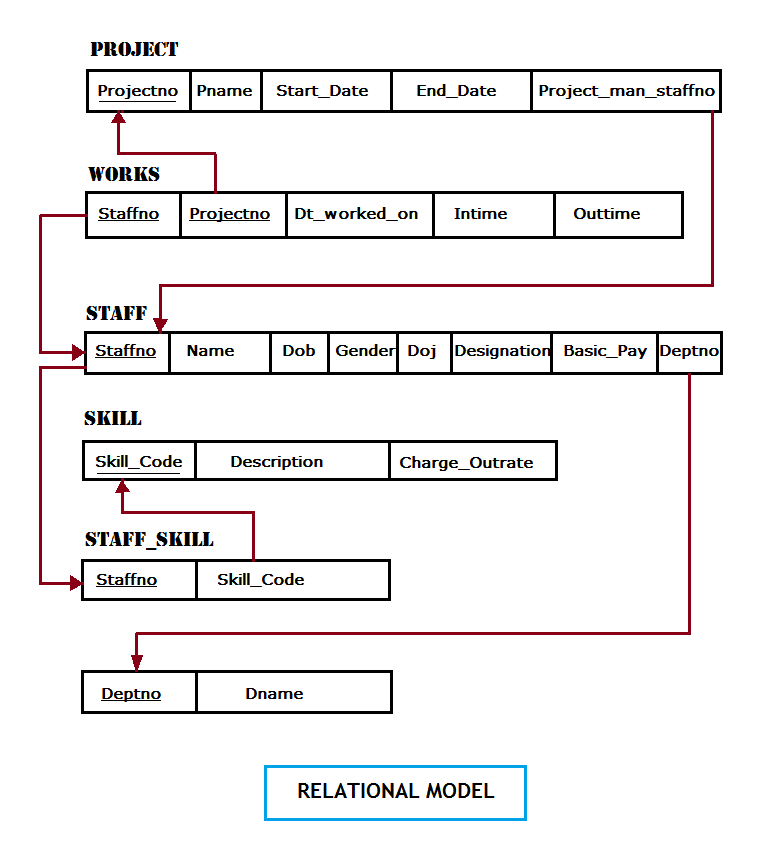
QUERIES
Solution(A)
CREATE TABLE DEPTS ( DEPTNO VARCHAR2(5), DNAME VARCHAR2(30));ALTER TABLE DEPTS ADD PRIMARY KEY(DEPTNO);
ALTER TABLE DEPTS ADD CONSTRAINT CPK CHECK (DEPTNO LIKE 'd%');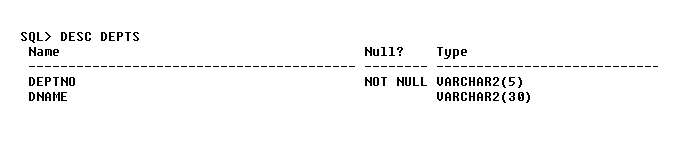
Create Table Department – Project Database
CREATE TABLE STAFF ( STAFFNO NUMBER(5), NAME VARCHAR2(30), DOB DATE, GENDER CHAR(2), DOJ DATE, DESIGNATION VARCHAR2(30), BASIC_PAY NUMBER(6),DEPTNO VARCHAR2(5));ALTER TABLE STAFF ADD PRIMARY KEY(STAFFNO);
ALTER TABLE STAFF ADD FOREIGN KEY(DEPTNO) REFERENCES DEPTS (DEPTNO);
ALTER TABLE STAFF ADD CONSTRAINT CPK2 CHECK( GENDER IN ('M','F'));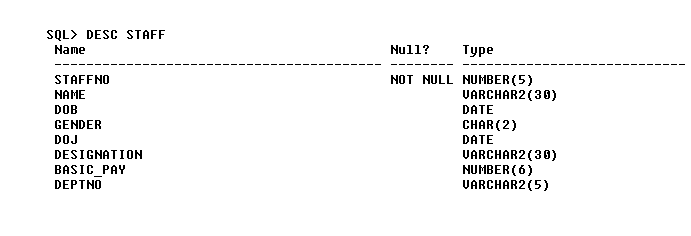
Create Table Staff – Project Database
CREATE TABLE SKILL ( SKILL_CODE VARCHAR2(5), DESCRIPTION VARCHAR2(30), CHARGE_OUTRATE NUMBER(3));ALTER TABLE SKILL ADD PRIMARY KEY(SKILL_CODE);
ALTER TABLE SKILL ADD CONSTRAINT CPK4 CHECK( SKILL_CODE LIKE 'S%');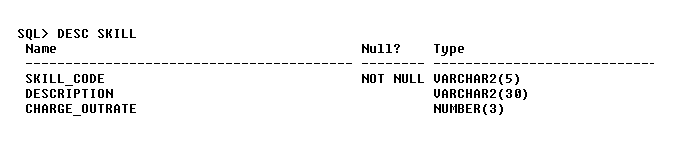
CREATE TABLE STAFF_SKILL ( STAFFNO NUMBER(5), SKILL_CODE VARCHAR2(5));ALTER TABLE STAFF_SKILL ADD PRIMARY KEY(STAFFNO,SKILL_CODE);
ALTER TABLE STAFF_SKILL ADD FOREIGN KEY(STAFFNO) REFERENCES STAFF(STAFFNO);
ALTER TABLE STAFF_SKILL ADD FOREIGN KEY(SKILL_CODE) REFERENCES SKILL(SKILL_CODE);
CREATE TABLE WORKS ( STAFFNO NUMBER(5), PROJECTNO VARCHAR2(5), DATE_WORKED_ON DATE, INTIME TIMESTAMP, OUTTIME TIMESTAMP);ALTER TABLE WORKS ADD PRIMARY KEY(STAFFNO,PROJECTNO);
ALTER TABLE WORKS ADD FOREIGN KEY(STAFFNO) REFERENCES STAFF(STAFFNO);
ALTER TABLE WORKS ADD FOREIGN KEY(PROJECTNO) REFERENCES PROJECT(PROJECTNO);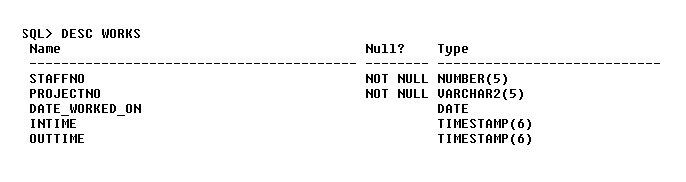
Solution (B)
Insert data into all the Relations.
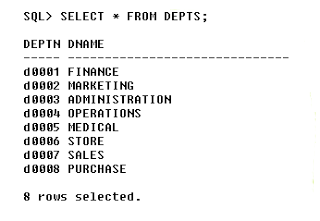
1. First we insert into the DEPTS relation.
INSERT INTO DEPTS VALUES('d0001','FINANCE');
INSERT INTO DEPTS VALUES('d0002','MARKETING');
INSERT INTO DEPTS VALUES('d0003','ADMINISTRATION');
INSERT INTO DEPTS VALUES('d0004','OPERATIONS');
INSERT INTO DEPTS VALUES('d0005','MEDICAL');
INSERT INTO DEPTS VALUES('d0006','STORE');
INSERT INTO DEPTS VALUES('d0007','SALES');
INSERT INTO DEPTS VALUES('d0008','PURCHASE');
Your table should look like this,
2. Next, we insert data into the STAFF relation.
INSERT INTO STAFF VALUES (50001,'RENUKA SHASTRI',TO_DATE('01-7-1980','DD-MM-YYYY'),'F',TO_DATE('10-5-2010','DD-MM-YYYY'),'ACCOUNTANT',20000,'d0001');

INSERT INTO STAFF VALUES (50002,'MIR RAJA',TO_DATE('02-08-1987','DD-MM-YYYY'),'M',TO_DATE('5-5-2011','DD-MM-YYYY'),' CHIEF ACCOUNTANT',50000,'d0001');

INSERT INTO STAFF VALUES (50003,'KARTICK RAJ',TO_DATE('04-11-1979','DD-MM-YYYY'),'M',TO_DATE('06-06-2013','DD-MM-YYYY'),'AUDITOR',30000,'d0001');

INSERT INTO STAFF VALUES (50004,'MIKE TYSON',TO_DATE('21-5-1984','DD-MM-YYYY'),'M',TO_DATE('4-6-2012','DD-MM-YYYY'),'AD DESIGNER',100000,'d0002');

INSERT INTO STAFF VALUES (50005,'NEIL ARMSTRONG',TO_DATE('01-04-1976','DD-MM-YYYY'),'M',TO_DATE('05-06-2011','DD-MM-YYYY'),'MANAGER',150000,'d0002');

INSERT INTO STAFF VALUES (50006,'KAVITA CHOPRA',TO_DATE('04-6-1988','DD-MM-YYYY'),'F',TO_DATE('21-08-2012','DD-MM-YYYY'),'WRITER',25000,'d0002');

INSERT INTO STAFF VALUES (50007,'VINI JOSEPH',TO_DATE('03-5-1982','DD-MM-YYYY'),'F',TO_DATE('03-07-2013','DD-MM-YYYY'),'OFFICE ASSISTANT',40000,'d0003');

INSERT INTO STAFF VALUES (50008,'MIKE PEGGS',TO_DATE('05-07-1987','DD-MM-YYYY'),'M',TO_DATE('5-5-2011','DD-MM-YYYY'),'OFFICE MANAGER',120000,'d0003');

INSERT INTO STAFF VALUES (50009,'LARRY PAGE',TO_DATE('06-6-1969','DD-MM-YYYY'),'M',TO_DATE('4-4-2010','DD-MM-YYYY'),'OFFICE SECRETARY',50000,'d0003');

INSERT INTO STAFF VALUES (50010,'YIN YO',TO_DATE('08-8-1987','DD-MM-YYYY'),'F',TO_DATE('6-5-2010','DD-MM-YYYY'),'OPERATIONS MANAGER',120000,'d0004');

INSERT INTO STAFF VALUES (50011,'WU YONG',TO_DATE('7-5-1987','DD-MM-YYYY'),'M',TO_DATE('6-3-2014','DD-MM-YYYY'),'EXECUTIVE',20000,'d0004');

INSERT INTO STAFF VALUES (50012,'PETER CHONG',TO_DATE('2-11-1982','DD-MM-YYYY'),'M',TO_DATE('1-5-2014','DD-MM-YYYY'),'EXECUTIVE',23000,'d0004');

INSERT INTO STAFF VALUES (50013,'XIN GI',TO_DATE('7-5-1987','DD-MM-YYYY'),'M',TO_DATE('6-3-2014','DD-MM-YYYY'),' PUBLIC RELATION EXEC',40000,'d0004');

INSERT INTO STAFF VALUES (50014,'RUSKIN BOND',TO_DATE('4-10-1988','DD-MM-YYYY'),'M',TO_DATE('5-5-2014','DD-MM-YYYY'),'STENOGRAPHER',10000,'d0004');

INSERT INTO STAFF VALUES (50015,'MARY DESOUZA',TO_DATE('6-10-1985','DD-MM-YYYY'),'M',TO_DATE('3-3-2014','DD-MM-YYYY'),'STORE KEEPER',15000,'d0004');

INSERT INTO STAFF VALUES (50016,'JASON KIRK',TO_DATE('6-8-1985','DD-MM-YYYY'),'M',TO_DATE('3-5-2014','DD-MM-YYYY'),'NUSRE',15000,'d0005');

INSERT INTO STAFF VALUES (50017,'JOHN DOE',TO_DATE('1-9-1988','DD-MM-YYYY'),'M',TO_DATE('3-11-2014','DD-MM-YYYY'),'NUSRE',15000,'d0005');

INSERT INTO STAFF VALUES (50018,'KIM BARN',TO_DATE('6-6-1990','DD-MM-YYYY'),'F',TO_DATE('23-5-2014','DD-MM-YYYY'),' CASHIER',15000,'d0005');

INSERT INTO STAFF VALUES (50019,'RAGHU RAM',TO_DATE('3-1-1978','DD-MM-YYYY'),'M',TO_DATE('3-2-2011','DD-MM-YYYY'),'MEDICAL OFFICER',55000,'d0005');

INSERT INTO STAFF VALUES (50020,'RAMAKANTH DORE',TO_DATE('1-10-1986','DD-MM-YYYY'),'M',TO_DATE('3-2-2012','DD-MM-YYYY'),'MEDICAL OFFICER',55000,'d0005');

INSERT INTO STAFF VALUES (50021,'DR. VIRDAS GUPTA',TO_DATE('2-5-1978','DD-MM-YYYY'),'M',TO_DATE('20-12-2014','DD-MM-YYYY'),' MD',115000,'d0005');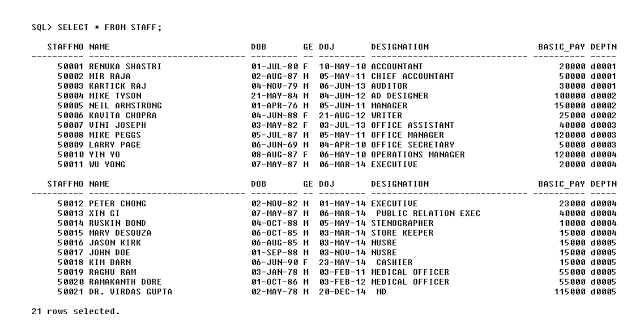
3. Insert data into the SKILL table.
INSERT INTO SKILL VALUES('S0001','TYPING SKILL',50);

INSERT INTO SKILL VALUES('S0002','BOOK KEEPING',60);

INSERT INTO SKILL VALUES('S0003','TALLY EXPERT',60);

INSERT INTO SKILL VALUES('S0004','AD DESIGNING',70);

INSERT INTO SKILL VALUES('S0005','ART WORKS',40);

INSERT INTO SKILL VALUES('S0006','WEB CONTENT WRITING',60);

INSERT INTO SKILL VALUES('S0007','STORE KEEPING',40);

INSERT INTO SKILL VALUES('S0008','MS OFFICE',80);

INSERT INTO SKILL VALUES('S0009','LINUX ADMINISTRATION',50);

INSERT INTO SKILL VALUES('S0010','AUTOCAD',100);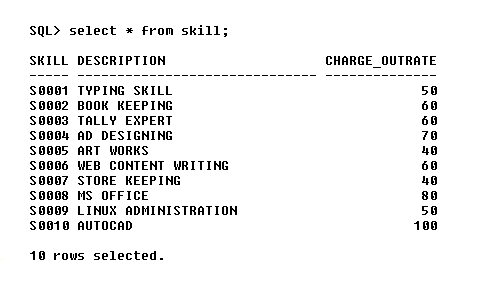
4. Insert data into the STAFF_SKILL relation where each staff can have one or more skills.
INSERT INTO STAFF_SKILL VALUES(50001,'S0001');

INSERT INTO STAFF_SKILL VALUES(50001,'S0002');

INSERT INTO STAFF_SKILL VALUES(50001,'S0003');

INSERT INTO STAFF_SKILL VALUES(50001,'S0007');

INSERT INTO STAFF_SKILL VALUES(50001,'S0008');

INSERT INTO STAFF_SKILL VALUES(50002,'S0001');

INSERT INTO STAFF_SKILL VALUES(50002,'S0002');

INSERT INTO STAFF_SKILL VALUES(50002,'S0003');

INSERT INTO STAFF_SKILL VALUES(50002,'S0008');

INSERT INTO STAFF_SKILL VALUES(50003, 'S0001');

INSERT INTO STAFF_SKILL VALUES(50003, 'S0002');

INSERT INTO STAFF_SKILL VALUES(50003, 'S0007');

INSERT INTO STAFF_SKILL VALUES(50003, 'S0008');

INSERT INTO STAFF_SKILL VALUES(50004,'S0001');

INSERT INTO STAFF_SKILL VALUES(50004,'S0008');

INSERT INTO STAFF_SKILL VALUES(50004,'S0004');

INSERT INTO STAFF_SKILL VALUES(50004,'S0005');

INSERT INTO STAFF_SKILL VALUES(50005,'S0010');

INSERT INTO STAFF_SKILL VALUES(50005,'S0008');

INSERT INTO STAFF_SKILL VALUES(50006,'S0001');

INSERT INTO STAFF_SKILL VALUES(50006,'S0006');

INSERT INTO STAFF_SKILL VALUES(50006,'S0008');

INSERT INTO STAFF_SKILL VALUES(50007,'S0001');

INSERT INTO STAFF_SKILL VALUES(50007,'S0002');

INSERT INTO STAFF_SKILL VALUES(50008,'S0002');

INSERT INTO STAFF_SKILL VALUES(50008,'S0008');

INSERT INTO STAFF_SKILL VALUES(50008,'S0010');

INSERT INTO STAFF_SKILL VALUES(50009,'S0008');

INSERT INTO STAFF_SKILL VALUES(50009,'S0009');

INSERT INTO STAFF_SKILL VALUES(50010,'S0002');

INSERT INTO STAFF_SKILL VALUES(50010,'S0008');

INSERT INTO STAFF_SKILL VALUES(50010,'S0004');

INSERT INTO STAFF_SKILL VALUES(50010,'S0010');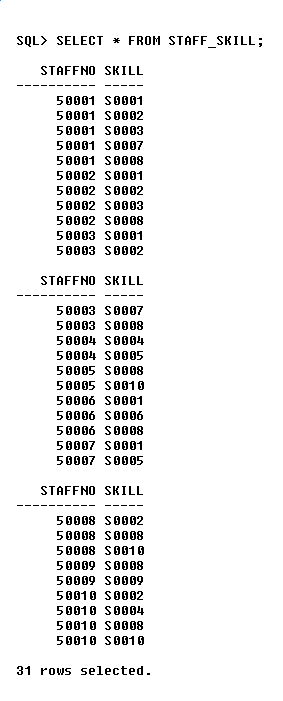
5. We now insert data into the relation WORKS.
INSERT INTO WORKS VALUES(50001,'P0003',TO_DATE('2-2-2015','DD-MM-YYYY'),TO_TIMESTAMP('2-FEB-2015 9.30.20','DD-MON-RR HH24.MI.SS'),TO_TIMESTAMP('2-FEB-2015 17.34.20' ,'DD-MON-RR HH24.MI.SS'));

INSERT INTO WORKS VALUES(50002,'P0003',TO_DATE('2-2-2015','DD-MM-YYYY'),TO_TIMESTAMP('2-FEB-2015 9.15.50','DD-MON-RR HH24.MI.SS'),TO_TIMESTAMP('2-FEB-2015 18.12.40' ,'DD-MON-RR HH24.MI.SS'));

INSERT INTO WORKS VALUES(50003,'P0001',TO_DATE('4-5-2015','DD-MM-YYYY'),TO_TIMESTAMP('4-MAY-2015 9.22.10','DD-MON-RR HH24.MI.SS'),TO_TIMESTAMP('4-MAY-2015 17.32.10' ,'DD-MON-RR HH24.MI.SS'));

INSERT INTO WORKS VALUES(50004,'P0005',TO_DATE('1-4-2014','DD-MM-YYYY'),TO_TIMESTAMP('1-APR-2014 9.15.20','DD-MON-RR HH24.MI.SS'),TO_TIMESTAMP('1-APR-2014 17.34.50' ,'DD-MON-RR HH24.MI.SS'));

INSERT INTO WORKS VALUES(50005,'P0004',TO_DATE('1-3-2014','DD-MM-YYYY'),TO_TIMESTAMP('1-MAR-2014 9.15.20','DD-MON-RR HH24.MI.SS'),TO_TIMESTAMP('1-MAR-2014 18.34.50' ,'DD-MON-RR HH24.MI.SS'));

INSERT INTO WORKS VALUES(50006,'P0006',TO_DATE('1-1-2015','DD-MM-YYYY'),TO_TIMESTAMP('1-JAN-2015 9.11.33','DD-MON-RR HH24.MI.SS'),TO_TIMESTAMP('1-JAN-2015 17.30.00' ,'DD-MON-RR HH24.MI.SS'));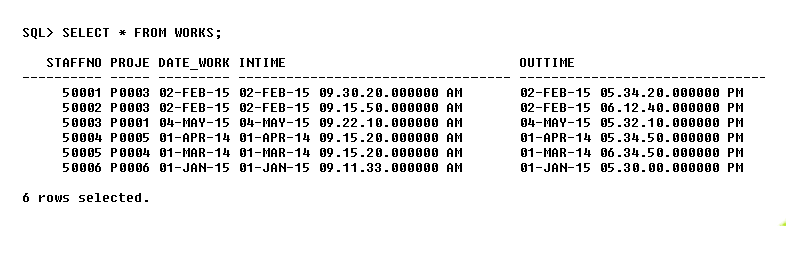
Solution (C)
SELECT DEPTNO, COUNT(STAFFNO) AS STAFF_COUNT FROM STAFF GROUP BY DEPTNO;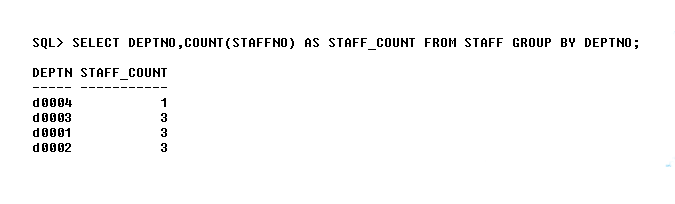
Solution (D)
SELECT * FROM STAFF WHERE BASIC_PAY < (SELECT AVG(BASIC_PAY) FROM STAFF;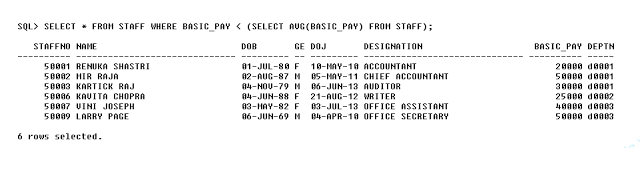
Solution (E)
SELECT * FROM STAFF WHERE STAFFNO IN ( SELECT STAFFNO FROM STAFF_SKILL WHERE SKILL_CODE IN ( SELECT SKILL_CODE FROM SKILL WHERE CHARGE_OUTRATE < 60));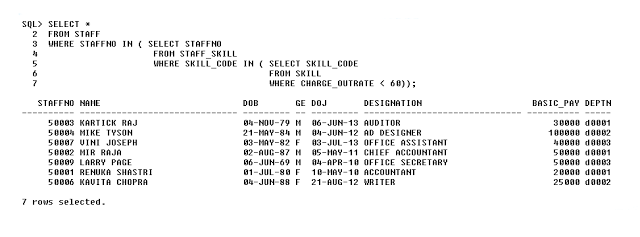
Solution (G)
CREATE VIEW STAFFCOUNT AS
SELECT D.DEPTNO,D.DNAME,COUNT(S.STAFFNO) AS STAFF_COUNT,SUM(S.BASIC_PAY) AS DEPT_EXPENSE
FROM DEPTS D,STAFF S
WHERE D.DEPTNO = S.DEPTNO GROUP BY D.DEPTNO,D.DNAME;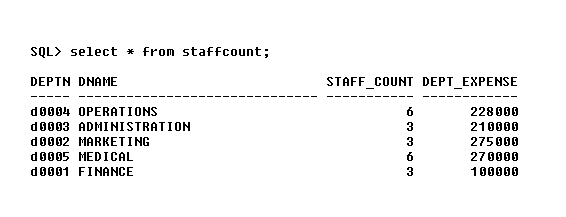
Solution (H)
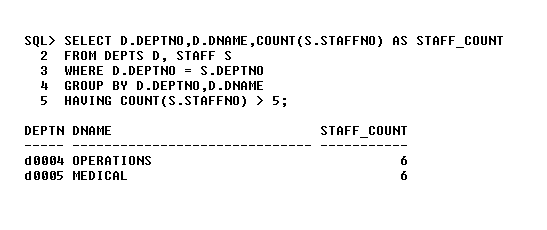
Solution (I)
SELECT * FROM STAFF
WHERE STAFFNO IN
( SELECT STAFFNO FROM STAFF_SKILL GROUP BY STAFFNO
HAVING COUNT(SKILL_CODE) > 3);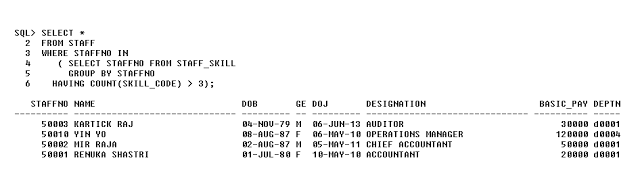
Solution to DBMS Question – 2
In this article, we have given the solution to the DBMS lab assignment question 2. The solution is for practice and understand DBMS by running queries which we believe is the best way to learn.
View DBMS Assignment Questions
Step 1: Make an ER Model
Step 2: ER Model into a Relational Model
Queries
Solution (A)
Create all relations and enforced primary key, foreign key and check constraints according to relational model.
CREATE TABLE CUSTOMER (CUSTOMERNO VARCHAR2 (5), CNAME VARCHAR2 (25));ALTER TABLE CUSTOMER ADD PRIMARY KEY (CUSTOMERNO));
ALTER TABLE CUSTOMER ADD CONSTRAINT CHK3 CHECK (CUSTOMERNO LIKE ‘C %’);CREATE TABLE CUST_ORDER (ORDERNO VARCHAR2 (5), ODATE DATE, CUSTOMERNO VARCHAR2 (5), ORD_AMT NUMBER (6) DEFAULT 0);ALTER TABLE CUST_ORDER ADD PRIMARY KEY (ORDERNO);
ALTER TABLE CUST_ORDER ADD FOREIGN KEY (CUSTOMERNO) REFERENCES CUSTOMER (CUSTOMERNO);
ALTER TABLE CUST_ORDER ADD CONSTRAINT CK2 CHECK (ORDERNO LIKE ‘O %’);CREATE TABLE ITEM (ITEMNO VARCHAR2 (5), ITEM_NAME VARCHAR2 (30), UNIT_PRICE NUMBER (5));ALTER TABLE ITEM ADD PRIMARY KEY (ITEMNO);
ALTER TABLE ITEM ADD CONSTRAINT CK4 CHECK (ITEMNO LIKE ‘I %’);CREATE TABLE ORDER_ITEM (ORDERNO VARCHAR2 (5), ITEMNO VARCHAR2 (5), QTY NUMBER (3));ALTER TABLE ORDER_ITEM ADD PRIMARY KEY (ORDERNO, ITEMNO);
ALTER TABLE ORDER_ITEM ADD FOREIGN KEY (ORDERNO) REFERENCES CUST_ORDER (ORDERNO);
ALTER TABLE ORDER_ITEM ADD FOREIGN KEY (ITEMNO) REFERENCES ITEM(ITEMNO);SOLUTION (B)
Now, we need to insert data to the relations created after following above steps. Insert data into the Customer table using insert command as follows.
INSERT INTO CUSTOMER VALUES (‘C0001’,’ANIL KUMAR’);Insert Data to Customer Table – Customer Order-Processing Database
Inserting data into the customer order table is bit different, assume that customer placed an order on particular date then we cannot compute the total amount unless we know the total quantity of purchase make by the customer and for each purchase calculate the total amount as follows.
Total amount = Item1 unit price * qty + item2 unit price * quantity.
This means we set the total order amount to 0 by default.
INSERT INTO CUST_ORDER (‘O0001’, TO_DATE (’12-5-2013’,’DD-MM-YYYY’), ‘C0002’,0);If we insert all data like this our cust_order table will look like following.
Now we insert data into the order_item table so that we know the total quantity and unit price of the item customer has purchased.
INSERT INTO ORDER_ITEM VALUES (‘O0001’, ‘I0002’, 4);Now we update the customer order table with order amount as follows
The result should look like the following.
SOLUTION (C)
SELECT * FROM CUSTOMER C WHERE C.CUSTOMERNO IN (SELECT O.CUSTOMERNO FROM CUST_ORDER O GROUP BY O.CUSTOMERNO HAVING COUNT (O.ORDERNO) > 2);SOLUTION (D)
SELECT * FROM ITEM I WHERE I.UNIT_PRICE < (SELECT AVG (UNIT_PRICE) FROM ITEM);SOLUTION (E)
SELECT ORDERNO, SUM (OTY) FROM ORDER_ITEM GROUP BY ORDERNO;SOLUTION (F)
SELECT * FROM ITEM WHERE ITEMNO IN (SELECT ITEMNO FROM ORDER_ITEM GROUP BY ITEMNO HAVING COUNT (ITEMNO) >= (SELECT (COUNT (*)/4) FROM CUST_ORDER));SOLUTION (G)
UPDATE CUST_ORDER SET ORD_AMT = (SELECT SUM (O.QTY * I.UNIT_PRICE) FROM ORDER_ITEM O, ITEM I WHERE CUST_ORDER.ORDERNO = O.ORDERNO AND O.ITEMNO = I.ITEMNO);Create a view the customer order table after update and its called Customer_Details.
Run the following command to view and instance of Customer_Details View.
Solution to DBMS Question – 1
On this page, you will find the solution to DBMS Question – 1 and all answers in this article is created using Oracle 10g.
View DBMS Assignment Questions
Step 1: Make an ER Model
Step 2: ER Model in to a Relational Model
Step 3: Implement the Relations (or Tables)
CREATE TABLE DEPARTMENT (DNO NUMBER (2), DNAME VARCHAR2 (20));ALTER TABLE DEPARTMENT ADD PRIMARY KEY (DNO);
CREATE TABLE BRANCH (BCODE NUMBER (3), BNAME VARCHAR2 (25), DNO NUMBER (2));ALTER TABLE BRANCH ADD PRIMARY KEY (BCODE);
ALTER TABLE BRANCH ADD FOREIGN KEY (DNO) REFERENCES DEPARTMENT (DNO);CREATE TABLE BRANCH_COURSE (BCODE NUMBER(3),CCODE NUMBER(4),SEMESTER NUMBER(2));ALTER TABLE BRANCH_COURSE ADD PRIMARY KEY (BCODE, CCODE);
ALTER TABLE BRANCH_COURSE ADD FOREIGN KEY (BCODE) REFERENCES BRANCH (BCODE);
ALTER TABLE BRANCH_COURSE ADD FOREIGN KEY (CCODE) REFERENCES COURSE (CCODE);CREATE TABLE STUDENT (ROLLNO NUMBER (5),
NAME VARCHAR2 (20),
DOB DATE, GENDER CHAR(2),
DOA DATE, BCODE NUMBER(3));ALTER TABLE STUDENT ADD PRIMARY KEY (ROLLNO);
ALTER TABLE STUDENT ADD FOREIGN KEY (BCODE) REFERENCES BRANCH (BCODE);
ALTER TABLE ADD CONSTRAINT CHK CHECK (GENDER IN ('M','F'));
ALTER TABLE ADD CONSTRAINT CHK2 CHECK (DOA < TO_DATE('31-4-2016,'DD-MM-YYYY');CREATE TABLE COURSE (CCODE NUMBER (4), CNAME VARCHAR2 (25), CREDITS NUMBER (2), DNO NUMBER (2));ALTER TABLE COURSE ADD PRIMARY KEY (CCODE);
ALTER TABLE COURSE ADD FOREIGN KEY (DNO) REFERENCES DEPARTMENT (DNO));CREATE TABLE ENROLLS (ROLLNO NUMBER (5), CCODE NUMBER (4), SESS VARCHAR2 (15), GRADE CHAR (2));ALTER TABLE ENROLLS ADD PRIMARY KEY (ROLLNO, CCODE, SESS);
ALTER TABLE ENROLLS ADD FOREIGN KEY ROLLNO) REFERENCES STUDENT (ROLLNO);
ALTER TABLE ENROLLS ADD FOREIGN KEY (CCODE) REFERENCES COURSE (CCODE);Step 4: Insert data into the Tables
Use example SQL commands for inserting data into Department table.
INSERT INTO (value, 'string_value', value,value);We inserted following records to the Department table.
We inserted data into the branch table. You may enter your own data for the branch which requires Branch_Code, Branch_Name and associated Department Number.
Each branch has a number of courses. We enter this information in the branch_course table. Again you can enter your own values for Branch_Course.
Now, insert values to Course table using the following command. Make sure that the Course ID from Branch_Course match with Course ID of Course Table.
INSERT INTO COURSE VALUES (1011, 'LINEAR ALGEBRA', 2,1);Insert data into Student Table using the following command.
INSERT INTO STUDENT VALUES ( 12001, 'RAMESH KAUSHIK', TO_DATE( '3-4-1989',DD-MM-YYYY') ,'M' , TO_DATE( '24-4-2016','DD-MM-YYYY'), 110);Now, we need to insert information about a student who has enrolled in the branches and the courses offered to them during a SESSION (SESS). This information is inserted into ENROLLS table.
INSERT INTO ENROLLS VALUES( 12001, 1112, 'APRIL2013','D');Answers to Questions
Solution (A)
SELECT * FROM DEPARTMENT D WHERE D.DNO IN (SELECT B.DNO FROM BRANCH B GROUP BY B.DNO HAVING COUNT (B.DNO) > 3);Solution (B)
SELECT * FROM DEPARTMENT D WHERE D.DNO IN (SELECT C.DNO FROM COURSE C GROUP BY C.DNO HAVING COUNT (C.CCODE) > 6);Solution (C)
SELECT * FROM COURSE C WHERE C.CCODE IN (SELECT B.CCODE FROM BRANCH_COURSE B GROUP BY B.CCODE HAVING COUNT (B.BCODE) > 3);Solution (D)
SELECT * FROM STUDENT S WHERE S.ROLLNO IN (SELECT E.ROLLNO FROM ENROLLS E WHERE E.GRADE = 'S' GROUP BY E.ROLLNO HAVING COUNT (E.GRADE) > 2);Solution (E)
CREATE VIEW STUDATA AS SELECT E.ROLLNO, S.NAME, COUNT (E.CCODE) AS CC FROM STUDENT S, ENROLLS E WHERE E.ROLLNO = S.ROLLNO AND E.GRADE ! = 'U' GROUP BY E.ROLLNO, S.NAME;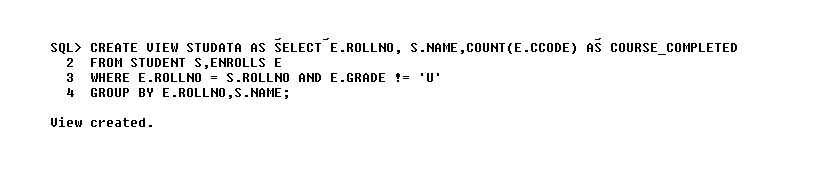
DBMS Lab Assignment Questions
These are DBMS Lab Assignment Questions for practice RDBMS in a lab environment and all queries were tested using Oracle 10g. The Queries may not give you expected result if you implement them on any other DBMS setup without necessary modifications.
Q1: Consider the following relational schema for the Office of the Controller of Examinations Application.
Student (Rollno, Name, Dob, Gender, Doa, Bcode);
Implement a check constraint for
- Gender
- Date of Admission
Branch (Bcode, Bname, Dno);
Department (Dno, Dname);
Course (Ccode, Cname, Credits, Dno);
Branch_Course (Bcode, Ccode, Semester);
Enrolls (Rollno, Ccode, Sess, Grade);
For Example,
SESS can take values ‘APRIL 2013’, ‘NOV 2013’
Implement a check constraint for grade Value Set (‘S’, ‘A’, ‘B’, ‘C’, ‘D’, ‘E’, ‘U’ );
Students are admitted to Branches and they are offered by Departments. A branch is offered by only one department.
Each branch has a set of Courses (Subjects). Each student must enroll during a semester. Courses are offered by Departments. A course is offered only by one department. If a student is unsuccessful in a course he/she must enroll for the course during next session. A student has successfully completed a course if the grade obtained by is from the list (A, B, C, D, and E).
A student is unsuccessful if he/she have grade ‘U’ in a course.
Primary Keys are underlined.
Questions
These are questions for assignment 1. The solution is available after the last question.
Question (A)
Develop a SQL query to list details of Departments that offer more than 3 branches.
Question (B)
Develop a SQL query to list the details of Departments that offer more than 6 courses.
Question (C)
Develop a SQL query to list the details of courses that are common for more than 3 branches.
Question (D)
Develop a SQL query to list students who got ‘S’ in more than 2 courses during single enrollment.
Question (E)
Create a view that will keep track of the roll number, name and number of courses, a student has completed successfully.
Q2: Consider the following relations for an Order Processing Database application in a Company.
Customer (Customerno varchar2 (5), Cname varchar2 (50));
Implement check constraints to check Customerno starts with ‘C’.
Cust_Order (Orderno varchar2(5), Odate Date, Customerno references Customer, Ord_amt number(8));
Implement check constraints to check Orderno starts with ‘O’.
Ord_amt is derived attribute (default value is 0);
Item (Itemno varchar2 (5), Item_name varchar2 (30), unit_price number (5));
Implement check constraint to check Itemno starts with ‘I’.
Order_item (Orderno references Cust_order, Itemno references item, qty number (3));
Primary Key is underlined.
Questions
These are questions for assignment 2. The solution is available after the last question.
Question (A)
Develop DDL to implement above schema enforcing primary key, check constraints and foreign key constraints.
Question (B)
Populate Database with rich data set.
Question (C)
Develop SQL query to list the details of customers who have placed more than 3 orders.
Question (D)
Develop a SQL query to list details of items whose price is less than the average price of all items in each order.
Question (E)
Develop a SQL query to list the orderno and number of items in each order.
Question (F)
Develop a SQL query to list the details of items that are present in 25% of the orders.
Question (G)
Develop an update statement to update the value of Ord_amt.
Question (H)
Create a view that keeps track of detail of each customer and number of Order placed.
Q3: Consider the following relational schema
Staff (Staffno number (5), Name varchar2 (30), Dob Date, Gender Char (2), Doj Date, Designation varchar2 (30), Basic_pay number (6), Deptno varchar2 (5));
Gender must take value ‘M’ or ‘F’.
Dept (Deptno varchar2 (5), Name varchar2 (30));
Skill (Skill_code varchar2 (5), Description varchar2 (30), Charge_Outrage number (3));
Staff_skill (Staffno number (5), Skill_code varchar2 (5));
Project (Projectno varchar2 (5), Pname varchar2 (5), Start_Date Date, End_Date Date, Project_Manager_Staffno number (5));
Project Number must start with ‘P’.
Works (Staffno number (5), Projectno varchar2 (5), Date_Worked_On Date, Intime Timestamp, Outtime Timestamp);
Primary Key is underlined.
Questions
These are questions for assignment 3. The solution is available after the last question.
Question (A)
Develop DDL to implement the above schema specifying appropriate data types for each attributes and enforcing primary key, check constraints and foreign key constraints.
Question (B)
Populate the database with rich data set.
Question (C)
Develop a SQL query to list the departmentno and number of staff in each department,
Question (D)
Develop a SQL query to list the details of staff who earn the AVG basic pay of all staff.
Question (E)
Develop a SQL query to list the details of staff who have more than 3 skills.
Question (F)
Develop a SQL query to list the details of staff who have skills with a charge outrate greater than 60 per hour.
Question (G)
Create a view that will keep track of the department number, department name, the number of employees in the department and total basic pay expenditure for the department.
Question (H)
Develop a SQL query to list the details of Depts which has more than 5 staff working in it.
Question (I)
Develop a SQL query to list the details of staff who have more than 3 skills.
Q4: Consider the following relational schema for a banking database application.
Customer (Cid, Cname);
Branch (Bcode, Bname);
Account (Ano, Atype, Balance, Cid, Bcode);
An account can be a saving account or a current account. Check Atype in ‘S’ or ‘C’. A customer can have both types of accounts.
Transaction (Tid, Ano, Tttype, Tdate, Tamount);
Ttype can be ‘D’ or ‘W’.
D – Deposit, W – Withdrawal
Primary Key is underlined.
Questions
These are questions for assignment 4. The solution is available after the last question.
Question (A)
Develop DDL to implement the above schema specifying an appropriate data type for each attribute enforcing primary key, check constraints and foreign key constraints.
Question (B)
Populate the database with a rich data set.
Question (C)
Develop a SQL query to list the details of customers who have a saving account and a current account.
Question (D)
Develop a SQL query to list the details of branches and the number of accounts in each branch.
Question (E)
Develop a SQL query to list the details of branches where the number of accounts is less than the average number of accounts in all branches.
Question (F)
Develop a SQL query to list the details of customers who have performed three transaction on a day.
Question (G)
Create a view that will keep track of branch details and the number of accounts in each branch.