Java Program to Compute Average Mark of Students
The program answers how to compute average mark of student. It reads a student’s mark in each subject and then compute the average and displays the results.
First, you will store the student records and second, take the average of the marks obtained in different subjects. This is a simple program that demonstrates the use of arithmetic expressions in a java program. The java program to calculate student marks is intended for beginners of java programming.
A flowchart, program code and a verified output is given to help you learn and practice the program. The program is written using NetBeans 8.2 with Java SDK 8u111.
Problem Definition
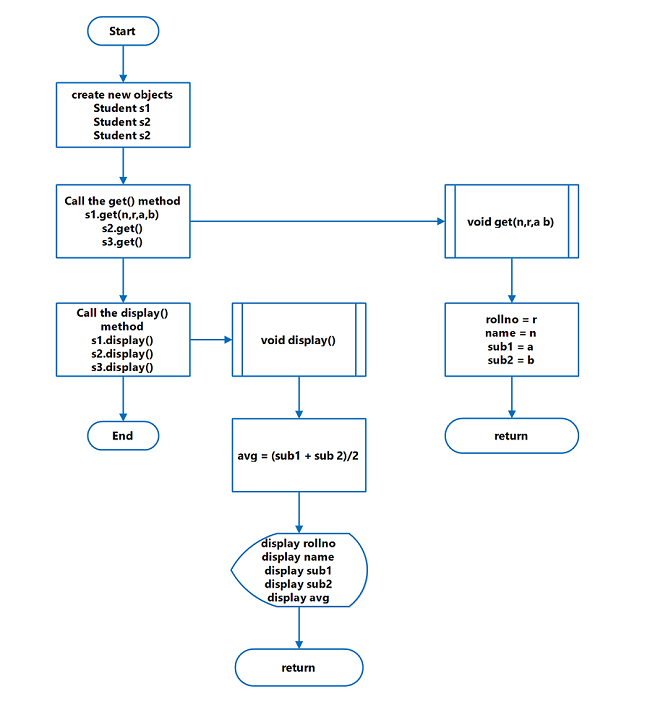
The program for computing average mark of students ask for student’s name, roll number and marks in two subjects – sub1 and sub2 using get() function. We have used only two subjects for the program, but you can always change the number of the subject suitable to you.
This will not break the program logic and still calculate average.
Next, the program computes the total marks and divide it with the number of subjects taken by the student.
This will give the average mark obtained by the student. To compute the average use following
Average mark = Total marks all subjects/Total subjectsFinally, the program displays the results using function – disp().
Flowchart – Average Mark of Students
Program Code – Average Mark of Student
 /** * * @author Admin */

class Student{

    int rollno;
    String name;
    int sub1;
    int sub2;
    int Avg;
    void get(String n, int r, int a, int b) {
        rollno = r;
        name = n;
        sub1 = a;
        sub2 = b;
}

void disp() {
    Avg = (sub1 + sub2)/2;
    System.out.println("Rollno=" + rollno);
    System.out.println("Name=" + name);
    System.out.println("Sub1=" + sub1);
    System.out.println("Sub2=" + sub2);
    System.out.println("Average=" + Avg);
    System.out.println("_________________");
    }
}

public class StudentMarkAvg {
    public static void main(String[] args){
        Student s1 = new Student();
        Student s2 = new Student();
        Student s3 = new Student();
        s1.get("Ram",16345,21,78);
        s2.get("Judith", 26312, 77,91);

        s3.get("Lee", 32132, 85, 65);
        s1.disp();
        s2.disp();
        s3.disp();
     }
}
Output – Average Mark
The output of the program compute average mark of student in NetBeans 8.2 is given below. It displays the student details and the average mark in two subjects.
Rollno=16345

Name=Ram

Sub1=21

Sub2=78

Average=49

------------------------------

Rollno=26312

Name=Judith

Sub1=77

Sub2=91

Average=84

------------------------------

Rollno=32132

Name=Wong

Sub1=85

Sub2=65

Average=75

------------------------------
Java Program to Demo Built-in String Functions
In java programming there are many built-in string manipulation functions.These functions belong to java.lang packages. The Java program to demo built in function use of each commonly used string function .More details about string class will be discussed in our Java Programming Tutorial.
The program is written using NetBean 8.2 and you may also need to install the suitable Java SDK version for NetBean IDE. The operating system platform is Windows 7 64-bit system. The program is a very simple one and intended for beginners of Java programming.
Problem Definition
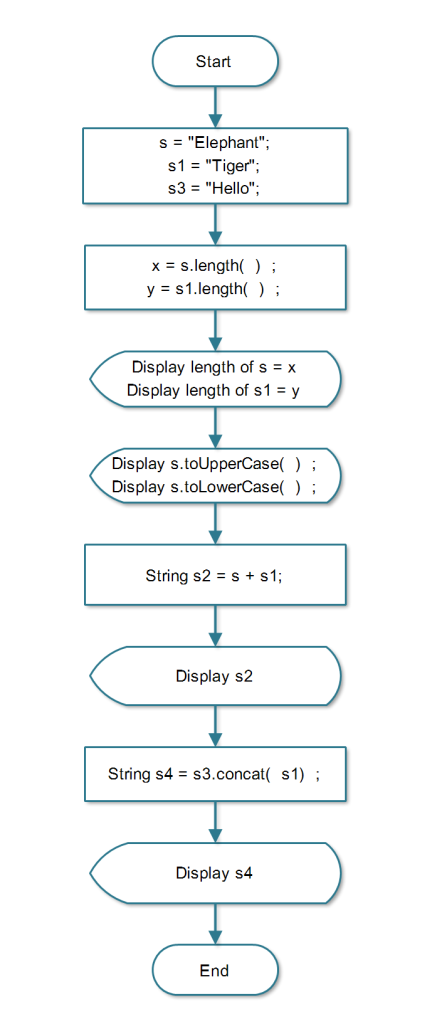
The program reads 3 string variables and then perform following operations on them.
- Find the length of the string using length () function.
- Convert the string into uppercase and lowercase using toUpperCase () and toLowerCase () functions respectively.
- Concatenate two strings using concat () function.
Flowchart
Program Code
/*
 * To change this license header, choose License Headers in Project Properties.
 * To change this template file, choose Tools | Templates
 * and open the template in the editor.
 */
package JavaExamples;

/**
*
* @author Admin
*/
public class StringDemo {

    public static void main(String[] args) {

        int x, y;

        String S = "Elephant";

        String S1 = "Tiger";

        String S3 = "Hello";

        x = S.length();
        y = S1.length();

        System.out.println("Length of S=" + x);
        System.out.println("Length of S1=" + y);

        System.out.println(S.toUpperCase());
        System.out.println(S.toLowerCase());

        String S2 = S + S1;

        System.out.println("S2=" + S2);

        String S4 = S3.concat(S1);

        System.out.println(S4);
    }

}
Output
The output of the program is given below. It show the various forms of string variable – uppercase, lowercase, concatenated strings and length of strings.
Length of S=8

Length of S1=5

ELEPHANT

elephant

S2 = ElephantTiger

HelloTiger
Related Articles:-
- Program to read text using Bufferedreader in Java.
- Java Program demonstrating String-Buffer Class and String-Builder Class.
- Java program to demo Builtin String functions.
Program to compute Average of an array of integers
The program to compute average of an array of integers is a simple program to demonstrate the usage of arrays.The program is intended for beginners of Java programming language.
We are using JDK 8u111 with Netbeans IDE 8.2 installed on a Windows 7 64-bit PC to compile and run the program. You may alternatively install JDK and compile and run the program from windows command line.
Problem Definition
To compute the average of integers stored in an array, first, we receive the user input values for an array. The next step sums the array of integers and divides by the total number of integers. This will give the average values and you can now display the results.
Program Code
/*
 * To change this license header, choose License Headers in Project Properties.
 * To change this template file, choose Tools | Templates
 * and open the template in the editor.
 */

package javademo;

/**
 *
 * @author admin
 */
//Average of an array of values

class Average {

    public static void main(String args[]){

    double num[]={10.1,11.2,12.3,13.4,14.5};

    double result = 0;

    int l;

    for(l=0;l<5;l++)

        result=result+num[l];

        System.out.println("Average is " + result/5);

    }

}
Output
Average is 12.299999999999999Related Articles:-
Assignment Operators in Java program
One of the operators in java is the assignment operator that helps assign value to variables and other identifiers. This is a simple program to demonstrate and learn the basics of Java Programming. It is intended for beginners of Java language.
We are using JDK 8u111 with Netbean IDE 8.2 installed on a Windows 7 64-bit PC. Alternatively, you can compile and run Java from Windows Command line also.
Problem Definition
In this program, we will demonstrate the use of assignment operator. We declare and initialize the variable using different methods and display the output.
Program Code
class assign {

public static void main(String args[]) {
                        int a=1;
                        int b=2;
                        int c=3;

                        a += 5;
                        b *= 4;
                        c += a * b;
                        c %= 6;

                        System.out.println("a=" + a);
                        System.out.println("b=" + b);

                        System.out.println("c=" + c);

                    }

             }
Output – Assignment Operator
The output of the above program is given below.
a= 6

b= 8

c= 5
Program in Java for Addition of Two Matrices
The program for addition of two matrices uses simple arithmetic operations on two given matrices and prints the output.
It is written in NetBeans 8.2 installed on a windows 7 64-bit system. You may also need to install the Java SDK version suitable for NetBeans 8.2.
It is a simple demonstration of arithmetic operations and it is intended for beginner level learner of Java programming.
Problem Definition
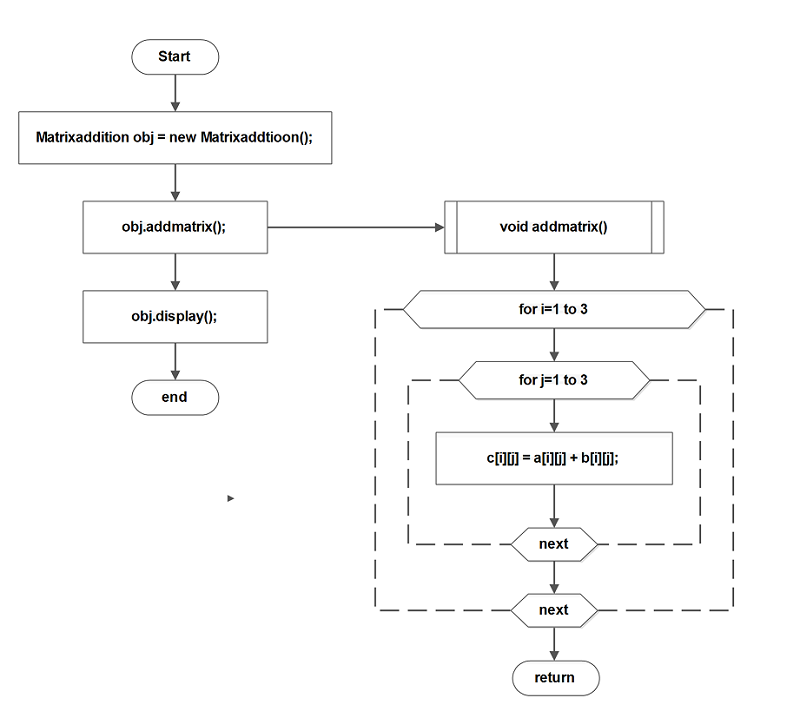
We reads two matrices – matrix A and matrix B and adds each corresponding element of the given matrix. The result of this addition is stored in a third matrix C.
For example, let A, B, and C be 3 x 3 matrices. Then
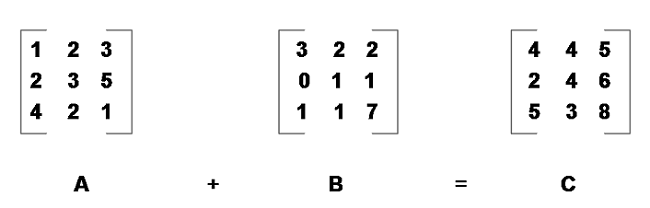
In the above figure, each element from first row of A is added to each element of the B and the sum is stored in the matrix C.
Flowchart
Program Code
/* To change this license header, choose License Headers in Project Properties.
 * To change this template file, choose Tools | Templates
 * and open the template in the editor.
 */


/**
*
* @author Admin
*/
public class Matrixaddition {

    int a[][] = {{1,2,3},{2,3,5},{4,2,1}};

    int b[][] = {{3,2,2},{0,1,1},{1,1,7}};

    int c[][] = new int [3][3];

    void addmatrix(){

        int i,j;
        for(i=0;i< 3;i++){

            for(j=0;j < 3;j++){

                c[i][j] = a[i][j] + b[i][j];
                }
        }
    }

void display(){

    int i,j;

    for(i=0;i < 3;i++){

        for(j=0;j < 3;j++){

            System.out.print (c[i][j] + " ");

            }
        System.out.println("\n");
        }
    }

public static void main(String[] args)
{
    Matrixaddition obj = new Matrixaddition();

    obj.addmatrix();
    obj.display();
}
}
Output
4      4      5

2      4      6

5 3 8Program to compute Average of an array of integers
The program to compute average of an array of integers is a simple program to demonstrate the usage of arrays.The program is intended for beginners of Java programming language.
We are using JDK 8u111 with Netbeans IDE 8.2 installed on a Windows 7 64-bit PC to compile and run the program. You may alternatively install JDK and compile and run the program from windows command line.
Problem Definition
To compute the average of integers stored in an array, first, we receive the user input values for an array. The next step sums the array of integers and divides by the total number of integers. This will give the average values and you can now display the results.
Program Code
/*
 * To change this license header, choose License Headers in Project Properties.
 * To change this template file, choose Tools | Templates
 * and open the template in the editor.
 */

package javademo;

/**
 *
 * @author admin
 */
//Average of an array of values

class Average {

    public static void main(String args[]){

    double num[]={10.1,11.2,12.3,13.4,14.5};

    double result = 0;

    int l;

    for(l=0;l<5;l++)

        result=result+num[l];

        System.out.println("Average is " + result/5);

    }

}
Output
Average is 12.299999999999999Related Articles:-
- Program to add two numbers in Java.
- Java program to compute average mark of students.
- Program in Java for addition of two matrices.
- Program to find area of triangle in Java.
Java Program Demonstrating usage of String-buffer Class and String-builder Class
In this article, we will create a program that uses both String-Builder and String-Buffer Class and displays the output. The main difference between these two class is that String-Builder Class is not threading safe like String-Buffer Class.
String-Buffer class objects are like String objects, but it can be modified at any time because it contains a sequence of characters.
This program is a basic introduction to the string-buffer and string-builder class. It is intended for beginner level learner of Java programming language.
Problem Definition
String-Buffer objects can be used with multiple threads. There are two important operations performed on String-Buffer class objects.
1. Append
2. Insert
String-Builder is like a replacement for String-buffer class instance. It also performs the same operation on data inputs. To create a program in Java that makes use of both String-Builder and String-Buffer Class use the following code.
Program Code
/*
 * To change this license header, choose License Headers in Project Properties.
 * To change this template file, choose Tools | Templates
 * and open the template in the editor.
 */
package JavaExamples;

/**
*
* @author Admin
*/
public class StringBufferDemo {

public static void main(String[] args)
{
String s;
String p;
StringBuilder sb = new StringBuilder(40);
StringBuffer sp = new StringBuffer(40);
int b = 40;
int a = 50;

s = sb.append("a = ").append(a).append("!").toString();
p = sp.append("b = ").append(b).append("!").toString();
System.out.println(s);
System.out.println(s.length());

System.out.println(p);
System.out.println(p.length());

}

}
Output
Output of the above program is given below.
a = 50!

7

b = 40!

7Java Program to Demonstrate the Use of Arrays
This is a simple Java program to demonstrate the use of arrays. Arrays are very important concept in any programming language and Java is not very different. An array is a sequential arrangement of variables of same type that share same name.
Instead of declaring lot of independent variables of same type, you can declare a sequential order of variables that is manipulated using an index value.
We wrote this program with NetBeans 8.2 installed on a Windows 7 64-bit system and is intended for beginners of Java programming.
Problem Definition
There are many ways to declare an array in Java. This program demonstrates those declarations and assign values to the array and print the results.
All the declaration type is shown here none of them are superior to each other, but different ways to work with arrays for solving computing problems.
Program Code
/*
 * To change this license header, choose License Headers in Project Properties.
 * To change this template file, choose Tools | Templates
 * and open the template in the editor.
 */
    package JavaExamples;

/**
*
* @author Admin
*/
public class ArrayDemo {

    public static void main(String[] args){

        int a[] = new int[5];
        int b[] = {2,3,4,5};

        int i;

        a[0] = 10;
        a[1] = 20;
        a[2] = 30;
        a[3] = 40;
        a[4] = 50;

        for(i = 0; i < 5;i++){

            System.out.println("a["+i+"]=" +a[i]);
        }

        for(i =0 ; i < 4;i++){

            System.out.println("b["+i+"]=" + b[i]);
        }
    }
}
Output – Array Demo
a[0]=10
a[1]=20
a[2]=30
a[3]=40
a[4]=50
b[0]=2
b[1]=3
b[2]=4
b[3]=5
Related Articles:-
- Program to demo usage of bit-wise shift operators.
- Program to add two numbers in Java.
- Java program to demo builtin string functions.
- Program to compute average of an array of integers.
- Program in Java for addition of two matrices.
Java Program using Multiple Classes
Java is an object-oriented programming language. You can create multiple classes in Java and create a class hierarchy such that one class can call another class. Do not confuse this with Java inheritance because, in class inheritance, there is a parent-child relationship between classes.
The derived or the child class always inherit the properties and methods from the parent or the base class.
Inheritance is not the scope of this article.
In general, Java has a main public class with a name that should match with the Java class file name and it calls other classes from this main class. The second approach is to write each class in different files and link them together with a package. In other words, all class files should be in the same class.
This program is a basic Java program to demonstrate the structure of the Java program. It is intended for beginner level learner of Java programming. It is written using Netbeans 8.2 installed on a Windows 7 64-bit PC. You may also want to install the suitable Java SDK 8.2.
Problem Definition
Our aim is to create a Java program that has three class, the 1st class will add two number and display results, and 2nd class will subtract two numbers and display results. The 3rd class will call the other two classes.
Program Code
The program code for add.java to add two numbers and display the results is given below.
/*
* To change this license header, choose License Headers in Project Properties.
* To change this template file, choose Tools | Templates
* and open the template in the editor.
*/
package JavaExamples;
/**
*
* @author Admin
*/
<span style="font-family: andale mono, monospace;">
public class Add {
int a;
int b;
int c;
void add(int x , int y ){
a = x;
y = b;
c = a + b;
System.out.println("C = " + c);
}
}
The program code for subtract.java to subtract two numbers and display the results is given below.
/*
 * To change this license header, choose License Headers in Project Properties.
 * To change this template file, choose Tools | Templates
 * and open the template in the editor.
 */
package JavaExamples;
/**
*
* @author Admin
*/
public class Subtract {

int m;
int n;
int p;

void subtraction(int r, int s){
m = r;
n = s;
p = m + n;
System.out.println("P =" + p);
}
}
The program code for Results.java to call the previous two classes is given below.
/*
 * To change this license header, choose License Headers in Project Properties.
 * To change this template file, choose Tools | Templates
 * and open the template in the editor.
 */
package JavaExamples;
/**
*
* @author Admin
*/
public class Results {

public static void main(String[] args){
Add obj = new Add();
Subtract obj2 = new Subtract();
obj.add(10,30);
obj2.subtraction(30,10);
}
}
Output
C = 10
P = 40
Related Articles:-
- Java program to demonstrate the usage of arrays.
- Program to demonstrate constructor overloading in Java.
- Program to read text using Bufferedreader in Java.
Program to compute area of a circle in Java
The program to compute the area of a circle in Java language is a simple demonstration of evaluating an expression. This formula for an area of a circle is the expression that we need to evaluate to get the expected results.
It is intended for beginners of Java programming language.
It is compiled using JDK 8u111 with Netbean IDE 8.2 on a Windows 7 64-bit PC. You can also compile and run the program using Command line utility in Windows.
Problem Definition
A circle is a basic geometric shape with a radius and a diameter. The diameter length is twice the length of radius.
diameter = $latex 2 * radius&s=1$The area of circle is given below.
Area of a Circle = $latex \pi * r^2&s=1$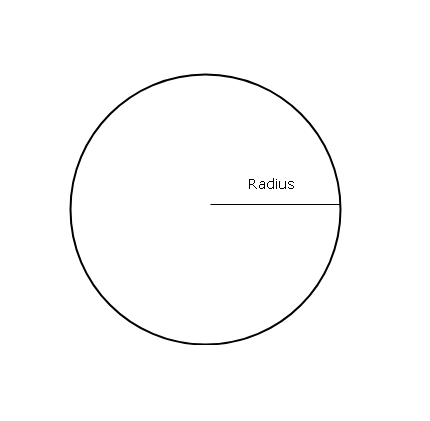
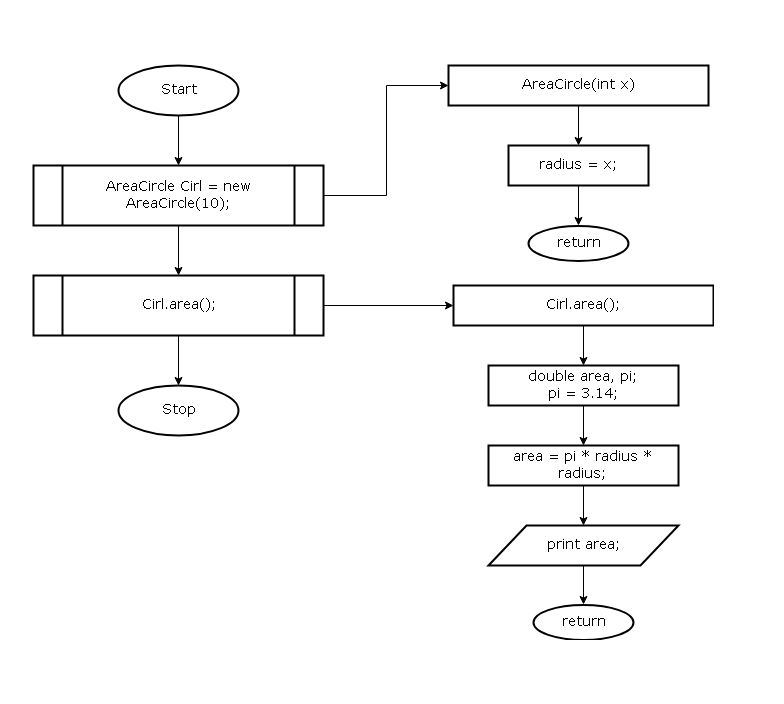
Flowchart – Area of Circle
The public class of this program is AreaCircle() with a constructor that set radius for the circle. Then the method area() computes the area of the circle and prints the output. The method area() is called using an object of class AreaCircle(). The output of the program is given in the next section.
Program Code
class AreaCircle
{

    int radius;
    int x;
    AreaCircle(int x)
    {
        radius = x;
    }
    void area()
    {
        double area,pi;
        pi=3.14;
        area = pi * radius * radius;
        System.out.println("Area of Circle=" + area);
    }

    public static void main(String args[])
    {

        AreaCircle Cir1 = new AreaCircle(10);
        Cir1.area();

    }
}
Output – Area of Circle
The output of the program for an input ( radius = 10 ) is given below.
Area of Circle = 314.0Related Articles:-
- Program to add two numbers in Java.
- Program to compute area of a triangle in Java.
- Program to compute average of an array of integers.
- Program to compute average marks of students.