C++ Program Structure
C++ is a very popular programming language. Every C++ program has a general structure that it must follow.
Here is common structure of a C++ program.
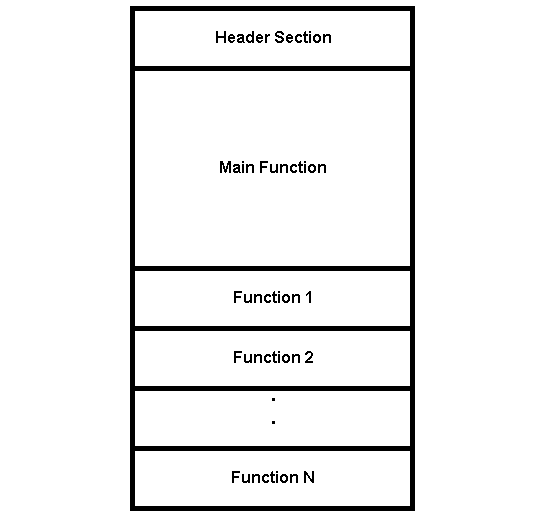
Header Section
The header section is used for
- Including header files
- Declaring global variables
- Declaring functions
- Defining constants
You can divide C++ functions into two categories – Builtin functions and User-defined functions. Builtin functions are written in a header file that ends with a .h extension. In other words, builtin functions comes with the C++ compiler located in a directory called Include.
User-defined functions are written by programmers. You can write your own codes and store them in the source file for C++ that ends with extension (.cpp).
Syntax to include header file in a C++ program
#include "iostream.h"

or

#include <iostream.h>
When you use double quotes the compiler look for the header file in the directory where the C++ program located and then look for file in Include directory that contains all the headers. Otherwise, if we use < ….> , then compiler look for the file only under Include directory.
The header section is a global section because it is outside the main program. You can declare functions (user-defined) with global scope so that all other functions can call it anytime.
void add() ;

int calculate();
You can declare global variables which is used by the main program components such as functions and expressions.
int number;

char name;
You can specify a macro or a numeric constant value in the header section. The value of a numeric constant does not change during the execution of a program.
Syntax for declaring numeric constant
#define MAX 10

#define PI  3.14
The Main Function
The main function is where your program gets executed first. The main function has a default return type of integer in C++. It calls other functions while executing.
void main()
{

            statement 1;

            statement 2;

            ...

            ...

            statement n;

}
The two braces – { and } indicate a block of statements and main() like every other function has a block of statements. The block is the entire C++ program and when it has finished execution, returns an integer value.
If you do not want main to return any value, use the keyword void main() to indicate this.
Other Functions
A user-defined function is a function that performs some task for the user in the program. It is different from built-in functions because user has the control to change the function anytime.
The programmer declares the function in the head section or in the main body of a C program. The declared function has definition that defines what the function does. The best practice is to keep the function definition after main() function. But, it is not necessary.
Putting it all together
The following is an example of C++ program structure.
#include <iostream.h>

#define NUM 100

void main()

{

        int x = 20;

        int sum = 0;

        sum = x + NUM;

        cout << sum << endl;

}
Output
120C++ Private Member Function & Nested Functions
You have learnt about member functions earlier. We now expand the idea and talk about private member function and nesting of function in C++.
A function declared inside the class’s private section is known as the “private member function”. A private member function is accessible through the only public member function.
Data Members
Data members include members that are mentioned with any of the fundamental types, as well as other types, including pointer, reference, array types, bit fields, and user-defined types.
You can declare a data member the same way as a variable, except those explicit initializers are not allowed inside the class definition. However, a constant static data member of integral or enumeration type may have an explicit initializer.
If an array is declared as a non-static class member, you must specify all of the dimensions of the array.
A class can have members that are of a class type or are pointers or references to a class type. Members that are of a class type must be of a class type that has been mentioned earlier.
An insufficient class type can be used in a member declaration as long as the size of the class is not needed. For example, a member can be implemented that is a pointer to an insufficient class type.
A class X cannot have a member that is of type X, but it can contain pointers to X, references to X, and static objects of X. Member functions of X can take arguments of type X and have a return type of X.
Member Functions
Member functions are operators and functions that are initialized as members of a class. Member functions do not include operators and functions initialized with the friend specifier.
These are called friends of a class. You can declare a member function as static; this is called a static member function. A member function that is not initialized as static is called a non-static member function.
The definition of a member function is within the scope of its enclosing class. The body of a member function is explored after the class declaration so that members of that class can be used in the member function body, even if the member function definition appears before the declaration of that member in the class member list.
When the function mul() is called in the following example, the data variables a, b, and c can be used in the body of mul().
Example #1
class x
{
public:
      int mul()             // inline member function mul
      {return a*b*c;};
private:
      int a,b,c;
};
Nesting of member Functions
Whenever we call a member function inside another member function of one class by using dot operator it is known as Nesting of the member function.
Normally, the member function which is called by another member function is kept private so that it cannot be called directly using the dot operator.
Example #2
#include<iostream.h>
//nested member function

class squarenumb
{
int number;
public:
long square();
void getnumber();
void display();
};

void squarenumb:getnumber()
{
cout<<"Please enter an integer number:";
cin>>number;
}

long squarenumber::square()
{
number=number*number;
return (number);
}

void squarenumb::display()
{
cout<<"Square of the number:"<<square();

}

int main ()
{
squarenumb square;
square.getnumber();
square.display();

return 0;
}
Output:
Please enter an integer number:10
10
Square of the number:100
Summary
The private member function is protection of data wherever necessary, it is for the data protection. Unlike public functions the restricted access ensure that only required members can access the data, which may happen with nested functions.
C++ Objects As Function Arguments
An object can be passed to a function just like we pass a structure to a function. we can pass the object of another class to a function of a different class. We can pass class objects as arguments and return them from a function.
When we want to initialize all data members of an object with another object, we can pass objects and assign the values of a supplied object to the current object. For complex or large projects, we need to use objects as an argument or parameters. So, here’s the question.
What is an object?
An Object is an instance of a Class. When a class is defined, no memory is allocated but when it is expressed it means an object is created and memory is allocated.
Declaring Objects: When a class is initialized, only the specification for the object is defined; no memory or storage is allocated. To use the data and access functions defined in the class, you need to create objects.
Syntax:
ClassName ObjectName;
What is a class?
A class is a template similar to a blueprint that binds the properties and functions of an entity. You can assign all the entities or objects having similar attributes under a single roof, known as a class. These can further implement the core concepts like encapsulation, data hiding, and abstraction. In C++, a class acts as a data type which can have objects or various instances of the class type.
- A Class is a user-defined data type that has data members and member functions.
- Data members includes data variables and member functions are the functions used to manipulate these variables together these data members and member functions define the properties and behavior of the objects in a Class.
Create a class called “MyCycle”:
class MyCycle {
  public:             // Access specifier
    int myNum;        // Attribute (int variable)
    string myString;  // Attribute (string variable)
};
To create an object of MyCycle, specify the class name, and act in accordance by the object name.
To access the class attributes (myNumb and myString), use the dot syntax (.) on the object:
Example #1
Create an object called “myObj” and access the attributes.
class MyCycle {
  public:             // Access specifier
    int myNumb;        // Attribute (int variable)
    string myString;  // Attribute (string variable)
};
int main() {
  MyCycle myObj;  // Create an object of MyCycle
  // Access attributes and set values
  myObj.myNumb = 15;
  myObj.myString = "Random Info";
  // Print attribute values
  cout << myObj.myNumb << "\n";
  cout << myObj.myString;
  return 0;
}
Output:
15
Random Info
Passing an Object as an argument
The objects of a class can be passed as arguments to member functions as well as non-members functions either by value or by reference. we can pass class objects as arguments and also return them from a function the same way we pass and return other variables. No special keyword or header file is required.
A copy of the actual object is created inside the function when an object is passed by value. This copy is destroyed when the function terminates. Moreover, any changes made to the copy of the object inside the function are not reflected in the actual object.
On the other hand, only a reference to that object (not the entire object) is passed to the function in a pass-by-reference. Thus, the changes made to the object within the function are also reflected in the actual object. No special keyword or header file is required to do so.
Whenever an object of a class is passed to a member function of the same class, its data members can be accessed inside the function using the object name and the dot operator. However, the data members of the calling object can be directly accessed inside the function without using the object name and the dot operator.
To pass an object as an argument we write the object name as the argument while calling the function the same way we do it for other variables.
Syntax:
function_name(object_name);Returning Object as argument
The returning object will be stored in another variable Object.
Syntax:
object = return object_name;
Example #2
#include <bits/stdc++.h>
using namespace std;

class Test{
public:
    int a;

    // This function will take
    // object as arguments and
    // return object
    Test add(Test Ta, Test Tb)
    {
        Test Tc;
        Tc.a = Ta.a + Tb.a;

        // returning the object
        return Tc;
    }
};
int main()
{
    Example T1, T2, T3;

    // Values are initialized
    // for both objects
    T1.a = 50;
    T2.a = 100;
    T3.a = 0;

    cout << "Initial Values \n";
    cout << "Value of object 1: " << T1.a
         << ", \nobject 2: " << T2.a
         << ", \nobject 3: " << T3.a
         << "\n";

    // Passing object as an argument
    // to function add()
    T3 = T3.add(T1, T2);

    // Changed values after
    // passing object as an argument
    cout << "New values \n";
    cout << "Value of object 1: " << T1.a
         << ", \nobject 2: " << T2.a
         << ", \nobject 3: " << T3.a
         << "\n";

    return 0;
}
Output:
Initial Values
Value of object 1: 50,
object 2: 100,
object 3: 0
New values
Value of object 1: 50,
object 2: 100,
object 3: 150
In this example, we can see both the things that are how we can pass the objects as well as return them. When the object T3 calls the add function it passes the other two objects namely T1 & T2 as arguments. Inside the function, another object is declared which calculates the sum of all the three variables and returns it to T3.
This code and the above code are almost the same, the only difference is that this time the add function returns an object whose value is stored in another object of the same class ‘Test’ T3. Here the value of T1 is displayed by object1, the value of T2 by object2, and the value of T3 by object3.
We can also pass an object as an argument within the member function of the class. This is useful, when we want to initialize all data members of an object with another object, we can pass objects and assign the values of a supplied object to the current object.
For complex or large projects, we need to use objects as an argument or parameters.
Example #3
#include <iostream>
using namespace std;

class Decide
{
	private:
	int a;
public:

	void set(int x)
	{
	a = x;
	}

		void sum(Demo ob1, Demo ob2)
		{
			a  = ob1.a + ob2.a;
		}
		void print()
		{
			cout<<"Value of A :  "<<a<<endl;
		}
};
int main()
{
	//object declarations
	Decide d1;
	Decide d2;
	Decide d3;

	//assigning values to the data member of objects
	d1.set(10);
	d2.set(20);

	//passing object d1 and d2
	d3.sum(d1,d2);

	//printing the values
	d1.print();
	d2.print();
	d3.print();

	return 0;
}
Output:
Value of A:  10
Value of A:  20
Value of A:  30
How do pass objects to functions?
There are four ways of passing objects to functions. Let’s assume you have a class X and want to pass it to a function.
Pass by value
This creates a shallow local copy of the object in the function scope. Things you modify here won’t be reflected in the object passed to it. For example,
Declaration
void fun(X x);
//Calling
X x;
fun(x);
Pass by reference
This passes a reference to the object to the function. Things you modify here will be reflected in the object passed to it. No copy of the object is created. For example,
Declaration
void fun(X &x);
//Calling
X x;
fun(x);
Pass by const reference
This passes a ‘const’ reference to the object to the function. You cannot modify/reassign the object here directly (you can use its methods that do so though). This is useful if you want the function to have only a read-only copy of the object. No copy of the object is created.
Declaration
void fun(X const &x);
//Calling
X x;
fun(x);
Pass by const pointer
This passes a const pointer to the object to the function. You cannot modify/reassign the pointer here.
This is useful if you want the function to have only the address of this object in the pointer. No copy of the object is created.
Declaration
void fun(X const *x);
//Calling
X x;
fun(&x);
Pass by pointer
This passes a pointer to the object to the function. This is similar to passing a reference to the object. No copy of the object is created.
Declaration
void fun(X *x);
//Calling
X x;
fun(&x);
Summary
You have learned about class and objects, how to treat an object as an argument to a function. Not only that , but you also learnt to return the object once the function terminates. It is quite useful to pass objects through function, instead of individual members. But the overhead to send any large object is high when you duplicate the code.
Therefore, we discussed many methods of passing entire object through function with minimum memory. In future articles, we will explore more on this topic.
C++ File Pointer And File Manipulators
What is a file pointer?
A pointer is used to handle and keep track of the files being accessed. Every file maintains two pointers called get_pointer (in input mode file) and put_pointer (in output mode file), which tells the current position where reading or writing will take place with the use of opening modes and their respective manipulators.
These pointers help attain random access to the file. Like Moving at once to any area withinside the record rather than shifting through it sequentially.
Functions of file handling:
seekg():-
It is used to move the get pointer to the desired location concerning a reference point.
Syntax: file_pointer.seekg (number of bytes ,Reference point);
Example: fin.seekg(10,ios::beg);
tellg():-
tellg() is used to realize which they get pointer is in a file.
Syntax: file_pointer.tellg();
Example: int posn = fin.tellg();
seekp():-
seekp() is used to move the put pointer to the desired location concerning a reference point.
Syntax: file_pointer.seekp(number of bytes ,Reference point);
Example: fout.seekp(10,ios::beg);
tellp():-
tellp()is used to realize which they get pointer is in a file.
Syntax:     file_pointer.tellp();
Example:    int posn=fout.tellp();
What are the reference points available?
The reference points are:
ios::beg – These are used from the beginning of the file
ios::end – These are used from the end of the file
ios::cur – These are used from the current position in the file.
Files Usage
- Data Preservation: Storing files in documents allows to hold records even though this system terminates.
- Easy Data Access: Accessing records will become easy whilst there may be a large number of records and it’s far saved with inside the record, then these files may be accessed the use of the C++ commands.
- Portability: It will become less difficult to switch records from one pc to any other with no changes.
Operations On Files
Various operations that can be performed on a file are:
- Creation of a new file (fopen with attributes as “a”)
- Opening an existing file (fopen).
- Reading from file (fscanf or fgets).
- Writing to a file (fprintf or fputs).
- Moving to a specific location in a file (fseek, rewind).
- Closing a file (fclose).
fstream library
Before diving into each sub-topics, let us first learn about the header file we will be using to gain access to the file handling method. In C++, the fstream library is used to handle files, and it is dealt with with the help of three classes known ofstream, ifstream, and fstream.
ofstream:
This class helps create and write the data to the file obtained from the program’s output.
ifstream:
We use this class to read data from files and also known as the input stream.
fstream:
This class is the combination of both ofstream and ifstream. It provides the ability of creating, writing, and reading a file.
To access the following classes, you must include the fstream as a header file like how we declare iostream in the header.
Example #1
1 #include<iostrea
2 #include<fstream>
fstream library
Before diving into each sub-topics, let us first learn about the header file we will be using to gain access to the file handling method. In C++, the fstream library is used to handle files, and it is dealt with with the help of three classes known ofstream, ifstream, and fstream.
ofstream:
This class helps create and write the data to the file obtained from the program’s output.
ifstream:
We use this class to read data from files and also known as the input stream.
fstream:
This class is the combination of both ofstream and ifstream. It provides the ability of creating, writing, and reading a file.
To access the following classes, you must include the fstream as a header file like how we declare iostream in the header.
After including the header file, there comes a question saying do we need to create the file within the program or else do we need to use an existing file. But this isn’t that difficult to answer because, in C++, we get four different methods to handle files
Opening Modes
What are opening modes?
An opening mode is a setting to control how the stream opens the file. An opening mode can be provided as a second parameter to the constructor of a file stream or its open() member function.
In the “std::ios” namespace we get all modes.
- “r”- This mode specifies it is open for reading.
If the file does not exist, fopen() returns NULL.
- “rb”– This mode specifies it is open for reading in binary mode.
If the file does not exist, fopen() returns NULL.
- “w”– This mode specifies it is Open for writing. If the file exists, its contents are overwritten.
If the file does not exist, it will be created.
- “wb”- This mode specifies it is Open for writing in binary mode.
If the file exists, its contents are overwritten. If the file does not exist, it will be created.
- “a” – This mode specifies it is Open for append. Data is added to the end of the file.
If the file does not exist, it will be created.
- “ab” – This mode specifies it is Open for append in binary mode. Data is delivered to the end of the file.
If the file does not exist, it will be created.
- “r+” – This mode specifies it is Open for both reading and writing.
If the file does not exist, fopen() returns NULL.
- “rb+” – This mode specifies it is Open for both reading and writing in binary mode.
If the file does not exist, fopen() returns NULL.
- “w+”– This mode specifies it is Open for both reading and writing.
If the file exists, its contents are overwritten. If the file does not exist, it will be created.
- “wb+”- This mode specifies it is open for both reading and writing in binary mode.
If the file exists, its contents are overwritten. If the file does not exist, it will be created.
- “a+” – This mode specifies it is open for both reading and appending.
If the file does not exist, it will be created.
- “ab+” – This mode specifies it is Open for both reading and appending in binary mode.
If the file does not exist, it will be created.
Example #2: For writing files
#include <iostream>
#include <fstream>
using namespace std;
int main() {
	fstream my_exfile;
	my_exfile.open("my_exfile.txt", ios::out);
	if (!my_exfile) {
		cout << "File not created here!";
	}
	else {
		cout << "File got created!";
		my_exfile << "Example01";
		my_exfile.close();
	}
	return 0;
}
Output:
The file got created!Closing File
The file (both text and binary) should be closed after reading/writing.
Closing a file is performed using the fclose() function.
fclose(fptr);
Here, fptr is a file pointer associated with the file to be closed.
Example #3: Reading from a File
#include <iostream>
#include <fstream>
using namespace std;
int main() {
	fstream my_exfile;
	my_exfile.open("my_exfile.txt", ios::in);
	if (!my_exfile) {
		cout << "No such file is present";
	}
	else {
		char ch;

		while (1) {
			my_exfile >> ch;
			if (my_exfile.eof())
				break;

			cout << ch;
		}

	}
	my_exfile.close();
	return 0;
}
Output:
Example01
Here, we got the output value which is stored in “example (a)”
Reading and writing to a binary file
Functions fread() and fwrite() are used for reading from and writing to a file on the disk respectively in the case of binary files.
Writing to a binary file?
To write into a binary file, you need to use the fwrite() function. The functions take four arguments:
address of data to be written on the disk
size of data to be written on the disk
number of such types of data
pointer to the file where you want to write.
Syntax:
fwrite(addressData, sizeData, numbersData, pointerToFile);
Example #4 – Writing a binary file using fwrite()
#include <stdio.h>
#include <stdlib.h>
struct threeDig
{
   int d1, d2, d3;
};
int main()
{
   int n;
   struct threeDig dig;
   FILE *fptr;
   if ((fptr = fopen("C:\\program.bin","wb")) == NULL){
       printf("Error! opening file");

       // Program exits if the file pointer returns NULL.
       exit(1);
   }

   for(n = 1; n < 5; ++n)
   {
      num.n1 = n;
      num.n2 = 5*n;
      num.n3 = 5*n + 1;
      fwrite(&num, sizeof(struct threeDig), 1, fptr);
   }
   fclose(fptr);

   return 0;
}
In this program, we create a new file program.bin in the C drive.
We declare a structure threeNum with three numbers – n1, n2, and n3, and define it in the main function as num.
Now, inside the for loop, we store the value into the file using fwrite().
The first parameter takes the address of num and the second parameter takes the size of the structure threeNum.
Since we’re only inserting one instance of num, the third parameter is 1. And, the last parameter *fptr points to the file we’re storing the data.
Finally, we close the file.
Manipulators
What are Manipulators?
Manipulators are helping functions that can modify the input/output stream. It does not mean that we change the value of a variable, it only modifies the I/O stream using insertion (<<) and extraction (>>) operators.
Types of Manipulators
There are various types of manipulators:
Manipulators without arguments: The most important manipulators defined by the IOStream library are provided below.
endl: It is defined in ostream. It is used to enter a new line and after entering a new line it flushes (i.e. it forces all the output written on the screen or in the file) the output stream.
ws: It is defined in istream and is used to ignore the whitespaces in the string sequence.
ends: It is also defined in ostream and it inserts a null character into the output stream. It typically works with std::ostrstream, when the associated output buffer needs to be null-terminated to be processed as a C string.
flush: It is also defined in ostream and it flushes the output stream, i.e. it forces all the output written on the screen or in the file. Without flush, the output would be the same, but may not appear in real-time.
Example #5
#include <iostream>
#include <istream>
#include <sstream>
#include <string>
using namespace std;
int main()
{
    istringstream str("           Challenging");
    string line;
    // Ignore all the whitespace in string
    // str before the first word.
    getline(str >> std::ws, line);

    // you can also write str>>ws
    // After printing the output it will automatically
    // write a new line in the output stream.
    cout << line << endl;
    // without flush, the output will be the same.
    cout << "only an example" << flush;
    // Use of ends Manipulator
    cout << "\nc";
    // NULL character will be added in the Output

    cout << "a" << ends;
    cout << "t" << endl;

    return 0;
}
Output:
Challenging
only an example
cat
The header file iomanip provides a set of functions called manipulators which can be used to manipulate the output formats.
They provide the same features as the ios(Input-output system) member functions and flags. Some manipulators are more convenient to use than their counterparts in the class(Input-output system) ios. such that, two or more manipulators can be used as a chain in one statement as shown below:
cout << manip1 << manip2 << manip3 << item;
cout << manip1 << item1 << manip2 << item2;
File Pointer & their Manipulation
The read operation from a file involves getting a pointer. It points to a specific location in the file and the reading starts from that location.
Then, the get pointer keeps moving forward which lets us read the entire file. Similarly, we can start writing to a location where the put pointer is currently pointing. The get and put are known as file position pointers and these pointers can be manipulated or repositioned to allow random access to the file
Summary
The C++ file handling is an effiecient tool to manage program output and data in files. In more advanced way to handing data is connecting C++ to a database system such as SQL server and manage data in an efficient way.
This articles talk about flat files manipulations, but you may like to try this examples with Microsoft excel program also.
C++ File Stream Classes
File streams are the libraries which are utilized in programming. These use the iostream preferred standard library because it offers cin and cout strategies which are used for analyzing from the input and writing to the output respectively.
A file is a collection of associated data stored in a particular area on a disk.
The data transfer can take place in bi-directional ways,
1. Data switch between the console unit and the program.
2. Data switch between the program and a disk file.
What are the file stream classes?
A file stream can be described by using the ifstream, ofstream, and fstream classes that are contained in the header file fstream.
The class to be used depends upon the purpose whether the write data or read data operation is to be executed on the file.
By Using iostream standard library, for reading from input and writing to output it provides cin and cout methods.
Operations in File Handling:
- Creating a file: open()
- Reading data: read()
- Writing new data: write()
- Closing a file: close()
To read and write from a file we are using the standard C++ library known as fstream
Fstream: It is used to create files, writes information to files, and read information from files.
This class provides maintenance for both input and output operations on the files at the same time. It inherits all the member functions of the istream and ostream classes via iostream class. when a file is opened in default mode, it also contains the open() function.
Ifstream: It is used to read information from files. This class supports input operations on the files
It inherits the features get( ), getline( ), read( ), seekg( ) and tellg( ) from istream class. When the file is opened in default mode, it contains open( ) function.
The functions of ifstream class are :
(i) get()
This function is used to read a single character from the file. The get pointer specifies the character which has to be read from the file.
(ii) getline()
This function reads a line of text which results up with a newline character. It can be called using cin object as regard to,
cin.getline( line, size)
Where the line is a variable that reads a line of text.
Size is many characters to be read getline() function reads the input until it encounters ‘\n’ or size ⎼1 character is read. It is not saved instead it is replaced by the null character.
(iii) read()
This function scans for a block of data of length specified by an argument ‘n’. This function reads data sequentially. So when the Ending of the function is reached before the whole block is read then the buffer will contain the elements read until the End of the function.
General Syntax
istream & read(char*str, size n);
(iv) seekg()
This function is used to shift the input pointer (i.e., get) to the given location. It belongs to ifstream. It is a file manipulator.
(v) tellg()
This function is used to shift the current position of the input pointer. It belongs to the ifstream class.
Ofstream: It is used to create files and write information to the files.
This class helps output operations on the files. It inherits the functions put(), seekp(), tellp() and write() from ostream class. When the file is opened in default mode, it also includes the open() function.
The functions of ofstream class are mentioned below,
(i) put();
This function is used to write a single character to the file. A stream object specifies to which file the character should be written. This individual will be located at the position specified by the put pointer. This function belongs to fstream class.
(ii) seekp()
This function is used to shift the output pointer that is gi ‘\n’ven location. It belongs to the ofstream class. It is likewise a file manipulator.
(iii) tellp()
This function is used with output streams and returns the current “put” position of the pointer in the stream.
It has no parameters and returns a value of the member type pos_type, which is an integer data type representing the current position of the put stream pointer.
(iv) write()
This function presents a line on the screen. It is used by cout object as follows,
cout.write(line, size)
Where the line is the string to be displayed.
Size is the number of characters to be displayed.
If the size of a string is greater than the line (i.e., text to be displayed) then the write() function stops displaying on encountering a null character but displays beyond the bounds of the line.
File streams are the libraries which are utilized in programming. These use the iostream preferred standard library because it offers cin and cout strategies which are used for analyzing from the input and writing to the output respectively.
A file is a collection of associated data stored in a particular area on a disk.
The data transfer can take place in bi-directional ways,
1. Data switch between the console unit and the program.
2. Data switch between the program and a disk file.
To read and write from a file we are using the standard C++ library known as fstream
(i) get()
This function is used to read a single character from the file. The get pointer specifies the character which has to be read from the file.
(ii) getline()
This function reads a line of text which results up with a newline character. It can be called using cin object as regard to,
cin.getline( line, size)
Where the line is a variable that reads a line of text.
Size is many characters to be read getline() function reads the input until it encounters ‘\n’ or size ⎼1 character is read. It is not saved instead it is replaced by the null character.
(iii) read()
This function scans for a block of data of length specified by an argument ‘n’. This function reads data sequentially. So when the Ending of the function is reached before the whole block is read then the buffer will contain the elements read until the End of the function.
General syntax,
istream & read(char*str, size n);
(iv) seekg()
This function is used to shift the input pointer (i.e., get) to the given location. It belongs to ifstream. It is a file manipulator.
(v) tellg()
This function is used to shift the current position of the input pointer. It belongs to the ifstream class.
Ofstream: It is used to create files and write information to the files.
This class helps output operations on the files. It inherits the functions put(), seekp(), tellp() and write() from ostream class. When the file is opened in default mode, it also includes the open() function.
What Are Functions Of ofstream class?
The functions of ofstream class are mentioned below,
(i) put();
This function is used to write a single character to the file. A stream object specifies to which file the character should be written. This individual will be located at the position specified by the put pointer. This function belongs to fstream class.
(ii) seekp()
This function is used to shift the output pointer that is gi ‘\n’ven location. It belongs to the ofstream class. It is likewise a file manipulator.
(iii) tellp()
This function is used with output streams and returns the current “put” position of the pointer in the stream.
It has no parameters and returns a value of the member type pos_type, which is an integer data type representing the current position of the put stream pointer.
(iv) write()
This function presents a line on the screen. It is used by cout object as follows,
cout.write(line, size)
Where the line is the string to be displayed.
Size is the number of characters to be displayed.
If the size of a string is greater than the line (i.e., text to be displayed) then the write() function stops displaying on encountering a null character but displays beyond the bounds of the line.
FileStream Writing to a File
Example #1
#include <iostream>
#include <fstream>
using namespace std;
int main () {

ofstream filestream("testout.txt");

if (filestream.is_open())

{
    filestream << “Example for \n";
    filestream << "Writing to File\n";
    filestream.close();

}

else cout <<"File does not open";

return 0;
}
Output
The content of a text file testout.txt is set with the data:
Example for
Writing to File
The content of a text file testout.txt is set with the data:
Example for
Opening a File:
A file must be opened before you can read from it or write to it. Either the ofstream or fstream object may be used to open a file for writing and ifstream object is used to open a file for reading purposes only.
You can combine two or more of these values by ORing them together.
For example: If you want to open a file in write mode and want to truncate it in case that already exists, the following will be the syntax –
ofstream outfile;

outfile.open("file.dat", ios::out | ios::trunc );
Same as we can open a file for reading and writing purposes as follows
fstream afile;
afile.open(“file.dat”, ios::out | ios::in );
Closing a File:
When a program terminates it automatically removes all the streams, releases all the allocated memory, and closes all the opened files. But it is always a good practice to close all the opened files before program termination.
Following is the standard syntax for close() function, which is a member of fstream, ifstream, and ofstream objects.
void close();
Example #2 – Closing a File
#include <iostream>
#include <fstream>
using namespace std;
int main () {
  ofstream myfile;
  myfile.open ("study.txt");
  if(myfile.is_open()){
    cout<<"File opened"<<endl;
    myfile.close();//file close
    cout<<"File Closed."<<endl;
  }
  else{
    cout<<"Error in file opening"<<endl;
  }
  return 0;
}
Output:
File opened
File Closed
File Position Pointers
Both istream and ostream provide member functions for repositioning the file-position pointer. These member functions are seekg (“seek get”) for istream and seekp (“seek put”) for ostream.
The argument to seekg and seekp normally is a long integer. A second argument can be specified to indicate the seek direction. The seek direction can be ios::beg (the default) for positioning relative to the beginning of a stream, ios::cur for positioning relative to the current position in a stream, or ios::end for positioning relative to the end of a stream.
The file-position pointer is an integer value that specifies the location in the file as several bytes from the file’s starting location. Some examples of positioning the “get” file-position pointer.
- position to the nth byte of fileObject (assumes ios::beg)
fileObject.seekg( n );
- position n bytes forward in fileObject
fileObject.seekg( n, ios::cur );
- position n bytes back from end of fileObject
fileObject.seekg( n, ios::end );
- position at end of fileObject
fileObject.seekg( 0, ios::end );
Example #3
fin.seekg(20, ios::beg);   // go to byte no. 20 from beginning of file

fin.seekg(-5, ios::cur);   // back up 5 bytes from the current position of

fin.seekg(0, ios::end);      // goes to the end of the file

fin.seekg(-9, ios::end);   // backup 9 bytes from the end of the file
Summary
The file stream has all the built-in functions to create, manipulate files using C++ programming. The article introduced the capabilities of C++ programming. Therefore, in the next article you can learn about file pointers, file manipulation in more detail.
C++ Virtual Functions
In this article, you are going to learn about an important concept in C++ called the virtual functions and pure virtual functions. However, it is recommended that you learn about basics of pointer, classes and derived classes before reading further.
What is Virtual Function?
A virtual function is a special type of member function that is declared within a base class and is Overridden by a derived class. When you refer to a derived class object using a pointer or a reference to the base class.
Its name in the base class and the derived classes remains the same Its definition in these classes is indistinct.
We call a virtual function for that object and execute the derived class version of the function. The virtual function in the derived class is executed through the pointer of the public base class.
How Virtual Functions are declared?
A virtual function is declared by writing the word virtual before function declaration in the base class. The functions with the same name are declared in the derived classes. The use of the word virtual before function declaration in derived classes is optional.
Once a function is declared virtual in a base class, it becomes virtual in all derived classes; even when the keyword virtual is not written in its definition in the derived classes.
The different versions of a virtual function have derived classes with it.
In derived classes, the virtual function is reused. A function that is already used is mentioned to override the base class function.
What is Pure Virtual Function?
A pure virtual function is a virtual function for which we don’t have a fulfillment, we only declare it.
A pure virtual function is declared by assigning 0 while implementing. The virtual function that is only mentioned but not defined in the base class is called the pure virtual function.
- The function is made pure virtual in its previous declaration with the keyword virtual and by adding it with equal to 0.
- A pure virtual function is usually can be implemented in a base class and must be implemented in a leaf subclass.
You denote that fact by appending the “= 0” to the declaration:
class Abstract Base
{
       virtual void PureVirtualFunction() = 0;
}
Then you cannot declare and instantiate a subclass without it implementing the pure virtual function:
class Derived: public Abstract Base
{
    virtual void PureVirtualFunction() override { }
}
The pure virtual function tells the compiler that the function is pure. The class that contains the pure virtual function exists only to act as a parent of the derived classes.
This function is implemented in the derived classes.
The base class that has one or more pure virtual functions is called the Abstract Base Class. These classes are designed as a framework or layout for derived classes.
An abstract base class cannot be identical, that is an object of its type cannot be defined. A pointer to an abstract base class can be defined.
The derived class that does not have any pure virtual function is called Concrete Derived Class. The pure virtual function of the abstract. Base Class is used in the Concrete Derived Class. The derived classes have their versions of the virtual functions.
The Abstract Base Class is defined at the top of this hierarchy. The Concrete Derived Classes are derived from the Abstract Base Class. The pure virtual functions are declared in the base class. Each derived class contains its version of these pure virtual functions.
Hence, Inferiority is gained within the hierarchy of the class.
What are the Similarities between virtual and pure virtual function?
- These are the concepts of run-time polymorphism.
- The syntax declaration of both the functions remains the same all over the program.
- These functions cannot be global or static.
Differences between virtual function and pure virtual function?
The virtual function and pure virtual function are concepts of run time polymorphism. The main difference between ‘virtual function’ and ‘pure virtual function’ is that ‘virtual function’ has its definition in the base class and also the inheriting derived classes reuse it.
The pure virtual function has no definition in the base class, and all the inheriting derived classes have to reuse. However, the virtual function is also called dynamic dispatch and run-time dispatch, due to the function called is specified in the run time following the type of the object used
The virtual function’ has its definition in the base class. A ‘Pure Virtual Function’ has no definition in the base class.
A virtual function is created by declaring the function in the base class and adding the keyword ‘virtual’.
Virtual functions are defined in the base class and overridden in the derived class. Pure Virtual Function is a base class particularly not defined in the base class.
Example of Virtual Function:
#include<iostream.h>
Class bb
{
   Public:
   Virtual void PPP()
   {
   Cout<<” it is the base class ”<<endl;
}
};

Class d1: public bb
{
Public:
Void PPP()
{
Cout<<” first derived class”<<endl;
}
};
Class d2: public bb
{
Public:
Void PPP()
{
Cout<<” second derived class”<<endl;
}
};
Main()
{
bb *p;
d1 a;
d2 b;
p=&a;
p->ppp();
p= &b;
p->ppp();
 }
Output:
first derived class
second derived class
Explanation of the above program:
In the above program, the keyword “virtual appears only in the definition of the base class bb: it has not been repeated in the derived classes dl & d2 that are derived from the base class bb. Each derived class d1 and d2 and the base class bb have a member function with the same name. i.e. PPP.
The statement “p = &a;“ assigns the address of object bb to the pointer object “p”. When the statement “p->ppp(); is executed for the first time, the pointer object of the base class contains the address of the object of the derived class d1 and the virtual member function of the derived class dl is executed.
Similarly, when the “p->pppo);” statement is executed for the
the second time, the pointer object ‘p’ of the base class contains the address of the derived class d2 and thus the virtual member function of the derived class d2 is executed
in executing the virtual function in c++, the computer selects the function to be called based on the contents of the pointer and not based on the type of the pointer.
Example of Pure Virtual Function:
#include<iostream>
using namespace std;
class B {
  public:
    virtual void s() = 0; // Pure Virtual Function
};

class D:public B {
  public:
    void s() {
     cout << " Example of Virtual Function in Derived class\n";
    }
};
int main() {
  B *b;
  D dobj; // An object of class D
  b = &dobj;// A pointer of type B* pointing to dobj
  b->s();// prints"D::s() called"
}
Output:
Example of Virtual Function in Derived class. C++ Pointers To Derived Classes
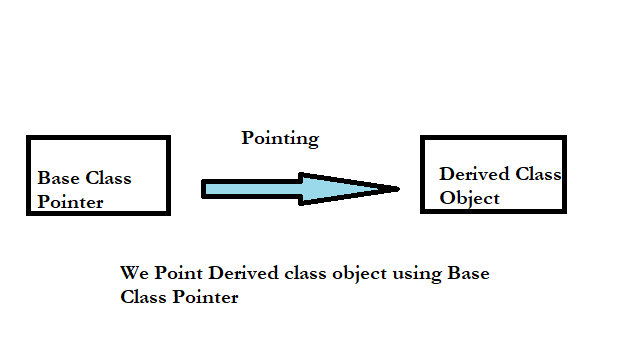
We know that pointers are used for an object of derived classes, we can also use them for the base objects. The pointer to the base class object is type-compatible (can be used in two ways) with a pointer to the object of the derived class.
To access the variable of the base class, a base class pointer will be used. So, a pointer is a type of base class, and it can access all, public function and variables of the base class since the pointer is of the base class, this is known as a binding pointer.
What is Pointer?
A pointer is a data type that stores the address of other data types in the original address of the memory location. We must declare a pointer before using it to store any variable address.
The general form of a pointer variable declaration is:-
data-type *variable name;

Example: int *emp;
The pointer of Base Class points to an unsimilar object of the derived class
Hence, To point an object to separate classes a single pointer variable is used.
What are Base Class and Derived Class?
Base Class: A base class is a class in OOP(Object Oriented Programming) from which other classes are derived. The Base class member functions and members are inherited from the Object of the derived class.
Base class member access specifiers derived in all three modes of inheritance in C++ are public, protected, and public.
The class which inherits the base class has all members of a base class as well as can also have some new additional properties. Another name for base class is parent class.
Derived Class: A class that is created from an existing class. The derived class can have more effectiveness concerning the Base class and can easily access the Base class.
The derived class inherits all members and member functions of a base class. Another name for Derived class is sub-class. It can inherit properties and methods of Base Class. All the code can be reused.
The syntax for creating Derived Class
class ExampleBaseClass{
// members....
// member function
    }
class DerivedClass : public ExampleBaseClass{
// members....
// member function
    }
Public inheritance
When a class uses public access specifier member to derive from a base, all public members of the base class are accessible as public members of the derived class and all protected members of the base class are accessible as protected members of the derived class.
What is Upcasting?
Upcasting is converting a derived-class reference or pointer to a base class. In other words, upcasting allows us to treat a derived type as though it were its base type.
It is always allowed for a public inheritance, without an explicit typecast. This is a result of the is-a relationship between the base and derived classes
Although C++ permits a base pointer to point to any object derived from that base, The pointer cannot be directly used to access all the members of the derived class we may have to use another pointer declared as a pointer to the derived type.
A derived class is a class that takes some properties from its base class. A pointer of one class can indeed point to another class, but classes must be a base and derived class, then it is possible.
Variable of the base class can be accessed through a base class pointer will be used. So, a pointer is a type of base class, and it can access all, public function and variables of the base class since the pointer is of the base class, this is known as a binding pointer.
In this pointer base class is owned by the base class but points to the derived class object. Similarly, it works with derived class pointer, values are changed.
Example #1
#include<iostream.h>
class base
{
   public:
      int n1;
      void show()
         {
             cout<<”\nn1 = “<<n1;
         }
};

class derive: public base
{

     public:
       int n2;
       void show()
          {
              cout<<”\nn1 = “<<n1;
              cout<<”\nn2 = “<<n2;

          }
};

int main()

{

   base b;
   base *bptr; //base pointer
   cout<<”Pointer of base class points to it”;
   bptr=&b; //address of base class
   bptr->n1=23; //access base class via base pointer
   bptr->show();
   derive d;
   cout<<”\n”;
   bptr=&d; //address of derive class
   bptr->n1=63; //access derive class via base pointer
   bptr->show();
   return 0;
  }
Output:
The pointer of the base class points to it
n1 = 23
The pointer of base class points to derive a class
n1=63C++ Pointers To Objects
To understand the topic of pointers to objects, we need to know what is an object , pointer and class. A class is defined in C++ using keyword class followed by the name of class.
The body of class is defined inside the curly brackets and terminated by a semicolon at the end.
What is object?
Object is an instance of a Class. When a class is defined, no memory is allocated but when it is instantiated (i.e. an object is created) memory is allocated.
As discussed above when object is created memory is allocated. So how do we declare an object.
How to declare Objects ?
When a class is defined, only the specification for the object is defined; no memory or storage is allocated. To use the data and access functions defined in the class, you need to create objects.
Syntax:
ClassName ObjectName;How to access data members and access functions ?
The data members and member functions of class can be accessed using the dot(‘.’) operator with the object.
For example if the name of object is obj and you want to access the member function with the name printName() then you will have to write obj.printName() .
Example:
//To demonstrate accessing of data members
#include <bits/stdc++.h>
using namespace std;
class Example
{
    // Access specifier
    public:
    // Data Members
    string Testname;
    // Member Functions()
    void printname()
    {
       cout << " Testname is: " << Testname;
    }
};

int main() {
    // Declare an object of class example
    Example obj1;

    // accessing data member
    obj1. testname = "Arjun";

    // accessing member function
    obj1.printname();
    return 0;
}

Output:
Testname is: Arjun
Output:
Testname is: ArjunSome C++ tasks are performed more easily with pointers, and other C++ tasks, such as dynamic memory allocation, cannot be performed without them.
As you know every variable is a memory location and every memory location has its address defined which can be accessed using ampersand (&) operator which denotes an address in memory. Consider the following which will print the address of the variables defined.
Example #2
  #include <iostream>
  using namespace std;
   int main () {
   int  var1;
   char var2[10];
   cout << "Address of var1 variable: ";
   cout << &var1 << endl;
   cout << "Address of var2 variable: ";
   cout << &var2 << endl;
   return 0;
}
Output:
When the above code is compiled and executed, it produces the following result −
Address of var1 variable: 0xbfebd5c0
Address of var2 variable: 0xbfebd5b6
What are Pointers?
A pointer is a variable whose value is the address of another variable. Like any variable or constant, you must declare a pointer before you can work with it. The general form of a pointer variable declaration is –
type *var-name;Example #3
string *student;Here, type is the pointer’s base type; it must be a valid C++ type and var-name is the name of the pointer variable. The asterisk you used to declare a pointer is the same asterisk that you use for multiplication. However, in this statement the asterisk is being used to assign a variable as a pointer. Following are the valid pointer declaration −
int    *ip;    // pointer to an integer
double *dp;    // pointer to a double
float  *fp;    // pointer to a float
char   *ch     // pointer to character
The actual data type of the value of all pointers, whether integer, float, character, or otherwise, is the same, a long hexadecimal number that represents a memory address. The only difference between pointers of different data types is the data type of the variable or constant that the pointer points to.
How do we use Pointers in C++?
There are few important operations, which we will do with the pointers very frequently.
- We define a pointer variable.
- Assign the address of a variable to a pointer.
- Finally access the value at the address available in the pointer variable. This is done by using unary operator * that returns the value of the variable located at the address specified by its operand. Following example makes use of these operations .
Example #4
#include <iostream>
using namespace std;
int main () {
   int  var = 20;   // actual variable declaration.
   int  *work;        // pointer variable
   work = &var;       // store address of var in pointer variable
   cout << "Value of var variable: ";
   cout << var << endl;
// print the address stored in ip pointer variable
   cout << "Address stored in ip variable: ";
   cout << work << endl;
   // access the value at the address available in pointer
   cout << "Value of *work variable: ";
   cout << *work << endl;
return 0;
}
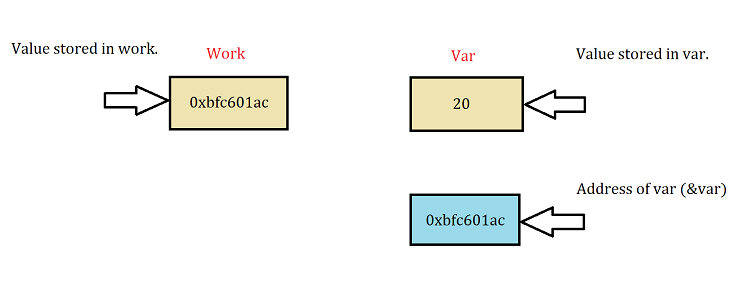
When the above code is compiled and executed, it produces result something as follows :-
Output:
Value of var variable: 20
Address stored in work variable: 0xbfc601ac
Value of *work variable: 20
As we seen above example , you can access an object either directly, or by using a pointer to the object. To access an element of an object when using the actual object itself, use the dot operator.
To access a specific element of an object when using a pointer to the object, you must use the arrow operator.
To declare an object pointer, you use the same declaration syntax that you would use for any other pointer type.
When to use ‘This’ Pointer ?
To better understand ‘this’ pointer, it is important to know how objects look at functions and data members of a class.
- Each object gets its own copy of the data member.
- All-access the same function definition as present in the code segment.
Meaning each object gets its own copy of data members and all objects share a single copy of member functions.
This is a keyword that refers to the current instance of the class. There can be 3 main usage of this keyword in C++.
- It can be used to pass current object as a parameter to another method.
- It can be used to refer current class instance variable.
- It can be used to declare indexers.
Then now question is that if only one copy of each member function exists and is used by multiple objects, how are the proper data members are accessed and updated?
The compiler supplies an any suggested pointer along with the names of the functions as ‘this’.
The ‘this’ pointer is passed as a hidden argument to all non-static member function calls and is available as a local variable within the body of all non-static functions. ‘this’ pointer is not available in static member functions as static member functions can be called without any object (with class name).
When do we use “this” keyword:
When local variable’s name is same as member’s name.
Example #5
#include<iostream>
using namespace std;
/* local variable is same as a member's name */
class Test
{
private:
   int m;
public:
   void setM (int m)
   {
       // The 'this' pointer is used to retrieve the object's m
       // hidden by the local variable 'm'
       this->m = m;
   }
   void print() { cout << "m = " << m << endl; }
};

int main()
{
   Test obj;
   int m = 20;
   obj.setM(m);
   obj.print();
   return 0;
}
Output:
m = 20Final Notes
In the above example program we can see when an ‘this’ keyword is used for local variable(m) and member name(M) is same.
We learnt how to use pointer and declare pointers and access member functions. Also now we understand when to use this keyword and advantage of it.
Preprocessor In C++
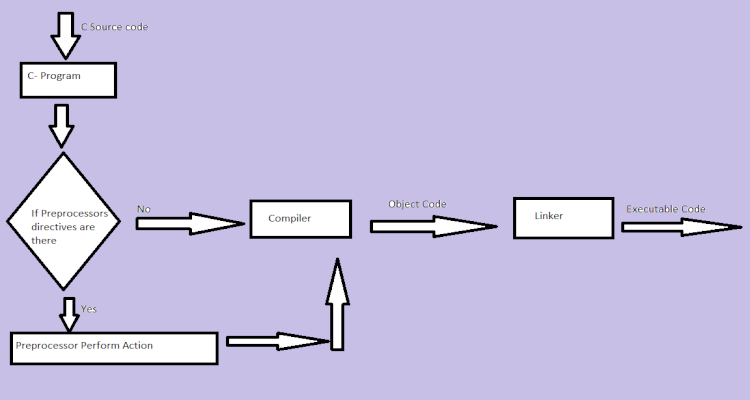
Understanding c preprocessor includes the source code which is written by programmers is stored in the file “program.c”. The file that is stored then processed by preprocessors and an expanded source code file is generated as named program.
This expanded file is compiled by the compiler and an object code file is generated as named program .obj. Finally, the linker links this object code file to the object code of the library functions to generate the executable file program.exe.
The preprocessor is best thought of as a separate program that manipulates the text in each code file. When the preprocessor runs, it scans through the code file (from top to bottom), looking for preprocessor directives.
What are C++ preprocessor directives ?
Preprocessor programs provide preprocessors directives which tell the compiler to preprocess the source code before compiling.
- All these preprocessor directives begin with a ‘#’ (hash) symbol.
- The ‘#’ symbol indicates that, whatever statement starts with #, is going to the preprocessor program,
- Preprocessor program will execute this statement.
Examples of some preprocessor directives are:
- #include,
- #define,
- #ifndef etc.
Remember that # symbol only provides a path that it will go to the preprocessor, and command such as include is processed by preprocessor program. For example, include will include extra code to your program. We can place these preprocessor directives anywhere in our program.
What are the types of preprocessor directives ?
There are 4 main types of preprocessor directives:
- Macros
- File Inclusion
- Conditional Compilation
- Other directives
What are macros ?
Macros are a piece of code in a program which is given some name. Whenever this name is encountered by the compiler the compiler replaces the name with the actual piece of code. The ‘#define’ directive is used to define a macro,
Example #1
include <iostream>
//We define LIMIT values as 5
//macro definition
#define LIMIT 5
int main()
{
    for (int i = 0; i < LIMIT; i++) {
        std::cout << i << "\n";
    }

    return 0;
}
In the above program, when the compiler executes the word LIMIT it replaces it with 5. The word ‘LIMIT’ in the macro definition is called a macro template and ‘5’ is macro expansion.
What is file inclusion directives ?
This type of preprocessor directive tells the compiler to include a file in the source code program. There are two types of files which can be included by the user in the program. Header File or Standard files: These files contains definition of pre-defined functions like printf(), scanf() etc. These files must be included for working with these functions. Different function are declared in different header files. For example standard I/O(Input/Output) functions are in ‘iostream’ file whereas functions which perform string operations are in ‘string’ file.
Syntax:
#include< file_name >The file_name is the name of file to be included. The ‘<‘ and ‘>’ brackets tells the compiler to look for the file in standard directory.
Example #2
‘Main.cpp’
#include<stdio.h>
#include <iostream.h>
//We included “Circle.h” file_name
#include "Circle.h"

int main()
{
    float r;

    cout << "Enter radius of Circle\n");
    cin >> r;

    cout << "Area of Circle is\n" << circle_area(r, PI)) endl;

    return 0;
}


‘Circle.cpp’
double circle_area(float r, float PI)
{
 return( PI * r * r );
}


‘Circle.h’
#define PI 3.14159265358979323846
double circle_area(float, float);
Output:
Enter radius of Circle
5
Area of Circle is 78.539819
‘Main.c’
This is main C program where we include Circle.h file. By including this file we also include macro definition for PI and also the function to calculate area of circle.
Preprocessor includes all the content of Circle.h into Main.cpp source code before passing the code to the compiler
We have to include Main.cpp, Circle.cpp and Circle.h are all in the same directory/folder.
user defined files:
When a program becomes very large, it is good practice to divide it into smaller files and include whenever needed. These types of files are user defined files. These files can be included as:
#include”filename”.
What is conditional compilation ?
Conditional Compilation directives are type of directives which helps to compile a specific portion of the program or to skip compilation of some specific part of the program based on some conditions. This can be done with the help of two preprocessing commands ‘ifdef‘ and ‘endif‘.
Syntax:
#ifdef macro_name
    statement1;
    statement2;
    statement3;
    .
    statementN;
#endif
If the macro with name as ‘macroname‘ is defined then the block of statements will execute normally but if it is not defined, the compiler will simply skip this block of statements while executing.
Example #3
#include <stdio.h>
#include <iostream.h>
void main ()
{
    cout << "Condition";
    #if 5<8!=1
     cout << "Works";
     cout << "needed";
    #endif
    cout << "Fine";
}
Output:
Condition FineOther Directives
Apart from the above directives there are two more directives which are not commonly used. These are:
#undef Directive:
The #undef directive is used to undefine an existing macro. This directive works as:
#undef LIMIT
#pragma startup and #pragma exit:
These directives helps us to specify the functions that are needed to run before program startup( before the control passes to main()) and just before program exit (just before the control returns from main()). #pragma startup and #pragma exit doesn’t work in GCC compiler.
Example #4
#include <bits/stdc++.h>
using namespace std;
void first1();
void second2();

#pragma startup first1
#pragma exit second2

void first1()
{
    cout << "Inside first1()\n";
}

void second2()
{
    cout << "Inside second2()\n";
}

int main()
{
    void first1();
    void second2();
    cout << "Inside main()\n";

    return 0;
}
Output:
Inside first1()
Inside main()
Inside second2()
Summary
The preprocessor directive of both C and C++ are identical and does the preliminary operations before source files are compiled. Therefore, we can say that they are much faster that the source code and are useful in most cases.
It is often in the hands of C/C++ programmer to chose the procedures to preprocess, based on their need. However, one can assume that speed and efficiency are the reason why we write programs that use C/C++ preprocessor codes.
C++ Reference Variable
C++ language allows you to create a new type of variable called reference variable.
What Is A Reference Variable ?
A variable that store values is called a value variable. The C++ reference variable is an alias for a value variable. It refers to the memory location of the value variable like pointer. Any changes in the value of reference variable can also change the value of variable that its referring to.
Syntax
<type> & <reference variable name> = <value variable name>;Example#1
int number = 7;
int & prime_num = number;
To declare a reference variable, first declare a value variable. In above example it is the number.
The <type> is the data type of the reference variable, and & is the reference operator (not address of operator) followed by the <reference variable name>.
The above is example of a non const reference variable whose original value changes in the C++ program. What if we want to protect the original variable from any changes in reference variable ?
const Reference Variable
Any changes in the reference variable also change the value of original variable. However, const keyword prevent such changes. A const reference variable is a reference-to-const.
Syntax
const <type> & <reference variable name> = <value variable name>;Example#2
// constant variable
const int digit = 15;
// reference to constant variable is valid
const int & ref_digit = digit;
Reference to const variable is valid. However, const reference to non const variable and non const reference to a constant is invalid. Consider two example given below.
Example#3
// non const reference to constant value is invalid
int & apples_stock = 34;
Similarly, const reference to non const variable will result in error. A variable which is not constant can change, therefore, reference to such variable is invalid.
Example#4
// non const variable
double average = 23.87;
// const reference to non const is invalid
const double & ref_average = average; //error
The const reference variable can be Initialized to a different type or to a rvalue. We will discuss more about it in later.
Multiple References
You can declare and Initialize multiple references at the same time.
Example#5
//multiple references
int a = 100, b = 200;
int & x = a, & y = b;
int c = 300, & z = c;
Difference Between Pointer And A Reference Variable
A pointer variable and a reference variable work are the same. Both points to memory location of a value variable with a difference that the reference is more efficient and simple than a pointer.
The differences are:
- Strict binding of reference variable to value variable and does not change, pointers are flexible.
- Unlike pointers , Null cannot be assigned to reference variable.
- Reference variables are simple, pointers need lot of dereferencing to access values.
- You must free pointer memory after use, however, reference variable does not need to free memory.
Initializing And Strict Binding
The reference variable cannot be declared first and then Initialized like pointers because the reference variable is strictly bound to the value variable that it refers to. Once Initialized a reference cannot change. Therefore, a reference must be Initialized as soon as it is declared.
Example#6
int x = 30;
//reference to integer declared
int & y;
// invalid initialization
y = x;
A pointer variable is declared first and can be Initialized later. Also, a variable is flexible, therefore, you can change the pointer to point to some other variable whenever you like.
Example#7
//declare a variable
float pi = 3.14;
// declare a pointer variable
float x;
// initialize pointer
x = π
// print current address
cout << " Address before change " << x << endl;
// new variable
float meter = 100.00;
// change pointer reference
x = &meter;
//print current address
cout << " Address after change" << x << endl;
Output#7
Address before change 0x0045d567
Address after change 0x0063a975
Is it possible to change reference variable like pointer ? The program below answers this question.
Example#8
int num1 = 40;
// Reference to num1
int & mynum1 = num1;
// New variable
int num2 = 500;
//Try change reference
mynum1 = num2;
// Output memory addresses
cout << " Address of Num2 = " << &num2 <<endl;
cout << " Address of Reference mynum1 = " << &mynum1 <<endl;
Output#8
Address of Num2 = 0x0065d675
Address of Reference mynum1 = 0x00624a765
The address are different because the reference variable mynum1 is still refering to num1. Only value of num2 is assigned to mynum1.
Null Assignment
The NULL is a macro that evaluates to 0 in C programming, but the it is a null pointer means its type casted using (void *)0.
The C and C++ NULL are not same where C++ does not allow (void*)0 definition of NULL. The C++ NULL should be integral constant expression that evaluates to 0. Therefore, a reference cannot be made to constant.
The C++-11, nullptr can be usd instead of NULL which implicitly converts to any pointer type it is assigned to.
A reference cannot be made to nullptr because it is not Initialized and does not point to any object.
Dereferencing Pointers
One of the major difference between pointer and reference variable is use of dereferencing operator. The pointers use dereferencing operator extensively to access values, whereas reference variables are simple to use.
Example#9
// swap using pointers
// function call
swap(&a, &b);
//function definition
swap(int *a, int *b)
{
  int temp;
  temp = *a; //dereference a
  *a = *b; //dereference b
  *b = temp;
}
//swap using reference variables x and y
//function call
swap(x, y);
//function definition
swap(int & x, int & y)
{
   int temp;
   temp = x; // direct assign x
   x = y ; // direct assign y
   y = temp;
}
The reference variables are better because no need to send memory address to a function call like pointers. Secondly, no need to dereference those memory address to access values. The reference variable is sending the original values in the function call .
We will discuss reference variables as function parameter in a separate article.
Free Pointer Memory
The major drawback of pointer in comparison with reference variable is that a pointer memory must be freed after use because pointers hold separate memory spaces.
This not a problem with reference variable because its is an alias for the original value variable.
Example#10
// reference to function
int & square (int a ) {
   int c = a * a;
   int & res = c;
   return res;
}
// No need to free function square
int x = square (10);
Now, consider the same function using pointers.
Example#11
//pointer to function
int square(int b){
   int *res = b * b;
   return *res;
}
// Now we must free pointer
int x = square(20);
free(res);
In the next article, we will discuss about the need for const keyword and reference variable as function parameters.