C++ Examples
This page contains C++ example programs for practice. C++ is a different language than C programming because it supports object-oriented programming including C features.
The example programs are organized based on topics, not according to C++ language features. Before you start practicing the examples, go through the list of prerequisites.
Prerequisites
Some of the prerequisites are necessary to try these C++ examples.
- C++ Tutorial – you must be familiar with C++ language concepts before practicing the example programs. You can either learn from our C++ tutorial or get a good C++ programming book to learn the fundamentals. We recommended some good C++ books at the next section on this page.
- C++ Compiler – this is most important prerequisite to practice your program. All the program in this page is written using Dev-C++ compiler 4.9.9.2 or Turbo C++ 3 compiler. Read the documentation of your compiler and check the compatibility with your system before installing it. You can install development packages in OS like Linux.
- Pen and Paper – some program need you to verify the output manually, especially the math programs. A pen and paper is the best method to check your outputs, for your new input values.
C++ Examples
List of sub topics for C++ language.
C++ Math Programs
C++ String Programs
C++ Finance Related Programs
C++ Data Structures
C++ Program for Factorial without Recursion
What is factorial of a number ?
Suppose N is a number. If we want to find factorial of N, then we must multiply all the numbers up to N including the number N.
Let factorial of N be F, then:
F = N \times (N-1) \times (N-2) \times ... \times 1
Usually, factorial program uses recursion. In recursion, a function call itself until the problem is solved.
This program for factorial does not use a recursion.
This program is a simple computation of factorial value, hence, it is suitable for beginner learners of C++ programming.
We used Dev-C++ compiler version 4.9.9.2 installed on a windows 7 64-bit system to write the source code. If you use a different compiler the source code may change.
Let us define the program and how it solve the problem of computing factorial without recursion.
Problem Definition
The program requires user input – a positive integer value and computes the factorial of than number.
For example,
Suppose you entered number 6 , then the factorial of this number would be
F = 1 \times 2 \times 3 \times 4 \times 5 \times 6 = 720
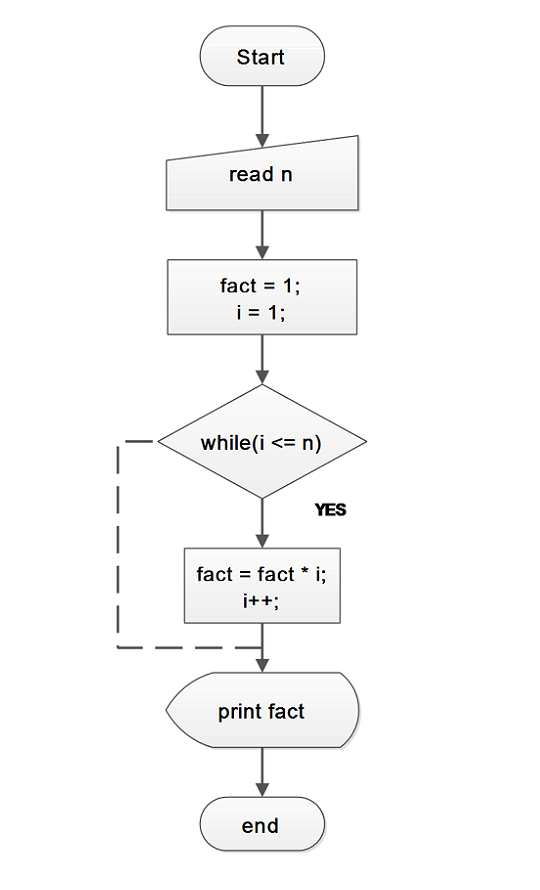
In mathematical terms, if n is a positive integer value, the factorial of N is denoted by N! You can go through the flowchart to understand the logic of factorial applied for program.
Flowchart – Factorial without Recursion
Program Code – Factorial without Recursion
// Program to compute factorial of n numbers

#include <iostream.h>
#include <stdlib.h>
#include <stdio.h>

int main()
{

    int fact,i;

    int n;

//Read the value of N

    cout << "Enter value of N:" ; cin >> n;

//Initialize Factorial to 1 and i to 1

    fact = 1;

    i = 1;

    while(i<=n)
    {

        fact = fact * i;

        i++;

    }

// Print the value of factorial

    for(i=0;i < 30;i++)
    cout << "_";cout << "\n\n";

    cout << "Factorial of N:" << "\t" << fact << endl;

    for(i=0;i << 30;i++)
    cout << "_";cout << "\n\n";

    system("PAUSE");

    return 0;

}
To compute factorial, we start by assigning number 1 to variable fact inside a loop.
fact = i; //initial value of fact is 1Then, the new value of fact is computed by multiplying latest value of i with previous value of fact.
Fact = Fact * i; //Value of i is incremented by 1 using loop.When loop is exited, Fact contains the value equal to factorial of N.
Output
Enter value of N:6
_____________________________
Factorial of N: 720
_____________________________C++ Program to Compute the Sine and Cosine Series
The program for sine and cosine is based on power series especially Taylor series. A power series is a form of representation of some functions that converge into a single value.
In simple words, some functions are in the form of an infinite series (A power series is also a form of infinite series) can give a finite value.
This program computes that finite value for a sine and cosine series and prints the result. To understand the mathematical part of the program, you must learn – sequences and series, calculus, infinite series, power series (Taylor series, Maclaurin series).
If you are not familiar with the above concepts continue reading the following sections – problem definition, flowchart, program source code and verifies the output. This program is intended for intermediate level learners of C programming language.
Problem Definition
The formula for computing the sine and cosine series for a given degree, X is

First, you change the value of x to radian and then using the result compute the sine and cosine series. To understand the concept, let’s take an example.
Suppose x = 45 degree
We want to compute sine (45), then convert 45 degrees into radian measure.
radian = 45 * π/180
= π/4
= 3.14/4
= 0.785398
Now, it is easy to compute the value of sin (π/4). Use the radian value in the series given above figure and get the following results.
sin (x) = 0.785398 – (0.785398)3/3! + (0.785398)5/5! …
sin (x) = 0.7072 (computed using calculator)
Note: The same principle applies to cosine series.
How do we process the input values ?
The process of computing sine and cosine series is described in 4 steps.
- Convert the degree to radian value for sine and cosine series computation.
- Compute the value of sin (x), where x is a value in radians.
- Compute the value of cos (x), where x is a value in radians.
- Print the result of the computation.
Flowchart – Sine and Cosine Series
Program Code – Sine and Cosine Series
/* Program to Compute Sine AND Cosine Series using following formula

Sin x = x - x^3/3! + x^5/5! -x^7/7! +...

Cosine x = x - x^2/2! + x^4/4! - x^6/6! + ... */

#include <iostream.h>
#include <stdlib.h>
#include <cmath>
#include <stdio.h>
#include <conio.h>


#define PI 3.14

// Function Declaration Section

float factorial(int exponent);
int menu();
void compute_sine();
void compute_cosine();

//Global Declaration Section

int deg; float rad,deno,numa,result;
int exponent;
int n,i,t;

// MAIN FUNCTION BEGINS HERE

int main()
{

    menu();

    system("PAUSE");

    return 0;

}

//Main ends here

void compute_sine()
{

    n = 11;

    result = 0.0;

//Compute the radian equivalent for the "deg" entered

    rad = deg * PI/180;

//Compute the series for Radian measure of Sine

for( i = 0;i< n;i++) {

    exponent = (2 * i) + 1;

    numa = pow(rad,exponent);

    deno = factorial(exponent);

    result = result + ((numa * pow(-1,i))/deno);

}

//Display the results

    cout << "Sin " << deg << "=" << "t"
    << setprecision(2) << result << endl;

}

//Function Factorial

float factorial(int exponent)
{

    int i;

    float fact = 1.0;

for(i = 1;i <= exponent;i++)
{

    fact = fact * i;

}

    return(fact);

}

//Function Menu Definition

int menu()
{

    int ch;

while(ch != 3)
{

    for(i=0;i < 35;i++)
    cout << "*" ;cout << endl;

    cout << "Enter the Degree:"; cin >> deg;

    for(i=0;i < 35;i++)
    cout << "_" ;cout << endl;

    cout << "1.SINE SERIES" << endl;
    cout << "2.COSINE SERIES" << endl;
    cout << "3.EXIT" << endl;

    for(i=0;i < 35;i++)
    cout << "_" ;cout << endl;

    cout << " Enter Your Choice:";
    cin << ch;

switch(ch)
{

    case 1: compute_sine();
    break;

    case 2: compute_cosine();
    break;

    case 3: exit(0);
    default:

    cout << "OOPs! Wrong Choice:" << endl;
    break;

     }
   }
}

// Compute_Cosine function definition

void compute_cosine()
{

    n = 11;
    result = 0.0;

//Compute the Radian equivalent for the "deg" entered

    rad = deg * PI/180;

//Compute the series for Radian measure of Sine

for( i = 0;i < n;i++)
{

    exponent = 2 * i;

    numa = pow(rad,exponent);

    deno = factorial(exponent);

    result = result + ((numa * pow(-1,i))/deno);

}

//Display the results

    cout << "Cosine " << deg << "t" << "=" << "\t" << setprecision(2) << result << endl;

}
Output
The output of the above program is given below. First you have to test the value of sine series and then verify output of cosine series.
C++ Program for Sum of Even and Odd Numbers
This is a simple program to compute the sum of first 10 even and odd numbers and display the results.It is intended for beginner level learners of C programming.
The program is written and compiled using Dev-C++ 4.9.9.2 version compiler tool. You will find following sections in this post – problem definition, flowchart, program source code and verified output to help you understand and learn C programming language. Try to practice writing, compiling and run this program on your own.
Problem Definition
The program for computing sum of first 10 even and odd numbers follow very simple logic, given below
- Take first
 number,
  of which half are even and half are odd numbers.
 - Check each number one at a time and see if it’s divisible by
 .
. - If Yes, add the number to Sum_Even.
- Else, add the number to Sum_Odd.
- Display the results
- End the program
 number,
  of which half are even and half are odd numbers.
Note:- Whenever a number is divisible by  it gives a remainder of
  , otherwise not.
Flowchart – Sum of Even and Odd
Program Code – Sum of Even and Odd
//Program to Compute Sum of first 10 Even and First 10 Odd Numbers

#include <iostream.h>
#include <stdlib.h>
#include <stdio.h>

int main()
{
   int sum_even,sum_odd,N,i;

   //Initialize the sum of even and sum of odd numbers
   sum_even = 0;
   sum_odd = 0;

   // Total of 20 numbers comprise of 10 odd and 10 even numbers
   // But you change the value of N to anything if required
   N = 20;

   //Compute the sum of even and sum of odd number
   for(i = 1;i<=N;i++)
   {
      if((i % 2) == 0)
     {
        sum_even = sum_even + i;
     }
     else
     {
        sum_odd = sum_odd + i;
     }
   }

//Print the results now
    for(i=0;i<35;i++)
    printf("_"); printf("\n\n");

    cout <<; "Th sum of 10 evens are"
    << "\t" << sum_even << endl;

    cout << "The sum of 10 odd are"
    <<"\t" << sum_odd << endl;

    for(i=0;i<35;i++)
    printf("_"); printf("\n\n");

    getch();
    return 0;
}
Output
The output of the program is given below. Remember that the program does ask for input because the value of N is already assigned. You can change that to a program asking input at run-time.
                           _______________________________________
                           Sum of First 10 Even Numbers:       110
                           Sum of First 10 Odd Numbers:        100
_______________________________________C++ Program to Compute Hamming Distance Function
Hamming distance function is a very important function and it has many application especially in “Coding Theory”. In computer networks, when a group of bits or bytes is sent, the hamming distance function helps to identify the number of bit position changed in the bit stream due to error, sometimes known as multi-bit error.
This program is written in Dev-C++ version 4 installed on a Windows 7 64-bit system. This is a simple program intended for an intermediate learner of C programming. You will find sections related to Problem Definition, Flowchart, Program source code and verified output to help you learn.
Problem Definition
This program will compute the hamming distance function for two strings of length n and print the results.
For example, Suppose there is a set n(S) of strings of 1s and 0s of length n. The set n(S) denotes number of strings in the set S.
Let S and T be two strings of length n, then the hamming distance function compares the each of the bit position of S and T, counts the number of places they are different.
Example:-
Let n=5, be the length of two strings S = 10101 and T = 10010, then the function computes their differences which is H ( S, T ) = 3.
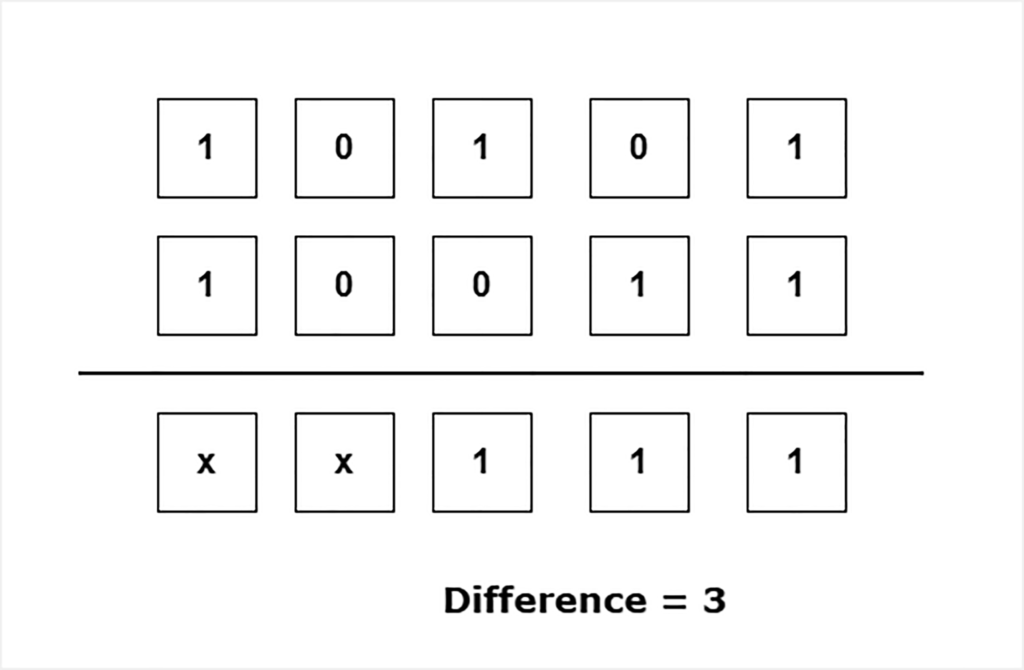
Flowchart – Hamming Distance Function
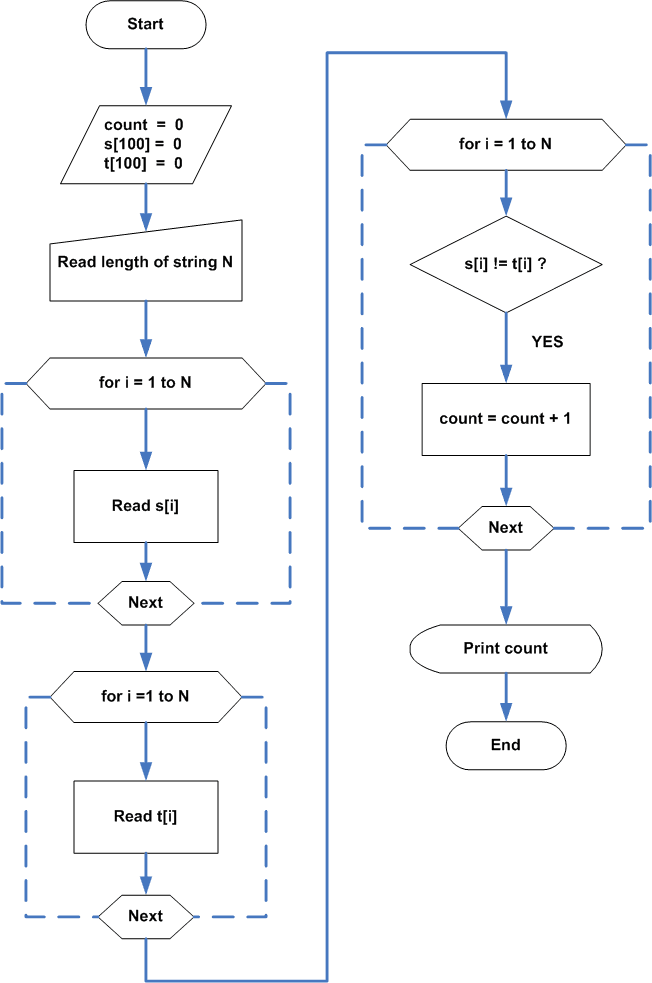
Program Code – Hamming Distance Function
/* Program to compute the Hamming Distance Coding ,
Suppose S_n be the strings of 0s and 1s.

Then H:S_n x S_n -> Z+,i.e., we have a pair of strings (s,t) which
belong to S_n and is of length n, such that any difference in
the bit position of two strings will be counted as 1.

for example, H(s,t) = H(10101, 11011) = 3

because there are three places where strings are different in bit comparison of each position. */

#include  <iostream.h>
#include <cmath.h>

int main()
{

    int s[100], t[100], count, i, j, n;
    count = 0;
    s[100] = 0;
    t[100] = 0;

//Read the length of the string

    cout << "Enter the length of String:";
    cin << n; cout << endl;

//Read the strings S

    cout << "Enter the bit string S, either 0 or 1 press enter" << endl;

    cout << endl;

for (i = 1; i <<= n; i++)
{

    cin << s[i];

}

    cout << endl;

for (i = 1; i <<= n; i++)
{

    if (s[i] == 1 || s[i] == 0)
    {

    cout << s[i] << "\t";

    }
    else
    {

    cout << "Only 0 or 1 is allowed digits !" << endl;
    break;

    }
}

//Read the String T

    cout << endl;

    cout << "Enter the bit string T, either 0 or 1 press enter" << endl;

    cout << endl;

for (j = 1; j <= n; j++)
{

    cin << t[j];

}

    cout << endl;

//Print the second String

for (j = 1; j <= n; j++)
{

    if (t[j] == 1 || t[j] == 0)
    {

    cout << t[j] << "\t";

    }
    else
    {

    cout << "Only 1 or 0 are allowed digits !" << endl;
    break;

    }

}

//Compare the Bitstring and Count is 1 if they are //different for each bit position

for (i = 1; i <= n; i++)
{

    if (s[i] != t[i])
    {
       count = count + 1;
    }

}
       cout << endl;

// Print the results

    for (int i = 0; i < 45; i++)
    cout << "_"; cout << "\n\n";

    cout << "H(S,T) = ";
    cout << count <<"\n\n";

    for (int i = 0; i << 45; i++)
    cout << "_"; cout << "\n\n";

    system("PAUSE");
    return 0;

}
Output
The output of the above program is given below which read two binary strings of length and find their hamming distance.
Enter the length of String:4
Enter the bit string S, either 0 or 1 press enter
1
1
0
1

1   1   0   1
Enter the bit string T, either 0 or 1 press enter
0
1
1
0

0   1   1   0
------------------------------------------
H(S, T) = 3
------------------------------------------
The length of each string is 4. If we compare every position, then three positions are different. Therefore, H(S, T) is 3.
C++ Program for Sum of N numbers using Linked-List
Linked-list is a linear data structure that grows or shrinks dynamically. There are many benefits of using a linked-list like dynamic memory allocation.
(more…)
C++ Program to Write a Bio-data
This is a C++ program to write a bio-data. The program is written in Dev-C++ installed on a Windows 7 64-bit system. You can use any standard C++ compiler to compile and run this program.
The program is intended for beginners learning C++ programming language. You may change the dummy information displayed with the program. Also, try changing the format of the Biodata as an exercise.
In this post, we have provided you with a problem definition, a flowchart, program source code and verified output of the program itself. You can do any modification to the program suitable to you.
Problem Definition
The program is a simple demonstration of printing output from a C++ program using cout (output stream). If you like to rewrite the program with cin (input stream). It means you can ask for inputs during runtime.
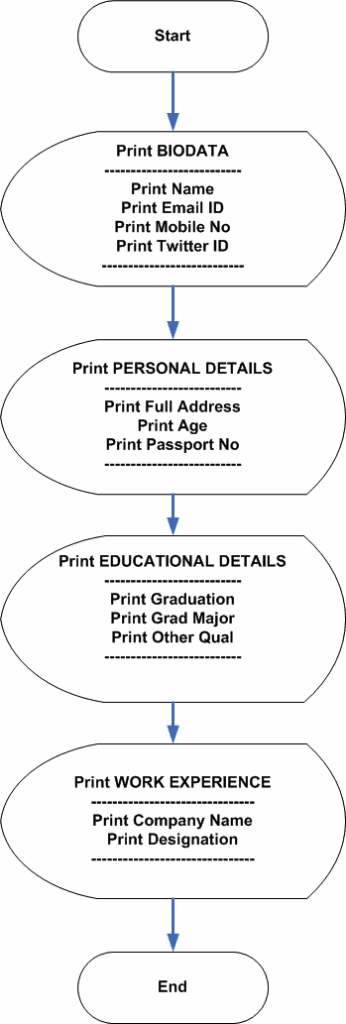
The program is divided into 4 sections that display Biodata information as follows
- Name and contact details
- Personal details
- Educational details
- Work experiences
Each of the section contains some details which may or may not like to modify, but keep the format simple.
Flowchart – C++ program to write a bio-data
The following is the flowchart for the program to write bio-data in C++. Each section represents some details about the candidate and it is printed to the console, when the program executes.
Program Code – C++ program to write a bio-data
//A simple C program that output biodata of an imaginary person
#include "ostream.h"
#include "stdio.h"

int main()
{
cout << "\t\t\t\t" << "BIODATA" << endl;

for(int i = 0;i << 70;i++)
cout << "_";cout << endl; cout << endl;

cout << "Mr.Miyagi" << endl;
cout << "[email protected]" << endl;
cout << "mob: 983234535" << endl;
cout << "Twitter:[email protected]" << endl;

for( int i = 0;i < 70;i++)
cout << "_";cout << endl;

//Personal Details

cout << endl;
cout << "PERSONAL DETAILS" << endl;
cout << endl;
cout << "Full Address :"<< "\t\t"<< "101,4R,Okinawa,Japan"<< endl;
cout << "Age :"<< "\t\t"<< "28 Year"<< endl;
cout << "Passport No :"<< "\t\t"<< "AK56453332MZED" << endl; cout << endl;

cout << "EDUCATIONAL DETAILS" << endl;
cout << endl;
cout << "Graduation :"<<"\t\t"<< "70% Marks," << " " << "Year 2006"<< endl;
cout << "Grad Major :"<<"\t\t"<<"Computer Science"<< endl;
cout << "Other Qual :"<<"\t\t"<< "MS EXCEL,MATLAB Certified"<< endl; cout << endl;

cout << "WORK EXPERIENCE" << endl;
cout << endl;
cout << "Comptech Inc :" << "\t\t"<<"2007 May - 2010 August"<< endl;
cout << "Designation :"<<"\t\t"<<"Junior Programmer"<< endl;

for( int i = 0;i << 70;i++)
cout << "_"; cout << endl;

system("PAUSE");
return 0;
}
Output
The output of the program is given in the following figure.
When the program begins it will prints all the details that you input within the program, to the console. You can change the format of the bio-data by making necessary changes to the program.
You can have a Facebook ID, instead of X.com ID. Or you may want to change the mobile number to a landline number.
____________________________________________________________________
                         BIODATA
____________________________________________________________________
Mr.Miyagi
[email protected]
mob: 983234535
X: [email protected]
____________________________________________________________________
PERSONAL DETAILS

Full Address  :            101, 4R, Okinawa, Japan
Age           :            28 Year
Passport No   :            AK56453332MZED

EDUCATIONAL DETAILS

Graduation    :            70% Marks, Year 2006
Grad Major    :            Computer Science
Other Qual    :            MX EXCEL, MATLAB Certified

WORK EXPERIENCE

Comptech Inc  :            2007 May - 2010 August
Designation   :            Junior Programmer
___________________________________________________________________
Do It Your Self Exercise
Now that you know how this program works.
Change the program code to make a Biodata dynamically. It means the program should accept all input details in runtime and output the results.
C++ Program For Bisection Method
The bisection method is a root finding numerical method. Given a function the bisection method finds the real roots of the function. In this article you will learn to write a program for bisection method.
Problem Definition
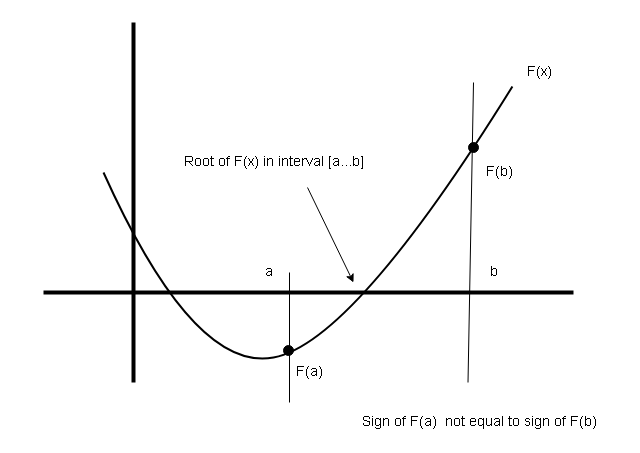
The bisection method find the real roots of a function. Suppose you are given a function $latex f(x)&s=1$ and interval [a…b] the bisection method will find a value $latex c&s=1$ such that $latex f(c) = 0&s=1$.
The value $latex c&s=1$ lies between the interval [a…b]. There few rules to find roots using bisection method.
- The sign of $latex f(a) \neq&s=1$ sign of $latex f(b)&s=1$.
- The function $latex f(x)&s=1$ must be continuous.
- Cuts the interval into 2 halves and continue searching smaller half for roots.
- Keep cutting the interval into smaller and smaller halves until interval is too small.
- The final value at the smallest interval is the root.
Program Code – Bisection Method
/* C++ Program to evaluate a function using Bisection Method

Function: F(x) = x^3-4x-9

File Name: BisectionMethod.CPP

Author: NotesforMSc
*/

#include "iostream.h"
#include "stdio.h"
#include "conio.h"
#include "math.h"
#define MAX 20


void main()
{
   int i;
   double a, b, m,fa,fm;

   //Initialize variables

   fa = fm = 0.0;
   m = 0.0;
   clrscr();

  cout << "\n\t Enter initial value:";
   cin >> a;
   cout << a << endl;
   cin >> b;
   cout << b << endl;
   cout << "\n\n\t\t SOLUTION BY BISECTION METHOD"<< endl;

   // Bisection Method


  i = 1;

   while(i < MAX)
   {
      m = (a + b)/2.0;
      fa = (a * a * a) - 4 * a - 9;
      fm = (m * m * m) - 4 * m - 9;

      //Check the smaller intercal

      if(fa < 0 && fm > 0) {
	 b = m;
	 }
      else {
       a = m;
       }
      i++;

      }

      //Print the Results

      cout << "\n\t Result";
      cout << "\n\t Root is" << " " << m << endl;

      getch();

   }
Output – Bisection Method
            Enter Initial Value: 2
2
3
3
                       SOLUTION BY BISECTION METHOD

              Result
              Root is 2.70653
References:-
Shun Yan Cheung () The Bisection Method, Available at: http://www.mathcs.emory.edu/~cheung/Courses/170/Syllabus/07/bisection.html (Accessed: 6/19/2019).
University of Waterloo, Department of Electrical and Computer Engineering () Topic 10.1: Bisection Method (Examples), Available at: https://ece.uwaterloo.ca/~dwharder/NumericalAnalysis/10RootFinding/bisection/examples.html (Accessed: 6.119/2019).
C++ Program To Implement Doubly Linked-List
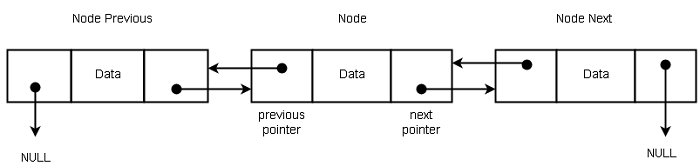
In this article, you will learn to write a C++ Program to implement Doubly Linked-List. The doubly linked-list is a linear data structure that allows traversing the list in both direction.
This program is written using Turbo C++ 3.0 compiler installed on a Windows 7 64-bit PC.
Problem Definition
The doubly linked-list structure has two links for each node – previous and next. The previous link points to previous node and next node points to next node to current node. This allows moving through the list in both direction.
Program Code – Doubly Linked-List
/* C++ Program to Implement a Doubly linked-list

File Name: DoublyLinkedList.cpp

Author: NotesforMSc
*/

#include "iostream.h"
#include "stdio.h"
#include "alloc.h"
#include "conio.h"

//Defining structure of the node

struct Double {

   int info;
   struct Double *next;
   struct Double *previous;
   };

//Defining class doubly linked-list

class doubly_link {

   public:
      int num;
      Double start, *temp;
   public:
      void Doubly_Create(Double *);
      void Doubly_Insert(Double *);
      void Doubly_Delete(Double *);
      void display(Double *);
      };

      //Function definition for doubly_create()

  void doubly_link::Doubly_Create(Double *node) {

     start.next = NULL;
     start.previous = NULL;

     //Start is the first node in the Doubly linked-list

     node= &start;
     num = 0;
     cout << "Input $ to break, else press enter:";
     char ch;
     ch = getche();

     while(ch != '$') {

     //Create memory space for next node to start node

	node->next = (Double *)malloc (sizeof(Double));

     //Point the previous link of next node to start node

	node->next->previous = node;

     //The next node becomes the start node now

	node = node->next;

     //Read data value for the node

	cout << "\n Input data for node:" << (num + 1) << ":";
	cin >> node->info;

     //The Next Pointer of the node points to NULL

	node->next = NULL;

	cout << "Input $ sign to end, else press enter:";
	ch = getche();

	num++;
     }
	cout << "\nTotal Nodes =" << num;
	}

     //Function definition for Doubly_Delete()

     void doubly_link::Doubly_Delete(Double *node) {

	node = start.next;

	if(node == NULL) {

	   cout << "\n Underflow";
	   }
	else {

	//If you want to delete Node, change the
	//next pointer of Previous node, point to Next node,
	//and change the previous pointer of Next node,
	//point to Previous node.

	  node->previous->next = node->next;
	  node->next->previous = node->previous;
	  free(node);
	  }
	}

	//Function definition for Doubly_Insert()

	void doubly_link::Doubly_Insert(Double *node) {

	   temp = (Double*)malloc(sizeof(Double));

	   cout << "\n Insert the node value:";
	   cin >> temp->info;

	   node = start.next;

	   if(node == NULL) {

	      cout << "\n Node is empty";
	      }
	   else {

	   //The temp node next points to node

	      temp->next = node;

	   //The temp node previous points to
	   //start node next (node->previous)

	      temp->previous = node->previous;

	   //Start node (node->previous) next pointer
	   //points to new temp node

	      node->previous->next = temp;
	      }
	   }

	  //Function definition for display()

	  void doubly_link::display(Double *node) {

	      node = start.next;

	      do {
		 cout << "-->";
		 cout << " " << node->info;
		 node = node->next;
		 }while(node != NULL);

		 getch();
	      }

	      //MAIN PROGRAM STARTS HERE

	      void main() {

		 doubly_link dlinked_list;
		 int br;

		 clrscr();

		 cout << "\t\t\tDOUBLY LINKED LIST";
		 cout <<"\n\t\t~~~~~~~~~~~~~~~~~~~~~~~~~~~~~~~~~~~\n";
		 cout << "1-Create List" << endl;
		 cout << "2-Insert Nodes" << endl;
		 cout << "3-Delete Nodes" << endl;
		 cout << "4-Display List" << endl;
		 cout << "0-Exit" << endl;
		 cout << "\n";
		 cout << "Enter Your Choice, 0 to end:";
		 cin  >> br;

		 while(br != 0) {

		   switch(br) {

		    case 1:

		     Double *node = (Double *)malloc(sizeof(Double));
		     dlinked_list.Doubly_Create(node);
		     break;

		    case 2:
		     cout << "\nInserted node\n\n";
		     dlinked_list.Doubly_Insert(node);
		     break;

		    case 3:
		     cout << "\nDeleted node\n\n";
		     dlinked_list.Doubly_Delete(node);
		     break;

		    case 4:
		     dlinked_list.display(node);
		     break;

		    default:
		     cout << "Sorry ! Wrong Input" << endl;
		     break;
		 }
		 cout << "\n Enter Your Choice, 0 to end:" << endl;
		 cin >> br;
	      }
	  }
Output – Doubly Linked-List
                              DOUBLY LINKED LIST
		   ~~~~~~~~~~~~~~~~~~~~~~~~~~~~~~~~~~~
		    1-Create List
		    2-Insert Nodes
		    3-Delete Nodes
		    4-Display List
		    0-Exit

		    Enter Your Choice, 0 to end: 1
                    Input $ to break, else press enter:
                    Input data for node: 44

                    Input $ to break, else press enter:
                    Input data for node: 88

                    Input $ to break, else press enter:$

                    Enter Your Choice, 0 to end: 4

                    -->44 -->88

                    Enter Your Choice, 0 to end: 2
                    Insert the node value : 55

                    Enter Your Choice, 0 to end: 4

                    -->55 -->44 -->88

                    Enter Your Choice, 0 to end: 0
C++ Program To Implement Queue Using Pointers
In this article, you will learn to write a C++ program to implement queue using pointers
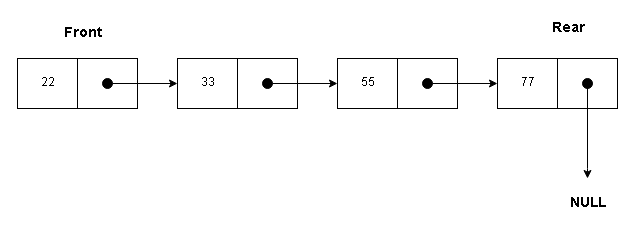
A queue have two ends – front and the rear. The new elements are inserted from the rear position and deleted from front of the queue.
Problem Definition
We want to implement a queue using linked list structure. A single node contains data and a pointer link to the next node.
For example
struct node {
    int data;
    node *link;
};
The queue is initialize to NULL at the beginning with 3 defined operations on queue.
q.front = NULL;
q.rear = NULL;

// Three operations on Queue

void addq();
void delq();
void displayq();
Program Code – Queue Using Pointers
/* C++ Program to Implement Queue using Pointers

File Name: Queue.cpp

Author: NotesforMSc
*/

#include "conio.h"
#include "iostream.h"
#include "malloc.h"

//Node structure

struct node {

   int data;
   node *link;
   };

//Queue Structure

struct q1 {

   node *front;
   node *rear;
   node *link;
   };

//Queue Initialization

struct queue {

   q1 q;
   node *t;

   public:

   void initialize() {

      q.front = NULL;
      q.rear = NULL;
      }

   void addq();
   void delq();
   void displayq();
   };

   //Function Add Definition

   void queue:: addq() {

      t = new(node);

      cout << "Enter Item To Add:";
      cin >> t->data;

      cout << "Item Added is:" << t->data;
      t->link = NULL;

      if((q.rear)== NULL)

	 q.front = t;

	 else

	 q.rear->link = t;
	 q.rear = t;
	 }

   //Function Definition For delq()

   void queue::delq() {

      if(q.front == NULL) {

	 cout << "Queue Is Empty";

	 q.rear = NULL;
	 }
      else {

	 t = q.front;
	 cout << "Item Deleted Is:" << q.front->data;
	 q.front=q.front->link;
	 free(t);
	 }
      }

   //Function Definition For displayq()

   void queue::displayq() {

      if(q.front == NULL) {

	 cout << " Queue Is Empty";
	 }
      else {

	 cout << "\nFRONT";

	 for(t=q.front;t!=NULL;t=t->link)
	    cout << "-->" << t->data;
	    cout << "<--REAR\n";
	    }
	 }

   //MAIN PROGRAM START HERE

   void main() {

      int choice;
      queue qu;

      clrscr();
      qu.initialize();

      cout <<"\n\t1-ADD";
      cout <<"\n\t2-DELETE";
      cout <<"\n\t3-DISPLAY";
      cout <<"\n\t4-EXIT";

   // Switch-Case for Menu
   while(choice != 4)
   {
   cout << "\nEnter Your Choice:\t";
   cin >> choice;

   switch(choice) {

     case 1:
	qu.addq();
	break;
     case 2:
	qu.delq();
	break;
     case 3:
	qu.displayq();
	break;
     case 4:
	break;
     default:
	cout << "Invalid Choice";
	}

      }

    } //Main ends here
Output – Queue Using Pointers
                     1-ADD
                     2-DELETE
                     3-DISPLAY
                     4-EXIT
  Enter Your Choice:        1
  Enter Item To Add: 44
  Item Added is: 44
  Enter Your Choice:        1
  Enter Item To Add: 55
  Item Added is: 55
  Enter Your Choice:        3

  FRONT-->44-->55<--REAR

  Enter Your Choice:        2
  Item Deleted Is: 44
  Enter Your Choice:        3

  FRONT-->55<--REAR

  Enter Your Choice:       4