JavaScript Indexed Collections
The first of data structures are collections that has index and items in the collection can be accessed through indexes.
What do we understand Collections?
Groups of data in different forms are one of the fundamental data structures in most programming languages. In many cases, groups of data expressed through different data types are referred to as Collections.
Includes collections of data that are ordered by an index value. This includes arrays and array-like constructs such as Array objects and Typed Array objects
What is an Array object?
An array is a required list of values that you associate to with a name and an index.
For example:
Consider an array called emp, which contains employees’ names indexed by their order-based employee number. So emp[0] would be employee number zero, emp[1] employee number one, and so on.
JavaScript does not have an explicit array data type. However, you can use the default Array object and its methods to work with arrays in your applications. The Array object has methods for manipulating arrays in various ways, such as joining, reversing, and searching for values. It has a property for determining the array length and other properties for use with regular expressions.
Creating an Array: There are many ways to create and initialize an array that is listed below:
1)Creating arrays without defining the array length. In this case, the length is equal to the number of arguments.
var arr = new Array( element0, element1, ... );
var arr = Array( element0, element1, ... );
var arr = [ element0, element1, ... ];
2)Creating an array with the given size
var arr = new Array(5);
var arr = Array(5);
var arr = [];
arr.length = 5;
3) Creating a variable-length array and add many elements as you need.
// First method: Initialize an empty
// array then add elements
var students = [];
students [0] = 'Manoj kush';
students [1] = 'Mallesh Kumar';
students [2] = 'Hruthika Khilb';

// Second method: Add elements to
// an array when you create it
var fruits = ['apple', 'melon', 'Banana'];
Accessing the Array Elements: Use indices to access array elements. Indices of Arrays are zero-based which means the index of the elements begins with zero.
var fruits = ['Apple', 'Melon', 'Banana'];
console.log(fruits [0]);
console.log(fruits[1]);
Output:
Apple
Melon
How to Add Elements to an Array?
We’ve seen how to create an Array, be it empty or non-empty. Now let’s see how to add new elements to it. Since we are working with indexed collections we will be operating with indexes.
As we already had created an Array of 4 empty elements, let’s work with that. To add an element, all we have to do is access the element through its index and assign a value to it:
How to Add Elements to an Array?
We’ve seen how to create an Array, be it empty or non-empty. Now let’s see how to add new elements to it. Since we are working with indexed collections we will be operating with indexes.
As we already had created an Array of 4 empty elements, let’s work with that. To add an element, all we have to do is access the element through its index and assign a value to it:
let myArray1 = new Array(4)
myArray1[0] = "First"
myArray1[1] = "Second"
myArray1[2] = "third"
myArray1[3] = "fourth"
console.log(myArray)
Output:
['First', 'Second', 'third', 'fourth']
Even though we allocated 4 spaces for elements when creating an array, in JavaScript, arrays are made dynamically, which means you can shrink or expand them at any time.
This means that we can add more elements to our Array, even though we “bordered” it with 4 spaces:
myArray1[4] = "fifth"
myArray1[5] = "sixth"
console.log(myArray)
Output:
['First', 'Second', 'third', 'fourth', 'fivth', 'sixth']
We can easily iterate through an array using a forloop or a forEach loop:console.log(‘Traditional for loop:’)
for (let i = 0; i < myArray1.length ; i++) {
	console.log(myArray1[i]);
}
console.log('Functional forEach loop:')
myArray1.forEach( function (element){ console.log(element);});
Output
Traditional for loop:
First
Second
third
fourth
fifth
sixth
Functional forEach loop:
First
Second
third
fourth
fifth
sixth
TypedArray Object
Array objects are perfect for working with any data type in JavaScript since they can store different types of elements in one array and has powerful methods to manipulate those elements.
However, when there is a need to work with raw binary data – that’s when TypedArray objects come into play. Raw data is processed when manipulating audio and video.
The architecture of a TypedArray Object
JavaScript typed arrays are divided into buffers and views. A buffer is an object only storing a chunk of data, with no methods to access or manipulate that data.
To achieve that, you must use a view – which provides a context, a data type that turns data into a TypedArray.
A buffer is implemented through an ArrayBuffer object. It is used to represent a fixed-length binary data buffer. To represent this buffer, we have to create a view – DataView – which represents that buffer in a chosen format. There are various types of views, representing the most common numeric types:
Int8Array - value range [-128, 127]
How to Create a Typed Array?
When creating a TypedArray object of a certain type, we achieve what we previously talked about – creating a buffer and a view. There is no explicit constructor for the TypedArray object – there is no new TypedArray()
syntax – we directly instantiate the type of array we need:
let tArray = new Int8Array(8);
Array methods
- concat(): joins two arrays and returns a new array.
var myArray = new Array('1', '2', '3');
myArray = myArray.concat('a', 'b', 'c');
// myArray is now ["1", "2", "3", "a", "b", "c"]- join(delimiter = ‘,’): joins all elements of an array into a string.
var employees = new Array('king', 'Adham', 'Ali');
var list = employees.join(' - ');      // list is "king - Adham - Ali"
- push(): adds one or more elements to the end of an array and returns the resulting length of the array.
var numbers = new Array('1', '2');
numbers.push('3'); // numbers is now ["1", "2", "3"]- pop(): removes the last element from an array and returns that element.
var numbers = new Array('1', '2', '3');
var last = numbers.pop();
// numbers is now ["1", "2"], last = "3"- shift(): removes the first element from an array and returns that element.
var numbers = new Array('1', '2', '3');
var first = numbers.shift();
// numbers is now ["2", "3"], first is "1"JavaScript Function Without Parameter and Without Return
In the previous post, we discussed about the JavaScript function and its components. The functions have different structures such as parameters or no parameters and some function return values and some do not in JavaScript.
The simplest of function is the one without an parameters and without return. The function compute its statements and then directly output the results.
Syntax
Here is the syntax for a function which does not have parameters and also does not return any value.
function <name>()
{
   statements;
   output statement;
}
function – The keyword function identify the block as a function object.
<name> – is the name of the function given by a user.
() – parenthesis does not contain any argument.
statements; – all JavaScript statements that gets executed by the function.
output statement – it is not necessary that a function that does not return anything must give output, but most of the time you will find a statement that prints the output in these type of functions.
Consider the following example program.
Example #1
//variable declarations
var side = 34;
//function declaration
function area_of_square()
{
 var area = side * side;
 console.log("Area of the Square =" + " " + area);
}
//function call
area_of_square();
Output #1
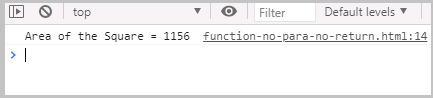
The above example illustrates two things given below.
(1) The variable side is not given to the parameter, but directly accessed by the function which is possible in JavaScript.
(2) The function does not return any value but prints the output to the browser console.
In the next lesson, we will discuss more about other types of function such as function that return some value and its advantages.
JavaScript Functions Overview
The functions are building blocks of the JavaScript programming. A function in JavaScript is a block of statements that may or may not take inputs and return a value. Therefore, it appears that JavaScript functions are no different from functions in other programming languages.
There are many difference between functions in other languages and JavaScript functions. The function are object in JavaScript that are created from the constructor Function(). JavaScript supports anonymous functions which are available many other languages.
Function Components
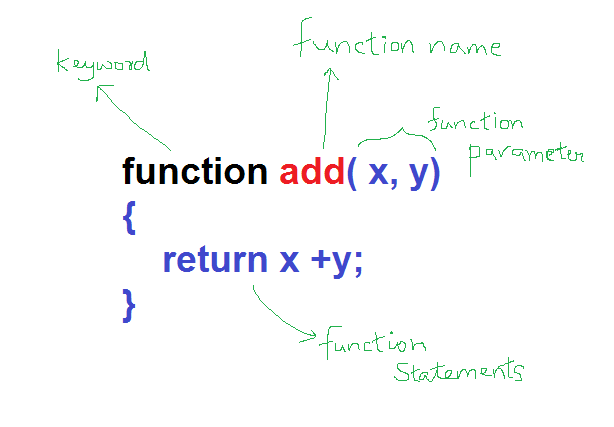
Any JavaScript function has few key components in syntax. Here is the list.
- The keyword function
- A function name
- A list of parameters.
- A block of statements to execute.
The following figure shows how these components are organized to write a function in JavaScript.
JavaScript Function Declaration
In other programming languages such as C/C++, you must explicitly declare you function type, its actual and formal parameters, and then write a separate definition for the function.
In JavaScript, function definition is also the function declaration. The structure of function also depends on what type of function it is.
Types of Functions in JavaScript
The JavaScript programming allows following type of functions.
- function with parameters, but no return value
- function with parameter and a return value
- function without parameter and no return
- function without parameter and a return value
- built-in JavaScript methods
- class methods
- anonymous functions
- constructors
We will discuss about each one of them in great detail in future lesssons.
Function Calls
The function calls in JavaScript is easiest in programming. You simply write the function name and supply the arguments. Either the function will return some value, or directly output a value to the browser.
There are three ways to call a JavaScript function.
- call function in the main program
- call function within another function
- call function from an HTML element such button, etc.
Whichever way you choose, once the function is called it will execute the statements within it.
Function Scope
There are three scope for the JavaScript functions.
Local Scope
It means that the variables that are defined inside the function can only be accessed by the function, not outside of it.
Parent Scope or Nested Scope
If a function is defined inside of another function, the parent function cannot access the variables of the child function. However, the child function can access variables within its own body and from the parent function.
Global Scope
A function defined within the JavaScript main program can access its own local variables and all the other global variables. However, the other global functions cannot access the local variables.
JavaScript Bitwise Operator
Bitwise operators are found in many programming languages like Java, C, C++ and so on. A bitwise operation is very similar to logical operators except that the operation take place at bit level at the computer. Also these type of programming scripts are very rare in JavaScript.
But, for the sake of learning we shall understand what and how bit level operators work.
Types of Bitwise Operators
There are many types of bitwise operators that manipulate operands at bit level. Here is a list of bitwise operators which we will discuss with examples later in this post.
| Operator | Name | Description |
| & | Bitwise AND | 1 & 1 gives 1 and 1 & 0 gives 0 or vice-versa. |
| | | Bitwise OR | 1 | 1 gives 1 and 1 & 0 gives 1 also, and vice-versa. |
| ^ | Bitwise XOR | If any bitwise is 1 then result is 1, else it is 0 for all other situations. |
| << | Bitwise Left shift | Shift a specified number of bits to the left. |
| >> | Bitwise Right shift | Shift a specified number of bits to the right. It is sign preserving shift. |
| ~ | Bitwise NOT | This is a unary operator that inverts all the bits of the operand. |
| >>> | Bitwise Zero-filled Right shift | This is the right shift that shift number bits to the right, but fill zero to the left. The result is always non-negative number. (unsigned binary number) |
Now we shall discuss each one of these operators in detail. But, first you must understand how JavaScript performs the bitwise operations.
Bitwise Operations in JavaScript
Remember that JavaScript store all numbers as 64-bit floating point representations. However, the bitwise operations are performed with 32-bit signed integers which means that each number has a sign MSB (most significant bit) .
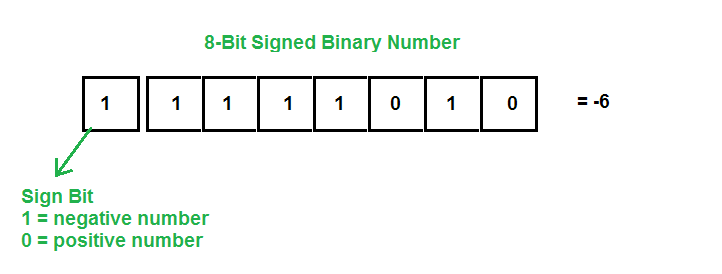
In the figure above, we have a 8-bit signed binary number and the leftmost bit is called sign bit. A 1-bit is negative number and 0-bit is a positive number. Note that the negative numbers are represented in 2’s complement form.
JavaScript programming uses similar representation with 32-bits for bitwise operations and return a 64-bit number as output.
// 32-bit representation of 4
00000000 00000000 00000000 00000100
//perform an bitwise NOT will inverse all bits
11111111 11111111 11111111 11111011
//The above number is a 2's complement form of a negative number because the sign bit is 1.
//Output: -5
Bitwise AND ( & )
The bitwise AND takes two operands and then compares each bit position, since each operand is of 32-bits. If a nth-bit position has 1 in both the operand, then the result will also have 1 in the nth-bit position.
If nth-bit position has a 0 in any one of the operands, the result will have a 0 in the nth-bit position. Consider the following example.
6 & 2 = 0110
        0010
       ======
        0010 = 2
       ======
Example #1
//variable declaration
var x = 6;
var y = 2;
console.log(x & y);
//output : 2
ANDing negative numbers
-5 & 1 = 1011
         0001
       =========
         0001 = 1
       =========
Example #2
//variable declaration
var x = -5;
var y = 1;
console.log(x & y);
//output : 1
Bitwise OR
The bitwise OR takes two operands and compares each bit positions of both the operands. If nth-bit position has a 1 in any one of the operands, then the nth-bit position of result will also have 1 in it. Only when nth-bit position of both operands are 0, the nth-bit of the result is 0.
 5 | 3 = 0101
         0011
        =======
         0111 = 7
        =======
Example #3
//variable declarations
var a = 5;
var b = 3;
console.log(a | b);
//output: 7
ORing with negative numbers
-6 | 2 = 1010
         0010
        =======
         1010  = -6
        =======
Example #4
//variable declaration
var x= -7;
var y = 4;
console.log(x | y);
//output:
// -7 = 1001
//  4 = 0100
//  =========
//      1101 = -3
Bitwise XOR (^)
The JavaScript bitwise XOR or exclusive OR is a special operator. It takes two operands and both must never have same bit value, if they are same, then the result will have a 0 in the nth-bit position. See the truth table below to understand how XOR works. The truth table is for two variables and each row is a input combination of the variables that will produce an output.
| X | Y | Output |
| 1 | 1 | 0 |
| 1 | 0 | 1 |
| 0 | 1 | 1 |
| 0 | 0 | 0 |
Now consider the following example, in this we will XOR each each bit position in both the operands.
5 ^ 3 =  0101
         0011
================
        0110 = 6
================
Example #5
//variable declarations
var x = 6;
var y = 4;
console.log(x ^ y);
//Output:
// 6 = 0110
// 4 = 0100
//===========
//     0010 = 2
XORing negative numbers
-4 ^ 3 = 1100
         0011
===============
         1111 = -1
===============
Example #6
//variable declarations
var x = -7;
var y = 2;
console.log(x ^ y);
//Output:
// -7 = 1001
//  2 = 0010
// ==========
//      1011 = -5
Bitwise Left Shift (<<)
Bitwise left shift (<<) is also available in other programming languages such as Java, C/C++, etc. This operator takes two operands.
//bitwise left shift syntax
<operand 1> << <operand 2>- Operand 1 holds the value whose bits are left shifted.
- Operand 2 is the number of bits to be shifted.
The Bitwise left shift operator changes the values to its binary equivalent and perform three activities during the shift:
- Shift left the number of bits specified in the operand 2.
- The right most bits of operand 1 is discarded by number of bits specified in operand 2.
- Fill the leftmost bits of operand 1 by number of zeros specified operand 2.
a = 7 // 00000111
b = 3
a << b
//left shift 3 bits and discard 3 bits from left.
// 00111
// add three zero from the right.
//00111000 = 56
Let’s check this with a JavaScript program.
Example #7
variable declarations
var a = 7;
var b = 3;
//left shift
var c = a << b;
console.log(c);
//Output: 56
Bitwise Right Shift (>>)
The bitwise right shift is similar to bitwise left shift operator. It also accepts two operands – one whose bits are shifted right, and the second operand specifies the number of bits to be shifted.
Since, numbers are in 32-bit signed binary format, the leftmost bit is either positive or negative. If positive, then it is 0 and if negative, then it is 1. Three things happen which right shift operation is performed:
- The bits of operand 1 is shifted right to the number specified by operand 2.
- The bits of operand 1 is discarded from right by the number specified by operand 2.
- If the number is positive, fill left-side of operand 1 with number of zeros specified in the operand 2.
- If the number is negative, fill left-side of the operand 1 with number of 1s specified in the operand 2.
Due to filling the left-side of operand 1 with either 0 or 1, the right shift operator is also known as “Sign preserving shift”.
a = -5 // 11111011
b = 2
a >> b
//right shift 2 bits and discard 2 bits from right.
// 111110
// add three 1s from the left
//11111110 = -2
Let us verify the above with the help of a JavaScript program.
Example #8
variable declarations
var a = -5;
var b = 2;
//right shift
c = a >> b;
console.log(c);
//Output: -2
Note how bitwise right shift (>>) preserves the negative sign in the output .
Bitwise Zero-Fill Right Shift (>>>)
The idea behind the bitwise zero-fill right shift (>>>) is to shift bits to the right, but the number must not preserve the sign.The output is always a non-negative number.
a = -9; //11110111
b = 2
//zero-fill right shift by 2 bits
a >>> b
//output : 001111001 = 1073741821
Example #9
//variable declarations
var a = -9;//11110111
var b = 2;
//zero fill right shift by 2 bits
var c = a >>> b;
console.log(c);
//output : 001111001 = 1073741821
Note that for negative number the output is expected number = 1073741821 which is correct. This is because we don’t preserve the sign bit and 1073741821 is result of unsigned binary representation of the number.
JavaScript Logical Operator
Logical operator is one that compare two boolean operands and gives a boolean output. They are of high importance in computer science, especially in digital design and computer architectures.
They operands of logical operator could be constants, variables of all types and expressions involving comparison operators. First, we must understand the working of these logical operators.
Types of Logical Operators
There are three types of logical operators and they are:
| Operator | Description |
| && | Logical AND operator |
| || | Logical OR operator |
| ! | Logical NOT operator |
Now, out of these three, you must be familiar with logical not operator which is also a unary operator. To learn more about unary operators visit following link.
Let us try to understand each logical operator separately.
Logical AND operator
The logical AND operator takes two or more operands and convert them to equivalent boolean value and return true if all of them are true, otherwise, if at least one operand is false, the result is false.
You can understand the working of this operator with the help of a truth table. A truth table gives output for all combination of variable inputs.
| X | Y | Output |
| T | T | T |
| T | F | F |
| F | T | F |
| F | F | F |
The above is a two variable truth table for logical AND which shows that the output is true when all operands( X and Y) are true.
Example #1
//variable declaration
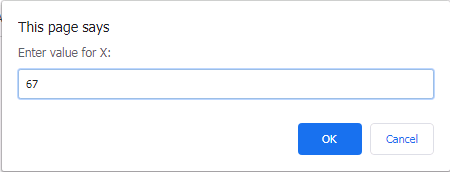
var x = prompt("Enter value for X:");
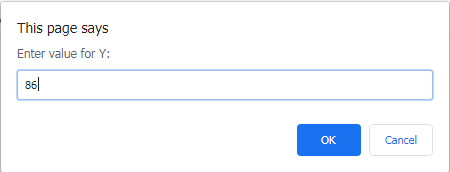
var y = prompt("Enter value for Y:");
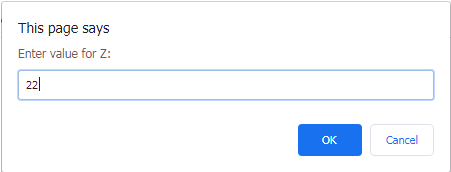
var z = prompt("Enter value for Z:");
var real_x = Number(x);
var real_y = Number(y);
var real_z = Number(z);
//Check greatest of all
if (real_x > real_y && real_x > real_z)
{
      alert("X is the greatest number");
}
else if ( real_y > real_x && real_y > real_z)
{
        alert( "Y is the greatest number");
}
else if ( real_z > real_x && real_z > real_y)
{
       alert("Z is the greatest number");
}
else
{
            alert("Invalid Input! Numbers cannot be same");
}
Output #1

Logical OR operator
The logical OR operator takes two or more operands and convert them into their boolean equivalent. If either of the operands is true, the logical outcome is also true, otherwise it is false.
Here is the truth table for logical OR.
| X | Y | Output |
| T | T | T |
| T | F | T |
| F | T | T |
| F | F | F |
In the above truth table, the outcome is false, when both operands (X and Y) are false. The rest of the entries are true.
Example #2
In this example, we will check if a number is within the range 1000 to 5000 including both numbers.
//variable declarations
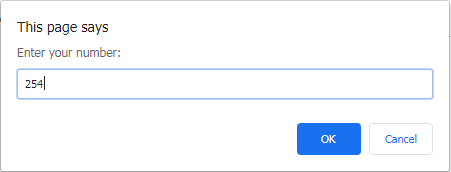
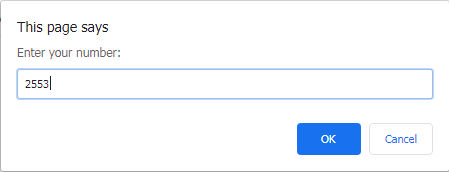
var x = prompt("Enter your number:");
var real_x= Number(x);
//check range
if ( x >= 1000 || x <= 5000)
{
     alert(" Valid Number");
}
else
{
     alert("Invalid Number");
}
Output #2

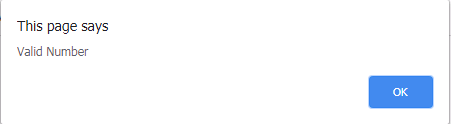
Logical NOT operator
The logical not operator takes a single operand and inverse the boolean value of it. Note than every literal or constant in JavaScript has a true or a false value by default. Most of them are true, except a few that are called falsy.
Here is the truth table for NOT operator.
| X | Output |
| T | F |
| F | T |
Note that the number of rows corresponds to 2^n,where n is the number of operands.
JavaScript Ternary Operator
JavaScript language supports a C style ternary operator, also called a conditional operator. Any variable can be assigned value based on boolean value of an expression.
Syntax
var <variable_name> = (<expression or condition>)?value 1:value 2;The new variable will get its value based on certain conditions, suppose the condition is true, then the value 1 will be assigned, otherwise value 2 will be assigned.
There are many usage of such type of conditional operator. For example, if the variable is above or below certain range we can use conditional operator to decide the actual value of the variable.
Example #1
//variable declaration
var price = prompt("Enter the price of the item:");
var real_price  = Number(price); // string price converted to numeric equivalent
var high-or-low = (real_price < 1000)? "Low Price":"High Price";
console.log(high-or-low);
Output #1
When you run the program you get a prompt asking you to enter the price of the item. Enter a random number to test.
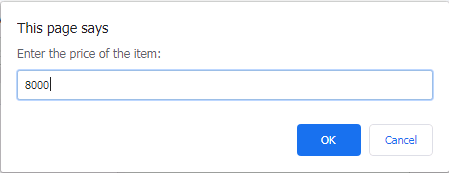
Then press OK to see the result. The value of variable is displayed based on whether it is high or low.

Consider one more example, where we check if the shape is rectangle or a square based on the area.
Example #2
//variable declaration
var area =  0;
var height = prompt("Enter Height");
var real_h= Number(height);
var length = prompt("Enter Length");
var real_l = Number(length);
area = real_l * real_h;
var shape_type = (real_l === real_h )? "Square":"Rectangle";
console.log(shape_type);
console.log("Area ="+ " " + area);
Output #2

The conditional operator save the extra code to write a conditional block such as if-else block in JavaScript. Also, there is an immediate variable assignment after the code executed successfully. There is not need to write an explicit return statement.
JavaScript Comparison Operator
The JavaScript comparison operator takes two operands and then compare it. The result of the comparison is a boolean value. The operands could be
- a number
- a string
- a boolean value
- or an object
Usage and Syntax
You can use comparison operator anywhere within the script, however, these are more popular in conditional blocks such as if-else, loops and so on.
//comparison operator syntax
<value1> comparison operator <value2>
//output: either true or false
Here is a simple example,
//comparison operator #1
console.log(34 == 23);
//output: false
if( 3 < 4)
{
    console.log(true);
}
//output: true
As you can see that a comparison operator can be used anywhere you want as long as you have valid operand types.
Types of Comparison Operators
The JavaScript introduces some new operators, for example, (==) is a simple equality operator found in most of the programming languages.It only checks for the equality of values mean ( “3” == 3) is true, whereas (===) is a new operator in JavaScript that not only checks for equality in value, but also checks for similarity in the data type; therefore, (“3” === 3) is false.
Here is a list of all comparison operators in JavaScript programming.
| Operator | Name | Description |
| == | equality | check for equal values |
| === | strict equality | check for equal values and same data type |
| != | not equality | check if operands are not equal in values |
| !== | strict not equality | check if operands are not equal in both value and type |
| < | less than | check if L is less than the R operand, ( L < R ) |
| <= | less than or equal to | check if L is less than or equal to the R operand ( L <=R ) |
| > | greater than | check if L is greater than the R operand, ( L > R ) |
| >= | greater than or equal to | check if L is greater than or equal to the R operand, (L >= R) |
Now we shall discuss each one of these operators with examples.
Equality Operator
The equality operator takes two operands and compare it for its value. If the value does not match then returns a false, otherwise, returns a true. The data type does not matter in the comparison.
Example #1
//variable declarations
var x = true;
var y = 1;
console.log(x == y);
var a = 20;
var b = "20";
console.log(a == b);
var c = 33;
var d = 23;
console.log(c == d);
Output #1
true
true
false
Strict Equality Operator
The strict equality operator ( === ) compares two operands for equal values and same type. If either value or type or both mismatches, it will return a false, otherwise returns a true.
Example #2
//variable declaration
var m = true;
var n = "1";
console.log(true === "1");
var p = 120;
var q = "120";
console.log(p === q);
var str1 = "Hello";
var str2 = "hello";
console.log(str1 === str2);
var r = "Apple";
var s = "Apple";
console.log(r === s);
Output #2
false
false
false
true
From the example above, it is very clear that the value and its type must match perfectly for strict equality to be true.
Not Equality Operator
The not equal to operator simply compares the values and if values are equal then returns a boolean true, otherwise, it is false. This comparison operator again do not check for the type, but only values.
Example #3
console.log(24 != "24");
//false
console.log(24 !=  35);
//true
console.log("Hello" != "hello");
//true
Output #3
false
true
true
In console.log(24 != “24”) , the value of 24 is same in both, but the type is different. Therefore, result is false. In the second case, console.log(24 != 35) the numbers are clearly not the same;therefore, result is true.
In the third case, strings are same, but, the character code of capital H and lowercase ‘h’ has different numeric values. It is also different, and result is true.
In comparing values, some values are special such as NaN or ( Not-a-Number). A NaN is defined as a numeric value that undefined or not re-presentable.
console.log(NaN != NaN);   //true
or
console.log(NaN == NaN);   //false
The IEEE specifies NaN using special floating point representation where exponents are all 1s, mantissa is a non-zero to represent invalid numbers. in JavaScript, NaN can be checked using isNaN() function. Mostly, some operations give invalid numbers represented by NaN. So, we can say that it is very rare that we use NaN systematically in our scripts.
Less Than Operator
The less than operator is only to compare two operand values. Suppose you have x and y that gives this expression – x < y. The less than operand compares if the value of x is less than the value of y. Caution: It is not y greater than x.
Example #4
//variable declarations
var x = 10;
var y = 20;
console.log(x < y); //true
console.log(y < x); //false
Output #3
true
false
The first case above, compares x with y for less than value, the result is true because x is 10 and y is 20; but the reverse is not true and result is false.
Less Than Or Equal To Operator
The less than or equal to is found in all programming languages and mathematics. It compares two kind of values – less than and equal values. Suppose x and y are two values, then x is compared with y for equal value or less then y. The result is a boolean true or false.
Example #4
//variable declarations
var x = 10;
var y =  43;
var z = 43;
console.log(x <= y); //true
console.log(y <= z); //false
Output #4
true
false
You can see that the <= operator can be used to check both equality or less than relationship between two operands.
Comparing strings
While comparing strings, the comparison operators will convert the string into its numerical value and then sees less then, greater than, or equality relationship. For example,
console.log("Hello" <= "hello"); //true Most modern browsers use utf-8 codes for characters which is compatible with ASCII codes. The letter ‘H’ has a utf-8 decimal value of 72 and the letter ‘h’ has a value of 104.
Greater Than Operator
Similar to less than operator, the greater than (>) operator compares left and right operand and sees if the left operand is greater than the right. Suppose x and y are two operands, then the greater than operator is compares x > y, if x is greater value, then result is true, otherwise, false.
Example #5
//variable declarations
var x = 100;
var y = 40;c
onsole.log(x > y);  // true
console.log(y > x); // false
Output #5
true
false
The left value which is x is greater in the first case. The result is true. However, the left value y is smaller in the second case, therefore, you get a false.
Greater Than Or Equal To
The greater than or equal to operator is similar to less than or equal to operation. Only difference is that we try to check for greater than and equality together. If x is greater than or equal value to y, then the result is true. If x is less then false.
Example #6
//variable declaration
var x = 23;
var y = 23;
var z = 54;
console.log(x >= y); //true
console.log(x >= z); // false
Output #6
true
false
The first case, x is equal to y and the result is true. But, in the second case, x is not greater than z; therefore, it is false.
,
JavaScript Unary Operators
In JavaScript and many other programming languages such as Java, C++, etc, a unary operator is that which takes only one operand and perform certain operation on it.
Syntax
var value = true;
console.log(!(value));
//output: false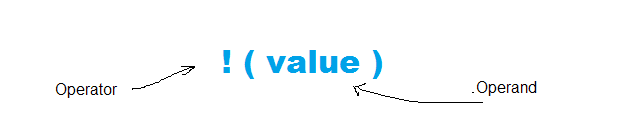
Unary Operators in JavaScript
There are many unary operators in JavaScript programming . Here is a list with description.
| Operators | Name | Description |
| + | unary plus | attempt to convert operand in to number. |
| – | unary minus | tried to convert operand into number and then negates it. |
| ! | logical not | negates the boolean value of operand. |
| ++ | increment operator | add one to the operand value. |
| — | decrement operator | subtracts one from the operand value. |
| ~ | bit-wise not | inverts all the binary bits of the operand and returns a number. |
| typeof | typeof operator | returns the data type of the operand. |
| delete | delete operator | delete specific property of an object including array types. |
| void | void operator | No return value for the expression is undefined. |
Unary Plus ( + )
The unary plus simply tries to convert the operand into a number. You can see the effect of this operator in other data types. The only data types that it does’t affect is the number because it is already a number type.
Example #1
//variable declaration
var myNum = 23.55;
var myString = "50";
var myBoolean = false;
var myNegative = -34;
//convert to number using unary plus
var res1 = +myNum;
var res2 = +myString;
var res3 = +myBoolean;
var res4 = +myNegative;
//display output
console.log(res1);
console.log(res2);
console.log(res3);
console.log(res4);
Output #1

Unary Minus (-)
The unary minus takes a single operand and tries to convert it to a number if it is not. Then it will change it into a negative number. See the effect of unary minus on other data types.
Example #2
//variable declaration
var myNum = 13
var myString = "50";
var myBoolean = true;
//convert to number using unary plus
var res1 = -myNum;
var res2 = -myString;
var res3 = -myBoolean;
//display output
console.log(res1);
console.log(res2);
console.log(res3);
Output #2
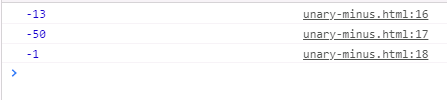
Note that the string number is first converted into a number type and then negated with a minus sign. Similarly, boolean equivalent of true is 1; therefore, it is converted to a number type and negative sign added to it afterwards.
Logical Not ( ! )
The logical not is frequently used logical operator in boolean algebra. Here in JavaScript, it tries to convert any type into it’s boolean equivalent and then negates it. To understand this operator, consider the following example.
Example #3
//variable declaration
var myNumber = 66;
var myString = "false";
var myBoolean = true;
//convert using logical not
var res1 = !(myNumber);
var res2 = !(myString);
var res3 = !(myBoolean);
//display output
console.log(res1);
console.log(res2);
console.log(res3);
Output #3
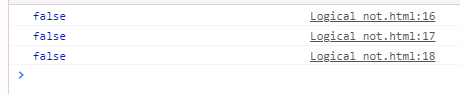
In the above script, the first variable is a number type, which is a truthy already.The logical not converts it into boolean true and negates it to false. Similarly, third variable is a string type with true, it is converted into its boolean equivalent and then to false.
Increment Operator
This increment operator is adds a one to the single operand. There are two version of increment available.
- x = ++j; ( increments the j first , and then assign to x )
- x = j++; ( assign first to x, and then increment the j )
Example #4
//variable declarations
var x; var y;
var i = 5;
//use increment operator
x = ++i;
y = i++;
//display results
console.log(x);
console.log(y);
Output #4
5
5
Decrement Operator
The decrement operator subtracts one from the single operand. Similar to the increment operator, two versions of decrement operator exists;
- x = –j; (decrement the j first and then update the x )
- x = j–; ( update the x first and then increment j )
Example #5
//variable declarations
var x; var y;
var i = 5;
//use decrement operator
x = --i;
y = i--;
//display results
console.log(x);
console.log(y);
Output #5
4
4
Bitwise Not Operator
The bit-wise not operator( ~) is a unary operator that changes any value to binary equivalent and then inverts the bits and return a number for it.
Example #6
//variable declaration
var x = -3;    // 8 bit value in 2's complement form : 11111101
var p = false; // bit value: 00000000
//use bit-wise not  operator
var y = ~x;
var z = ~p;
//display results
console.log(y);    //8 bit value: 00000010 = 2
console.log(z);    //8 bit value in 2's complement:10000001
Output #6
2
-1
The variable x has a value of –3 which is 11111100 in binary numbers. The bit-wise operator changes the bits into 00000010. The leftmost bit is called a sign bit . Therefore, the value of variable y is 2.
Similarly, the 8-bit value of false is 00000000. The bit-wise operator changes it into a 2’s complement negative number, that is, 10000001.
Typeof operator
The typeof operator simply tell you the date type of any variable. To learn about type of operator visit – JavaScript typeof operator.
Delete operator
The delete operator is used to delete a property of an object. Since, array is also an object you can use delete to remove an item from a JavaScript array using index value.
Example #7
//object declaration
var myCar= { model:"Toyota", price:  3500000};
//display before delete
console.log(myCar);
delete myCar.price;
//display after delete
console.log(myCar);
Output #7
>{model:"Toyota" , price: 3500000}         delete_operator.html:10
>{model:"Toyota"}                          delete_operator.html:13
Void Operator
The void operator when associated with any variable will return undefined, which means we are not expecting any return value. Consider a simple example,
console.log( true); //output: true
console.log( void true);//output: undefined
The void operator is used with functions that does not return anything.
void function multiply(x,y){
           console.log(x * y); //output directly
}
To understand the working of these operators, we recommend that you try some simple programs on your own.
In the next post, we will discuss about some interesting operators of JavaScript programming.
JavaScript Arithmetic Operators
The arthemetic operators are those that use two or more operands in the form of constants or variables and return single value as results. The value of arithmetic expressions are stored in a variable or used in other expressions.
There are 6 arithmetic operators in JavaScript language. These are:
- Addition
- Subtraction
- Multiplication
- Division
- Remainder
- Exponential
We shall discuss each one of them with examples.
Addition Operator
The addition operator also known as plus(+), adds two numbers and output the result. The syntax for addition operator is given below.
//Syntax
<variable> = <variable1> + <variable2. + ... + <variableN>;
Example #1
//variable declarations
var A = 10;
var B = 23;
var C = A + B; //addition
console.log(c);
Output #1
33Subtraction Operator
Subtraction operator takes two operand and subtract the value of second operand from the first. The result is single value stored in a variable to display or used in a new expression. The subtraction is a left-to-right operation.
//Syntax
<variable> = <variable1> - <variable2> - ... - <variableN>;
Example #2
//variable declaration
var A = 20;
var B = 12;
var C = A - B; //subtraction
console.log(C); //output
Output #2
8Multiplication Operator
The multiplication operator takes two or more operands and multiply (*) them to get a single number result. The operands are constants or variables . Here is the syntax for multiplication.
//Syntax
<variable> = <variable1> * <variable2> * ... * <variableN>;
Example #3
//variable declaration
var A = 5;
var B = 25;
var C = A * B; //multiply
console.log(C); //output
Output #3
125Division Operator
Division operator or divide operation takes two operands and divide the first number with the second number. You get a result called the quotient of the division. The first number is called dividend and the second called divisor.
//Syntax
<variable> = <variable1> / <variable2>;
Example #4
//variable declaration
var A = 440;
var B = 4;
var C = A/B; //division
console.log(C); //output
Output #4
110Remainder Operator
Unlike division, the remainder operator will give remainder of a division , not quotient even if it is a zero. The is a special symbol to indicate remainder division (%).
//Syntax
<variable> = <variable1> % <variable2>;
The second number divides the first number and give the remainder that gets stored in the variable to the left.
Example #5
//variable declaration
var A = 18;
var B = 4;
var C = A % B; //remainder division
console.log(C); //output
Output #5
2Exponential Operator
JavaScript has a new operator called the exponential operator that takes two operands – number and its power. So, if x is the first and y is the second number, then x^y is represented by x ** y using exponential operator.
Example #6
//variable declaration
var A = 6;
var B = 2;
var C = A ** B; // exponential operation
console.log(C);//output
Output #6
36In future post, we will discuss about more such operators.
JavaScript Assignment Operator
The JavaScript assignment operator assigns a value to a JavaScript variable.The value of a variable or an expression is assigned to another variable, the variable that receives the value is always on left hand side and expression whose value is assigned is on right hand side of the assignment operator.
Syntax
//Syntax
var <variable> = < variable or expression>;
//Example
var myNumber = 334.55;
var myExp = a + 3;
The JavaScript assignment operation is evaluated from right-to-left.
There are many types of assignment in JavaScript which are:
- Simple assignment
- Chained assignment
- Complex or Self-assignment
- Destructuring assignment
We shall discuss each one of them one-by-one with suitable examples.
Simple Variable Assignment
You have already seen an example of simple assignment in the earlier section. In this method, you simply assign a value of constant, or a variable or an expression to the variable on the left-hand side of the assignment operator.
Consider the following example,
//variable declaration simple assignment
var A = 33;    //assigned a constant
var B = C;     //assigned a variable value
var F = 3 * 4; //assigned an expression
Chained Assignment
The JavaScript programming allows multiple assignments at the same time that looks like a chained assignment. Each part of the chain is executed first from right and then followed by other assignment to the leftmost variable.
//variable declaration chained assignment
var A = B = C = 220;
//The above is same as
var A = 220;
var B = 220;
var C = 220;
var D = 220;
The chained assignment starts with rightmost expression first and then move to the leftmost variable in the expression. The expression A = B = C is same as A = (B = C). The expression in the parenthesis is executed first and then the next pair (A = B).
Self-Assignment
The self-assignment is compound assignment where the left-hand variable is part of right-hand expression. Consider the following example.
//variable declaration self-assignemnt
var x += 10;
//It is same as
var x = x + 10;
The expression involving left-hand side( x + 10) on the right side is of assignment operator is evaluated first, and then assigned back to the variable x. This is self-assignment.
Note that the expression x += 10 can also be written as x = x + 10;
Here is a list of all self-assignment types in JavaScript.
| Assignment Expression | Expression | Standard Form |
| addition | x += 1 | x = x + 1 |
| subtraction | x -= 1 | x = x – 1 |
| multiplication | x *= 1 | x = x * 1 |
| division | x /= 1 | x = x / 1 |
| remainder | x %= 1 | x = x % 1 |
| exponential | x **=1 | x = x ** 1 |
| right shift | x >>= 1 | x = x >> 1 |
| left shift | x <<= 1 | x = x << 1 |
| unsigned right shift | x >>>= 1 | x = x >>> 1 |
| logical AND | x &&=1 | x = x && 1 |
| logical OR | x ||= 1 | x = x || 1 |
| bitwise AND | x &= 1 | x = x &= 1 |
| bitwise OR | x |= 1 | x = x | 1 |
| bitwise XOR | x ^= 1 | x = x ^ 1 |
Destructuring Assignment
The destructuring allows to quickly assign the values of an array to variables. Consider the following example, where we accessed each element of the by its index and assigned it to another variables.
//array declaration
var fruits = ["oranges","apples","banana", "mangoes"];
//assigning values of array to variables
var item1 = fruits[0];
var item2 = fruits[1];
var item3 = fruits[2];
var item4 = fruits[3];
The same can be does in few steps using destructuring. See the same example with destructuring below.
//array declaration
var fruits = ["oranges","apples","banana", "mangoes"];
//destructuring array
var [item1, item2, item3, item4] = fruits;
//output to console
console.log(item1);
console.log(item2);
console.log(item3);
console.log(item4);
The output of the above program is given below.
You can clearly see how easily we were able to assign values of array to variables using destructuing assignment.
In the next post, we will discuss about arithmetic operators.