XML Attributes
.
Many times, the XML elements contains extra information. This extra information is stored in some new attributes. The attributes in XML are extra information that we provide for the elements. Element can have any number of attributes with unique names. But before that, we must describe how attributes look like and how to use them.
What are attributes?
The attributes are for elements, as it enhances the feature of element by providing some extra information in the form of name and value pair.
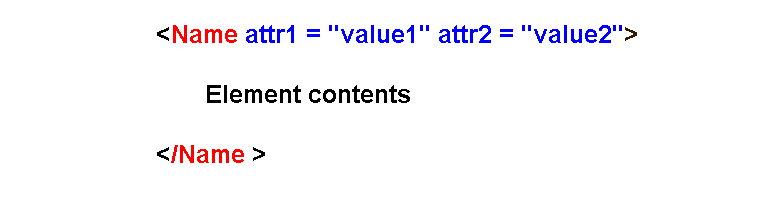
From the above example, you can see that the XML attributes are name/value pairs. You can put any number of attributes for element, and you can also, put attributes in any order, but the name comes first and then the value of the attribute.
Attribute Values
The value of an XML attribute is enclosed with a single quote or a double quote. All the attributes in an element are separated by spaces and you can write them in any order.
For example,
<address type="Home">
<city>Banglore</city>
</address>
In the above example, we have an attribute type which describes the type of address for the element <address>. The value is Home which is enclosed within double quotes. Similarly, we can enclose an attribute value with single quotes.
For example,
<car color='white'>Toyota</car>Here we have another example of attribute value enclosed within a single quote.
Sometime the value contains quote within the text, in that case, use opposite kind of quote.
<greeting tag="It's simple welcome">Welcome</greeting>

Second example,

<greeting birthday='my "Birthday" today'> Happy Birthday</greeting>
The above code use opposite quote type when the internal quote is either double quote or single quote. The outer quote for attribute must be opposite of quote used in the value string. The quotes can be replaced with HTML symbol , when used as value. These values are given in the following table.
| Character Special | Symbol | HTML code |
| Single left quote | ‘ | ‘ or ' |
| Single right quote | ‘ | ’ or ' |
| Double left quote | “ | “ or " |
| Double right quote | “ | ” or " |
We can replace the quotes with any of the code in XML attribute values and it will work fine. This will also reduce the confusion with quotes because quotes inside of the text is now a specific code.
Consider the following example.,
<greeting tag="thank's">Thank you</greeting>Number of XML attributes
As I mentioned earlier, you can have many XML attributes for a single element, however, there are some rules to follow while describing the attributes.
Do not repeat same attribute
You should not repeat the same attribute with different values. Consider the following XML element that repeats same attribute multiple times.
<?xml version="1.0" encoding="UTF-8"?>
<student name="Ram" name="Seeta" name="Lakshman">
<course>Ramayana</course>
</student>
Declaring the XML element with same attribute with different value is invalid. Here is the result of validation check for the above XML document.
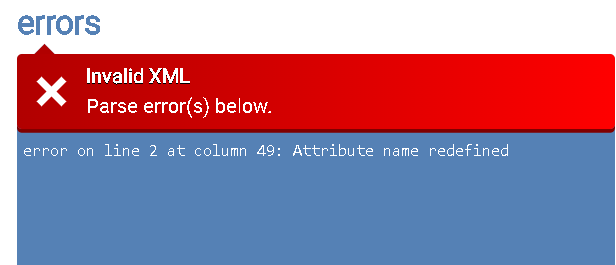
Image Source: Validate XML – Online XML Tools
The error indicates that the attribute is redefined multiple times which is true. Instead of this, you can use single attribute to declare multiple values.
<?xml version="1.0" encoding="UTF-8"?>
<student name="Ram Seeta Lakshman">
<course>Ramayana</course>
</student>
This will pass the validation test.
Note: Some parser will not allow such declarations and consider multiple values invalid.
The best practice is to declare multiple attributes as child elements of the parent element. Therefore, we can use our example and redefine the XML document as:
<?xml version="1.0" encoding="UTF-8"?>
<student>
<name>Ram</name>
<name>Seeta</name>
<name>Lakshman</name>
<course>Ramayana</course>
</student>
If you validate the document now, it passes the validation test.
Attributes with DTD
In this section, you will learn about certain attributes that are constrained to certain types if you use DTD. There are two special attributes used called the ID and IDREF attribute. This attribute tells that the element has a unique ID to an XML processor within the document. The IDREF attribute is reference to ID attribute in the document. There are few point you must remember about ID and IDREF attributes.
- ID values must start with underscore or letter, not numbers, and contains only letters and numbers with some special symbols.
- Two elements cannot have same ID attributes.
- IDREF value must match the value of ID attribute. No non-existent ID allowed.
- It is not guaranteed that the ID and IDREF will be parsed by XML Processors that don’t use DTD. For example, SOAP do not use DTD information.
You can declare an attribute in DTD with restricted values, such as “month” that contains only month names as values. So month = “Saturn” will be rejected if not in the list. Such is the case with restricted attributes.
Reserved XML Attributes
The reserved XML attributes are for specific purposes and begins with xml:. There are many such XML attributes, but I will talk about only four important ones here.
The xml:lang and xml:space is reserved for xml version 1.0. The xml:link and xml:base are defined by XML link which is standard to describe how to link XML documents.
xml:lang
This attribute classifies an element based on the language of its content. In a document, xml:lang =”en” will describe an element with English content. The XML parser can render contents based on language only, and user will receive document based on his language preference.
xml:space
This attribute preserves whitespaces in the content of an element. The whitespace in general sense is means space between the content of an XML element. However, the whitespace means newline, carriage return, tab, and space here. The XML specifies whitespaces as:
Significant Whitespace – the general whitespace between contents and must be preserved.
Insignificant Whitespace – These are whitespaces outside of content area and preserved using the xml:space attribute.
It only works if the XML processor recognize it and parse it. Use of this attribute like xml:lang must be declared in xml schema or DTD There are two values for xml:space , preserve and default.
When you use preserved value, all whitespaces (insignificat) is preserved between parent element and the child elements and their children as well.
The default value accepts the processing of xml:space according to XML processor options.
xml:link
Tells the xlink processor that the element is a link element. More on this when we talk about xlink.
xml:base
This attribute provides a base URL for the xlink:href attribute. The xlink:href attribute will only contains the html file. Consider the following example, to understand this.
<student xml:base = "https://www.my-schoool-example.com/" >
 <course  xlink:type="locator"
  xlink:label="CSE"
  xlink:href="courses/cse.html"
   </course>
</student>
Summary
In this article, you learned about XML attribute which is name/value pairs and how to use them in XML documents. Also, some attributes are restricted from DTD or schema file. There special reserved XML attributes in XML that are useful and must be declared inside a DTD before use.
XML Document Type Declaration
In the previous post, you learned about XML declarations in detail, now we look into the document type declarations. The document type declarations are optional entries that includes DTD for validating your documents, root element, and any entities that you want to declare.
Syntax
The syntax for XML document type definition is given below.
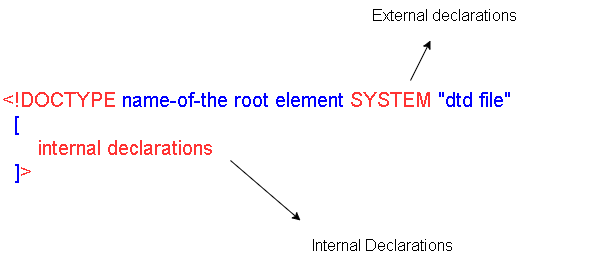
The document type declaration starts with <!DOCTYPE declaration, and next is:
- name of the root element
- SYSTEM means the local directory where you can find current XML document.
- DTD file enclosed in quotes.
- The two square braces for any internal entities or elements declaration.
The exteranl DTD is called for validity check of the document. The XML parser will match the document instance with the content of the DTD document model and does the validity check.
This is purely optional, and it checks for the elements pattern and required data in the document.
The next is SYSTEM that map to the current directory of the XML and expect to find the DTD file there, if you have located the file elsewhere, you must provide a URI path to the DTD file. The name of the file is enclosed in quotes.
Here is an example of document type declarations.
<?xml version="1.0" encoding="utf-8"?>
<!DOCTYPE cat SYSTEM "cats.dtd"
[
 <!ENTITY breed "Bengal cat">
 <!ENTITY color "Black">
]>
It is possible that you may have some internal declaration where you want to change the existing DTD information of the DTD fil(external), basically, you are redefining it. Usually, it contains the entities declarations and other parts of the document. It is only place to declare something within the document.
Summary
In this article, you have learned about the XML document type declaration within the prolog, that help define some document type definition file and internal entities, purely optional. If you declare the DTD then parser will try to check the validity against the DTD file.
XML Declaration
In the previous article, you learned the structure of a XML document and know that an optional prolog exists before any XML root element.
The very first line is an XML declaration that tells the XML processor that the document is XML language and markup.
Declaration Structure
The following image describes the structure of XML declaration.
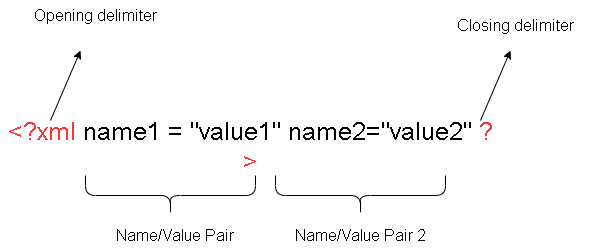
The declaration starts with a delimiter and ends with a delimiter.
<?xml ........ ?>There are some number of properties with property name and the value which is enclosed within a “double quote”.
The Properties
There are three different properties that you can declare.
- Version
- Encoding
- Standalone
You can visit the W3C website to more information: Extensible Markup Language (XML) 1.0 (Fifth Edition) (w3.org)
Example declaration:
<?xml version="1.0"?>
<?xml version='1.0' encoding='US-ASCII' standalone='yes'?>
<?xml version = '1.0' encoding= 'iso-8859-1' standalone ="no"?>
Version
Currently there is only one edition which is version 1.0, but the edition keeps changing. There is fifth edition of XML version 1.0. If at all the version number changes, you must specify the exact version of your document.
Encoding
Encoding means how to handle the character encoding in the document. If you are aware of the encoding like US-ASCII or iso-8859-1 or UTF-8 encoding, then you can specify it here. Otherwise, it is wise to leave it blank.
Standalone
Standalone is a declaration of how to use the document, whether the document has additional files to load or not. If the document has DTD to load, then this option can be set to “no”. Otherwise, you can set it to “yes”.
Note that these are optional parameters, and you can still write XML documents without them.
Summary
In this article, you have learned the importance of XML declarations, including the properties and meaning of each property.
XML Elements and Tree View
As we already know that XML is only to hold data and it gives complete freedom to choose any name for elements. XML don’t care about how the document looks or how we are going to use the data.
The only requirement is to follow the rules of the XML document markup language. It is best to choose names for your elements that make sense.
Tags
Elements themselves cannot store information. An element in XML is enclosed within angle brackets (< >) and there are two types of elements – opening element and the closing element. Unlike HTML, where tags are limited, XML asks you to create your own tags.
Consider an example,
<?xml version="1.0"?>
<mail>
<message> Meet me at <emphasis>Delhi</empahsis>School. </message>
</mail>
In the above example, we have two elements – <mail> and <message>. The elements are with their respective closing elements, together they are called a tag.
So, when we say tag mail, it means <mail> </mail>. Each of the XML tags contain either another tag or some content. The <mail> tag contains <message> tag and <message> tag contains a “message” text.
The element <emphasis> is inline tag to decorate textual information or provide value add to the content. All tags have the same purpose, that is to label the content meaningfully.
In this way, tags are used to define the label and structure of an XML document.
The XML document is not finished until we apply some style to it. Only then we can say that the document is finished or complete, otherwise, it is just an outlined document using. tags.
The Prolog
First few lines of the XML document are the prolog that describes some information about the document. It is an optional, but if your document contains this, then it must be positioned before the root element.
The contents of prolog are:
- Document type declaration.
- Links to document type definition (DTD).
- Document type definition (DTD) files kept at separate locations.
- Special Declarations if any
Let us understand this with an example.
<?xml version="1.0" encoding= "UTF-8"?>   - (1)
<!DOCTYPE car SYSTEM "car.dtd"            - (2) and (3) is "car.dtd"
[
<!ENTITY Model SYSTEM "model.xml">        - (4)
<!ENTITY Brand SYSTEM "brand.xml">
]
<car>                                     - (5)

</car>
Let us understand each line in the prolog and root element here is the <car>.
Document Declaration
First attribute specifies the current version of the XML document standard, and if you have foreign characters, then XML uses UTF-8 encoding system to display symbols and characters. It called the parser to treat the document as XML document.
Link to DTD
The next line is a link to a DTD file called the cars.dtd and its location is SYSTEM which is local directory of the XML file.
DTD Entities
After link to DTD fil, we have declared the two DTD entities and fifth line is the root element. The prolog is up to the root element, and it is optional.
The Tree View
Earlier we mentioned about the tree view of the document and discuss how elements and tags divide the document into different parts in a tree like structure. In this tree view, circle represents the elements and boxes are content of the elements.
The tree always starts from top with a root element. Consider the following XML document and its tree view. Each of the tag /element is like a box that contains other elements and their content. This is the basis for document tree structure in XML.
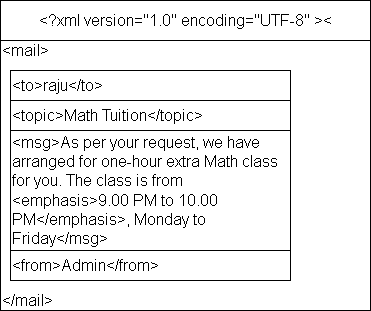
You can see that the elements are nested where <mail> is the root of the tree that set the boundaries for the document. The root contains all the elements called its children and contents are the lowest in the tree called the leaves. For a leaf node, all other nodes above it is its ancestors, and they are the descenders, starting from the root.
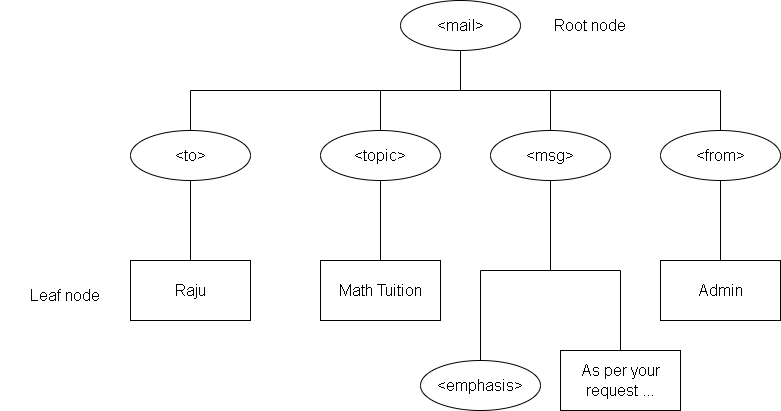
Note the hierarchy that starts with the root node <mail> and all the content of each element/tag is the leaf node depicted using a rectangular box.
Siblings and Subtrees
The root has multiple child nodes, and they are at the same level. The relationship between them is of siblings. For instance, the tag <to> and <from> are siblings’ nodes.
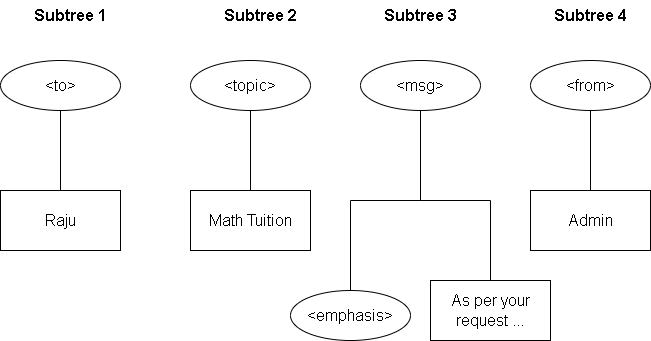
Each of these siblings have children that makes another hierarchy called a subtree. Its structure is similar to that of root and its child nodes.
Therefore, we have four subtrees from the above tree view, one for each child node of the root.
Summary
In this article, you learned that the XML document has nested regions called the tags made of element. The element describes the structure of the document which tree like. You can understand this by turning you XML document into a tree diagram.
XML Stylesheets
From the previous article, you know that XML does not have any implicit style information. One way to display formatted document is using the XHTML page. It seems alright, but does not provide full-fledged. styling for XML documents.
We solve this problem by using an external stylesheet , just for the style and transformation of XML documents, tags and elements. In this way, we ensure that the style information is kept separately than the data within XML.
Different Types of Stylesheets
There are different types of stylesheets to style web pages. Here is a list for you.
- Cascading Style Sheet (CSS)
- Extensible Stylesheet Language (XSL)
- Document Style Semantics and Specification Language (DSSSL)
- Formatting Output Specification Instance(FOSI)
- Proprietary Stylesheet Languages (PSL)
I will try to give brief description for each of these.
Cascading Stylesheet (CSS )
The cascading stylesheet is lightweight and simple, easy to learn stylesheet language. It is more popular in the HTML space. All web browser implement some sort of CSS all the time, with slight variation.
No browser can fully support the CSS standards and it keep changing. While CSS get good job in rendering webpages, it is not a sophisticated system, then printing systems, that use CMYK or Pantone colors schemes. CSS get most of the colors through RGB or HSL schemes.
Current CSS standard is CSS3. To learn CSS, go to CSS tutorial.
Extensible Stylesheet Language (XSL)
XSL is the stylesheet for XML documents. It does not work like CSS which attach the style information to the elements. Instead, XSL is a programming language with templates, functions, and recursion, its quality of style is far better than CSS, but the complexity keeps it away from becoming popular.
Other stylesheets are for both SGML and XML both except the Proprietary Stylesheet Language(PSL)
that want to customize the styling experience. The goal is not using the style information on lot of products and wherever it is used produce high quality results.
How to View XML Documents
It is a well-known fact that you cannot view XML documents on its own, because it has not style information. There are only two ways to view XML documents on screen.
- Display in web browser like you do for webpages.
- Convert the XML information into HTML for display.
It is true that there is no style information with XML still it is visible in the browser when you open the doc.
Hierarchical View
The XML document can be viewed in any browser, without any style information. Only the hierarchies of elements and tags are visible.
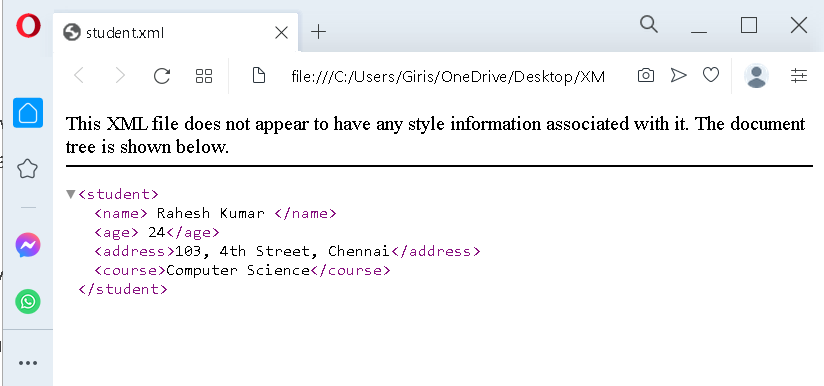
When you open the XML in hierarchical view, only the outline of the document is visible and a warning indicating that no stylesheet is being rendered.
XHTML Viewing
The XHTML is another standard that conforms to the XML strict standards, and it has some formatting for elements. It guarantees that the information and tags are well-formed before rendering the style information.
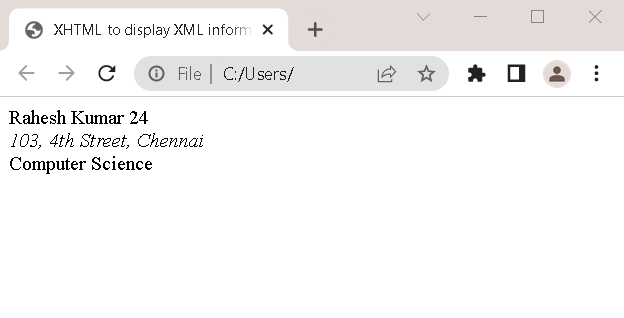
In the above example, I have tried to open the XML information from an XHTML document, and it hides the hierarchical view of XML and present a built-in style for XML data. Note how, address field is italicized, and course information is in bold.
Customized Software to Read XML information
Not all information can be rendered through XML, because XML itself helps create other markup languages. Some software is required to show the custom information.
Jumbo software uses Chemical Markup Language to display molecule structure , Math ML shows formulas through XML and MathML extension is required to display that kind of information.
You can visit MathML website for more information: MathML Core (w3c.github.io)
General Purpose Browsers
A browser is the ultimate destination to view HTML or XML files, if not consumed by an application. There are several general-purpose browsers and I cannot list them all, which support XML technologies.
- Google Chrome
- Mozilla Firefox
- Opera
- Microsoft Edge (Internet Explorer)
- Amaya
- Safari
Summary
In this article, you have learned ways to view XML document with or without style information. The browser choice or technique is your decision, and you must choose according to your need and satisfaction.
XML Editors
Out of many XML software, XML editors are the most important ones, that allow you to create documents, update existing one and sometimes viewing the XML document.
There are so many XML editors from simple text editors to highly customizable graphical text editors that show elements in colors and features to collapse or expand the tags hiding the hierarchy for author’s convenience.
Built-in Text Editors
XML is a highly flexible text editor that allows whitespace and comments, and you just need a simple text editor that is native to the operating systems, for example, Notepad in Windows, vi editor in UNIX, and SimpleText in Apple OS.
These built-in text editors are capable of understanding the logical structure of an XML documents. One thing to note is that if you are using a simple editor, there is chance of error in documents. You don’t get extra features like a dedicated XML editor like color coding for tags and content, relocating elements, and autocomplete the tags.
Automatic Syntax Checking
A robust XML authoring tool has automatic structure checking built into it. The author of XML document is less prone to making error which using these editors. There is less chance of adding elements that don’t belong to the context of the document.
However, sometime a lot of time is wasted when the author wishes to reorganize the document by shifting the tags. The editor being strict may not allow the change in positions all the time, that keep the author wondering what went wrong.
The features that are expected from a good XML editor are:
- Ability to configure the authoring environment and customize it to our need.
- Check the validity of the document.
- Get to select a set of valid elements for our document.
- Ability to write our own macros to automate some editing tasks.
- Keyboard shortcuts for tasks and macros.
- Ability to change the look and feel of the editor such as font and colors.
If the XML editor supports stylesheet interface for documents, then you can configure the appearance of the document pretty easily. Configuring such editors is very easy. You may also have to create a DTD for your document.
XML Editors
Now I discuss different types of text editors available from simple to complex multi-feature editors. There are two kinds of XML editors including the editor provided by operating systems.
vi editor
The vi editor belongs to Linux/Unix systems. This simple editor help you create XML files, but you can’t tell the difference between tags and content so easily. The typeface is same and not much scope for styling.
Fortunately, there are other variants of vi editors some improved. These are Vim, Elvis, Nvi, Nano, and Vile. The Vim is available for Windows systems as well, with some validation check for documents.
Elvis is reason for development of other variants of vi editor with some additional features like display modes to view or format HTML documents. More details in this page: Elvis-2.2_0 Display Modes (the-little-red-haired-girl.org)
Emacs
The Emacs is an old text editor that were used as word processors. Emacs is little complex because originally it was built for POSIX systems and available for Linux, Unix, FreeBSD, MacOS and Windows.
Since, early days of computing managing large documents was difficult which resulted in writing lot of macros for managing the documents evolved into Emacs or editing macros.
The Emacs has nXML mode that has detailed information on how to manage XML files including DTD and Schema, and styling information for XML. You can learn more about it from the following link.
The current version of Emacs is called the GNU Emacs and it is free to download.
Sublime text and Notepad ++
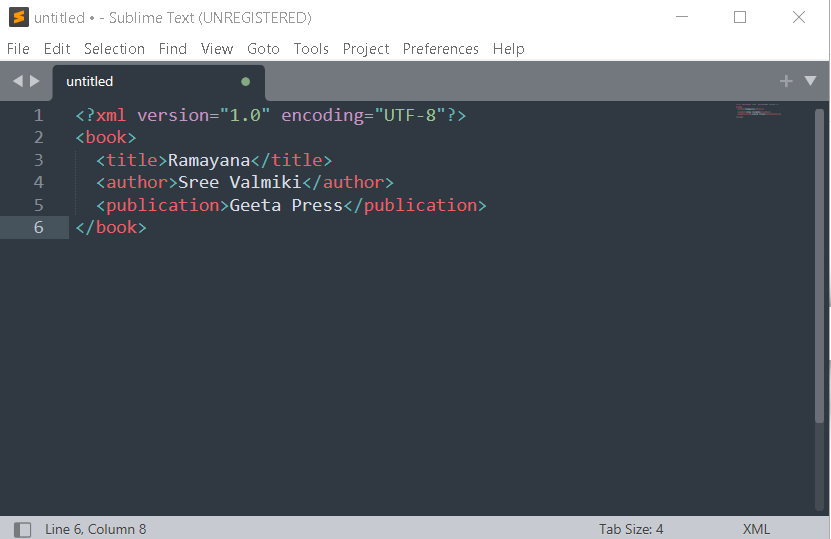
Moden windows text editors are my favorites because it supports a wide range of languages and very popular tools. The Notepad++ is there for some time and it is an advanced version of the Notepad. Similarly, Sublime Text is a popular choice for its robust interface and code management.
Graphical XML Editors
Most people like to use graphical text editors, that has drop-down menus, drag-and-drop editors, copy-paste options, etc. They provide interface that is based on what-you-see-is-what-you-get (WYSIWYG). Basically, people don’t want complex tools, but something easy to use and create documents faster and efficiently.
Since, the XML is child of SGML, most editors were for SGML which are expensive. XML has editors that are not complex and easy to use, plus they offer validity check which is most important for XML documents.
Here is the list of tools for editing XML files.
- Adobe Framemaker
- Arbortext Editor Kit
- SoftQuad’s XMetal Editor
- Conglomerate XML Editor
- NetBeans
- Microsoft Visual Studio XML Editor
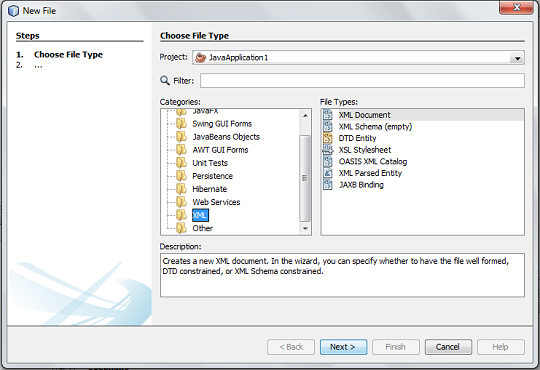
These are some robust XML editors that has full support for all the XML technologies. Note that some of the examples from this XML tutorial are generated from NetBeans IDE 8.
Summary
In this article, you learned about different types of XML editors classified into Simple text editors with limited capabilities and a feature rich complex text editor. The choice is mostly dependent on syntax highlighting for elements and content, Stylesheet support and extended features like validation check, and DTD support.
XML Technologies
XML is an open-source technology that is officially maintained by the W3C, and it is at Version 1.0 If you want to read the XML standard, then, visit the link to W3C website – Extensible Markup Language (XML) 1.0 (Fifth Edition) (w3.org).
The XML technology is a subset of SGML technology that has a goal to send, receive and process information across the web that HTML could not do. It has interoperability with SGML and HTML.
XML Inspired Technologies
A number of technologies are inspired by XML including HTML documents. XML itself is best way to handle data or information across web, but a number of other technologies also required to assist in the process of creating, displaying, sending, receiving and processing documents.
For example, Cascading Style Sheet (CSS) is web specifications that tell how to format and display the XML document for human users. These auxiliary technologies are classified into:
- XML Core Syntax
- XML Applications
- Document Modeling Techniques
- XML Query Language
- XML Styling and Transformation
- XML Programming Interface and Document Object Modeling (DOM)
We will briefly discuss each of these technologies and understand how they related to XML documents.
XML Core Syntax
The XML core syntax contains all the rules for creating XML documents. It has information from XML specifications like roots element, namespaces (to avoid name conflicts), character encoding, and Xlink, a language to create hyperlinks or link documents together and other rules for XML documents.
XML Applications
Earlier I mentioned that the XML application is any application that has a markup language just like the XML. The technologies like HTML, XHTML, a version of HTML that incorporates the features of XML, and MathML (a mathematical equation language). The MathML is quite popular when you want to display math equations in your documents. You note that the XHTML is stricter version of HTML and does not entertain incomplete or missing tags in HTML documents. It wants all HTML documents to be well-formed, unlike HTML.
Document Modeling Techniques
In a previous article, I have discussed about the importance of defining the XML document for making it a valid and well-formed document. The freeform XML rules are limited in that aspect. The two techniques to achieve this are document type definition (DTD) and Schema definition. You will learn more about these in detail.
XML Query Language
Sometimes we need to search and locate the information inside of an XML document. There are many ways to locate the desired information, for instance, XPath is the path to the data inside an XML document, similarly, XPointer link to a specific part of the document using Xlink and XPath.
What SQL (Structured Query Language) is form databases, XQL (XML Query Language) is for XML documents. It directly queries the document and get the desired results.
XML Styling and Transformation
There are four different ways to style the XML documents. These technologies are Cascading Stylesheet (CSS), XML Stylesheet Language (XSL), XSL Transformation Language (XSLT), and Extensible Stylesheet Language for Formatting Objects (XSL-FO).
XML Programming Interface and Document Object Modeling (DOM)
This category contains lot of information about how to access the XML through programming interfaces. such as Document Object Modeling (DOM), a standard way to access the web page information using programming languages like JavaScript. XML Fragment Interchange contains information on how to split the XML document into multiple pieces to send it over networks, and XML Information Set, which is a language to describe the content of the document. Apart from this, Simple API for XML (SAX) is a programming interface for manipulating XML data.
XML Processing
XML creates documents that other applications can use, any program that can read and process XML document is called an XML processor. There are so many examples of XML processors.
The examples are:
- Web Browsers
- XML Editors
- Validity Checkers
- Data archiving systems and so on.
XML Parser
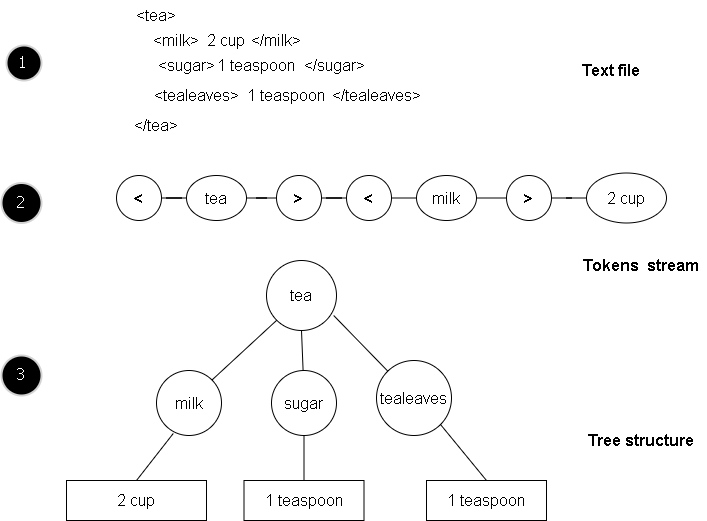
A parser is the fundamental XML processor that converts an XML document into internal representation for programs or subroutines to use. This parser is an important part of XML processing applications.
Parser takes a stream of characters from the file and turn it into meaningful groups called tokens.
Tokens are interpreted as either event to drive the program or built into a structure in memory(like a tree structure) for program to use.
Strict Rules for Validity
XML processors are very strict and does not allow missing markups or wrong tags in the document, it cannot allow uppercase elements when it should be lowercase. In short, the document should be well-formed. If an error is found, the parser will stop further processing, until the problem is fixed.
HTML document allows missing tags and incomplete tags and ignores it. It can fix the missing tag; the XML processor don’t allow such thing to make the working of XML parser as predictable as possible.
XML documents are used in variety of applications and must work in the same way every time, if there are even minor errors, that will be difficult to fix later, and to prevent such situation, the XML parsers are strict.
XML Document Style
XML documents are used for human viewing too. However, when you access the XML document in a web browser, it will not display the content as HTML page do. Though both are markup languages.
XML Raw Data
XML do not have style information and show the row data which is little difficult to understand. The following figure is one such example.
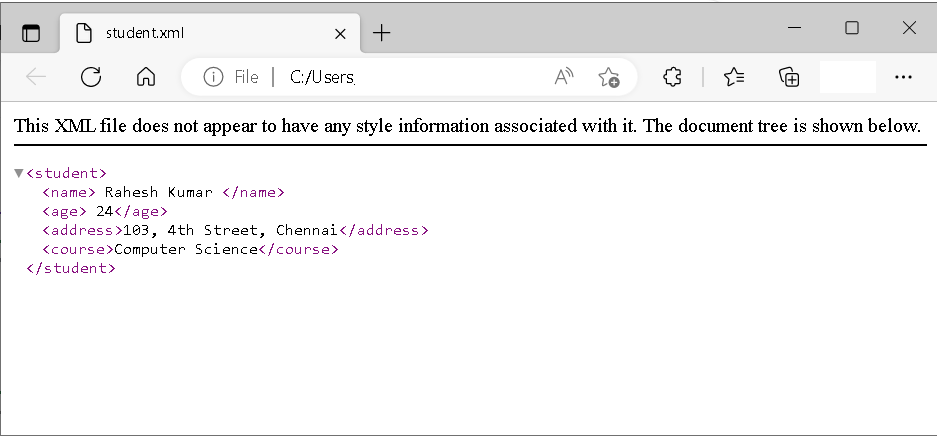
The figure above shows raw data about student and the browser indicate that there is no style information attached.
HTML Stylesheets
The HTML is also a markup language, but it has certain tags that help format the style information of the document. Let say you want to bold title for you document. Then there are header styles from <h1> to <h6>. There are other font styling tags such as italic (<i>), bold (<b>), etc.
Other document style information is provided by Cascading Style Sheet also known as CSS. The style information is kelp separate from the document. It is because changing the style for a particular tag is difficult unless you are ready to rewrite the tags all over again.
<?xml version="1.0"?>
<computer>
  <brand>Compaq</brand>
  <model>Compaq Presario</model>
  <ram>1 <i>GB, DRAM</i> </ram>
  <disk>10 GB</disk>
  <monitor>22 in</monitor>
  <price><i>Rs 35000</i></price>
</computer>
In the above example, what if we want to change the style for <ram> and <price>. I have to rewrite the whole thing, that exactly is the problem. For smaller documents, I can manage, not with a document with 10000 lines.
XML Stylesheet
The XML also follows the standard of HTML and has its own stylesheet to keep the style information separate, it is called XSLT (extensible Language Stylesheet Transformation). Note the word “transformation”. The XSLT is more powerful than the CSS because not only, it provides with style information, it can add or remove elements from the final output. At this point, I don’t want to discuss the full abilities of XSLT.
The XSLT also use XPath to attach the stylesheet information to the XML document. One excellent feature of XSLT is the ability to transform XML document to HTML.
Summary
In this lesson, you learned that the style information is not supported by XML tags. It is kept separate like HTML document which uses CSS. The style information is managed by XSLT for XML documents, which has more abilities than CSS, as it can transform the XML document itself.