Table of Contents
Our goal in post is to test a simple algorithm to convert temperature in Celsius to Fahrenheit and display on a HTML page. The language used to write this program is JavaScript. JavaScript is a browser based scripting language and works fine with HTML and CSS.
The steps are listed below:
- Receive input from a HTML text box.
- When user click the button to convert Celsius to Fahrenheit, execute JavaScript function –
convertToF(). - The function uses the formula:
F = (Celsius * 9/5) + 32to convert Celsius to Fahrenheit. - The function then output the result to an H1 tag for display.
STEP 1: Receive input from a HTML text box
For this step, you need to create a HTML text box control and a button to trigger the JavaScript function. A user enters the Celsius value in the text box.
<input type="text" id="inp" value="enter celsius"/>STEP 2:
The second step is to create an HTML button , that has onclick event that will trigger the function – convertToF().
<button onclick="convertToFahrenheit()">Convert</button>This button convert the celsius value to fahrenheit value using the JavaScript function.JavaScript Code.
STEP 3: The JavaScript Function
In this step, you create the JavaScript function in you HTML document between the <script> </script> tags. Put this script in <head> , <body>. or <footer> ,it does not matter. But the best practice is to put the code between <head> </head> tags.
. Here is the code for function convertToF().
function convertToF() {
let celsius = document.getElementById("inp").value;
  let fahrenheit = (celsius * 9/5) + 32;
  document.getElementById("demo").innerHTML = fahrenheit + "°F";
}
The function uses following formula to convert Celsius to Fahrenheit:
Fahrenheit = (Celsius \times \frac{9}{5}) + 32Here is the code version:
let fahrenheit = (celsius * 9/5) + 32;STEP 4: Printing Output
The function uses the id attribute of HTML element to access the input and print the output in the above program. The rest of the code is to compute the Fahrenheit value.
The entire HTML code and JavaScript code for the program is given below. We also put some CSS code so that the input elements appear nice. You can Learn HTML Basic – step by step.
Having difficulty understanding this example, learn and master JavaScript first.
HTML and JavaScript Code: Celsius to Fahrenheit
<!DOCTYPE html>
<html>
<head>
    <title>Celcius To Fahrenheit</title>
    <meta charset="utf-8">
</head>
<body>
    <h1 id="demo">Output here</h1>
    <input type="text" id="inp" value="enter celsius"/>
    <button onclick="convertToFahrenheit()">Convert</button>
    <script>
       function convertToFahrenheit() {
          let celsius = document.getElementById("inp").value;
          let fahrenheit = (celsius * 9/5) + 32;
          document.getElementById("demo").innerHTML = fahrenheit + "°F";
        }
    </script>
</body>
</html>
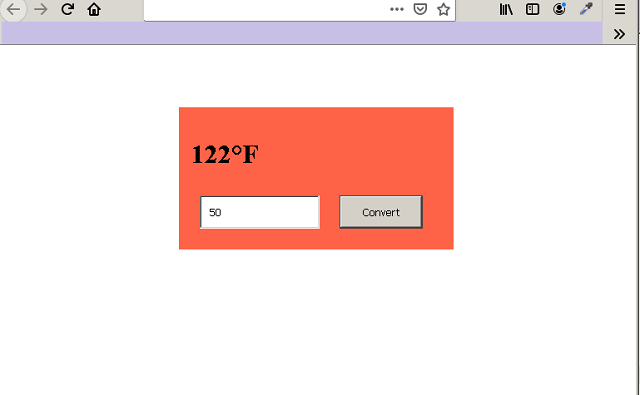
Output To Browser:
Designing the HTML page and the form is totally upto you. I have used a bit of CSS to give color to the form.
You can Learn CSS Styling and Layout and build beautiful HTML pages.