C++ Write First Program
Earlier you learned about C++ program structure. In this article, you will learn to write about your first C++ program and program elements in detail.
The meat of the C++ is in main function, and before main we need to declare the header files.
Simple C++ Program
Let us consider an example program and then we discuss the program elements in detail. The program declare a header file required for standard input and output operations called  .
.
#include <iostream.h>
void main(void)
{
         //Variable declaration
        int number;
        // Reading input values
        cout << "Enter the a number:" ;
        cin >> number;
       // if block
       if (number > 100)
       {
           cout << "Number is greater than 100;
       }
}
The above program prints only when the number is greater than  . That is, when the user input a number that is more than .
Variable Declaration
The main program begins with variable declaration. In C++ , you must declare your variable first and the syntax to declare the variable is:
<date_type> <indentifier 1>, <identifier 2>, ... <identifier N>;For example,
int A;                         // variable declared as integer type
char ID1, ID2,ID3;             // variable declared as character type
float Number;                  // variable declared as floating type
Statements
A statement in C++ program perform some action. Every statement ends with a semi colon ( ). The C++ statements can be divided into following category.
- Simple statements
- Expressions
- Statement blocks
Simple Statements – This type of statement are instruction to get input, print output or any one line statement that ends with a semi-colon.
For example,
cout<<  " Hello World ! ";
int number;
Sometimes a simple expression can also be a simple statement.
Expressions – An expression is a mathematical expression or an assignment that evaluates to a single value and ends with semi-colon. This type of statements use C++ operators.
For example,
result = number1 + number2;
area_of_triangle = ( 1/2 * base) * height;
We can write any type of complex expressions which depends on the problem we are solving.
Statement blocks – In the above program, if block is an example of statement block which encloses many simple statements.
{
     if ( x == 0)
     {
          area = 0;
     }
     else
     {
          area = x * x;
     }
     cout << "Area = " <<  " " << area ;
}
For example,
The example above has two blocks – if block and else block. The if block contains only one statement – an expession and the else block contains two statements.
This the advantage of grouping the statements into blocks, so that you can execute then as part of a task. The else block above computes the area and prints the result. Two actions were performed within a block.
Comments
C++ comments are lines ignored by the compiler. The compiler understands that the comments are not to be executed. The comments are of two types
- Single line comment (
 )
) - Multiline comment (
 )
)
 )
)Single Line Comment – You can write a single line of text as comment after ( ) symbol. See the program above.
For example,
// this is a comment ignored by the compiler
// this is another line
Multiline Comment – Inherited from C language, C++ allows to add multiple lines as comments. Anything in between  and
and  is ignored. The multiple line comment is used for describing the program details. There is not restriction on white space or new line for multiline comments.
For example,
/*
Program Name: Tax Calculator
Program Author: Notesformsc.org
Program Description: The program receives inputs such as yearly income, tax rates and computes total tax payable by the employees.
Version: 1.0
*/
Common Mistakes While Writing C++ Programs
These are some common mistakes by beginners of C++ programming language.
- Forget to add necessary header files.
- Spelling mistakes
- Not initializing the variables
- Not following a naming convention for variables.
- Forget to add semi-colon at the end of the statement.
- Block is not closed.
If you avoid the above mistakes, then you will have a clean and error free programs.
C++ Unary Operators
The unary operators take a single argument in C++ language. Some of the operators you have already seen in previous articles are unary operators.
Here is the list of unary operators.
| Unary Operators | Description |
| * | Dereference operator |
| & | Address Of operator |
| – | Minus sign |
| ! | Not operator |
| ~ | Complement |
| ++ | Increment operator |
| — | Decrement operator |
| type | Forced type conversion |
| sizeof | Size of the data type |
Dereference Operator (*)
When a C++ pointer type is declared, and it is pointing to a variable. The dereference operator helps to access the content of a pointer type. We will learn more about while discussing pointers.
Address Of Operator (&)
It resembles the bitwise  , but when used as a unary operator it returns the address of the variable.
int A = &B;The variable  will store address of the variable B, not its value.
Minus Sign (-)
Minus is an arithmetic operator, but as a unary operator, it is used to denote a negative value. It is most commonly used the unary operator in C++ programs.
Negation Operator(!)
The negation is a logical operator which negates the value of a boolean variable. If the value is  (true) then, it becomes
  (false). If the value is (false) then, it becomes (true).
Bitwise Complement (~)
The bitwise complement modifies the binary value of a variable to  ‘s complement binary value. In other words, you get a negative value for a positive number plus .
\begin{aligned}p = 45 \hspace{5px} becomes \hspace{5px} -46 \hspace{5px} after \hspace{5px} \sim p.\end{aligned}Increment Operator (++)
The increment operator is used in loop structures. You will learn about loop structures later in this C++ tutorial. The increment operator increments an associated variable by .
i = 12;
i++; // same as saying i = i + 1;
The value of  after increment is
  .
.
Decrement Operator (–)
The decrement operator decreases the associated variable value by .
i = 34;
i--;
The value will be  after decrement.
Type Operator
The type conversion operator is used to modify the data type of a variable by force. The initial data type is changed to what specified in the type operator. It is also known as cast operator.
int A;
A = 10;
(float) A;
This will change the variable into  type from an
  .
.
Sizeof Operator( sizeof)
The sizeof operator is a special operator that returns the size of the data type in C++ program.
int A;
sizeof(A);
This will return the size of integer data type which is  bytes.
C++ Bitwise Operators
Most high-level language does not allow a bitwise operation because it is a machine level task. The bit is manipulated in memory to get the desired results using bitwise operators.
The list of bitwise operators are as follows
| Bitwise Operators | Description |
| & | Bitwise AND |
| | | Bitwise OR |
| ^ | Bitwise XOR |
| << | Bitwise left shift |
| >> | Bitwise right shift |
| ~ | Complement |
Bitwise AND
A bitwise operation happens between two bits. A number is converted into a bit string and then bitwise operations performed on them.
The  works similarly as
  . All output combination is show for below.
Let and  be two variables with some one bit value, then:
| A | B | Output |
| 1 | 1 | 1 |
| 1 | 0 | 0 |
| 0 | 1 | 0 |
| 0 | 0 | 0 |
The only time output is when both and are .
For example, with  and
and  will result in following:
\begin{aligned}&1 \hspace{5px}1 \hspace{5px}0 \hspace{5px}0 \hspace{5px}\backslash \backslash  Binary \hspace{5px}value\hspace{5px} of \hspace{5px}12\\ \\
&0 \hspace{5px}1 \hspace{5px}1 \hspace{5px}1 \hspace{5px}\backslash \backslash  Binary \hspace{5px}value\hspace{5px} of \hspace{5px}7\\ \\
&--------------\\
&0 \hspace{5px}1 \hspace{5px}0 \hspace{5px}0 \hspace{5px}\backslash \backslash  Binary \hspace{5px}value\hspace{5px} of \hspace{5px}4\\
&--------------\end{aligned}
The result is number .
Example Program: Bitwise AND
We now illustrate the correctness of the  through a program.
#include <cstdlib>
#include <iostream>
using namespace std;
int main()
{

    //Variable Declaration

    unsigned int a, b;
    unsigned int result;
    //Variable initialization

    a = 12;
    b = 7;

    result = a & b;
    //printing the results

    cout << " Output = " << " " << result << endl;
    system("PAUSE");
    return EXIT_SUCCESS;
}
Output:
Output = 4
Bitwise OR
The  is similar to
  you learned earlier, except that it works at bit level. When a
  is performed on two bits – and , then the result is if the bit value of or is . The bitwise operations are possible for more than two bits.
All combination of bit values is given below for .
| A | B | Output |
| 1 | 1 | 1 |
| 1 | 0 | 1 |
| 0 | 1 | 1 |
| 0 | 0 | 0 |
For example,
If you want to perform operation on  and
and  then
then
\begin{aligned}&1 \hspace{5px}1 \hspace{5px}1 \hspace{5px}0 \hspace{5px}\backslash \backslash  Binary \hspace{5px}value\hspace{5px} of \hspace{5px}14\\ \\
&0 \hspace{5px}0 \hspace{5px}1 \hspace{5px}1 \hspace{5px}\backslash \backslash  Binary \hspace{5px}value\hspace{5px} of \hspace{5px}3\\ \\
&--------------\\
&1 \hspace{5px}1 \hspace{5px}1 \hspace{5px}1 \hspace{5px}\backslash \backslash  Binary \hspace{5px}value\hspace{5px} of \hspace{5px}15\\
&--------------\end{aligned}
Therefore, the output is  .
.
Example Program: Bitwise OR
To verify the output from above example, we will write a program that computes using .
#include <cstdlib>
#include <iostream>
using namespace std;
int main()
{
    //Variable declarations

    int a,b,result;

    //Variable initialization

    a = 14;
    b = 3;
    result = 0;

    // Bitwise OR operation

    result = a | b;

    //printing the results

    cout << "Output =" << " " << result << endl;

    system("PAUSE");
    return EXIT_SUCCESS;
}
Output:
Output = 15
The output is what we expected.
Bitwise XOR (Exclusive-OR)
The  is a special kind of logical operation where two single bit inputs – and gives an output of if either of them if is . Otherwise, the result is .
All combination of two inputs and a single output is given for below.
| A | B | Output |
| 1 | 1 | 0 |
| 1 | 0 | 1 |
| 0 | 1 | 1 |
| 0 | 0 | 0 |
Note how the output is when either input is .
Let us see a manual example for and later create a program that performs to verify our output.
If  and
and  then will result in following result.
\begin{aligned}&0 \hspace{5px}0 \hspace{5px}0\hspace{5px}1 \hspace{5px}1 \hspace{5px}0 \hspace{5px}0\hspace{5px}0 \hspace{5px}\backslash \backslash  Binary \hspace{5px}value\hspace{5px} of \hspace{5px}24\\ \\
&0 \hspace{5px}0 \hspace{5px}1 \hspace{5px}0 \hspace{5px}1 \hspace{5px}1 \hspace{5px}0 \hspace{5px}1\hspace{5px}\backslash \backslash  Binary \hspace{5px}value\hspace{5px} of \hspace{5px}45\\ \\
&-------------------\\
&0 \hspace{5px}0 \hspace{5px}1 \hspace{5px}1 \hspace{5px}0 \hspace{5px}1 \hspace{5px}0 \hspace{5px}1 \hspace{5px}\backslash \backslash  Binary \hspace{5px}value\hspace{5px} of \hspace{5px}53\\
&-------------------\end{aligned}
Therefore, the output  is binary equivalent of
  .
.
Example Program: Bitwise XOR
#include <cstdlib>
#include <iostream>
using namespace std;
int main()
{
    //Variable declarations

    int a,b,result;

    //Variable initialization

    a = 24;
    b = 45;
    result = 0;

    // Bitwise OR operation

    result = a ^ b;

    //printing the results

    cout << "Output =" << " " << result << endl;

    system("PAUSE");
    return EXIT_SUCCESS;
}
Output:
Output = 53
Left Shift Operator (<<)
The value of the variable can be modified by changing the bits. This is achieved using bitwise shift operators.
The  modifies the value of variable by shifting the leftmost bits.
For example,
If  and you want to change the value of using ,
\begin{aligned}&0 \hspace{5px}0 \hspace{5px}0\hspace{5px}1 \hspace{5px}0 \hspace{5px}1 \hspace{5px}1 \hspace{5px}1 \hspace{5px}\backslash \backslash  Binary \hspace{5px}value\hspace{5px} of \hspace{5px}23 \\ \\
&0 \hspace{5px}0 \hspace{5px}1\hspace{5px}0 \hspace{5px}1 \hspace{5px}1 \hspace{5px}1 \hspace{5px}0 \hspace{5px}\backslash \backslash  Binary \hspace{5px}value\hspace{5px} of \hspace{5px}46 \hspace{5px}after\hspace{5px}1 \hspace{5px}bit \hspace{5px}left\hspace{5px} shift
\end{aligned}
Therefore, after shifting a single bit to the left, we get  .
.
Example Program: Left Shift
#include <cstdlib>
#include <iostream>
using namespace std;
int main()
{
    //Variable Declaration
     int A;

     // Variable initialization

     A = 23;

     //Bitwise Left Shift

     A = A << 1;

     // Printing the results

     cout << "Output = " << " " << A << endl;

    system("PAUSE");
    return EXIT_SUCCESS;
}
Output:
Output = 46
It is not necessary that you have to shift only one bit, you can shift more than one to archive the desired results.
Right Shift Operator(>>)
The  is similar to left shift operator and it modify the value of a variable by shifting the rightmost bits.
For example,
If and you want to shift rightmost bit then,
\begin{aligned}&0 \hspace{5px}0 \hspace{5px}0\hspace{5px}1 \hspace{5px}0 \hspace{5px}1 \hspace{5px}1 \hspace{5px}1 \hspace{5px}\backslash \backslash  Binary \hspace{5px}value\hspace{5px} of \hspace{5px}23 \\ \\
&0 \hspace{5px}0 \hspace{5px}0\hspace{5px}0 \hspace{5px}1 \hspace{5px}0 \hspace{5px}1 \hspace{5px}1 \hspace{5px}\backslash \backslash  Binary \hspace{5px}value\hspace{5px} of \hspace{5px}11\hspace{5px}after\hspace{5px}1 \hspace{5px}bit \hspace{5px}right\hspace{5px} shift
\end{aligned}
After shift bit to the right we get  .
.
Example Program: Right Shift Operator(>>)
#include <cstdlib>
#include <iostream>
using namespace std;
int main()
{
    //Variable Declaration
     int A;

     // Variable initialization

     A = 23;

     //Bitwise Left Shift

     A = A >> 1;

     // Printing the results

     cout << "Output = " << " " << A << endl;

    system("PAUSE");
    return EXIT_SUCCESS;
}
Output:
Output = 11
Complement(~)
The complement inverts the bits of a variable. If  with binary value
  then the 1’s complement binary value is
  which is
  .
.
The compiler gives the output in 2’s complement. To convert into 2’s complement.
\begin{aligned}&1 \hspace{5px}1 \hspace{5px}0\hspace{5px}1 \hspace{5px}0 \hspace{5px}0 \hspace{5px}1 \hspace{5px}1 \hspace{5px}\\ \\
&0 \hspace{5px}0 \hspace{5px}0\hspace{5px}0 \hspace{5px}0 \hspace{5px}0 \hspace{5px}0 \hspace{5px}1 \hspace{5px}\\
&-----------------------\\
&1 \hspace{5px}1 \hspace{5px}0 \hspace{5px}1 \hspace{5px}0 \hspace{5px}1 \hspace{5px}0 \hspace{5px}0\hspace{5px}\backslash \backslash  Signed \hspace{5px} binary \hspace{5px}value\hspace{5px} of \hspace{5px}-45\\
&-----------------------
\end{aligned}
Example Program: Complement
#include <cstdlib>
#include <iostream>
using namespace std;
int main()
{
    //Variable Declaration
     short int A;

     // Variable initialization

     A = 45;

     //Bitwise Left Shift

     A = ~A;

     // Printing the results

     cout << "Output = " << " " << A << endl;

    system("PAUSE");
    return EXIT_SUCCESS;
}
Output:
Output = -45
C++ Equality Operators
In C++ programs sometimes we need to check for equality of two variables or two expressions. The result of which is a boolean value such as true or false. The equality operators help us compare two numbers or expressions.
This will change the flow of the program in different directions. There are two equality operators:
| Equality Operators | Description |
| == | Is equal to |
| != | Is not equal to |
The equality operators are similar to relational operators, but they are not part of relational operators. The working of equality operator is to check the equality and nothing else.
The  operator is confusing for some people because it resembles the assignment operator. They are not the same. The equality operator cannot be used to assign a value, this will result in a compilation error.
Example Program: Is equal to (==)
#include <cstdlib>
#include <iostream>
using namespace std;
int main()
{
    //Variable declaration

    int a, b, c;

    //Variable initialization

    a = 200;
    b = 300;
    c = 200;

    //Expression with eqaulity operator

    if( a == c)
    {
        cout << "A is equal to C" << "\n";
    }
    else
    {
        cout << "A is not equal to C"<< "\n";
    }
    system("PAUSE");
    return EXIT_SUCCESS;
}
Output:
A is equal to CIn the above example, the result of the equality expression is true.
Example Program: Is not equal to (!=)
The is not equal to  can also output two Boolean value –
  or
or  depending on the expression.
#include <cstdlib>
#include <iostream>
using namespace std;
int main()
{
    //Variable declaration

    int a, b, c;

    //Variable initialization

    a = 200;
    b = 300;
    c = 200;

    //Expression with eqaulity operator

    if( a != b)
    {
        cout << "A is not equal to B" << "\n";
    }
    else
    {
        cout << "A is equal to B"<< "\n";
    }
    system("PAUSE");
    return EXIT_SUCCESS;
}
Output:
A is not equal to BNow, we have modified the previous program slightly and if  meaning
  is true statement, then the output of equality expression in
  will be executed.
This will print  .
.
C++ Relational Operators
The C++ relational operators used to compare two numbers and check which one is larger or smaller than the other. The result is a boolean value – true or false.
There are four relational operators listed here.
| Relational Operator | Description |
| < | Less than |
| > | Greater than |
| <= | Less than or equal to |
| >= | Greater than or equal to |
The relational operators are used in a C++ program where you want to check for some condition before executing a block of statement such as if-else or switch or a loop. More about branching, loops in future lessons.
The syntax for an expression with relational operator is:
(expression1) relational operator (expression2)You can replace the expression with a constant, variable or anything comparable and the result will be either true or a false.
Example Program: Relational Operator
The following program demonstrate the use of a relational operator. The program requests four input numbers and then find the greatest number of all and prints the result to the console.
#include <cstdlib>
#include <iostream>
using namespace std;
int main()
{
    int a,b,c,d;


    cout << "Enter value for a:";
    cin >> a;

    cout << "Enter value for b:";
    cin >> b;

    cout << "Enter value for c:";
    cin >> c;

    cout << "Enter value for d:";
    cin >> d;

    if(a >= b)
    {
         if(c >= a)
         {
              if(d >= c)
              {
                   cout << "The greatest number is" << " " << d << endl;
              }
              else
              {
                  cout << "The greatest number is" << " " << c << endl;
              }
         }
         else
         {
              if(d >= a)
              {
                   cout << "The greatest number is" << " " << d << endl;
              }
              else
              {
                  cout << "The greatest number is" << " " << a << endl;
              }
         }
    }
    else
    {
        if(c >= b)
        {
             if(d >= c)
             {
                  cout << "The greatest number is" << " " << d << endl;
             }
             else
             {
                 cout << "The greatest number is" << " " << c << endl;
             }
        }
        else
        {
            if(d >= b)
            {
                 cout << "The greatest number is" << " " << d << endl;
            }
            else
            {
                cout << "The greatest number is" << " " << b << endl;
            }
        }
    }
    system("PAUSE");
    return EXIT_SUCCESS;
}
Output:
Enter value for a:45
Enter value for b:66
Enter value for c:70
Enter value for d:4
The greatest number is 70
C++ Identifiers
C++ identifiers are names that identify program elements such as variables using alphabets, numbers, and underscore.
Here is the list of characters for:
- Alphabets:

- Numbers:

- Underscore:




Any other character from your keyboard that does not fall under the above category is called a special character. The uppercase and lowercase are distinct characters. They have different numeric values according to ASCII standard.
There is no limit for the number of characters used as  , but some compiler put limitation by recognizing first
  characters as
  name. You should read the compiler documentation to get the information.
Rules for Variable Names
The C++ identifiers are used for variable names. We must learn the rules to give valid names to variables. The names must contain allowed characters.
My_var
Table
S
R
The above are some valid names.
5chair
speeed$boat
three dimension
The above three variable names are invalid because:
- variable names cannot begin with a number
- special characters are not allowed
- whitespace is not allowed for variable names.
C++ Keywords
Keywords are special identifiers because they are reserved by the compiler. You cannot use them as variable names and they are case sensitive.
Here is a list of C++ keywords.
| asm | auto | break | case | catch | char |
| class | const | continue | default | delete | do |
| double | else | enum | extern | float | for |
| friend | goto | if | inline | int | long |
| new | operator | private | protected | public | register |
| return | short | signed | size of | static | struct |
| switch | template | this | throw | try | typedef |
| union | unsigned | virtual | void | volatile | while |
Note that sometimes one or more keywords are used together.
C++ Logical Operators
The C++ needs logical operators to control the flow of the program. The expressions involving logical operators evaluate to boolean value – true or false. Then the program makes decisions based on the outcome.
There are three types of logical operators.
| Logical Operators | Description |
| && | Logical AND |
| || | Logical OR |
| ! | Not |
Note that there is difference between bitwise AND and logical AND. The same applied to bitwise OR, complement.
Logical AND
The two operands of logical expression evaluates to true if both the operands are true, otherwise it is false.
A logical expression with two or more logical expression as operands is called a compound expression. When the two operands are individual expressions then each of them must evaluate to true so that the compound logical expression is true.
(expression1) && (expression2)The data type for both the expression must be same. If expression1 is integer, then expression must be an integer. In case, one of the expression is character data type, then it is automatically converted to integer equivalent by the compiler.
(a && 34)
becomes
(97 && 34)
The ASCII value for ‘a’ is 97.
The all possible outcome of logical AND operation are:
| Expression1 | Expression2 | Output |
| true | true | true |
| true | false | false |
| false | true | false |
| false | false | false |
Logical OR
The logical expression with logical OR operator evaluates to true if at least one operand is true. Otherwise, it is false.
A compound logical expression with two or more expression gives a boolean output – true if one of the expressions evaluates to true. The data type of each operand must be same except char type.
(expression1) && (expression2)All possible outcome of the expression is given below.
| Expression1 | Expression2 | Output |
| true | true | true |
| true | false | true |
| false | true | true |
| false | false | false |
Not Operator
The Not operation is a special operation which negates the boolean value of any expression or variable.
expression1 = truethen
!(expression1) = falseThe Not operator can be use anywhere to negate the existing value of a variable or expression. The table below gives all combination of output for the Not operator.
| Expression1 | Description |
| true | false |
| false | true |
Example Program: Logical Operators
#include <cstdlib>
#include <iostream>
using namespace std;
int main()
{
    //Variable Declarations

    int a,b,c,d;

    //Variable Initialization

    a = 100;
    b = 90;

    c = 30;
    d = 20;

    // Logical AND

    if( (a > b) && (c > d))
    {
        cout << "This logical AND statement has value = True" << "\n";
    }
    else
    {
         cout << "This logical AND statement has value = False" << "\n";
    }

    // Logical OR

     if( (a < b) || (c > d))
    {
        cout << "This logical OR statement has value = True" << "\n";
    }
    else
    {
         cout << "This logical OR statement has value = False" << "\n";
    }

    // NOT operation

     if( !(a > b))
    {
        cout << "This NOT statement has value = True" << "\n";
    }
    else
    {
         cout << "This NOT statement has value = False" << "\n";
    }
    system("PAUSE");
    return EXIT_SUCCESS;
}
Output:
This logical AND statement has value = True
This logical OR statement has value = True
This NOT statement has value = FalseC++ Assignment Operators
The assignment operators assign new values to the variable. The variable may already be holding a value ,but the assignment will change the current value to a new one.
It can appear anywhere within an expression, with the sole purpose of assigning the right-hand-side (RHS) value to the left-hand-side (LHS) value.
Here is the list of valid assignment operators.
| Assignment Operator | Description |
| = | LHS is assigned RHS. |
| += | LHS is added to RHS and then assigned to LHS again. |
| -= | LHS is subtracted to RHS and then assigned to LHS again. |
| *= | LHS is multiplied to RHS and assigned to LHS again. |
| /= | LHS is divided to RHS and assigned back to LHS again. |
| %= | LHS is assigned a remainder value after division between LHS and RHS. |
| >>= | Right shift and then LHS is assigned a value. |
| <<= | Left shift and then LHS is assigned a value. |
| &= | Perform bitwise AND and assign to LHS. |
| |= | Perform bitwise OR and assign to LHS. |
| ~= | Perform complement and assign to LHS. |
Example Program
In the following example, we will perform all types of assignments and view the results.
#include <cstdlib>
#include <iostream>
using namespace std;
int main()
{
    // Variable Declarations

    int number1, number2, number3;


    //Variable initialization uses Assignment Operators

    number1 = 23;
    number2 = 34;
    number3 = 12;

    cout << "Number1 =" << number1 << endl;
    cout << "Number2 =" << number2 << endl;
    cout << "Number3 =" << number3 << endl;


    //This is equal to number1 = number1 + 3

    number1 += 3;
    cout << "(Number1 += 3)Equation=" << number1 << endl;

    //This is equal to number2 = number2 - 1

    number2 -= 1;
    cout << "(Number2 -= 1)Equation=" << number2 << endl;

    //This is equal to number3 = number3 * 2

    number3 *= 2;
    cout << "(Number3 *= 2)Equation=" << number3 << endl;

    //This is equal to number1 = number1 / 2

    number1 /= 2;
    cout << "(Number1 /= 2)Equation=" << number1 << endl;

    //This is equal to number2 = number2 % 5

    number2 % 5;
    cout << "(Number2 %= 5)Equation=" << number2 << endl;

    /* Assignment Operators with Shift Operators */


    number1 = number1 >> 1;
    cout << "(Number1 >>= 1)Equation=" << number1 << endl;

    number2 = number2 << 1;
    cout << "(Number2 <<= 1)Equation=" << number2 << endl;

    /* Assignment Operators with Logical Operators */

    number1 = number1 & 2;
    cout << "(Number1 &= 2)Equation=" << number1 << endl;

    number3 = number3 | 5;
    cout << "(Number3 |= 5) Equation=" << number3 << endl;

    number2 = ~number2;
    cout << "(Number2 ~= Number2) Equation=" << number2 << endl;

    system("PAUSE");
    return EXIT_SUCCESS;
}
Output:
Number1 =23
Number2 =34
Number3 =12
(Number1 += 3) Equation=26
(Number2 -= 1) Equation=33
(Number3 *= 2) Equation=24
(Number1 /= 2) Equation=13
(Number2 %= 5) Equation=33
(Number1 >>= 1) Equation=6
(Number2 <<= 1) Equation=66
(Number1 &= 2) Equation=2
(Number3 |= 5) Equation=29
(Number2 ~= Number2) Equation=-67C++ Arithmetic Operators
Arithmetic operators carry basic arithmetic operations in a C++ program. These operators are used in simple mathematical expressions. They are also known as binary operators because each operator requires at least two operands.
Here is a list of arithmetic operators.
| Arithmetic Operators | Description |
| + | Addition |
| – | Subtraction |
| * | Multiplication |
| / | Division |
| % | Modulo |
The operators plus  , minus
  , and multiplication
  need two numbers to produce results. Similarly, the divide operator requires two number –
  and
and  . The result of the division is a quotient. The last arithmetic operator is modulo
  which gives the remainder of a division of two integer numbers (not allowed for float or double types).
If one of the numbers is a floating point number and another integer for any arithmetic operator in C++ will result in a floating point value.
\begin{aligned}&integer + integer = integer\\ \\&float + integer = float\\ \\&integer + float = float\\ \\&float + float = float\end{aligned}For example, the following program is a working example of the above rules.
Program Code:
#include <cstdlib>
#include <iostream>
using namespace std;
int main()
{
    // variable declaration

    int a, b, result1;
    float e,d, result2, result3, result4;

    // Variable initialization

    a = 20;
    b = 30;

    d = 25.5;
    e = 20.3;

    result1 = 0;
    result2 = result3 = result4 = 0.0;

    // Arithmetic Expressions

    result1 = a + b;
    cout << "a + b =" << result1 << endl;

    result2 = a + d;
    cout << "a + d =" << result2 << endl;

    result3 = e + b;
    cout << "e + b =" << result3 << endl;

    result4 = d + e;
    cout << "d + e =" << result4 << endl;

    system("PAUSE");
    return EXIT_SUCCESS;
}
Output:
a + b = 50
a + d = 45.5
e + b = 50.3
d + e = 45.8
Arithmetic Expressions
The operands and the C++ operators make an expression that evaluates to a single value. An expression can be a simple one with two numbers and a single operator or it can be a complex expression involving many numbers and operators.
From the above example,
\begin{aligned}
&e + b \hspace{3px}  evaluates \hspace{3px}  to \hspace{3px}  50.3\\\\
&d + e \hspace{3px} evaluates \hspace{3px} to \hspace{3px} 45.8
\end{aligned}
But, within the C++ program, an expression is written as
\begin{aligned}
&result3 = e + b\\ \\
&result4 = d + e
\end{aligned}
In a complex expression, the terms are evaluated based on the operator precedence. The expression with higher precedence operator is executed first and then the expression with lower precedence operator.
res = 2 + 4 * ( 1 + 5)
In the above example,
The parentheses  has the highest precedence so
  is evaluated first.
The multiplication  has second highest priority so
  is evaluated second.
The plus  is evaluated last.
\begin{aligned}
&= 2 + 4 * 6\\ \\
&= 2 + 24\\ \\
&= 26
\end{aligned}
Example Program: Arithmetic Operators
#include <cstdlib>
#include <iostream>
using namespace std;
int main()
{
    // Variable Declarations

    int number1, number2, result1;
    float number3, number4, result2;

    // Variable Initialization

    number1 = 100;
    number2 = 74;
    result1 = 0;

    number3 = 24.65;
    number4 = 12.5;
    result2 = 0.0;

    //Arithmetic Expressions

    result1 = number1 + number2;
    result2 = number3 + number4;
    cout << "Integer Addition =" << result1 << endl;
    cout << "Float Addition =" << result2 << endl;

    result1 = number1 - number2;
    result2 = number3 - number4;
    cout << "Integer Subtraction =" << result1 << endl;
    cout << "Float Subtraction = " << result2 << endl;

    result1 = number1 * number2;
    result2 = number3 * number4;
    cout << "Integer Multiplication =" << result1 << endl;
    cout << "Float Multiplication = " << result2 << endl;

    result1 = number1 / number2;
    result2 = number3 / number4;
    cout << "Integer Division =" << result1 << endl;
    cout << "Float Division = " << result2 << endl;

    result1 = number1 % number2;
    cout << "Integer Modulo Operation =" << result1 << endl;


    system("PAUSE");
    return EXIT_SUCCESS;
}
Output:
The output of the above program is as follows.
Integer Addition =174
Float Addition =37.15
Integer Subtraction =26
Float Subtraction = 12.15
Integer Multiplication =7400
Float Multiplication = 308.125
Integer Division =1
Float Division = 1.972
Integer Modulo Operation =26C++ Operator Classification
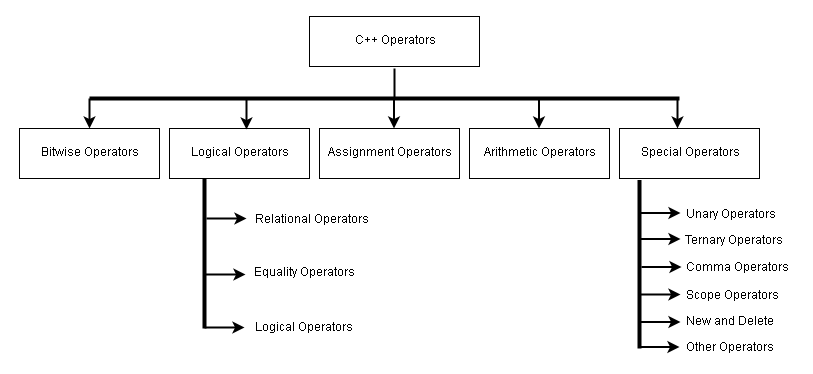
The C++ programming language offers different types of operators. These operators are used in expressions that evaluate to a single value. Sometimes the operator is used in decision making that changes the flow of the program.
Here is the diagram that classifies C++ operators into different categories.
Arithmetic Operators
| Operator | Description |
| + | Addition operation |
| – | Subtraction operation |
| * | Multiplication |
| / | Division operation |
| % | Mod operation ( gives remainder) |
Assignment Operators
| Operator | Description |
| = | Assigns right-value to left-value |
| += | Assigns ( left-value + right-value) to left-value |
| -= | Assigns ( left-value – right-value) to left-value |
| *= | Assigns ( left-value * right-value) to left-value |
| /= | Assigns ( left-value/ right-value ) to left-value |
| %= | Assigns (left-value % right-value) to left-value |
| >>= | Right-shift and then assign to left-value |
| <<= | Left-shift and then assign to left-value |
| &= | Bitwise AND operation and then assign to left-value |
| |= | Bitwise OR operation and then assign to left-value. |
| ~= | Bitwise complement and then assign to left-value |
Note: In the following expression is left-value and  is right-value.
A = 10;
Logical Operators
| Operator | Description |
| < | Less than |
| > | Greater than |
| <= | Less than or equal to |
| >= | Greater than or equal to |
| == | Equal to |
| != | Not equal to |
| && | AND operation |
| || | OR operation |
| ! | NOT operation |
Bitwise Operators
| Operator | Description |
| & | Bitwise AND operation |
| | | Bitwise OR operation |
| ^ | Bitwise Exclusive OR (XOR) operation |
| >> | Bitwise Right Shift |
| << | Bitwise Left Shift |
| ~ | Bitwise Complement |
Unary Operators
| Operator | Description |
| * | Pointer reference |
| & | Reference to address of a variable |
| – | Negative value |
| ! | Not operation |
| ~ | Bitwise complement |
| ++ | Increment operator |
| — | Decrement operator |
| type | Forced conversion to another data type |
| sizeof | Size of a data type in bytes |