Program to Solve Linear Equations using Gauss Elimination Method
The linear equations in a matrix form are \Large A \cdot X = B and we want to find the values of X. You can solve it in many ways, and one of the simplest ways to solve \Large A \cdot X = B system of equations is Gauss elimination method. It is also known as Reduction method.
This example program solves any kind of linear equation of matrix form using Gauss elimination method.
Problem Definition
This program asks users to input the number of equations in the system of linear equations. The system of the equation looks like the following if the number of an equation is \Large 3.
Example,
\Large \begin{aligned}&x_1 + x_2 + x_3 = 2\\ \\
&2x_1 - 3x_2 + 2x_3 = -6 \\ \\
&x_1 + x_2 - 3x_3 = 6
\end{aligned}
The same system of equation in \Large A \cdot X = B form will be
\Large \begin{bmatrix}1 & 1 & 1 \\2& -3 & 2 \\ 1&1& -3 \end{bmatrix} \cdot \begin{bmatrix}x_1 \\ x_2\\ x_3\end{bmatrix} = \begin{bmatrix}2\\-6\\6\end{bmatrix}You want to find the solution to \Large x_1, x_2 and \Large x_3using the Gauss elimination method. The Gauss elimination method is done using a series of row and column operations on the coefficient matrix. The coefficient matrix must be a square matrix otherwise the equation will not work.
For example, if we perform a series of row operation on the above matrix.
\Large \begin{aligned}
&R_2 \rightarrow R_2 - 3R_1\\
&R_3 \rightarrow R_3 - R_1
\end{aligned}
where \Large R_2 is row2 and \Large R_3 is row3.
You get an upper triangular matrix as shown below. The equation is in the form \Large A \cdot X = B.
\Large \begin{bmatrix}1 & 1 & 1 \\0&-5&0\\0&0& -4 \end{bmatrix} \cdot \begin{bmatrix}x_1 \\ x_2\\ x_3\end{bmatrix} = \begin{bmatrix}2\\-10\\4\end{bmatrix}Note that whatever operations performed on \Large A will also be performed on \Large B. Finally, by “back substitution”, you can find values of other solutions.
for example,
 \Large \begin{aligned}&-5x_2 = -10\\
& x_2 = 2\\\\
&x_1 + 2 - 1 = 2\\
&x_1 =1\\\\
&-4x_3=4\\
&x_3=-1\end{aligned}
Now we have \Large x_1 = 1 , x_2 = 2 and \Large x_3 = -1 as solution the system of equations.
Program Codes
/* Program to solve the given system of equations

x1 - x2 + x3 = 1
-3x1 + 2x2 - 3x3 = -6
2x1 - 5x2 + 4x3 = 5

We will use Gauss Elimination Method to solve it */

#include <stdio.h>
#include <stdlib.h>
#include <math.h>

int main()
{

    int n,i,j,k;
    float a[10][10]={0.0}, x[10]={0.0};
    float pivot = 0.0;
    float factor = 0.0;
    float sum = 0.0;
    printf("Solution by Simple Gauss Elimination \n\n");

    printf("How many elements of the equations:");

    scanf("%d",&n);

    printf("%d\n",n);

    printf("\n\t Input Coefficients a[i, j+1], row-wise\n");

for(i=1;i<=n;i++)
{

    for(j=1;j<=n+1;j++)
    {
        scanf("%f",&a[i][j]);
    }

}
    printf("\n\n");
for(i=1;i<=n;i++)
{
    for(j=1;j<=n+1;j++)
    {

        printf("\t%10.0f",a[i][j]);

    }

    printf("\n\n");

}

for(k=1;k<=n-1;k++)
{

    if(a[k][k]==0.0)
    {

        printf("error");

    }
    else
    {
        pivot = a[k][k];
        for(j=k;j<=n+1;j++)
            a[k][j]= a[k][j]/pivot;

for(i=k+1;i<=n;i++)
{
    factor = a[i][k];

    for(j = k;j<=n+1;j++)
    {
        a[i][j] = a[i][j] - factor * a[k][j];
    }
}

}

if(a[n][n]==0)

printf("error");

else
{

    x[n] = a[n][n+1]/a[n][n];

    for(i=n-1;i>=1;i--)
    {

        sum = 0.0;

        for(j=i+1;j<=n;j++)

        sum = sum + a[i][j] * x[j];

        x[i]= ( a[i][n+1]- sum )/a[i][i];

}

}

}

for(i=1;i<=n;i++)
{

    printf("\n\tx[%1d]=%10.4f",i,x[i]);

}

    system("PAUSE");
    return 0;

}
#include <iostream>
#include <vector>
using namespace std;
int main() {
int n;
cout << "Number of variables: ";
cin >> n;
vector<vector<float>> a(n, vector<float>(n + 1));
vector<float> x(n, 0.0);
cout << "Enter augmented matrix row-wise (coefficients + constants):\n";
for (int i = 0; i < n; i++)
for (int j = 0; j < n + 1; j++)
cin >> a[i][j];
// Forward elimination
for (int k = 0; k < n - 1; k++) {
if (a[k][k] == 0) {
cout << "Error: Zero pivot element!\n";
return 1;
}
for (int i = k + 1; i < n; i++) {
float factor = a[i][k] / a[k][k];
for (int j = k; j < n + 1; j++)
a[i][j] -= factor * a[k][j];
}
}
// Back-substitution
for (int i = n - 1; i >= 0; i--) {
float sum = 0.0;
for (int j = i + 1; j < n; j++)
sum += a[i][j] * x[j];
x[i] = (a[i][n] - sum) / a[i][i];
}
cout << "\nSolution:\n";
for (int i = 0; i < n; i++)
cout << "x[" << i + 1 << "] = " << x[i] << "\n";
return 0;
}
import java.util.Scanner;

class GaussElimination {
    public static void main(String[] args) {
        Scanner sc = new Scanner(System.in);

        // Number of variables
        int n = 3;
        float[][] a = new float[n][n + 1]; // augmented matrix
        float[] x = new float[n];          // solution vector

        System.out.println("Enter augmented matrix row-wise (coefficients + constants):");
        for (int i = 0; i < n; i++)
            for (int j = 0; j < n + 1; j++)
                a[i][j] = sc.nextFloat();

        // Forward elimination
        for (int k = 0; k < n - 1; k++) {
            if (a[k][k] == 0) {
                System.out.println("Error: Zero pivot element!");
                return;
            }
            for (int i = k + 1; i < n; i++) {
                float factor = a[i][k] / a[k][k];
                for (int j = k; j < n + 1; j++)
                    a[i][j] -= factor * a[k][j];
            }
        }

        // Back-substitution
        for (int i = n - 1; i >= 0; i--) {
            float sum = 0;
            for (int j = i + 1; j < n; j++)
                sum += a[i][j] * x[j];
            x[i] = (a[i][n] - sum) / a[i][i];
        }

        // Print solution
        System.out.println("\nSolution:");
        for (int i = 0; i < n; i++)
            System.out.println("x[" + (i + 1) + "] = " + x[i]);

        sc.close();
    }
}
n = int(input("Number of variables: "))
a = []
print("Enter augmented matrix row-wise (coefficients + constants):")
for _ in range(n):
row = list(map(float, input().split()))
a.append(row)
x = [0.0 for _ in range(n)]
# Forward elimination
for k in range(n - 1):
if a[k][k] == 0:
print("Error: Zero pivot element!")
exit()
for i in range(k + 1, n):
factor = a[i][k] / a[k][k]
for j in range(k, n + 1):
a[i][j] -= factor * a[k][j]
# Back-substitution
for i in range(n - 1, -1, -1):
sum_ = 0
for j in range(i + 1, n):
sum_ += a[i][j] * x[j]
x[i] = (a[i][n] - sum_) / a[i][i]
print("\nSolution:")
for i in range(n):
print(f"x[{i+1}] = {x[i]:.4f}")Output
   2             1             1            1

  -6             2            -3            2

   6             1             1           -3

       x[1]=     1.0000
       x[2]=     2.0000
       x[3]=    -1.0000
Press any key to continue . . . Program To Print Floyd Triangle
There are number of ways to display and Floyd triangle display consecutive numbers in different row. In this example, you will write a program to print Floyd triangle.
Problem Definition
The program ask for number of row to print. When the user input the number, a list of consecutive numbers are printed for each row. The number of elements for each row also grows.
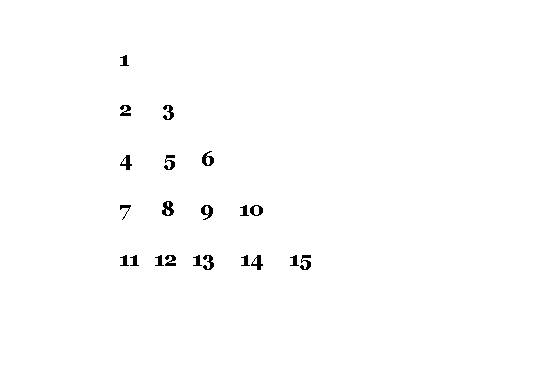
Suppose the user input is \Large 5 , then five rows of consecutive number are printed and each row has one more number than the previous. See the figure below.
Program Codes – Floyd Triangle
#include <stdio.h>

int main()
{
    int n, i, c, a = 1;

    printf("Enter the Number of Rows for Floyd Triangle:\n");
    scanf("%d", &n);

    for (i = 1; i <= n; i++)
    {
        for (c = 1; c <= i; c++)
        {
            printf("%d\t", a);
            a++;
        }
        printf("\n");
    }

    return 0;
}
#include <iostream>
using namespace std;
int main()
{
int n, a = 1;
cout << "Enter the Number of Rows for Floyd Triangle:\n";
cin >> n;
for (int i = 1; i <= n; i++)
{
for (int c = 1; c <= i; c++)
{
cout << a << "\t";
a++;
}
cout << endl;
}
return 0;
}Output
Enter the Number of Rows for Floyd Triangle:
5

1
2       3
4       5       6
7       8       9       10
11 12 13 14 15C Program for Tower of Hanoi Problem using Recursion
The Tower of Hanoi is an interesting recurrence relation problem. In this example, you will write a program to solve the Tower of Hanoi using a recursive function.
Before you begin, learn basics of C programming language, if you the basics skip this step and continue reading.
Problem Definition
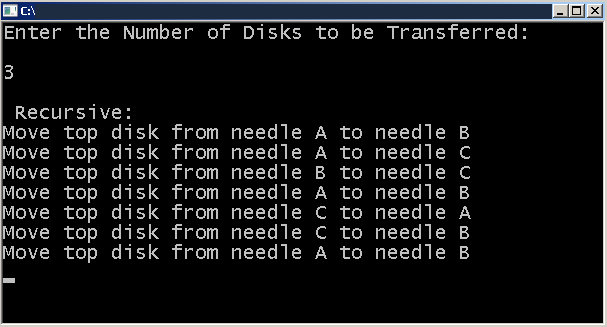
Suppose you are given 3 disks of different size and 3 pegs. Each peg is labeled – A, B and C and smaller disk is always place on top of larger disks. The peg A has all three disks and your task is to move all the disks to the peg C. But there are rules to move disk between pegs.
- You can move only one disk at a time.
- You cannot place a larger disk on top of smaller disk.
- You should solve the problem with minimum disk movements.
If the solution is achieved in 10 steps, a 12 step solution is not acceptable by rule 3.
Learn more about Tower of Hanoi in the following article.
In this example, a recursive method is used to solve the Tower of Hanoi problem.
Program Source Code
#include <stdio.h>
#include <stdlib.h>

void hanoirecursion(int num,char ndl1, char ndl2, char ndl3)
{
    if(num == 1)
    {
    printf("Move top disk from needle %c to needle %c\n",ndl1,ndl2);
    return;
    }

hanoirecursion(num-1,ndl1,ndl3,ndl2);
printf("Move top disk from needle %c to needle %c\n",ndl1,ndl2);
hanoirecursion(num-1,ndl3,ndl2,ndl1);

}

int main()
{
    int no;
    printf("Enter the Number of Disks to be Transferred:\n\n");
    scanf("%d",&no);

if(no<1)
{
    printf("\n There is nothing to move:\n");
}
else
{
    printf("\n Recursive:\n");
    hanoirecursion(no,'A','B','C');
}

getch();
return 0;
}
Output
Related Articles: –
- C Program to Reverse a Number using Recursion.
- C Program to Compute Nth Factorial using Recursion.
- C Program to Compute Nth Fibonacci Number.
- C Program to Manipulate Matrices.
C Program To Output Current Date And Time
C programming language has several predefined macros. In this article we will demonstrate the usage of two important macros.
Before you begin with the example, learn C programming basics. If you know them already, skip and continue with the examples.
Problem Definition
As we mentioned earlier, there are two important macros related to Date and Time. This example program demonstrate the usage of these macros.
__DATE__
The data macro expands to a string constant that display date when the preprocessor was run. It display the date in following format – “ Jan 23 2012 “. If it cannot show the data then, display – “??? ?? ????“.
__TIME__
The time macro expands to a string that shows the current time when the preprocessor ran on the system. It display the time in following format – “12:55:35“. If date cannot be displayed then it shows – “??? ?? ????”
Program Source Code
#include <stdio.h>
#include <stdlib.h>
int main()
{
     printf("Current Date: %s\n\n",__DATE__);
     printf("Current Time: %s\n\n",__TIME__);
     system("PAUSE");
     return 0;
}
Output
Current Date: Jul 11 2018
Current Time: 22:41:38
Press any key to continue . . ._Program to Generate Random Numbers
C language has a built-in function to generate random numbers. In this program, we will use that function to generate a few random numbers.
Problem Definition
The program uses the \Large random() function from C standard library and generates random numbers. Its only requirement is a max limit to the random numbers generated. Therefore, the random number is between \Large 0 to max which is supplied by the user. Also, we keep the \Large random() function inside of a loop so that this process is repeated for \Large n times. The value of \Large n is input by the user.
Program Source Codes
#include <stdio.h>
#include <stdlib.h>

int main()
{

    int n, max, num, c;

    printf("Enter Number of Random Numbers You Want:");
    scanf("%d", &n);

    printf("Enter Maximum value for the Random Numbers:");
    scanf("%d", &max);

    printf("%d random numbers from 0 to %d\n\n",n,max);

for(c = 1; c <= n; c++)
{

    num = rand() % max + 1;
    printf("%d\n",num);

}

system("PAUSE");
return 0;

}
#include <iostream>
#include <cstdlib>
#include <ctime>
using namespace std;
int main() {
int n, max, num;
cout << "Enter Number of Random Numbers You Want: ";
cin >> n;
cout << "Enter Maximum value for the Random Numbers: ";
cin >> max;
cout << "\n" << n << " random numbers from 1 to " << max << "\n\n";
srand(time(0)); // seed the random number generator
for (int c = 1; c <= n; c++) {
num = rand() % max + 1;
cout << num << endl;
}
return 0;
}import java.util.Random;
import java.util.Scanner;
class RandomNumbers {
public static void main(String[] args) {
Scanner sc = new Scanner(System.in);
Random rand = new Random();
System.out.print("Enter Number of Random Numbers You Want: ");
int n = sc.nextInt();
System.out.print("Enter Maximum value for the Random Numbers: ");
int max = sc.nextInt();
System.out.println("\n" + n + " random numbers from 1 to " + max + "\n");
for (int c = 1; c <= n; c++) {
int num = rand.nextInt(max) + 1;
System.out.println(num);
}
sc.close();
}
}import random
n = int(input("Enter Number of Random Numbers You Want: "))
max_val = int(input("Enter Maximum value for the Random Numbers: "))
print(f"\n{n} random numbers from 1 to {max_val}\n")
for _ in range(n):
num = random.randint(1, max_val)
print(num)Output
Enter Number of Random Numbers You Want: 10
Enter Maximum value for the Random Numbers: 1000
10 random numbers from 0 to 1000

42
468
335
501
170
725
479
359
963
465
Press any key to continue . . . _C Program To Write A File
C programming allows to read or write files. In this program, a user will enter some text which will be stored in a file using file operations in C.
Learn C programming concepts, before you begin with this example.
Problem Definition
The program demonstrate the C language ability to write to file and it is achieved with the help of following C language features.
FILE – a file structure data type which is usually hidden from users.
fopen() – builtin function to open a file in buffer, so that you can read or write to file.
fprintf() – a print function to write to file from console.
fclose() – close the file and file pointer.
Program Source Code
Before you start executing the program, make sure you have created a file called demo.txt in the same directory where the program resides.
#include <stdio.h>
#include <stdlib.h>
int main()
{
    char c[1000];
    FILE *fptr;
    fptr = fopen("demo.txt","w");
    if(fptr == '\0')
    {
        printf("Error!!\n");
        exit(1);
    }
    printf("Enter a Sentence:\n\n");
    gets(c);
        fprintf(fptr,"%s", c);
        fclose(fptr);
    system("PAUSE");
    return 0;
}
Output
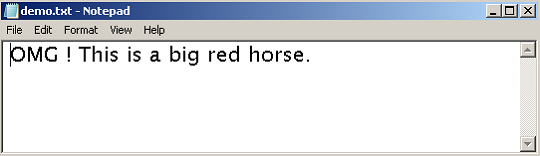
When run the program, it will ask for a sentence from user as input. See the diagram below, type the sentence you want to write to the file and press enter.
Enter a Sentence:

OMG ! This is a big red horse.
Press any key to continue . . .
You must go to the directory where the C program resides and open the file – demo.txt. The content of the console is written to the file successfully.
Program To Compute Sum Of Geometric Progression
In this post, you will learn to write a program to compute sum of geometric progression.
A geometric progression is a sequence of numbers where each term is obtained by multiplying the previous term by a fixed number, called the common ratio.
The program receive two numbers and compute the sum of geometric progression.
How does the program works?
The program does the following:
- Implements the geometric progression ,
- Compute the input values when it receives it,
- Output the results.
Problem Definition
A geometric progression has two conditions.
- \Large a_1 = a where \Large a is the first term and not equal to \Large 0.
- \Large a_n = a_{n-1}r for \Large n \geq 1
\Large r is called the common ratio.
\Large \begin{aligned} &Suppose \hspace{2px} a = 1 \hspace{4px} and\hspace{4px} r = 5, \hspace{2px} then\\ \\&a_1=1\\ &a_2= 5,\\&a_3=25\\& a_4= 125\end{aligned}Basically, you can compute any term using the following formula.
\Large \begin{aligned}a_n \hspace{1ex} = \hspace{1ex} a \cdot \hspace{1ex} r_{n-1}\end{aligned}The summation of a geometric progression is given below.
\Large \begin{aligned} 1\hspace{1ex} + \hspace{1ex} x \hspace{1ex} + \hspace{1ex} x^2\hspace{1ex} + \hspace{1ex} x^3 \hspace{1ex} + \hspace{1ex} x^4 \hspace{1ex} + \hspace{1ex} \cdots \hspace{1ex} + \hspace{1ex} x^{n-1} \hspace{1ex} \cdots\end{aligned}The summation can be translated into a program for any given \Large x value and \Large n value.
The program for geometric series is given below.
Program Source Codes
#include <stdio.h>
#include <stdlib.h>
#include <math.h>
int main()
{
    int geo_sum, i, x,n;
    geo_sum = 1;
    printf("Enter the value for x:");
    scanf("%d",&x);
    printf("Enter the value for n:");
    scanf("%d",&n);
if(n <= 0 || x <= 0)
{
    printf("Incorrect Value!!\n\n");
}
else
{
    printf("The value is valid!!\n\n");
}
for(i = 1;i <= n; i++)
{
    geo_sum = geo_sum + pow(x,i);
}
printf("The Sum of Series = %d\n",geo_sum);
system("PAUSE");
return 0;
}
#include <iostream>
#include <cmath>
using namespace std;
int main()
{
int x, n;
long long geo_sum = 1;
cout << "Enter the value for x: ";
cin >> x;
cout << "Enter the value for n: ";
cin >> n;
if (n <= 0 || x <= 0)
{
cout << "Incorrect Value!!" << endl;
return 0;
}
else
{
cout << "The value is valid!!" << endl;
}
for (int i = 1; i <= n; i++)
{
geo_sum += pow(x, i);
}
cout << "The Sum of Series = " << geo_sum << endl;
return 0;
}import java.util.Scanner;
class GeometricSeries
{
public static void main(String args[])
{
Scanner sc = new Scanner(System.in);
int x, n;
long geo_sum = 1;
System.out.print("Enter the value for x: ");
x = sc.nextInt();
System.out.print("Enter the value for n: ");
n = sc.nextInt();
if (n <= 0 || x <= 0)
{
System.out.println("Incorrect Value!!");
return;
}
else
{
System.out.println("The value is valid!!");
}
for (int i = 1; i <= n; i++)
{
geo_sum += Math.pow(x, i);
}
System.out.println("The Sum of Series = " + geo_sum);
sc.close();
}
}import math
geo_sum = 1
x = int(input("Enter the value for x: "))
n = int(input("Enter the value for n: "))
if n <= 0 or x <= 0:
print("Incorrect Value!!")
else:
print("The value is valid!!")
for i in range(1, n + 1):
geo_sum += math.pow(x, i)
print("The Sum of Series =", int(geo_sum))
Output
The input values for the program is \Large r = x = 2 and \Large n = 10. If we use the values in the geometric expression as follows.
1 + 2 + 22 + 23 + 24 + 25 + 26 + 27 + 28 + 29
= 1  + 2 + 4 + 8 + 16 + 32 + 64 + 128 + 256 + 512 + 1024
= 2047
Therefore, the output is correct.
Enter the value for x:2
Enter the value for n:10
The value is valid!!
The Sum of Series = 2047
Press any key to continue . . . _C Program To Convert Binary Number To 2’s Complement
A 2’s complement is used for binary operations in a computer system. In this example program, you are going to receive a binary string and convert the string into 2’s complement in two steps.
Learn the basics of C programming before you begin with the example. Skip this step if you already familiar with these concepts.
- C Program Structure.
- How to install Turbo C++ 3.2 Compiler.
- C Data Types.
- C Flow Control Structures.
- C For Loop.
- C Functions.
Problem Definition
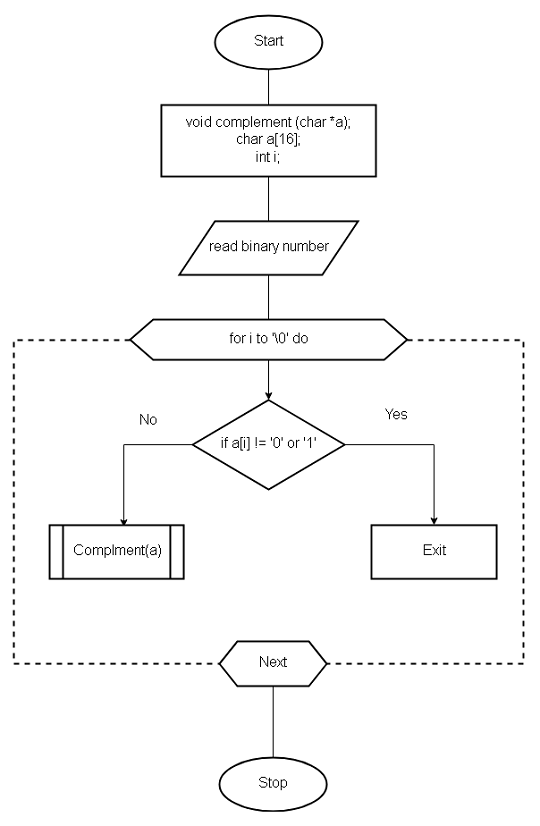
The program ask for a input binary string. To convert this binary string in to 2’s complement, you need two steps.
- Convert the input binary string to 1’s complement.
- Add 1 to the 1’s complement obtained.
For example, suppose a the input string is 1100.
Step 1: The 1’s complement can be obtained by converting 1’s in to 0 and 0s into 1s.
\begin{aligned}1100 \hspace{3px}becomes \hspace{3px}0011\end{aligned}Step 2: Add 1 to the 1’s complement to get 2’s complement of the number.
This step requires you to understand the binary math.
\begin{aligned}&1 + 1 = 10\\&1 + 0 = 1\\&0 + 1 = 1\\&0 + 0 = 0\end{aligned}Using the above, you add 1 to the 1’s complement.
\begin{aligned}&\hspace{2px}0\hspace{2px}0\hspace{2px}1\hspace{2px}1\\&\hspace{8px} + 1 \\&----\\&\hspace{2px}0\hspace{2px}1\hspace{2px}0\hspace{2px}0\\&----\end{aligned}Therefore,
The two’s complement of the number is 0100.
Flowchart
Program Source Code
#include <stdio.h>
#include <stdlib.h>
void complement(char *a);
int main()
{
    char a[16];
    int i;
    printf("Enter the binary number:");
    gets(a);
for(i=0;a[i] != '\0';i++)
{
    if(a[i] != '0' && a[i]!= '1')
    {
    printf("The number entered is not a binary number");
    printf("Enter the correct number!");
    exit(0);
    }
}
complement(a);
getch();
system("PAUSE");
return 0;
}

void complement (char *a)
{
    int l, i, c = 0;
    char b[16];
    l = strlen(a);
/* Get the 1's complement of the given binary string */
    for(i = l-1;i>=0;i--)
    {
        if(a[i] == '0')
        {
        b[i]= '1';
        }
        else
        {
        b[i] = '0';
        }
    }
/* Add 1 to the 1's complement obtained in the previous step */
    for(i = l-1;i>=0;i--)
    {
    if(i == l-1)
    {
        if(b[i]== '0')
        {
        b[i] = '1';
        }
        else
        {
        b[i] == '0';
        c = 1;
        }
    }
    else
    {
        if(c==1 && b[i] == '0')
        {
        b[i] = '1';
        c = 0;
        }
        else if(c == 1 && b[i] == '1')
        {
        b[i] = '0';
        c = 1;
        }
    }
    }
b[l] = '\0';
printf("The 2's Complement is %s\n", b);
}
Output
Enter the binary number:11000101
The 2's Complement is 00111011
The given input string here is 11000101 and the final output is its 2’s complement.
\begin{aligned}11000101 \hspace{2px} has\hspace{2px} 1's \hspace{2px} complement \hspace{2px} of\hspace{2px} 00111010\end{aligned}And if you add 1 to 1’s complement.
\begin{aligned}00111010 + 1 \rightarrow 00111011\end{aligned}Therefore, the 2’s complement is 00111011.
C Program to Find Max and Min Using Pointers
The program receives an array of numbers as input and finds the minimum number and a maximum number using pointers.
This program is intended for intermediate level learners familiar with the concept of pointers. If you are not familiar with pointer concepts, visit the link below to learn about pointers with an example.
C Programming Tutorial – Pointers
You can also learn about implementing linear search and binary search algorithms, it will strengthen your concepts.
Learn implementation of Linear Search and Binary Search
Problem Definition
We want to write a program to find the MAX and MIN using pointers in an array of numbers. The program accept 10 numbers from user and store them in an array of integers.
We then use two pointers to locate the maximum and the minimum of the array. The pointer traverse through all the values of the array and compares it with value of max which is 0 at the beginning.
If the number in array greater than max current value, then make the new number as new max value, otherwise keep looking for another max. The same logic applies to minimum of array.
Flowchart – Find Max and Min using Pointers
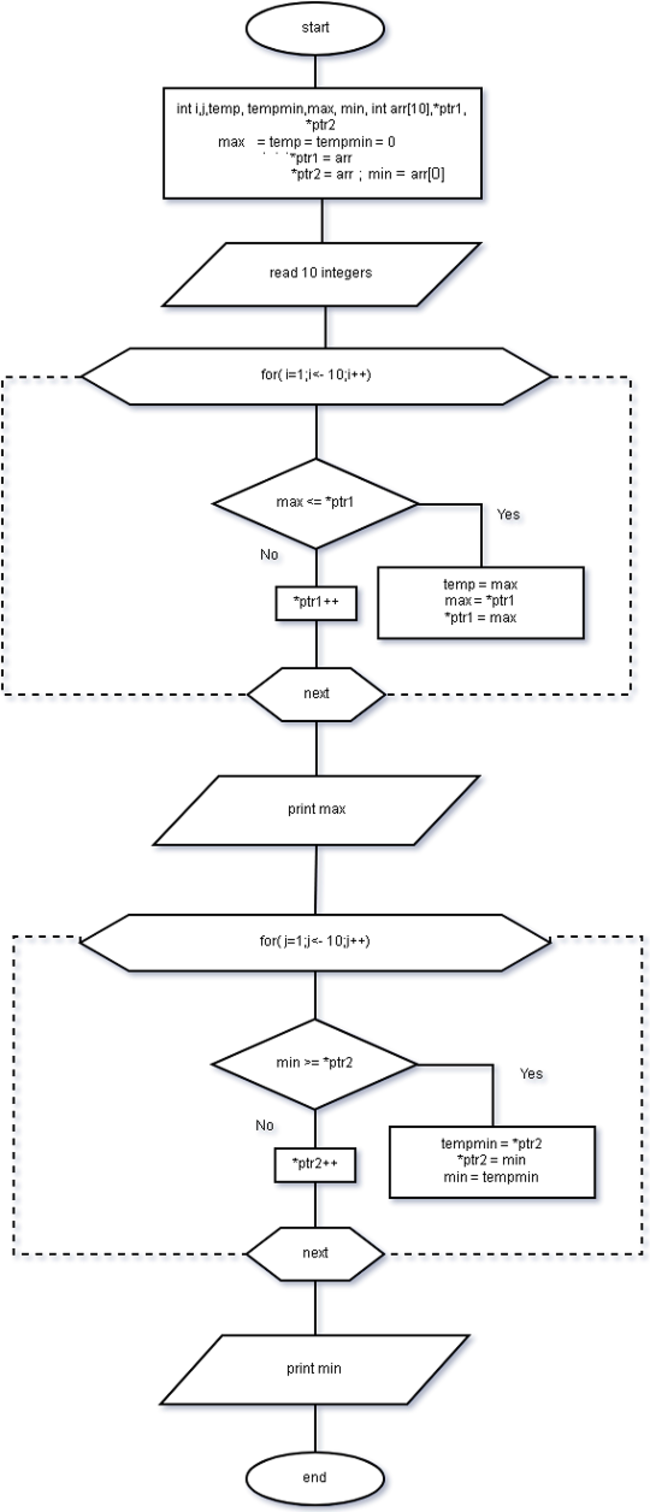
Program Source Code – Find MAX and MIN using Pointers
#include <stdio.h>

#include <conio.h>

int main()

{

    int i,j,temp,tempmin, max,min;

    max = temp = tempmin = 0;

    int arr[10];

    min = arr[0];

    printf("Enter up to 10 numbers:\n");

    for(i=0;i<=10;i++)
    {

        scanf("%d",&arr[i]);

    }

    int *ptr1, *ptr2;

    ptr1 = arr;

    ptr2 = arr;

    for(i=1;i<=10;i++)
    {

      if(max <= *ptr1)
      {

     temp = max;

     max = *ptr1;

     *ptr1 = temp;

     }

     ptr1++;

   }

    printf("MAX=%d\n",max);

// finding minimum

for(j=1;j<=10;j++) {

    if(min >= *ptr2)
    {

        tempmin = *ptr2;

        *ptr2 = min;

        min = tempmin;

    }

    ptr2++;

    }

    printf("MIN=%d\n",min);

    system("PAUSE");

    return 0;

}
Output – Find MAX and MIN using Pointers
The output of the program is given below. The array stores the 10 numbers and MAX and MIN is found using pointers. The MAX value in example is 87 and MIN value is 5 after the program completes.
Enter up to 10 numbers:
23
5
66
87
34
65
32
21
25
85
45
MAX=87
MIN=5C Program To Write A String Copy Function
This program copy text from one string to another string character-by-character with the help of string copy function. C programming language does have a builtin string copy function called strcpy() located in String.h header file.
In this example, you will write a program that uses a user-defined string copy function and does not use the builtin function.
This program is written using Dev-C++ compiler installed on a Windows 7 64-bit machine. If you want to use a different compiler, then modify the program source code to get an error-free program.
Also, before you begin, learn following C programming concepts if unfamiliar with them.
Problem Definition
The program reads a string and then copy that string to another string and display the results.Each string is an array of characters with a null character at the end of the string. Make sure that the size of the string is same or greater than string 2 size, otherwise, there will be problem copying string 1 to string 2.
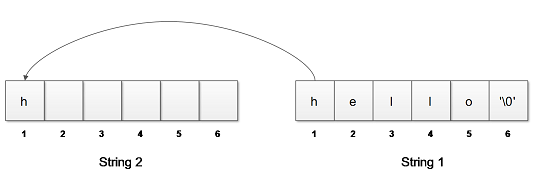
Start copying string character by character from string 1 to string 2, until we reach a null character.
Assign a null character to the string 2 when all characters of string 1 are copied successfully. This is because every string in C language must end with a ‘\0’.
For Example:-
Suppose the program reads “hello” to string 1, and then the starts copying string 1 to string 2 one character at a time until a null is encountered. See figure below.
Flowchart – String Copy Function
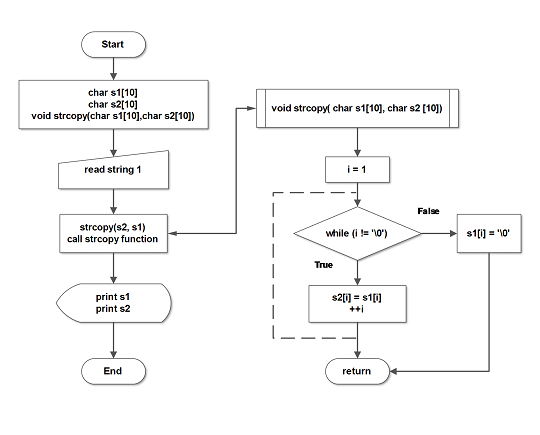
Program Code – String Copy Function
#include <stdio.h>
#include <string.h>
#include <conio.h>
int main ()
{
    char s1 [10];
    char s2 [10];
    int i;
    void strcopy (char s2 [10], char s1 [10]);
    /* Read the String 1 */
    printf ("Enter String 1 :");
    gets (s1);
    /* Copy the String 1 to String 2 */
    strcopy (s2, s1);
    /* Print both the functions */
        for (i=0; i<35; i++)
    printf("_");printf("\n\n");
    printf("String2=%s \n\nString1=%s\n",s2,s1);
    for(i=0;i<35;i++)
    printf("_");printf("\n\n");
    system("PAUSE");
    return 0;
}
void strcopy (char s2[10], char s1[10])
{
    int i= 0;
    while(s1[i] !='\0')
    {
        s2[i] = s1[i];
        ++i;
    }
    s2[i]='\0';
}
Output
Enter String 1:Hello world
__________________________________________
String2=Hello world

String1=Hello world
__________________________________________