Program to Reverse a Number using Recursion
The program uses recursion to reverse an input number. A function is recursively called to extract each digit from the number and place it in reverse order. The final output is a reversed number.
Problem Definition
The program receives an input number and reverse each by extracting the digits one at a time from original number n. It starts with two initial conditions. The remainder r = 0 and if n=0 then return 0.
The procedure to reverse the number 567 is shown below. The program does the following tasks to reverse the input number.
- Extract a digit from the unit position.
- Each iteration multiply the number with 10 to reverse it.
- Next extracted digit is added to previously obtained result.
- After final extraction the number is completely reversed.
Go through each step below to understand the working of the reverse() function.
Step 1: Extract the number 7
\begin{aligned}&r = r + n \hspace{2mm}\% \hspace{2mm}10\\ \\
&r = 0 + 567 \hspace{2mm}\% \hspace{2mm}10\\ \\
&t = 7
\end{aligned}
Step 2: Change the position of a number from unit place to tenth place.
\begin{aligned}
&r = r * 10\\ \\
& r = 7 * 10\\ \\
 &r = 70
\end{aligned}
Step 3: Get ready for the next extraction.
\begin{aligned}
&= reverse (n/10)\\ \\
&= reverse (567/10)\\ \\
&= reverse (56)
\end{aligned}
Step 4: Extraction the second digit when value of r = 70 from Step 2.
\begin{aligned}
&r = 70 + n \% 10\\ \\
&r = 70 + 56 \% 10\\ \\
&r = 70 + 6\\ \\
&r = 76
\end{aligned}
Step 5: Change position of r to tenth place to hundredth place.
\begin{aligned} &r = r * 10\\ \\
&r = 76 * 10\\ \\
&r = 760
\end{aligned}
Step 6: Get ready for a new n value.
\begin{aligned}
&= reverse (n/10)\\ \\
& = reverse ( 56/1)\\ \\
& = reverse (5)
\end{aligned}
Step 7: Extract last digit from original number, when r = 760
\begin{aligned}
&r = r + n \% 10\\ \\
& r = 760 + 5\\ \\
&r = 765
\end{aligned}
The number is successfully reversed.
Note:- The above steps are demonstration of reversing a 3 digit number, hence, the number of steps are limited. If you take a larger number there will be more steps.
Flowchart – reverse a number using recursion
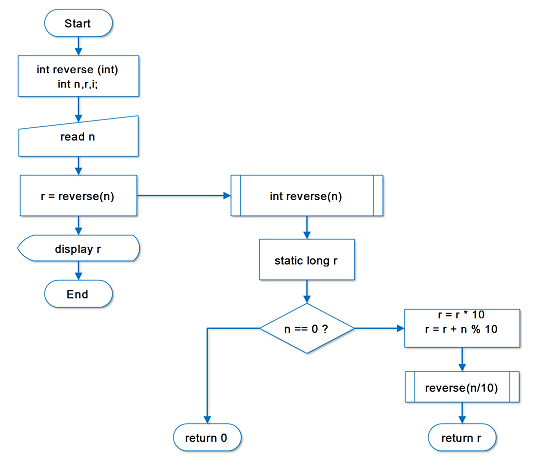
Program Codes – reverse a number using recursion
#include
#include
int reverse(int);
int main()
{
        int n, r, i;
        printf("Enter a Number to Reverse:");
        scanf("%d", & n);
        r = reverse(n);
        for (i = 0; i < 30; i++)
            printf("_"); printf("\n\n");
            printf("%d\n\n", r);
        for (i = 0; i < 30; i++)
            printf("_"); printf("\n\n");
        system("PAUSE");
        return (0);
}
/* The Reverse Function */
int reverse(int n)
{
        static long r = 0;
        if (n == 0)
        {
            return 0;
        }
        r = r * 10;
        r = r + n % 10;
        reverse(n / 10);
        return r;
}
#include <iostream>
using namespace std;
long reverse(int n)
{
static long r = 0; // static variable to retain value
if (n == 0)
return 0;
r = r * 10 + (n % 10);
reverse(n / 10);
return r;
}
int main()
{
int n;
long r;
cout << "Enter a Number to Reverse: ";
cin >> n;
r = reverse(n);
for (int i = 0; i < 30; i++)
cout << "_";
cout << "\n\n";
cout << r << "\n\n";
for (int i = 0; i < 30; i++)
cout << "_";
cout << "\n";
return 0;
}
import java.util.Scanner;

class ReverseNumber {

    static long r = 0;   // static variable

    static long reverse(int n) {
        if (n == 0) {
            return 0;
        }
        r = r * 10 + (n % 10);
        reverse(n / 10);
        return r;
    }

    public static void main(String[] args) {
        Scanner sc = new Scanner(System.in);

        System.out.print("Enter a Number to Reverse: ");
        int n = sc.nextInt();

        long result = reverse(n);

        for (int i = 0; i < 30; i++)
            System.out.print("_");
        System.out.println("\n");

        System.out.println(result + "\n");

        for (int i = 0; i < 30; i++)
            System.out.print("_");
        System.out.println();

        sc.close();
    }
}
def reverse(n, r=0):
    if n == 0:
        return r
    return reverse(n // 10, r * 10 + n % 10)


n = int(input("Enter a Number to Reverse: "))
result = reverse(n)

print("_" * 30)
print("\n", result, "\n")
print("_" * 30)
Output
The program ask for an input number, when you enter a number – for example, 244. The program reverses the digits of the number and prints on the console. The solution is 442.
Enter a Number to Reverse: 244
_______________________________
442
_______________________________Program To Identify A Quadrilateral
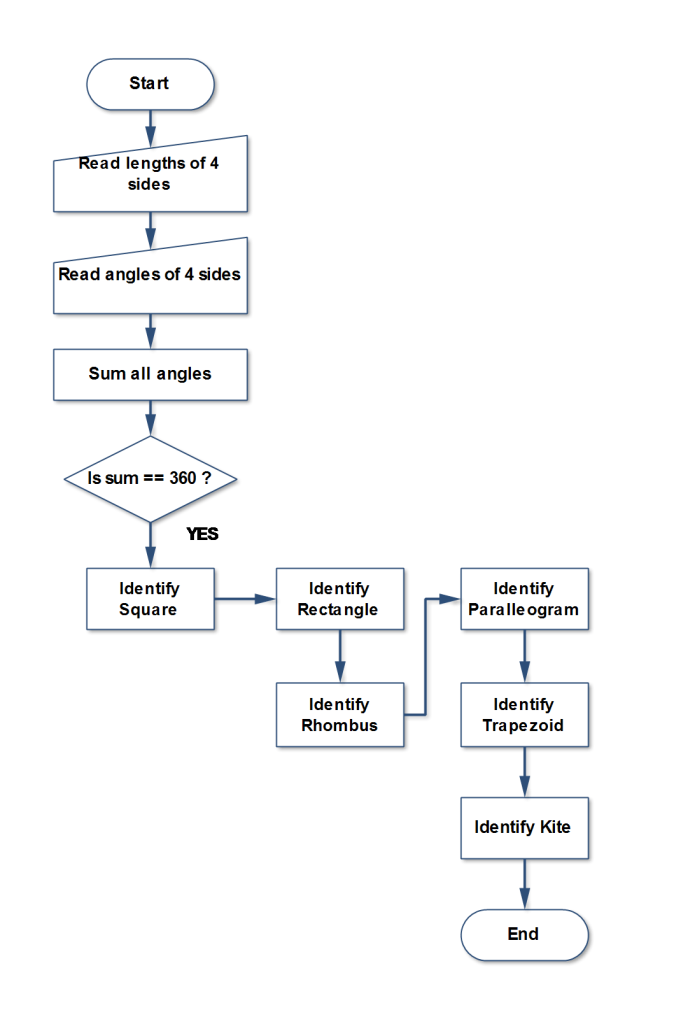
The program to identify a quadrilateral read inputs – length of sides and angles made by the quadrilateral shape and prints the shape name as output.
Before you practice this program, you must go through the concepts of quadrilateral shapes and their differences. See the next section.
Problem Definition
A quadrilateral is a polygon shape that has \Large 4 sides and corners that make \Large 4 angles. The sum of those angles must be equal to \Large 360 \hspace{4px} degrees. There are many types of quadrilateral shapes, you will find a brief description of each shape below.
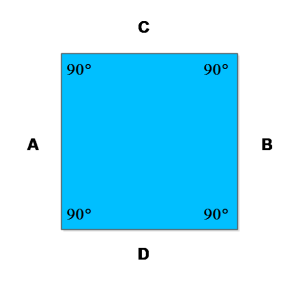
Square
A square has \Large 4 equal sides and \Large 4 right angles at each corner.
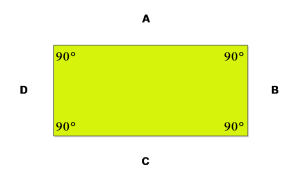
Rectangle
A rectangle has \Large 4 sides with parallel sides are of the same length and \Large 4 corners are right angles. The rectangle has a longer side and a shorter side.
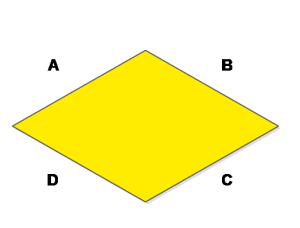
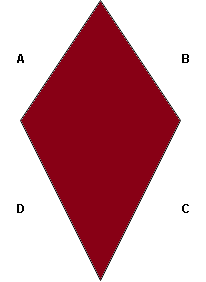
Rhombus
A rhombus is like a square or diamond with \Large 4 equal sides, but none of the corners is a right angle.
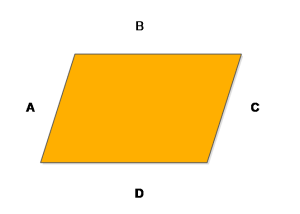
Parallelogram
Any quadrilateral that has two pair of parallel sides is a parallelogram. There are shapes which demonstrate properties of parallelogram – square, rectangle, and a rhombus are special case of a parallelogram.
In general, parallelogram has:
- Opposite sides are parallel
- Opposite sides are equal
- Opposite angles are equal
Trapezoid
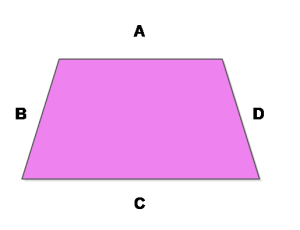
If a quadrilateral contains at least one pair of parallel lines then it is called a trapezoid.
Kite
A kite is a quadrilateral that has a pair of adjacent sides of equal length and the angle where these two pair meet are equal.
Flowchart
Program Codes – Program to Identify Quadrilateral
#include <stdio.h>
#include <stdlib.h>
#include <math.h>

int main()
{
    float side[4], angle[4];
    float sum = 0;
    int i, right = 0, equal = 0;

    printf("Enter 4 sides:\n");
    for (i = 0; i < 4; i++)
        scanf("%f", &side[i]);

    printf("Enter 4 angles:\n");
    for (i = 0; i < 4; i++)
    {
        scanf("%f", &angle[i]);
        sum += angle[i];
        if (fabs(angle[i] - 90) < 0.001)
            right++;
    }

    if (fabs(sum - 360) > 0.001)
    {
        printf("Invalid quadrilateral\n");
        return 0;
    }

    for (i = 1; i < 4; i++)
        if (fabs(side[i] - side[0]) < 0.001)
            equal++;

    if (equal == 3 && right == 4)
        printf("Square\n");
    else if (right == 4 && side[0] == side[2] && side[1] == side[3])
        printf("Rectangle\n");
    else if (equal == 3)
        printf("Rhombus\n");
    else if (side[0] == side[2] || side[1] == side[3])
        printf("Parallelogram\n");
    else
        printf("Trapezoid\n");

    return 0;
}
#include <iostream>
#include <cmath>
using namespace std;

int main()
{
    float side[4], angle[4], sum = 0;
    int right = 0, equal = 0;

    cout << "Enter 4 sides:\n";
    for (int i = 0; i < 4; i++)
        cin >> side[i];

    cout << "Enter 4 angles:\n";
    for (int i = 0; i < 4; i++)
    {
        cin >> angle[i];
        sum += angle[i];
        if (fabs(angle[i] - 90) < 0.001)
            right++;
    }

    if (fabs(sum - 360) > 0.001)
    {
        cout << "Invalid quadrilateral\n";
        return 0;
    }

    for (int i = 1; i < 4; i++)
        if (fabs(side[i] - side[0]) < 0.001)
            equal++;

    if (equal == 3 && right == 4)
        cout << "Square\n";
    else if (right == 4 && side[0] == side[2] && side[1] == side[3])
        cout << "Rectangle\n";
    else if (equal == 3)
        cout << "Rhombus\n";
    else if (side[0] == side[2] || side[1] == side[3])
        cout << "Parallelogram\n";
    else
        cout << "Trapezoid\n";

    return 0;
}
import java.util.Scanner;
class Quadrilateral {
public static void main(String[] args) {
Scanner sc = new Scanner(System.in);
float[] side = new float[4];
float[] angle = new float[4];
float sum = 0;
int right = 0, equal = 0;
System.out.println("Enter 4 sides:");
for (int i = 0; i < 4; i++)
side[i] = sc.nextFloat();
System.out.println("Enter 4 angles:");
for (int i = 0; i < 4; i++) {
angle[i] = sc.nextFloat();
sum += angle[i];
if (Math.abs(angle[i] - 90) < 0.001)
right++;
}
if (Math.abs(sum - 360) > 0.001) {
System.out.println("Invalid quadrilateral");
return;
}
for (int i = 1; i < 4; i++)
if (Math.abs(side[i] - side[0]) < 0.001)
equal++;
if (equal == 3 && right == 4)
System.out.println("Square");
else if (right == 4 && side[0] == side[2] && side[1] == side[3])
System.out.println("Rectangle");
else if (equal == 3)
System.out.println("Rhombus");
else if (side[0] == side[2] || side[1] == side[3])
System.out.println("Parallelogram");
else
System.out.println("Trapezoid");
sc.close();
}
}side = []
angle = []
sum_angle = 0
right = equal = 0
print("Enter 4 sides:")
for _ in range(4):
side.append(float(input()))
print("Enter 4 angles:")
for _ in range(4):
a = float(input())
angle.append(a)
sum_angle += a
if abs(a - 90) < 0.001:
right += 1
if abs(sum_angle - 360) > 0.001:
print("Invalid quadrilateral")
exit()
for i in range(1, 4):
if abs(side[i] - side[0]) < 0.001:
equal += 1
if equal == 3 and right == 4:
print("Square")
elif right == 4 and side[0] == side[2] and side[1] == side[3]:
print("Rectangle")
elif equal == 3:
print("Rhombus")
elif side[0] == side[2] or side[1] == side[3]:
print("Parallelogram")
else:
print("Trapezoid")
Output
Enter 4 sides:
20
20
20
20
Enter 4 angles:
90
90
90
90

Square
Enter 4 sides:
12
24
12
24
Enter 4 angles:
60
120
60
120

Parallelogram
Program For Law Of Sine Problems
With the law of sine, you can find any unknown angle of a given triangle or the length of a particular side of a triangle or the length of a particular side of a triangle.
We will see two cases while using law of sine.
- When length of 2 sides and 1 angle is given.
- When 2 angles and 1 side is given.
Problem Definition
The law of sine is given below. The triangle has three sides \Large a, \hspace{1ex} b and \Large c ; It also has three angles – \Large \angle A, \hspace{1ex} \angle B and \Large \angle C.
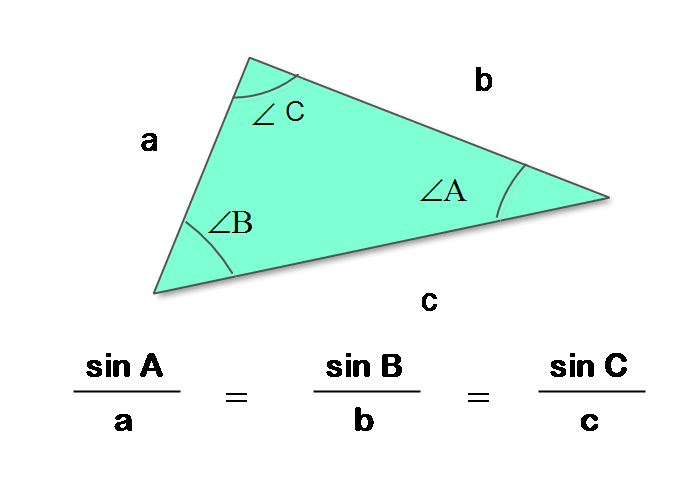
In general, there are two cases for problems involving the law of sine.
Case 1: When the length of two sides is given and the angle opposite to one of the sides with length is given.
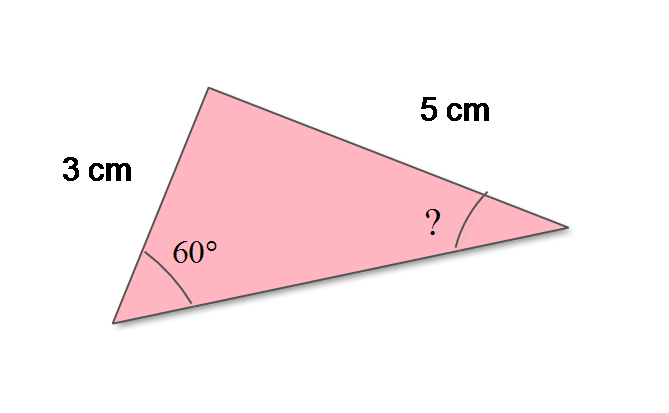
When the length of two side – \Large A and \Large B are given and the angle opposite to side \Large A is given. Then using law of sine
\Large \begin{aligned}&X \hspace{1ex} = \hspace{1ex} sin \hspace{1ex} \frac{A}{a}\\ \\
&sin  \hspace{1ex}\frac{B}{b} \hspace{1ex} = \hspace{1ex} X\\ \\
&sin \hspace{1ex} B \hspace{1ex} =\hspace{1ex}  X \hspace{1ex}\ast \hspace{1ex}b\\ \\
&\angle {B }\hspace{1ex} = \hspace{1ex} arcsin ( X \ast b)
\end{aligned}
This the way to find the value of sin \Large B and then using arcsin to find the \Large \angle B.
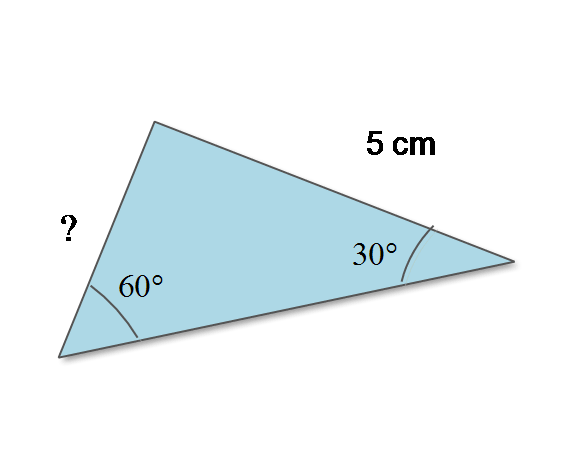
Case 2: When 2 angles – angle A and angle B are given with length of the side opposite to angle A or angle B.
When two angles and length of at least one side opposite to \Large \angle A or \Large \angle B is given. Find the \Large sin \hspace{3px} A and \Large sin \hspace{3px} B values first.
Find \Large X \hspace{1ex} = \frac{\Large sin \hspace{3px} A}{\Large a} or \frac{\Large sin \hspace{3px} B}{\Large b}, whichever is given in the problem.
The length of side
\Large \begin{aligned}b \hspace{1ex} = \hspace{1ex} sin\hspace{2px} B \cdot X\end{aligned}This is how you will find the value of the length of side \Large b when \Large \angle A and \Large\angle B is given along with the length of side \Large a.
In next section, you will find the flowchart of the program for the law of sine and the above two cases to understand the logic of the program.
Flowchart – Program for Law of Sine Problems
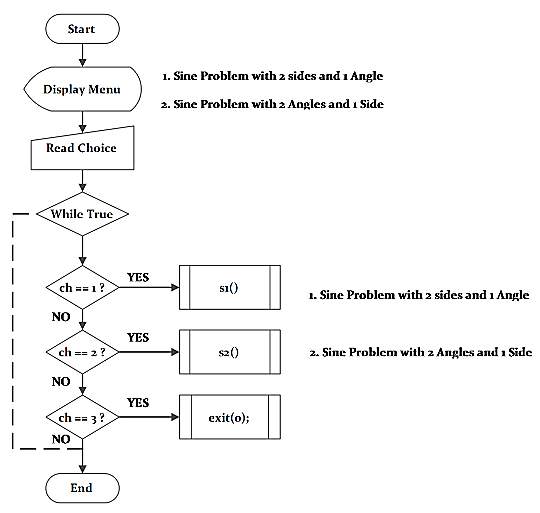
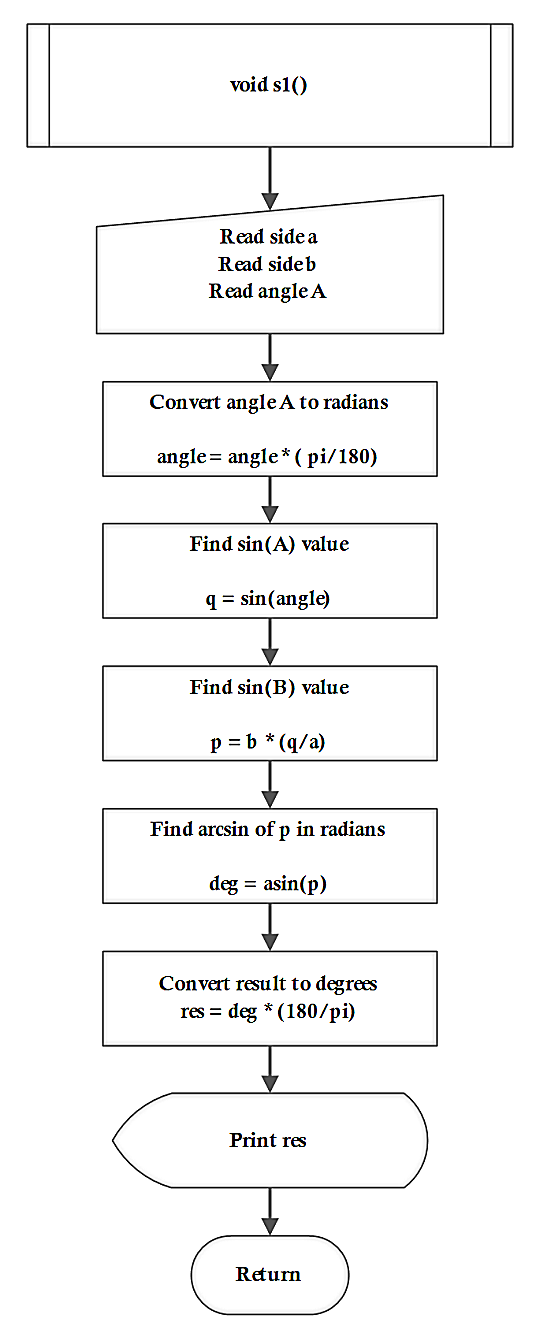
The next flowchart is of function \Large s1() which covers the case 1 of the law of sine problems.
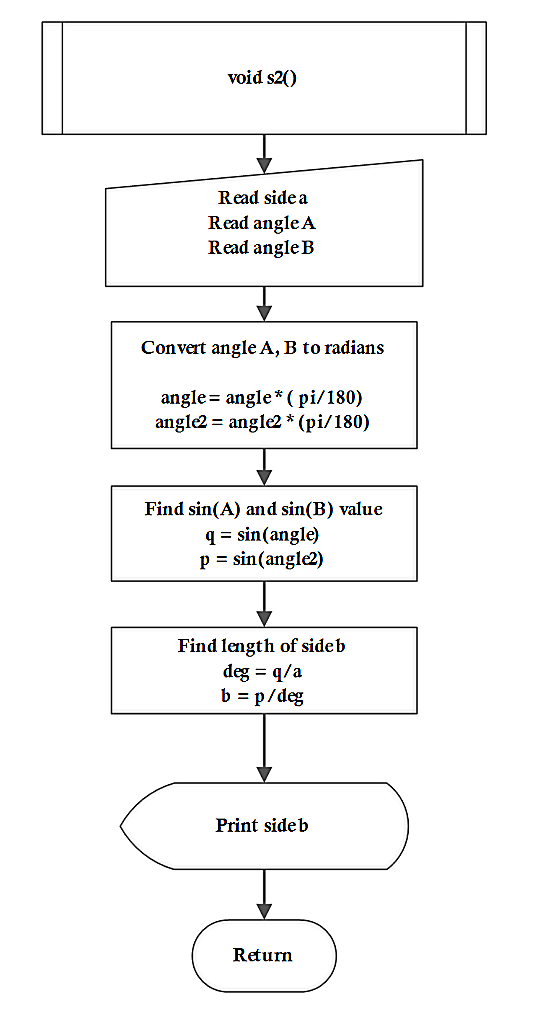
The flowchart for function \Large s2 () that covers the case 2 of the law of sine problems is given below.
Program Codes – Program for Law of Sine Problems
/* C Program for solving law of sine problems */
#include <stdio.h>
#include <math.h>
#include<stdlib.h>
/* Variable declarations */
        int ch,i;
        float a, b, q, p, deg;
        float angle,angle2, res;
/* Function declaration */
        void s1();
        void s2();
int main()
{
        for(i=0;i < 30;i++)
        printf("*");printf("\n\n");
        printf("\tMenu\n\n");
        for(i=0;i < 30;i++)
        printf("*");printf("\n\n");
                printf("1.Sine Problem with 2 Sides and 1 Angle:\n");
                printf("2.Sine Problem with 2 Angles and 1 Side:\n");
                printf("3.Quit using any other number:\n\n");
        for(i=0;i < 30;i++)
        printf("*");printf("\n\n");
        while(1)
        {
                 printf("Enter your Choice:");
                 scanf("%d",& ch);
                 if(ch == 1)
                {
                     s1();
                }
                else if(ch == 2)
                {
                     s2();
                }
                else if(ch == 3)
                {
                     exit(0);
                }
               else
               {
                     printf("Wrong choice ! Try again:\n");
               }
        }
               system("PAUSE");
               return 0;
}
/* Main function ends */
/* Function definition - s1() */
void s1()
{
        float pi = 3.141;
        for(i=0;i < 30;i++)
        printf("_");printf("\n\n");
                printf("Enter value for side with angle:");
                scanf("%f",&a);
                printf("Enter value for side without angle:");
                scanf("%f",&b);
                printf("Enter the angle(degrees):");
                scanf("%f",&angle);
        for(i=0;i < 30;i++)
        printf("_");printf("\n\n");
                angle = angle * (pi/180);
                q = sin(angle);
                p = b * (q/a);
                deg = asin(p);
                res = deg * (180/pi);
        for(i=0;i < 30;i++)
        printf("_");printf("\n\n");
                printf("Angle B = %f\n",res);
        for(i=0;i < 30;i++)
        printf("_");printf("\n\n");
}
/* Function definition - s2() */
void s2()
{
        float pi = 3.141;
        for(i=0;i < 30;i++)
        printf("_");printf("\n\n");
                printf("Enter value of side a with angle:");
                scanf("%f",&a);
                printf("Enter angle A for side a:");
                scanf("%f",&angle);
                printf("Enter value angle B of side b:");
                scanf("%f",&angle2);
        for(i=0;i < 30;i++)
                printf("_");printf("\n\n");
                angle = angle * (pi/180);
                angle2 = angle2 * (pi/180);
                q = sin(angle);
                p = sin(angle2);
                deg = q/a;
                b = p/deg;
        for(i=0;i < 30;i++)
        printf("_");printf("\n\n");
                printf("Side b = %f\n",b);
       for(i=0;i<30;i++)
       printf("_");printf("\n\n");
}
/* C++ Program for solving law of sine problems */
#include <iostream>
#include <cmath>
#include <cstdlib>
using namespace std;
/* Global variables */
int ch, i;
float a, b, q, p, deg;
float angle, angle2, res;
/* Function declarations */
void s1();
void s2();
int main()
{
for (i = 0; i < 30; i++) cout << "*";
cout << "\n\n\tMenu\n\n";
for (i = 0; i < 30; i++) cout << "*";
cout << "\n\n";
cout << "1. Sine Problem with 2 Sides and 1 Angle\n";
cout << "2. Sine Problem with 2 Angles and 1 Side\n";
cout << "3. Quit using any other number\n\n";
for (i = 0; i < 30; i++) cout << "*";
cout << "\n\n";
while (1)
{
cout << "Enter your Choice: ";
cin >> ch;
if (ch == 1)
s1();
else if (ch == 2)
s2();
else
exit(0);
}
return 0;
}
void s1()
{
float pi = 3.141f;
cout << "\n------------------------------\n";
cout << "Enter value for side with angle: ";
cin >> a;
cout << "Enter value for side without angle: ";
cin >> b;
cout << "Enter the angle (degrees): ";
cin >> angle;
angle = angle * (pi / 180);
q = sin(angle);
p = b * (q / a);
deg = asin(p);
res = deg * (180 / pi);
cout << "Angle B = " << res << "\n";
}
void s2()
{
float pi = 3.141f;
cout << "\n------------------------------\n";
cout << "Enter value of side a with angle: ";
cin >> a;
cout << "Enter angle A for side a: ";
cin >> angle;
cout << "Enter angle B of side b: ";
cin >> angle2;
angle = angle * (pi / 180);
angle2 = angle2 * (pi / 180);
q = sin(angle);
p = sin(angle2);
deg = q / a;
b = p / deg;
cout << "Side b = " << b << "\n";
}/* Java Program for solving law of sine problems */
import java.util.Scanner;
public class LawOfSine {
static int ch;
static float a, b, q, p, deg;
static float angle, angle2, res;
static Scanner sc = new Scanner(System.in);
public static void main(String[] args) {
for (int i = 0; i < 30; i++) System.out.print("*");
System.out.println("\n\n\tMenu\n");
for (int i = 0; i < 30; i++) System.out.print("*");
System.out.println("\n\n1. Sine Problem with 2 Sides and 1 Angle");
System.out.println("2. Sine Problem with 2 Angles and 1 Side");
System.out.println("3. Quit using any other number\n");
while (true) {
System.out.print("Enter your Choice: ");
ch = sc.nextInt();
if (ch == 1)
s1();
else if (ch == 2)
s2();
else
System.exit(0);
}
}
static void s1() {
float pi = 3.141f;
System.out.print("Enter value for side with angle: ");
a = sc.nextFloat();
System.out.print("Enter value for side without angle: ");
b = sc.nextFloat();
System.out.print("Enter the angle (degrees): ");
angle = sc.nextFloat();
angle = angle * (pi / 180);
q = (float) Math.sin(angle);
p = b * (q / a);
deg = (float) Math.asin(p);
res = deg * (180 / pi);
System.out.println("Angle B = " + res);
}
static void s2() {
float pi = 3.141f;
System.out.print("Enter value of side a with angle: ");
a = sc.nextFloat();
System.out.print("Enter angle A for side a: ");
angle = sc.nextFloat();
System.out.print("Enter angle B of side b: ");
angle2 = sc.nextFloat();
angle = angle * (pi / 180);
angle2 = angle2 * (pi / 180);
q = (float) Math.sin(angle);
p = (float) Math.sin(angle2);
deg = q / a;
b = p / deg;
System.out.println("Side b = " + b);
}
}# Python Program for solving law of sine problems
import math
import sys
def s1():
pi = 3.141
a = float(input("Enter value for side with angle: "))
b = float(input("Enter value for side without angle: "))
angle = float(input("Enter the angle (degrees): "))
angle = angle * (pi / 180)
q = math.sin(angle)
p = b * (q / a)
deg = math.asin(p)
res = deg * (180 / pi)
print("Angle B =", res)
def s2():
pi = 3.141
a = float(input("Enter value of side a with angle: "))
angle = float(input("Enter angle A for side a: "))
angle2 = float(input("Enter angle B of side b: "))
angle = angle * (pi / 180)
angle2 = angle2 * (pi / 180)
q = math.sin(angle)
p = math.sin(angle2)
deg = q / a
b = p / deg
print("Side b =", b)
while True:
print("\n************** Menu **************")
print("1. Sine Problem with 2 Sides and 1 Angle")
print("2. Sine Problem with 2 Angles and 1 Side")
print("3. Quit")
ch = int(input("Enter your Choice: "))
if ch == 1:
s1()
elif ch == 2:
s2()
else:
sys.exit()Outputs from the Program
The program gives three choices during run time
- Apply the law of sine when the length of 2 sides and 1 angle opposite to a given side is available.
- Apply the law of sine when 2 angles are given and length of 1 side opposite to an angle is given.
- Quit the program
The output from both the cases are given below, you should run the program and verify the output for yourself.
                                Menu
***********************************************************************
1.Sine Problem with 2 Sides and 1 Angle:
2.Sine Problem with 2 Angles and 1 Side:
3.Quit using any other number:
***********************************************************************
Enter your Choice:1
_______________________________________________________________________
Enter value for side with angle:5
Enter value for side without angle:4
Enter the angle(degrees):60
_______________________________________________________________________
_______________________________________________________________________
Angle B = 43.855770
_______________________________________________________________________
Enter your Choice:_
Now, we will test option 2 from the menu.
                                Menu
***********************************************************************
1.Sine Problem with 2 Sides and 1 Angle:
2.Sine Problem with 2 Angles and 1 Side:
3.Quit using any other number:
***********************************************************************
Enter your Choice:2
_______________________________________________________________________
Enter value of side a with angle:30
Enter angle A for side a:14
Enter value angle B of side b:55
_______________________________________________________________________
_______________________________________________________________________
Side b = 101.586449
_______________________________________________________________________
Enter your Choice:_Program To Count Frequency Of Vowels
The program to count the frequency of vowels, consonants and white spaces for a given word or a sentence is a string manipulation program. A loop with conditions check the given input string and count the number of vowels, consonants, and white spaces.
Problem Definition
In programming languages, every string is like an array with each character of the string hold a position in this array. The last character is null character by default in C/C++.
Programming languages like Java, Python, and JavaScript do not add a null at the end of a string, but they treat a string as sequence of individual characters as an array.
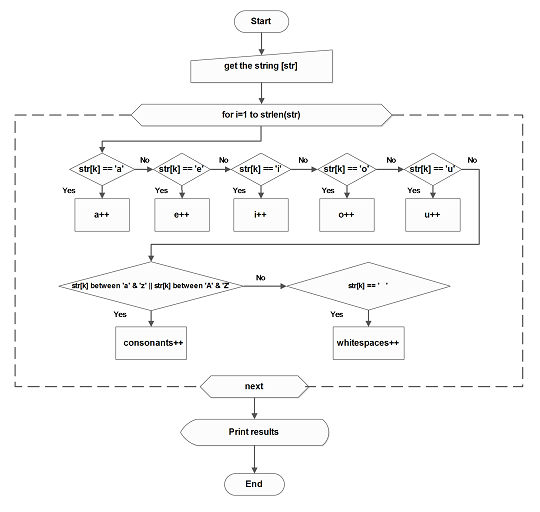
Using this array logic, the program read a word or a sentence during execution and check each and every character of input string. It counts the number of vowels, consonants and white spaces.
For example, the array representation of word – SPIDERMAN as follows.
\begin{aligned} &0 \hspace{5px}1  \hspace{5px}2\hspace{5px} 3 \hspace{5px}4 \hspace{5px}5 \hspace{5px}6\hspace{5px} 7\hspace{5px} 8 \hspace{5px}9 \\
&S \hspace{3px} P\hspace{3px} I \hspace{3px}D \hspace{3px}E \hspace{3px}R \hspace{3px}M\hspace{3px} A \hspace{3px}N \hspace{3px}\backslash\empty\end{aligned}
Note:- The Null character is added to all the strings in C by default.
Flowchart – Program to Count Frequency of Vowels
Program Codes – Program to Count Frequency of Vowels
#include <iostream>
#include <string>
using namespace std;

int main()
{
    string str;
    int a=0, e=0, i=0, o=0, u=0;
    int consonant=0, whitespace=0;

    cout << "Enter a sentence: ";
    getline(cin, str);

    for (char ch : str)
    {
        if (ch=='a'||ch=='A') a++;
        else if (ch=='e'||ch=='E') e++;
        else if (ch=='i'||ch=='I') i++;
        else if (ch=='o'||ch=='O') o++;
        else if (ch=='u'||ch=='U') u++;
        else if (isalpha(ch)) consonant++;
        else if (ch == ' ') whitespace++;
    }

    cout << "a : " << a << endl;
    cout << "e : " << e << endl;
    cout << "i : " << i << endl;
    cout << "o : " << o << endl;
    cout << "u : " << u << endl;
    cout << "Consonants : " << consonant << endl;
    cout << "Whitespaces : " << whitespace << endl;

    return 0;
}
import java.util.Scanner;
public class VowelCount {
public static void main(String[] args) {
Scanner sc = new Scanner(System.in);
int a=0, e=0, i=0, o=0, u=0;
int consonant=0, whitespace=0;
System.out.print("Enter a sentence: ");
String str = sc.nextLine();
for (char ch : str.toCharArray()) {
if (ch=='a'||ch=='A') a++;
else if (ch=='e'||ch=='E') e++;
else if (ch=='i'||ch=='I') i++;
else if (ch=='o'||ch=='O') o++;
else if (ch=='u'||ch=='U') u++;
else if (Character.isLetter(ch)) consonant++;
else if (ch == ' ') whitespace++;
}
System.out.println("a : " + a);
System.out.println("e : " + e);
System.out.println("i : " + i);
System.out.println("o : " + o);
System.out.println("u : " + u);
System.out.println("Consonants : " + consonant);
System.out.println("Whitespaces : " + whitespace);
sc.close();
}
}s = input("Enter a sentence: ")
a = e = i = o = u = consonant = whitespace = 0
for ch in s:
if ch in 'aA': a += 1
elif ch in 'eE': e += 1
elif ch in 'iI': i += 1
elif ch in 'oO': o += 1
elif ch in 'uU': u += 1
elif ch.isalpha(): consonant += 1
elif ch == ' ': whitespace += 1
print("a :", a)
print("e :", e)
print("i :", i)
print("o :", o)
print("u :", u)
print("Consonants :", consonant)
print("Whitespaces :", whitespace)Apart from being a string program, we used built-in functions from C standard library to get string input (fgets) and compute the length of the given input string (strlen).
The C++ code uses getline() command to read the sentence.
Similarly, the scanner object sc is used to read the input text in Java program. It uses nextline() method which can read an entire line.
The input() function in Python is capable of reading a line of text from user.
After input, the operations on string to extract vowels, consonants, and spaces is similar in all four programming languages for the program.
Output
The output of the program is given below. When the sentence ” A large reptile” is entered, the program reads all the vowels, consonants and white spaces and print the results.
ENTER A WORD OR A SENTENCE:
A large reptile
_____________________________________________
a :1
e :3
i :1
o :0
u :0

CONSONANTS :8
WHITESPACES :2C Program To Display Student Results
The C program to display student results demonstrates the working of conditional statement in the C language. The program takes student’s marks in percentage (%) as input , process the input value and displays the results (pass or fail) as output.
The output depends on the conditional statement in the example program.
Learn C programming basics before you begin with this example program.
Problem Definition
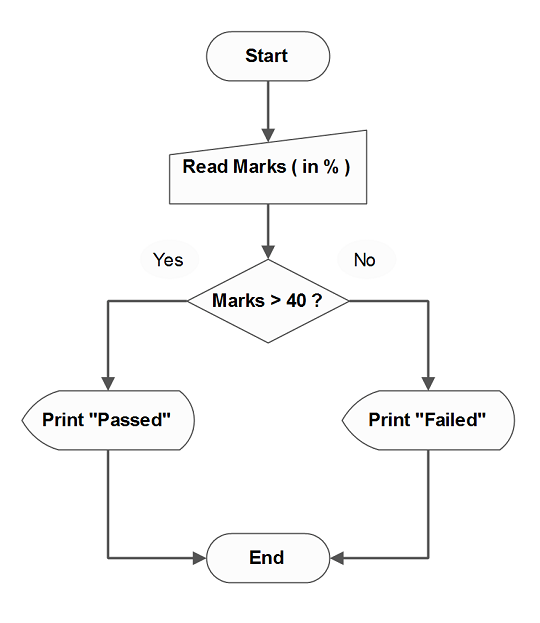
The program decides whether a student has passed or failed an exam. If the input is in percentage mark ( say 70%), a simple conditional statement checks if given percentage mark is below 40%.
( mark < 40)
The student result is a pass when mark is above 40% , else the student has failed. The result is displayed at the console.Here we list the steps involved in processing input values.
- Receive input in percentage mark (%)
- Check if the given mark is above below 40%
- If below 40%, then the student has failed
- Else the student passed.
- Display the result.
Flowchart – Display Student Results
The program start at the top (Start) and terminates where it says, (End) in the flowchart.
Program Code – Display Student Results
/*Show result of student using Marks */
#include <stdio.h>
#include <conio.h>
int main()
{
    int marks,i;
    /* Read student marks */
    printf("Enter the marks (in percentage ) of Student:");
    scanf("%d",&marks);
    /* display result */
    if(marks < 40)
    {
        for(i=0;i<40;i++)
        printf("_");printf("\n\n");
        printf("Result = Failed\n");
        for(i=0;i<40;i++)
        printf("_");printf("\n\n");
    }
    else
    {
        for(i=0;i<40;i++)
        printf("_");printf("\n\n");
        printf("Result = Passed\n");
        for(i=0;i<40;i++)
        printf("_");printf("\n\n");
    }
    system("pause");
    return 0;
}
Output
The student entered his or her mark which is 60%. The given mark are above 40%, required condition to pass the exam. Hence, the student result is passed.
Enter the marks ( in percentage ) of Student:60
___________________________________________________
Result = Passed
___________________________________________________Program for Sum of First N Natural Numbers
The program adds first N natural numbers (starts from 1) and prints the sum in the console.
We recommend that you try this on your own first and then compare the solutions.
Problem Definition
Natural numbers are all positive numbers greater than number 0 and it does not include the number zero.
For example
Natural\hspace{2mm} numbers = 1, 2, 3, 4, 5, \cdotsThe program reads the value of number N which is a natural number and then sum all other natural numbers up to number N start from 1. Suppose N = 10 then
Sum = 1 + 2 + 3 + 4 + 5 + 6 + 7 + 8 + 9 + 10 = 55
Flowchart – Sum of First N Natural Numbers
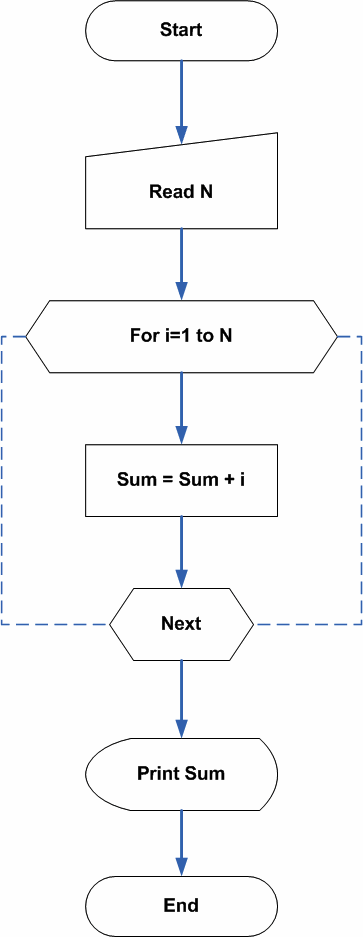
Program Codes – Sum of First N Natural Numbers
/* Program for sum of First N Natural Numbers */
#include <stdio.h>
#include <stdlib.h>
main() {
int num,i,sum;
    sum = 0; /* read the number */
    printf("Enter number to sum:");
    scanf("%d",&num);
    for(i=1;i<=num;i++)     {
    sum = sum + i;
}
printf("sum of %d number is %d\n",num,sum);
    getch();
    return 0;
}
/* Program for sum of First N Natural Numbers */
#include <iostream>
using namespace std;
int main() {
int num, sum = 0;
cout << "Enter number to sum:";
cin >> num;
for (int i = 1; i <= num; i++) {
sum += i;
}
cout << "sum of " << num << " number is " << sum << endl;
return 0;
}/* Program for sum of First N Natural Numbers */
import java.util.Scanner;
public class SumOfN {
public static void main(String[] args) {
int num, sum = 0;
Scanner sc = new Scanner(System.in);
System.out.print("Enter number to sum:");
num = sc.nextInt();
for (int i = 1; i <= num; i++) {
sum += i;
}
System.out.println("sum of " + num + " number is " + sum);
sc.close();
}
}# Program for sum of First N Natural Numbers
num = int(input("Enter number to sum:"))
sum = 0
for i in range(1, num + 1):
sum += i
print(f"sum of {num} number is {sum}")The most important piece of code in the above example is the for loop.
for ( i = 1; i <= num; i++)
{
    sum = sum + 1;
}
The for loop starts from 1 and goes through each digit between 1 and num because variable i is incremented with each iteration ( i++). The value of num is user input and it can be a large number.
The value of i is added to variable sum using the following statement. The value of sum also increments with each iteration of the variable i in the for loop.
sum = sum + i;The final value of the sum is printed as output.
Output
How many numbers to add?:10

sum of 10 number is 55
Program To Compute Nth Fibonacci Number
The program computes Nth Fibonacci number using a technique called recursion and prints the results. A recursion is the ability of a procedure or function to call itself several times.
You can write the program without recursion, but computer science students learn Fibonacci series as an introduction to recursion or recurrence relations. It is a topic of higher importance in both mathematics and computer science.
Problem Definition
In mathematics, the whole number means all positive numbers starting with 0. Any term in Fibonacci series takes a sum of previous two terms. The formula for the nth term of Fibonacci series is given below.
\Large \begin{aligned}
& f_{n} = f_{n-1} + f_{n-2}
\end{aligned}
The first few terms of the series are as follows
\Large \begin{aligned}
&0, 1, 1, 2, 3, 5, 8, 13, 21, 34, \cdots
\end{aligned}
Flowchart – Program for Fibonacci Series
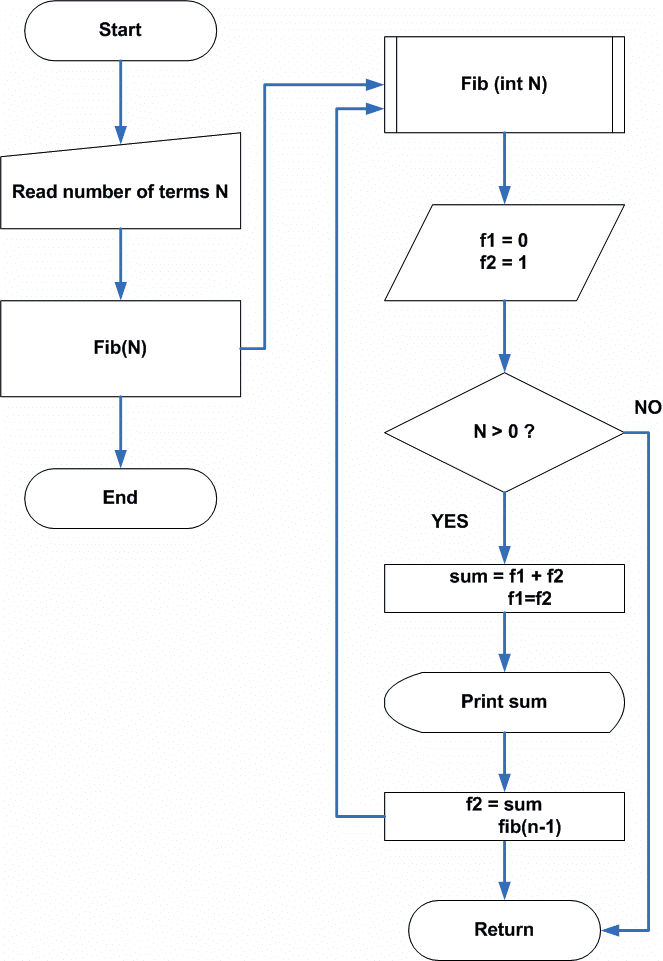
Program Codes – Fibonacci Series
/* Program to calculate Fibonacci Series */
#include < stdio.h >
#include < stdlib.h >
main ()
{
    int n;
    void fib ();
    printf ("Number of terms to be generated?");
    scanf ("%d", & n);
    printf ("%d", n);
    printf ("\n\n Fibonacci sequence up to %d terms :\n\n");
    fib(n);
    printf("\n");
    system("PAUSE");
    return 0;
}

void fib(int n)
{
    static long int f1 = 0, f2 = 1, sum;
    if (n > 0)
    {
        sum = f1 + f2;
        f1 = f2;
        printf("%5d", sum);
        f2 = sum;
        fib(n - 1);
    }
}
#include <iostream>
using namespace std;
void fib(int n) {
static long f1 = 0, f2 = 1;
long sum;
if (n > 0) {
sum = f1 + f2;
f1 = f2;
f2 = sum;
cout << sum << " ";
fib(n - 1);
}
}
int main() {
int n;
cout << "Number of terms to be generated?";
cin >> n;
cout << "\nFibonacci sequence up to " << n << " terms:\n\n";
fib(n);
cout << endl;
return 0;
}import java.util.Scanner;
class Fibonacci {
static long f1 = 0, f2 = 1;
static void fib(int n) {
if (n > 0) {
long sum = f1 + f2;
f1 = f2;
f2 = sum;
System.out.print(sum + " ");
fib(n - 1);
}
}
public static void main(String[] args) {
Scanner sc = new Scanner(System.in);
System.out.print("Number of terms to be generated?");
int n = sc.nextInt();
System.out.println("\nFibonacci sequence up to " + n + " terms:\n");
fib(n);
System.out.println();
sc.close();
}
}f1, f2 = 0, 1
def fib(n):
global f1, f2
if n > 0:
s = f1 + f2
f1, f2 = f2, s
print(s, end=" ")
fib(n - 1)
n = int(input("Number of terms to be generated?"))
print(f"\nFibonacci sequence up to {n} terms:\n")
fib(n)
print()Output
Number of terms to be generated?:8
Fibnacci sequence upto 8 terms :
-------------------------------------------------------
     1     2     3     5     8     13    21     34
-------------------------------------------------------Program For A Simple Calculator
This example program accepts two input numbers and performs an arithmetic operation such as addition, subtraction, division, multiplication and mod operation on them. The output is printed to the console.
Program Definition
This calculator program is built using C arithmetic operators. The user is presented with a list of choices. Once the user input his or her choice that operation is performed.
Here is the list of operations presented to the users.
- Addition
- Subtraction
- Multiplication
- Division
- Modulo
- Close
The C calculator is implemented using the switch-case mechanism of C language.
Flowchart
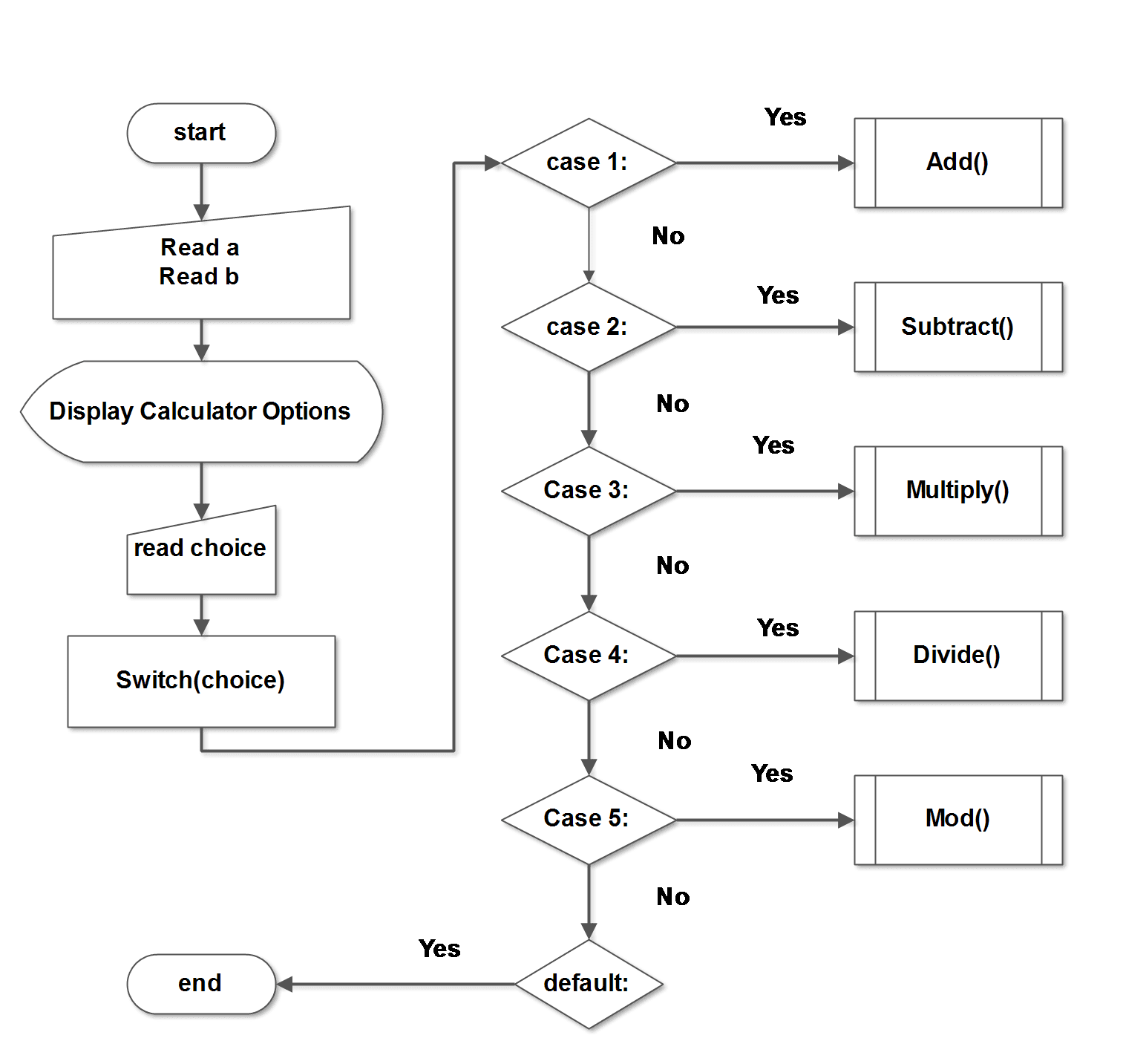
Program Codes
/* Program for a simple calculator
in C using Switch_Case */
#include <stdio.h>
#include <conio.h>
main()
{
/* Variable declarations */
        int i,a,b,choice,result;
        void menu(int a,int b,int choice);
        printf("ENTER TWO NUMBERS:n");
        printf("a=:");
        scanf("%d",&a);
        printf("b=:");
        scanf("%d",&b);
        i=0;
        while(choice != 6)
        {
            menu(a,b,choice);
            i++;
        }
        getch();
        return 0;
}
void menu(int a, int b, int choice)
{
        int result,i;
        for(i=0;i < 35;i++)
        printf("*"); printf("\n\n");
        printf("\tC CALCULATOR\n\n");
        for(i=0;i < 35;i++)
        printf("_"); printf("\n\n");
        printf("1.ADDITION\n");
        printf("2.SUBTRACTION\n");
        printf("3.MULTIPLICATION\n");
        printf("4.DIVISION\n");
        printf("5.MODULO \n");
        printf("6.CLOSE\n");
        for(i=0;i < 35;i++)
        printf("_"); printf("\n\n");
        printf("Enter your Choice\n");
        scanf("%d",&choice);
        switch(choice)
        {
        case 1:
            result = a + b;
            for(i=0;i < 35;i++)
            printf("_"); printf("\n\n");
            printf("Result=%d\n",result);
/* Addition Operation */
            printf("\n\n");
            break;
        case 2:
            result = a - b;
            for(i=0;i < 35;i++)
            printf("_"); printf("\n\n");
            printf("Result=%d\n",result);
/* Subtraction */
            printf("\n\n");
            break;
        case 3:
            result = a * b;
            for(i=0;i < 35;i++)
            printf("_"); printf("\n\n");
            printf("Result=%d\n",result);
/* Multiplication */
            break;
        case 4:
            result = a/b;
            for(i=0;i < 35;i++)
            printf("_"); printf("\n\n");
            printf("Result=%d\n",result);
/* Division operation */
            printf("\n\n");
            break;
        case 5:
            result = a % b;
            for(i=0;i < 35;i++)
            printf("_"); printf("\n\n");
            printf("Result=%d\n",result);
/* Modulo operation */
            printf("\n\n");
            break;
            default:
            exit(0);
    }
}
#include <iostream>
using namespace std;
void menu(int a, int b) {
int choice, result;
while (true) {
for (int i = 0; i < 35; i++) cout << "*";
cout << "\n\n\tC++ CALCULATOR\n\n";
for (int i = 0; i < 35; i++) cout << "_";
cout << "\n\n";
cout << "1. ADDITION\n";
cout << "2. SUBTRACTION\n";
cout << "3. MULTIPLICATION\n";
cout << "4. DIVISION\n";
cout << "5. MODULO\n";
cout << "6. CLOSE\n";
for (int i = 0; i < 35; i++) cout << "_";
cout << "\n\nEnter your choice: ";
cin >> choice;
switch (choice) {
case 1:
result = a + b;
break;
case 2:
result = a - b;
break;
case 3:
result = a * b;
break;
case 4:
result = a / b;
break;
case 5:
result = a % b;
break;
case 6:
return;
default:
cout << "Invalid choice\n";
continue;
}
cout << "\nResult = " << result << "\n\n";
}
}
int main() {
int a, b;
cout << "ENTER TWO NUMBERS\n";
cout << "a = ";
cin >> a;
cout << "b = ";
cin >> b;
menu(a, b);
return 0;
}
import java.util.Scanner;

class Calculator {

    static void menu(int a, int b) {
        Scanner sc = new Scanner(System.in);
        int choice, result;

        while (true) {
            for (int i = 0; i < 35; i++) System.out.print("*");
            System.out.println("\n\n\tJAVA CALCULATOR\n");
            for (int i = 0; i < 35; i++) System.out.print("_");
            System.out.println("\n");

            System.out.println("1. ADDITION");
            System.out.println("2. SUBTRACTION");
            System.out.println("3. MULTIPLICATION");
            System.out.println("4. DIVISION");
            System.out.println("5. MODULO");
            System.out.println("6. CLOSE");

            for (int i = 0; i < 35; i++) System.out.print("_");
            System.out.print("\n\nEnter your choice: ");
            choice = sc.nextInt();

            switch (choice) {
                case 1:
                    result = a + b;
                    break;
                case 2:
                    result = a - b;
                    break;
                case 3:
                    result = a * b;
                    break;
                case 4:
                    result = a / b;
                    break;
                case 5:
                    result = a % b;
                    break;
                case 6:
                    return;
                default:
                    System.out.println("Invalid choice");
                    continue;
            }

            System.out.println("\nResult = " + result + "\n");
        }
    }

    public static void main(String[] args) {
        Scanner sc = new Scanner(System.in);

        System.out.println("ENTER TWO NUMBERS");
        System.out.print("a = ");
        int a = sc.nextInt();
        System.out.print("b = ");
        int b = sc.nextInt();

        menu(a, b);
        sc.close();
    }
}
def menu(a, b):
while True:
print("*" * 35)
print("\n\tPYTHON CALCULATOR\n")
print("_" * 35)
print("1. ADDITION")
print("2. SUBTRACTION")
print("3. MULTIPLICATION")
print("4. DIVISION")
print("5. MODULO")
print("6. CLOSE")
print("_" * 35)
choice = int(input("Enter your choice: "))
if choice == 1:
result = a + b
elif choice == 2:
result = a - b
elif choice == 3:
result = a * b
elif choice == 4:
result = a // b
elif choice == 5:
result = a % b
elif choice == 6:
break
else:
print("Invalid choice")
continue
print("\nResult =", result, "\n")
a = int(input("ENTER TWO NUMBERS\na = "))
b = int(input("b = "))
menu(a, b)
Each arithmetic operator performs their respective operation on user inputs and return the results. Here is the list of important expressions used in the program.
result = a + b;
result = a - b;
result = a * b;
result = a / b;
result = a % b;
Output
The calculator program shows options when you run it. Enter two input numbers and then enter your choice of arithmetic operation.
ENTER TWO NUMBERS:
a=:33
b=:55
****************************************
               C CALCULATOR
________________________________________
1.ADDITION
2.SUBTRACTION
3.MULTIPLICATION
4.DIVISION
5.MODULO
6.CLOSE
________________________________________

Enter your Choice
_
The output will be displayed on the screen.
                C CALCULATOR
___________________________________________________
1.ADDITION
2.SUBTRACTION
3.MULTIPLICATION
4.DIVISION
5.MODULO
6.CLOSE
___________________________________________________
Enter your Choice
1
___________________________________________________
Result=88Program to Swap Two Numbers Without a Third Variable
The program to swap two number uses the simple procedure with a fewer number of variables.The regular swapping procedure contains an extra variable called temp, a temporary variable to hold values in between the swap task. This program does not use any temp variable and achieve the same results.
Problem Definition
The following code shows the common method to swap two integer numbers within a program. As mentioned earlier, it uses a temp variable. The temp is assigned the value of variable a and a is assigned the value of variable b.
\begin{aligned}
&temp = 10\\ \\
&a = 20
\end{aligned}
In the next step, b is assigned the value of temp to complete the swap procedure.
\begin{aligned}
&b = temp;\\ \\
&b \hspace{2mm} is \hspace{2mm} 10 \hspace{2mm}now.
\end{aligned}
Code For Swap Using A Temp Variable
a = 10
b = 20
/* Store the value of variable a into temp */
temp = a;
/* Value of b is assigned to a */
a = b;
/* Value of temp is assigned to b*/
b = temp;
Flowchart – Swap Numbers without Third Variable
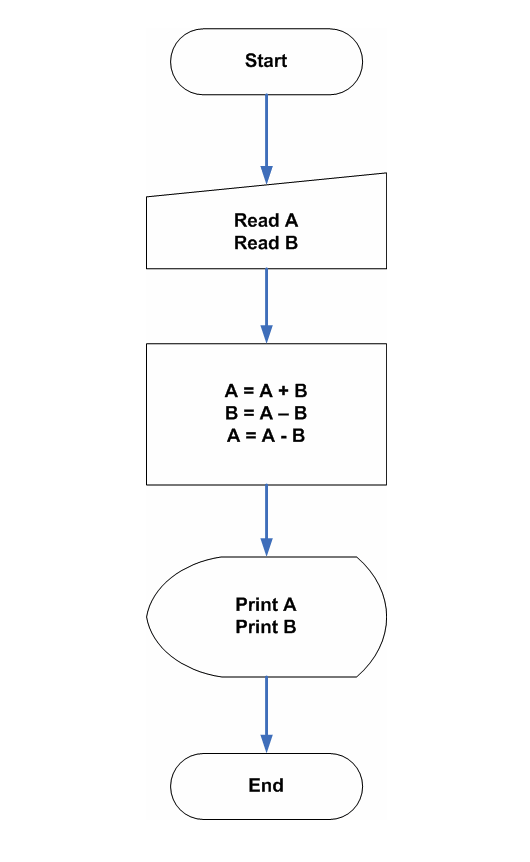
Program Code – Swap Numbers without Third Variable
The above source code shows efficient use of arithmetic operators to swap the number and moreover, it is faster because there are no unnecessary assignments of variables.
/*Program to swap two numbers without third variable */
#include <stdio.h>
#include >conio.h>
main()
{
int a,b;
/* Read input */
printf("Enter value for A:");
scanf("%d\n",&a);
printf("Enter value for B:");
scanf("%d\n",&b);
/* Swap numbers */
a = a + b;
b = a - b;
a = a - b;
/* Print the results */
printf("------------------------------------");
printf("A = %d", a); printf("B = %d",b);
printf("------------------------------------");
return 0;
}
/* Program to swap two numbers without third variable */
#include <iostream>
using namespace std;
int main() {
int a, b;
/* Read input */
cout << "Enter value for A:";
cin >> a;
cout << "Enter value for B:";
cin >> b;
/* Swap numbers */
a = a + b;
b = a - b;
a = a - b;
/* Print the results */
cout << "------------------------------------";
cout << "A = " << a;
cout << "B = " << b;
cout << "------------------------------------";
return 0;
}/* Program to swap two numbers without third variable */
import java.util.Scanner;
public class SwapWithoutTemp {
public static void main(String[] args) {
int a, b;
Scanner sc = new Scanner(System.in);
/* Read input */
System.out.print("Enter value for A:");
a = sc.nextInt();
System.out.print("Enter value for B:");
b = sc.nextInt();
/* Swap numbers */
a = a + b;
b = a - b;
a = a - b;
/* Print the results */
System.out.print("------------------------------------");
System.out.print("A = " + a);
System.out.print("B = " + b);
System.out.print("------------------------------------");
sc.close();
}
}# Program to swap two numbers without third variable
# Read input
a = int(input("Enter value for A:"))
b = int(input("Enter value for B:"))
# Swap numbers
a = a + b
b = a - b
a = a - b
# Print the results
print("------------------------------------")
print("A =", a)
print("B =", b)
print("------------------------------------")
Output
Enter value for A:24
Enter value for B:44
----------------------------------------
A = 44 B = 24
----------------------------------------C Program To Check A Palindrome String
This C program checks a given string whether it is a palindrome or not. The string is read from left to right and right to left and each character is matched. If all the characters in the input string match correctly, then it is a palindrome string, otherwise not.
This program is written using Dev C++ compiler version 4.9.9.2 on a Windows 7 64-bit system. You may use any ANSI C compiler and compile this program. The goal is to get an error-free program.
Before you get started with the program, we recommend you to learn the following C programming concepts for the better understanding of this example.
- C Printing Outputs
- C Reading Input Values
- C Arithmetic Operators
- C Logical Operators
- C Flow Control Structures
- C For Loop
Problem Definition
A palindrome string is a special string which is same when you read it from left-to-right or right-to-left.
For example, the string “ToboT“, is same if you read it from left-to-right or right-to-left, therefore, it is a Palindrome.
When the program is executed, provide an input string to read and it will check whether it is a palindrome string or not and display the output to the console.
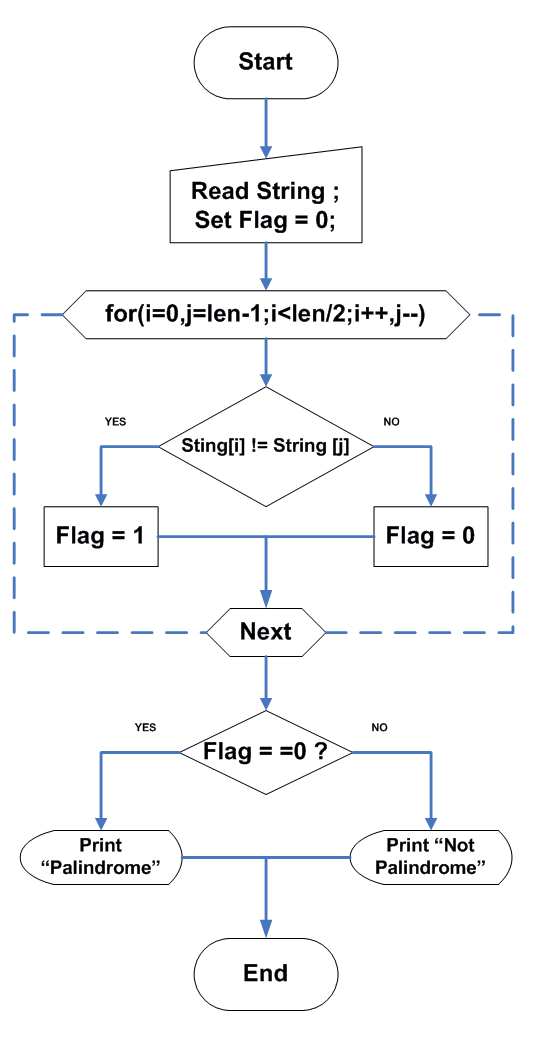
How does the program process the input string?
Each of the step helps in isolating the character of the input string and compare it from both direction. It should match in order to be a palindrome.
Step 1 – Read the input string
Step 2 – Read the input string from left-to-right & right-to-left character by character.
Step 3 – Compare each character of left side to the right side character one at a time.
Step 4 – If any character is different, set flag = 1, else flag = 0.
Step 5 – If flag = = 0, print “It is a Palindrome“.
Step 6 – Finally, if flag = = 1, print” It is not a Palindrome“.
Step 7 – End the program.
Flowchart – Check a Palindrome String
Program Code – Palindrome String
/*Program to Check if the String is Palindrome or not */
#include <stdio.h>
#include <conio.h>
main()
{
    char string [80],c;
    int i,j,len,flag=0;
    /* Read the string */
    printf("Enter a String for Palindrome Check:\n\n");
    scanf("%[^n]",string);
    printf("%s",string);
    /* Find length of the string */
    for(len=0;string[len]!='\0';len++)
    printf("\n\nLength is %d\n",len);
    /* Double initialisation for FOR loop */
    for(i=0,j=len-1;i<len/2;i++,j--)
    {
        if(string[i]!=string[j])
            flag=1;
    }
/* Check if Palindrome and print the result */
    if(flag)
    {
      for(i=1;i<=30;i++)
      printf("_");printf("\n\n");
      printf("\nString is not Palindrome.\n");
      for(i=1;i<=30;i++)
      printf("_");printf("\n\n");
    }
    else
    {
      for(i=1;i<=30;i++)
      printf("_");printf("\n\n");
      printf("\nString is a Palindrome.\n");
      for(i=1;i<=30;i++)
      printf("_");printf("\n\n");
    }
    system("PAUSE");
    return 0;
}
Output
The output of the program is given below. The program reads a string called “TaboT” and prints the output to the console.
Enter a String for Palindrome Check:

tabot
tabot

Length is 5
_____________________________

String is not Palindrome.
_____________________________