Python if Statement
In python programming, you can run a specific block of code with the help of conditions. Usually, these types of block start with  statement.
The statement in python can change the direction of the program with these conditions. Suppose condition is true, then  will be executed and if condition is false, then nothing happens. The program continues with the rest of the statements. See the figure below
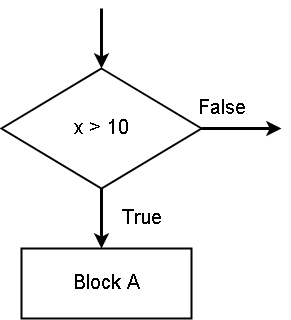
In the figure above, if the condition  is true, the python executes the
  statements. If the condition is false, nothing happens.
Example – if block
In this example, we will check if a customer has enough cash to buy a product whose price and tax if given. If the customer has enough cash, then he can buy the product, otherwise, purchase cannot be made.
# Customer declare the amount of cash
cash_available = 5000
# Price of the item is 3000 and tax amount is 100.
price = 3000
tax = 100
# Now we check if cash is less than total of price and tax, so that we can # decide the purchase
if cash <= price + tax:
    total_amount = price + tax
    print("Purchase Successful", total_amount)
print("Transaction Completed")
In the program above, observe how statement ends with a  . Also, watch each line start with an
  and not with a
  . The semi-colon is a way to tell the program that a new block is starting after the statement. Statements inside a single block must have the same indentation rules.
Output – if Block
The output of the above program is as follows.
Purchase Successful 3100
Transaction Completed
Python Logical Operators
A logical operator is the one that compares one or more values and return Boolean true or false. Python has a set of logical operators that are used in conditionals and loops. The python programming language supports following logical operators:
- Relational operators
- Set membership operators
- Boolean operators
Relational Operators
Lets us list all the logical operators.
| Operator | Meaning |
| < | less than |
| <= | less than and equal to |
| > | greater than |
| >= | greater than and equal to |
| == | equality operator |
| != | not equal to |
The above is the list of python relational operators. A relational operator in python compares both  and
and  and return
  or
or  . Let us see few examples.
In the following examples, we will check equality of two numbers and print the results.
# Checking equality of two numbers
print(10 == 10)
print(23 == 12)
print(45 != 56)
# Checking equality of two variable containing numbers
num1 = 200
num2 = 100
print(num1 == num2)
The program above will print following results.
= RESTART: C:/PROGRAMMING/PythonExercises/Relational Operators/Numeric-Equalilty.py
True
False
True
False
>>>
The value of variable  does not match with
  , therefore, the output is . The same is tested for other equality. In python, you can also check the equality of a string which is a
  value.
In the example below, we will check the equality of two strings.
str1 = "IT Employee"
str2 = "IT Employee"
str3 = "It Employee"
print(str1 == str2)
print(str2 == str3)
The python code above compares each character of both strings at corresponding location. It is going to be True, if
- The length of the strings match
- Each of the characters match at each position starting with 0.
Output of the above code is given below.
= RESTART: C:/PROGRAMMING/PythonExercises/Relational Operators/Non-Numeric_Quality.py
True
False
>>>
In the case,  , both string length and characters are equal, therefore, the program returns . In the second case,
  is different by one character, therefore, program returns . Let us now check the relational operator for greater than or less that another number.
# Check if number is grater than another number
number1 = 35
number2 = 44
print(number1 < number2)
# Check if string is greater than another string
str1 = "Hello"
str2 = "hello"
print(str1 > str2)
In the above example,  is true because
  . But
. But  is false. You need to understand why
  is false. The different between
  and
and  is letter
  and
and  respectively. In python, letters are in following sequence.
A \hspace{3px}B \hspace{3px}C\hspace{3px} D \hspace{3px}E\hspace{3px} F \hspace{3px}G \hspace{3px}... \hspace{3px}a \hspace{3px} b \hspace{3px}c \hspace{3px}d \hspace{3px}e... Since, comes after  , therefore, is greater than . Also, consider another capital after such as
  . The letter is also greater than because it comes after .
Set Membership Operators
The set membership operators check if a number belong to a particular set. If it belongs then return  , else return
  . Here is the list of set membership operators.
| Operators | Meaning |
| in | does the item belong in the list |
| not in | does the item not belong to the list |
In the example, we will check a list of fruits for  and output our result.
my_list = ['oranges','grapes','apple','banana']
print('apple' in my_list)
print('mango' not in my_list)
The program checks for in the list and also, checks if  is not in the list. The output of the program is as follows.
= RESTART: C:/PROGRAMMING/PythonExercises/Relational Operators/Set_Membership_operators.py
True
True
>>>
The output is true for both statements involving set operators.
Boolean Operators
The Boolean operators are for complex conditions, when there are multiple conditions that need to be checked before a block of code executes in python. Here is a list of Boolean operators.
| Operators | Meaning |
| and | logical AND |
| or | logical OR |
| not | logical NOT |
Logical AND – compares two Boolean values and if both of them are true then return , otherwise, return . Here is an example.
exp = 3 > 2
exp2 = 5 > 3
if exp and exp2:
   print("condition is true")
else:
   print("condition is false")
The above program checks both  and
and  . If both are true, only then it prints
  . Otherwise, it will prints
  . The output is given below.
>>>
== RESTART: C:/PROGRAMMING/PythonExercises/Relational Operators/Logical AND.py =
condition is true
>>>
| Variable A | Variable B | Output |
| True | True | True |
| True | False | False |
| False | True | False |
| False | False | False |
Logical OR – compares two Boolean values and if any one of them is , it returns a true. Otherwise, .
exp = 3 > 7
exp2 = 5 > 3
if exp or exp2:
   print("condition is true")
else:
   print("condition is false")
The is false, but the is true which is enough to make the condition true and it prints  as output. The output is given below.
== RESTART: C:/PROGRAMMING/PythonExercises/Relational Operators/logical OR.py ==
condition is true
>>>
Truth table for the logical OR is given below.
| Variable A | Variable B | Output |
| True | True | True |
| True | False | True |
| False | True | True |
| False | False | False |
Logical NOT
This operator is also known as  . it will negate any statement into and statement into . Consider the following example.
# The my_exp is false at the beginning
my_exp = 233 > 555
# Convert my_exp into true
if not(my_exp):
    print("This statement is true now!")
print("Done execution")
The  will never execute unless
  operator convert the condition into . The output is given below.
== RESTART: C:/PROGRAMMING/PythonExercises/Relational Operators/logical NOT.py =
This statement is true now!
Done execution
>>>
Let us look at the truth table for logical NOT.
| Variable A | Output |
| True | False |
| False | True |
Note: since, there is only one variable, the number of row is  , if variable is
  , then
  .
.
Python Arithmetic Operators
Operators are one of the most important aspect of programming language. The operators give the ability to do various types of computation in programming languages.
The arithmetic operator is the most common and basic type of operators you will come across in programming languages. Python also supports the basic arithmetic operators and some new operators.
Here is the list of common arithmetic operators in python.
| Operators | Meaning |
| + | Addition |
| – | Subtraction |
| * | Multiplication |
| / | Division |
| % | Remainder (Modulus) |
Special arithmetic operators in python.
| Operator | Meaning |
| ** | Exponential |
| // | Floor |
Now we will see some examples of each other and discuss the properties.
Addition Operator (+)
The addition operator will add two numbers and display the result of the expression.
num1 = 20
num2 = 23
result = num1 + num2
print(result)
The output of the program is  . See below.
============== RESTART: C:/Python_projects/Addition_operator.py ==============
43
>>>
The python will add floating point number and integer and result will be float. This is because the floating point representation always take more memory bits than integers.
num3 = 345
num4 = 67.255
result2 = num3 + num4
print("The result is",result2)
The output of the above program is  . See output below.
=========== RESTART: C:/Python_projects/addition_float_integer.py ===========
412.255
>>>
The addition operator is also good for strings. It can be used to concatenate two strings. For example.
str1 = "Demo "
str2 = "Program"
result3 = str1 + str2
print("This is a",result3)
The above code will add two strings into a common string and display the output.
=============== RESTART: C:/Python_projects/Add_Two_Strings.py ===============
This is a Demo Program
>>>
Subtraction Operator (-)
The subtraction operator also known as minus. It will subtract from first variable, a quantity equal to the second variable.
num5 = 200
num6 = 50
result4 = num5 - num6
print("The final value is",result4)
A quantity of  which is num6 will be subtracted from num5 and output is displayed. See the output below.
============ RESTART: C:/Python_projects/subtraction_operator.py ============
The final value is 150
>>>
Multiplication Operator (*)
The multiplication operator will multiply a number with another number to get a final value.
num7 = 10
num8 = 22
result5 = num7 * num8
print("The product is", result5)
The first number is multiplied with the second number to produce the product. Then the program output the result.
=========== RESTART: C:/Python_projects/Multiplication_operator.py ===========
The product is 220
>>>
Division Operator(/)
The output of division operator is always floating point number. The operator divides first number with the second number and return the quotient value.
For example.
dividend = 2300
divisor = 100
result6 = dividend/divisor
print("The quotient is", result6)
The output is in floating point as follows.
============== RESTART: C:/Python_projects/Division_Operator.py ==============
The quotient is 23.0
>>>
Modulus Operator (%)
The modulus operator will give remainder of a division. It is useful in some mathematical expression where we need to check the class of number( just by checking the number we can decide the class).
For example.
number1 = 23
number2 = 5
remainder_value = number1 % number2
print("The remainder is", remainder_value)
The output of the above is  which is remainder of the division
  . See the output below.
============= RESTART: C:/Python_projects/Remainder_Operator.py =============
The remainder is 3
>>>
Special Operators
The two special operators are floor and the exponential. In many programming languages like C/C++ the exponential and floor are part of the math library. However, despite having a math module, python created these two operators due to the popularity and usage of these operator in programming world.
Floor Operator (//)
Since, the division of python is floating point number, sometimes you need an integer output. The floor operator will result the lowest possible integer value of a division. Take for example, which will return  as the result, instead of
  .
.
number_1 = 23
number_2 = 5
quotient = 23/5
result_floored = 23 // 5
print(quotient)
print(result_floored)
The output of the above is given below. Note the difference between quotient and the floor.
============== RESTART: C:/Python_projects/Floored_operator.py ==============
4.6
4
>>>
Exponential (**)
Exponential are frequently used in the both mathematics and computer programming. Exponents have two values – integer part and power part. An integer is raised to power of another number. For example,
23 \hspace{3px} means \hspace{3px} 2 * 2 * 2 = 8number = 2
power = 4
expo = number ** power
print("The output is", expo)The output is equal to raised to power of which is  . See answer below.
================= RESTART: C:\Python_projects\Exponetial.py =================
The output is 16
>>>
Arithmetic Operator With Mixed Data Types
Now, you are familiar with the data types and arithmetic operators. The arithmetic operators are naturally for numbers. However, you can also use them with certain combination of other data types.
Number With String
out1 = "Jet Lee" * 5
print(out1)
The above code will not give error but print following.
====== RESTART: C:\Python_projects\Number_with_String_multiplication.py ======
Jet LeeJet LeeJet LeeJet LeeJet Lee
>>>
Number With Boolean
You can even multiply with a Boolean value and number because Boolean is  or
or  when converted to numbers. Therefore,
out2 = True * 5
print(out2)
The output will be as follows.
============= RESTART: C:/Python_projects/Number_with_Boolean.py =============
5
>>>
You may try different combination and will find that the only combination that does not work is  .
.
out3 = "Hello" * 3.3
print(out3)
The output is not printed, but you will get an error.
 RESTART: D:/Users/username/AppData/Local/Programs/Python/Python37-32/string_with_float_multiplicaition.py
Traceback (most recent call last):
  File "D:/Users/username/AppData/Local/Programs/Python/Python37-32/string_with_float_multiplicaition.py", line 1, in <module>
    out3 = "Hello" * 3.3
TypeError: can't multiply sequence by non-int of type 'float'
>>>
In the next few articles, we will talk more about relational operators and Boolean operators in detail.
Python Variables
Python variables are core of python language. A variable in python hold some data of a specific type. In python, the data for a variable can change frequently, it is not fixed as in other languages.
In this article, you will learn about the rules to create python variables, variable scope and how to type variables names in python programming.
Re-declaration of Variables
In python programming, you can declare a variable with a specific type and then re-declare it with another data type. For example.
some_variable = 30
print(some_variable)
some_variable = "Hello World!"
print(some_variable)
In the above code, the python first prints the value of some_variable as number and then after re-declaration it prints the number as string. Therefore, the output will be as follows.
=============== RESTART: C:/Python_projects/Re-declaration.py ===============
30
Hello World!
Rules To Create Variable Names
Like other programming languages , python also follows some rules while you create a variable.
- Variable names cannot start with a number or special character other than “_” underscore.
- Variable names cannot contains white spaces.
- Variable names must not contain any special character other than “_” underscore.
Variable Must Not Start With Number
If you try to create a variable that start with a number. Here is the error you get.
>>> #amount = 66000
>>> #amount
>>> #t = 44
>>> #t
>>> 45ten = 45000
SyntaxError: invalid syntax
>>>
In the example, about we tried to create variables with special character or numbers at the beginning. It is not working and does not print anything. Even you receive a syntax error.
Variable Name Must Not Use Special Characters Other Than Underscore
>>> my$variable = 34
SyntaxError: invalid syntax
>>>
Try to put a special character in the middle or end it will give you same – syntax error. However, if you choose to use “_” underscore, python will allow you to create a valid variable.Here is an example.
>>> my_variable = "Hello World"
>>> my_variable
'Hello World'
>>>
The above variable name is accepted with ‘underscore’ in the middle.
Variable Name Cannot Use a Whitespace
Inexperienced programmer, usually create a variable with white space in between, however, a white space is treated as a special character. Tab or white space key on your keyboard will generate a space that is not acceptable in python as a part of variable name. See following example.
>>> my variable = 2100
SyntaxError: invalid syntax
>>> first Name = "peter"
SyntaxError: invalid syntax
>>>
In the code above, we have tried to create two variables with white space in between that resulted in ‘syntax error’.
Variable Names In Python
A variable name in python must be self-explanatory, meaning it must define the type of data it holds. For example, the following name does not make sense.
n1 = "Harry"
n2 = "potter"
a = 34
Instead of typing above code you can simply type following that make sense.
firstName = "Harry"
lastName = "Potter"
age = 34
Another thing about variable is to choose the convention or style for variable names. Two styles are very popular
- camel case
- using underscore
Camel Case
The camel case for variable name is basically useful if you have variable names with more than two words.
For example
superCatName = "Meow"
myHero = "Spiderman"
Here in the names above, the first word starts with lowercase letters and other words in the variable name starts with capital letter.
Underscore as variable name separater
This is what most of the python programmer uses. They separate the words in variable names with underscore (“_”). For example.
super_cat_name = "teddy"
my_hero = "superman"
Python Variable Scope
A python variable can exist in side a block or outside the block. When it is outside of a block of statements or loops it has a global scope. It means that it will be visible throughout the program. However, if the variable is created inside of a block then it cannot be seen outside unless the block is executed.
See the example below.
sum = 10
if sum == 10:
   # in this block we create a variable called result
   result = sum + 100
   print(sum)
print(result)
First the variable sum is evaluated and enter the if-block successfully. Then the 100 is added to the sum and assigned to a new variable result. The sum is also printed inside the block.
10
110
When the block is exited, the variable result will display the final value.
Python Data Types
The python programming language is not a typed language like Java, C/C++, etc. However, python supports all the primitive data types like other languages.
Here are the list of data types supported by python programming language.
- integer
- string
- float
- boolean
- list
- dictionaries
- set
- tuple
- files
The first four types are primitive types and the remaining five types are user-defined types. We will not discuss each one of them in detail.
Primitive Types
The primitive types of data is common to all programming languages. Though python is not a typed language it understand the primitive types.
Integer Type
This type contains all the number or integers that include both negative and positive numbers.
For example
my_Integer = 244
print(type(my_Integer))
In the code above, we assigned an integer to variable called my_Integer. To know the type of variable, use the type() function which prints the following results.
<class 'int'>
Each type has a class in python and variables are instances of these classes.
String Type
The string type is a group of character that is enclosed within a double or single quotes. It can be a single word or a sentence or sometimes numbers are displayed as strings.
my_string = "hello"
print(type(my_string))
In the code above, we have declared and assign “hello” to the variable called my_string. You can use the type() function to verify the type of the variable.
<class 'str'>
Float Type
Python does not have a C style ‘float‘, but it has a C style ‘double‘. Any number that is a decimal number with a fractional part in python is a double precision number. You can control the fraction part in a number of ways. Here we used the format() function to control the fraction of a decimal number.
Consider the following example.
my_float = 23.4667445778967
# Method 1
# prints total 5 numbers only including fraction
print(format(my_float,'.5g')
# Method 2
# prints 2 digits in the fraction part
print(format(my_float,'.2f')
# check the type of my_float
print(type(my_float))
The output of the program is given below.
23.467
23.47
<class 'float'>
The method 1 gives a result of 23.467 which has exactly 5 digits. The method2 results in 23.47 because we only allowed 2 digits in the fractional part.
Boolean Type
The python Boolean type only holds two values – True or False. The numeric value of True is 1 and 0 for False.
Consider the following example
my_Bool = True
print(type(my_Bool))
The output of the above program gives the type of the variable.
<class 'bool'>
User-Defined Type in Python
The user-defined type contains primitive types and it is a named type constructed by the user. We already mentioned earlier that list, dictionaries, set, tuple and files are the five user-defined types in python. Let us now discuss them in detail.
List Type
A list type is equal to an array in JavaScript which contains multiple data type. In programming language such as Java or C++ , the array is typed and therefore, contain only one type of element. The python list is flexible and supports multiple data type. Consider the following example.
my_list = ['Apple',"Oranges", 25, 55.77]
print(type(my_list))
The output of the above code, will print the data type of my_list which is list.
<class 'list'>
Dictionaries in Python
Dictionary in python is an object with name/value pair. It is similar to JavaScript declaration of object literals. Here is an example of dictionary.
# dictionary defining an employee
employee = {
  'firstName': 'Jon',
  'lastName' : 'Rambo',
  'age' : 45,
  'designation' : 'Manager',
  'salary' : 35000
}
# print the employee
print(employee)
print(type(employee))
The output of the above program is given below.
{'firstName': 'Jon', 'lastName': 'Rambo', 'age': 45, 'designation': 'Manager', 'salary': 35000}
<class 'dict'>
Set in Python
The set is similar to a mathematical set in python. You can use a set in various ways. Here is a way to declare a set.
my_set = {"apple","oranges",33.55,99}
print(type(my_set))
The result of the above code is as follows. It prints the data type of the variable my_set.
<class 'set'>
Tuple Type in Python
Not only sets, but you can also create tuple in python. The tuple in python is unchangeable or immutable. To change the value of a tuple, first change it to list and then back to tuple.
my_tuple = ("Dog","Cat","Mice")
print(type(my_tuple))
The output is the type of the variable called my_tuple.
<class 'tuple'>
Files in Python
The python programming language allows you to manipulate files like other programming languages. Here file is treated as an object with properties and methods.
file = open("dummy.txt")
print(type(file))
The output is as follows.
================ RESTART: C:/Python_projects/file-handling.py ================
<class '_io.TextIOWrapper'>
The ‘io’ is a module in python and it helps to deal with various type of IO that the python program performs. An object from this module is called a file object or a stream object. The common types of IO performed by Python are: text IO, binary IO and raw IO. In the above program we are using a Text IO (_io.TextIOWrapper).
Python Debugging Techniques
In earlier article,you learned about different python errors. In this article, we will talk about how to debug those errors. There are several techniques, but we will discuss some practical ways to fix errors in python programs.
Types of Debugging in Python
Three types of debugging technique that you can employ in python programming are:
- Print debugging technique
- Scope debugging technique
- Squeeze Debugging technique
You can use any or all other methods mentioned above in your python programming. The ultimate goal should be to fix the error.
Print Debugging
The print debugging is a technique that you can use to add extra lines of code usually a print statement to check the status of variables or block of code in python program. Consider the following example.
principal = 25000
rate = 0.12
time_in_year = 3
simple_interest = principal * rate * time_in_year
total_amount = principle + simple_interest + simple_interest
print(total_amount)
In the program above, there is no error. However, the program does a mistake of adding simple_interest two times resulting in 43000 as total_amount. That is incorrect.
To debug the incorrect result error, you need to check the value of simple_interest using a print statement.See the modified code below.
principal = 25000
rate = 0.12
time_in_year = 3
simple_interest = principal * rate * time_in_year
print(simple_interest)
total_amount = principle + simple_interest
print(total_amount)
## Output following
9000
34000
Now the, you can correct the code and output should be 34000 after removing the second simple_interest in the code.
Scope Debugging
The error or the problem might be in a block of code resulting in a wrong output. Add print debugging and scope debugging to debug your program block by block would be a good idea.
In the following example, we are trying to take average of a list of marks for a student. There is an error in for loop that results in incorrect output, therefore, we are using both print debugging and scope debugging.
myMarks = [23,55,66,52,99]
# get the total marks of the student
sum = 0
# get the number of subjects
count = 0
for mark in myMarks:
   sum = mark
   count = count + 1
print(sum/count)
The program prints following output which does not seems right. The value of average is too low.
================ RESTART: C:/Python_projects/Average_Marks.py ================
19.8
We need to add a print statement above the for loop and inside the block to check the difference. This is scope debugging because we are checking the block separately. See the modified version of the program below.
myMarks = [23,55,66,52,99]
# get the total marks of the student
sum = 0
# get the number of subjects
count = 0
print(sum)
for mark in myMarks:
   sum = mark
   print(sum)
   count = count + 1
print(sum/count)
After running the program again, we get following outputs.
================ RESTART: C:/Python_projects/Average_Marks.py ================
0
23
55
66
52
99
19.8
>>>
The sum variable starts with 0 and then enters the loop. It is not incrementing each time a new iteration starts. The final average is 19.8 which is incorrect. To fix the problem we have to add the previous sum to the new sum at each iteration.
myMarks = [23,55,66,52,99]
# get the total marks of the student
sum = 0
# get the number of subjects
count = 0
for mark in myMarks:
   sum = sum + mark
   count = count + 1
print(sum/count)
Now, we will get the correct output as follows.
================ RESTART: C:/Python_projects/Average_Marks.py ================
59.0
>>>
Note: make sure that you remove all the debugging print statements before saving your program for the final time.
Squeeze Debugging
Sometimes that programs are large and complex and using print debugging or scope debugging is not enough. The squeeze debugging technique uses a method of solving the logical programming problem by explaining the logic in detail.
When explain the problem and each step of the program in detail, it gives you opportunity to check your program in-depth and debug it completely. Later, you can combine other debugging methods to solve an error in the program.
Python Error Types
In the previous article, you have learnt about various programming paradigms. A program is instructions to the computer. If the instruction are not correct then it will result in error.
In this article, you will learn about different types of errors in programming and types of error that python programming language identifies.
Error in Programming
Error in programming is common and there are different categories of error. Some of them are easily identifiable and some are not. There are two major categories of errors.
- Compile time errors
- Run-time errors
The python programming language is a interpreted scripting language. It does not compile a program in to machine code. The interpreter executes the source code line by line. Therefore, a compile time error is any error found in the source code. The run-time errors are those errors that are identified during the execution of program, means when the program is in memory.
Incorrect Output
There is a category of error which associated with outcome of a program. A program may run successfully, but give an incorrect result. These types of errors are very hard to find.
For example, if you want to compute average of 5 numbers, however, you divide the sum of all numbers by 6 (instead of 5). You may get an output, but that will be incorrect.
// Find average of following
a = 10
b = 23
c = 17
d = 30
e = 25
average = (a + b + c + d + e)/6
# This is a mistake in above code , the total items are 5
# This is an example of logical error or incorrect output
With incorrect results, the problem is in the logic of the program. Therefore, it is also a logical error in the programming. We will discuss more about incorrect result, when we talk about debugging python programs.
Types of Error in Python
The python programming language recogize 4 types of error. The list is given below:
- Name Error
- Type Error
- Syntax Error
- Attribute Error
We will discuss each of them in detail.
Name Error
The name error occurs when you try to use a variable that does not exist in the program. The python will execute all the lines of code one-by-one until it encounters an error such as a name error. Consider the following example where we attempt to use a unknown variable.
// Name error in Python
a = 20
b = 10
c = a + b + d
print(c)
The above code will generate following name error.
================= RESTART: C:/Python_projects/Name_Error.py =================
Traceback (most recent call last):
  File "C:/Python_projects/Name_Error.py", line 3, in <module>
    c = a + b + d
NameError: name 'd' is not defined
In the program above, the variable is not defined and hence, it becomes a name error.
Type Error
A type error happens in python when you try to do something not meant for the data type. For example, you cannot multiply two strings and use two numbers to multiply. Consider the following example,
##Example of a Type Error
str1 = "Medical"
str2 = "Cure"
print(str1 * str2)
# The program above tries to multiply two strings and result in error
The output of the program is given below.
================= RESTART: C:/Python_projects/Type_Error.py =================
Traceback (most recent call last):
  File "C:/Python_projects/Type_Error.py", line 3, in <module>
    print(str1 * str2)
TypeError: can't multiply sequence by non-int of type 'str'
Syntax Error
The syntax error is the most common type of error in any programming language. It is related to the instruction that you give in a program. Each instruction must follow a grammar of the programming language. For example, using a wrong keyword will result in syntax error.
##The program prints an integer after conversion from string
str = "100"
myInt = int(str)
if myInt == 100
   print(myInt)
# The program prints integer but result in syntax error
# because the if statement does not end in 'colon'
# resulting in syntax error.
The result of the program is given below.
  File "<ipython-input-4-9ad9ea10cf9f>", line 3
    if myInt == 100
                   ^
SyntaxError: invalid syntax
The above code is written using Jupiter Notebook(Anaconda).
Attribute Error
Similar to type error, you can use specific properties of a data type. It you invoke wrong property of a data type. It will result in attribute error in python. Consider following example.
str = "Apple"
num = 100
print(str.endswith("le"))
print(num.endswith("le"))
# The first print statement works because it is using the string
# The second print statement fails with Attribute error due to data type # being Number
The output of the above code is given below.
True
---------------------------------------------------------------------------
AttributeError                            Traceback (most recent call last)
<ipython-input-7-37f0e0108256> in <module>
      2 num = 100
      3 print(str.endswith("le"))
----> 4 print(num.endswith("le"))
AttributeError: 'int' object has no attribute 'endswith'
If you observe the code, the first print statement will result in True.That is, because the string endswith "le".
Python Scripting Mode
In the previous article, you learned about the python IDLE and interactive mode. You will learn about scripting mode of python in this article. The scripting mode allows you to run python files.
Python Files
A python file is a script with .py extension. The interactive mode doesn’t allow you to run scripts inside a python file. Therefore, you need to open the script in python script mode and execute it to get the results.
Python Scripting Mode
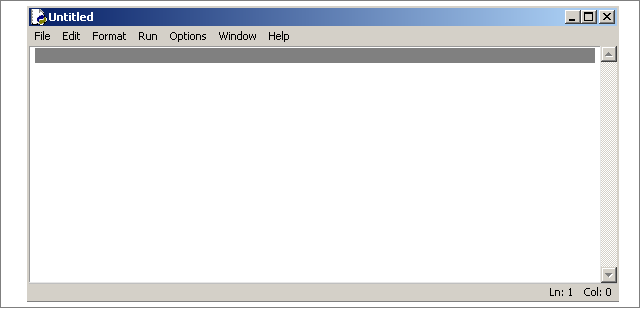
To open the scripting mode go to IDLE and press – ctrl + N. This will open a new “Untitled” script file. Look at the figure below.
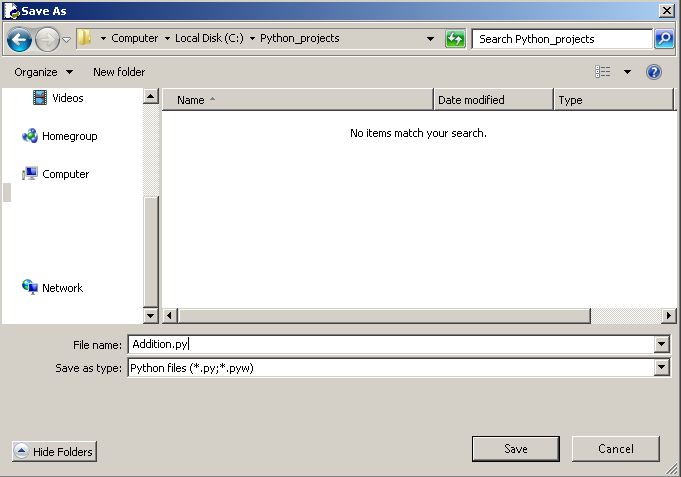
Before you start writing code, make sure you save the file in a directory of your choice.We saved our file as Addition.py in a directory called python_projects.
Writing and Executing Codes
While the file is open, simply write your code and use the “Run” tab to “Run Module” to execute the code. For example, the following script will print “Hi” as output.
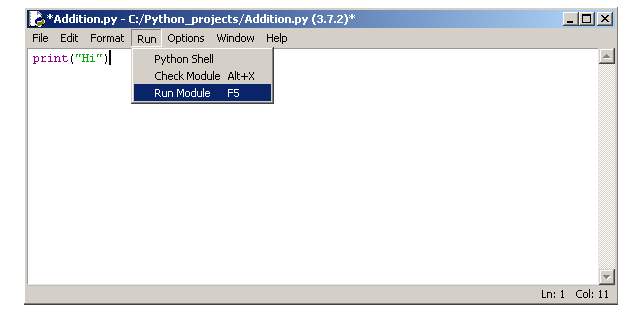
The output of the above script is displayed as follows.
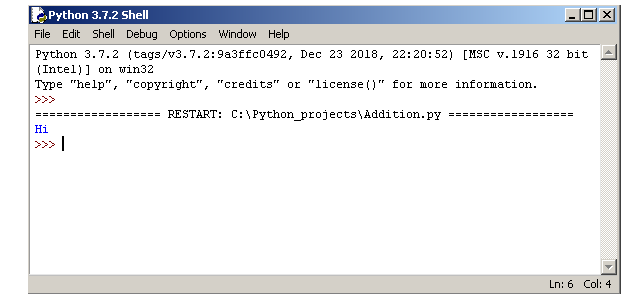
Note: Make sure that you save your script changes before executing it, otherwise, you won’t get the correct output.
In the next article, we will discuss about the programming paradigms.
Python 3.x Interactive Mode
In the previous article, you learned about installing python 3.x on your windows computer. After installing python you can start writing programs in python language. In this article, you will learn about interactive mode to write programs. The python programming has two different mode to write programs. They are:
- Interactive Mode
- Script Mode
Python Interactive Mode
Python 3.x is a interpretive language. It means whatever line of code you write will be interpreted immediately. The output of the code is immediately visible.
You can go to start > All Programs > Python 3.x > IDLE. Now open the IDLE which include both interactive mode and script mode. The IDLE starts with an interactive mode where you can type your python codes.
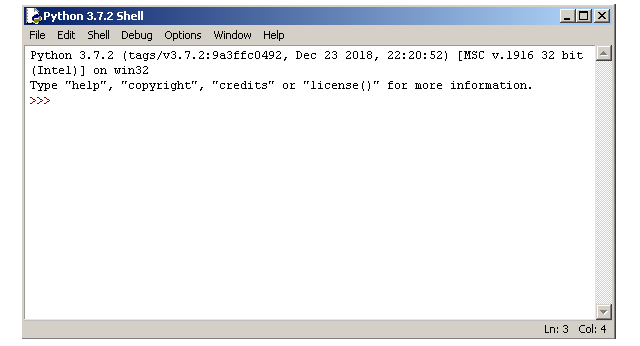
Executing Codes
The IDLE will immediately interpret your python code and display the results or otherwise an error. In the examples below, when you enter 5 + 11, the python computes it like a calculator and display the result 16. You can declare a variable and assign a value 34. When you type the variable name on the IDLE it will return the value of that variable.
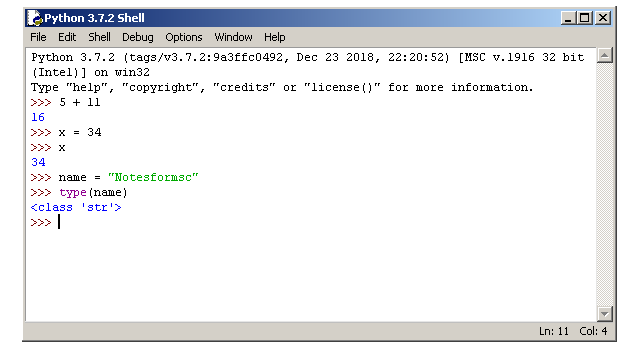
Lastly, python supports inbuilt functions such as type() to check the data type of a variable. In this case, name is a string type. If you observe, there is one drawback of this type of programming. You cannot execute multiple lines of code at the same time. The python allows you to run codes using a script with the help of scripting mode. We will discuss about the scripting mode in next article.
Installing Python
To start with Python programming language, you need to download and install the python software. This article serves as a simple guide to help you install Python on your Windows 7 64-bit computer.
Download Python
The first step to python programming is that you must download Python 3 from the python.org site. On the website, you must go to download tab and select the version suitable for your operating systems.
Installing Python 3.x
The next step is to right click the Python setup and choose Runs As Administrator.
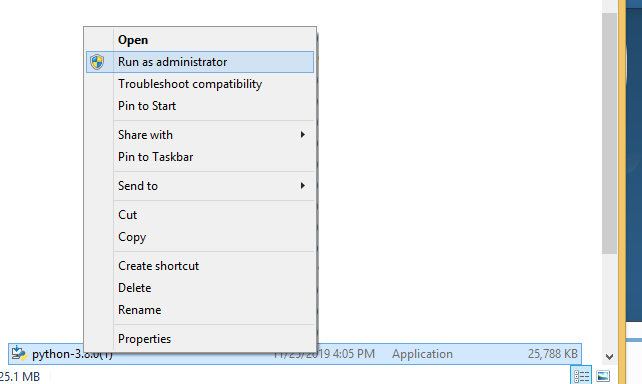
You can install python 3 with the default settings that include standard features, or you can do a custom install that involves enabling and disabling features.
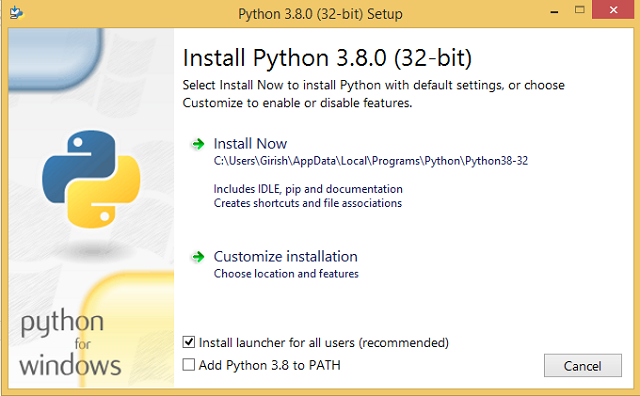
In the next step, the python 3 setup will continue to install the software. It will take a few minutes depending on the speed of your computer.
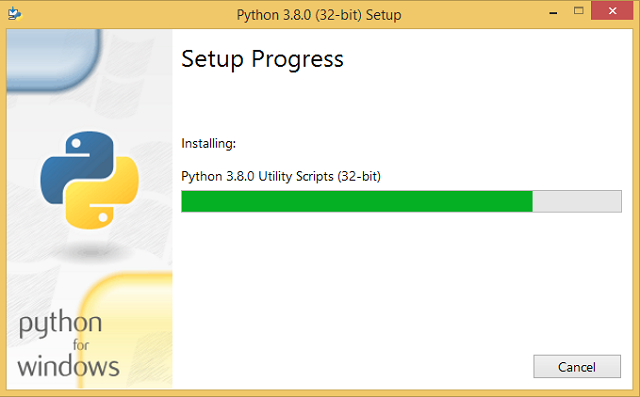
The python step will complete and ask you to finish the installation. You can go to start on Windows 7 and expand the python folder. This will list all the python 3.x installations on your computer.
In the next article, we will discuss about using Python to write programs.