Python Continue, Break, and Pass Keywords
In previous lessons, you learned about different types of loops such as for loop, while loop and for-each loop. Each of the loop terminate successfully. What if you want your loop to exit in between execution, or you want to skip some of the iterations.
There are three keywords in python programming that does that for you. In this article, we will learn how to use them in python programs.
Here is the list of keywords that break the normal execution of loop.
- continue
- break
- pass
Continue
The continue keyword is used inside the loop control structure and based on the conditions it will skip the current execution and continue with the rest of the iterations.
Here is an example of continue.
# example program for continue keyword in python
for i in range(10):
    if i == 5:
       continue
    print(i, end = " ")
The above program prints 10 numbers from 0 to 9 and if the number is equal to 5. it skip the iteration and continue with the rest of the code. The output of the program is given below.
====== RESTART: C:/Python_projects/Loops/Continue_Keyword.py ======
0 1 2 3 4 6 7 8 9
>>>
You note that the value 5 is not printed, that is because it was skipped.
Break
The break keyword is known in many programming languages. It break the loop and comes of it as soon as a break is encountered. However, all iterations are successful until a break is reached.
Consider the following example
for i in range(8):
     if i > 4:
        break
     print(i, end = " ")
print("Rest of the code")
In the program above, when the variable i reach 5, the loop is terminated immediately. The rest of the program code is executed successfully.
======= RESTART: C:/Python_projects/Loops/break_keyword.py =======
0 1 2 3 4 Rest of the code
>>>
Pass
Sometimes program wants to create a loop for testing purpose and do nothing. Python will not allow a loop to exist if it does not have at least one indented line of code.
For example
for i in range(10):
    # No indented code
The above code does not do anything because there is not indented line of code. Pythons produce an error in such cases. See the error below.
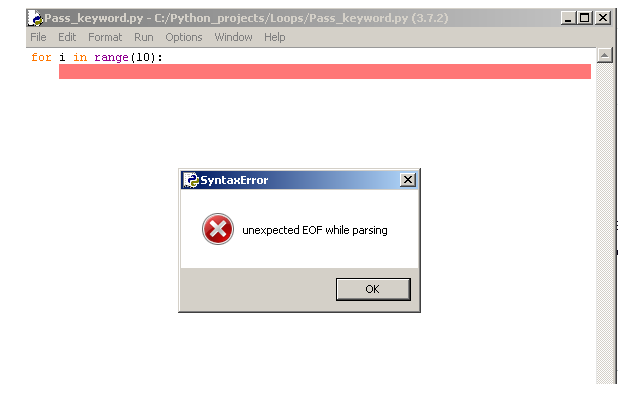
You can fix this problem using the pass keyword. The loop will exist and do nothing with the help of pass.
for i in range(10):
    pass
Summary
There are fewer programs that require to implement the continue, break, or pass keywords. We have seen that the most frequently used keyword is break. In some program, it is necessary to break out of look structure immediately, and break is certainly the best option.
Python Nested Loops
A python nested loop is loop with in a loop. Python programming allows you to create such loops. Now the choice of loops is totally up to the programmer. You can for-loop inside for-loop, for-loop inside while-loop, while-loop inside a while and so on.Therefore, various combination of loop is possible with deep levels of nesting.
In this article, we will discuss about 4 different types of nesting which are
- for-loop within for-loop
- for-loop within while-loop
- while-loop within while-loop
Note that all kind of loop are interchangeable. A while loop can do the task performed by a for-loop or for-each loop.
For-Loop Within For-Loop
In this example, we are going to print a number triangle. Since, we already know that the number of iterations are fixed. The best choice would be for-loops.
for i in range(1,11):
    for j in range(1,i + 1):
        print(j, end=" ")
In the example above the loop for variable i will run from 1 to 10. For each value of i , the variable j will run up to i + 1.
Note that if range(1, 11), then python will print 1 to 10, not 11. Therefore, range(1, i + 1) will include all numbers from 1 to i leaving last number alone
In the program above, i represents the rows and j represents the columns. therefore, for each i(row) there would be j columns. See the output below.
=== RESTART: C:/Python_projects/Loops/For_loop_inside_For_loop.py =======
1
1 2
1 2 3
1 2 3 4
1 2 3 4 5
1 2 3 4 5 6
1 2 3 4 5 6 7
1 2 3 4 5 6 7 8
1 2 3 4 5 6 7 8 9
1 2 3 4 5 6 7 8 9 10
>>>
For-Loop Within While-Loop
In our next example, we will modify the previous program using a for-loop nested inside a while-loop.
i = 1
while i < 11:
   for j in range(1, i + 1):
      print(j, end= " ")
   i = i + 1
The code is very similar to previous one except that now we are using an outer while loop which initializes a variable i, puts termination condition i < 11 and finally increment it for each iteration i = i + 1. The above code will produce similar output as we saw earlier.
== RESTART: C:/Python_projects/Loops/for-loop_inside_while_nested_loops.py ==
1
1 2
1 2 3
1 2 3 4
1 2 3 4 5
1 2 3 4 5 6
1 2 3 4 5 6 7
1 2 3 4 5 6 7 8
1 2 3 4 5 6 7 8 9
1 2 3 4 5 6 7 8 9 10
>>>
While-Loop Within While-Loop
In this example, we will be using nested while-loop. This will work exactly like two for-loops.
i = 0
while i < 10:
   j = 0
   while j < i:
      print(j, end=" ")
      j = j+ 1
   i = i + 1
   print()
The output of the program is given below. This time we have started with 0 and ends in 9.
===== RESTART: C:/Python_projects/Loops/Nested_While_loops.py =======
0
0 1
0 1 2
0 1 2 3
0 1 2 3 4
0 1 2 3 4 5
0 1 2 3 4 5 6
0 1 2 3 4 5 6 7
0 1 2 3 4 5 6 7 8
0 1 2 3 4 5 6 7 8 9
>>>
Scope of Variable Inside Loop
The scope of the variable is not changing. If the variable is created inside of the loop, then it can be seen as long as you enter the loop at least once. Otherwise, the local variable will be treated as unknown variable and gives Name error.
# Program to print sum of numbers
count = 0
for i in range(10):
   sum = 10
   sum = sum + i;
   count = count + 1
print(sum)
The program above will print the correct value of sum as long as the loop is executed. The variable sum will be created, however, if we do not enter the loop, it will never create sum and return an error while printing.
If you create a global variable like count in the above program. You can use it in any function regardless of whether the loop is entered or not. It will never give a Name error.
Python Type Casting
Casting means changing a data type to another. It is popular in many programming languages like C/C++, Java, etc. Python also supports the type casting and it is done using casting functions. In python, there are two primary casting operations you can do and they are:
- Change string to other types such as Integer, Float, Boolean types.
- Convert other types to string
Here are a list functions involved in casting from one type to another.
Examples of Type Casting in Python
The example contains following types.
- Integer to string
- Float to string
- Boolean to string
Integer to String
num = 2233
result = str(num)
print(type(result))
The output of the above code is
==== RESTART: C:/Python_projects/type casting/integer_to_string.py =======
<class 'str'>
>>>
Float to String
num_float = 344.55
result = str(num_float)
print(type(result))
Once again the output is a string. Note that we are only checking the type and not printing the actual value.
===== RESTART: C:/Python_projects/type casting/float_to_string.py ========
<class 'str'>
>>>
Boolean to String
bool = True
result = str(bool)
print(type(result))
Here is the output of the above code. Once again it is string, the value True will be "True". Note the double quotes around.
===== RESTART: C:/Python_projects/type casting/Bool_to_String.py =========
<class 'str'>
>>>
Examples of String Type to Other Types
In this section, we will convert other types to its string equivalent.
- String to integer
- String to float
- String to Boolean
String to Integer
str = "Hello World"
str2 = "45"
result = int(str)
print(type(result))
The output of the above program is given below. The str cannot be converted into an integer and produce following error.
==== RESTART: C:/Python_projects/type casting/String to Integer.py =======
Traceback (most recent call last):
  File "C:/Python_projects/type casting/String to Integer.py", line 3, in <module>
    result = int(str)
ValueError: invalid literal for int() with base 10: 'Hello World'
>>>
However, the string “45” is converted to number 45 successfully. See the output below.
==== RESTART: C:/Python_projects/type casting/String to Integer.py =======
<class 'int'>
>>>
String to Float
Now we will check two cases , first we will
- convert a number string to float
- convert a float number string to float
number_string = "399"
result = float(number_string)
print(type(result))
This was successful and the output is below.
======= RESTART: C:/Python_projects/Number_String_To_Float.py ===========
<class 'float'>
>>>
Now we will convert a float string to float value.
float_string = "3.14"
result = float(float_string)
print(result)
print(type(result))
The output is given below.
======= RESTART: C:/Python_projects/Float_String_to_Float.py =========
3.14
<class 'float'>
>>>
String to Boolean Value
To convert a boolean string such as “True” or “False”, you have to use the ast or Abstract Syntax Trees.
Visit following link to learn more about – ast
It has many utilities function and one of them is ast.literal_aval() that evaluates string to other types such as Boolean.
import ast
boolString = "True"
result = ast.literal_eval(boolString)
print(result)
print(type(result))
The output is given below. Note that the result and its type both are printed.
======= RESTART: C:/Python_projects/bool_string_to_boolean.py ========
True
<class 'bool'>
>>>
Python While Loop
In the previous article, you learned about the different types of for-loops. The python while-loop can do everything that a for-loop does. However, the for-loop is used when the number of iteration is already known.
In this article, we will explore the while loop and know how to use it in out program.
While Loop Syntax
To create a while loop make sure that you follow the syntax. There are three steps to it.
- Initialize the loop variable
- Set terminating conditions for the loop variable
- increment the loop variable
Let us see an example of while loop below.
# Initialize the loop variable
x = 1
# Set condition that will terminate the loop
while x <= 10:
   print(x)
# Increment the loop for next iteration
   x = x + 1
In the above code the x will print for 10 times and when x == 11 the while condition becomes false and loop terminates. See the output below.
========= RESTART: C:/Python_projects/While_Loop_3.py ================
1
2
3
4
5
6
7
8
9
10
>>>
Infinite Loop
There is nothing that the while loop which for-loop does. However, you must be careful with the infinite loop which in you program.
An infinite loop is created due to wrong conditions in the while loop which cause the loop to run infinitely.
Consider following example.
# Do not try to run this code
i = 0
while i >= 0:
   print(i + 3)
   i = i + 1
The syntax in the above code is correct, however, this code will run forever because incorrect terminating conditions., the x will always be greater than 0 and the loop will continue to print values.
Example: Python While Loop
In this example program we are going to keep adding numbers until the number is not equal to 99. After the number becomes 99, the program prints the sum of all the previous numbers.
sum = 0
myNum = 0
while myNum != 99:
     myNum = int(input("Enter your Number: "))
     sum = sum + myNum
print(sum)
Note that the input value is a string and we need to convert it to another type such as integer. Here we use the function called int()
Output of the above program is given below.
========== RESTART: C:\Python_projects\While_Choice_Sum.py ==============
Enter your Number: 44
Enter your Number: 66
Enter your Number: 77
Enter your Number: 45
Enter your Number: 77
Enter your Number: 99
408
>>>
Python For-Each Loop
In python programming language, thepython for-each loop is another variation of for loop structure. In this loop structure, you get values from a list, set and assign it to a variable during each iteration.
It is little hard to understand without an example. Consider the usual way to using for loop.
for i in range(1,11):
     print(i)
The above construct is useful and variable i can be used as an index to a set or list and solve a problem.
Consider the following example.
my_list = [23, 66, 68, 88, 19]
sum = 0
# now we will use i as an index for the list items
for i in range(0,5):
    sum = sum + my_list[i]
print(sum/5)
In the program above, the sum is 0. The variable i used as index to my_list and adds each item to sum during an iteration.
================ RESTART: C:\Python_projects\For-Each_Loop.py ================
52.8
>>>
The final value is sum of all number which is divided by 5 to get the average.
For-Each Loop
The for-each loop can be written as follows.
my_list = [55,66,77,88,99]
for list_item in my_list:
    print(list_item)
The value of list is assigned to list_item during the iteration and it printed in the next line.
================ RESTART: C:/Python_projects/For-Each_Loop.py ================
55
66
77
88
99
>>>
The for-each loop gives an opportunity to go through each item without skipping an member. The range of the loop depends on the set or the list.
A for-each loop can do everything that a traditional for loop can do. Consider the example, where we have modified the average finding program using for loop.
my_list = [55, 66, 77, 88, 99]
sum = 0
# take a sum of the numbers in the list
for list_item in my_list:
   sum = sum + list_item
print(sum/5)
The program does everything that a traditional loop would do and take an average. The range() function is replaced with the my_list.
============= RESTART: C:\Python_projects\For-each_average_2.py =============
77.0
>>>
Note that the loop will run until it has finished adding each item to the sum.
Python For Loop
A loop structure in programming language is to repeat a piece of code or block several times. Python has several types of loops such as for loop, for-each loop, and while loop.
In this article, you will learn about for loop structure. A for loop is used when you know exact number of times a loop is going to run. Each time a code is executed within the loop is called an  .
.
Suppose you want to count how many item in a shopping list. Then you go through each item of the list is an example of loop. Here you are looping through each item of the list.
Python For Loop Structure
The traditional way of writing a for loop in python is as follows.
# for loop structure
for i in range([start], end, [step]):
      do something
      do something
Let’s understand the above code in detail. The loop starts with a keyword called for which is a reserved keyword in python. The a variable  represents each item in a
  or
or  . This variable take one value during each iteration from the range. The range function represents a list of numbers that has a start and ending number. The
  will include all numbers starting from
  to
to  . However, it includes only starting number and does not include the
  or
or  number.
The step is optional, and it tells the loop to skip few numbers or loop in steps of some value. Consider the following example.
# This example prints all number in a range.
for i in range(1,10):
    print(i)
The above for loop will assign a number from to to the variable during each iteration. Then the value of is printed as output. The output of the program is given below.
1
2
3
4
5
6
7
8
9
Note that the loop does not print the last digit in the range.
Different Types of Ranges
You can set the range function in different ways. Here are some examples.
Range without start
# This is example of for loop with range without a start
for i in range(5):
   print(i)
The loop will print all number starting from  to
to  with except the last digit .
0
1
2
4
Range with steps
# This example prints all the even numbers
for i in range(0, 10, 2):
     print(i)
This loop will print all the even numbers between to except . The number  in the range allow the loop to print the second digit from the current value of . Suppose if starts with , then the next value of will be and so on.
0
2
4
6
8
Range in reverse order
Sometimes you want to loop through in reverse order, that is, the higher number is first and lowest number is last. Again, the last digit is skipped. Consider the following example.
for i in range(10,0, -1)
   print(i)
The above range is printed in reverse order.
10
9
8
7
6
5
4
3
2
1
Note that the last digit 0 is not printed. In the next article, you will learn another way of writing the for loop.
Python Conditionals and Operators
So far you have learned about different structures of conditional. But the conditionals such as if-then-else also employ different types of logical operators. In this article, you will learn about the conditionals and operators that we can use with conditional structures. There are categories of logical operators that the python programming language uses and they are :
- Relational Operators
- Set Membership operators
- Boolean Functions
- Boolean Operators
Now we see examples of each one them and understand how it works.
Relational Operators
The relational operators are those operators that return true or false after comparing numeric or non-numeric values. To learn more about relational or logical operators visit the following link:
Example Program:
# Check the mark of a student and display the result
marks_average = 60
if marks_average >= 50:
    print("You have passed the Test")
else:
    print("You failed! Try harder next time")
The program uses “greater than or equal to” (>=) operator to evaluate the  . The output of the program is given below.
You have passed the Test
Set Membership Operator
The set membership operator checks if a particular value belongs to a set or not. The set could be anything that represent a  or
or  . There are two set membership operators
- in
- not in
In this example, we are going to use  operator to check if a value belongs to a list or not.
my_fruits = ["Oranges","Apples","Grapes","Banana","Mango"]
# now check if "Apples" in the fruit list or not
if "Apples" in my_fruits:
   print("Apples in the list")
else:
   print("Not in the list")
The set operator will check each item with  and if not found returns
  . If found returns a
  . You will print the result based on the output you get.
Boolean Functions
Python has special function associated with different data types or for testing certain conditions. They are called  because the return either or . Consider the following code which checks if a string is digit or not.
str = "23444"
if str.isdigit():
   print("This string is digits")
else:
   print("This is string")
The output of the program is given below.
============== RESTART: C:/Python_projects/Boolean_Functions.py ==============
This string is digits
Boolean Operators
The Boolean operators can check multiple conditions at a time and return either or . There are three  which are given below.
- and
- or
- not
# In the example, we check the price of cake which must be less than $100
# and must contain chocolate, if true you can buy them, else not buy them
# ===================================================================
cake_price = 90
contains_chocolate = True
# ===================================================================
# check the conditions using Boolean operator AND
# ===================================================================
if cake_price < 100 and contains_chocolate == True:
    print("Go ahead, buy the cake")
else:
    print("Don't buy the cake")
Output of the program is given below.
======== RESTART: C:/Python_projects/Boolean_Operator_Cake_Example.py ========
Go ahead, buy the cake
Python Nested If Statements
The python if-then-else statement runs a block of code based on the condition which can be true or false. Sometimes you need to check multiple conditions event after a block is true. This is achieved using python nested if statements.
For example, assume that a user is trying to login to a system. This can be easily implemented using a single if-then-else statement. First, we check the username and then check the password and allow user to login to the system. Consider the following python code.
username = input("Enter Username: ")
password = input("Enter Password: ")
# Now we check the username and password and print success else failure
if username == "Donald" and password == "test@3344":
       print("Success")
else:
       print("Failure")
Note that the program does the job, but in case the password or username is wrong, it does not tell you anything and prints  only. Therefore, to solve problem like this we can use a nested
  statement or
  or any such constructs. Consider the modified code below.
username = input("Enter Username: ")
password = input("Enter Password: ")
# check the username first
if username == "Robin":
      # Check password now
      if password == "test#1212":
           print("Login Successful")
      else:
           print("Password Incorrect! try again!")
else:
     # print the failure message for username
      print("Invalid User")
The code above will be able to tell us the reason for failure. it may be username or password, but we will know. The nested can even be possible in  or
or  block.
customerName = "Peter"
name = input("Enter customer name: ")
cardType = "Visa"
password = "test@3344"
attempt = 3
for i in range(attempt):
    # Withdraw the money from ATM
    if customerName == name:
          print("Customer verified")
          if cardType == "Visa":
              print("Card verified")
              if password == "test@3344":
                   print("Withdraw Cash Now")
              else:
                   print("Incorrect Password")
          else:
              print("Invalid Card")
    else:

         print("Invalid Customer")

         if i >= 2:
             print("Try again later!")
         else:
             print("Try again!")
             name = input("Enter customer name:")
The output of the program is as follows.
=========== RESTART: C:/Python_projects/Customer_ATM_Nested_IF.py ===========
Enter customer name: Kiran
Invalid Customer
Try again!
Enter customer name:Larson
Invalid Customer
Try again!
Enter customer name:Romeo
Invalid Customer
Try again later!
Python If-Then-Elif-Else Statement
In previous two articles, we discussed conditional statements such as and . All of those previous structures are using one conditions only, what if, we want to check multiple conditions at different time and make decisions based on the output of those conditions. The python has a special  construct to check multiple conditions one after another. Look at the figure below to understand this logic better.
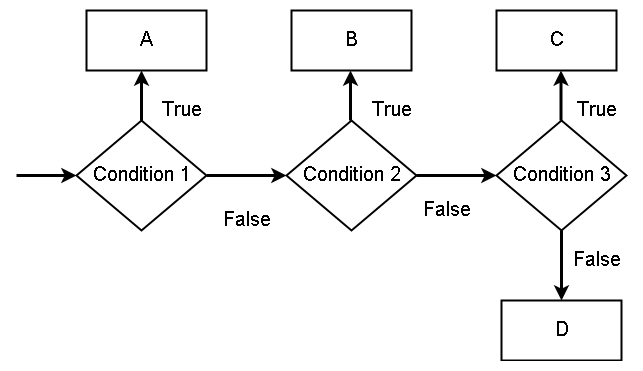
Note that the condition 1 comes from if-block, condition 2 comes from elif, condition 3 is elif and else block is D.
The first condition,  is the if-block and if true then executes the
  and if false will move to the next condition, which is
  . If is true, that will execute
  and if it is false then move to
  . The if true will execute the
  and if everything is false, the final output is
  .
.
Example – If-then-elif-else
In this example, student receive his grade in  and
and  .
.
\begin{aligned}
&A = Excellent\\
&B = Outstanding\\
&C = Very \hspace{3px}Good\\
&D = Good\\
&E = Fair \\
&F = Fail
\end{aligned}
We need to print the result based on the grade that the student gets. Consider the following code.
grade = input("Enter Your Grade:" )
if grade == "A":
    print("You grade is Excellent!")
elif grade == "B":
    print("Your grade is Outstanding!")
elif grade == "C":
    print("Your grade is Very Good!")
elif grade == "D":
    print("Your grade is Good!")
elif grade == "E":
    print("Your grade is Fair..Work Hard!")
elif grade =="F":
    print("Your Failed.. Try again later")
else:
    print("Wrong Input")
The output of the program is given below.
Output – If-then-elif-else
=========== RESTART: C:/Python_projects/Display_Student_Result.py ===========
Enter Your Grade:D
Your grade is Good!
>>>
Python If-Then-Else Statement
In the previous article, you learned about the  and how it executes statement if the condition for the is true. But we have not discussed anything about what should happen when is false.
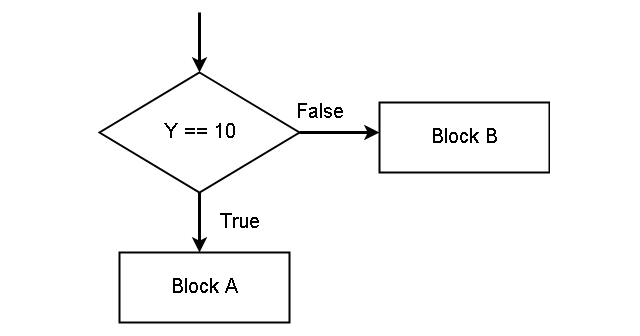
The python programming language have a separate block of code to execute when the is false. It is called the  . Consider the following diagram. In the figure, if the condition is true, execute
  (also call it ) and if the condition is false, execute .
Example – if-then-else
Let us take out previous example of  to purchase an item with
  and
and  . If the
  is less than the , a purchase can be done. Otherwise, customer cannot buy the item.
# Declaring cash available for purchase
cashAvailable = 5000
# price of item with tax
price = 5000
tax = 200
# The if-block executes if the price + tax is less than or equal to cash
if cashAvailable >= price + tax:
     print("Purchase Successful", price + tax)
# The else will tell what to do if cash available is less
else:
     print("Insufficient Cash ! Purchase cannot be done!")
print("Transaction Complete!")
The output of the program will be as follows.
Insufficient Cash! Purchase cannot be done!
Transaction Complete!
The program first check if is less than the cash available. It is not true because the total amount is  . Therefore, the program jumps into the second block. the else block and prints
  . Note the indentation for the else block also. All line within a block has the same indentation.